microsoft entra
38 Topics
Feature Request: Extend Security Copilot inclusion (M365 E5) to M365 A5 Education tenants
Background At Ignite 2025, Microsoft announced that Security Copilot is included for all Microsoft 365 E5 customers, with a phased rollout starting November 18, 2025. This is a significant step forward for security operations. The gap Microsoft 365 A5 for Education is the academic equivalent of E5 — it includes the same core security stack: Microsoft Defender, Entra, Intune, and Purview. However, the Security Copilot inclusion explicitly covers only commercial E5 customers. There is no public roadmap or timeline for extending this benefit to A5 education tenants. Why this matters Education institutions face the same cybersecurity threats as commercial organizations — often with fewer dedicated security resources. The A5 license was positioned as the premium security offering for education. Excluding it from Security Copilot inclusion creates an inequity between commercial and education customers holding functionally equivalent license tiers. Request We would like Microsoft to: Confirm whether Security Copilot inclusion will be extended to M365 A5 Education tenants If yes, provide an indicative timeline If no, clarify the rationale and what alternative paths exist for education customers Are other EDU admins in the same situation? Would appreciate any upvotes or comments to help raise visibility with the product team.1.5KViews16likes4Comments
From “No” to “Now”: A 7-Layer Strategy for Enterprise AI Safety
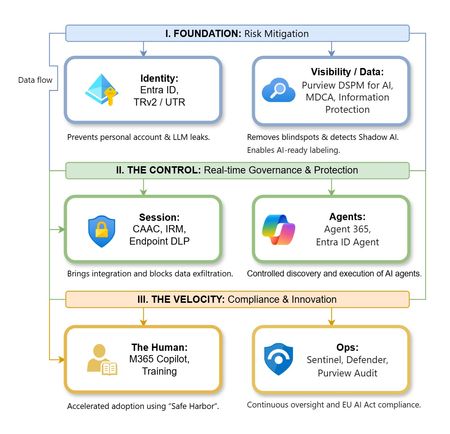
The “block” posture on Generative AI has failed. In a global enterprise, banning these tools doesn't stop usage; it simply pushes intellectual property into unmanaged channels and creates a massive visibility gap in corporate telemetry. The priority has now shifted from stopping AI to hardening the environment so that innovation can run at velocity without compromising data sovereignty. Traditional security perimeters are ineffective against the “slow bleed” of AI leakage - where data moves through prompts, clipboards, and autonomous agents rather than bulk file transfers. To secure this environment, a 7-layer defense-in-depth model is required to treat the conversation itself as the new perimeter. 1. Identity: The Only Verifiable Perimeter Identity is the primary control plane. Access to AI services must be treated with the same rigor as administrative access to core infrastructure. The strategy centers on enforcing device-bound Conditional Access, where access is strictly contingent on device health. To solve the "Account Leak" problem, the deployment of Tenant Restrictions v2 (TRv2) is essential to prevent users from signing into personal tenants using corporate-managed devices. For enhanced coverage, Universal Tenant Restrictions (UTR) via Global Secure Access (GSA) allows for consistent enforcement at the cloud edge. While TRv2 authentication-plane is GA, data-plane protection is GA for the Microsoft 365 admin center and remains in preview for other workloads such as SharePoint and Teams. 2. Eliminating the Visibility Gap (Shadow AI) You can’t secure what you can't see. Microsoft Defender for Cloud Apps (MDCA) serves to discover and govern the enterprise AI footprint, while Purview DSPM for AI (formerly AI Hub) monitors Copilot and third-party interactions. By categorizing tools using MDCA risk scores and compliance attributes, organizations can apply automated sanctioning decisions and enforce session controls for high-risk endpoints. 3. Data Hygiene: Hardening the “Work IQ” AI acts as a mirror of internal permissions. In a "flat" environment, AI acts like a search engine for your over-shared data. Hardening the foundation requires automated sensitivity labeling in Purview Information Protection. Identifying PII and proprietary code before assigning AI licenses ensures that labels travel with the data, preventing labeled content from being exfiltrated via prompts or unauthorized sharing. 4. Session Governance: Solving the “Clipboard Leak” The most common leak in 2025 is not a file upload; it’s a simple copy-paste action or a USB transfer. Deploying Conditional Access App Control (CAAC) via MDCA session policies allows sanctioned apps to function while specifically blocking cut/copy/paste. This is complemented by Endpoint DLP, which extends governance to the physical device level, preventing sensitive data from being moved to unmanaged USB storage or printers during an AI-assisted workflow. Purview Information Protection with IRM rounds this out by enforcing encryption and usage rights on the files themselves. When a user tries to print a "Do Not Print" document, Purview triggers an alert that flows into Microsoft Sentinel. This gives the SOC visibility into actual policy violations instead of them having to hunt through generic activity logs. 5. The “Agentic” Era: Agent 365 & Sharing Controls Now that we're moving from "Chat" to "Agents", Agent 365 and Entra Agent ID provide the necessary identity and control plane for autonomous entities. A quick tip: in large-scale tenants, default settings often present a governance risk. A critical first step is navigating to the Microsoft 365 admin center (Copilot > Agents) to disable the default “Anyone in organization” sharing option. Restricting agent creation and sharing to a validated security group is essential to prevent unvetted agent sprawl and ensure that only compliant agents are discoverable. 6. The Human Layer: “Safe Harbors” over Bans Security fails when it creates more friction than the risk it seeks to mitigate. Instead of an outright ban, investment in AI skilling-teaching users context minimization (redacting specifics before interacting with a model) - is the better path. Providing a sanctioned, enterprise-grade "Safe Harbor" like M365 Copilot offers a superior tool that naturally cuts down the use of Shadow AI. 7. Continuous Ops: Monitoring & Regulatory Audit Security is not a “set and forget” project, particularly with the EU AI Act on the horizon. Correlating AI interactions and DLP alerts in Microsoft Sentinel using Purview Audit (specifically the CopilotInteraction logs) data allows for real-time responses. Automated SOAR playbooks can then trigger protective actions - such as revoking an Agent ID - if an entity attempts to access sensitive HR or financial data. Final Thoughts Securing AI at scale is an architectural shift. By layering Identity, Session Governance, and Agentic Identity, AI moves from being a fragmented risk to a governed tool that actually works for the modern workplace.Authentication Context (Entra ID) Use case
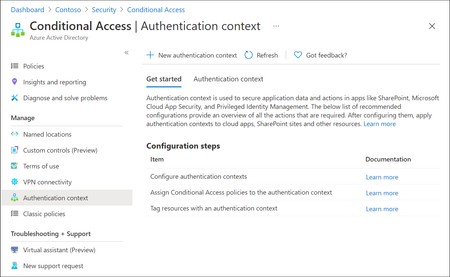
Microsoft Entra ID has evolved rapidly over the last few years, with Microsoft continuously introducing new identity, access, and security capabilities as part of the broader Zero Trust strategy. While many organizations hold the necessary Entra ID and Microsoft 365 licenses (often through E3 or E5 bundles), a number of these advanced features remain under‑utilised or entirely unused. This is frequently due to limited awareness, overlapping capabilities or uncertainty about where and how these features provide real architectural value. One such capability which is not frequently used is Authentication Context. Although this feature is available for quite some time, it is often misunderstood or overlooked because it does not behave like traditional Conditional Access controls. Consider Authentication Context as a mobile “assurance tag” that connects a resource (or a particular access route to that resource) to one or several Conditional Access (CA) policies, allowing security measures to be enforced with resource-specific accuracy instead of broad, application-wide controls. Put simply, it permits step-up authentication only when users access sensitive information or perform critical actions, while maintaining a smooth experience for the “regular path.” When used intentionally, it enables resource‑level and scenario‑driven access control, allowing organizations to apply stronger authentication only where it is actually needed without increasing friction across the entire user experience. Not expensive Most importantly to use Authentication Context the minimum licensing requirement is Microsoft Entra ID Premium P1 which most customers already have this license. so you not need to convenience for higher license to utilize this feature. But do note Entra Premium 2 is needed if your Conditional Access policy uses advanced signals, such as: User or sign‑in risk (Identity Protection) Privileged Identity Management (PIM) protected roles Risk‑based Conditional Access policies The Workflow Architecturally, Authentication Context works when a claims request is made as part of token issuance commonly expressed via the acrs claim. When the request includes a specific context (for example c1), Entra evaluates CA policies that target that context and forces the required controls (MFA, device compliance, trusted location, etc.). The important constraint: the context must be requested/triggered by a supported workload (e.g., SharePoint) or by an application designed to request the claim; it is not an automatic “detect any action inside any app” feature. Lets look at few high level architecture reference 1. Define “assurance tiers” as contexts Create a small set of contexts (e.g., c1: Confidential Access, c2: Privileged Operations) and publish them for use by supported apps/services. 2. Bind contexts to resources Assign the context to the resource boundary you want to protect—most commonly SharePoint sites (directly or via sensitivity labels), so only those sites trigger the context. (e.g - Specific SharePoint sites like financials, agreements etc ) 3. Attach Conditional Access policies to the context Create CA policies that target the context and define enforcement requirements (Additional MFA strength, mandating device compliance, or location constraint through named locations etc.). The context is the “switch” that activates those policies at the right moment. 4. Validate runtime behavior and app compatibility Because authentication context can impact some client apps and flows, validate supported clients and known limitations (especially for SharePoint/OneDrive/Teams integrations). Some Practical Business Scenarios Scenario A — Confidential SharePoint Sites (M&A / Legal / HR) Problem: You want stronger controls for a subset of SharePoint sites without forcing those controls for all SharePoint access. Architect pattern: Tag the confidential site(s) with Authentication Context and apply a CA policy requiring stronger auth (e.g., compliant device + MFA) for that context. Pre-reqs: SharePoint Online support for authentication context; appropriate licensing and admin permissions; CA policies targeted to the context Scenario B — “Step-up” Inside a Custom Line-of-Business App Problem: Users can access the app normally, but certain operations (approval, export, privileged view) need elevated assurance. Architect pattern: Build the app on OpenID Connect/OAuth2 and explicitly request the authentication context (via acrs) when the user reaches the sensitive path; CA then enforces step-up. Pre-reqs: App integrated with Microsoft identity platform using OIDC/OAuth2; the app can trigger claims requests/handle claim challenges where applicable; CA policies defined for the context Scenario C — Granular “Resource-based” Zero Trust Without Blanket MFA Problem: Security wants strong controls on crown jewels, but business wants minimal prompts for routine work. Architect pattern: Use authentication context to enforce higher assurance only for protected resources (e.g., sensitive SharePoint sites). This provides least privilege at the resource boundary while reducing global friction. Pre-reqs: Clearly defined resource classification; authentication context configured and published; CA policies and monitoring. In a nutshell, Authentication Context allows organizations to move beyond broad, one‑size‑fits‑all Conditional Access policies and adopt a more precise, resource‑driven security model. By using it to link sensitive resources or protected access paths to stronger authentication requirements, organizations can improve security outcomes while minimizing unnecessary user friction. When applied deliberately and aligned to business‑critical assets, Authentication Context helps close the gap between licensing capability and real‑world value—turning underused Entra ID features into practical, scalable Zero Trust controls. If you find this useful, please do not forget to like and add your thoughts 🙂The Fileless Paradox: How My 33-Day-Old Research Became Today's Ransomware Reality
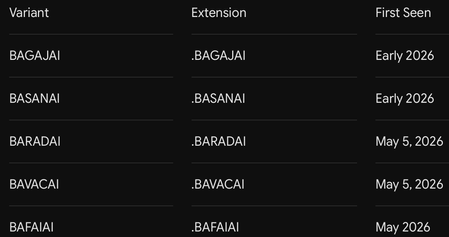
33 Days Before BARADAI Emerged 🔴 Before You Read: What Is This Article About? This is the first article I have published on Microsoft Tech Community, and this is not a standard threat report. This is the story of being right before anyone believed it — and of a ransomware family called BARADAI that proved it. On April 5, 2026, I published a technical research article documenting, in detail, a fileless malware architecture that operated entirely in RAM using steganography and Windows Registry persistence. When I shared it on social media, the reactions were immediate and brutal: “A fileless payload cannot be persistent. If it leaves no trace on disk, it cannot survive a reboot.” “This technique is entirely theoretical. No real threat actor would ever use this in production.” “You cannot have persistence without leaving traces. Pick one.” And the most absurd ones: “Stop writing articles with AI.” “This level of technical detail is unrealistic — did AI generate this?” “Forensic artifacts cannot be erased. What kind of technique is this?” At that moment, I could not prove myself. I had a working proof-of-concept. I had built the architecture myself. The technical logic was sound. But I did not yet have a real-world threat actor using it in production. 33 days later, BARADAI appeared. And it used the exact same playbook I had written. This article is the first volume of the “We Saw It Coming” series. In this series, I correlate my independent research with emerging real-world threats, document technical overlaps, and provide actionable detection and defense guidance for Microsoft environments. Right now, I am actively trying to reverse and decrypt BARADAI. I do not yet have a definitive solution. But I am publishing this journey because my goal is to finalize a solution by collecting additional logs and intelligence. 📌 Table of Contents The Moment Nobody Believed 33 Days Later: Meet BARADAI The B-Family: Shared Infrastructure Ecosystem Side-by-Side: Technical Overlap Analysis Deep Dive: The Fileless Paradox — How Both Architectures Work The PAIDMEMES Anomaly: Forensic Residue Inside BARADAI My Technique vs BARADAI: Shared Technical Patterns Microsoft Sentinel Detection Rules (KQL) MITRE ATT&CK Mapping Decryption Research and My Current Approaches Defensive Recommendations Sources and References ------------------------------------------------------------------------------ 1. The Moment Nobody Believed April 5, 2026 — A Research Paper, a Community, and Silence On April 5, 2026, I published a detailed technical research article on Medium titled: “STEGOMALWARE — PNG Persistence Through Steganography and Windows Registry” The article documented a complete attack architecture that I designed and tested from scratch in a controlled laboratory environment. My core thesis was this: A fileless malware strain can achieve persistent, reboot-resilient execution without ever writing a malicious executable to disk — by hiding its payload inside the pixels of a PNG image using LSB steganography and leveraging the Windows Registry for persistence. I demonstrated this by building a keylogger. The architecture had four defining characteristics: Feature 1 — Fileless Execution (RAM-Only) The malicious payload never touches disk as an executable file. Instead, a small, “clean-looking” loader script extracts hidden code from the pixel data of a PNG image and executes it directly in RAM. No .exe, no .py, no .dll on disk. Traditional antivirus file-scanning mechanisms are effectively blind to this. Feature 2 — Registry-Based Persistence Contrary to critics claiming that fileless malware cannot survive reboots, the loader writes itself into the Windows Registry Run key: HKCU\SOFTWARE\Microsoft\Windows\CurrentVersion\Run This means that every time Windows starts, the loader executes again, extracts the payload from the PNG, and runs it back in memory. The malware lives in the Registry — not on disk. Feature 3 — Process Masquerading I compiled the loader under the name svchost.exe and assigned it a Windows service icon. When viewed in Task Manager, it appeared indistinguishable from a legitimate Windows system process. Feature 4 — Self-Repair (Self-Integrity Check) The loader continuously validated both its Registry entry and its file copy. If an antivirus product deleted the file or removed the Registry entry, the loader detected the modification and restored itself during the next execution cycle. Feature 5 — Intelligent Data Collection The keylogger I built automatically embedded collected data into the pixels of a PNG image every 10 characters or every 30 seconds — whichever occurred first. After each cycle, it reset itself, cleared temporary memory artifacts, and initiated a fresh collection loop. This architectural design enabled the malware to remain undetected on a system for months. Because there was no ever-growing log file on disk — the data was continuously transferred into images. ------------------------------------------------------------------------------------------ The Reactions The reactions I received when sharing this research did not surprise me, but they disappointed me. Technical objections: “Fileless malware, by definition, cannot survive reboots. No disk means no persistence.” “Forensic evidence cannot be erased. This makes no technical sense.” “If you are writing to the Registry, then it is not truly fileless.” Personal attacks: “Stop writing with AI.” “If you can perform technical analysis this detailed, why has nobody heard of you before?” “Copied from AI — even the formatting looks AI-generated.” This feedback revealed two things: First, people fundamentally misunderstood the concept of fileless malware — they were confusing “fileless execution” with “leaving absolutely no traces anywhere.” The Registry is not a traditional file in the conventional sense, yet it remains a persistent storage mechanism resilient across reboots. Second, it demonstrated how easily independent researchers are dismissed. Research not published by a major corporation or university was automatically labeled “AI-generated” or “theoretical.” At that moment, I could not prove myself. 33 days later, BARADAI proved me right. ------------------------------------------------------------------------------ 2. 33 Days Later: Meet BARADAI May 5–8, 2026 — A New Threat Surfaces On May 5, 2026, researchers at PCrisk documented a new ransomware sample submitted to VirusTtl. On the same day, CYFIRMA’s underground forum monitoring team flagged it in their threat intelligence feeds. By May 8, CYFIRMA’s Weekly Intelligence Report had published the first structured analysis. The threat was named BARADAI — derived from the extension it appends to encrypted files: .BARADAI -------------------------------------------- What Is BARADAI? BARADAI is a Windows ransomware variant belonging to the MedusaLocker family. MedusaLocker has been active since late 2019 and remains one of the most prolific and long-lived ransomware-as-a-service (RaaS) operations in the threat landscape. BARADAI is a specific variant of the MedusaLocker v3 architecture — sometimes tracked in threat intelligence repositories as “BabyLockerKZ.” Detection names across major security vendors: Microsoft Defender: Ransom:Win64/MedusaLocker.MZT!MTB ESET: Win64/Filecoder.MedusaLocker.A Avast: Win64:MalwareX-gen [Ransom] Kaspersky: HEUR:Trojan-Ransom.Win32.Generic ------------------------------------------------------------ How Does It Operate? BARADAI follows a double-extortion model. Silent Phase (Reconnaissance) After initial access, BARADAI does not immediately begin encryption. Instead, it performs systematic reconnaissance: -Enumerates running processes -Maps network topology -Collects browser-stored credentials -Harvests session cookies and SSL certificates -Captures desktop screenshots -Exfiltrates collected data to attacker-controlled C2 infrastructure Encryption Phase After exfiltration is complete, BARADAI activates its cryptographic payload: -AES-256-CBC for file content encryption -RSA-4096 for key protection Extortion Phase A ransom note (read_to_decrypt_files.html or WHATS_HAPPEND.txt) is dropped into every encrypted directory. Victims are given a 72-hour deadline. If payment is not made before expiration, stolen data is published on the group’s Data Leak Site (DLS). ------------------------------------------------------------------- Confirmed Targeting as of May 2026 Geographies -United States -Brazil -France -Australia -Italy -Israel -Malaysia Sectors -Education -Manufacturing -Engineering -Retail -Logistics -NGOs Ransom Demand Range -USD $10,000 — $80,000 per incident (CYFIRMA, May 2026) ------------------------------------------------------------------ 3. The B-Family: Shared Infrastructure Ecosystem One of the most important findings that emerged during my analysis was this: BARADAI is not operating alone. Threat intelligence monitoring identified a cluster of MedusaLocker variants sharing: -The same naming conventions -Similar code architecture -And most critically — the same Tor-based infrastructure I named this cluster: “The B-Family” --------------------------------------------- Evidence of Shared Infrastructure The strongest evidence of coordination inside the B-Family is not behavioral similarity — it is shared infrastructure. BARADAI’s ransom note lists the following Tor hidden service for victim negotiations: t33zoj4qwv455fog7qnb2azi5xcdxkixughmmduzbw2rtdgryqfbh6id.onion This is identical to the Tor address listed as the Data Leak Site and file leak server for BAVACAI — independently verified by ransomware.live, which identified the server running NGINX 1.24.0. PCrisk’s BARADAI documentation also includes screenshots of the leak site using the filename prefix: bavacai- This is structural evidence confirming that the same backend infrastructure serves both variants. What This Means The B-Family is not a collection of copycat operations. It is a single operation — or a tightly coordinated RaaS affiliate ecosystem — using different “brand names” per campaign in order to complicate attribution, tracking, and law enforcement disruption. ----------------------------------------------------------- Known Victims (BAVACAI DLS — Shared Backend) As of May 8, 2026, the BAVACAI DLS listed 16 victims — all published simultaneously on May 5. ------------------------------------------------------------ 4. Side-by-Side: Technical Overlap Analysis This section is the core of the article. The table below correlates the exact techniques documented in my April 5, 2026 research with the verified BARADAI behaviors documented by CYFIRMA, PCrisk, and the broader MedusaLocker analysis corpus. The conclusion is direct and unavoidable: The architecture I built, tested, documented, and published in a controlled laboratory environment on April 5, 2026 — the same architecture the community dismissed as “theoretical,” “AI-generated,” and “impossible” — was operationalized by a real threat actor 33 days later. -------------------------------------------------------- 5. Deep Dive: The Fileless Paradox Let us settle the debate permanently. The Misconception: “Fileless Malware Cannot Be Persistent” The argument I repeatedly encountered was this: “If malware does not leave files on disk, it cannot survive a reboot because RAM is volatile.” Technically correct. Strategically incomplete. It is true that RAM-resident code disappears when the system powers off. However, persistence does not require the malicious payload itself to reside on disk. It requires a mechanism that re-executes the payload after reboot. Those are two different things. -------------------------------------------------------------- The Architecture: How It Actually Works ┌──────────────────────────────────────────────────────────┐ │ ATTACK ARCHITECTURE │ │ │ │ DISK (minimal footprint): │ │ ┌──────────────────────────────────────────────────┐ │ │ │ loader.exe (masquerading as svchost.exe) │ │ │ │ cover_image.png (contains hidden payload) │ │ │ └──────────────────────────────────────────────────┘ │ │ │ │ │ REGISTRY (persistence): │ │ │ ┌──────────────────────────────────────────────────┐ │ │ │ HKCU\...\Run\WindowsUpdateService │ │ │ │ → points to loader.exe │ │ │ └──────────────────────────────────────────────────┘ │ │ │ │ │ ON EVERY BOOT: │ │ │ Registry triggers → loader.exe executes → │ │ Reads PNG pixels → extracts payload → │ │ Loads into RAM → executes │ │ (No malicious .exe is ever written to disk) │ │ │ │ RAM (execution): │ │ ┌──────────────────────────────────────────────────┐ │ │ │ Keylogger / RAT / Ransomware module │ │ │ │ Executes entirely in memory │ │ │ │ Invisible to disk-based AV scanning │ │ │ └──────────────────────────────────────────────────┘ │ └──────────────────────────────────────────────────────────┘ Only the loader exists on disk — and the loader itself is a small, legitimate-looking executable without a malicious signature. The malicious payload lives in: -The pixel data of the PNG image (steganographically encoded) -RAM (during active execution) The Registry provides the trigger mechanism — not the payload itself. That was the exact distinction critics failed to understand. ------------------------------------------------------------------ Why It Evades Traditional Detection BARADAI’s Implementation BARADAI uses the same logical architecture at larger scale. The MedusaLocker v3 binary: - Achieves persistence via Registry Run Key: HKCU\SOFTWARE\Microsoft\Windows\CurrentVersion\Run\BabyLockerKZ -Executes core ransomware logic in memory without writing recoverable payload components to disk -Uses Parent PID Spoofing (T1134.004) to appear as a child process of explorer.exe or svchost.exe -Restores itself through persistence mechanisms if binaries are deleted ------------------------------------------------------------------------------ 6. The PAIDMEMES Anomaly: Forensic Residue Inside BARADAI One of BARADAI’s most distinctive — and frankly bizarre — technical characteristics is its configuration and key storage mechanism. Unlike most ransomware variants that attempt to keep all cryptographic material exclusively in volatile memory, BARADAI writes directly into the Windows Registry under an extremely unusual hive: HKCU\SOFTWARE\PAIDMEMES\PUBLIC HKCU\SOFTWARE\PAIDMEMES\PRIVATE - HKCU\SOFTWARE\PAIDMEMES\PUBLIC stores the Base64-encoded RSA public key extracted from the malware configuration. - HKCU\SOFTWARE\PAIDMEMES\PRIVATE stores encrypted runtime state and configuration parameters required for persistence across multiple execution instances. ------------------------------------------- Why This Matters The PAIDMEMES Registry hive is not random — it serves a specific operational purpose. When BARADAI is launched with the -network flag (instructing it to encrypt network shares), it spawns a secondary instance of itself as a non-elevated process. By storing cryptographic keys and configuration inside the Registry, that secondary instance — even without administrative privileges — can access everything necessary to continue the attack. These two Registry artifacts represent your highest-confidence BARADAI detection signals: HKCU\SOFTWARE\PAIDMEMES (Key creation = active infection) HKCU\...\Run\BabyLockerKZ (Persistence = infection survived reboot) ------------------------------------------------------------ 7. My Technique vs BARADAI: Detailed Technical Similarities Now let us go deeper technically and explain why I believe I am one of the people closest to understanding BARADAI. 7.1 Payload Concealment: LSB Steganography My Technique I replaced the least significant bits (LSB) of RGB channels in PNG pixels with Base64-encoded keylogger payload bits. A 1/255 modification inside an 8-bit value is visually imperceptible to the human eye. In BARADAI The stegomalware technique forms the core of payload transportation. The same LSB logic applies: -No visible image corruption -No signature-based scanner triggers -Payload blended into image “noise” Shared Point Mathematically, it is the same approach. The only difference is scale: I concealed a keylogger. BARADAI conceals a ransomware module. -------------------------------------------------------- 7.2 Fileless + Registry: The “Impossible” Combination My Technique I registered my loader under: HKCU\...\Run\WindowsUpdateService Every time Windows booted, the loader executed, read the PNG, extracted the payload into RAM, and launched it. A .py file never existed on disk. In BARADAI HKCU\...\Run\BabyLockerKZ Exactly the same mechanism. Same Registry path. Same logic. Same “fileless yet persistent” paradox. ------------------------------------------------- Shared Point When critics claimed these two concepts could not coexist, they were wrong. Both BARADAI and I proved it. 7.3 Process Concealment: svchost.exe Masquerading My Technique I compiled the loader with PyInstaller under the name svchost.exe and assigned it a Windows service icon. Inside Task Manager, it appeared identical to a legitimate system process. In BARADAI BARADAI uses Parent PID Spoofing. Through Windows API manipulation, it makes execution appear as if initiated by svchost.exe or explorer.exe. EDR behavioral engines typically flag unknown processes performing system-level modifications. This technique bypasses those checks. Shared Point Same concealment strategy. Different implementation layer. 7.4 Timers and Silent Collection My Technique The keylogger embedded data into PNG images every 10 characters OR every 30 seconds — whichever occurred first. After each cycle: -Temporary memory artifacts were cleared -The process reset -No ever-growing log file existed on disk This is why antivirus products could not see it. This is why it could remain undetected for months. In BARADAI “Ghost Software.” After initial compromise, BARADAI does not immediately encrypt. It silently waits. Harvests credentials. Maps the network. Exfiltrates data. Encryption is the final signature. Shared Point Both architectures rely on a “silent hunter” model. I used 30-second image-based exfiltration loops. BARADAI remains dormant for days or weeks while collecting intelligence. The logic is identical. Only the timescale differs. ---------------------------------------------------------------- 7.5 Why I Believe I Am One of the People Closest to Solving BARADAI These similarities are not coincidence. They reflect the same technical mindset reaching the same solutions to the same problems. Because I built this architecture from scratch: -I understand its weak points — because I encountered the same weak points myself -I can reverse-engineer LSB steganography workflows — because I wrote the same algorithm -I understand Registry-based configuration logic — the PAIDMEMES hive pattern is familiar to me - I understand interruption points inside timer-based collection loops — because I built the same cycle architecture myself ------------------------------------------------------------------------------ 8. Microsoft Sentinel Detection Rules (KQL) The following Kusto Query Language (KQL) queries are designed for deployment in Microsoft Sentinel. They target specific behavioral artifacts associated with BARADAI and the broader MedusaLocker family. Deploy all three as scheduled analytics rules. Rule 1: PAIDMEMES / BabyLockerKZ Registry Artifact Detection High confidence. Detects exact forensic strings unique to MedusaLocker v3 / BARADAI. If This Rule Triggers The device is actively infected with BARADAI or the malware has successfully established persistence. Treat as a P1 incident. Immediately isolate the endpoint. Rule 2: Shadow Copy & Backup Deletion Chain Detection High confidence. Detects BARADAI’s recovery-destruction sequence. If This Rule Triggers A ransomware payload is actively preparing for encryption. This is your final detection window before data loss begins. Immediately isolate the affected endpoint and every reachable network share. Rule 3: EnableLinkedConnections — Network Share Privilege Escalation Detection Medium-High confidence. Detects BARADAI’s technique for accessing administrator-mapped network drives from non-elevated processes. If This Rule Triggers An attacker is preparing to encrypt network shares normally visible only to administrator-level processes. This is a pre-encryption lateral movement signal. ---------------------------------------------------------------- 9. MITRE ATT&CK Mapping ------------------------------------------------------------------------------ 10. Decryption Research and My Current Approaches Let me be completely transparent. Current status: There is no verified public decryptor available for BARADAI. -The No More Ransom project lists no decryptor for any MedusaLocker v3 / BabyLockerKZ variant -The AES-256-CBC + RSA-4096 implementation is mathematically sound -Historical decryptors existed only for significantly older MedusaLocker v1 and early v2 variants by exploiting key sanitization weaknesses in memory management -Those vulnerabilities were patched in v3 What We Know About the Encryption BARADAI uses intermittent encryption for large files: -Files larger than ~7.7MB are not fully encrypted -The malware encrypts 750KB, skips 250KB, encrypts another 750KB, and repeats This dramatically reduces encryption time while still rendering the file structurally unusable. --------------------------------------------------------------- What I Am Currently Researching I am currently analyzing the BARADAI binary from multiple angles: PRNG Weaknesses I am investigating the entropy source used during AES key generation. If the PRNG is insufficiently random, the effective key space may be reducible. Key Sanitization Behavior I am investigating whether AES keys remain in memory after usage. This weakness existed in MedusaLocker v1 and v2 and enabled historical decryptors. Although patched in v3, implementation mistakes remain possible. PAIDMEMES Registry Storage Analysis The PAIDMEMES hive stores runtime state. I am investigating whether this storage area contains recoverable cryptographic material. Registry-stored cryptographic data could provide a viable decryption foothold. Weaknesses in Intermittent Encryption The 750KB-encrypt / 250KB-skip pattern enables structural comparisons between encrypted and unencrypted regions. Known file formats (.docx, .xlsx, etc.) contain predictable header structures. This creates potential for partial known-plaintext attacks. ------------------------------------------------------------------------------ I will publish my findings in Vol.4 of this series regardless of the outcome. ------------------------------------------------- If You Are a BARADAI Victim -Do not pay the ransom until all alternatives are exhausted -Contact professional incident response services -Preserve all encrypted files and ransom notes — a future decryptor may eventually become available -Regularly monitor nomoreransom.org ---------------------------------------------------- 11. Defensive Recommendations Priority 1: Phishing-Resistant MFA (Against AiTM) Traditional MFA — push notifications, SMS codes, authenticator apps — can be defeated by AiTM reverse-proxy attacks. Deploy: -FIDO2 hardware security keys (YubiKey, etc.) -Windows Hello for Business These technologies cryptographically bind authentication tokens to the legitimate TLS session of the login portal. Stolen cookies become useless in separate sessions. ------------------------------------------------------- Priority 2: Eliminate RDP Exposure BARADAI’s primary initial access vector is exposed RDP on TCP 3389. -Disable Internet-facing RDP at the perimeter firewall -Enforce MFA + VPN for all remote administrative access -Implement account lockout policies and Network Level Authentication (NLA) Priority 3: Immutable Backups BARADAI deletes Volume Shadow Copies via vssadmin. Implement: -A 3–2–1 backup strategy with at least one offline/immutable copy -Azure Immutable Blob Storage (WORM) -Multi-user authorization for backup vaults -Monthly restoration testing --------------------------------------------- Priority 4: FSRM Canary Files Configure Windows File Server Resource Manager (FSRM): Immediately alert when files with extensions: .BARADAI .BAVACAI .BASANAI .BAGAJAI are created. Trigger automated scripts that: -Terminate the originating user session -Revoke network share access -------------------------------------------------- Priority 5: Deploy the Sentinel KQL Rules Above The three rules in Section 8 provide layered behavioral detection that signature-based tooling cannot replicate. Deploy them before an incident occurs. -------------------------------------------------------------------------- Priority 6: Zero Trust Architecture BARADAI’s EnableLinkedConnections Registry modification allows standard user processes to encrypt administrator-mapped drives. -Segment backup servers, Domain Controllers, and critical infrastructure -Require hardware-backed MFA for sensitive segments -Implement least privilege and Just-In-Time (JIT) administrative access with Azure PIM ------------------------------------------------------------------------ 📢 Call to Action: Collective Intelligence I started this research alone. But disrupting the impact of the B-Family requires collective effort. If your organization or threat-hunting operations have observed additional logs, unusual network traffic, or alternative steganographic payload samples associated with the B-Family (BARADAI, BAVACAI, BASANAI, etc.), do not remain silent. Data Sharing You may share anonymized IoCs or log artifacts with us. and Direct Contact If you have technically significant observations or findings related to BARADAI analysis, you can contact me directly through my Webex profile. Webex Contact - email address removed for privacy reasons Our collective security depends on the aggregation of these small signals. --------------------------------------------- Sources and References For technical verification and further investigation, refer to the following resources: Threat Intelligence & Ransomware Reports CYFIRMA: Weekly Threat Intelligence Report (2026–05–08) Ransomware.live: BAVACAI Group & DLS Infrastructure PCrisk: BAVACAI | BAGAJAI | BASANAI Analysis Technical Foundations & MITRE TTPs CISA: MedusaLocker Advisory (AA22–181A) Picus Security: MedusaLocker TTPs and Simulation Barracuda: GhostFrame Phishing Kit Spotlight (2025–12–04) Detection & Response Tools Microsoft Sentinel: Official Shadow Copy Deletion Analytics Rule GitHub (Bert-JanP): Hunting Queries and Detection Rules No More Ransom: Global Decryption Tools Repository Cassandra MARE Independent Research Deniz Tektek: Stegomalware & Fileless Persistence (2026–04–05) https://medium.com/@deniizz/stegomalware-steganografi-ve-windows-registry-ile-kalıcılık-sağlayan-png-01e50849a218 Cassandra Community: Initial BARADAI Analysis (2026–05–14) https://medium.com/@cassandracommunity/baradai-ransomware-hayalet-yazılım-ı-parçalarına-ayırıyoruz-0c04bb008f73 This article has been published strictly for defensive purposes. All described techniques have been analyzed within the context of threat detection and defense. This is my debut article on the Microsoft Tech Community. I am Deniz Tektek, a Red Team Operator, Cybersecurity Analyst, and Founder of the Cassandra community. My work focuses on the intersection of human psychology, IoT security, and the development of zero-trust local AI agents. This article, “The Fileless Paradox,” is the inaugural entry in my "We Saw It Coming" threat intelligence series, where I document technical overlaps between independent research and active real-world threats. What’s Next? Vol. 2: "Invisible Exfiltration" — Analyzing how BARADAI’s C2 hides in plain sight. Vol. 3: "The Human Gateway" — Why your MFA and AI-driven defenses are currently being bypassed. Vol. 4: "Cracking BARADAI" — My ongoing decryption research. Connect With Me If you want to discuss these findings, exchange logs, or collaborate on security research, please check my profile bio for contact information or connect with me via LinkedIn. I welcome all technical perspectives and peer reviews. My LinkedIn: https://www.linkedin.com/in/deniz-t-91166438a Deniz Tektek — May 2026 © Deniz Tektek & Cassandra — All Rights Reserved. Originally published on Microsoft Tech Community. Cross-posted on Medium.
Windows Hello passkeys dialog appearing and cannot remove or suppress it.
Hi everyone, I’m dealing with a persistent Windows Hello and passkey issue in Chrome and Brave and yes this is relevant as they're the only browsers having this issue whilst Edge for example is fine, and at this point I’m trying to understand whether this is expected behavior, a bug, or a design oversight. PS. Yes, I'm in contact with related browser support teams but since they seem utterly hopeless i'm asking here, since its at least partially Windows Hello issue. Problem description Even with: Password managers disabled in browser settings, Windows Hello disabled in Chrome/Brave settings, Windows Hello PIN enabled only for device login, Passkeys still stored under chrome://settings/passkeys (which I cannot delete since its used for logging on the device), The devices are connected to Entra ID but this is not required to reproduce the issue although a buisness account configuration creates a Passkey with Windows Hello afaik. Observed behavior When I attempt to sign in on office.com, Windows Hello automatically triggers a dialog offering authentication via passkeys, even though: I don’t want passkeys used for browser logins, passkeys are turned off everywhere they can be, Windows Hello is intended only for local device authentication. The dialog cannot be suppressed, disabled, or hidden(trust me, i tried for weeks). It effectively forces the Windows Hello prompt as a primary option, which causes problems both personally and in business contexts (wrong credential signaling, misleading users that are supposed to use a dedicated password manager solution insted of browser password managers, enforcing an unwanted authentication flow, etc.). What I already verified Many, many, (too many) Windows registry workarounds that never worked. Dug through almost all flags on those browsers. Chrome/Brave → Password Manager: disabled Chrome/Brave → Windows Hello toggle: off Looked through what feels like almost every related option in Windows Settings. Tried gpedit.msc local rules System up to date Windows Hello configured to use PIN, but stores "passkeys used to log on to this device" Why this is a problem Windows Hello automatically assumes that the device-level Windows Hello credentials should always be available as a WebAuthn authenticator. This feels like a big security and UX issue due to: unexpected authentication dialogs, Inability to controll where and how passkey credential are shared to applications, inability to turn the feature off, no administrative or local option to disable Hello for WebAuthn separately from device login. Buisness users either having issues with keeping passwords in order (our buissnes uses a dedicated Password Manager but this behaviour covers its dialog option) or not having PIN to their devices (when I disable windows hello entierly, since when there is no passkeys the option doesn't appear) Questions Is there any supported way to disable Windows Hello as a WebAuthn/passkey option in browsers, while keeping Hello enabled for local device login? Is this expected behavior from the Windows Hello, or is it considered a bug? Are there registry/policy settings (documented or upcoming) that allow disabling the Windows platform authenticator specifically for browsers like Chrome and Brave? Is Microsoft aware of this issue? If so, is it tracked anywhere? Additional notes This issue replicates 100% across (as long as there are passkeys configured): Windows 11 devices i've managed to get my hands on, Chrome and Brave (latest versions), multiple Microsoft accounts and tenants, multiple clean installations. Any guidance or clarification from the Windows security or identity teams would be greatly appreciated. And honestly if there is any more info i could possibly provide PLEASE ask away.3.9KViews1like3CommentsMicrosoft Entra Conditional Access Optimization Agent - Move from Static to Continuous Protection
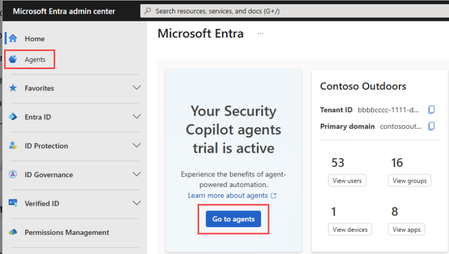
Conditional Access has long been Microsoft Entra’s Zero Trust policy engine—powerful, flexible, and can easily go wrong with misconfiguration over time due to large volume of policies. As the no of tenants increase the no of new users and applications the new modern authentication methods are introduced continuously, and Conditional Access policies that once provided full coverage often drift into partial or inconsistent protection. This is an operational gap which introduces complexity and manageability challenges. The solution to this is utilizing Conditional Access Optimization Agent, an AI‑powered agent integrated with Microsoft Security Copilot that continuously evaluates Conditional Access coverage and recommends targeted improvements aligned to Microsoft Zero Trust best practices. In this article, Let us understand what problem the agent can solve, how it works, how it can be best utilized with the real‑world Entra Conditional Access strategy. The Problem is Conditional Access does not break loudly Most Conditional Access issues are not caused by incorrect syntax or outright failure. Instead, they emerge gradually due to the continuous changes into the enviornment. New users are created but not included in existing policies New SaaS or enterprise apps bypass baseline controls MFA policies exist, but exclusions expand silently Legacy authentication or device code flow remains enabled for edge cases Multiple overlapping policies grow difficult to reason about Although there are tools like What‑If, Insights & Reporting, and Gap Analyzer workbooks help, they all require manual review and interpretation. At enterprise scale with large no of users and applications, this becomes increasingly reactive rather than preventative. What is the Conditional Access Optimization Agent? The Conditional Access Optimization Agent is one of the Microsoft Entra agents built to operate autonomously using Security Copilot. Its purpose is to continuously answer a critical question. Are all users, applications, and agent identities protected by the right Conditional Access policies - right now? The agent analyzes your tenant and recommends the following. Creating new policies Updating existing policies Consolidating similar policies Reviewing unexpected policy behavior patterns All recommendations are reviewable and optional, with actions typically staged in Report‑Only mode before enforcement. How the agents actually works ? The agent operates in two distinct phases - First the Analysis and then Recommendation & remediation During the analysis phase it evaluates the following. Enabled Conditional Access policies User, application, and agent identity coverage Authentication methods and device‑based controls Recent sign‑in activity (24‑hour evaluation window) Redundant or near‑duplicate policies This phase identifies gaps, overlaps, and deviations from Microsoft’s learned best practices. The next and final phase of recommendation and remediation depends on the results from the finding. Based on this the agent can suggest the following. Enforcing MFA where coverage is missing Adding device compliance or app protection requirements Blocking legacy authentication and device code flow Consolidating policies that differ only by minor conditions Creating new policies in report‑only mode Some of offer one click remediation making it easy for the administrators to control and enforce the decisions more appropriately. What are its key capabilities ? Continuous coverage validation The agent continuously checks for new users and applications that fall outside existing Conditional Access policy scope - one of the most common real‑world gaps in Zero Trust deployments. Policy consolidation support Large environments often accumulate near‑duplicate policies over time. The agent analyzes similar policy pairs and proposes consolidation, reducing policy sprawl while preserving intent. Plain‑language explanations Each recommendation includes a clear rationale explaining why the suggestion exists and what risk it addresses, helping administrators validate changes rather than blindly accepting automation. Policy review reports (This feature is still in preview) The agent can generate policy review reports that highlight spikes or dips in enforcement behavior—often early indicators of misconfiguration or unintended impact Beyond classic MFA and device controls, One of the most important use case is the agent also supports passkey adoption campaigns (This feature is still in preview) . It can include the following. Assess user readiness Generate phased deployment plans Guide enforcement once prerequisites are met This makes the agent not only a corrective tool, but it is helpful as a migration and modernization assistant for building phishing‑resistant authentication strategies. Zero Trust strategies utilizing agents For a mature Zero Trust strategies, the agent provides continuous assurance that Conditional Access intent does not drift as identities and applications evolve. The use of Conditional Access Optimization Agent does not replace the architectural design or automatic policy enforcement instead it can be utilized to ensure continuous evaluation, early‑alarm system for any policy drift and can act as a force‑multiplier for identity teams managing change at scale. The object of agent usage is to help close the gap upfront between policy intent depending on the actual use, instead of waiting for the analysis to complete upon resolving incidents and post auditing. In this modernized era, the identity environments are dynamic by default. The Microsoft Entra Conditional Access Optimization Agent reflects a shift toward continuous validation and assisted governance, where policies are no longer assumed to be correct simply because they exist. For organizations already mature in Conditional Access, the agent offers operational resilience. For those still building, it provides guardrails that scale with complexity but without removing human accountability.
Moving Microsoft 365 authentication to Entra ID Cloud Auth from On-Prem ADFS
Hi Identity Brain Trust, Assuming this would be the right place for my question as I couldn't find any other hub more relevant for this one. We have several applications configured to be authenticated via ADFS. We are looking to move these gradually to Entra ID Cloud auth and decommission ADFS, eventually. I would like to test out how Microsoft 365 can be moved to Cloud Auth from ADFS for a certain group of people. I have tried to use ADFS migration wizard in Entra but 365 app is not showing in the ADFS Application Migration section of Entra ID. I've read this official guide but still couldn't find how this can be manually done when App Migration section won't have the app appearing there. - https://learn.microsoft.com/en-us/entra/identity/enterprise-apps/migrate-ad-fs-application-overview Appreciate any of your inputs on this one! KevEnterprise Strategy for Secure Agentic AI: From Compliance to Implementation
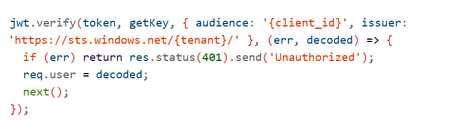
Imagine an AI system that doesn’t just answer questions but takes action querying your databases, updating records, triggering workflows, even processing refunds without human intervention. That’s Agentic AI and it’s here. But with great power comes great responsibility. This autonomy introduces new attack surfaces and regulatory obligations. The Model Context Protocol (MCP) Server the gateway between your AI agent and critical systems becomes your Tier-0 control point. If it fails, the blast radius is enormous. This is the story of how enterprises can secure Agentic AI, stay compliant and implement Zero Trust architectures using Azure AI Foundry. Think of it as a roadmap a journey with three milestones - Milestone 1: Securing the Foundation Our journey starts with understanding the paradigm shift. Traditional AI with RAG (Retrieval-Augmented Generation) is like a librarian: It retrieves pre-indexed data. It summarizes information. It never changes the books or places orders. Security here is simple: protect the index, validate queries, prevent data leaks. But Agentic AI? It’s a staffer with system access. It can: Execute tools and business logic autonomously. Chain operations: read → analyze → write → notify. Modify data and trigger workflows. Bottom line: RAG is a “smart librarian.” Agentic AI is a “staffer with system access.” Treat the security model accordingly. And that means new risks: unauthorized access, privilege escalation, financial impact, data corruption. So what’s the defense? Ten critical security controls your first line of protection: Here’s what a production‑grade, Zero Trust MCP gateway needs. Its intentionally simplified in the demo (e.g., no auth) to highlight where you must harden in production. (https://github.com/davisanc/ai-foundry-mcp-gateway) Authentication Demo: None Prod: Microsoft Entra ID, JWT validation, Managed Identity, automatic credential rotation Authorization & RBAC Demo: None Prod: Tool‑level RBAC via Entra; least privilege; explicit allow‑lists per agent/capability Input Validation Demo: Basic (ext whitelist, 10MB, filename sanitize) Prod: JSON Schema validation, injection guards (SQL/command), business‑rule checks Rate Limiting Demo: None Prod: Multi‑tier (per‑agent, per‑tool, global), adaptive throttling, backoff Audit Logging Demo: Console → App Service logs Prod: Structured logs w/ correlation IDs, compliance metadata, PII redaction Session Management Demo: In‑memory UUID sessions Prod: Encrypted distributed storage (Redis/Cosmos DB), tenant isolation, expirations File Upload Security Demo: Ext whitelist, size limits, memory‑only Prod: 7‑layer defense (validate, MIME, malware scanning via Defender for Storage), encryption at rest, signed URLs Network Security Demo: Public App Service + HTTPS Prod: Private Endpoints, VNet integration, NSGs, Azure Firewall no public exposure Secrets Management Demo: App Service env vars (not in code) Prod: Azure Key Vault + Managed Identity, rotation, access audit Observability & Threat Detection (5‑Layer Stack) Layer 1: Application Insights (requests, dependencies, custom security events) Layer 2: Azure AI Content Safety (harmful content, jailbreaks) Layer 3: Microsoft Defender for AI (prompt injection incl. ASCII smuggling, credential theft, anomalous tool usage) Layer 4: Microsoft Purview for AI (PII/PHI classification, DLP on outputs, lineage, policy) Layer 5: Microsoft Sentinel (SIEM correlation, custom rules, automated response) Note: Azure AI Content Safety is built into Azure AI Foundry for real‑time filtering on both prompts and completions. Picture this as an airport security model: multiple checkpoints, each catching what the previous missed. That’s defense-in-depth. Zero Trust in Practice ~ A Day in the Life of a Prompt Every agent request passes through 8 sequential checkpoints, mapped to MITRE ATLAS tactics/mitigations (e.g., AML.M0011 Input Validation, AML.M0004 Output Filtering, AML.M0015 Adversarial Input Detection). The design goal is defense‑in‑depth: multiple independent controls, different detection signals, and layered failure modes. Checkpoints 1‑7: Enforcement (deny/contain before business systems) Checkpoint 8: Monitoring (detect/respond, hunt, learn, harden) AML.M0009 – Control Access to ML Models AML.M0011 – Validate ML Model Inputs AML.M0000 – Limit ML Model Availability AML.M0014 – ML Artifact Logging AML.M0004 – Output Filtering AML.M0015 – Adversarial Input Detection If one control slips, the others still stand. Resilience is the product of layers. Milestone 2: Navigating Compliance Next stop: regulatory readiness. The EU AI Act is the world’s first comprehensive AI law. If your AI system operates in or impacts the EU market, compliance isn’t optional, it’s mandatory. Agentic AI often falls under high-risk classification. That means: Risk management systems. Technical documentation. Logging and traceability. Transparency and human oversight. Fail to comply? Fines up to €30M or 6% of global turnover. Azure helps you meet these obligations: Entra ID for identity and RBAC. Purview for data classification and DLP. Defender for AI for prompt injection detection. Content Safety for harmful content filtering. Sentinel for SIEM correlation and incident response. And this isn’t just about today. Future regulations are coming US AI Executive Orders, UK AI Roadmap, ISO/IEC 42001 standards. The trend is clear: transparency, explainability, and continuous monitoring will be universal. Milestone 3: Implementation Deep-Dive Now, the hands-on part. How do you build this strategy into reality? Step 1: Entra ID Authentication Register your MCP app in Entra ID. Configure OAuth2 and JWT validation. Enable Managed Identity for downstream resources. Step 2: Apply the 10 Controls RBAC: Tool-level access checks. Validation: JSON schema + injection prevention. Rate Limiting: Express middleware or Azure API Management. Audit Logging: Structured logs with correlation IDs. Session Mgmt: Redis with encryption. File Security: MIME checks + Defender for Storage. Network: Private Endpoints + VNet. Secrets: Azure Key Vault. Observability: App Insights + Defender for AI + Purview + Sentinel. Step 3: Secure CI/CD Pipelines Embed compliance checks in Azure DevOps: Pre-build: Secret scanning. Build: RBAC & validation tests. Deploy: Managed Identity for service connections. Post-deploy: Compliance scans via Azure Policy. Step 4: Build the 5-Layer Observability Stack App Insights → Telemetry. Content Safety → Harmful content detection. Defender for AI → Prompt injection monitoring. Purview → PII/PHI classification and lineage. Sentinel → SIEM correlation and automated response. The Destination: A Secure, Compliant Future By now, you’ve seen the full roadmap: Secure the foundation with Zero Trust and layered controls. Navigate compliance with EU AI Act and prepare for global regulations. Implement the strategy using Azure-native tools and CI/CD best practices. Because in the world of Agentic AI, security isn’t optional, compliance isn’t negotiable, and observability is your lifeline. Resources https://learn.microsoft.com/en-us/azure/ai-foundry/what-is-azure-ai-foundry https://learn.microsoft.com/en-us/azure/defender-for-cloud/ai-threat-protection https://learn.microsoft.com/en-us/purview/ai-microsoft-purview https://atlas.mitre.org/ https://digital-strategy.ec.europa.eu/en/policies/european-approach-artificial-intelligence https://techcommunity.microsoft.com/blog/microsoft-security-blog/microsoft-sentinel-mcp-server---generally-available-with-exciting-new-capabiliti/4470125Never Get Locked Out: The Importance of a Break Glass Admin Account
One of the simplest but most critical safeguards in Microsoft Entra ID is having a Break Glass Admin account. In my lab, I created a dedicated emergency account with: - Permanent Global Admin role (for emergencies only) - Excluded from Conditional Access policies - Strong password stored securely - Monitoring in place to detect any sign-in attempts This account is never used for daily operations — it exists only to guarantee access in case Conditional Access, MFA, or identity protection policies block all other admins. This setup prevents accidental lockouts and ensures continuity. Does your organization maintain a Break Glass Admin account, and how do you secure it?
Authenticator not displaying numbers on MacOS
I'm have an issue with MFA on a Mac (all the latest versions). We have conditional access policies in place, so once a day I'm prompted for MFA (I work off-site) and the Office app (e.g. Outlook, Teams) will create the pop-up window that 'should' display a number that I then match on my phone. My phone see's the push notification, but the Mac never creates the numbers in the first place. The pop-up is there, just no number. The workaround is: Answer 'its not me' on the phone On the Mac, select 'I can't use Authenticator right now' Tell the Mac to send a new request This time it creates the number and I can authenticate on the phone. It only appears to happen for the installed Office applications i.e. if I'm accessing applications/admin-centre via the browser, then the pop-up is within the browser and everything works first time. Is this a known issue?1.7KViews2likes6Comments