microsoft entra
257 Topics
Feature Request: Extend Security Copilot inclusion (M365 E5) to M365 A5 Education tenants
Background At Ignite 2025, Microsoft announced that Security Copilot is included for all Microsoft 365 E5 customers, with a phased rollout starting November 18, 2025. This is a significant step forward for security operations. The gap Microsoft 365 A5 for Education is the academic equivalent of E5 — it includes the same core security stack: Microsoft Defender, Entra, Intune, and Purview. However, the Security Copilot inclusion explicitly covers only commercial E5 customers. There is no public roadmap or timeline for extending this benefit to A5 education tenants. Why this matters Education institutions face the same cybersecurity threats as commercial organizations — often with fewer dedicated security resources. The A5 license was positioned as the premium security offering for education. Excluding it from Security Copilot inclusion creates an inequity between commercial and education customers holding functionally equivalent license tiers. Request We would like Microsoft to: Confirm whether Security Copilot inclusion will be extended to M365 A5 Education tenants If yes, provide an indicative timeline If no, clarify the rationale and what alternative paths exist for education customers Are other EDU admins in the same situation? Would appreciate any upvotes or comments to help raise visibility with the product team.747Views13likes3CommentsGetting started with CIAM: External ID and Azure AD B2C Tech Community Live
Join our CIAM product experts who can answer any questions you may have about your customer identity and access management (CIAM) strategy! They will dive into how to get started with our next-generation CIAM solution, Microsoft Entra External ID and will also be able to answer any questions about the status of our existing solution, Azure AD B2C. For more information, check out our FAQ: https://aka.ms/ExternalIDFAQ7.6KViews13likes43CommentsAsk Microsoft Anything: Why Cybersecurity Needs a New Security Stack for the AI Era with David Weston
David Weston leads Agentic Security at Microsoft, where he and his team build the AI models, autonomous agents, and evaluation systems redefining how defenders operate. At Microsoft since the Windows 7 era, he has worked across exploit mitigation design, malware analysis, APT research, and led security engineering for Windows, Xbox, Azure OS, and Microsoft's Offensive Security Research & Engineering group. His current work is leading teams training frontier security models, agentic security systems for defenders, and pushing AI-driven vulnerability discovery through Microsoft's Multi-Model Agentic Scanning Harness (MDASH). A longtime member of the research community and former CISA technical advisor, David is a regular presenter at BlueHat, Black Hat, and DEF CON. Key areas Dave and his team can discuss: The vision behind Project Perception How AI is changing the economics of cyber offense and defense Lessons learned from building MDASH and Microsoft's AI security initiatives Security-first AI development and deployment What's next for defenders as agentic systems become mainstream This will be a TEXT-BASED AMA, so ask your questions in the comment section down below and David and team will be answering via comment replies during the live hour!2.3KViews7likes3CommentsWelcome to the Microsoft Security Community!
We have moved! Registering for webinars is now easier than ever—you can add any session directly to your calendar with a single click using the link below. Please visit: https://securitycommunity.microsoft.com/VirtualEvents/ to sign up for future webinars!52KViews7likes13CommentsAuthorization and Identity Governance Inside AI Agents
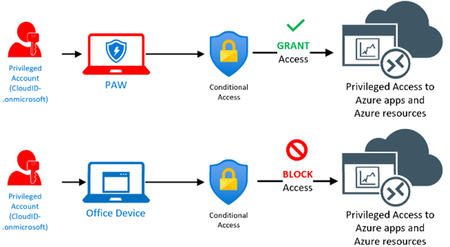
Designing Authorization‑Aware AI Agents Enforcing Microsoft Entra ID RBAC in Copilot Studio As AI agents move from experimentation to enterprise execution, authorization becomes the defining line between innovation and risk. AI agents are rapidly evolving from experimental assistants into enterprise operators—retrieving user data, triggering workflows, and invoking protected APIs. While many early implementations rely on prompt‑level instructions to control access, regulated enterprise environments require authorization to be enforced by identity systems, not language models. This article presents a production‑ready, identity‑first architecture for building authorization‑aware AI agents using Copilot Studio, Power Automate, Microsoft Entra ID, and Microsoft Graph, ensuring every agent action executes strictly within the requesting user’s permissions. Why Prompt‑Level Security Is Not Enough Large Language Models interpret intent—they do not enforce policy. Even the most carefully written prompts cannot: Validate Microsoft Entra ID group or role membership Reliably distinguish delegated user identity from application identity Enforce deterministic access decisions Produce auditable authorization outcomes Relying on prompts for authorization introduces silent security failures, over‑privileged access, and compliance gaps—particularly in Financial Services, Healthcare, and other regulated industries. Authorization is not a reasoning problem. It is an identity enforcement problem. Common Authorization Anti‑Patterns in AI Agents The following patterns frequently appear in early AI agent implementations and should be avoided in enterprise environments: Hard‑coded role or group checks embedded in prompts Trusting group names passed as plain‑text parameters Using application permissions for user‑initiated actions Skipping verification of the user’s Entra ID identity Lacking an auditable authorization decision point These approaches may work in demos, but they do not survive security reviews, compliance audits, or real‑world misuse scenarios. Authorization‑Aware Agent Architecture In an authorization‑aware design, the agent never decides access. Authorization is enforced externally, by identity‑aware workflows that sit outside the language model’s reasoning boundary. High‑Level Flow The Copilot Studio agent receives a user request The agent passes the User Principal Name (UPN) and intended action A Power Automate flow validates permissions using Microsoft Entra ID via Microsoft Graph Only authorized requests are allowed to proceed Unauthorized requests fail fast with a deterministic outcome Authorization‑aware Copilot Studio architecture enforces Entra ID RBAC before executing any business action. The agent orchestrates intent. Identity systems enforce access. Enforcing Entra ID RBAC with Microsoft Graph Power Automate acts as the authorization enforcement layer: Resolve user identity from the supplied UPN Retrieve group or role memberships using Microsoft Graph Normalize and compare memberships against approved RBAC groups Explicitly deny execution when authorization fails This keeps authorization logic: Centralized Deterministic Auditable Independent of the AI model Reference Implementation: Power Automate RBAC Enforcement Flow The following import‑ready Power Automate cloud flow demonstrates a secure RBAC enforcement pattern for Copilot Studio agents. It validates Microsoft Entra ID group membership before allowing any business action. Scenario Trigger: User‑initiated agent action Identity model: Delegated user identity Input: userUPN, requestedAction Outcome: Authorized or denied based on Entra ID RBAC { "$schema": "https://schema.management.azure.com/providers/Microsoft.Logic/schemas/2016-06-01/workflowdefinition.json#", "contentVersion": "1.0.0.0", "triggers": { "Copilot_Request": { "type": "Request", "kind": "Http", "inputs": { "schema": { "type": "object", "properties": { "userUPN": { "type": "string" }, "requestedAction": { "type": "string" } }, "required": [ "userUPN" ] } } } }, "actions": { "Get_User_Groups": { "type": "Http", "inputs": { "method": "GET", "uri": "https://graph.microsoft.com/v1.0/users/@{triggerBody()?['userUPN']}/memberOf?$select=displayName", "authentication": { "type": "ManagedServiceIdentity" } } }, "Normalize_Group_Names": { "type": "Select", "inputs": { "from": "@body('Get_User_Groups')?['value']", "select": { "groupName": "@toLower(item()?['displayName'])" } }, "runAfter": { "Get_User_Groups": [ "Succeeded" ] } }, "Check_Authorization": { "type": "Condition", "expression": "@contains(body('Normalize_Group_Names'), 'ai-authorized-users')", "runAfter": { "Normalize_Group_Names": [ "Succeeded" ] }, "actions": { "Authorized_Action": { "type": "Compose", "inputs": "User authorized via Entra ID RBAC" } }, "else": { "actions": { "Access_Denied": { "type": "Terminate", "inputs": { "status": "Failed", "message": "Access denied. User not authorized via Entra ID RBAC." } } } } } } } This pattern enforces authorization outside the agent, aligns with Zero Trust principles, and creates a clear audit boundary suitable for enterprise and regulated environments. Flow Diagram: Agent Integrated with RBAC Authorization Flow and Sample Prompt Execution: Delegated vs Application Permissions Scenario Recommended Permission Model User‑initiated agent actions Delegated permissions Background or system automation Application permissions Using delegated permissions ensures agent execution remains strictly within the requesting user’s identity boundary. Auditing and Compliance Benefits Deterministic and explainable authorization decisions Centralized enforcement aligned with identity governance Clear audit trails for security and compliance reviews Readiness for SOC, ISO, PCI, and FSI assessments Enterprise Security Takeaways Authorization belongs in Microsoft Entra ID, not prompts AI agents must respect enterprise identity boundaries Copilot Studio + Power Automate + Microsoft Graph enable secure‑by‑design AI agents By treating AI agents as first‑class enterprise actors and enforcing authorization at the identity layer, organizations can scale AI adoption with confidence, trust, and compliance.
Introducing Microsoft Sentinel data lake
Today, we announced a significant expansion of Microsoft Sentinel’s capabilities through the introduction of Sentinel data lake, now rolling out in public preview. Security teams cannot defend what they cannot see and analyze. With exploding volumes of security data, organizations are struggling to manage costs while maintaining effective threat coverage. Do-it-yourself security data architectures have perpetuated data silos, which in turn have reduced the effectiveness of AI solutions in security operations. With Sentinel data lake, we are taking a major step to address these challenges. Microsoft Sentinel data lake enables a fully managed, cloud-native, data lake that is purposefully designed for security, right inside Sentinel. Built on a modern lake architecture and powered by Azure, Sentinel data lake simplifies security data management, eliminates security data silos, and enables cost-effective long-term security data retention with the ability to run multiple forms of analytics on a single copy of that data. Security teams can now store and manage all security data. This takes the market-leading capabilities of Sentinel SIEM and supercharges it even further. Customers can leverage the data lake for retroactive TI matching and hunting over a longer time horizon, track low and slow attacks, conduct forensics analysis, build anomaly insights, and meet reporting & compliance needs. By unifying security data, Sentinel data lake provides the AI ready data foundation for AI solutions. Let’s look at some of Sentinel data lake’s core features. Simplified onboarding and enablement inside Defender Portal: Customers can easily discover and enable the new data lake from within the Defender portal, either from the banner on the home page or from settings. Setting up a modern data lake now is just a click away, empowering security teams to get started quickly without a complex setup. Simplified security data management: Sentinel data lake works seamlessly with existing Sentinel connectors. It brings together security logs from Microsoft services across M365, Defender, Azure, Entra, Purview, Intune plus third-party sources like AWS, GCP, network and firewall data from 350+ connectors and solutions. The data lake supports Sentinel’s existing table schemas while customers can also create custom connectors to bring raw data into the data lake or transform it during ingestion. In the future, we will enable additional industry-standard schemas. The data lake expands beyond just activity logs by including a native asset store. Critical asset information is added to the data lake using new Sentinel data connectors for Microsoft 365, Entra, and Azure, enabling a single place to analyze activity and asset data enriched with Threat intelligence. A new table management experience makes it easy for customers to choose where to send and store data, as well as set related retention policies to optimize their security data estate. Customers can easily send critical, high-fidelity security data to the analytics tier or choose to send high-volume, low fidelity logs to the new data lake tier. Any data brought into the analytics tier is automatically mirrored into the data lake at no additional charge, making data lake the central location for all security data. Advanced data analysis capabilities over data in the data lake: Sentinel data lake stores all security data in an open format to enable analysts to do multi-modal security analytics on a single copy of data. Through the new data lake exploration experience in the Defender portal, customers can leverage Kusto query language to analyze historical data using the full power of Kusto. Since the data lake supports the Sentinel table schema, advanced hunting queries can be run directly on the data lake. Customers can also schedule long-running jobs, either once or on a schedule, that perform complex analysis on historical data for in-depth security insights. These insights generated from the data lake can be easily elevated to analytics tier and leveraged in Sentinel for threat investigation and response. Additionally, as part of the public preview, we are also releasing a new Sentinel Visual Studio Code extension that enables security teams to easily connect to the same data lake data and use Python notebooks, as well as spark and ML libraries to deeply analyze lake data for anomalies. Since the environment is fully managed, there is no compute infrastructure to set up. Customers can just install the Visual Studio Code extension and use AI coding agents like GitHub Copilot to build a notebook and execute it in the managed environment. These notebooks can also be scheduled as jobs and the resulting insights can be elevated to analytics tier and leveraged in Sentinel for threat investigation and response. Flexible business model: Sentinel data lake enables customers to separate their data ingestion and retention needs from their security analytics needs, allowing them to ingest and store data cost effectively and then pay separately when analyzing data for their specific needs. Let’s put this all together and show an example of how a customer can operationalize and derive value from the data lake for retrospective threat intelligence matching in Microsoft Sentinel. Network logs are typically high-volume logs but can often contain key insights for detecting initial entry point of an attack, command and control connection, lateral movement or an exfiltration attempt. Customers can now send these high-volume logs to the data lake tier. Next, they can create a python notebook that can join latest threat intelligence from Microsoft Defender Threat Intelligence to scan network logs for any connections to/from a suspicious IP or domain. They can schedule this notebook to run as a scheduled job, and any insights can then be promoted to analytics tiers and leveraged to enrich ongoing investigation, hunts, response or forensics analysis. All this is possible cost-effectively without having to set up any complex infrastructure, enabling security teams to achieve deeper insights. This preview is now rolling out for customers in Defender portal in our supported regions. To learn more, check out our Mechanics video and our documentation or talk to your account teams. Get started today Join us as we redefine what’s possible in security operations: Onboard Sentinel data lake: https://aka.ms/sentineldatalakedocs Explore our pricing: https://aka.ms/sentinel/pricingblog For the supported regions, please refer to https://aka.ms/sentinel/datalake/geos Learn more about our MDTI news: http://aka.ms/mdti-convergence General Availability of Auxiliary Logs and Reduced Pricing