microsoft entra
266 TopicsWelcome to the Microsoft Security Community!
We have moved! Registering for webinars is now easier than ever—you can add any session directly to your calendar with a single click using the link below. Please visit: https://securitycommunity.microsoft.com/VirtualEvents/ to sign up for future webinars!53KViews7likes13CommentsNIST CSF 2.0 - Protect (PR) - Applications for Microsoft 365 (Part 1)
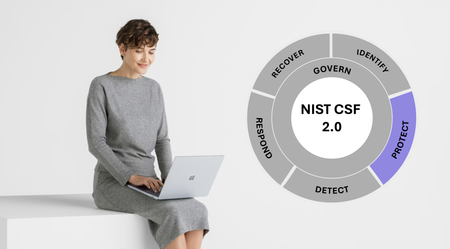
This blog and series will look to apply the National Institute of Standards and Technology (NIST) Cybersecurity Framework (CSF) 2.0 and, specifically, the Protect (PR) Function to Microsoft 365. Though the discussion will endeavor to focus primarily on Microsoft 365, topics may venture into Microsoft Azure topics periodically by the nature of each solution. Part 1 or any subsequent blogs in the series will not be an exhaustive review of all possible applications of NIST CSF 2.0, nor exhaustive of the technologies mentioned and their abilities to manage cybersecurity risks. Other applicable Functions or Categories found in NIST CSF 2.0 will be evoked throughout in the true spirit of the framework. PR as a function is intended to cover “safeguards to manage the organization’s cybersecurity risks” and contains five Categories. The prior CSF publication included six categories, but two were significantly edited and renamed. Let’s first dive into Identity Management, Authentication, and Access Control (PR.AA).Microsoft Entra Private Access protections for on-premises & private cloud network resources
Enable secure access to all your private on-prem and cloud resources, beyond what you can do with traditional VPNs, with Microsoft Entra Private Access, part of Microsoft’s Security Service Edge solution. 19KViews4likes15Comments
Introducing Microsoft Sentinel data lake
Today, we announced a significant expansion of Microsoft Sentinel’s capabilities through the introduction of Sentinel data lake, now rolling out in public preview. Security teams cannot defend what they cannot see and analyze. With exploding volumes of security data, organizations are struggling to manage costs while maintaining effective threat coverage. Do-it-yourself security data architectures have perpetuated data silos, which in turn have reduced the effectiveness of AI solutions in security operations. With Sentinel data lake, we are taking a major step to address these challenges. Microsoft Sentinel data lake enables a fully managed, cloud-native, data lake that is purposefully designed for security, right inside Sentinel. Built on a modern lake architecture and powered by Azure, Sentinel data lake simplifies security data management, eliminates security data silos, and enables cost-effective long-term security data retention with the ability to run multiple forms of analytics on a single copy of that data. Security teams can now store and manage all security data. This takes the market-leading capabilities of Sentinel SIEM and supercharges it even further. Customers can leverage the data lake for retroactive TI matching and hunting over a longer time horizon, track low and slow attacks, conduct forensics analysis, build anomaly insights, and meet reporting & compliance needs. By unifying security data, Sentinel data lake provides the AI ready data foundation for AI solutions. Let’s look at some of Sentinel data lake’s core features. Simplified onboarding and enablement inside Defender Portal: Customers can easily discover and enable the new data lake from within the Defender portal, either from the banner on the home page or from settings. Setting up a modern data lake now is just a click away, empowering security teams to get started quickly without a complex setup. Simplified security data management: Sentinel data lake works seamlessly with existing Sentinel connectors. It brings together security logs from Microsoft services across M365, Defender, Azure, Entra, Purview, Intune plus third-party sources like AWS, GCP, network and firewall data from 350+ connectors and solutions. The data lake supports Sentinel’s existing table schemas while customers can also create custom connectors to bring raw data into the data lake or transform it during ingestion. In the future, we will enable additional industry-standard schemas. The data lake expands beyond just activity logs by including a native asset store. Critical asset information is added to the data lake using new Sentinel data connectors for Microsoft 365, Entra, and Azure, enabling a single place to analyze activity and asset data enriched with Threat intelligence. A new table management experience makes it easy for customers to choose where to send and store data, as well as set related retention policies to optimize their security data estate. Customers can easily send critical, high-fidelity security data to the analytics tier or choose to send high-volume, low fidelity logs to the new data lake tier. Any data brought into the analytics tier is automatically mirrored into the data lake at no additional charge, making data lake the central location for all security data. Advanced data analysis capabilities over data in the data lake: Sentinel data lake stores all security data in an open format to enable analysts to do multi-modal security analytics on a single copy of data. Through the new data lake exploration experience in the Defender portal, customers can leverage Kusto query language to analyze historical data using the full power of Kusto. Since the data lake supports the Sentinel table schema, advanced hunting queries can be run directly on the data lake. Customers can also schedule long-running jobs, either once or on a schedule, that perform complex analysis on historical data for in-depth security insights. These insights generated from the data lake can be easily elevated to analytics tier and leveraged in Sentinel for threat investigation and response. Additionally, as part of the public preview, we are also releasing a new Sentinel Visual Studio Code extension that enables security teams to easily connect to the same data lake data and use Python notebooks, as well as spark and ML libraries to deeply analyze lake data for anomalies. Since the environment is fully managed, there is no compute infrastructure to set up. Customers can just install the Visual Studio Code extension and use AI coding agents like GitHub Copilot to build a notebook and execute it in the managed environment. These notebooks can also be scheduled as jobs and the resulting insights can be elevated to analytics tier and leveraged in Sentinel for threat investigation and response. Flexible business model: Sentinel data lake enables customers to separate their data ingestion and retention needs from their security analytics needs, allowing them to ingest and store data cost effectively and then pay separately when analyzing data for their specific needs. Let’s put this all together and show an example of how a customer can operationalize and derive value from the data lake for retrospective threat intelligence matching in Microsoft Sentinel. Network logs are typically high-volume logs but can often contain key insights for detecting initial entry point of an attack, command and control connection, lateral movement or an exfiltration attempt. Customers can now send these high-volume logs to the data lake tier. Next, they can create a python notebook that can join latest threat intelligence from Microsoft Defender Threat Intelligence to scan network logs for any connections to/from a suspicious IP or domain. They can schedule this notebook to run as a scheduled job, and any insights can then be promoted to analytics tiers and leveraged to enrich ongoing investigation, hunts, response or forensics analysis. All this is possible cost-effectively without having to set up any complex infrastructure, enabling security teams to achieve deeper insights. This preview is now rolling out for customers in Defender portal in our supported regions. To learn more, check out our Mechanics video and our documentation or talk to your account teams. Get started today Join us as we redefine what’s possible in security operations: Onboard Sentinel data lake: https://aka.ms/sentineldatalakedocs Explore our pricing: https://aka.ms/sentinel/pricingblog For the supported regions, please refer to https://aka.ms/sentinel/datalake/geos Learn more about our MDTI news: http://aka.ms/mdti-convergence General Availability of Auxiliary Logs and Reduced PricingSecurity Dashboard for AI - Now Generally Available
AI proliferation in the enterprise, combined with the emergence of AI governance committees and evolving AI regulations, leaves CISOs and AI risk leaders needing a clear view of their AI risks, such as data leaks, model vulnerabilities, misconfigurations, and unethical agent actions across their entire AI estate, spanning AI platforms, apps, and agents. 53% of security professionals say their current AI risk management needs improvement, presenting an opportunity to better identify, assess and manage risk effectively. 1 At the same time, 86% of leaders prefer integrated platforms over fragmented tools, citing better visibility, fewer alerts and improved efficiency. 2 To address these needs, we are excited to announce the Security Dashboard for AI, previously announced at Microsoft Ignite, is now generally available. This unified dashboard aggregates posture and real-time risk signals from Microsoft Defender, Microsoft Entra, and Microsoft Purview - enabling users to see left-to-right across purpose-built security tools from within a single pane of glass. The dashboard equips CISOs and AI risk leaders with a governance tool to discover agents and AI apps, track AI posture and drift, and correlate risk signals to investigate and act across their entire AI ecosystem. Security teams can continue using the tools they trust while empowering security leaders to govern and collaborate effectively. Gain Unified AI Risk Visibility Consolidating risk signals from across purpose-built tools can simplify AI asset visibility and oversight, increase security teams’ efficiency, and reduce the opportunity for human error. The Security Dashboard for AI provides leaders with unified AI risk visibility by aggregating security, identity, and data risk across Defender, Entra, Purview into a single interactive dashboard experience. The Overview tab of the dashboard provides users with an AI risk scorecard, providing immediate visibility to where there may be risks for security teams to address. It also assesses an organization's implementation of Microsoft security for AI capabilities and provides recommendations for improving AI security posture. The dashboard also features an AI inventory with comprehensive views to support AI assets discovery, risk assessments, and remediation actions for broad coverage of AI agents, models, MCP servers, and applications. The dashboard provides coverage for all Microsoft AI solutions supported by Entra, Defender and Purview—including Microsoft 365 Copilot, Microsoft Copilot Studio agents, and Microsoft Foundry applications and agents—as well as third-party AI models, applications, and agents, such as Google Gemini, OpenAI ChatGPT, and MCP servers. This supports comprehensive visibility and control, regardless of where applications and agents are built. Prioritize Critical Risk with Security Copilots AI-Powered Insights Risk leaders must do more than just recognize existing risks—they also need to determine which ones pose the greatest threat to their business. The dashboard provides a consolidated view of AI-related security risks and leverages Security Copilot’s AI-powered insights to help find the most critical risks within an environment. For example, Security Copilot natural language interaction improves agent discovery and categorization, helping leaders identify unmanaged and shadow AI agents to enhance security posture. Furthermore, Security Copilot allows leaders to investigate AI risks and agent activities through prompt-based exploration, putting them in the driver’s seat for additional risk investigation. Drive Risk Mitigation By streamlining risk mitigation recommendations and automated task delegation, organizations can significantly improve the efficiency of their AI risk management processes. This approach can reduce the potential hidden AI risk and accelerate compliance efforts, helping to ensure that risk mitigation is timely and accurate. To address this, the Security Dashboard for AI evaluates how organizations put Microsoft’s AI security features into practice and offers tailored suggestions to strengthen AI security posture. It leverages Microsoft’s productivity tools for immediate action within the practitioner portal, making it easy for administrators to delegate recommendation tasks to designated users. With the Security Dashboard for AI, CISOs and risk leaders gain a clear, consolidated view of AI risks across agents, apps, and platforms—eliminating fragmented visibility, disconnected posture insights, and governance gaps as AI adoption scales. Best of all, the Security Dashboard for AI is included with eligible Microsoft security products customers already use. If an organization is already using Microsoft security products to secure AI, they are already a Security Dashboard for AI customer. Getting Started Existing Microsoft Security customers can start using Security Dashboard for AI today. It is included when a customer has the Microsoft Security products—Defender, Entra and Purview—with no additional licensing required. To begin using the Security Dashboard for AI, visit http://ai.security.microsoft.com or access the dashboard from the Defender, Entra or Purview portals. Learn more about the Security Dashboard for AI at Microsoft Security MS Learn. 1AuditBoard & Ascend2 Research. The Connected Risk Report: Uniting Teams and Insights to Drive Organizational Resilience. AuditBoard, October 2024. 2Microsoft. 2026 Data Security Index: Unifying Data Protection and AI Innovation. Microsoft Security, 2026