microsoft defender for servers
49 Topics
Defending Container Runtime from Malware with Microsoft Defender for Containers
In cloud-native environments, malware protection is no longer traditional antivirus — it is runtime workload security, ensuring containerized applications remain safe throughout their lifecycle. Many organizations focus on scanning container images before deployment. While image scanning is important, this does not stop runtime attacks. Image scanning protects before deployment, but malware detection protects during execution. Malware can enter cloud environments through container images, compromised CI/CD pipelines, exposed services, or misuse of legitimate administrative tools, making runtime malware detection an essential security control rather than an optional enhancement. Runtime Malware detection and Prevention acts as the last line of defence when preventive controls fail. If malware executes successfully inside a container, it may attempt Privilege escalation, Container escape and Host compromise. Antimalware in Defender for Containers Defender for Containers antimalware, powered by Microsoft Defender Antivirus cloud protection, near-real-time malware detection directly into container environments. The antimalware feature is available via Helm with sensor version 0.10.2 for AKS, GKE, and EKS. Defender for Containers Sensor Defender for Containers Antimalware provides: Runtime monitoring of container activity Malware detection on Container Workloads Malware detection for Kubernetes nodes Alerts integrated into Defender XDR Anti-malware detection and blocking - Microsoft Defender for Cloud | Microsoft Learn Container antimalware protection in Defender for Containers is powered by three main components: 1) Defender Sensor - version 0.10.2 installed via Helm or arc-extension The Defender sensor runs inside the Kubernetes cluster and monitors workload activity in real time. It provides: Runtime visibility into container processes Binary execution monitoring Behavioral inspection Alert and Block Malware execution Multicloud Support (Azure Kubernetes Service, AWS EKS, GCP GKE) Prerequisites: Ensure the following components of the Defender for containers plan are enabled: Defender sensor Security findings Registry access Kubernetes API access To Install Defender Sensor for Antimalware, ensure there are sufficient resources on your Kubernetes Cluster and outbound connectivity. In addition to the core sensor memory and CPU requirements, you need: Component Request Limit CPU 50m 300m Memory 128Mi 500Mi All sensor components use outbound-only connectivity (no inbound access required). To install Defender for Containers sensor follow the guidance here To Verify the sensor deployed successfully on all nodes, use the commands as screenshot below: You should see the collectors pods in Running state with 3/3 containers. 2) Antimalware Policy Engine Policies define what happens when malware is detected: Alert only Block execution Ignore (allowlisted cases) Policies can be scoped to Azure subscriptions, AWS Accounts and GCP Projects and also to Specific clusters, Namespaces, Pods, Images, Labels or workloads. This allows organizations to reduce false positives while enforcing strict security where needed. Host vs Workload Protection — How Sensor Covers Both Antimalware Rules can be applied to Resource scopes: Scope What Is Protected Workload (Container) Processes inside containers Host (Node) Kubernetes node OS and runtime Default rules include: Default antimalware workload rule Default antimalware host rule This matters because attackers often escape containers and target kubelet, container runtime, and node filesystem. Blocking malware at both workload and host layers prevents cluster takeover. To configure the Antimalware policy follow the guidance here To verify the antimalware policy is deployed to the cluster, login to your K8s cluster and use the commands as screenshot below: 3) Cloud Protection (Microsoft Defender Antivirus Cloud) Defender for Containers Sensor integrates with Microsoft Defender Antivirus cloud protection, which provides Global threat intelligence, Machine learning classification, Reputation scoring, Zero-day detection. When suspicious binaries appear, cloud analysis determines whether they should be allowed or blocked. To test Malware detection and blocking, upload an EICAR file to a running Container on your cluster. If policy action = Block Malware, the sensor performs enforcement. Blocking actions include, Killing malicious process and Generates Defender for Cloud alert as below: The malware is detected and execution is blocked. Defender for Cloud Alerts are also available in Defender XDR portal. Security Operations teams can further investigate the infected file by navigating to the Incidents and Alerts section in the Defender portal. When a container or pod is determined to be compromised, Defender XDR enables Security Operations Team to take response actions. For more details : Investigate and respond to container threats in the Microsoft Defender portal Binary Drift Detection and Prevention : Containers are expected to be immutable. Running containers should only execute binaries that came from the original container image. This is extremely important because most container attacks involve Curl/wget downloading malware, Crypto miners dropped post-compromise, Attack tools installed dynamically. For more details refer Binary drift detection and blocking Defender detects runtime drift, such as New binaries downloaded after deployment Files written into container filesystem Tools installed via reverse shell Payloads dropped by attackers To Configure drift detection and prevention policy follow the guidance here . When a drift is detected on a container workload, Defender for Container sensor detects drift and prevents it from being drifted. To test drift prevention, deploy a container and introduce a drift in the running container. The drift will be detected by the sensor and prevents drift, and alert is generated as shown in the screenshot below: References: Anti-malware detection and blocking Install Defender for Containers sensor using Helm Binary drift detection and blocking Investigate and respond to container threats in the Microsoft Defender portal Reviewed by: Eyal Gur, Principal Product Manager, Microsoft Defender for Cloud
Microsoft Defender for Cloud expands U.S. Gov Cloud support for CSPM and server security
U.S. government organizations face unique security and compliance challenges as they migrate essential workloads to the cloud. To help meet these needs, Microsoft Defender for Cloud has expanded support in the Government Cloud with Defender cloud security posture management (CSPM) and Defender for Servers Plan 2. This expansion helps strengthen security posture with advanced threat protection, vulnerability management, and contextual risk insights across hybrid and multi-cloud environments. Defender CSPM and Defender for Servers are available in the following Microsoft Government Clouds: Microsoft Azure Government (MAG) – FedRamp High, DISA IL4, DISA IL5 Government Community Cloud High (GCCH) – FedRamp High, DISA IL4 Defender for Cloud offers support for CSPM in U.S. Government Cloud First, Defender CSPM is generally available for U.S. Government cloud customers. This expansion brings advanced cloud security posture management capabilities to U.S. federal and government agencies—including the Department of Defense (DoD) and civilian agencies—helping them strengthen their security posture and compliance in the cloud. Defender CSPM empowers agencies to continuously discover, assess, monitor, and improve their cloud security posture, including the ability to monitor and correct configuration drift, ensuring they meet regulatory requirements and proactively manage risk in highly regulated environments. Additional benefits for government agencies: Continuous Compliance Assurance Unlike static audits, Defender CSPM provides real-time visibility into the security posture of cloud environments. This enables agencies to demonstrate ongoing compliance with federal standards—anytime, not just during audit windows Risk-Based Prioritization Defender CSPM uses contextual insights and attack path analysis to help security teams focus on the most critical risks first—maximizing impact while optimizing limited resources Agentless Monitoring With agentless scanning, agencies can assess workloads without deploying additional software—ideal for sensitive or legacy systems Security recommendations in Defender CSPM To learn more about Defender CSPM, visit our technical documentation. Defender for Cloud now offers full feature parity for server security in U.S. Government Cloud In addition to Defender CSPM, we’re also expanding our support for server security in the U.S. GovCloud. Government agencies face mounting challenges in securing the servers that support their critical operations and sensitive data. As server environments expand across on-premises, hybrid, and multicloud platforms, maintaining consistent security controls and compliance with federal standards like FedRAMP and NIST SP 800-53 becomes increasingly difficult. Manual processes and periodic audits can’t keep up with configuration drift, unpatched vulnerabilities, and evolving threats—leaving agencies exposed to breaches and compliance risks. Defender for Servers provides continuous, automated threat protection, vulnerability management, and compliance monitoring across all server environments, enabling agencies to safeguard their infrastructure and maintain a strong security posture. We are excited to share that all capabilities in Defender for Servers Plan 2 are now available in U.S. GovCloud, including these newly added capabilities: Agent-based and agentless vulnerability assessment recommendations Secrets detection recommendations EDR detection recommendations Agentless malware detection File integrity monitoring Baseline recommendations Customers can start using all capabilities of Defender for Servers Plan 2 in U.S. Government Cloud starting today. To learn more about Defender for Servers, visit our technical documentation. Get started today! To gain access to the robust capabilities provided by Defender CSPM and Defender for Servers, you need to enable the plans on your subscription. To enable the Defender CSPM and Defender for Servers plans on your subscription: Sign in to the Azure portal. Search for and select Microsoft Defender for Cloud. In the Defender for Cloud menu, select Environment settings. Select the relevant Azure subscription On the Defender plans page, toggle the Defender CSPM plan and/or Defender for Servers to On. Select Save.1.2KViews0likes0CommentsGuidance for handling CVE-2025-31324 using Microsoft Security capabilities
Short Description Recently, a CVSS 10 vulnerability, CVE-2025-31324, affecting the "Visual Composer" component of the SAP NetWeaver application server, has been published, putting organizations at risk. In this blog post, we will show you how to effectively manage this CVE if your organization is affected by it. Exploiting this vulnerability involves sending a malicious POST request to the "/developmentserver/metadatauploader" endpoint of the SAP NetWeaver application server, which allows allow arbitrary file upload and execution. Impact: This vulnerability allows attackers to deploy a webshell and execute arbitrary commands on the SAP server with the same permissions as the SAP service. This specific SAP product is typically used in large organizations, on Linux and Windows servers across on-prem and cloud environments - making the impact of this vulnerability significant. Microsoft have already observed active exploits of this vulnerability in the wild, highlighting the urgency of addressing this issue. Mapping CVE-2025-31324 in Your Organization The first step in managing an incident is to map affected software within your organization’s assets. Using the Vulnerability Page Information on this CVE, including exposed devices and software in your organization, is available from the vulnerability page for CVE-2025-31324. Using Advanced Hunting This query searches software vulnerable to the this CVE and summarizes them by device name, OS version and device ID: DeviceTvmSoftwareVulnerabilities | where CveId == "CVE-2025-31324" | summarize by DeviceName, DeviceId, strcat(OSPlatform, " ", OSVersion), SoftwareName, SoftwareVersion To map the presence of additional, potentially vulnerable SAP NetWeaver servers in your environment, you can use the following Advanced Hunting query: *Results may be incomplete due to reliance on activity data, which means inactive instances of the application - those installed but not currently running, might not be included in the report. DeviceProcessEvents | where (FileName == "disp+work.exe" and ProcessVersionInfoProductName == "SAP NetWeaver") or FileName == "disp+work" | distinct DeviceId, DeviceName, FileName, ProcessVersionInfoProductName, ProcessVersionInfoProductVersion Where available, the ProcessVersionInfoProductVersion field contains the version of the SAP NetWeaver software. Optional: Utilizing software inventory to map devices is advisable even when a CVE hasn’t been officially published or when there’s a specific requirement to upgrade a particular package and version. This query searches for devices that have a vulnerable versions installed (you can use this link to open the query in your environment): DeviceTvmSoftwareInventory | where SoftwareName == "netweaver_application_server_visual_composer" | parse SoftwareVersion with Major:int "." Minor:int "." BuildDate:datetime "." rest:string | extend IsVulnerable = Minor < 5020 or BuildDate < datetime(2025-04-18) | project DeviceId, DeviceName, SoftwareVendor, SoftwareName, SoftwareVersion, IsVulnerable Using a dedicated scanner You can leverage Microsoft’s lightweight scanner to validate if your SAP NetWeaver application is vulnerable. This scanner probes the vulnerable endpoint without actively exploiting it. Recommendations for Mitigation and Best Practices Mitigating risks associated with vulnerabilities requires a combination of proactive measures and real-time defenses. Here are some recommendations: Update NetWeaver to a Non-Vulnerable Version: All NetWeaver 7.x versions are vulnerable. For versions 7.50 and above, support packages SP027 - SP033 have been released and should be installed. Versions 7.40 and below do not receive new support packages and should implement alternative mitigations. JIT (Just-In-Time) Access: Cloud customers using Defender for Servers P2 can utilize our "JIT" feature to protect their environment from unnecessary ports and risks. This feature helps secure your environment by limiting exposure to only the necessary ports. The Microsoft research team has identified common ports that are potential to be used by these components, so you can check or use JIT for these. It is important to mention that JIT can be used for any port, but these are the most common ones. Learn more about the JIT capability Ports commonly used by the vulnerable application as observed by Microsoft: 80, 443, 50000, 50001, 1090, 5000, 8000, 8080, 44300, 44380 Active Exploitations To better support our customers in the event of a breach, we are expanding our detection framework to identify and alert you about the exploitation of this vulnerability across all operating systems (for MDE customers). These detectors, as all Microsoft detections, are also connected to Automatic Attack Disruption, our autonomous protection vehicle. In cases where these alerts, alongside other signals, will allow for high confidence of an ongoing attack, automatic actions will be taken to contain the attack and prevent further progressions of the attack. Coverage and Detections Currently, our solutions support coverage of CVE-2025-31324 for Windows and Linux devices that are onboarded to MDE (in both MDE and MDC subscriptions). To further expand our support, Microsoft Defender Vulnerability management is currently deploying additional detection mechanisms. This blog will be updated with any changes and progress. Conclusion By following these guidelines and utilizing end-to-end integrated Microsoft Security products, organizations can better prepare for, prevent and respond to attacks, ensuring a more secure and resilient environment. While the above process provides a comprehensive approach to protecting your organization, continual monitoring, updating, and adapting to new threats are essential for maintaining robust security.6.6KViews0likes0CommentsMicrosoft Defender for Cloud Customer Newsletter
What's new in Defender for Cloud? Defender for Cloud’s CSPM sensitive scanning capabilities now include Azure files. This feature is in GA. Learn more about it here. File integrity monitoring (FIM) update Staring June 2025, FIM requires a minimum Defender for Endpoint (MDE) client version. For Windows devices, please make sure you have Windows 10.8760 or later and for Linux, 30.124082. For more details, please refer to our documentation. Blogs of the month In December, our team published the following blog posts we would like to share: AKS Security Dashboard Strategy to Execution: Operationalizing Microsoft Defender CSPM MDC Named a Leader in Frost Radar TM for CNAPP for the 2nd Year in a Row! GitHub Community Learn more about MDC and XDR integration by following this lab – module 25. Visit our GitHub page. Defender for Cloud in the field MDC Ignite updates 2024 Cloud detection response (CDR) for Defender for Containers Improvements in Container's posture management Visit our YouTube page! Customer journey Discover how other organizations successfully use Microsoft Defender for Cloud to protect their cloud workloads. This month we are featuring Properstar, a leading real estate platform, partnered with Microsoft to simplify unstructured real estate data and leverage dynamic AI-powered solutions like Azure Open AI to provide relevant search results. Then, they were able to scale up, using Defender for Cloud to implement data protection and regulatory compliance. Security community webinars Join our experts in the upcoming webinars to learn what we are doing to secure your workloads running in Azure and other clouds. Check out our upcoming webinars this month in the link below! I would like to register Watch past webinars We offer several customer connection programs within our private communities. By signing up, you can help us shape our products through activities such as reviewing product roadmaps, participating in co-design, previewing features, and staying up-to-date with announcements. Sign up at aka.ms/JoinCCP. We greatly value your input on the types of content that enhance your understanding of our security products. Your insights are crucial in guiding the development of our future public content. We aim to deliver material that not only educates but also resonates with your daily security challenges. Whether it’s through in-depth live webinars, real-world case studies, comprehensive best practice guides through blogs, or the latest product updates, we want to ensure our content meets your needs. Please submit your feedback on which of these formats do you find most beneficial and are there any specific topics you’re interested in https://aka.ms/PublicContentFeedback. Note: If you want to stay current with Defender for Cloud and receive updates in your inbox, please consider subscribing to our monthly newsletter: https://aka.ms/MDCNewsSubscribe759Views0likes0Comments
Introducing the new File Integrity Monitoring with Defender for Endpoint integration
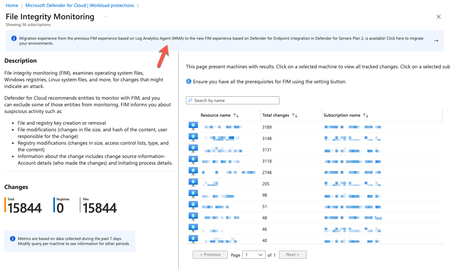
As the final and most complex piece of this puzzle is the release of File Integrity Monitoring (FIM) powered by Defender for Endpoint, marks a significant milestone in the Defender for Servers simplification journey. The new FIM solution based on Defender for Endpoint offers real-time monitoring on critical file paths and system files, ensuring that any changes indicating a potential attack are detected immediately. In addition, FIM offers built-in support for relevant security regulatory compliance standards, such as PCI-DSS, CIS, NIST, and others, allowing you to maintain compliance.Vulnerability Assessment with Defender for Servers, Powered by Defender Vulnerability Management
Enhanced Vulnerability Assessment with Defender for Servers, Driven by Defender Vulnerability Management, provides a unified and seamless solution within Defender for Cloud. Discover the benefits, including consistency, efficiency, and compliance support. Get step-by-step guidance on transitioning to this powerful solution and optimizing your security strategy. Read more now Elevated Vulnerability Assessment with Defender for Servers, Driven by Defender Vulnerability Management,8.6KViews4likes0CommentsProtecting Containers: A Primer for Moving from an EDR-based Threat Approach
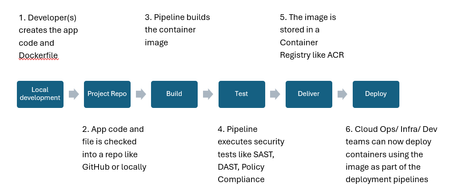
Many Security teams are familiar with an EDR-based approach to security. However, container protection within their cloud ecosystem can seem much more challenging and complex. Protecting containers requires an understanding of the complete attack surface that containers expose--whether you are running them using an orchestrator like Kubernetes or locally using Docker. In this article, we will describe the attack surface, how it compares and aligns with the security technologies you might already have, and then make the case for a stronger focus on pre-deployment protections, adding to standard EDR post-deployment detections.Microsoft Defender for Cloud support for Azure Database for MySQL - Flexible Server - GA
We’re excited to announce general availability of Microsoft Defender for Cloud support for Azure Database for MySQL - Flexible Server. Defender for Cloud provides Advanced Threat Protection (ATP), simplifying security management of your MySQL flexible server by enabling effortless threat prevention, detection, and mitigation through increased visibility into and control over harmful events.9.5KViews1like0Comments
Unleashing the Power of Microsoft Defender for Cloud – Unique Capabilities for Robust Protection
So you have implemented a non-native Cloud Security Posture Management solution but there are security gaps that you might not have considered. How Defender for Cloud is uniquely positioned to secure your cloud attack surface.