microsoft defender for servers
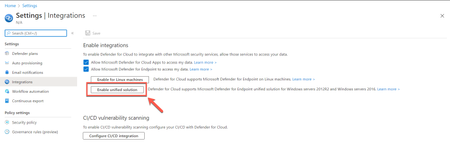
49 TopicsDefender for Servers Plan 2 now integrates with Defender for Endpoint unified solution
Today, we're excited to announce the release of Microsoft Defender for Endpoint’s unified agent integration with Microsoft Defender for Servers Plan 2. With this release, we align the integration experience between Microsoft Defender for Endpoint and both Microsoft Defender for Servers Plans.39KViews12likes47CommentsAgentless scanning for virtual machines in the cloud – technical deep dive
Over the past three years, a notable shift has unfolded in the realm of cloud security. Increasingly, security vendors are introducing agentless scanning solutions to enhance the protection of their customers. These solutions empower users with visibility into their security posture and the ability to detect threats — all achieved without the need to install any additional software, commonly referred to as an agent, onto their workloads.9.2KViews10likes3CommentsMicrosoft Defender for Endpoint for Linux and Microsoft Defender for Servers
When it comes to protecting servers in hybrid and multicloud environments, Microsoft Defender for Servers as part of Microsoft Defender for Cloud is the solution you might be looking for. However, with all the features, dependencies, and complexity, it might become challenging to always make the right decision when planning, integrating, and deploying Defender for Servers across your environment. With this blog, we are focusing on deployment and integration of Microsoft Defender for Endpoint with Microsoft Defender for Servers on Linux machines.Microsoft Defender for Cloud Cost Estimation Dashboard
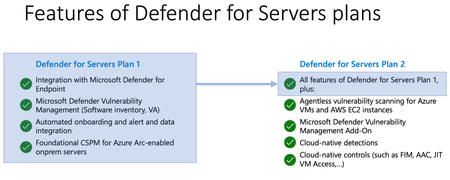
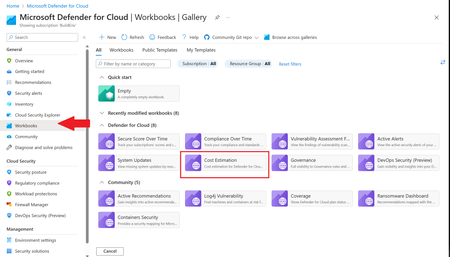
This blog was updated on April 16 th , 2023 to reflect the latest version of the Cost Estimation workbook. Microsoft Defender for Cloud provides advanced threat detection capabilities across your cloud workloads. This includes comprehensive coverage plans for compute, PaaS and data resources in your environment. Before enabling Defender for Cloud across subscriptions, customers are often interested in having a cost estimation to make sure the cost aligns with the team’s budget. We previously released the Microsoft Defender for Storage Price Estimation Workbook, which was widely and positively received by customers. Based on customer feedback, we have extended this offering by creating one comprehensive workbook that covers most Microsoft Defender for Cloud plans. This includes Defender for Containers, App Service, Servers, Storage, Cloud Security Posture Management and Databases. The Cost Estimation workbook is out-of-the box and can be found in the Defender for Cloud portal. After reading this blog and using the workbook, be sure to leave your feedback to be considered for future enhancements. Please remember these numbers are only estimated based on retail prices and do not provide actual billing data. For reference on how these prices are calculated, visit the Pricing—Microsoft Defender | Microsoft Azure. Overview The cost estimation workbook provides a consolidated price estimation for Microsoft Defender for Cloud plans based on the resource telemetry in your organization’s environment. The workbook allows you to select which subscriptions you would like to estimate the price for as well as the Defender Plans. In a single pane of glass, organizations can see the estimated cost per plan on each subscription as well as the grand total for all the selected subscriptions and plans. To see which plans are currently being used on the subscription, consider using the coverage workbook. Defender Cloud Security Posture Management (CSPM) Defender CSPM protects all resources across your subscriptions, but billing only applies to Compute, Databases and Storage accounts. Billable workloads include VMs, Storage accounts, open-source relational databases and SQL PaaS & Servers on machines. See here for more information regarding pricing. On the backend, the workbook checks to see how many billable resources were detected and if any of the above plans are enabled on the subscription. It then takes the number of billable resources and multiplies it by the Defender CSPM price. Defender for App Service The estimation for Defender for App Services is based on the retail price of $14.60 USD per App Service per month. Check out the Defender for App Service Price Estimation Dashboard for a more detailed view on estimated pricing with information such as CPU time and a list of App Services detected. Defender for Containers The estimation for Defender for Containers is calculated based on the average number of worker nodes in the cluster during the past 30 days. For a more detailed view on containers pricing such as average vCores detected and the number of image scans included, consider also viewing the stand-alone Defender for Containers Cost Estimation Workbook. Defender for Databases Pricing for Defender for Databases includes Defender for SQL Databases and Defender for open-source relational databases (OSS DBs). This includes PostgreSQL, MySQL and MariaDB. All estimations are based on the retail price of $15 USD per resource per month. On the backend, the workbook runs a query to find all SQL databases and OSS DBs in the selected subscriptions and multiplies the total amount by 15 to get the estimated monthly cost. Defender for Key Vault Defender for Key Vault cost estimation is not included in the out of the box workbook, however, a stand-alone workbook is available in the Defender for Cloud GitHub. The Defender for Key Vault dashboard considers all Key Vaults with or without Defender for Key Vault enabled on the selected subscriptions. The calculations are based on the retail price of $0.02 USD per 10k transactions. The “Estimated Cost (7 days)” column takes the total Key Vault transactions of the last 7 days, divides them by 10K and multiples them by 0.02. In “Estimated Monthly Price”, the results of “Estimated Cost (7 days)” are multiplied by 4.35 to get the monthly estimate. Defender for Servers Defender for Servers includes two plan options, Plan 1 and Plan 2. The workbook gives you the option to toggle between the two plans to see the difference in how they would effect pricing. Plan 1 is currently charged at $5 per month where as Plan 2 is currently charged at $15. Defender for Storage The Defender for Storage workbook allows you to estimate the cost of the two pricing plans: the legacy per-transaction plan and the new per-storage plan. The workbook looks at historical file and blob transaction data on supported storage types such as Blob Storage, Azure Files, and Azure Data Lake Storage Gen 2. We have released a new version of this workbook, and you can find it here: Microsoft-Defender-for-Cloud/Workbooks/Microsoft Defender for Storage Price Estimation and learn more about the storage workbook in Microsoft Defender for Storage – Price Estimation blog post. Limitations Azure Monitor Metrics data backends have limits and the number of requests to fetch data might time out. To solve this, narrow your scope by reducing the selected subscriptions and Defender plans. The workbook currently only includes Azure resources. Acknowledgements Special thanks to everyone who contributed to different versions of this workbook: Fernanda Vela, Helder Pinto, Lili Davoudian, Sarah Kriwet, Safeena Begum Lepakshi, Tom Janetscheck, Amit Biton, Ahmed Masalha, Keren Damari, Nir Sela, Mark Kendrick, Yaniv Shasha, Mauricio Zaragoza, Kafeel Tahir, Mary Lieb, Chris Tucci, Brian Roosevelt References: What is Microsoft Defender for Cloud? - Microsoft Defender for Cloud | Microsoft Learn Pricing—Microsoft Defender | Microsoft Azure Workbooks gallery in Microsoft Defender for Cloud | Microsoft Docs Pricing Calculator | Microsoft Azure Microsoft Defender for Key Vault Price Estimation Workbook Microsoft Defender for App Services Price Estimation Workbook Microsoft Defender for Containers Cost Estimation Workbook Coverage WorkbookWhat you need to know when deleting and re-creating the security connector(s) in Defender for Cloud
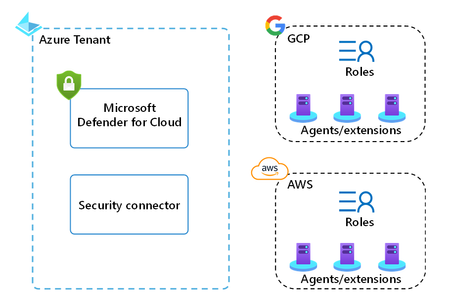
Introduction: Have you ever found yourself in a situation where you needed to move a security connector in Defender for Cloud between subscriptions or tenant? This article provides guidance on important considerations for removing and re-creating security connectors for AWS/GCP in Microsoft Defender for Cloud. These security connectors store the configuration preferences that Defender for Cloud uses to access your AWS/GCP environment and provide security recommendations and alerts. There may be instances where you need to re-create the connector, such as following best practice guidance, connecting to a different Azure tenant, or storing connectors in different resource groups. I cover the process of re-creating the connector in more detail, including the creation of the connector, the deletion of the connector, and the re-creation of the connector. Creating the security connector: To onboard your AWS/GCP environment to Defender for Cloud, you need to create a security connector. As part of this process, you run a Cloud Formation template in AWS or a cloud shell script in GCP. These templates/scripts create the roles and resources that Defender for Cloud requires to provide security recommendations and alerts for your workloads. The resources and roles created in AWS/GCP depend on the Defender for Cloud plans you select on the security connector. In AWS, the minimum set of roles and resources created by the template includes: Identity provider IAM roles In GCP, the minimum set of roles and resources created by the script includes: Workload identity provider Workload identity pool Policy (role bindings) The outcome of the security connector creation process is the creation of the connector as an Azure resource inside the selected subscription and resource group, as well as the roles and resources created in AWS/GCP. If you enable CWP capabilities and auto-provisioning, the Azure Arc agent and extensions also get installed on AWS/GCP compute resources such as servers, managed Kubernetes, and databases (figure 1). Deleting the security connector: If you need to delete the security connector, you can do so through the Environment settings blade or via the Security Connectors REST API. This will delete the connector as an Azure resource inside the resource group and subscription selected during the creation process. However, it is important to note that deleting the connector in Defender for Cloud does not remove the roles and resources created by the template/script in AWS/GCP. After deleting the connector, it is your responsibility to properly delete these resources in AWS/GCP (like the AWS roles created by the security connector that are displayed in figure 2, note that some information is intentionally obfuscated). There is an additional consideration, if you enable CWP capabilities, on AWS/GCP compute resources such as servers, managed Kubernetes, and databases. Defender for Cloud will now automatically delete Azure Arc machines when those machines are deleted in connected AWS or GCP account. This applies to machine connected to an AWS and GCP account and covered by Defender for Servers or Defender for SQL on machines. After deleting the connector, it is your responsibility to properly remove the Azure Arc agent and extensions installed on any other resources in AWS/GCP. If you wish to offboard completely, additionally you need to delete the Azure Arc representations of these resources, in the resource group in which the security connector was stored. If you're planning on re-creating the security connector, there are some exceptions to the above guidance: if you’re connecting the same AWS/GCP environment, to the same Azure tenant and are using the same Azure subscription, but different resource group to store the connector in, then you don’t need to delete the roles and resources that the security connector created in AWS/GCP. if you’re connecting the same AWS/GCP environment, to the same Azure tenant and are using different Azure subscription, and different resource group to store the connector in, then you don’t need to delete the roles and resources that the security connector created in AWS/GCP. if you’re connecting the same AWS environment, to a different Azure tenant and are using different Azure subscription, and different resource group to store the connector in, then it's highly recommended due to security reasons to delete the Stack/StackSet in AWS you used during the onboarding process. if you’re connecting the same GCP environment, to a different Azure tenant and are using different Azure subscription, and different resource group to store the connector in, then it's highly recommended due to security reasons to delete the old Workload identity pool and providers in GCP. Then you can create a new workload identity pool and providers in the management project and link the providers to pre-existing policy (role bindings). Re-creating the security connector: There are certain scenarios that warrant re-creating the security connector, for example you might want to store security connectors in different subscriptions or resource groups. If you need to re-create the security connector, you will need to follow the same process as outlined in the "Creating a security connector" section. Please note, you need to wait at least one minute after deleting the security connector in Azure, prior to re-creating it. When re-creating the security connector in the same Azure tenant, you don’t need to delete the roles and resources on the AWS/GCP side. However, if choose to do so you might need to wait longer until you're able to re-create the security connector, because in GCP there is a 'soft' delete for 30 days. The deletion in AWS is instantaneous. Conclusion: In summary, it is important to carefully consider the process of removing and re-creating security connectors in Microsoft Defender for Cloud. Properly deleting and re-creating these connectors requires following the correct process and properly deleting the resources and roles created in AWS/GCP. Following these steps will help ensure the security and effectiveness of your cloud environments. Reviewers: Or Serok Jeppa, Senior PM Manager Ameer Abu Zhaia, Software Engineer II Giulio Astori, Principal Product Manager Contributors: Ameer Abu Zhaia, Software Engineer II Chemi Shumacher, Senior Software EngineerSecurity posture management and server protection for AWS and GCP are now generally available
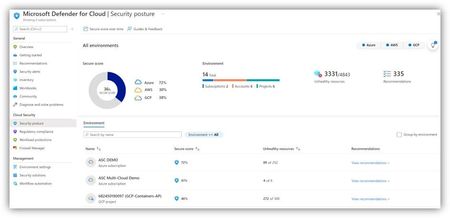
We’re excited to announce that Microsoft Defender for Cloud’s multi cloud capabilities for posture management and server protection for both Amazon Web Services (AWS) and Google Cloud Platform (GCP) workloads are generally available. Organizations can now easily manage and track their security state across the three largest cloud providers, as well as on-premises environments, in one centralized experience.New Ransomware Recommendation Dashboard in Microsoft Defender for Cloud
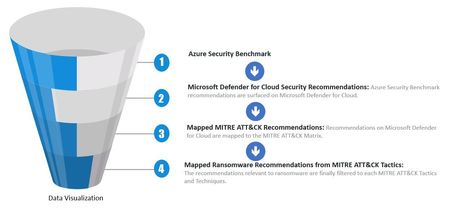
The new Ransomware recommendations dashboard is an Azure workbook that provides you visibility into what security recommendations you should prioritize to reduce the likelihood of getting compromised by a Ransomware attack. It leverages Microsoft Defender for Cloud recommendations, and secure score to help you track progress of your security posture enhancement. Since it is based on Defender for Cloud, it also brings built-in automation capabilities to help remediate security recommendations and reduce expose factors. The diagram below represents a holistic view of how Azure Security Benchmark, which is the security foundation for Azure workloads, mapped to the MITRE ATT&CK Matrix with data visualization for end user experience. Now you will be able to identify gaps in your security hygiene that are related to Ransomware and prioritize the remediations accordingly. Addressing these will improve the overall security posture of your Azure workloads and help you in your journey to improve your secure score. This dashboard is focused on the following aspects: In this dashboard you will find tabs that allow you to navigate and explore the security recommendations based on different criteria. Please watch the video below for a full demonstration on how to use this dashboard: By understand in which stage of the MITRE ATT&CK matrix the recommendation is located, you can prioritize remediations earlier on and reduce the probability of further damage done by the attacker. The Ransomware dashboard can be utilized to prioritize the remediation of recommendations for scenarios such as: Ensures up to date VMs with relevant security patches Enable anti-malware on your VMs Reduce attack surface by enabling just-in-time access to management ports For more information about Ransomware attacks, make sure to read the following resources: Azure Defenses for Ransomware Attack Human-operated ransomware Maximize Ransomware Resiliency with Azure and Microsoft 365 3 steps to prevent and recover from ransomwarePrepare for upcoming transitions in Defender for Servers
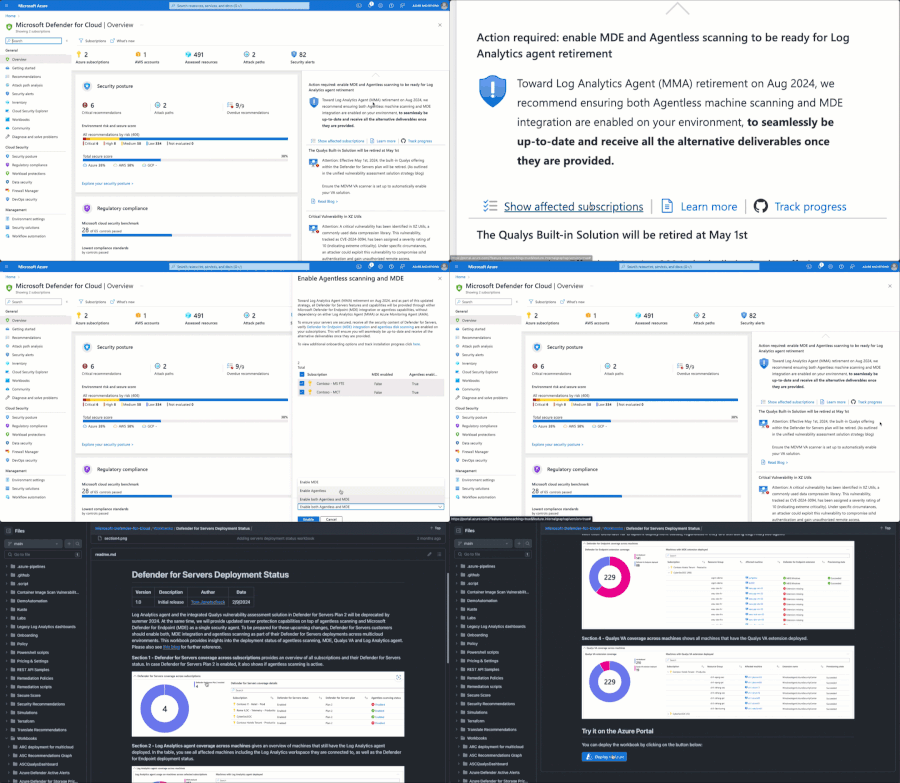
Last summer, within the scope of the upcoming Log Analytics agent deprecation, we announced a new agent strategy for Defender for Servers with the goal to simplify the onboarding and reduce external dependencies in our offering while improving existing and adding new capabilities. As part of that new strategy, we encourage our customers to enable both, agentless scanning as part of Defender for Servers Plan 2, and integration with Microsoft Defender for Endpoint in both Defender for Servers plans as a unified security agent. With this blog, we are sharing a thorough approach that you can use to make sure you are prepared for upcoming changes and that you can track your progress across your environment.
Defender for cloud's Agentless secret scanning for virtual machines is now generally available!
Cloud cybersecurity is of paramount importance in today's digital landscape, as organizations increasingly rely on cloud services to store and manage sensitive data, applications, and infrastructure. Attacks on cloud infrastructure pose severe risks to organizations such as data theft, ransomware attacks, crypto mining attacks, and service disruption. During a cyber-attack, after gaining initial access to the target network, the attacker begins to move deeper into the network in search of sensitive data and other high-value assets. This stage, called lateral movement, is critical, as it enables threat actors to explore and expand their presence within a target network, increasing the potential for further compromise of critical systems. One of the most common techniques used by hackers to move laterally in a network is credential theft. This technique involves the exploitation of exposed secrets such as passwords, keys, tokens, and connection strings to gain access to additional assets in the network. Secrets are often found on files, stored on the disks of virtual machines (VMs) or containers running on various cloud platforms. The exposed secrets challenge: Having exposed secrets can happen due to the following reasons: Lack of awareness: Some organizations may not be aware of the risks and consequences of exposing secrets in their cloud environment. They may not have a clear policy or guidance on how to handle and protect secrets in their code and configuration files. Lack of discovery tools: due to missing tools or processes to detect and remediate secrets leaks. Complexity and speed: Modern software development is complex and fast-paced, relying on multiple cloud platforms, open-source software, and third-party code. Developers may use secrets to access and integrate various resources and services in their cloud environment. They may also store secrets in their source code repositories for convenience and reuse. It can lead to accidental exposure of secrets in public or private repositories, or during data transfer or processing. Trade-off between security and usability: Some organizations may choose to keep secrets exposed in their cloud environment for usability reasons, to avoid the complexity and latency of encrypting and decrypting data at rest and in transit. This can compromise the security and privacy of their data and credentials. Defender for cloud's Agentless secret scanning for virtual machines: The agentless secret scanning is designed to assist in mitigating the risk of lateral movement. It broadens the coverage of cloud assets, enabling quick detection, prioritization, and remediation of exposed secrets. Utilizing cloud APIs, it captures snapshots of your disks and conducts an out-of-band analysis, ensuring no impact on your virtual machines' performance. In addition, it identifies a variety of secrets across Azure, AWS, and GCP and provides practical suggestions for the following mitigations: Elimination of unnecessary secrets. Apply the Principle of Least Privilege. Strengthening the security of your secrets by employing secret management systems such as Azure Key Vault when possible. Usage of short-lived secrets, such as substituting Azure Storage connection strings with SAS tokens that possess shorter validity periods. Onboarding: Knowing that assets’ coverage plays crucial roles, we created a straightforward, easy onboarding experience – just one click, and all assets under the specified subscription is covered by our agentless scanning capability Agentless scanning configuration within the Defender for Servers settings Detection and prioritization: Microsoft’s secrets detection engine can identify a wide range of secret types, such as tokens, passwords, keys, or credentials, that are stored in different file types within the OS file system. After collecting the necessary file and secrets’ metadata from the disk, it sends them to the Defender for cloud portal. Prioritizing secrets can be a daunting task. You may wonder which secrets are the riskiest and require immediate attention. To evaluate the severity and urgency of each secret we detected, we provide: Rich metadata for every secret we detect such as the file’s last access time, token expiration date, an indication if the target resource that the secret provides access to exists and more. We also combine the secrets’ metadata with the assets cloud context, helping you to start with assets that are exposed to the internet and contain secrets that may compromise other sensitive assets. We are happy to announce that the secrets scanning findings will be also incorporated into our new DCSPM risk-based approach to prioritize recommendation and enhance attack path analysis. We have developed multiple views to assist you in pinpointing the most commonly found secrets or assets containing secrets. This enables a prioritized approach towards the elimination of exposed secrets. Security Recommendations: Enhanced recommendation experience aggregated by secret type The security recommendations for secrets offer a consolidated view of the detected secrets, including details such as the file location of the secrets, the last access time, an indicator if the target resource that the secret provides access to exists, and more. Attack Path: In this attack scenario, our scanner identified an AWS access key on the disk of an GCP VM instance. It was then able to pinpoint the AWS S3 bucket that the key could authenticate to. Leveraging the capabilities of Microsoft Defender CSPM, the attack path revealed that the initial GCP VM instance has a critical vulnerability and is exposed to the internet. This comprehensive context equips you with the necessary information for effective risk assessment and prioritization. Cloud Security Explorer: Use the cloud security explorer to search for plaintext secrets Secret’s tab (inventory): Use the secret's tab to view all secrets detected for a specified virtual machine We are thrilled to announce that the Agentless secret scanning for virtual machines is now GA for Defender CSPM and Defender for Servers P2 plans. To start using this new feature, ensure that agentless scanning under the environment settings is enabled for the relevant subscriptions. For customers who have already enabled the agentless scanning, there’s no further action needed. To learn more regarding the prerequisites, detection, capabilities and more, please refer the following documentation.5.9KViews6likes2Comments