microsoft defender for servers
49 Topics
Microsoft Defender for Cloud - strategy and plan towards Log Analytics Agent (MMA) deprecation
Log Analytics agent (also known as MMA) is on a deprecation path and will be retired in Aug 2024. The purpose of this blogpost is to clarify how Microsoft Defender for Cloud will align with this plan and what is the impact on customers.108KViews2likes28CommentsDeploy Microsoft Defender for Cloud via Terraform
Terraform is an Infrastructure as a Code tool created by Hashicorp. It’s used to manage your infrastructure in Azure, as well as other clouds. In this article, we’ll be showing you how to deploy Microsoft Defender for Cloud (MDC) using Terraform from scratch.Microsoft Defender for Cloud Cost Estimation Dashboard
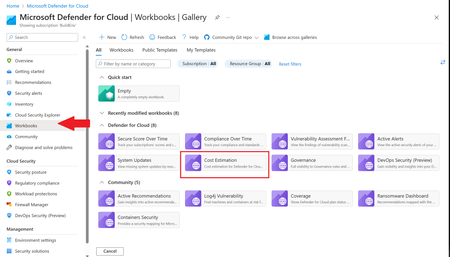
This blog was updated on April 16 th , 2023 to reflect the latest version of the Cost Estimation workbook. Microsoft Defender for Cloud provides advanced threat detection capabilities across your cloud workloads. This includes comprehensive coverage plans for compute, PaaS and data resources in your environment. Before enabling Defender for Cloud across subscriptions, customers are often interested in having a cost estimation to make sure the cost aligns with the team’s budget. We previously released the Microsoft Defender for Storage Price Estimation Workbook, which was widely and positively received by customers. Based on customer feedback, we have extended this offering by creating one comprehensive workbook that covers most Microsoft Defender for Cloud plans. This includes Defender for Containers, App Service, Servers, Storage, Cloud Security Posture Management and Databases. The Cost Estimation workbook is out-of-the box and can be found in the Defender for Cloud portal. After reading this blog and using the workbook, be sure to leave your feedback to be considered for future enhancements. Please remember these numbers are only estimated based on retail prices and do not provide actual billing data. For reference on how these prices are calculated, visit the Pricing—Microsoft Defender | Microsoft Azure. Overview The cost estimation workbook provides a consolidated price estimation for Microsoft Defender for Cloud plans based on the resource telemetry in your organization’s environment. The workbook allows you to select which subscriptions you would like to estimate the price for as well as the Defender Plans. In a single pane of glass, organizations can see the estimated cost per plan on each subscription as well as the grand total for all the selected subscriptions and plans. To see which plans are currently being used on the subscription, consider using the coverage workbook. Defender Cloud Security Posture Management (CSPM) Defender CSPM protects all resources across your subscriptions, but billing only applies to Compute, Databases and Storage accounts. Billable workloads include VMs, Storage accounts, open-source relational databases and SQL PaaS & Servers on machines. See here for more information regarding pricing. On the backend, the workbook checks to see how many billable resources were detected and if any of the above plans are enabled on the subscription. It then takes the number of billable resources and multiplies it by the Defender CSPM price. Defender for App Service The estimation for Defender for App Services is based on the retail price of $14.60 USD per App Service per month. Check out the Defender for App Service Price Estimation Dashboard for a more detailed view on estimated pricing with information such as CPU time and a list of App Services detected. Defender for Containers The estimation for Defender for Containers is calculated based on the average number of worker nodes in the cluster during the past 30 days. For a more detailed view on containers pricing such as average vCores detected and the number of image scans included, consider also viewing the stand-alone Defender for Containers Cost Estimation Workbook. Defender for Databases Pricing for Defender for Databases includes Defender for SQL Databases and Defender for open-source relational databases (OSS DBs). This includes PostgreSQL, MySQL and MariaDB. All estimations are based on the retail price of $15 USD per resource per month. On the backend, the workbook runs a query to find all SQL databases and OSS DBs in the selected subscriptions and multiplies the total amount by 15 to get the estimated monthly cost. Defender for Key Vault Defender for Key Vault cost estimation is not included in the out of the box workbook, however, a stand-alone workbook is available in the Defender for Cloud GitHub. The Defender for Key Vault dashboard considers all Key Vaults with or without Defender for Key Vault enabled on the selected subscriptions. The calculations are based on the retail price of $0.02 USD per 10k transactions. The “Estimated Cost (7 days)” column takes the total Key Vault transactions of the last 7 days, divides them by 10K and multiples them by 0.02. In “Estimated Monthly Price”, the results of “Estimated Cost (7 days)” are multiplied by 4.35 to get the monthly estimate. Defender for Servers Defender for Servers includes two plan options, Plan 1 and Plan 2. The workbook gives you the option to toggle between the two plans to see the difference in how they would effect pricing. Plan 1 is currently charged at $5 per month where as Plan 2 is currently charged at $15. Defender for Storage The Defender for Storage workbook allows you to estimate the cost of the two pricing plans: the legacy per-transaction plan and the new per-storage plan. The workbook looks at historical file and blob transaction data on supported storage types such as Blob Storage, Azure Files, and Azure Data Lake Storage Gen 2. We have released a new version of this workbook, and you can find it here: Microsoft-Defender-for-Cloud/Workbooks/Microsoft Defender for Storage Price Estimation and learn more about the storage workbook in Microsoft Defender for Storage – Price Estimation blog post. Limitations Azure Monitor Metrics data backends have limits and the number of requests to fetch data might time out. To solve this, narrow your scope by reducing the selected subscriptions and Defender plans. The workbook currently only includes Azure resources. Acknowledgements Special thanks to everyone who contributed to different versions of this workbook: Fernanda Vela, Helder Pinto, Lili Davoudian, Sarah Kriwet, Safeena Begum Lepakshi, Tom Janetscheck, Amit Biton, Ahmed Masalha, Keren Damari, Nir Sela, Mark Kendrick, Yaniv Shasha, Mauricio Zaragoza, Kafeel Tahir, Mary Lieb, Chris Tucci, Brian Roosevelt References: What is Microsoft Defender for Cloud? - Microsoft Defender for Cloud | Microsoft Learn Pricing—Microsoft Defender | Microsoft Azure Workbooks gallery in Microsoft Defender for Cloud | Microsoft Docs Pricing Calculator | Microsoft Azure Microsoft Defender for Key Vault Price Estimation Workbook Microsoft Defender for App Services Price Estimation Workbook Microsoft Defender for Containers Cost Estimation Workbook Coverage WorkbookDefender for Servers Plan 2 now integrates with Defender for Endpoint unified solution
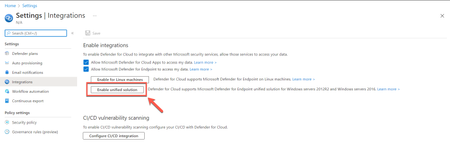
Today, we're excited to announce the release of Microsoft Defender for Endpoint’s unified agent integration with Microsoft Defender for Servers Plan 2. With this release, we align the integration experience between Microsoft Defender for Endpoint and both Microsoft Defender for Servers Plans.39KViews12likes47Comments
Defender for Cloud unified Vulnerability Assessment powered by Defender Vulnerability Management
We are thrilled to announce that Defender for Cloud is unifying our vulnerability assessment engine to Microsoft Defender Vulnerability Management (MDVM) across servers and containers. Security admins will benefit from Microsoft’s unmatched threat intelligence, breach likelihood predictions and business contexts to identify, assess, prioritize, and remediate vulnerabilities - making it an ideal tool for managing an expanded attack surface and reducing overall cloud risk posture.32KViews4likes15CommentsHow to configure Security Events collection with Azure Monitor Agent
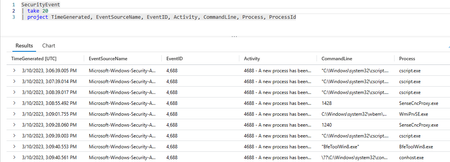
Security events collection (for Windows systems only) is done with the help of a guest agent. This has been possible so far with the legacy Log Analytics agent and the Defender for Servers auto-provisioning experience, and is also possible for Microsoft Sentinel users, via the Log Analytics and Azure Monitor Agent (AMA) data connectors. However, if you are not a Sentinel user yet and you are using Defender for Servers with the new AMA experience, it is still possible to collect security events, as you will learn next.26KViews6likes2CommentsMicrosoft Defender for Endpoint for Linux and Microsoft Defender for Servers
When it comes to protecting servers in hybrid and multicloud environments, Microsoft Defender for Servers as part of Microsoft Defender for Cloud is the solution you might be looking for. However, with all the features, dependencies, and complexity, it might become challenging to always make the right decision when planning, integrating, and deploying Defender for Servers across your environment. With this blog, we are focusing on deployment and integration of Microsoft Defender for Endpoint with Microsoft Defender for Servers on Linux machines.Security posture management and server protection for AWS and GCP are now generally available
We’re excited to announce that Microsoft Defender for Cloud’s multi cloud capabilities for posture management and server protection for both Amazon Web Services (AWS) and Google Cloud Platform (GCP) workloads are generally available. Organizations can now easily manage and track their security state across the three largest cloud providers, as well as on-premises environments, in one centralized experience.Microsoft Defender for Cloud latest protection against sophisticated abuse of Azure VM Extensions
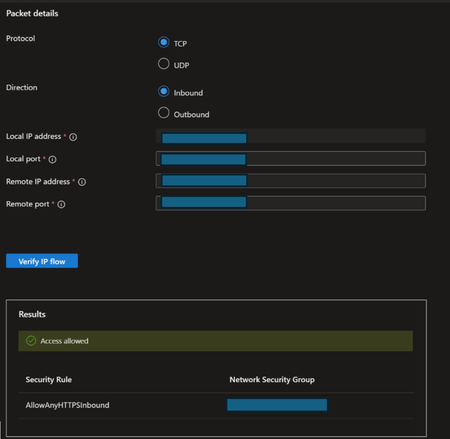
Introduction Throughout recent years, the IT world has shifted its workloads, management layers, and machines to the cloud, thus introducing a new attack surface, accompanied by new attack vectors. The following introduced a tactic for threat actors to deploy their cyber-attacks against organizations’ cloud environments, gaining strong permissions, operating for financial gain, and more. Upon succeeding in compromising an identity with sufficient permissions in Azure, threat actors often try to abuse existing features within the environment that allow them to deploy their malicious activity stealthily, efficiently, and easily, and one special feature is: Azure VM extensions. Announcing new detections and alerts against extension abuse Azure VM extension abuse has never left Microsoft’s sight since its first appearance, and previous publication has discussed the topic. Today, we continue to deliver customer protection as a result of extensive research and monitoring, thus announcing the new and enhanced protection capabilities that Microsoft Defender for Cloud offers as part of Microsoft Defender for Servers plan 2 offering, against extension abuse, and its importance. Our customers can enjoy the protection capabilities effortlessly, without the need to manually deploy a dedicated agent on the VM. Azure virtual machine extensions Azure virtual machines extensions are small applications that provide post-deployment configuration and automation on Azure VMs, such as software updates, code and script execution, antimalware deployments, and more. VM extensions play an instrumental role in workload management and VM maintenance. Many organizations’ cloud environments are dependent on the extension’s capabilities, such as automation in configuration deployment, security management, continuous monitoring, troubleshooting and log analytics. On the other hand, extensions can be abused as a powerful cloud-native tool by threat actors who gained an initial foothold in the victim’s Azure environment. Solely dependent on Azure RBAC permissions, threat actors can abuse VM extensions to execute operations with high privileges to perform stealthy and destructive cyber-attacks. In this blog, we will discuss the various extensions, their uniqueness, the corresponding MITRE techniques associated with them that are abused in the wild and researched in the security world, and introduce Microsoft Defender for Cloud new series of alerts that combats this abuse. Threat hunting Reconnaissance Network Watcher, Azure Monitor, VMSnapshot extensions The following extensions allow different kinds of data collection and monitoring over network traffic, resources data, diagnostics, analytics and more. Network Watcher allows threat actors to capture network traffic, analyze packets, verify IP flow, and diagnose network security groups (NSGs). The Network Watcher tool can be invaluable for advanced threat actors looking to learn about the environment topology and identify weaknesses in the victim’s cloud environment by: Understanding the structure of the environment’s security framework. Using IP Flow to verify packet allowance to find exposed resources. Analyzing existing NSGs to determine how to manipulate them to gain access and then persistence. Azure Monitor allows threat actors to create data collection rules over resources, in order to capture various kinds of machine logs and events. Capturing Windows events of different kinds like security, system, and applications logs, could be of high importance for threat actors to gather information about the running compute inside the environment. This can be done by creating a dedicated log analytics that will consume the logs from the Azure Monitor agent on the VM. VMSnapshot allows threat actors to capture VM disks snapshots as part of Azure Backup service. Through Microsoft’s extensive research and investigation of recent sophisticated attacks, evidence has shown that not only do threat actors attempt to reset passwords and gain access and persistence to VMs by leveraging the VMAccess extension (which will be discussed later on), they also attempt to capture disk snapshots of VMs that capture their interest during the initial phases, by leveraging Azure Backup service capabilities. Capturing disk snapshots allows threat actors to export critical data from the VM’s disks during a short window of time, to a local or remote location, using a dedicated URL for downloading, or copying the disk to another location in the environment. After that, threat actors will attempt to attach the snapshots of the disks to their own controlled machines, after configuring them to the right format. Execution Azure VM extensions offer a variety of ways for code execution and running scripts as SYSTEM/sudo on your virtual machines, thus providing threat actors with a powerful tool to facilitate deployments of their different attack techniques, at scale: (Managed) Run Command Run Command uses the VM agent to run scripts on the VM, as SYSTEM/sudo. It can be abused in a variety of ways, from running recon commands to learn about the victim’s cloud environment, creating local admin users for persistence, to downloading payloads on the machine, executing crypto miners for impact, and more. Custom Script extension (CSE) The custom script extension allows the user to download and run a script on the VM, as SYSTEM/sudo. CSE can be used to deploy different attack vectors at scale especially when looking to run the same script across different VMs within a virtual machine scale set (unlike Run Command). As an example, Microsoft witnessed the following techniques being abused by a threat actor: Password Spraying campaign Threat actor successfully gains initial access to user accounts in Azure. Mass compute resource creation Threat actor sets up the crypto mining environment with the needed network resources. Mass deployment of XMRig software on all compute using Custom Script Extensions to initiate the crypto mining campaign. Azure Desired State Configuration (DSC) extension The extension uploads and applies a DSC configuration on the VM. Using DSC, threat actors can maliciously deploy scheduled tasks, apply configurations, and execute scripts, resulting in the deployment of a backdoor, connection to a C2 (Command and Control), extracting the VM managed identity, and more. Persistence Virtual Machine Access extension The VMAccess extension allows the user to manage administrative users and reset access on Azure VMs. Threat actors often abuse the VMAccess extension to gain access to VMs inside the victim’s environment, after they gain initial foothold, by resetting passwords, SSH keys, and manipulating the admin users in the VM. As a result, they can choose their target wisely inside the environment and gain access to it, only by using the cloud native RBAC roles needed to execute the extension, thus, discovering sensitive information and disrupting critical workloads inside the environment. We can see that the new user can successfully run commands as sudo: Impact GPU Driver extension The extension provides the ability to install the NVIDIA or AMD GPU drivers on supported compute VMs, which are GPU card equipped, in order to take full advantage of the card capabilities. Threat actors can leverage this capability to deploy a GPU driver on supported Azure VMs in the victim’s Azure environment and follow up with the installation of crypto mining software by leveraging the Custom Script Extension, or any other technique, and move on to the mining phase. Disk Encryption extension Azure Disk Encryption uses BitLocker to provide full disk encryption on Azure virtual machines. Threat actors can abuse this extension by attempting to encrypt the VMs’ disks in the victim’s cloud environment that captures the threat actor’s interest, with the goal to render all data permanently inaccessible by attempting to delete the encryption key or the key vault that contains the key. In such cases, it is crucial for the victim to be aware of purge protection and the protection measures that Microsoft provides to delay/prevent the deletion of the encryption key. Detection After going through the abuse scenarios for the variety of VM extensions, we will dive through Microsoft’s new detection capabilities and techniques, and how we are able to defend our customers through continuous monitoring and analysis of suspicious signals, from the control plane to the endpoint. Microsoft Defender for Cloud is announcing a new series of alerts targeting Azure VM extensions abuse, which are available to the customer through Microsoft Defender for Servers plan 2. Not only does the new series of detections target a wide range of abuse techniques, but it also targets a wide range of extension abuse types, to protect our customers against attack vectors that emerge. Through extensive research, we have been able to single out and identify the suspicious signals for which the likelihood of a breach is high, and as a result of studying the user’s behavior, and monitoring for such signals, we are able to detect suspicious activity, some of the signals are the following: Usage of VM extensions by a user account which hasn’t used any VM extensions recently. A sudden surge in extension usage by a suspicious user account, which might indicate a post-breach reconnaissance, impact, or persistence activity. Code or script execution containing parts that indicate a malicious intent. Usage of a combination of extensions in a short time windows which might indicate a recon attempt. Mitigation Identities in Azure require certain high privileged roles in Azure to be able to use extensions, this is yet another example of how identities and permissions represent the core of the cloud environment’s access controls. As a result, we recommend building a strong framework which is least privileged based, in order to provide the identity with the least permissions needed to perform its dedicated and legitimate operations and prevent imminent attacks. In addition to the above, continuous monitoring and detection efforts are essential to remediate ongoing attacks and prevent possible future ones. Conclusion With the advent and continued growth of cloud computing in Azure, many threat actors rely on techniques that facilitate their deployment of malicious activities, thus targeting Azure VM Extensions. As a result of in-depth research and continued monitoring, Microsoft Defender for Cloud is announcing a detection campaign to provide its customers with strong security measures for sophisticated attack vectors and threat actor campaigns targeting extensions abuse. Learn more about VM extensions: Link Learn more about the new series of alerts: Release Notes, Azure VM extensions alerts table Learn more about Defender for Cloud plans: Link Learn more about Defender for Servers plans: Link