microsoft defender for cloud apps
298 Topics
Monitoring work from home
My boss has asked me if there is a way to see just how "busy" people who are working from home are. I have this data in Sentinel: Entra sign-in logs Defender for Endpoint logs Office 365 logs Most, if not all, on premise AD login events Netskope (current ZTNA solution) logs I have my known office location IPs so i could just exclude those and look for activity from other IPs however many times people will work in the morning or on the way to work appearing from a non corporate IP, come into the office appearing to come from a corporate IP, and then from home again in the evening. I need a way to query Sentinel looking for people who appear to be working but not coming from Corp IP. If they came from different IPs on the same day including Corp check to see if those non Corp are before and after business hours and exclude those. Anyone know of a good query to achieve this? Or maybe a tool that can extract and generate a report?47Views0likes0CommentsWhy UK Enterprise Cybersecurity Is Failing in 2026 (And What Leaders Must Change)
Enterprise cybersecurity in large organisations has always been an asymmetric game. But with the rise of AI‑enabled cyber attacks, that imbalance has widened dramatically - particularly for UK and EMEA enterprises operating complex cloud, SaaS, and identity‑driven environments. Microsoft Threat Intelligence and Microsoft Defender Security Research have publicly reported a clear shift in how attackers operate: AI is now embedded across the entire attack lifecycle. Threat actors use AI to accelerate reconnaissance, generate highly targeted phishing at scale, automate infrastructure, and adapt tactics in real time - dramatically reducing the time required to move from initial access to business impact. In recent months, Microsoft has documented AI‑enabled phishing campaigns abusing legitimate authentication mechanisms, including OAuth and device‑code flows, to compromise enterprise accounts at scale. These attacks rely on automation, dynamic code generation, and highly personalised lures - not on exploiting traditional vulnerabilities or stealing passwords. The Reality Gap: Adaptive Attackers vs. Static Enterprise Defences Meanwhile, many UK enterprises still rely on legacy cybersecurity controls designed for a very different threat model - one rooted in a far more predictable world. This creates a dangerous "Resilience Gap." Here is why your current stack is failing- and the C-Suite strategy required to fix it. 1. The Failure of Traditional Antivirus in the AI Era Traditional antivirus (AV) relies on static signatures and hashes. It assumes malicious code remains identical across different targets. AI has rendered this assumption obsolete. Modern malware now uses automated mutation to generate unique code variants at execution time, and adapts behaviour based on its environment. Microsoft Threat Intelligence has observed threat actors using AI‑assisted tooling to rapidly rewrite payload components, ensuring that every deployment looks subtly different. In this model, there is no reliable signature to detect. By the time a pattern exists, the attacker has already moved on. Signature‑based detection is not just slow - it is structurally misaligned with AI‑driven attacks. The Risk: If your security relies on "recognising" a threat, you are already breached. By the time a signature exists, the attacker has evolved. The C-Suite Pivot: Shift investment from artifact detection to EDR/XDR (Extended Detection and Response). We must prioritise behavioural analytics and machine learning models that identify intent rather than file names. 2. Why Perimeter Firewalls Fail in a Cloud-First World Many UK enterprise still rely on firewalls enforcing static allow/deny rules based on IP addresses and ports. This model worked when applications were predictable and networks clearly segmented. Today, enterprise traffic is encrypted, cloud‑hosted, API‑driven, and deeply integrated with SaaS and identity services. AI‑assisted phishing campaigns abusing OAuth and device‑code flows demonstrate this clearly. From a network perspective, everything looks legitimate: HTTPS traffic to trusted identity providers. No suspicious port. No malicious domain. Yet the attacker successfully compromises identity. The Risk: Traditional firewalls are "blind" to identity-based breaches in cloud environments. The C-Suite Pivot: Move to Identity-First Security. Treat Identity as the new Control Plane, integrating signals like user risk, device health, and geolocation into every access decision. 3. The Critical Weakness of Single-Factor Authentication Despite clear NCSC guidance, single-factor passwords remain a common vulnerability in legacy applications and VPNs. AI-driven credential abuse has changed the economics of these attacks. Threat actors now deploy adaptive phishing campaigns that evolve in real-time. Microsoft has observed attackers using AI to hyper-target high-value UK identities- specifically CEOs, Finance Directors, and Procurement leads. The Risk: Static passwords are now the primary weak link in UK supply chain security. The C-Suite Pivot: Mandate Phishing‑resistant MFA (Passkeys or hardware security keys). Implement Conditional Access policies that evaluate risk dynamically at the moment of access, not just at login. Legacy Security vs. AI‑Era Reality 4. The Inherent Risk of VPN-Centric Security VPNs were built on a flawed assumption: that anyone "inside" the network is trustworthy. In 2026, this logic is a liability. AI-assisted attackers now use automation to map internal networks and identify escalation paths the moment they gain VPN access. Furthermore, Microsoft has tracked nation-state actors using AI to create synthetic employee identities- complete with fake resumes and deepfake communication. In these scenarios, VPN access isn't "hacked"; it is legally granted to a fraudster. The Risk: A compromised VPN gives an attacker the "keys to the kingdom." The C-Suite Pivot: Transition to Zero Trust Architecture (ZTA). Access must be explicit, scoped to the specific application, and continuously re‑evaluated using behavioural signals. 5. Data: The High-Velocity Target Sensitive data sitting unencrypted in legacy databases or backups is a ticking time bomb. In the AI era, data discovery is no longer a slow, manual process for a hacker. Attackers now use AI to instantly analyse your directory structures, classify your files, and prioritise high-value data for theft. Unencrypted data significantly increases your "blast radius," turning a containable incident into a catastrophic board-level crisis. The Risk: Beyond the technical breach, unencrypted data leads to massive UK GDPR fines and irreparable brand damage. The C-Suite Pivot: Adopt Data-Centric Security. Implement encryption by default, classify data while adding sensitivity labels and start board-level discussions regarding post‑quantum cryptography (PQC) to future-proof your most sensitive assets. 6. The Failure of Static IDS Traditional Intrusion Detection Systems (IDS) rely on known indicators of compromise - assuming attackers reuse the same tools and techniques. AI‑driven attacks deliberately avoid that assumption. Threat actors are now using Large Language Models (LLMs) to weaponize newly disclosed vulnerabilities within hours. While your team waits for a "known pattern" to be updated in your system, the attacker is already using a custom, AI-generated exploit. The Risk: Your team is defending against yesterday's news while the attacker is moving at machine speed. The C-Suite Pivot: Invest in Adaptive Threat Detection. Move toward Graph‑based XDR platforms that correlate signals across email, endpoint, and cloud to automate investigation and response before the damage spreads. From Static Security to Continuous Security Closing Thought: Security Is a Journey, Not a Destination For UK enterprises, the shift toward adaptive cybersecurity is no longer optional - it is increasingly driven by regulatory expectation, board oversight, and accountability for operational resilience. Recent UK cyber resilience reforms and evolving regulatory frameworks signal a clear direction of travel: cybersecurity is now a board‑level responsibility, not a back‑office technical concern. Directors and executive leaders are expected to demonstrate effective governance, risk ownership, and preparedness for cyber disruption - particularly as AI reshapes the threat landscape. AI is not a future cybersecurity problem. It is a current force multiplier for attackers, exposing the limits of legacy enterprise security architectures faster than many organisations are willing to admit. The uncomfortable truth for boards in 2026 is that no enterprise is 100% secure. Intrusions are inevitable. Credentials will be compromised. Controls will be tested. The difference between a resilient enterprise and a vulnerable one is not the absence of incidents, but how risk is managed when they occur. In mature organisations, this means assuming breach and designing for containment: Access controls that limit blast radius Least privilege and conditional access restricting attackers to the smallest possible scope if an identity is compromised Data‑centric security using automated classification and encryption, ensuring that even when access is misused, sensitive data cannot be freely exfiltrated As a Senior Enterprise Cybersecurity Architect, I see this moment as a unique opportunity. AI adoption does not have to repeat the mistakes of earlier technology waves, where innovation moved fast and security followed years later. We now have a rare chance to embed security from day one - designing identity controls, data boundaries, automated monitoring, and governance before AI systems become business‑critical. When security is built in upfront, enterprises don’t just reduce risk - they gain the confidence to move faster and unlock AI’s value safely. Security is no longer a “department”. In the age of AI, it is a continuous business function - essential to preserving trust and maintaining operational continuity as attackers move at machine speed. References: Inside an AI‑enabled device code phishing campaign | Microsoft Security Blog AI as tradecraft: How threat actors operationalize AI | Microsoft Security Blog Detecting and analyzing prompt abuse in AI tools | Microsoft Security Blog Post-Quantum Cryptography | CSRC Microsoft Digital Defense Report 2025 | Microsoft https://www.ncsc.gov.uk/news/government-adopt-passkey-technology-digital-servicesAnnouncing public preview of custom graphs in Microsoft Sentinel
Security attacks span identities, devices, resources, and activity, making it critical to understand how these elements connect to expose real risk. In November, we shared how Sentinel graph brings these signals together into a relationship-aware view to help uncover hidden security risks. We’re excited to announce the public preview of custom graphs in Sentinel, available starting April 1 st . Custom graphs let defenders model relationships that are unique to their organization, then run graph analytics to surface blast radius, attack paths, privilege chains, chokepoints, and anomalies that are difficult to spot in tables alone. In this post, we’ll cover what custom graphs are, how they work, and how to get started so the entire team can use them. Custom graphs Security data is inherently connected: a sign-in leads to a token, a token touches a workload, a workload accesses data, and data movement triggers new activity. Graphs represent these relationships as nodes (entities) and edges (relationships), helping you answer questions like: “Who received the phishing email, who clicked, and which clicks were allowed by the proxy?” or “Show me users who exported notebooks, staged files in storage, then uploaded data to personal cloud storage- the full, three‑phase exfiltration chain through one identity.” With custom graphs, security teams can build, query, and visualize tailored security graphs using data from the Sentinel data lake and non-Microsoft sources, powered by Fabric. By uncovering hidden patterns and attack paths, graphs provide the relationship context needed to surface real risk. This context strengthens AI‑powered agent experiences, speeds investigations, clarifies blast radius, and helps teams move from noisy, disconnected alerts to confident decisions. In the words of our preview customers: “We ingested our Databricks management-plane telemetry into the Sentinel data lake and built a custom security graph. Without writing a single detection rule, the graph surfaced unusual patterns of activity and overprivileged access that we escalated for investigation. We didn't know what we were looking for, the graph surfaced the risk for us by revealing anomalous activity patterns and unusual access combinations driven by relationships, not alerts.” – SVP, Security Solutions | Financial Services organization Use cases Sentinel graph offers embedded, Microsoft managed, security graphs in Defender and Microsoft Purview experiences to help you at every stage of defense, from pre-breach to post-breach and across assets, activities, and threat intelligence. See here for more details. The new custom graph capability gives you full control to create your own graphs combining data from Microsoft sources, non-Microsoft sources, and federated sources in the Sentinel data lake. With custom graphs you can: Understand blast radius – Trace phishing campaigns, malware spread, OAuth abuse, or privilege escalation paths across identities, devices, apps, and data, without stitching together dozens of tables. Reconstruct real attack chains – Model multi-step attacker behavior (MITRE techniques, lateral movement, before/after malware) as connected sequences so investigations are complete and explainable, not a set of partial pivots. Reconstruct these chains from historical data in the Sentinel data lake. Figure 2: Drill into which specific MITRE techniques each IP is executing and in which tactic category Spot hidden risks and anomalies – Detect structural outliers like users with unusually broad access, anomalous email exfiltration, or dangerous permission combinations that are invisible in flat logs. Figure 3: OAuth consent chain – a single compromised user consented four dangerous permissions Creating custom graph Using the Sentinel VS Code extension, you can generate graphs to validate hunting hypotheses, such as understanding attack paths and blast radius of a phishing campaign, reconstructing multi‑step attack chains, and identifying structurally unusual or high‑risk behavior, making it accessible to your team and AI agents. Once persisted via a schedule job, you can access these custom graphs from the ready-to-use section in the graphs section in the Defender portal. Figure 4: Use AI-assisted vibe coding in Visual Studio Code to create tailored security graphs powered by Sentinel data lake and Fabric Graphs experience in the Microsoft Defender portal After creating your custom graphs, you can access them in the Graphs section of the Microsoft Defender portal under Sentinel. From there, you can perform interactive, graph-based investigations, for example, using a graph built for phishing analysis to quickly evaluate the impact of a recent incident, profile the attacker, and trace paths across Microsoft telemetry and third-party data. The graph experience lets you run Graph Query Language (GQL) queries, view the graph schema, visualize results, see results in a table, and interactively traverse to the next hop with a single click. Figure 5: Query, visualize, and traverse custom graphs with the new graph experience in Sentinel Billing Custom graph API usage for creating graph and querying graph is billed according to the Sentinel graph meter. Get started To use custom graphs, you’ll need Microsoft Sentinel data lake enabled in your tenant, since the lake provides the scalable, open-format foundation that custom graphs build on. Use the Sentinel data lake onboarding flow to provision the data lake if it isn’t already enabled. Ensure the required connectors are configured to populate your data lake. See Manage data tiers and retention in Microsoft Sentinel | Microsoft Learn. Create and persist a custom graph. See Get started with custom graphs in Microsoft Sentinel (preview) | Microsoft Learn. Run adhoc graph queries and visualize graph results. See Visualize custom graphs in Microsoft Sentinel graph (preview) | Microsoft Learn. [Optional] Schedule jobs to write graph query results to the lake tier and analytics tier using notebooks. See Exploring and interacting with lake data using Jupyter Notebooks - Microsoft Security | Microsoft Learn. Learn more Earlier posts (Sentinel graph general availability) RSAC 2026 announcement roundup Custom graphs documentation Custom graph billingUnsanctioned cloud apps generates constant alerts
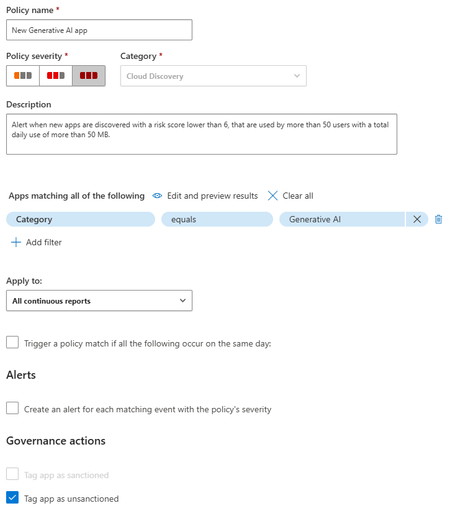
When I mark a cloud app as unsanctioned it created a URL based indicator to block the site. However, it also by default enables the Generate Alert option on the indictor. This causes my SOC to bet inundated with garbage alerts. Now normally if I'm just unsanctioning one Cloud App a could go and turn of the alert. However, I use cloud app policy that will identify any new Cloud Apps in an entire category and then unsanction it. But it enables Generate Alert on the URL indicator. Then if someone accesses that new one the generate alert kicks off. I don't want to have to go into every new app and untick generate alert manually that's just too time consuming. Is there a way to change the default behaviour when adding an indicator to not enable the generate alert? Of is there some other way to do this? I could consider using power automate or something but I'd rather the default behaviour be the fix as automation can break. I don't have time to babysit it.McasShadowItReporting / Cloud Discovery in Azure Sentinel
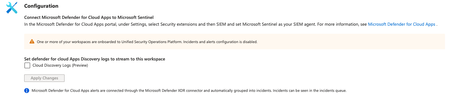
Hi! I´m trying to Query the McasShadowItReporting Table, for Cloud App DISCOVERYs The Table is empty at the moment, the connector is warning me that the Workspace is onboarded to Unified Security Operations Platform So I cant activate it here I cant mange it via https://security.microsoft.com/, too The Documentation ( https://learn.microsoft.com/en-us/defender-cloud-apps/siem-sentinel#integrating-with-microsoft-sentinel ) Leads me to the SIEM Integration, which is configured for (for a while) I wonder if something is misconfigured here and why there is no log ingress / how I can query them485Views0likes1Comment
Artificial Intelligence & Security
Understanding Artificial Intelligence Artificial intelligence (AI) is a computational system that perform human‑intelligence tasks, learning, reasoning, problem‑solving, perception, and language understanding by leveraging algorithmic and statistical methods to analyse data and make informed decisions. Artificial Intelligence (AI) can also be abbreviated as is the simulation of human intelligence through machines programmed to learn, reason, and act. It blends statistics, machine learning, and robotics to deliver following outcomes: Prediction: The application of statistical modelling and machine learning techniques to anticipate future outcomes, such as detecting fraudulent transactions. Automation: The utilisation of robotics and artificial intelligence to streamline and execute routine processes, exemplified by automated invoice processing. Augmentation: The enhancement of human decision-making and operational capabilities through AI-driven tools, for instance, AI-assisted sales enablement. Artificial Intelligence: Core Capabilities and Market Outlook Key capabilities of AI include: Data-driven decision-making: Analysing large datasets to generate actionable insights and optimise outcomes. Anomaly detection: Identifying irregular patterns or deviations in data for risk mitigation and quality assurance. Visual interpretation: Processing and understanding visual inputs such as images and videos for applications like computer vision. Natural language understanding: Comprehending and interpreting human language to enable accurate information extraction and contextual responses. Conversational engagement: Facilitating human-like interactions through chatbots, virtual assistants, and dialogue systems. With the exponential growth of data, ML learning models and computing power. AI is advancing much faster and as According to industry analyst reports breakthroughs in deep learning and neural network architectures have enabled highly sophisticated applications across diverse sectors, including healthcare, finance, manufacturing, and retail. The global AI market is on a trajectory of significant expansion, projected to increase nearly 5X by 2030, from $391 billion in 2025 to $1.81 trillion. This growth corresponds to a compound annual growth rate (CAGR) of 35.9% during the forecast period. These projections are estimates and subject to change as per rapid growth and advancement in the AI Era. AI and Cloud Synergy AI, and cloud computing form a powerful technological mixture. Digital assistants are offering scalable, cloud-powered intelligence. Cloud platforms such as Azure provide pre-trained models and services, enabling businesses to deploy AI solutions efficiently. Core AI Workloads Capabilities Machine Learning Machine learning (ML) underpins most AI systems by enabling models to learn from historical and real-time data to make predictions, classifications, and recommendations. These models adapt over time as they are exposed to new data, improving accuracy and robustness. Example use cases: Credit risk scoring in banking, demand forecasting in retail, and predictive maintenance in manufacturing. Anomaly Detection Anomaly detection techniques identify deviations from expected patterns in data, systems, or processes. This capability is critical for risk management and operational resilience, as it enables early detection of fraud, security breaches, or equipment failures. Example use cases: Fraud detection in financial transactions, network intrusion monitoring in cybersecurity, and quality control in industrial production. Natural Language Processing (NLP) NLP focuses on enabling machines to understand, interpret, and generate human language in both text and speech formats. This capability powers a wide range of applications that require contextual comprehension and semantic accuracy. Example use cases: Sentiment analysis for customer feedback, document summarisation for legal and compliance teams, and multilingual translation for global operations. Principles of Responsible AI To ensure ethical and trustworthy AI, organisations must embrace: Reliability & Safety Privacy & Security Inclusiveness Fairness Transparency Accountability These principles are embedded in frameworks like the Responsible-AI-Standard and reinforced by governance models such as Microsoft AI Governance Framework. Responsible AI Principles and Approach | Microsoft AI AI and Security AI introduces both opportunities and risks. A responsible approach to AI security involves three dimensions: Risk Mitigation: It Is addressing threats from immature or malicious AI applications. Security Applications: These are used to enhance AI security and public safety. Governance Systems: Establishing frameworks to manage AI risks and ensure safe development. Security Risks and Opportunities Due to AI Transformation AI’s transformative nature brings new challenges: Cybersecurity: This brings the opportunities and advancement to track, detect and act against Vulnerabilities in infrastructure and learning models. Data Security: This helps the tool and solutions such as Microsoft Purview to prevent data security by performing assessments, creating Data loss prevention policies applying sensitivity labels. Information Security: The biggest risk is securing the information and due to the AI era of transformation securing IS using various AI security frameworks. These concerns are echoed in The Crucial Role of Data Security Posture Management in the AI Era, which highlights insider threats, generative AI risks, and the need for robust data governance. AI in Security Applications AI’s capabilities in data analysis and decision-making enable innovative security solutions: Network Protection: applications include use of AI algorithms for intrusion detection, malware detection, security situational awareness, and threat early warning, etc. Data Management: applications refer to the use of AI technologies to achieve data protection objectives such as hierarchical classification, leak prevention, and leak traceability. Intelligent Security: applications refer to the use of AI technology to upgrade the security field from passive defence toward the intelligent direction, developing of active judgment and timely early warning. Financial Risk Control: applications use AI technology to improve the efficiency and accuracy of credit assessment, risk management, etc., and assisting governments in the regulation of financial transactions. AI Security Management Effective AI security requires: Regulations & Policies: Establish and safety management laws specifically designed to for governance by regulatory authorities and management policies for key application domains of AI and prominent security risks. Standards & Specifications: Industry-wide benchmarks, along with international and domestic standards can be used to support AI safety. Technological Methods: Early detection with Modern set of tools such as Defender for AI can be used to support to detect and mitigate and remediate AI threats. Security Assessments: Organization should use proper tools and platforms for evaluating AI risks and perform assessments regularly using automated tools approach Conclusion AI is transforming how organizations operate, innovate, and secure their environments. As AI capabilities evolve, integrating security and governance considerations from the outset remains critical. By combining responsible AI principles, effective governance, and appropriate security measures, organizations can work toward deploying AI technologies in a manner that supports both innovation and trust. Industry projections suggest continued growth in AI‑related security investments over the coming years, reflecting increased focus on managing AI risks alongside its benefits. These estimates are subject to change and should be interpreted in the context of evolving technologies and regulatory developments. Disclaimer References to Microsoft products and frameworks are for informational purposes only and do not imply endorsement, guarantee, or contractual commitment. Market projections referenced are based on publicly available industry analyses and are subject to change.
From “No” to “Now”: A 7-Layer Strategy for Enterprise AI Safety
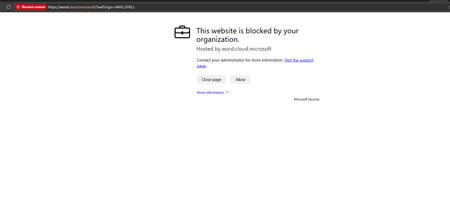
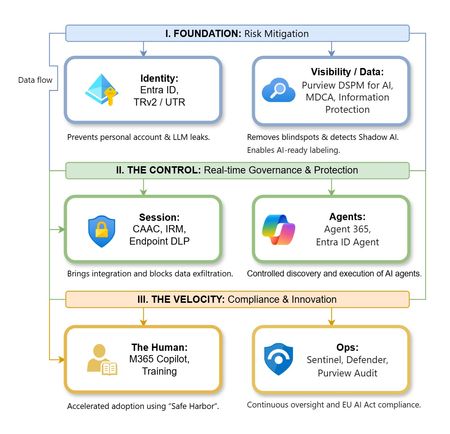
The “block” posture on Generative AI has failed. In a global enterprise, banning these tools doesn't stop usage; it simply pushes intellectual property into unmanaged channels and creates a massive visibility gap in corporate telemetry. The priority has now shifted from stopping AI to hardening the environment so that innovation can run at velocity without compromising data sovereignty. Traditional security perimeters are ineffective against the “slow bleed” of AI leakage - where data moves through prompts, clipboards, and autonomous agents rather than bulk file transfers. To secure this environment, a 7-layer defense-in-depth model is required to treat the conversation itself as the new perimeter. 1. Identity: The Only Verifiable Perimeter Identity is the primary control plane. Access to AI services must be treated with the same rigor as administrative access to core infrastructure. The strategy centers on enforcing device-bound Conditional Access, where access is strictly contingent on device health. To solve the "Account Leak" problem, the deployment of Tenant Restrictions v2 (TRv2) is essential to prevent users from signing into personal tenants using corporate-managed devices. For enhanced coverage, Universal Tenant Restrictions (UTR) via Global Secure Access (GSA) allows for consistent enforcement at the cloud edge. While TRv2 authentication-plane is GA, data-plane protection is GA for the Microsoft 365 admin center and remains in preview for other workloads such as SharePoint and Teams. 2. Eliminating the Visibility Gap (Shadow AI) You can’t secure what you can't see. Microsoft Defender for Cloud Apps (MDCA) serves to discover and govern the enterprise AI footprint, while Purview DSPM for AI (formerly AI Hub) monitors Copilot and third-party interactions. By categorizing tools using MDCA risk scores and compliance attributes, organizations can apply automated sanctioning decisions and enforce session controls for high-risk endpoints. 3. Data Hygiene: Hardening the “Work IQ” AI acts as a mirror of internal permissions. In a "flat" environment, AI acts like a search engine for your over-shared data. Hardening the foundation requires automated sensitivity labeling in Purview Information Protection. Identifying PII and proprietary code before assigning AI licenses ensures that labels travel with the data, preventing labeled content from being exfiltrated via prompts or unauthorized sharing. 4. Session Governance: Solving the “Clipboard Leak” The most common leak in 2025 is not a file upload; it’s a simple copy-paste action or a USB transfer. Deploying Conditional Access App Control (CAAC) via MDCA session policies allows sanctioned apps to function while specifically blocking cut/copy/paste. This is complemented by Endpoint DLP, which extends governance to the physical device level, preventing sensitive data from being moved to unmanaged USB storage or printers during an AI-assisted workflow. Purview Information Protection with IRM rounds this out by enforcing encryption and usage rights on the files themselves. When a user tries to print a "Do Not Print" document, Purview triggers an alert that flows into Microsoft Sentinel. This gives the SOC visibility into actual policy violations instead of them having to hunt through generic activity logs. 5. The “Agentic” Era: Agent 365 & Sharing Controls Now that we're moving from "Chat" to "Agents", Agent 365 and Entra Agent ID provide the necessary identity and control plane for autonomous entities. A quick tip: in large-scale tenants, default settings often present a governance risk. A critical first step is navigating to the Microsoft 365 admin center (Copilot > Agents) to disable the default “Anyone in organization” sharing option. Restricting agent creation and sharing to a validated security group is essential to prevent unvetted agent sprawl and ensure that only compliant agents are discoverable. 6. The Human Layer: “Safe Harbors” over Bans Security fails when it creates more friction than the risk it seeks to mitigate. Instead of an outright ban, investment in AI skilling-teaching users context minimization (redacting specifics before interacting with a model) - is the better path. Providing a sanctioned, enterprise-grade "Safe Harbor" like M365 Copilot offers a superior tool that naturally cuts down the use of Shadow AI. 7. Continuous Ops: Monitoring & Regulatory Audit Security is not a “set and forget” project, particularly with the EU AI Act on the horizon. Correlating AI interactions and DLP alerts in Microsoft Sentinel using Purview Audit (specifically the CopilotInteraction logs) data allows for real-time responses. Automated SOAR playbooks can then trigger protective actions - such as revoking an Agent ID - if an entity attempts to access sensitive HR or financial data. Final Thoughts Securing AI at scale is an architectural shift. By layering Identity, Session Governance, and Agentic Identity, AI moves from being a fragmented risk to a governed tool that actually works for the modern workplace.Microsoft Ignite 2025: Top Security Innovations You Need to Know
🤖 Security & AI -The Big Story This Year 2025 marks a turning point for cybersecurity. Rapid adoption of AI across enterprises has unlocked innovation but introduced new risks. AI agents are now part of everyday workflows-automating tasks and interacting with sensitive data—creating new attack surfaces that traditional security models cannot fully address. Threat actors are leveraging AI to accelerate attacks, making speed and automation critical for defense. Organizations need solutions that deliver visibility, governance, and proactive risk management for both human and machine identities. Microsoft Ignite 2025 reflects this shift with announcements focused on securing AI at scale, extending Zero Trust principles to AI agents, and embedding intelligent automation into security operations. As a Senior Cybersecurity Solution Architect, I’ve curated the top security announcements from Microsoft Ignite 2025 to help you stay ahead of evolving threats and understand the latest innovations in enterprise security. Agent 365: Control Plane for AI Agents Agent 365 is a centralized platform that gives organizations full visibility, governance, and risk management over AI agents across Microsoft and third-party ecosystems. Why it matters: Unmanaged AI agents can introduce compliance gaps and security risks. Agent 365 ensures full lifecycle control. Key Features: Complete agent registry and discovery Access control and conditional policies Visualization of agent interactions and risk posture Built-in integration with Defender, Entra, and Purview Available via the Frontier Program Microsoft Agent 365: The control plane for AI agents Deep dive blog on Agent 365 Entra Agent ID: Zero Trust for AI Identities Microsoft Entra is the identity and access management suite (covering Azure AD, permissions, and secure access). Entra Agent ID extends Zero Trust identity principles to AI agents, ensuring they are governed like human identities. Why it matters: Unmanaged or over-privileged AI agents can create major security gaps. Agent ID enforces identity governance on AI agents and reduces automation risks. Key Features: Provides unique identities for AI agents Lifecycle governance and sponsorship for agents Conditional access policies applied to agent activity Integrated with open SDKs/APIs for third‑party platforms Microsoft Entra Agent ID Overview Entra Ignite 2025 announcements Public Preview details Security Copilot Expansion Security Copilot is Microsoft’s AI assistant for security teams, now expanded to automate threat hunting, phishing triage, identity risk remediation, and compliance tasks. Why it matters: Security teams face alert fatigue and resource constraints. Copilot accelerates response and reduces manual effort. Key Features: 12 new Microsoft-built agents across Defender, Entra, Intune, and Purview. 30+ partner-built agents available in the Microsoft Security Store. Automates threat hunting, phishing triage, identity risk remediation, and compliance tasks. Included for Microsoft 365 E5 customers at no extra cost. Security Copilot inclusion in Microsoft 365 E5 Security Copilot Ignite blog Security Dashboard for AI A unified dashboard for CISOs and risk leaders to monitor AI risks, aggregate signals from Microsoft security services, and assign tasks via Security Copilot - included at no extra cost. Why it matters: Provides a single pane of glass for AI risk management, improving visibility and decision-making. Key Features: Aggregates signals from Entra, Defender, and Purview Supports natural language queries for risk insights Enables task assignment via Security Copilot Ignite Session: Securing AI at Scale Microsoft Security Blog Microsoft Defender Innovations Microsoft Defender serves as Microsoft’s CNAPP solution, offering comprehensive, AI-driven threat protection that spans endpoints, email, cloud workloads, and SIEM/SOAR integrations. Why It Matters Modern attacks target multi-cloud environments and software supply chains. These innovations provide proactive defense, reduce breach risks before exploitation, and extend protection beyond Microsoft ecosystems-helping organizations secure endpoints, identities, and workloads at scale. Key Features: Predictive Shielding: Proactively hardens attack paths before adversaries pivot. Automatic Attack Disruption: Extended to AWS, Okta, and Proofpoint via Sentinel. Supply Chain Security: Defender for Cloud now integrates with GitHub Advanced Security. What’s new in Microsoft Defender at Ignite Defender for Cloud innovations Global Secure Access & AI Gateway Part of Microsoft Entra’s secure access portfolio, providing secure connectivity and inspection for web and AI traffic. Why it matters: Protects against lateral movement and AI-specific threats while maintaining secure connectivity. Key Features: TLS inspection, URL/file filtering AI Prompt Injection protection Private access for domain controllers to prevent lateral movement attacks. Learn about Secure Web and AI Gateway for agents Microsoft Entra: What’s new in secure access on the AI frontier Purview Enhancements Microsoft Purview is the data governance and compliance platform, ensuring sensitive data is classified, protected, and monitored. Why it matters: Ensures sensitive data remains protected and compliant in AI-driven environments. Key Features: AI Observability: Monitor agent activities and prevent sensitive data leakage. Compliance Guardrails: Communication compliance for AI interactions. Expanded DSPM: Data Security Posture Management for AI workloads. Announcing new Microsoft Purview capabilities to protect GenAI agents Intune Updates Microsoft Intune is a cloud-based endpoint device management solution that secures apps, devices, and data across platforms. It simplifies endpoint security management and accelerates response to device risks using AI. Why it matters: Endpoint security is critical as organizations manage diverse devices in hybrid environments. These updates reduce complexity, speed up remediation, and leverage AI-driven automation-helping security teams stay ahead of evolving threats. Key Features: Security Copilot agents automate policy reviews, device offboarding, and risk-based remediation. Enhanced remote management for Windows Recovery Environment (WinRE). Policy Configuration Agent in Intune lets IT admins create and validate policies with natural language What’s new in Microsoft Intune at Ignite Your guide to Intune at Ignite Closing Thoughts Microsoft Ignite 2025 signals the start of an AI-driven security era. From visibility and governance for AI agents to Zero Trust for machine identities, automation in security operations, and stronger compliance for AI workloads-these innovations empower organizations to anticipate threats, simplify governance, and accelerate secure AI adoption without compromising compliance or control. 📘 Full Coverage: Microsoft Ignite 2025 Book of News3.3KViews2likes0CommentsMonthly news - December 2025
Microsoft Defender Monthly news - December 2025 Edition This is our monthly "What's new" blog post, summarizing product updates and various new assets we released over the past month across our Defender products. In this edition, we are looking at all the goodness from November 2025. Defender for Cloud has its own Monthly News post, have a look at their blog space. 😎 Microsoft Ignite 2025 - now on-demand! 🚀 New Virtual Ninja Show episode: Advancements in Attack Disruption Vulnerability Remediation Agent in Microsoft Intune Microsoft Defender Ignite 2025: What's new in Microsoft Defender? This blog summarizes our big announcements we made at Ignite. (Public Preview) Defender XDR now includes the predictive shielding capability, which uses predictive analytics and real-time insights to dynamically infer risk, anticipate attacker progression, and harden your environment before threats materialize. Learn more about predictive shielding. Security Copilot for SOC: bringing agentic AI to every defender. This blog post gives a great overview of the various agents supporting SOC teams. Account correlation links related accounts and corresponding insights to provide identity-level visibility and insights to the SOC. Coordinated response allows Defenders to take action comprehensively across connected accounts, accelerating response and minimizing the potential for lateral movement. Enhancing visibility into your identity fabric with Microsoft Defender. This blog describes new enhancements to the identity security experience within Defender that will help enrich your security team’s visibility and understanding into your unique identity fabric. (Public Preview) The IdentityAccountInfo table in advanced hunting is now available for preview. This table contains information about account information from various sources, including Microsoft Entra ID. It also includes information and link to the identity that owns the account. Microsoft Sentinel customers using the Defender portal, or the Azure portal with the Microsoft Sentinel Defender XDR data connector, now also benefit from Microsoft Threat Intelligence alerts that highlight activity from nation-state actors, major ransomware campaigns, and fraudulent operations. For more information, see Incidents and alerts in the Microsoft Defender portal. (Public Preview) New Entity Behavior Analytics (UEBA) experiences in the Defender portal! Microsoft Sentinel introduces new UEBA experiences in the Defender portal, bringing behavioral insights directly into key analyst workflows. These enhancements help analysts prioritize investigations and apply UEBA context more effectively. Learn more on our docs. (Public Preview) A new Restrict pod access response action is now available when investigating container threats in the Defender portal. This response action blocks sensitive interfaces that allow lateral movement and privilege escalation. (Public Preview) Threat analytics now has an Indicators tab that provides a list of all indicators of compromise (IOCs) associated with a threat. Microsoft researchers update these IOCs in real time as they find new evidence related to the threat. This information helps your security operations center (SOC) and threat intelligence analysts with remediation and proactive hunting. Learn more. In addition the overview section of threat analytics now includes additional details about a threat, such as alias, origin, and related intelligence, providing you with more insights on what the threat is and how it might impact your organization. Microsoft Defender for Identity (Public Preview) In addition to the GA release of scoping by Active Directory domains a few months ago, you can now scope by Organizational Units (OUs) as part of XDR User Role-Based Access Control. This enhancement provides even more granular control over which entities and resources are included in security analysis. For more information, see Configure scoped access for Microsoft Defender for Identity. (Public Preview). New security posture assessment: Change password for on-prem account with potentially leaked credentials. The new security posture assessment lists users whose valid credentials have been leaked. For more information, see: Change password for on-prem account with potentially leaked credentials. Defender for Identity is slowly rolling out automatic Windows event auditing for sensors v3.x, streamlining deployment by applying required auditing settings to new sensors and fixing misconfigurations on existing ones. As it becomes available, you will be able to enable automatic Windows event-auditing in the Advanced settings section in the Defender portal, or using the Graph API. Identity Inventory enhancements: Accounts tab, manual account linking and unlinking, and expanded remediation actions are now available. Learn more in our docs. Microsoft Defender for Cloud Apps (Public Preview) Defender for Cloud Apps automatically discovers AI agents created in Microsoft Copilot Studio and Azure AI Foundry, collects audit logs, continuously monitors for suspicious activity, and integrates detections and alerts into the XDR Incidents and Alerts experience with a dedicated Agent entity. For more information, see Protect your AI agents. Microsoft Defender for Endpoint Ignite 2025: Microsoft Defender now prevents threats on endpoints during an attack. This year at Microsoft Ignite, Microsoft Defender is announcing exciting innovations for endpoint protection that help security teams deploy faster, gain more visibility, and proactively block attackers during active attacks. (Public Preview) Defender for Endpoint now includes the GPO hardening and Safeboot hardening response actions. These actions are part of the predictive shielding feature, which anticipates and mitigates potential threats before they materialize. (Public Preview) Custom data collection enables organizations to expand and customize telemetry collection beyond default configurations to support specialized threat hunting and security monitoring needs. (Public Preview) Native root detection support for Microsoft Defender on Android. This enables proactive detection of rooted devices without requiring Intune policies, ensuring stronger security and validating that Defender is running on an uncompromised device, ensuring more reliable telemetry that is not vulnerable to attacker manipulation. (Public Preview) The new Defender deployment tool is a lightweight, self-updating application that streamlines onboarding devices to the Defender endpoint security solution. The tool takes care of prerequisites, automates migrations from older solutions, and removes the need for complex onboarding scripts, separate downloads, and manual installations. It currently supports Windows and Linux devices. Defender deployment tool: for Windows devices for Linux devices (Public Preview) Defender endpoint security solution for Windows 7 SP1 and Windows Server 2008 R2 SP1. A Defender for endpoint security solution is now available for legacy Windows 7 SP1 and Windows Server 2008 R2 SP1 devices. The solution provides advanced protection capabilities and improved functionality for these devices compared to other solutions. The new solution is available using the new Defender deployment tool. Microsoft Defender Vulnerability Management (Public Preview) The Vulnerability Management section in the Microsoft Defender portal is now located under Exposure management. This change is part of the vulnerability management integration to Microsoft Security Exposure Management, which significantly expands the scope and capabilities of the platform. Learn more. (General Availability) Microsoft Secure Score now includes new recommendations to help organizations proactively prevent common endpoint attack techniques. Require LDAP client signing and Require LDAP server signing - help ensure integrity of directory requests so attackers can't tamper with or manipulate group memberships or permissions in transit. Encrypt LDAP client traffic - prevents exposure of credentials and sensitive user information by enforcing encrypted communication instead of clear-text LDAP. Enforce LDAP channel binding - prevents man-in-the-middle relay attacks by ensuring the authentication is cryptographically tied to the TLS session. If the TLS channel changes, the bind fails, stopping credential replay. (General Availability) These Microsoft Secure Score recommendations are now generally available: Block web shell creation on servers Block use of copied or impersonated system tools Block rebooting a machine in Safe Mode Microsoft Defender for Office 365 Microsoft Ignite 2025: Transforming Phishing Response with Agentic Innovation. This blog post summarizes the following announcements: General Availability of the Security Copilot Phishing Triage Agent Agentic Email Grading System in Microsoft Defender Cisco and VIPRE Security Group join the Microsoft Defender ICES ecosystem. A separate blog explains these best practices in more detail and outline three other routing techniques commonly used across ICES vendors. Blog series: Best practices from the Microsoft Community Microsoft Defender for Office 365: Fine-Tuning: This blog covers our top recommendations for fine-tuning Microsoft Defender for Office 365 configuration from hundreds of deployments and recovery engagements, by Microsoft MVP Joe Stocker. You may be right after all! Disputing Submission Responses in Microsoft Defender for Office 365: Microsoft MVP Mona Ghadiri spotlights a new place AI has been inserted into a workflow to make it better… a feature that elevates the transparency and responsiveness of threat management: the ability to dispute a submission response directly within Microsoft Defender for Office 365. Blog post: Strengthening calendar security through enhanced remediation.6KViews0likes0Comments