microsoft 365
5183 Topics
Microsoft 365 Outlook Classic Latest Update Copilot issues
Hello to all, we are currently using the Microsoft 365 Outlook Classic, using version Version 2604 Build 16.0.19929.20172 (Current Channel) Copilot works as expected; However ever since the next update was released (Version 2605 (Build 20026.20076)) some users including me, have been getting the below error: I have tried uninstalling and installing the latest version directly, with the same issue. Scanned for any corrupted system files with no issues,but still get the error; I have tried the update Licence from the Outlook application, with no issues but the copilot something went wrong error keeps on persisting. Internet searches are very vague and the I have found some registry suggestions which I have also tried with no solution. The only way to get Copilot working on Outlook Classic was to revert to a previous working version, only then Copilot works as expected. This only happens in Outlook Classic; Copilot works fine on the latest version of Microsoft Office 365 with Word, Excel, etc. For those that maybe might ask why not switch to the New Outlook, we have had issues with it and it has been recommended to use the Classic Outlook for the time being. Has anyone been experiencing such issues please? Thanks for any help.640Views4likes7Comments
Pre-fill Responses in Your Microsoft Forms
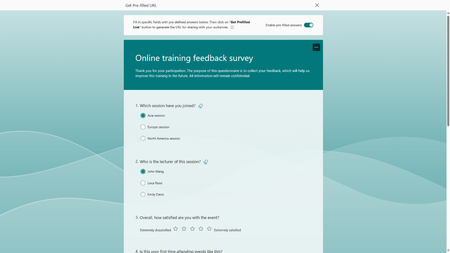
We are excited to share that Microsoft Forms now supports pre-filled links, making your data collection process more efficient and improving data accuracy. This feature not only allows you to set default answers for your questions, it empowers you to strategize how you would like the responses categorized. To help you better understand how to leverage this new feature, let's try it together with an online training feedback survey.77KViews10likes50Comments
Sole Microsoft 365 Admin Locked Out After Phone Replacement / Lost MFA Device
I am the sole admin for a Microsoft 365 tenant and I am currently locked out after replacing my phone. The old phone was wiped before Microsoft Authenticator was fully re-registered on the new device. Authenticator was the only MFA method configured on the account. Current situation: password is known, Teams desktop sessions are still active, Authenticator cloud backup restored successfully, but all Microsoft security and admin pages still require approval from the old Authenticator registration. I cannot access Security Info, Entra Admin, or Microsoft 365 Admin Center because every path loops back to the dead MFA registration. I have already attempted Microsoft business support phone lines, Authenticator restore and recovery, and existing desktop sessions, but support queues are disconnecting and I cannot open business support tickets because the admin account itself is MFA locked. Tenant: lowepfg.onmicrosoft.com What is the fastest recovery or escalation path to force MFA reset or re-register Microsoft Authenticator for the tenant admin account?39Views0likes2CommentsZoom in or out of forms, tables, and queries when in Form View or Datasheet View
Access now lets you zoom in and out when you’re working with forms, tables, and queries in Form View or Datasheet View. Zoom in for a closer look at your data or zoom out to see more on screen at once. You can adjust the zoom level using the Zoom button on the ribbon, the zoom slider on the status bar, or keyboard shortcuts. Zoom is also available in Print Preview for reports. Zoom isn’t supported in Report View or Design View. This feature is available in Access for Microsoft 365, version 2605 and later. Choose a magnification setting from the ribbon On the Home tab, select Zoom and choose one of the following options: 50%, 75%, 125%, 150%, 175%, 200%, or 500%. To return the view to 100% zoom, click Zoom 100%. If you prefer to use the keyboard, you can press Ctrl + Alt + 0 (zero). Use the zoom slider to quickly zoom in or out On the status bar in the lower right-hand corner of Access, select the zoom slider. Slide to the percentage zoom setting that you want. Press – or + to zoom in gradual increments. Use zoom keyboard shortcuts or mousewheel To zoom in, press Ctrl + Alt + Plus (+). To zoom out, press Ctrl + Alt + Minus (-). To return to 100% magnification, press Ctrl + Alt + 0 (zero). To use the mousewheel and scroll to zoom in or out, press Ctrl + mousewheel. Change your default zoom percentage Access doesn't save zoom settings on closing and reopening a form. Instead, it opens your form using the default zoom setting. To set your zoom default percentage, choose File > Options > Current Database > Application Options and choose the Default Zoom setting. Note Content inside of ActiveX controls, such as the text in a TreeView control, doesn't resize when zoomed. Zooming in Access only affects Access-native controls. If a form uses ActiveX controls, consider replacing them with native Access controls so they scale with the rest of the form.333Views1like4Comments
Allow Canvas Studio Public Embeds in Microsoft Sway
Sway is a hidden gem inside of Microsoft 365. I just discovered it, and it's an amazing tool to turn old PowerPoints or even lecture notes into dynamic lessons for students! One limitation I'm running into is the embed whitelist. While I know this app likely has low priority, is there any chance there is a way to request a specific site be added to the embed whitelist? My biggest priority would be Instructure's Canvas Studio. Microsoft's new LTI 1.3 integration with Canvas has some rough edges, but it's an amazing start! Thing is, I don't want to share a wall of text lecture notes from Microsoft Word through OneDrive. I like the dynamic and more visually oriented style of Sway. The Problem: Currently, when trying to embed instructional videos from Canvas Studio into a Sway presentation, the platform blocks the embed code. This forces educators to either upload duplicate files to a different hosted service (like YouTube or Vimeo) or break the seamless student experience by using text hyperlinks. And the problem with YouTube is that many of our local community partners at K-12 schools have YouTube blocked on the Chromebooks early college students use. Proposed Solution: White-list Canvas Studio public embed domains so that users can seamlessly paste iframe code from Canvas Studio directly into Sway Embed Cards. This will create a smoother workflow for the thousands of schools utilizing both Microsoft 365 and Canvas LMS. And while you're in there adding Canvas, You might consider expanding that whitelist further. Scribe tutorials would be great, or similar services. TikTok might be controversial, but that would be good. Students don't click links; they'll click play on embedded content. Expand the whitelist, please!11Views0likes0CommentsEmbracing Responsible AI: A Comprehensive Guide and Call to Action
In an age where artificial intelligence (AI) is becoming increasingly integrated into our daily lives, the need for responsible AI practices has never been more critical. From healthcare to finance, AI systems influence decisions affecting millions of people. As developers, organizations, and users, we are responsible for ensuring that these technologies are designed, deployed, and evaluated ethically. This blog will delve into the principles of responsible AI, the importance of assessing generative AI applications, and provide a call to action to engage with the Microsoft Learn Module on responsible AI evaluations. What is Responsible AI? Responsible AI encompasses a set of principles and practices aimed at ensuring that AI technologies are developed and used in ways that are ethical, fair, and accountable. Here are the core principles that define responsible AI: Fairness AI systems must be designed to avoid bias and discrimination. This means ensuring that the data used to train these systems is representative and that the algorithms do not favor one group over another. Fairness is crucial in applications like hiring, lending, and law enforcement, where biased AI can lead to significant societal harm. Transparency Transparency involves making AI systems understandable to users and stakeholders. This includes providing clear explanations of how AI models make decisions and what data they use. Transparency builds trust and allows users to challenge or question AI decisions when necessary. Accountability Developers and organizations must be held accountable for the outcomes of their AI systems. This includes establishing clear lines of responsibility for AI decisions and ensuring that there are mechanisms in place to address any negative consequences that arise from AI use. Privacy AI systems often rely on vast amounts of data, raising concerns about user privacy. Responsible AI practices involve implementing robust data protection measures, ensuring compliance with regulations like GDPR, and being transparent about how user data is collected, stored, and used. The Importance of Evaluating Generative AI Applications Generative AI, which includes technologies that can create text, images, music, and more, presents unique challenges and opportunities. Evaluating these applications is essential for several reasons: Quality Assessment Evaluating the output quality of generative AI applications is crucial to ensure that they meet user expectations and ethical standards. Poor-quality outputs can lead to misinformation, misrepresentation, and a loss of trust in AI technologies. Custom Evaluators Learning to create and use custom evaluators allows developers to tailor assessments to specific applications and contexts. This flexibility is vital in ensuring that the evaluation process aligns with the intended use of the AI system. Synthetic Datasets Generative AI can be used to create synthetic datasets, which can help in training AI models while addressing privacy concerns and data scarcity. Evaluating these synthetic datasets is essential to ensure they are representative and do not introduce bias. Call to Action: Engage with the Microsoft Learn Module To deepen your understanding of responsible AI and enhance your skills in evaluating generative AI applications, I encourage you to explore the Microsoft Learn Module available at this link. What You Will Learn: Concepts and Methodologies: The module covers essential frameworks for evaluating generative AI, including best practices and methodologies that can be applied across various domains. Hands-On Exercises: Engage in practical, code-first exercises that simulate real-world scenarios. These exercises will help you apply the concepts learned tangibly, reinforcing your understanding. Prerequisites: An Azure subscription (you can create one for free). Basic familiarity with Azure and Python programming. Tools like Docker and Visual Studio Code for local development. Why This Matters By participating in this module, you are not just enhancing your skills; you are contributing to a broader movement towards responsible AI. As AI technologies continue to evolve, the demand for professionals who understand and prioritize ethical considerations will only grow. Your engagement in this learning journey can help shape the future of AI, ensuring it serves humanity positively and equitably. Conclusion As we navigate the complexities of AI technology, we must prioritize responsible AI practices. By engaging with educational resources like the Microsoft Learn Module on responsible AI evaluations, we can equip ourselves with the knowledge and skills necessary to create AI systems that are not only innovative but also ethical and responsible. Join the movement towards responsible AI today! Take the first step by exploring the Microsoft Learn Module and become an advocate for ethical AI practices in your community and beyond. Together, we can ensure that AI serves as a force for good in our society. References Evaluate generative AI applications https://learn.microsoft.com/en-us/training/paths/evaluate-generative-ai-apps/?wt.mc_id=studentamb_263805 Azure Subscription for Students https://azure.microsoft.com/en-us/free/students/?wt.mc_id=studentamb_263805 Visual Studio Code https://code.visualstudio.com/?wt.mc_id=studentamb_263805914Views0likes0Comments
How do I find the account linked to an Office Home & Student 2013 key?
Hello everyone, Microsoft's after-sales service redirected me here because they no longer provide updates for this type of product, nor even security support. I have two Microsoft accounts. However, when I try to reconnect my key to one of them, it tells me the key is already linked to another Microsoft account. But which one?! How can I find that account or regain ownership of my Office key ? Thanks for your help.10Views0likes0CommentsMicrosoft 365 PC: The Modern Windows Experience for Work and Business
In today’s workplace, a computer is no longer just a machine used to write documents or browse the internet. Modern businesses need devices that are secure, connected to the cloud, easy to manage remotely, and powerful enough to support hybrid work. That is where the concept of a “Microsoft 365 PC” comes in. https://dellenny.com/microsoft-365-pc-the-modern-windows-experience-for-work-and-business/41Views0likes0Comments