microsoft 365
5302 TopicsBeyond Tokens: Rethinking AI Economics with Microsoft Foundry
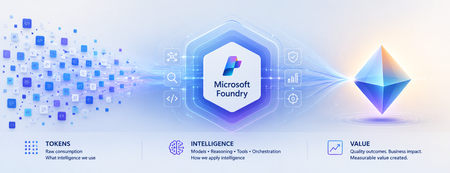
Beyond Tokens: Rethinking AI Economics with Microsoft Foundry From the cost of intelligence to the value of outcomes Enterprise AI has an accounting problem. Executives expect agentic AI to return roughly 171% on investment, according to one widely cited survey. Yet McKinsey finds only about 39% of organizations can attribute any earnings impact to AI at all. Both numbers can be true at once — because the gap between them is not a technology gap. It is a measurement gap. For the first few years of generative AI, one number dominated the economics conversation: tokens. How many tokens did a model consume? What was the cost per million tokens? Could a smaller model perform the same task? Those questions mattered when enterprises were experimenting with AI. They are no longer enough as AI moves into production. An enterprise agent doesn't simply consume tokens. It reasons, retrieves context, invokes tools, calls APIs, verifies its work, retries unsuccessful actions and sometimes escalates exceptions to humans. The model call might cost pennies. The business outcome could cost considerably more. Which leads to an increasingly important question: What is the right economic unit for intelligence? From AI experimentation to economic accountability The first wave of enterprise AI was about possibility: Can AI do this? The next wave is about production, as AI becomes embedded in software engineering, customer service, finance, healthcare and supply chains. And production changes the question: Should AI do this and at what cost? Microsoft has moved decisively onto this ground. In August 2026, the Microsoft Foundry team launched its Economics of Agent Optimization series, arguing that "tokens have become the new unit of technology spend" and that AI should be run as a managed investment system. On the latest earnings call, Satya Nadella described Microsoft's objective as "advancing the frontier on the cost-to-outcome curve, ensuring every customer can turn tokens into business results." The discipline is going mainstream too: 98% of FinOps teams now manage AI spend, up from 31% two years ago. Microsoft's series is largely about the numerator of that curve - making every request, agent and dollar more efficient. This article is about the denominator: what an outcome is, what it truly costs, and what it is worth. The evolution of Microsoft Foundry reflects the same shift. At Build 2026, Microsoft expanded the conversation beyond building agents toward tracing behavior, evaluating quality, monitoring production performance, optimizing agents and connecting their operation to ROI. Think of the progression as: Trace → Evaluate → Monitor → Optimize → ROI This is more than a technology roadmap. It represents a shift from observing AI as technology to managing AI as an economic asset. Tokens became the unit of spend. They were never the unit of value. Consider two AI agents handling the same customer-service workflow. Agent A costs $0.08 per interaction. Agent B costs $0.20. Agent A appears cheaper. But suppose Agent A successfully resolves only 55% of cases, while Agent B resolves 90%. The remainder require retries, additional reasoning or human intervention. Which agent is actually cheaper? The inexpensive interaction may produce the expensive resolution. This illustrates a fundamental problem: We often measure AI where it is consumed rather than where value is created. Tokens are a unit of consumption. Businesses operate in outcomes. A customer-service leader cares about issues resolved. An engineering leader cares about high-quality software reaching production. A finance leader cares about reconciliations completed accurately. The economic denominator needs to move closer to the business. The AI Economic Ladder I think of this evolution as an AI Economic Ladder: Tokens → Interactions → Tasks → Outcomes → Value Each step moves measurement closer to what the enterprise actually cares about. At the token level: What intelligence did we consume? At the interaction level: What did each AI run cost? At the task level: What did it cost to complete the work? At the outcome level: What did a successful result cost? At the value level: Was the outcome worth creating? An AI system can become more efficient at every technical metric while creating little economic value. Conversely, an expensive AI workflow could be extraordinarily valuable if it prevents revenue leakage, reduces operational risk or accelerates a critical business process. The objective isn't cheaper AI. It is better economics. Not every completed task is a successful outcome There is another complication. If an agent completes a workflow, should we count it as a successful outcome? Not necessarily. A meaningful outcome needs three characteristics: Completed. Quality-gated. Attributable. It must reach its intended end state, meet an explicit standard for quality, accuracy, safety or business acceptability, and be attributable to the agent or workflow that produced it. That gives us a more meaningful measure: Cost per Successful Outcome = Fully Loaded AI Workflow Cost / Completed, Quality-Gated, Attributable Outcomes The denominator becomes real only when named in business language: cost per prior authorization resolved in healthcare, per pull request triaged and tested in engineering, per disputed invoice reconciled in finance operations. If you cannot name the outcome in a sentence the process owner recognizes, you are not ready to measure it. The quality gate matters. With AI, "the system ran successfully" and "the system produced a good outcome" are not the same thing. Microsoft Foundry's tracing and evaluation capabilities become economically important for precisely this reason. Evaluation isn't merely quality control. It helps determine what gets counted as value. What does an AI outcome really cost? The true economic footprint goes far beyond inference: Model + Reasoning + Grounding + Tools + Orchestration + Infrastructure + Retries + Evaluation + Governance + Human Intervention Human intervention is particularly easy to overlook. Every time someone must review, correct, approve or recover an AI-generated outcome, the economics change. The same applies to verification. An agent reaching an acceptable result in three steps has different economics from one requiring fifteen steps and multiple retries. And verification is not a rounding error — it is the bulk of the bill. McKinsey's 2026 analysis of production agentic workflows found roughly 60% of an agentic task's cost is tied to refining answers — checking, repairing, re-verifying — not generating the initial response. Most of what you pay for is not intelligence. It is assurance. This means quality and economics are connected. The quality bar you set influences the cost you pay. The challenge isn't simply minimizing consumption. It is finding the right balance between quality, cost, speed and risk. Cost per outcome is only half the equation Now imagine two agents. Both cost $5 per successful outcome. One saves an employee ten minutes of administrative work. The other prevents $500 in revenue leakage. Their cost efficiency is identical. Their economics clearly aren't. So we need to move another step up the ladder: from Cost per Outcome to Value per Outcome. The question isn't only how cheaply AI can complete the work. It is: How much economic value does this outcome create relative to the intelligence required to produce it? Now the CIO, CFO, CAIO and business leader have a common conversation. Give every outcome an Intelligence Budget Not every problem deserves the smartest model available. Classifying an email may require relatively little intelligence. Resolving a complicated customer complaint may justify more context and reasoning. Assessing the risks in a multimillion-dollar contract may justify sophisticated reasoning, multiple validations and human review. Every business outcome therefore has an economically rational amount of intelligence worth spending on it. Call it an Intelligence Budget. This changes the architecture question from which model should we standardize on, to: What combination of model, reasoning, context, tools and human judgment does this outcome deserve? This is where Microsoft Foundry's model router becomes interesting. Individual requests can be dynamically routed so simpler work doesn't consume the same model resources as complex reasoning. If the Intelligence Budget is the economic principle, intelligent routing is one way of operationalizing it. The future enterprise AI architecture won't be about one model doing everything. It will route intelligence according to the economics, quality and risk of the outcome. Making AI economics observable None of this works without visibility. An AI system can be technically healthy and economically unhealthy — responsive and error-free while repeatedly choosing inefficient reasoning paths, invoking unnecessary tools or producing outputs requiring expensive human correction. AI economics and AI observability are becoming inseparable. Microsoft Foundry increasingly connects these disciplines. Tracing shows what an agent did. Evaluation determines whether it met required criteria. Observability helps monitor production behavior. Agent optimizer can test improvements across prompts, skills and models. Microsoft's emerging ROI capabilities take the next step by connecting operating costs with measures such as task completion, time saved and cost efficiency. Attribution is the bridge to the finance conversation. Teams place Azure API Management in front of Foundry endpoints as an AI Gateway, stream token telemetry into Application Insights, and use Entra Agent ID to give every agent run a discrete identity that maps cost to its cost center. Microsoft Agent 365 extends the discipline tenant-wide — spending policies, budget caps and departmental chargeback across Microsoft and third-party agents. Together, they create something enterprises have historically lacked: A feedback loop between how intelligence is consumed and what that intelligence accomplishes. The paradox of cheaper intelligence There is another reason AI economics will become more important as models get cheaper. The Jevons paradox suggests that when technology makes a resource cheaper and more efficient, total consumption can actually increase. AI may experience the same effect. Cheaper intelligence enables more agents, more reasoning and more workflows that were previously uneconomic. So we could see cost per unit of intelligence fall while total intelligence consumed rises. Cheaper AI may therefore produce larger AI bills. That isn't necessarily bad — provided value grows faster than consumption. The objective isn't minimum AI consumption. It is maximum economic value from AI consumption. From workload economics to portfolio economics As AI scales, economics becomes a capital-allocation question. I see three levels. Workload Economics: Is this AI system running efficiently? Outcome Economics: Is it producing quality outcomes economically? Portfolio Economics: Where should we put our next AI dollar? That final question will become increasingly important. An enterprise with hundreds of AI initiatives shouldn't assume every one deserves continued investment. Some should scale. Some need optimization. Some should be redesigned or consolidated. And some should be stopped. The ability to experiment cheaply created the first explosion of enterprise AI. The discipline to allocate capital intelligently will determine what scales. Who owns AI economics? Once an agent becomes part of how work gets done, its economics cannot remain purely an IT metric. The business understands the value of the outcome. Technology understands the architecture and optimization levers. Finance brings economic discipline and comparability. That suggests a shared model: Business owns the outcome. Technology owns the optimization levers. Finance owns the economic discipline. AI economics ultimately isn't just a technology-cost conversation. It is a business-performance and capital-allocation conversation. From abundant intelligence to intelligent economics We are entering an era where intelligence is becoming an increasingly abundant, programmable and variable-cost resource. Microsoft Foundry and the broader Microsoft AI stack are making it easier to build, evaluate, observe, optimize and govern that intelligence. But abundant intelligence does not guarantee abundant value. Enterprises still need to decide where AI belongs, how much intelligence each problem deserves, what defines a successful outcome, when humans should remain involved and which AI investments deserve more capital. The winners won't necessarily use the cheapest models. They won't consume the fewest tokens. And they won't be the organizations that build the most agents. They will become exceptionally good at moving up the AI Economic Ladder: from consumption, to outcomes, to value. Because the next era of AI won't be won by organizations that buy intelligence most cheaply. It will be won by those that convert intelligence into value most efficiently. Where to start: the first 90 days Define the denominator for your top three agents — what counts as done, what quality gate applies, who signs off. Instrument attribution — Azure API Management as an AI Gateway, token telemetry to Application Insights, Entra Agent ID on every run. Wire evaluations into the cost pipeline so only quality-gated outcomes count. Set Intelligence Budgets — model router per request, agent optimizer against your evaluators, Agent 365 policies as circuit breakers. Stand up a joint monthly review — business, technology and finance on one dashboard: outcomes delivered, cost per outcome, value per outcome. Frequently asked questions What is Cost per Successful Outcome in enterprise AI? The fully loaded cost of an AI workload divided by outputs that were completed, quality-gated and attributable - for example, cost per prior authorization resolved or per pull request triaged. It turns token metrics into the unit economics of AI-performed work. What is an Intelligence Budget? The economically rational amount of intelligence - model capability, reasoning, context, tools and human review — worth spending on a given outcome, based on its value and risk. Model router in Microsoft Foundry is one way to operationalize it. Why do AI agents cost more than single model calls? One agent task can involve planning, tool calls, retries and verification - many model calls with compounding context. Research on production agentic workflows attributes roughly 60% of task cost to refining and verifying answers, not generating the first response. Will falling model prices make AI cost management unnecessary? No. By the Jevons paradox, cheaper intelligence expands consumption, so total AI spend typically rises as unit prices fall. The discipline that matters is maximizing value per unit of intelligence. Who should own AI economics? A shared model: the business owns the outcome and its value, technology owns the optimization levers, and finance owns the economic discipline and review cadence. #MicrosoftFoundry #Agent365 #AzureAI #FinOps #AgenticAI #AIAgents #Azure #MicrosoftCostManagement #AIEconomics #Tokens References Microsoft Azure Blog: "The Economics of Agent Optimization: From pilots to measurable returns" (August 12, 2026) Microsoft FY26 Q4 earnings call (Satya Nadella, July 2026) McKinsey — "Cost versus value: managing agentic AI system performance" (July 2026) FinOps Foundation — State of FinOps 2026; Microsoft Learn — Model router for Microsoft Foundry; Agent optimizer; Foundry Control Plane cost optimization14Views0likes0CommentsAutoSave disabled when opening SharePoint-synced files from Finder after macOS Tahoe 26.6 update
Files stored in SharePoint Online and synchronized locally through OneDrive are opened as local documents when launched from Finder. Office applications display "Saved to my Mac" and AutoSave is turned off by default. However, opening the exact same files through Word/Excel > Open > Sites, or via SharePoint "Open in Desktop App", correctly identifies them as cloud documents. In that scenario, AutoSave is enabled and collaboration/version history features work as expected. Troubleshooting already performed: OneDrive reset and re-linked SharePoint library re-synced Signed out and back into both Office and OneDrive Removed Microsoft credentials from macOS Keychain and re-authenticated Recreated local OneDrive sync relationships Verified OneDrive File Provider extensions are enabled Verified Office applications and OneDrive are fully up to date Tested with newly created files and existing files Tested "Always Keep on This Device" with no change in behavior The issue appears to be specific to the Finder-to-Office launch path after upgrading to macOS Tahoe 26.6. Before upgrading to macOS Tahoe 26.6, opening the same SharePoint-synchronized files directly from Finder correctly preserved cloud document identity and AutoSave was enabled as expected. I discussed this issue in detail with Apple Support, but they quickly dismissed it, saying that the problem is not on Apple's side and that I should contact Microsoft instead.786Views6likes10Comments
What is the Microsoft Graph API replacement for deprecated Recent, SharedWithMe, and Insights APIs?
Hi Microsoft Graph community, I'm currently working on a Microsoft Graph integration that needs to retrieve: Files recently accessed/used by the current user Files shared with the current user Files from OneDrive and SharePoint I'm currently using the following APIs: GET /me/drive/recent GET /me/drive/sharedWithMe GET /me/insights/used However, these APIs are deprecated, and some of them will stop returning data after November 2026. (https://learn.microsoft.com/en-us/graph/api/drive-sharedwithme?view=graph-rest-1.0&utm_source=chatgpt.com) I'm stuck in development because I haven't been able to identify a Microsoft-supported replacement that provides the same functionality. Could someone please clarify: What is the official replacement for /me/drive/recent? What is the official replacement for /me/drive/sharedWithMe? What is the official replacement for /me/insights/used? Is there a single recommended Microsoft Graph API that can provide recently used and shared files across both OneDrive and SharePoint? I'm specifically looking for the officially supported API/recommended approach, rather than a workaround that may also become deprecated. Any guidance from Microsoft Graph experts or Microsoft employees would be greatly appreciated. Thanks!3Views0likes0Comments
Benefit expiration tied to membership end date
The benefit end date is now aligned with the membership end date. (Source) That means, if my Partner Core Benefits expire on day X, the Microsoft 365 internal use benefits also expire on day X. On the surface, this makes perfect sense, but, in practice, this makes renewal extremely inconvenient: Partner programs cannot be renewed before they expire, so I can only renew them on day X or later. Microsoft 365 subscriptions must be renewed before they expire, so I must renew them no later than day X. That means that the person responsible for renewing these things must work on day X - no matter if it's a week-end, a national holiday or a long-planned vacation. Getting sick or having a power outage on that day is out of the question as well, or all the Microsoft 365 mail accounts will stop working. Can Microsoft do something to make this a little less stressful for us poor sysadmins? Either add a few grace days to the expiry of Microsoft 365, or allow us to voluntarily renew our partner subscriptions earlier - I don't mind losing a few days of benefits, if it help ensure that everything can be done well ahead of time.81Views1like1CommentSharePoint Showcase: 5 Ways Organizations Improve Business Processes with Copilot in SharePoint
AI becomes most impactful when it helps with the work teams already do every day. The challenge is rarely a lack of information. It is turning trusted information into a clear, repeatable process without starting from scratch each time. That is where Copilot in SharePoint can help. It works with the content and structure already in SharePoint, including sites, pages, lists, libraries, and files. Teams can ask questions, compare and summarize content, organize information, create outputs, and turn repeatable multi-step processes into reusable skills. The examples below are based on real customer scenarios from organizations exploring Copilot in SharePoint. To protect customer confidentiality, organization names and identifying details have been generalized. What matters is the pattern: start with trusted SharePoint content, define the work that needs to happen, keep people in control, and make the process easier to repeat.345Views0likes0CommentsPrepare for the launch of growth margins with API readiness resources
Starting October 1, 2026, growth margins will provide eligible partners with incremental margin on qualifying Microsoft 365 growth opportunities. Built on partner feedback, growth margins give you more flexibility to structure deals, compete for new business, reward reseller performance, and reinvest in capabilities that support long-term growth. Review the available readiness resources now so you can maximize growth opportunities, maintain business continuity, and prepare for upcoming technical changes. Technical guidance is available to help you navigate API changes and implement best practices for data export and billing automation. Review the partner resource collection. Evaluate opportunities to incorporate growth margins into your Microsoft 365 sales and growth strategies. Eligible partners may open an advisory case with Microsoft Partner Technical Consulting for API transition guidance.80Views0likes0CommentsAuthorization and Governance for AI Agents: Runtime Authorization Beyond Identity at Scale
Designing Authorization‑Aware AI Agents at Scale Enforcing Runtime RBAC + ABAC with Approval Injection (JIT) Microsoft Entra Agent Identity enables organizations to govern and manage AI agent identities in Copilot Studio, improving visibility and identity-level control. However, as enterprises deploy multiple autonomous AI agents, identity and OAuth permissions alone cannot answer a more critical question: “Should this action be executed now, by this agent, for this user, under the current business and regulatory context?” This post introduces a reusable Authorization Fabric—combining a Policy Enforcement Point (PEP) and Policy Decision Point (PDP)—implemented as a Microsoft Entra‑protected endpoint using Azure Functions/App Service authentication. Every AI agent (Copilot Studio or AI Foundry/Semantic Kernel) calls this fabric before tool execution, receiving a deterministic runtime decision: ALLOW / DENY / REQUIRE_APPROVAL / MASK Who this is for Anyone building AI agents (Copilot Studio, AI Foundry/Semantic Kernel) that call tools, workflows, or APIs Organizations scaling to multiple agents and needing consistent runtime controls Teams operating in regulated or security‑sensitive environments, where decisions must be deterministic and auditable Why a V2? Identity is necessary—runtime authorization is missing Entra Agent Identity (preview) integrates Copilot Studio agents with Microsoft Entra so that newly created agents automatically get an Entra agent identity, manageable in the Entra admin center, and identity activity is logged in Entra. That solves who the agent is and improves identity governance visibility. But multi-agent deployments introduce a new risk class: Autonomous execution sprawl — many agents, operating with delegated privileges, invoking the same backends independently. OAuth and API permissions answer “can the agent call this API?” They do not answer “should the agent execute this action under business policy, compliance constraints, data boundaries, and approval thresholds?” This is where a runtime authorization decision plane becomes essential. The pattern: Microsoft Entra‑Protected Authorization Fabric (PEP + PDP) Instead of embedding RBAC logic independently inside every agent, use a shared fabric: PEP (Policy Enforcement Point): Gatekeeper invoked before any tool/action PDP (Policy Decision Point): Evaluates RBAC + ABAC + approval policies Decision output: ALLOW / DENY / REQUIRE_APPROVAL / MASK This Authorization Fabric functions as a shared enterprise control plane, decoupling authorization logic from individual agents and enforcing policies consistently across all autonomous execution paths. Architecture (POC reference architecture) Use a single runtime decision plane that sits between agents and tools. What’s important here Every agent (Copilot Studio or AI Foundry/SK) calls the Authorization Fabric API first The fabric is a protected endpoint (Microsoft Entra‑protected endpoint required) Tools (Graph/ERP/CRM/custom APIs) are invoked only after an ALLOW decision (or approval) Trust boundaries enforced by this architecture Agents never call business tools directly without a prior authorization decision The Authorization Fabric validates caller identity via Microsoft Entra Authorization decisions are centralized, consistent, and auditable Approval workflows act as a runtime “break-glass” control for high-impact actions This ensures identity, intent, and execution are independently enforced, rather than implicitly trusted. Runtime flow (Decision → Approval → Execution) Here is the runtime sequence as a simple flow (you can keep your Mermaid diagram too). ```mermaid flowchart TD START(["START"]) --> S1["[1] User Request"] S1 --> S2["[2] Agent Extracts Intent\n(action, resource, attributes)"] S2 --> S3["[3] Call /authorize\n(Entra protected)"] S3 --> S4 subgraph S4["[4] PDP Evaluation"] ABAC["ABAC: Tenant · Region · Data Sensitivity"] RBAC["RBAC: Entitlement Check"] Threshold["Approval Threshold"] ABAC --> RBAC --> Threshold end S4 --> Decision{"[5] Decision?"} Decision -->|"ALLOW"| Exec["Execute Tool / API"] Decision -->|"MASK"| Masked["Execute with Masked Data"] Decision -->|"DENY"| Block["Block Request"] Decision -->|"REQUIRE_APPROVAL"| Approve{"[6] Approval Flow"} Approve -->|"Approved"| Exec Approve -->|"Rejected"| Block Exec --> Audit["[7] Audit & Telemetry"] Masked --> Audit Block --> Audit Audit --> ENDNODE(["END"]) style START fill:#4A90D9,stroke:#333,color:#fff style ENDNODE fill:#4A90D9,stroke:#333,color:#fff style S1 fill:#5B5FC7,stroke:#333,color:#fff style S2 fill:#5B5FC7,stroke:#333,color:#fff style S3 fill:#E8A838,stroke:#333,color:#fff style S4 fill:#FFF3E0,stroke:#E8A838,stroke-width:2px style ABAC fill:#FCE4B2,stroke:#999 style RBAC fill:#FCE4B2,stroke:#999 style Threshold fill:#FCE4B2,stroke:#999 style Decision fill:#fff,stroke:#333 style Exec fill:#2ECC71,stroke:#333,color:#fff style Masked fill:#27AE60,stroke:#333,color:#fff style Block fill:#C0392B,stroke:#333,color:#fff style Approve fill:#F39C12,stroke:#333,color:#fff style Audit fill:#3498DB,stroke:#333,color:#fff ``` Design principle: No tool execution occurs until the Authorization Fabric returns ALLOW or REQUIRE_APPROVAL is satisfied via an approval workflow. Where Power Automate fits (important for readers) In most Copilot Studio implementations, Agents calls Power Automate (agent flows), is the practical integration layer that calls enterprise services and APIs. Copilot Studio supports “agent flows” as a way to extend agent capabilities with low-code workflows. For this pattern, Power Automate typically: acquires/uses the right identity context for the call (depending on your tenant setup), and calls the /authorize endpoint of the Authorization Fabric, returns the decision payload to the agent for branching. Copilot Studio also supports calling REST endpoints directly using the HTTP Request node, including passing headers such as Authorization: Bearer <token>. Protected endpoint only: Securing the Authorization Fabric with Microsoft Entra For this V2 pattern, the Authorization Fabric must be protected using Microsoft Entra‑protected endpoint on Azure Functions/App Service (built‑in auth). Microsoft Learn provides the configuration guidance for enabling Microsoft Entra as the authentication provider for Azure App Service / Azure Functions. Step 1 — Create the Authorization Fabric API (Azure Function) Expose an authorization endpoint: HTTP Step 2 — Enable Microsoft Entra‑protected endpoint on the Function App In Azure Portal: Function App → Authentication Add identity provider → Microsoft Choose Workforce configuration (enterprise tenant) Set Require authentication for all requests This ensures the Authorization Fabric is not callable without a valid Entra token. Step 3 — Optional hardening (recommended) Depending on enterprise posture, layer: IP restrictions / Private endpoints APIM in front of the Function for rate limiting, request normalization, centralized logging (For a POC, keep it minimal—add hardening incrementally.) Externalizing policy (so governance scales) To make this pattern reusable across multiple agents, policies should not be hardcoded inside each agent. Instead, store policy definitions in a central policy store such as Cosmos DB (or equivalent configuration store), and have the PDP load/evaluate policies at runtime. Why this matters: Policy changes apply across all agents instantly (no agent republish) Central governance + versioning + rollback becomes possible Audit and reporting become consistent across environments (For the POC, a single JSON document per policy pack in Cosmos DB is sufficient. For production, add versioning and staged rollout.) Store one PolicyPack JSON document per environment (dev/test/prod). Include version, effectiveFrom, priority for safe rollout/rollback. Minimal decision contract (standard request / response) To keep the fabric reusable across agents, standardize the request payload. Request payload (example) Decision response (deterministic) Example scenario (1 minute to understand) Scenario: A user asks a Finance agent to create a Purchase Order for 70,000. Even if the user has API permission and the agent can technically call the ERP API, runtime policy should return: REQUIRE_APPROVAL (threshold exceeded) trigger an approval workflow execute only after approval is granted This is the difference between API access and authorized business execution. Sample Policy Model (RBAC + ABAC + Approval) This POC policy model intentionally stays simple while demonstrating both coarse and fine-grained governance. 1) Coarse‑grained RBAC (roles → actions) FinanceAnalyst CreatePO up to 50,000 ViewVendor FinanceManager CreatePO up to 100,000 and/or approve higher spend 2) Fine‑grained ABAC (conditions at runtime) ABAC evaluates context such as region, classification, tenant boundary, and risk: 3) Approval injection (Agent‑level JIT execution) For higher-risk/high-impact actions, the fabric returns REQUIRE_APPROVAL rather than hard deny (when appropriate): How policies should be evaluated (deterministic order) To ensure predictable and auditable behavior, evaluate in a deterministic order: Tenant isolation & residency (ABAC hard deny first) Classification rules (deny or mask) RBAC entitlement validation Threshold/risk evaluation Approval injection (JIT step-up) This prevents approval workflows from bypassing foundational security boundaries such as tenant isolation or data sovereignty. Copilot Studio integration (enforcing runtime authorization) Copilot Studio can call external REST APIs using the HTTP Request node, including passing headers such as Authorization: Bearer <token> and binding response schema for branching logic. Copilot Studio also supports using flows with agents (“agent flows”) to extend capabilities and orchestrate actions. Option A (Recommended): Copilot Studio → Agent Flow (Power Automate) → Authorization Fabric Why: Flows are a practical place to handle token acquisition patterns, approval orchestration, and standardized logging. Topic flow: Extract user intent + parameters Call an agent flow that: calls /authorize returns decision payload Branch in the topic: If ALLOW → proceed to tool call If REQUIRE_APPROVAL → trigger approval flow; proceed only if approved If DENY → stop and explain policy reason Important: Tool execution must never be reachable through an alternate topic path that bypasses the authorization check. Option B: Direct HTTP Request node to Authorization Fabric Use the Send HTTP request node to call the authorization endpoint and branch using the response schema. This approach is clean, but token acquisition and secure secretless authentication are often simpler when handled via a managed integration layer (flow + connector). AI Foundry / Semantic Kernel integration (tool invocation gate) For Foundry/SK agents, the integration point is before tool execution. Semantic Kernel supports Azure AI agent patterns and tool integration, making it a natural place to enforce a pre-tool authorization check. Pseudo-pattern: Agent extracts intent + context Calls Authorization Fabric Enforces decision Executes tool only when allowed (or after approval) Telemetry & audit (what Security Architects will ask for) Even the best policy engine is incomplete without audit trails. At minimum, log: agentId, userUPN, action, resource decision + reason + policyIds approval outcome (if any) correlationId for downstream tool execution Why it matters: you now have a defensible answer to: “Why did an autonomous agent execute this action?” Security signal bonus: Denials, unusual approval rates, and repeated policy mismatches can also indicate prompt injection attempts, mis-scoped agents, or governance drift. What this enables (and why it scales) With a shared Authorization Fabric: Avoid duplicating authorization logic across agents Standardize decisions across Copilot Studio + Foundry agents Update governance once (policy change) and apply everywhere Make autonomy safer without blocking productivity Closing: Identity gets you who. Runtime authorization gets you whether/when/how. Copilot Studio can automatically create Entra agent identities (preview), improving identity governance and visibility for agents. But safe autonomy requires a runtime decision plane. Securing that plane as an Entra-protected endpoint is foundational for enterprise deployments. In enterprise environments, autonomous execution without runtime authorization is equivalent to privileged access without PIM—powerful, fast, and operationally risky.How to Fix Microsoft 365 Activation Failed: A Complete Troubleshooting Guide
Seeing the “Microsoft 365 Activation Failed” message can be frustrating, especially when you need to open Word, Excel, PowerPoint, or Outlook and get work done. In many cases, the problem is not as serious as it looks. Activation can fail because of an incorrect Microsoft account, an expired subscription, an internet connection problem, conflicting Office installations, outdated Office apps, or an issue with the device’s date and time settings. Link to the post93Views0likes1CommentSharePoint Showcase: 10 Custom AI Skills Every SharePoint Site Owner Should Build
In this edition of SharePoint Showcase, we explore how skills work, how to create or install them, and ten practical examples to help SharePoint site owners get started. These examples are not an exhaustive list, but a curated starting point for identifying everyday processes that can become reusable, team-ready skills.7.9KViews4likes1Comment