microsoft 365 insider
339 TopicsOutlook for Mac Beta 16.116 — Repeated Calendar Widget Crashes
Since October 26, Outlook for Mac Beta 16.116 (build 16.116.26102843) has repeatedly generated CalendarWidgetExtension crash reports on macOS 27.2. The crashes occur even though I don’t use Outlook Calendar or its widgets. Outlook email continues working normally. Investigation of the crash reports indicates that the extension cannot locate mbuinstrument.framework, even though the framework is present in the Outlook application bundle. Examination of the extension executable suggests an incorrect framework search path. The embedded path references a directory outside the widget’s framework location. Disabling the extension through PlugInKit did not prevent additional crashes. This appears to be a framework packaging or runtime search-path issue in the current Outlook Beta build. Are other Outlook for Mac Beta users experiencing this? I can provide detailed crash reports and diagnostic findings.147Views0likes2Comments
Proposal: Microsoft Motion – Core 2D Animation Studio for M365
Dear Microsoft Team, Following Microsoft Canvas, I propose Microsoft Motion: an independent core application for native 2D animation and motion graphics in Microsoft 365. Key Architecture: Ultra-Lightweight Core: Low-resource engine for fast keyframe animation, GIFs, and educational graphics. Modular Add-ons: Optional power tools for creators (2D character rigging, pixel animation, VFX). Seamless Canvas Integration: One-click asset pipeline between Canvas and Motion. This creates a unified, high-performance creative ecosystem for M365 without system bloat. Contact for technical discussions: email address removed for privacy reasons Best regards93Views0likes0CommentsProposal: Microsoft Canvas - Unified Creative Tool
Proposal: Unified Creative Suite & Performance Solutions The Concept ("Microsoft Canvas"): A lightweight application for Microsoft 365 that unifies Pixel Art, Vector Graphics, and Freehand Painting in a single engine. Designed for indie game developers, content creators, and designers. Technical & Structural Solutions: Custom Workspaces: Users select their target drawing style (Pixel, Vector, or Hybrid) at startup. The app loads only the required rendering engine, saving memory and CPU resources. Modular Packages: Keep the base app light and install extra toolsets/modules as on-demand packages. The "Fullness" Concept: A smart fill system that applies multi-toned textures, shading, and gradients as a cohesive object in one step. Impact: Bridges the gap between productivity and creative game/art design in M365, driving adoption among indie creators. Contact for feedback or technical discussions: [email address removed for privacy reasons]58Views0likes0CommentsAutomatic lowering of Raised Hand after speaking in Teams meetings
The Teams Public Preview team wants to help you ensure smoother meeting facilitation, that's why they're excited to share a new feature that automatically detects and lowers a user’s Raised Hand after they’ve finished contributing to the discussion. This will be available for Teams Public Preview users who use Windows or macOS. Interested? Learn more in our blog post! Best, Devin Microsoft 365 Insider Social Community Manager Become a Microsoft 365 Insider and gain exclusive access to new features while helping to shape the future of Microsoft 365. Join Now: Windows | Mac | iOS | Android7.5KViews4likes7Comments
Insider status / membership / icon disappear
After installin Visio 2024 I lost my Insider status I have Microsoft 365 Subscription (consumer) (actually I have more subscriptions but active is consumer) Formarly I had joined Insider but now there is missing any connection to insider HOw to get back Insider Henn (very long time insider and MCT since 1996)301Views0likes2CommentsOffice 365 for ARM64
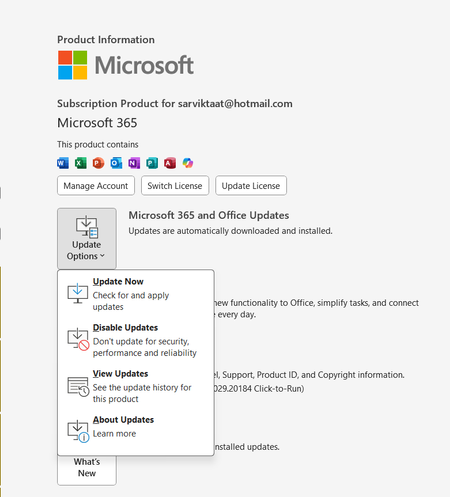
I am currently experiencing serious problems with Office 365 on an HP Elitebook ultra G1q notebook, Snapdragon® X Elite X1E-78-100 processor, Windows 11 Pro operating system. Outlook does not refresh, it takes a long time to send or receive emails, Microsoft Teams slows down and the screen freezes at times. I have AI completely disabled, but I am told that I need to get a version of Office 365 for ARM64. The thing is, it is supposed to install automatically when it detects that it is a Snapdragon processor, but when we check the installed version, it does not mention anywhere that it is for ARM64. This is happening with almost all notebooks of the same model in the company. We have other HP notebooks with Intel processors and this does not happen; everything is perfect there. Does anyone know how I can force the installation of Office 365 for ARM64? Thank you. Actualmente tengo serios problemas con el Office 365 desde una Notebook HP Elitebook ultra G1q, Procesador Snapdragon® X Elite X1E-78-100, Sistema operativo Windows 11 Pro. El Outlook no refresca, se demora un buen rato en enviar correos o recibirlos, Microsoft Teams se pone lento y se congela la pantalla por momentos. Tengo la IA totalmente deshabilitada pero me dicen que debo conseguir una versión de Office 365 para ARM64, el tema es que se supone debe instalarse en automático cuando detecte que se trata de un procesador Snapdragon, pero cuando comprobamos la versión instalada no menciona para nada, por ningun lado que es para ARM64. y esto esta sucediendo con casi todas las notebooks del mismo modelo en la compañia. Tenemos otras notebooks HP con Intel y esto no ocurre, alli todo perfecto. Alguein sabe como puedo forzar la instalación de Office 365 para ARM64? gracias9.9KViews0likes1Comment