microsoft 365 defender
111 Topics
Windows defender is having a lot of problems.
So I have a Microsoft 365 Family subscription, and Dark Web Monitoring shows 0 monitored items. SSN verification fails and advises you to contact support. I was also unable to delete the monitored information. I’m receive the error "Something went wrong, try again in a bit." The issue occurs in the Microsoft Defender app, web portal, and across devices. Is there anyway that I can get help with this?
No way to automate restoring user‑reported emails after “no threats found”
When a user reports an email as phishing in Defender, the message gets moved to Deleted Items. After we triage it, if we mark it as “no threats found,” there’s no way to push it back to the user’s inbox as part of that workflow. That creates a bit of a broken experience: User is told the email is safe with our customized email response, but has to go find it themselves In a lot of cases they don’t (Outlook search won’t find it) We end up with follow‑ups like “where did it go?” Technically we could restore the email as part of our triage process, but that just shifts the effort onto the SOC. It doesn’t scale, and it’s not really the right place for that work. We have tried to create an automation to do this, but we have not been able to create an advanced hunting query based on our triage result that can then trigger an action to restore it to the mailbox. So we end up choosing between: Users having a bad experience, or Analysts doing manual mailbox work Neither is ideal. Other platforms (like Proofpoint) handle this end‑to‑end — once something is confirmed clean, it can be returned to the user automatically. Right now Defender stops at classification instead of completing the workflow. Is there a reason this isn’t wired in, or anything on the roadmap to address it?
Enable per‑user language selection for phishing simulation emails and landing pages
We use Attack Simulation Training to deliver phishing simulations to a global, multilingual user base. While Microsoft Defender supports multi‑language content, phishing simulation emails and landing pages are currently delivered in a single selected language per campaign. We are requesting a feature that allows phishing simulation emails and associated landing pages (including credential‑harvest pages) to automatically render in each user’s preferred language, based on: Outlook mailbox language settings, and/or Microsoft Entra ID user language preferences This capability would: Improve realism and accuracy of phishing simulations Ensure users experience simulations in the same language they normally work in Improve behavioral measurement in global organizations Reduce the need to create and manage multiple parallel simulations by language Providing consistent, per‑user language alignment across simulation emails, landing pages, and follow‑up training would significantly enhance the effectiveness of Attack Simulation Training for large, multilingual enterprises.188Views2likes2CommentsEnable automatic per‑user language selection for Defender training modules
We use Attack Simulation Training and Microsoft Defender training modules as part of our security awareness program for a global audience. Currently, training content is assigned in a single language per campaign, even though users already have preferred language settings defined in Outlook and Microsoft Entra ID (Azure AD). This creates challenges for multinational organizations and often requires duplicating campaigns or accepting that some users receive training in a non‑preferred language. We are requesting a capability that allows Defender training modules to automatically display in each user’s preferred language, based on: Outlook mailbox language settings, and/or Microsoft Entra ID user language preferences Enabling per‑user language selection would: Improve comprehension and learning outcomes Increase training effectiveness for non‑native speakers Reduce administrative overhead and duplicated campaigns Align Defender training with existing Microsoft 365 localization behavior Defender already supports training content in multiple languages. Allowing dynamic language delivery per user would significantly improve scalability and usability for enterprise security awareness programs.
Do XDR Alerts cover the same alerts available in Alert Policies?
The alerts in question are the 'User requested to release a quarantined message', 'User clicked a malicious link', etc. About 8 of these we send to 'email address removed for privacy reasons'. That administrator account has an EOM license, so Outlook rules can be set. We set rules to forward those 8 alerts to our 'email address removed for privacy reasons' address. This is, very specifically, so the alert passes through the @tenant.com address, and our ticketing endpoint knows what tenant sent it. But this ISN'T ideal because it requires an EOP license (or similar - this actually hasn't been an issue until now just because of our customer environments). I've looked at the following alternatives: - Setting email address removed for privacy reasons as the recipient directly on the Alert Policies in question. This results in the mail going directly from microsoft to our Ticketing Portal - so it ends up sorted into Microsoft tickets. and the right team doesn't get it. SMTP Forwarding via either Exchange AC User controls or Mail Flow Rules. But these aren't traditional forwarding, and they have the same issue as above. Making administrator @tenant.com a SHARED mailbox that we can also login to (for administration purposes). But this doesn't allow you to set Outlook rules (or even login to Outlook). I've checked out the newer alerts under Defender's Settings panel - XDR alerts, I think they're called. Wondering if these can be leveraged at all for this? Essentially, trying to get these Alerts to come to our external ticketing address, from the tenants domain (instead of Microsoft). I could probably update Autotask's rules to check for a header, and set that header via Mail Flow rules, but.. just hoping I don't have to do that for everyone.Impersonation Protection: Users to Protect should also be Trusted Senders
Hey all, sort of a weird question here. Teaching my staff about Impersonation Protection, and it's kind of occurred to me that any external sender added to 'Senders to Protect' sort of implicitly should also be a 'Trusted Sender'. Example - we're an MSP, and we want our Help Desk (email address removed for privacy reasons) to be protected from impersonation. Specifically, we want to protect the 'Help Desk' name. So we add email address removed for privacy reasons to Senders to protect. However, we ALSO want to make sure our emails come thru. So we've ALSO had to add email address removed for privacy reasons to Trusted Senders on other tenants. Chats with Copilot have sort of given me an understanding that this is essentially a 'which is more usefuI' scenario. But CoPilot makes things up, and I want some human input. In theory, ANYONE we add to 'trusted senders' we ALSO want protected from Impersonation. Anyone we protect from Impersonation we ALSO want to trust. Copilot says you SHOULDN'T do both. Which is better / more practical?
I have absolutely no idea what Microsoft Defender 365 wants me to do here
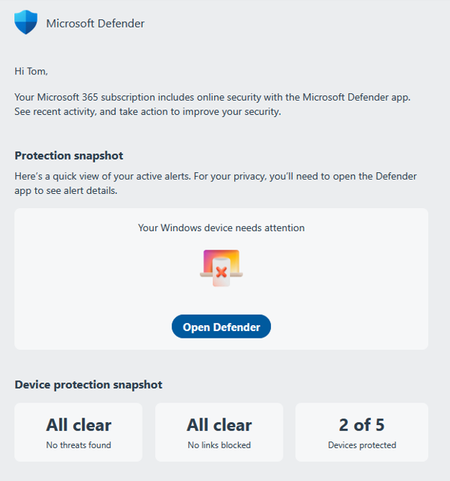
The process starts with an emal: There's more below on the email - an offer for credit monitoring, an option to add another device, an option to download the mobile app - but I don't want to do any of the, so I click on the "Open Defender" button, which results in this: OK, so my laptop is the bad boy here, there's that Status not of "Action recommended", with no "recommendations" and the only live link here is "Add device", something I don't need to do. The only potential "problem" I can even guess at here is that Microsoft is telling me that the laptop needs updating. Since I seldom use the laptop, only when traveling, I'd guess the next time I'd fire it up the update will occur, but of course I really don't know that's the recommended action it's warning me about, do I? You'd expect that if something is warning you "ACTION NEEDED!!!" they'd be a little more explicit, wouldn't you?279Views0likes3CommentsTenant Forwarding - Trusted ARC Sealer
As part of a tenant to tenant migration we often need to forward mail from one tenant to another. This can cause some issues with email authentication verdicts on the destination tenant. Is it possible or best practice to configure another tenant as a Trusted ARC sealer to help with forwarded email deliverability?user-reported phishing emails
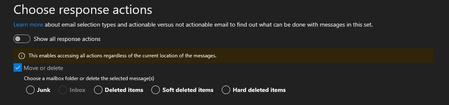
Dear Community I have a technical question regarding user-reported emails. In Defender, under “Action and Submissions” -> “Submissions,” I can see the emails that users have reported under the “user reported” option. There, we have the option to analyze these emails and mark them as “no threats found,” “phishing,” or “spam.” The user is then informed. Question: Do these reported emails remain in the user's inbox when they report them? If not, do we have the option to return these reported emails to the user's inbox with the “No threats found” action? Because I don't see this option. In another tenant, under “Choose response Action,” I see “move or delete,” but the “inbox” option is grayed out. Why is that? Thank you very much!Marking Quarantine Notice senders as safe for entire tenant
Our users get quarantine notices weekly. They're configured to come from email address removed for privacy reasons (the domain specific to tenant).. sometimes they come from email address removed for privacy reasons anyways, but this is fine. The thing is, I end up with a LOT of users who end up receiving these in their junk mail. We have a lot of tenants - I don't really have the time to keep checking them, taking action on mis-junked items. Most stuff is configured to go to quarantine anyway. What's the best way to allow these senders? The IB Anti-Spam safe-senders component is not Secure-Score recommended, and we try to keep these scores high. But the tenant allow/block list allows a max of 45days since last use. There's so many options, I'm a little confused as to what's 'right' Thanks