microsoft 365 copilot
562 Topics
Copilot OneDrive and Teams Integration useless for PDFs of scanned documents
Hi, I have this ubiquitous Copilot button everywhere in OneDrive, Teams, SharePoint, you name it. But Everytime I use the suggested „Summarise this file“ button of a PDF document that contains scanned pages Copilot complains that the images are very low resolution and nothing meaningful can be extracted. But when I let Copilot analyse the exact same file in the pure Copilot view everything works fine. After some lengthy conversations with Copilot it admits, that it only access the complete file when the Copilot view is used. In all other views using Copilot only works on the preview images that are created of the file when uploaded. That explains why the images to analyse are of a too low resolution to do OCR and why on some files only the first page gets processed. Why is Copilot integrated in that way? I expect Copilot to always work on the original file for any request I do. Especially when Copilot is promoted everywhere and I’m constantly nagged to get a summary or FAQ of a selected file. The way it currently works would be better removed or -better- just redirect with the selected file into Copilot view. Cheers11Views0likes0Comments
Cowork tab appearing despite Admin settings
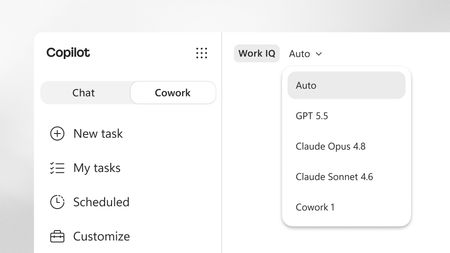
The Cowork tab in the Copilot App has started to appear for some of our Basic and Premium users. I'm not sure why this is happening as we have not setup any usage-based billing and explicitly disabled the following admin setting: Despite this, the users are able to click on the Cowork tab and enter a prompt. When it is submitted, Copilot tries to login, fails and continues trying to authenticate over and over again. I also cannot find the Copilot Cowork agent (1.3.0) in the Agent Registry to block it.3Views0likes0CommentsCopilot Studio Preview : MCP Agent works in Teams but not in Microsoft 365 Copilot Chat
I’m currently testing the new preview version of Copilot Studio and I ran into a behavior I’d like to validate with the community. I created a custom Copilot agent using the new interface, connected to a Microsoft Learn MCP server (for retrieving official documentation), and deployed it across both: - Microsoft Teams - Microsoft 365 Copilot (Copilot Chat) Configuration-wise, everything seems correctly set up: - Agent published - Channel enabled for Teams and Microsoft 365 Copilot - Permissions and access configured - MCP tool working properly Here is the key point: - In Microsoft Teams: The agent works perfectly. It correctly calls the MCP server, retrieves Microsoft Learn documentation, and returns accurate responses. - In Microsoft 365 Copilot Chat: The same agent does not work at all. No MCP call is triggered, and no response is generated from the agent. Instead, Copilot returns the following message: "Sorry, I am not able to find a related topic. Can you rephrase and try again?" Even with: - Explicit invocation using @AgentName - Very simple prompts - Minimal instructions - Added knowledge sources (for testing) The behavior remains the same. At this point, it looks like: - The agent is accessible and deployed - But it is not actually executed by the Microsoft 365 Copilot runtime Has anyone experienced the same behavior with agents in the new Copilot Studio preview, especially when using MCP tools? Is there any known limitation or requirement for agents to be properly executed inside Microsoft 365 Copilot Chat (compared to Teams)? Thanks in advance for your feedback.127Views0likes2CommentsMicrosoft Power Platform community call - June 2026
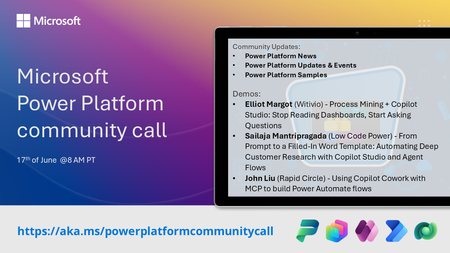
💡 Power Platform monthly community call focuses on different extensibility options for builders, makers and developers within the Power Platform. Typically demos are from our awesome community members who showcase the art of possible within the Power Platform capabilities. 👏 Looking to catch up on the latest news and updates, including cool community demos, this call is for you! 📅 On 17th of June we'll have following agenda: Power Platform Updates & Events Latest on Power Platform samples Elliot Margot (Witivio) - Process Mining + Copilot Studio: Stop Reading Dashboards, Start Asking Questions Sailaja Mantripragada (Low Code Power) - From Prompt to a Filled-In Word Template: Automating Deep Customer Research with Copilot Studio and Agent Flows John Liu (Rapid Circle) - Using Copilot Cowork with MCP to build Power Automate flows 📅 Download recurrent invite from https://aka.ms/powerplatformcommunitycall 📞 & 📺 Join the Microsoft Teams meeting live at https://aka.ms/PowerPlatformMonthlyCall 💡 Building something cool for Microsoft 365 or Power Platform (Copilot, SharePoint, Power Apps, etc)? We are always looking for presenters - Volunteer for a community call demo at https://aka.ms/community/request/demo 👋 See you in the call! 📖 Resources: Previous community call recordings and demos from the Microsoft 365 & Power Platform community YouTube channel at https://aka.ms/community/videos Microsoft 365 & Power Platform samples from Microsoft and community - https://aka.ms/community/samples Microsoft 365 & Power Platform community details - https://aka.ms/community/home93Views0likes1Comment
Can Copilot help summarize employee feedback and review data?
My boss asked me to look into whether Copilot can help managers prep for performance reviews. Like, instead of reading through months of feedback and notes manually, could Copilot pull together a summary of key themes from peer feedback, goal progress, and past 1:1 notes? If we keep all of these on Sharepoint, can we prompt Copilot to automatically access and summarize them? Do we need to build something custom for this or are there apps in the M365 ecosystem that already have AI built in for this kind of thing?66Views1like4Comments
CoPilot Agent for copying and renaming Excel spreadsheets
Hi- Does CoPilot have the functionality to build copying and renaming Excel spreadsheets into an agent? I want to design an agent to take an excel file and copy the contents into another spreadsheet by use of a CoPilot prompt. These files would be resident in a Teams channel.42Views0likes1Comment