microsoft 365 copilot admin
98 Topics
Cannot Access Cowork
Hi, I'm based in the UK and have a M365 Copilot (Premium) Licence. I am trying to use Cowork and submitted a request a few weeks ago - it now states 'Request Sent'. I'm a Global Admin and have been all around the various Admin Centers trying to find where I can approve the request/enable Cowork and setup Copilot credits. Just wondering if anyone can point me in the right direction. Thanks.68Views0likes1Comment
Recent Bug or issue i got for last 3 days when i am using Chat sessions.
Recent Bug or issue i got for last 3 days when i am using Chat sessions after creating New Projects and saving outside chats there. But in New chats when i opened and used attachment to it from Notta Memo it is clearly working its taking transcript and giving Summary and details i asked. Please help if any one faced same issue and you guys got any resolution in fixing this issue. Thanks in advance.28Views0likes0Comments
Seeking Guidance on Microsoft 365 Copilot Adoption Support for an Enterprise Customer
Hi Everyone, We are a newly enrolled Microsoft partner currently working with a customer to accelerate Microsoft 365 Copilot adoption across their organization. We are exploring how we can best support the customer and would like to understand whether there are any Microsoft programs, resources, partner managers, or engagement channels available to help us collaborate with Microsoft on Copilot adoption opportunities. Could anyone advise on: The recommended Microsoft channel/team to engage for an enterprise Copilot adoption opportunity Any Microsoft programs or resources available to support customer adoption How partners can collaborate with Microsoft for customer-specific Copilot adoption support Any guidance on the appropriate Microsoft team, program, or point of contact would be greatly appreciated. Thank you!50Views0likes0Comments
Disabling Agent Creation for End Users with Copilot for Microsoft 365
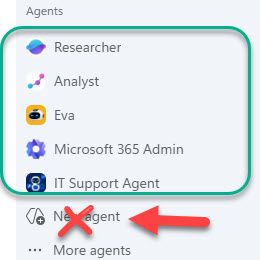
Hello! I am an IT admin at my organization, and we recently rolled out Copilot for Microsoft 365 for all end users. I would like our end users to be able to access agents published by my organization and Microsoft (Analyst, Researcher, etc.) but I do not want them to be able to create agents in Copilot Studio OR Agent Builder. We have disabled Copilot Studio at the license level, but our end users are still able to create agents in the M365 Copilot app with the "New Agent" button. To summarize, I want our users to be able to access Agents created by our organization and Microsoft, but I do not want them to be able to create any agents of their own at this time. Is there a way to do this? Thank you in advance, stevenwagner544Views0likes8Commentsdeactivate the Microsoft Copilot Consumer App
Hi support .. would like to deactivate the Microsoft Copilot Consumer App while ensuring that Microsoft 365 Copilot (work/enterprise) continues to function normally for users. Here is my Questions Is it possible to disable only the Copilot Consumer App while keeping Microsoft 365 Copilot fully functional? If this is supported, what is the recommended Microsoft approach to achieve this? Are there any known limitations or potential impacts on Microsoft 365 Copilot or other Microsoft 365 services after disabling the Consumer App? Is this configuration officially supported by Microsoft? noticed that in Microsoft Defender for Cloud Apps (Cloud App Catalog), both the Copilot Consumer App and Microsoft 365 Copilot appear as Sanctioned automatically through the App Connector. Is this expected behavior, and can the Consumer App be managed independently without affecting Microsoft 365 Copilot?123Views0likes2CommentsCopilot API for usage
From the microsoft admin backend it is possible to download usage from copilot, so it is possible to see how many prompts users have made etc. But i struggle to find an API that support that lookup. If have found API that show last activity date - but need an API that shows how many prompts etc has been used. I don´t want to see what is prompted of course - but just to show amount of prompts, so we can verify how much usage there is and make some automation in case copilot is not used, as license then can be removed154Views0likes2CommentsCopilot pain points....
Guys… seriously… we need some improvements here. I’m not asking Copilot to solve quantum physics or decode alien transmissions. I’m asking a Microsoft program for help with a Microsoft program. You’d think that would be the one scenario where Copilot would shine, right? Like, “Ah yes, my home turf, allow me to demonstrate competence.” But no. I can’t even get Copilot to correctly explain how to do basic SharePoint tasks. BASIC. As in, “click the thing, then click the other thing.” Instead I get a TED Talk about SharePoint philosophy and a guided meditation on patience. And then there’s the folder comparison fiasco. I want Copilot to do something so simple it should practically be a reflex: Compare two folders on my hard drive and tell me if they’re identical. Copilot’s response? “Absolutely, I can do that!” Followed immediately by an ever‑expanding scavenger hunt of things I apparently need to do first. It’s like asking someone to hand you a screwdriver and they say, “Sure, but first you’ll need to assemble this IKEA shelving unit, install three dependencies, sacrifice a goat, and agree to a quest.” I’m glad to hear you’re merging all the copilots into one “super Copilot.” Great idea. Fantastic. But let’s be honest — I’m praying the one that survives is the personal Copilot, because Copilot 365… whew. That thing feels like it was built by a committee that communicates exclusively through interpretive dance. And don’t even get me started on the wrapper versions. Those are like Copilot wearing a Halloween costume of itself, but the costume is made of cardboard and disappointment. And by the way — I’m STILL waiting for Copilot to create an app or program that automatically files my Outlook emails into folders. This is not a moon landing. This is not a Mars rover. This is not a Nobel Prize category. This is a simple, everyday, normal-person task. Yet somehow Copilot treats it like I’ve asked it to build the next Windows release from scratch using only a spoon and positive thinking. Come on, guys. We love the vision. We love the potential. But the basics need to work before the magic tricks do.79Views1like1CommentUnderstanding Microsoft 365 Copilot Risk Surface and Mitigations
Microsoft 365 Copilot acts on the access users already have. It does not grant new permissions — it is a force multiplier that makes existing access faster and easier to discover, aggregate, and act on across Microsoft 365. That speed and accessibility can also amplify existing security and governance gaps. In environments with overshared content, excessive permissions, or inconsistent governance, users may gain faster access to sensitive information than organizations realize. It’s a shift that carries important security implications organizations should understand before scaling deployment. Customers with Microsoft 365 E5 licensing may already have access to many of the tools that can help identify and reduce Copilot-related risk, but licensing alone does not reduce exposure. What’s often missing during early Copilot deployments is a clear understanding of the risk surface itself: what data is exposed, who can access it, and through which vectors.
Company-Wide Copilot Prompt Library (Enterprise)
Question Regarding Organizational Prompt Import Fields I'm working on importing prompts into the Microsoft 365 Copilot Organizational Prompts library using the CSV import process. According to the documentation, each prompt can include the following fields: Title Display Prompt Prompt Language Task Type Department Supported Apps Description My question is: Which of these fields accept administrator-defined free-form text, and which fields must use predefined Microsoft-supported values when importing prompts via CSV? For example, the documentation appears to indicate that: Language uses supported locale values (such as en-US, es-ES, etc.). Task Type uses supported task type values (such as Analyze, Create, Edit, etc.). However, it isn't clear whether fields such as Department and Supported Apps also require predefined values, or if administrators can enter their own custom values. Specifically, I'm trying to determine: Which fields accept free-form text? Which fields require values from a Microsoft-defined list? For any fields that require predefined values, where can the complete list of valid values be found? Reference: https://learn.microsoft.com/en-us/microsoft-365/copilot/organizational-prompts#prompt-fields-reference Any input would be very much appreciated! Thank you!175Views0likes1CommentToken Limit Exceeded ?
Hi All, Please check out my latest blog on “Token Limit Exceeded” would love to hear your thoughts https://techcommunity.microsoft.com/blog/1c769f9e-c0b0-45a7-af52-fecceca10bb2/token-limit-exceeded-whats-actually-going-on-and-what-to-do-about-it-/4536271167Views2likes2Comments