microsoft 365 admin center
18 Topics
Conditional Access enforces MFA but Service Account still ask to secure account
Hi, I've setup Conditional Access policies to enforce MFA. But it excludes a group for service accounts. Whenever we login to a Service Account, they all ask to secure your account. Hit next > It says no MFA options are available > Skip. Both our own MFA conditional access policy and MS per-user conditional access policy excludes this group. The Legacy per-user authentication policy has all accounts disabled there in favour of the conditional access policy. We must be missing something here. Some of these are shared inboxes, others regular user accounts. Many of these services requires login through the typical Microsoft sign in screen to authorize access. Some does not support OpenID. So how do I 100% exclude service accounts from MFA? And how do I get rid of this popup to secure these accounts when it says no MFA options are available? TIA1.2KViews0likes2Comments
Can't access Microsoft Authenticator for business accounts
Hello. I am the tech support for a small church, where I am the admin for our MS 365 accounts, which are set up as "business accounts". I have been using Microsoft Authenticator for MFA for years. Recently I switched to a new phone and installed Microsoft Authenticator. All of my personal Authenticator accounts transferred over just fine, but all of the church's business accounts say "Scan the QR Code provided by your organization to finish recovering this account". The thing is, I am the "organization" and I don't know how to generate any QR code to recover the accounts. It was suggested that I could do something about this by logging into my Microsoft 365 administrator account, but when I try to log into my admin account, the only MFA option is "enter the code from Microsoft Authenticator". It's not offering a text or alternate email, only Microsoft Authenticator, which is what I'm locked out of. So I'm stuck in a loop. I opened a ticket with Microsoft Support nine days ago. I have received one phone call since then. The support person insisted that they needed to talk to the account's "alternate administrator", which I set up as my pastor, who is pretty computer savvy but not a deep IT person. They tried to call him one time, but he was not available to answer right then. There has been no communication since then. I'm hoping someone in this group can help me figure this out.858Views2likes4Comments
Sole Global Admin locked out - lost MFA device, SSPR phone verification returns error
Hello, I am the sole Global Administrator of a Microsoft 365 Business Standard tenant and I am completely locked out of the account. What happened: - My phone with Microsoft Authenticator was physically destroyed. - I installed Authenticator on a new phone. My personal account restored from cloud backup, but the work account only appears as a "connected account" - it shows no TOTP code and receives no push notifications. Push requests still go to the old device. What I tried while my admin session was still alive: - Entra ID > per-user MFA > "Require selected users to provide contact methods again" - saved successfully. - User > Authentication methods > "Require re-register multifactor authentication" - returned "Delete operation failed. Try this command again or delete them one by one in the user authentication methods blade." - The Authentication methods list for the user was EMPTY, and default sign-in method showed "No default". "Add authentication method" button was greyed out. - "Revoke sessions" - succeeded, but this also terminated my own admin session and signed me out of Outlook and OneDrive. - aka.ms/mfasetup cannot be reached because it requires a fresh MFA challenge. Self-service password reset (passwordreset.microsoftonline.com): - First verification via alternate email succeeds every time (I have full access to that mailbox). - Second verification fails: both "Text my mobile phone" and "Call my office phone" return "Sorry, we ran into a problem contacting you." I tried +370xxxxxxx, 370xxxxxxx and 8xxxxxxxx formats - same error every time. This looks like a service-side failure, not a formatting issue. - Sign-in Helper now also reports "Account blocked due to multiple incorrect password attempts." Error codes seen: 500121 and AADSTS50133. I have tried calling Microsoft support in several countries. The automated system either asks for an internal extension number or the AI assistant disconnects the call before reaching a human. There is no second Global Admin and no recovery codes. I can provide the tenant ID, user unique identifier, subscription order number and proof of access to the billing email address privately. Requesting escalation to the Data Protection team for admin account recovery. Any guidance on how to reach a human agent would be greatly appreciated. Thank you.643Views1like4Comments
Stuck in an authenticator loop
I have a 365 Business account. Haven't logged in for a while due to reasons, i was just starting up as a sole trader. Anyway decided now is the time to resurrect it and get up and running, except Authenticator doesn't work because I changed my phone, and my back up email is out of date, and no longer exists. I have tried the support web chat which wants to send a code to authenticator or my back up email. Just called the help line that referred me to the web chat which doesn't work, I couldn't get past the bot. So I am stuck. Any recovery options does not recognise my log in details, i think this is because its been a while since I logged in (I still pay but ....) but I can't resurrect it because I don't have a way of getting a code due to authenticator/back up email as cited above. I am really at a loss as to what to do. I don't want to abandon it and start again as there are documents in my one drive that I need. Can anyone help please. (I think all that needs to happen is an update to my back up email and then I can get going). I am the sole administrator on my business account.502Views1like3Comments
Strange redirect when signing in - phishing?
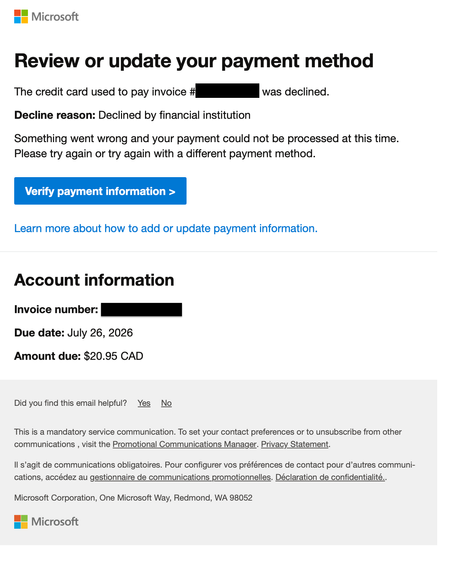
I just restarted my Business Standard 365 license today and this afternoon got an email from email address removed for privacy reasons with the following content: But when I clicked on the 'Verify payment information' button I am redirected to a page with the following URL: https://admin.cloud.microsoft/Error/UnAuth?errorCode=100014 looking like this: This looks highly suspicious (Times New Roman font, URL with no top-level extension such as .com, unusual graphics). Is this legitimate or a phishing attempt? Now, when I try to login to admin.microsoft.com to check my account the same suspicious "Sign out and login with a different account" page pops up repeatedly.755Views0likes6CommentsM365, Entra ID, Google Password Manager Passkeys
I went into my tenant, opened the Entra ID Admin, and enabled passkeys (fido2) authentication. I want to use Google Password manager since it will work across al my devices/platforms (Windows, Mac, Android, iOS). I went into the security settings for Microsoft 365 account to add an authentication method. I am happy to say that "passkey" is listed as an option, so I created a new passkey in Google Chrome/Password Manager and named it after my userid in the tenant. To test it, I logged out and attempted to log in using the passkey. The option came up, but Microsoft complained it was not a valid key. I tried again stating that I would my phone for the key and scanned the QR code but my phone said there is no passkey I would need to create one. How do I solve this? BTW: I did add Google's AAGUID in the Entra admin and allowed it but that did not solve the issue.Solved568Views0likes2Comments
Vaihdoit uuteen puhelimeen. Authenticator ongelma
Vaihdoit uuteen puhelimeen. Microsoft Authenticator ei ole enää saatavilla vanhalla laitteellasi. Et voi kirjautua Microsoft 365 -työtilillesi, koska MFA-vahvistus vaaditaan. Sinulla ei ole pääsyä mihinkään vaihtoehtoiseen todennusmenetelmään. Tarvitset apua suomeksi, jos mahdollista.453Views0likes1Comment
Unable to access Global Admin, username not recognised, need tenant recovery billing active
Unable to access Global Admin account for Microsoft 365 tenant. Username not recognised and I need tenant recovery. Billing is still active. I am the billing owner of a Microsoft 365 Business subscription for yutoriacupuncture.com.au but I have lost access to all Global Admin accounts. The original admin account email is returning “username may be incorrect”. No other admin or business emails are recognised. I have a business email associated with the admin account i can still log into. I recently briefly cancelled and reinstated my domain which may have affected tenant linkage. I also recently joined a university Microsoft 365 organisation which may be affecting sign-in routing? I have tried login.microsoftonline.com, admin.microsoft.com, password resets, and incognito browsers with no success. I have tried contacting support via phone and email but keeps cutting out, saying it can't identity me, or sends me into a loop hole with the support chat bot. I need Microsoft to escalate this to tenant recovery or Data Protection team to restore Global Admin access using billing and domain ownership verification.168Views0likes2CommentsMicrosoft Feedback Portal account is not working
I changed my Microsoft password a year ago, and it updated everywhere other than the Feedback Portal. As a result, I get an error when I try to login, or do anything on the page. Microsoft account support's suggestion was to login to the Feedback Portal which is insane given I'm having issues accessing it. How can I get this issue resolved? I've got three separate support tickets now and they keep asking me to wait 24 hours to get the issue resolved. Can someone from the Feedback Portal team please contact me to resolve this?" This is what Microsoft Support have said: "understand your frustration, and yes—this is an account‑related issue because the Feedback Portal is still tied to your old alias, which causes login conflicts and forces you out. Your Microsoft account itself signs in correctly, but the Feedback Portal is pulling outdated identity data that you cannot update on your own. Since you cannot access the Portal to submit feedback, directing you back there is not a workable solution. What you need is for Support to escalate this to the internal Identity/Feedback Platform engineering team so they can manually correct the outdated alias mapping on the backend. In this situation, the Feedback Portal and Tech Community teams are the ones who manage and maintain that specific platform. Because the issue appears on the Feedback Portal side—even though your Microsoft account is working normally—only their dedicated team can make the necessary corrections on their end. That’s why we are guiding you to connect with them through the links provided: https://techcommunity.microsoft.com/ or https://feedbackportal.microsoft.com/feedback. They will be able to review the portal‑specific account data and assist you further. I understand why this is frustrating. Since you’re unable to stay signed in to the Feedback Portal, I completely see why posting there isn’t possible for you. However, I do need to be transparent: I’m not able to escalate this issue directly to the Feedback Portal team, as they don’t provide internal escalation channels for us and only accept requests through their own platform. "218Views0likes2CommentsCase 2512040040001886 - Cannot Access Account
Since the 4th of December we have been patiently waiting on MS Tech support to assist on resolving our Case with no success endless calls and endless promises with no luck. How do you proceed in using Microsoft for a Business if they don't deliver on the support. My business is taking the brunt of it. I suppose another call holding for hours and another Support person promise a solution. No other methods to log complaints as you cannot log into your Account Portal.165Views0likes2Comments