memory
56 Topics
Hyper-V Ubuntu VM: Memory Demand Different at Hyper-V and OS Level
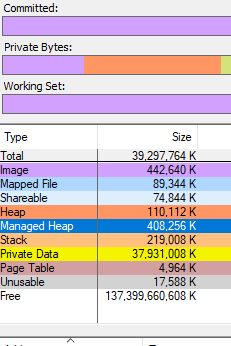
Hello all, Looking for advice and insight for a strange problem we are experiencing. We have a cluster of Windows Server 2025 hosts, on which we are using Hyper-V manager to run mostly Windows VMs. To access these VMs, we are using Apache Guacamole which is hosted on a Ubuntu VM on our cluster. We originally assigned 32GB memory to this VM. Recently, we have noticed an increased memory demand for this VM at the Hyper-V level which prompted us to increase the assigned memory of the VM to 64GB. Despite this, the memory demand has continued rising despite no apparent change in the usage of Guacamole. When logging into the VM and observing the memory usage here, the VM is using no where near the amount that is assigned. As shown in the attached images which were taken at the same time: Memory Demand Hyper-V Level (And seems to be continuing to increase...): Memory Demand OS Level: This morning, the memory demand spiked to 95GB on Hyper-V but at OS level was only 12GB and we were forced to restart the VM. The biggest concern is where this discrepancy is coming from and the potential unnecessary disruptions that will be caused from having to restart/rebuild the VM. Has anyone experienced this sort of issue before and found a fix? Can anyone suggest how to debug this issue? TIA78Views0likes1Comment
Polybase - Enforce TCP/IP Protocol
Hello, We know Polybase service in SQL server by default makes use of shared memory protocol to connect SQL server (local). I would like to know if there is any way we can change or force the connections to make use of TCP / IP protocol. Any help would be appreciated.95Views0likes0CommentsBuild Enterprise-Ready AI Agents with the New Azure Postgres LangChain + LangGraph Connector
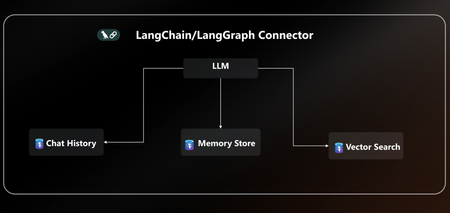
AI agents are only as powerful as the data layer behind them. That’s why we’re excited to announce native LangChain + LangGraph connector for Azure Database for PostgreSQL. With this release, Postgres becomes your single source of truth for AI agents, handling knowledge retrieval, chat history, and long-term memory all in one place. This new connector is packed with everything you need to build secure, scalable and enterprise-ready AI agents on Azure without the complexity. With EntraID authentication, DiskANN acceleration, vector store, and a dedicated agent store, you can go from prototype to production on Azure faster than ever. You can quickly get started with the LangChain + LangGraph connector today pip install langchain-azure-postgresql In this post, we’ll cover: How Azure Postgres connector for LangGraph can serve as the single persistence + retrieval layer for an AI agent New first-class connector for LangChain +LangGraph A practical example to help you get started Azure PostgreSQL as the single persistence + retrieval layer for an AI agent When building AI agents today, developers face a fragmented stack: Vector storage and search require a library, service or separate database. Chat history & short-term memory need yet another data source. Long-term memory often means bolting on yet another system. This sprawl leads to complex integrations, higher costs, and weaker security, making it hard to scale AI agents reliably. The Solution The new Azure Postgres connector for LangChain + LangGraph transforms your Azure Postgres database to the single persistence + retrieval layer for AI agents. Instead of working on a fragmented stack, developers can now: Run embeddings + semantic search with built-in DiskANN acceleration in the same database that powers their application logic. Persist chat history and short-term memory and keep agent conversations grounded via seamless context retrieval from data stored in Postgres. Capture, retrieve, and evolve knowledge over time with a built-in long-term memory without bolting on external systems. All in one database, simplified, secure, and enterprise ready. Postgres becomes the persistent and retrieval data layer for your AI agent. Built for Enterprise Readiness: LangChain + LangGraph Connector This release unlocks several new capabilities that make it easy to build robust, production-ready agents: Auth with EntraID: Enterprise-grade identity to securely connect LangChain + LangGraph workflows to Azure Database for PostgreSQL within a centrally managed security perimeter based on identity. DiskANN & Extensions: First-class support for faster vector search using pgvector combined with DiskANN indexing, enabling support for high-dimensional vectors and cost-efficient search. Additionally, helper functions ensure your favorite extensions are installed. Native Vector Store: Store and query embeddings, enabling semantic search and Retrieval-Augmented Generation (RAG) scenarios. Dedicated Agent Store: Persist agent state, memory, and chat history with structured access patterns, perfect for multi-turn conversations and long-term context. Together, these features give developers a turnkey persistence solution for building reliable AI agents without stitching together multiple storage systems. Using LangGraph on Azure Database for PostgreSQL Using LangGraph with Azure Database for PostgreSQL is easy. Enable the vector & pg_diskann Extension: Allowlist the vector and pg_diskann extension within your server configuration. Import LangChain + LangGraph connector pip install langchain-azure-postgresql pip install -qU langchain-openai pip install -qU azure-identity Login to Azure, to your Entra ID Run az login in your terminal, where you will also run the LangGraph code. az login To get started, you need to set up a production-ready vector store for your agent in a few lines of code. # 1. Auth: Securely connect to Azure Postgres connection_pool = AzurePGConnectionPool(azure_conn_info=ConnectionInfo(host=os.environ["PGHOST"])) #2. Create embeddings embeddings = AzureOpenAIEmbeddings(model="text-embedding-3-small") # 3. Initialize a vector store in Postgres with DiskANN vector_store = AzurePGVectorStore(connection=connection, embedding=embeddings) Use LangGraph to build a sample agent. Here’s a practical example that combines vector search and checkpointer inside Postgres: #4 Define the tool for data retrieval. def get_data_from_vector_store(query: str) -> str: """Get data from the vector store.""" results = vector_store.similarity_search(query) return results #5 Define the agent, checkpointer and memory store. with connection_pool.getconn() as conn: agent = create_react_agent( model=model, tools=[get_data_from_vector_store], checkpointer=PostgresSaver(conn) ) #6 Run the agent and print results config = {"configurable": {"thread_id": "1", "user_id": "1"}} response = agent.invoke( {"messages": [{"role": "user", "content": "What does my database say about cats? Make sure you address me with my name"}]}, config ) for msg in response["messages"][-2:]: msg.pretty_print() With just a few lines of code, you can: Uses the vector store backed by Postgres Enable DiskANN for semantic search Use checkpointers for short-term conversation history Learn More This is just the beginning. With native LangChain + LangGraph support in Azure PostgreSQL, developers can now rely on a single, secure, high-performance data layer for building the next generation of AI agents. 👉 Ready to start? All the code are available in the Azure Postgres Agents Demo GitHub repository. See how easy it is to bring your AI agent to life on Azure. 👉 Check out the docs for more details on the LangChain + LangGraph connector.4.6KViews3likes0Comments
Allocate Memory to Applicaitons in AVD
We've recently made a move from Citrix to MS AVD (windows 10 multisession). We've been told by a tech that AVD does not support the ability to assign memory/cpu per app. I am not an Azure tech and the searches I've done so far have come up empty. is there any definitive documentation from MS on this?Solved1.3KViews0likes1Comment
Memory Grants: The mysterious SQL Server memory consumer with Many Names
First published on MSDN on Jan 01, 2013 The Memory Consumer with Many NamesHave you ever wondered what Memory grants are? What about QE Reservations? And Query Execution Memory? Workspace memory? How about Memory Reservations?As with most things in life, complex concepts often reduce to a simple one: all these names refer to the same memory consumer in SQL Server: memory allocated during query execution for Sort and Hash operations (bulk copy and index creation fit into the same category but a lot less common).47KViews3likes0CommentsHuge memory consumption and lagging in Canary version
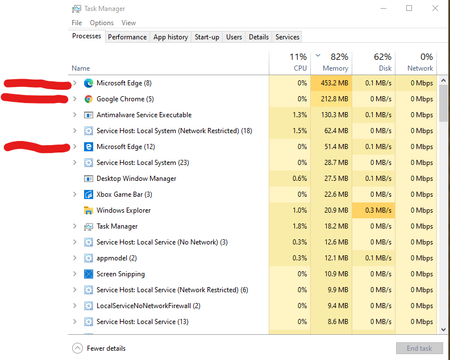
Deleted I have started to feel the browser lag significantly compared to previous versions. Version 83 was best in performance. The browser used to take just 150MB ram on startup and now it takes 30MB ram on startup. I am running Windows May 2020 update and canary version. The main performance lag occurs when I open a new tab - here it should not take more than 1% CPU and not disk usage and the current browser lags for a sec and then start showing the typed text in the Omnibox. Compared with previous version the performance has significantly deteriorated. Edge legacy was the best in memory management. Even chrome canary uses less ram now than edge canary. See the difference in the image below. Edge legacy has 2 have pdf's open and still consumes only 60MB. Edge canary consumes 453MB of ram with just 'new conversation' page on EdgeInsiderDiscussions. Chrome has same page opened but consumes only 212.8MB ram. Kindly improve upon ram management. You have full OS support. Your browser should not take more than 60~70 MB of ram on startup. I am feeling to switch back to chrome canary.1.9KViews2likes1Commenttermsvcs memory hog
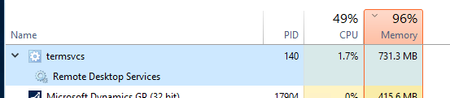
The process termsvcs on my server running Server 2016 continues to be a memory hog. We were consistently in the high 90% on memory usage, so I got rid of alot of unnecessary programs and services that we did not use hoping that would fix the issue. However, we continue to be in the high 90%, as termsvcs continues to grow in memory usage as I delete other programs and services. Is there any settings for termsvcs to help with memory usage? Thank you.Solved52KViews0likes11Comments
SQL Server 2016 crashes
Hey Guys, I am facing really weird issue with MS SQL 2016 crashes. Every so often there is a crash dump generated: SqlDumpExceptionHandler: Process 105 generated fatal exception c0000005 EXCEPTION_ACCESS_VIOLATION. SQL Server is terminating this process. This information is very vague so you cannot really determine what is the cause of it. I was playing with the dump file a bit An I got into the module that is causing the crash: ntdll!NtWaitForSingleObject+0x14: 00007ffb`d5255ac4 c3 ret SQL is working the cluster with 4 nodes. Two nodes are in one site and two other nodes are in the second site. Network is working fine. There are no error logs inside the system event viewer or Failover Cluster operational logs. I have noticed that we are running on older version of ODBC drivers which is 17.3.1.1 and the newest one is 17.4.2.1. Do you think this might be related? Regards, Wojciech1.7KViews0likes0Comments