mcp
58 TopicsBeyond text: Returning images and interactive apps from MCP servers
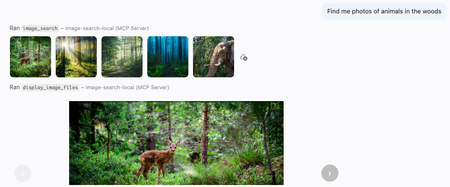
The Model Context Protocol (MCP) is becoming a richer foundation for agent experiences. Though most servers return plain text from their tool calls, MCP servers can also return binary results and provide interactive apps in clients that support those features, like VS Code. In this post, I'll use both capabilities to build an MCP server that searches a collection of nature photos with natural language, lets the model inspect the matching images, and presents selected results in an interactive gallery. The same approach can be adapted to product catalogs, digital asset managers, photo archives, and other multimedia libraries. Searching the image library Let's start with the search experience from a user's perspective, then dive into the code behind it. After connecting VS Code to the deployed MCP server, I can ask a question in GitHub Copilot about the images: Find landscape photos that show dramatic terrain and water. Show me the strongest options for a nature gallery. The GitHub Copilot agent realizes that it can use the image search MCP tool to answer that question. Here's what it looks like in the chat interface: The tool results include rendered thumbnails. I can click a thumbnail to inspect it directly in VS Code, much like a file in the workspace, while the Copilot agent can review both the image binary data and their textual descriptions. Behind the scenes, the agent called the image_search tool with these arguments: { "query": "dramatic natural landscapes with mountains and water", "max_results": 5 } The tool call returned a mix of binary files and structured data: a thumbnail for each matching image, plus JSON containing its filename, display name, and generated description. The thumbnails let a multimodal model inspect the actual pixels, while the structured content gives the agent compact metadata it can reference in later tool calls. { "results": [ { "filename": "Picture1.jpg", "display_name": "Picture1.jpg", "description": "A clear mountain lake surrounded by pine forest and steep rocky peaks." }, ...] } Returning images from MCP tools Now let's look at the code powering that tool call. I built the server with FastMCP, a popular Python framework for writing MCP servers. I declare each tool by decorating a function with mcp.tool() and annotating its arguments with types and helpful descriptions. FastMCP converts the function signature into a JSON Schema that helps GitHub Copilot decide when and how to call image_search : @mcp.tool(annotations={"readOnlyHint": True}) async def image_search( query: Annotated[ str, "Text description of images to find (e.g., 'sunlit mountain lake')" ], max_results: Annotated[int, "Maximum number of images to return (1-20)"] = 5) -> ToolResult: """ Search for images matching a natural language query. Returns the image data and descriptions. """ Inside the function, I use Azure AI Search to perform hybrid retrieval, combining the text query with its vector embedding. The target index contains multimodal image embeddings and LLM-generated descriptions. Then I retrieve the image from Azure Blob Storage and resize it to a thumbnail. The tool returns both the binary image data for the thumbnails and structured metadata with image details. results = await search_client.search(search_text=query, top=max_results, vector_queries=[VectorizableTextQuery(k_nearest_neighbors=max_results, fields="embedding", text=query)], select=["metadata_storage_path", "verbalized_image"]) blob_service_client = get_blob_service_client() files: list[File] = [] image_results: list[dict[str, str]] = [] async for result in results: url = result["metadata_storage_path"] description = result.get("verbalized_image") container_name, blob_name = get_blob_reference_from_url(url) blob_client = blob_service_client.get_blob_client(container=container_name, blob=blob_name) stream = await blob_client.download_blob() image_bytes = await stream.readall() image_format = get_image_format(url) display_name = os.path.basename(blob_name) file_basename = Path(display_name).stem thumbnail_bytes = resize_image_bytes(image_bytes, image_format) files.append(File(data=thumbnail_bytes, format=image_format, name=file_basename)) image_results.append({"filename": blob_name, "display_name": display_name, "description": description}) return ToolResult( content=files, structured_content={ "query": query, "results": image_results, }, ) Displaying selected images Finding the right images is only the first half of the experience. Once the agent has review the thumbnails and their generated descriptions, it needs a better way to present its favorite selected images to the user. That is where MCP apps come in. An MCP app renders an interactive webpage inside a sandboxed iframe in the MCP client. For this server, the app is a small, JavaScript-powered carousel for browsing the selected images. GitHub Copilot calls the display_image_files tool when it wants to render the carousel app: Returning apps from MCP tools Let's check out the code that powers that MCP carousel app. An app is associated with a tool, so I once again decorate a Python function with mcp.tool() . This time, I pass an AppConfig that points to the image viewer's HTML resource. @mcp.tool( app=AppConfig(resource_uri=IMAGE_VIEW_URI), annotations={"readOnlyHint": True}, ) async def display_image_files( filenames: Annotated[list[str], "List of image filenames to retrieve and display in a carousel."], descriptions: Annotated[list[str], "Image descriptions, in the same order as filenames."] ) -> ToolResult: """Fetch images by filename and render in carousel with filenames, descriptions, and file details.""" Inside the function, I fetch the selected images from Azure Blob Storage by filename, then return both the binary image data and structured content describing each image—its filename, generated description, MIME type, dimensions, format, and size. blob_service_client = get_blob_service_client() image_blocks: list[types.ImageContent] = [] image_results: list[dict[str, str | int]] = [] for image_index, filename in enumerate(filenames): blob_client = blob_service_client.get_blob_client(container=IMAGE_CONTAINER_NAME, blob=filename) stream = await blob_client.download_blob() image_bytes = await stream.readall() mime_type = get_image_mime_type(filename) with Image.open(io.BytesIO(image_bytes)) as image: width, height = image.size image_format = image.format image_blocks.append(types.ImageContent( type="image", data=base64.b64encode(image_bytes).decode("utf-8"), mimeType=mime_type)) image_results.append( { "filename": filename, "description": descriptions[image_index], "mimeType": mime_type, "width": width, "height": height, "format": image_format, "sizeBytes": len(image_bytes), } ) return ToolResult( content=image_blocks, structured_content={ "images": image_results, }, ) Next, I define the resource that serves the image viewer HTML page. I decorate a Python function with @mcp.resource , assign it a ui:// URL that is unique to the MCP server, and use its Content Security Policy (CSP) to declare which external domains the app may load resources from: @mcp.resource(IMAGE_VIEW_URI, app=AppConfig(csp=ResourceCSP(resource_domains=["https://unpkg.com"]))) def image_view() -> str: """Render images returned by display_image_files as an MCP App.""" return load_image_viewer_html() The final piece is the HTML that renders inside the app's iframe. This small page imports ext-apps, a JavaScript package that manages bidirectional communication with the MCP client. The JavaScript creates an App instance, defines the ontoolresult callback, and connects the app. That callback receives images from the tool result and renders them in the carousel. MCP apps can also send messages back to the host, although this read-only viewer does not need to. <!DOCTYPE html> <html lang="en"> <body> <div id="carousel"> <button id="prev" type="button" aria-label="Previous">‹</button> <div id="frame"></div> <button id="next" type="button" aria-label="Next">›</button> <span id="counter" aria-live="polite"></span> </div> <script type="module"> import { App } from "https://unpkg.com/@modelcontextprotocol/ext-apps@0.4.0/app-with-deps"; const app = new App({ name: "Image Viewer", version: "1.0.0", }); let images = []; let index = 0; const frame = document.getElementById("frame"); const prevBtn = document.getElementById("prev"); const nextBtn = document.getElementById("next"); const counter = document.getElementById("counter"); function show(i) { index = i; const img = images[index]; frame.innerHTML = ""; const el = document.createElement("img"); el.src = `data:${img.mimeType || "image/jpeg"};base64,${img.data}`; el.alt = "Blob image"; frame.appendChild(el); prevBtn.disabled = index === 0; nextBtn.disabled = index === images.length - 1; counter.textContent = images.length > 1 ? `${index + 1} / ${images.length}` : ""; } prevBtn.addEventListener("click", () => { if (index > 0) { show(index - 1); } }); nextBtn.addEventListener("click", () => { if (index < images.length - 1) { show(index + 1); } }); app.ontoolresult = ({ content }) => { images = (content || []).filter((block) => block.type === "image"); if (images.length > 0) { show(0); } }; await app.connect(); </script> </body> </html> Try it yourself! The full MCP server code is available in Azure-Samples/image-search-aisearch, along with a minimal image search website and an Azure AI Search indexing pipeline. The indexer uses an Azure OpenAI model to describe each image and Azure AI Vision to create multimodal embeddings. The repository includes a sample nature dataset, but you can replace it with any image collection. Here are more ways you could extend it it: Support more media types: add transcript search and a video or audio player app, while keeping the same search-then-display tool pattern. Enrich the metadata: index dates, locations, creators, accessibility text, or domain-specific tags alongside generated descriptions and embeddings. Optimize token consumption: images require many tokens, so returning too many thumbnails can quickly consume the model's context window. Experiment with smaller previews, higher compression, metadata-only search results, or a two-stage retrieval flow. Add authentication: many media libraries contain private or licensed assets. You can add key-based authentication or OAuth with the FastMCP auth providers, as I described in the MCP auth livestream. Once search results can carry both structured metadata and real media, an agent can do more than locate files: it can compare, curate, and present them in the same conversation. I hope you'll try the sample with a multimedia collection of your own!Building AI Agents from Zero to Production
Building AI Agents from Zero to Production Most agent demos stop at "it answered my question." Production doesn't. The gap between a notebook that calls an LLM and a governed, observable, multi-agent system your organisation can actually depend on is where real engineering happens, evaluation, deployment, data sovereignty, tool governance, and cross-team interoperability. Microsoft's open-source course Building AI Agents from Zero to Production walks that entire arc in seven lessons, using one realistic use case and the Microsoft Agent Framework (MAF) plus Microsoft Foundry. This post is a developer-focused tour of what it teaches, the architecture decisions behind each stage, and the code patterns that matter when you move from prototype to production. Who this is for AI engineers building their first or first production, agent system. Backend and full-stack developers integrating agents into real applications and CI/CD. Cloud architects who need data sovereignty, private networking, and governance around agent workloads. Technical leads deciding how to standardise tools and orchestration across multiple teams. The samples are Python 3.12+, served through Microsoft Foundry using GPT-5 series models (for example gpt-5.1 ). Lesson 4 adds a TypeScript/React frontend. You will want an Azure subscription and the Azure CLI. The AI Agent Development Lifecycle The course is organised around a lifecycle rather than a feature list. Each lesson is a stage, and each stage assumes the previous one is solved: # Stage The production question it answers 1 Agent Design What should each agent do, and how do they hand off? 2 Agent Development How do I build and run them with the Agent Framework? 3 Agent Evaluations How do I know they actually work — and keep working? 4 Agent Deployment How do I ship one as a hosted service with a UI and CI gate? 5 Production Hosted Agents How do I meet enterprise data, network, and governance needs? 6 Microsoft Toolbox How do I govern tools once, and reuse them across teams? 7 Multi-Agent & A2A How do agents from different teams interoperate safely? The thread running through all seven is a single scenario: a Developer Onboarding agent system that helps a new hire find the right teammates, get a sensible first task, and pull learning resources and code snippets. It is deliberately mundane, which is exactly why it exposes the production concerns that flashy demos hide. Lesson 1 — Agent Design: three components, one graph The course defines an agent by three parts: an LLM for reasoning, tools to act, and memory to retain context. The design work is context engineering — making sure the right information reaches the model at the right moment, no more and no less. Rather than one monolithic assistant, the onboarding system is split into specialists coordinated by a triage agent using handoff orchestration: Agent Job Tool Employee Search Answer org and people questions Foundry file search over an employee-directory vector store Task Recommendation Suggest 1–3 GitHub issues for the new dev GitHub MCP Server (reads recent commits + open issues) Code Assistant Provide resources and runnable snippets Microsoft Learn MCP + Code Interpreter Architecturally this is a directed graph: User → Triage → [Employee, Learning, Coding] . Splitting responsibilities early pays off later, each agent gets a tightly scoped prompt (less hallucination), can be evaluated independently, and can be upgraded without touching its peers. Lesson 2 — Development: standalone agents with MAF Here the design becomes code. Each specialist is a small, independently runnable service built with the Microsoft Agent Framework, authenticated to Foundry with your Azure CLI login. Setup is deliberately boring: az login az account set --subscription "<your-subscription-id>" cp .env.example .env # Fill FOUNDRY_PROJECT_ENDPOINT and FOUNDRY_MODEL (e.g. gpt-5.1) # Create the employee-directory vector store once; note the printed VECTOR_STORE_ID python lesson-2-agent-development/setup_vector_store.py # Start an agent — serves on http://localhost:8090 python lesson-2-agent-development/employee-search-agent.py The FoundryChatClient auto-reads any FOUNDRY_ -prefixed environment variables and uses AzureCliCredential , so there are no keys in code. The lesson ships six samples, each on its own port, so you can chat with them individually in the local DevUI before wiring them together: Sample Tool Port employee-search-agent.py Foundry file search / vector store 8090 task-recommendation-agent.py GitHub MCP Server 8095 azure-learning-agent.py Microsoft Learn MCP 8092 coding-agent.py Code Interpreter 8093 learning-recommendation-agent.py Learn MCP + reasoning 8091 agent-orchestration.py Multi-agent handoff 8094 Why this matters: keeping each agent as its own process with its own port is a testability decision, not an accident. You can smoke-test one specialist in isolation, then compose them in agent-orchestration.py . Lesson 3 — Evaluation: you can't unit-test a probability distribution This is the lesson that separates a demo from a product. Agents are non-deterministic, so traditional assertions don't fit. The course uses three complementary layers: Observability / tracing — always on, via OpenTelemetry to Application Insights. Smoke tests — fast, run on every deploy. Evaluations — deeper, model-based scoring run on-demand or nightly. Turning on tracing is a single call: from agent_framework.foundry import FoundryChatClient client = FoundryChatClient() client.configure_azure_monitor() # export traces + metrics to Application Insights For quality it uses Foundry's built-in "LLM-as-a-judge" evaluators against real persisted responses (identified by response_id ), not freshly regenerated ones: Evaluator evaluator_name Measures Relevance builtin.relevance Does the response address the request? Groundedness builtin.groundedness Is it supported by retrieved data (no hallucination)? Tool-call accuracy builtin.tool_call_accuracy Were the right tools called with the right arguments? Tool-output utilization builtin.tool_output_utilization Did the agent actually use tool results? The judge model is set independently via AZURE_AI_MODEL_DEPLOYMENT_NAME , so you can evaluate a cheap production model with a stronger one. The run prints a report_url that deep-links into the Foundry portal. Lesson 4 — Deployment: a hosted agent, a UI, and a CI gate Now the agent becomes a managed service. It is deployed as a Foundry Hosted Agent a Microsoft-managed execution environment and fronted by an OpenAI ChatKit React UI talking to a FastAPI backend: ChatKit React (3000) → FastAPI backend (8001) → Foundry Hosted Agent → tools Building the agent is declarative attach tools, name it, serve it: agent = client.as_agent( name="DevOnboardingAgent", instructions="...", tools=[file_search_tool, learn_mcp_tool], ) # served with: from_agent_framework(agent).run() The recommended deploy path is the Azure Developer CLI: cd hosted-agent azd auth login azd agent deploy The genuinely production-minded part is the smoke test as a post-deploy CI gate. Six cases cover reachability, each scenario, off-topic prompt adherence, and multi-turn threading (verifying state via previous_response_id ). The GitHub Action runs them against the freshly deployed agent: export FOUNDRY_TOKEN=$(az account get-access-token \ --resource https://ai.azure.com/ --query accessToken -o tsv) python runner.py \ --project-endpoint "https://<account>.services.ai.azure.com/api/projects/<project>" \ --agent-name dev-onboarding \ --tests-file tests/smoke-tests.json Pitfall to remember: the token audience must be https://ai.azure.com/ . A cognitiveservices.azure.com token is rejected by the Responses API — a mistake that costs many engineers an afternoon. Lesson 5 — Production: separating where an agent runs from where its data lives The pivotal concept for enterprise readiness is the distinction between a Hosted Agent (compute, scaling, identity) and a Capability Host (where conversation history, files, and embeddings actually reside): Concern Hosted Agent Capability Host Compute / scaling / identity ✅ Provided — Conversation history Microsoft-managed default Redirect to your Azure Cosmos DB File uploads Microsoft-managed default Redirect to your Azure Storage Vector embeddings Microsoft-managed default Redirect to your Azure AI Search Required to run the agent? ✅ Yes ❌ Optional Required for data sovereignty? ❌ Not sufficient ✅ Yes "Basic" setup uses Microsoft-managed storage and is perfect for getting started. "Standard" setup redirects each data plane to your own Azure resources through a project-level capability host, this is how you keep customer data in your tenant, inside your network boundary: PUT .../accounts/{account}/projects/{project}/capabilityHosts/{name}?api-version=2025-06-01 { "properties": { "capabilityHostKind": "Agents", "threadStorageConnections": ["my-cosmosdb-connection"], "vectorStoreConnections": ["my-ai-search-connection"], "storageConnections": ["my-storage-connection"] } } Operational constraints worth internalising before you provision: there is one capability host per scope (a second attempt returns 409 Conflict ), configuration is immutable (delete and recreate to change it), deletion is destructive, and the account-level host must exist before the project-level one. Lesson 6 — Toolbox: govern tools once, reuse everywhere Left unchecked, every team re-implements the same tools, scatters credentials, and loses governance visibility. The Microsoft Foundry Toolbox solves this by exposing a curated, versioned set of tools behind a single MCP-compatible endpoint, with credentials held in Foundry connections rather than agent code. You build a toolbox version once: from azure.ai.projects.models import MCPTool, ToolboxSearchPreviewTool, WebSearchTool toolbox_version = project.toolboxes.create_toolbox_version( name="agent-tools", description="Web search + an MCP server + tool search", tools=[ WebSearchTool(), MCPTool( server_label="myserver", server_url="https://your-mcp-server.example.com", require_approval="never", project_connection_id="my-key-auth-connection", # credentials live in Foundry ), ToolboxSearchPreviewTool(), ], ) And every agent consumes it through one endpoint, no per-team tool code: from agent_framework import MCPStreamableHTTPTool mcp_tool = MCPStreamableHTTPTool( name="toolbox", url=TOOLBOX_ENDPOINT, # {project_endpoint}/toolboxes/{name}/mcp?api-version=v1 http_client=http_client, load_prompts=False, ) agent = chat_client.as_agent(name="my-toolbox-agent", instructions="...", tools=[mcp_tool]) Versioning is blue/green: create a new version, test it on its version-specific endpoint, then promote it to default and every consumer picks it up with zero code changes. A Guardrail (RAI) policy can be applied at the toolbox layer, independent of model-level content filters. Note the toolbox management APIs are currently preview; the portal or VS Code Foundry Toolkit are practical alternatives for creation today. Lesson 7 — Multi-Agent & A2A: agents as networked peers The final lesson contrasts two ways agents collaborate: Handoff / Workflow — in-process, same codebase, fastest, tightest coupling. Agent-to-Agent (A2A) — cross-process over an open protocol, so agents from different teams, orgs, or frameworks interoperate. A2A gives each agent a discoverable Agent Card at /.well-known/agent-card.json and a task lifecycle (submitted → working → completed/failed). The elegant part: A2AExecutor wraps an existing MAF agent with no changes to that agent's code. from agent_framework.a2a import A2AExecutor from a2a.server.apps import A2AStarletteApplication from a2a.server.tasks import InMemoryTaskStore agent_card = AgentCard( name="Coding Assistant", url="http://localhost:9000/", version="1.0.0", capabilities=AgentCapabilities(streaming=True), skills=[AgentSkill(id="generate-code", name="Generate code", tags=["code"])], ) request_handler = DefaultRequestHandler( agent_executor=A2AExecutor(agent), # wraps your existing MAF agent unchanged task_store=InMemoryTaskStore(), ) app = A2AStarletteApplication(agent_card=agent_card, http_handler=request_handler).build() Consuming a remote agent then looks exactly like calling a local one: from agent_framework.a2a import A2AAgent remote_agent = A2AAgent(name="remote-coding-assistant", url="http://localhost:9000") result = await remote_agent.run("Write a Python function that reverses a string.") Because an A2AAgent can be a participant inside a HandoffBuilder workflow, you can mix in-process routing with remote services in the same orchestration. For enterprise use, A2AAgent accepts an auth_interceptor for bearer tokens, and the Agent Card carries security_schemes . Responsible and secure by design Production readiness in this course is not just uptime, it is governance: Identity over keys — AzureCliCredential and managed identity throughout; no secrets in code. Least privilege — CI runners get a scoped Azure AI User role assignment on the specific project. Data sovereignty — capability hosts keep conversation history, files, and embeddings in your own Cosmos DB, Storage, and AI Search. Tool approval and guardrails — MCP approval_mode and toolbox-level RAI policy gate what agents can do. Grounded evaluation — groundedness and tool-utilization scoring catch hallucination and unused-tool behaviour before users do. Cost hygiene — the lessons create real Azure resources; delete the resource group when done: az group delete --name <rg> --yes --no-wait . Key takeaways Design as a graph of specialists. Handoff orchestration with tightly scoped agents beats one monolith on reliability and testability. One .run() contract, many backends. The Agent Framework keeps orchestration code stable from local dev to hosted production. Evaluate continuously. Tracing + smoke tests + model-based evaluators are three layers, not alternatives. Separate compute from data. Hosted Agents run the agent; Capability Hosts give you sovereignty — you need both for enterprise. Govern tools centrally. A versioned toolbox behind one MCP endpoint kills tool sprawl and credential duplication. Open protocols for interop. A2A lets agents cross team, org, and framework boundaries without rewrites. Get started Clone the repo (skip the 50+ translations for a faster download) and work through the lessons in order: git clone --filter=blob:none --sparse https://github.com/microsoft/Building-AI-Agents-From-Zero-To-Production.git cd Building-AI-Agents-From-Zero-To-Production git sparse-checkout set --no-cone '/*' '!translations' '!translated_images' References Building AI Agents from Zero to Production — course repo Microsoft Agent Framework Microsoft Foundry documentation Agent-to-Agent (A2A) protocol specification a2a-python SDK AI Agents for Beginners MCP for Beginners Microsoft Foundry DiscordCreating Autonomous Teams Agents Using OpenClaw, MCP, and Azure Container Apps
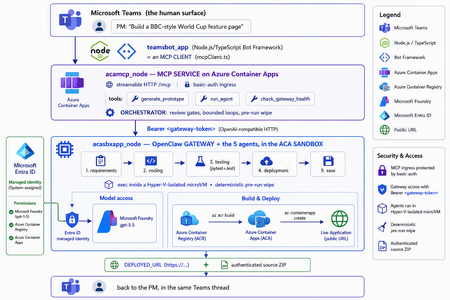
The one shift that changes everything For two years, "AI coding" meant autocomplete. A suggestion appears in your editor, you hit tab, you move on. The agent only existed while you were actively typing. That is no longer the only model. A new category of tools runs asynchronously and autonomously: you message the agent from a chat window — Teams, Slack, Telegram — describe what you want, and walk away. The agent plans, writes code, runs tests, deploys, and hands you back a result. Some of them never sleep: they hold a persistent memory, load their own skills, and act on a schedule without being prompted. This is the world of OpenClaw, Hermes Agent, and the other long-running autonomous agents that exploded across developer culture in 2026. OpenClaw alone crossed 377,000 GitHub stars and millions of active users, becoming — for a while — the most-starred project on GitHub. You install it with one line, connect a channel, and start delegating from your phone. The workflow moves from pair programming to delegation and review. The interactive copilot asks, "What should I write next?" The autonomous agent asks, "What do you need done?" And that reframing is exactly why three questions now keep architects awake: Is it safe? You are handing a self-driving process the ability to run shell commands, touch files, and call APIs. One community report memorably described these agents as a teammate in your group chat who happens to have root access to your codebase. That is not a compliment — it is a threat model. Can it fit into real multi-agent work? A single agent is a demo. Production is a fleet — specialists that hand off to each other with gates in between. Is it flexible and controllable? Autonomy is thrilling right up until the agent packages last week's stale files into this week's deliverable, or loops forever on a failing test. This post answers all three — not with hand-waving, but with a working reference implementation you can clone today: CustomCodingAgentApp in the Multi-AI-Agents-Cloud-Native repo, an "Agentic Prototype Factory" that turns a plain-language idea into a tested, live-on-Azure prototype without leaving the chat window. A product manager types "Build a BBC-style World Cup feature page" in Microsoft Teams. Minutes later they get back a running HTTPS URL and a downloadable source ZIP. Under the hood, five specialized OpenClaw agents powered by Microsoft Foundry gpt-5.5 collaborate in a shared sandbox, run real pytest/Jest suites, and ship the result to Azure Container Apps — all orchestrated behind a Model Context Protocol (MCP) service so any MCP client (GitHub Copilot, Claude, the Teams bot) can drive it. We'll build up to that architecture in the order you should learn it. Part 1 — Long-running autonomous agents, and their two hard problems What actually makes them different A traditional chatbot is text in, text out. It waits for you. An autonomous agent inverts that: Property Traditional chatbot Long-running autonomous agent Execution Responds to a prompt Acts proactively (a "heartbeat" wakes it on a schedule) Scope Words Files, shell, browser, APIs — the real machine Memory This session only Persistent across sessions Interface A web box Any chat channel + the terminal Autonomy None Plans and takes multi-step action on its own Architecturally, OpenClaw is not a library you import — it's a runtime. A single long-running process (the Gateway) bridges your messaging channels to an LLM backend, keeps sessions alive, queues work in ordered lanes, and drives the classic agent loop: call the model → execute the tool calls it asks for → feed results back → repeat until done. There is no rigid step-planner; the model itself steers. That is what makes it feel magical — and what makes it hard to contain. That containment problem has two faces. Hard problem #1 — Security The same properties that make an autonomous agent useful make it dangerous. Full system access + proactive execution + a 32,000-server tool ecosystem is a large, self-driving attack surface. OpenClaw's own short history is the cautionary tale: a critical one-click remote-code-execution CVE early in its life, hundreds of malicious community "skills" discovered on its marketplace, and tens of thousands of gateways found exposed on the open internet. None of this means "don't use autonomous agents." It means: never run one with ambient credentials on a machine you care about. The agent belongs in a box with a hard wall around it. Hard problem #2 — Persistence and continuity Real agent work is long. Refactoring a codebase, researching across dozens of pages, building-testing-deploying an app — these take minutes to hours, far past a single request/response. So the runtime needs durable sessions, a place to keep state, and a workspace that survives across steps. But a persistent workspace that is reused creates its own hazard: state leakage. Files from yesterday's task can contaminate — or get shipped inside — today's result. Continuity and cleanliness pull in opposite directions, and you have to engineer the tension out. One agent is a demo; production is a fleet A single monolithic agent asked to "gather requirements, write the code, test it, deploy it, and package it" will do all four mediocrely and blur the boundaries between them. The production pattern is orchestrator-worker: specialized agents, each with one job, handing off to the next through explicit gates. OpenClaw supports exactly this — it can spawn sub-agents and even dispatch external coding harnesses, acting as a meta-orchestrator rather than a single model. The open question is never whether to go multi-agent; it's where the seams and the guardrails go. The answer to "is it safe?": put the agent in a microVM If the agent needs root to be useful, then give it root — inside a disposable microVM, not on your host. In 2026 there are several credible ways to do this: Kata Containers on AKS — each pod gets its own lightweight VM boundary and guest kernel. Hyperlight Wasm — per-call, snapshot-restored Wasm microVMs for running LLM-generated code. Azure Container Apps dynamic sessions — prewarmed, Hyper-V-isolated sandboxes that start in milliseconds, scale to thousands, and are purpose-built for "secure execution of custom code" and "running LLM-generated scripts." That last one — the ACA sandbox — is the sweet spot for a chat-driven agent factory: strong isolation without you operating a Kubernetes cluster, and an exec API to run commands inside the box. It's what the reference implementation uses. Part 2 — Putting OpenClaw into the ACA sandbox Here is where the repo stops being a diagram and becomes running code. The Agentic Prototype Factory decomposes the "idea → live app" job into five specialized OpenClaw agents that run in sequence, all inside the sandbox: requirements → coding → testing → deployment → save Each is addressable as its own model target on the OpenClaw gateway's OpenAI-compatible API: model value Routes to openclaw / openclaw/default Default agent openclaw/requirements-agent Requirement Agent openclaw/coding-agent Coding Agent openclaw/testing-agent Testing Agent openclaw/deployment-agent Deployment Agent openclaw/save-agent Save & download Agent Control, not vibes: review gates with feedback loops Autonomy without gates is how you get an agent that confidently deploys a broken app. The orchestrator wires the five agents into a graph with hard, bounded gates: Every knob is explicit and lives in server.py: _MAX_TEST_ROUNDS = 3, _MAX_DEPLOY_REVIEW = 2, _DEPLOY_POLL_ATTEMPTS = 12, _DEPLOY_POLL_DELAY_S = 20. The Testing Agent must end each turn with a literal TESTS_PASSED / TESTS_FAILED verdict; the orchestrator won't declare success until it HTTP-checks the deployed URL and inspects the response body — because a ResourceNotFound can happily return an HTTP 200. That is what "flexible and controllable" looks like in practice: the LLM drives creatively inside a deterministic state machine. The deterministic pre-run wipe (solving state leakage) Because the sandbox is reused across runs (fast, cheap), the orchestrator does something disciplined before every run: it wipes all lingering agent workspaces. Stale files from a previous task can never leak into — or be packaged as — the new result. This is the engineered answer to Hard Problem #2. Working with the sandbox's limits, not against them The ACA sandbox exec API is hard-capped at ~120 seconds — shorter than a cold az acr build plus az containerapp create. A naive agent would time out and report failure. The clever bit: those commands finish server-side on Azure even after the client exec disconnects. So deployment is split in two: deploy-build <dir> <app> — installs the deploy helpers, writes a tight .dockerignore, and kicks off the ACR build tagged <app>:latest. If the client drops at ~120s, the image still lands in ACR. deploy-finish <app> — idempotent, polled up to 12×. It reports STILL_BUILDING until the image exists, then fires a --no-wait containerapp create, and finally returns DEPLOYED_URL=https://<fqdn>. This is the single most important lesson of the whole sample: an autonomous agent doesn't need a longer timeout — it needs to understand the durability semantics of the platform it runs on. Part 3 — MCP, and why its security is the whole ballgame The five-agent workflow is powerful, but it would be a silo if the only way to reach it were a bespoke API. Instead, the repo wraps the entire orchestration as a Model Context Protocol (MCP) service (acamcp_node) exposed over streamable HTTP at /mcp, with a tiny, legible tool surface: MCP tool What it does generate_prototype Run the full five-agent workflow end to end run_agent Invoke a single named agent check_gateway_health Liveness / readiness of the OpenClaw gateway The payoff is enormous: any MCP client can now drive the factory — GitHub Copilot, Claude, or the Teams bot we're about to meet. One protocol, many front-ends. But MCP is not just an integration convenience — it's a control plane, and every MCP tool is a privileged capability. In an ecosystem with 32,000+ community servers, "just add an MCP server" is a supply-chain decision. A tool call is code execution by another name. So the security posture has to be deliberate. Here is how the reference implementation hardens it — and the principles are portable to any MCP deployment: Auth in front of the protocol. The MCP ingress sits behind basic auth (MCP_BASIC_AUTH_PASSWORD); the gateway itself requires the gateway token as a bearer credential (Authorization: Bearer <token>). No anonymous tool calls. A tiny, named allowlist — not a blank check. The gateway routes only to six explicit model targets. There is no "run arbitrary agent" escape hatch; the routing table is the allowlist. No secrets in the workload. There are no model API keys anywhere in the running containers — model access is brokered entirely through Entra ID managed identities. The gateway token is stored as a Kubernetes secret and never baked into an image. Private by default. The gateway's OpenAI-compatible endpoint is operator-level access — it stays on private ingress, with TLS and authentication added before anything is ever exposed publicly. Least privilege at the identity layer. The gateway is granted exactly the Foundry roles it needs (Cognitive Services User / Cognitive Services OpenAI User) on the Foundry resource — nothing more. The takeaway for MCP is the same as for the agent itself: treat the protocol as a doorway, and put a guard on the door. Authentication, an explicit allowlist, private ingress, and brokered identity turn MCP from an open blast radius into a governed control plane. Part 4 — The complete solution: Teams + MCP on ACA + OpenClaw on the ACA sandbox Now assemble the three deployable components into one loop: The request lifecycle, end to end A PM sends one sentence in Teams. The teamsbot_app bot — acting as an MCP client via mcpClient.ts — opens an MCP handshake and calls generate_prototype. The MCP service on ACA (acamcp_node) runs the orchestrator: pre-run wipe, then requirements → coding → testing. The OpenClaw gateway in the ACA sandbox (acasbxapp_node) executes each agent, talking to Foundry gpt-5.5 through a managed identity — no keys in the box. Real pytest + Jest suites run inside the sandbox. Fail → loop back (bounded). Pass → deploy. Deployment uses the build + poll split to survive the ~120s exec cap; the app lands in Azure Container Apps and is health-checked body-aware at its live URL. The Save Agent produces an authenticated ZIP download URL. The bot streams each agent's progress back into the Teams thread and returns the running HTTPS URL + source ZIP — optionally auto-opening the project in VS Code Insiders. How the architecture answers the three questions The question How this solution answers it Is it safe? The autonomous agent runs in a Hyper-V-isolated ACA sandbox, not on anyone's laptop. No model keys in the workload — Entra ID managed identity brokers Foundry. MCP behind basic auth; gateway behind a bearer token on private ingress; token as a secret, never in an image. A deterministic pre-run wipe removes cross-run leakage. Does it fit multi-agent work? It is a multi-agent system — five specialist OpenClaw agents with A2A hand-offs and review gates — and because it's exposed via MCP, any client (Copilot, Claude, Teams) can orchestrate it. Is it flexible and controllable? Creativity lives inside a deterministic state machine: explicit TESTS_PASSED/FAILED verdicts, bounded retry loops (_MAX_TEST_ROUNDS, _MAX_DEPLOY_REVIEW), body-aware health checks, and a human approving in the Teams thread. Deploy it yourself The repo ships scripts for all three tiers (the gateway uses the platform's managed identity to reach Foundry — no key handling, no image rebuild): # 1) OpenClaw gateway + the 5 agents (acasbxapp_node) cd acasbxapp_node cp .env.example .env # gateway token, Foundry endpoint, sandbox ids ./scripts/build-openclaw-image.sh # build + push the OpenClaw image to ACR ./scripts/deploy-aks-gateway.sh # grant Foundry roles + deploy # 2) MCP service (acamcp_node) cd ../acamcp_node cp .env.example .env # ACR + cluster; gateway token read from ../acasbxapp_node/.env ./scripts/build-images.sh # build + push the MCP image ./scripts/deploy-aks.sh # secret + manifests to the openclaw namespace ./scripts/smoke-check.sh # verify the MCP handshake # 3) Teams bot (teamsbot_app) — Node.js/TypeScript MCP client cd ../teamsbot_app # configure + run per the folder README, then sideload the Teams app package The reference implementation targets Azure (ACA + AKS) — the OpenClaw gateway and MCP service run as containers, and the code-execution sandbox uses the ACA dynamic-sessions exec API. Keep the gateway on private ingress and add TLS before any public exposure. Final thought Strip away the World Cup demo and a reusable pattern remains — a blueprint for running any long-running autonomous agent in the enterprise: A message-driven agent (OpenClaw / Hermes) + a microVM sandbox (Azure Container Apps dynamic sessions) + an MCP control plane with auth + enterprise identity (Entra ID managed identity) + a human surface (Microsoft Teams). The autonomy that made these agents go viral is the same autonomy that makes security teams nervous. You don't resolve that tension by slowing the agent down — you resolve it by giving it a box with a hard wall, a control plane with a guard on the door, an identity instead of a secret, and a human in the loop. Do that, and "your PM types a sentence, Azure ships an app" stops being a scary demo and becomes something you can actually put in production. Clone it, break it, harden it further: kinfey/Multi-AI-Agents-Cloud-Native → code/CustomCodingAgentApp The chat window is the new terminal. Let's make it a safe one.285Views2likes0CommentsMCP for Beginners: Why Every AI Engineer and Developer Should Learn the Model Context Protocol
If you have spent any time building with large language models in the last year, you have hit the same wall everyone hits: your model is brilliant at reasoning but blind to the real world. It cannot read your database, call your internal API, search your documents, or trigger a deployment unless you hand-write glue code for every single integration. The Model Context Protocol (MCP) exists to tear that wall down, and Microsoft's open-source MCP for Beginners curriculum (reachable via the short link https://aka.ms/mcp-for-beginners) is the most complete, hands-on way to learn it. This post explains what MCP is, walks through the latest updates to the course, shows real code, and makes the case for why MCP belongs on your learning roadmap right now. Whether you are an AI engineer shipping agents to production, a developer wiring tools into Copilot, or a student trying to build a standout portfolio project. What is MCP, and why does it matter? Think of MCP as a universal translator for AI applications. Just as a USB-C port lets you connect any peripheral to any laptop without a custom cable per device, MCP lets an AI model connect to any tool or data source through one standardized protocol. The course uses exactly this analogy, and it holds up well. Before MCP, integrations were an M × N problem: every one of your M AI applications needed bespoke code to talk to each of your N tools. MCP turns that into an M + N problem. Build a tool once as an MCP server, and any MCP-compatible client, Claude Desktop, VS Code, Cursor, GitHub Copilot, and many others — can use it immediately. The protocol is built on a clean client–server model with a small set of primitives: Tools — functions the model can call (query a database, send an email, run code). Resources — data the server exposes for context (files, records, documents). Prompts — reusable, parameterized prompt templates. Sampling — a server asking the client's LLM to generate a completion, enabling collaborative workflows. Elicitation — a server requesting structured input from the user mid-task. Roots — boundaries that tell a server which directories or resources it is allowed to operate on. Communication runs over JSON-RPC, with transports for local processes ( stdio ) and remote servers (streamable HTTP). That standardization is the whole point: write to the spec, and you interoperate with the entire ecosystem. What's new: the latest updates to the course The MCP for Beginners curriculum is actively maintained, and the public changelog reads like a release log for a living product. Here are the most important recent changes, drawn directly from that changelog. 1. Aligned to MCP Specification The biggest update: the entire curriculum has been validated against the current MCP Specification 2025-11-25 and the latest official SDKs. Stale references to older spec revisions (2025-03-26 and 2025-06-18) were corrected across the security, transport, real-time search, sampling, and stdio-server modules, with links repointed to the canonical modelcontextprotocol.io spec paths. A gap analysis confirmed the course already covers every primitive introduced or expanded in the latest spec: Sampling — covered in lesson 3.14 and Advanced Topics. Elicitation (including URL mode) — in Core Concepts and Protocol Features. Roots — in the Introduction, Core Concepts, and Root Contexts. Tasks (experimental, long-running operations) — in Core Concepts and Protocol Features. Tool Annotations ( readOnlyHint / destructiveHint ) — in Core Concepts and Protocol Features. 2. Samples validated against current SDKs Code that does not run is worse than no code at all, so the maintainers re-validated the core samples: TypeScript: @modelcontextprotocol/sdk resolved to 1.29.0 ; a tsc --noEmit type-check passed with no errors — the McpServer and StdioServerTransport APIs remain valid. Python: validated in an isolated virtual environment with mcp[cli] (1.27.2); FastMCP.list_tools() correctly returned the sample add and subtract tools. SDK version pins across labs were bumped (for example mcp>=1.26.0 ) and lockfiles regenerated so every sample tracks the current release. 3. A serious security pass Security is treated as a first-class concern, not an afterthought. A full audit across every dependency manifest and the sample source code was run, and npm audit now reports 0 vulnerabilities in every audited directory. Highlights: Transitive npm advisories (in the MCP Inspector dev tool, the OpenAI client, and the SDK) were remediated by bumping @modelcontextprotocol/inspector to 0.22.0 and pinning a patched shell-quote . A real code-level command-injection fix (OWASP A03): an open_in_vscode tool that used subprocess.run(..., shell=True) was rewritten to launch the resolved executable directly with no shell — closing a metacharacter-injection vector. Python dependencies were audited with pip-audit , and a vulnerable transitive werkzeug was pinned to a patched >=3.1.6 . For anyone learning to ship agents, this is gold: the course demonstrates the whole secure-development loop, not just the happy path. 4. New lessons and a growing curriculum The curriculum keeps expanding with practical, modern lessons: 5.17 Adversarial Multi-Agent Reasoning — two agents argue opposite sides of a question using shared MCP tools ( web_search + run_python ), judged by a third agent. Includes a Mermaid architecture diagram, orchestrators in Python, TypeScript, and C#, and use cases like hallucination detection, threat modeling, and API design review. 3.12 MCP Hosts — configuration for Claude Desktop, VS Code, Cursor, Cline, and Windsurf, with JSON templates and a transport comparison table. 3.13 MCP Inspector — a debugging guide for testing tools, resources, and prompts. 4.1 Pagination — cursor-based pagination patterns in Python, TypeScript, and Java. 5.16 Protocol Features — progress notifications, request cancellation, resource templates, and lifecycle management. 5. Microsoft product rebranding Content was updated to reflect Microsoft's rebranding: Azure AI Foundry → Microsoft Foundry, and the AI Toolkit (AITK) → Microsoft Foundry Toolkit Extension for VS Code. If you have seen older tutorials referencing the previous names, the curriculum is now current. Your first MCP server: see how little code it takes The course's "first server" lesson builds a simple calculator. Here is the shape of a minimal MCP server in Python using FastMCP , which mirrors the validated sample in the repo. Notice how the protocol plumbing disappears — you just decorate functions. # server.py — a minimal MCP server with two tools from mcp.server.fastmcp import FastMCP # Name your server; this identifies it to MCP clients mcp = FastMCP("Calculator") @mcp.tool() def add(a: int, b: int) -> int: """Add two numbers and return the result.""" return a + b @mcp.tool() def subtract(a: int, b: int) -> int: """Subtract b from a and return the result.""" return a - b if __name__ == "__main__": # Run over stdio so local hosts (VS Code, Claude Desktop) can connect mcp.run() The same idea in TypeScript, using the official SDK validated at version 1.29.0 : // server.ts — minimal MCP server in TypeScript import { McpServer } from "@modelcontextprotocol/sdk/server/mcp.js"; import { StdioServerTransport } from "@modelcontextprotocol/sdk/server/stdio.js"; import { z } from "zod"; const server = new McpServer({ name: "Calculator", version: "1.0.0" }); // Register a tool with a typed input schema server.tool( "add", { a: z.number(), b: z.number() }, async ({ a, b }) => ({ content: [{ type: "text", text: String(a + b) }], }) ); // Connect over stdio and start listening const transport = new StdioServerTransport(); await server.connect(transport); That is a complete, runnable server. The docstrings and schemas matter: MCP exposes them to the model so it knows when and how to call each tool. Clear descriptions are effectively prompt engineering for your tools — a common pitfall is leaving them vague, which leads to the model misusing or ignoring the tool. Connecting it in VS Code Once your server runs, an MCP host connects to it. A typical VS Code / host configuration looks like this: { "servers": { "calculator": { "command": "python", "args": ["server.py"] } } } Lesson 3.12 (MCP Hosts) covers the equivalent JSON for Claude Desktop, Cursor, Cline, and Windsurf, and lesson 3.13 shows how to use the MCP Inspector to test your tools before wiring them into a host — the single best debugging habit you can build early. How the course is structured The curriculum is organized as a progressive journey with hands-on code in C#, Java, JavaScript, Python, Rust, and TypeScript. It is grouped into phases: Foundations (Modules 0–2): Introduction, Core Concepts, and Security. Building (Module 3): Getting Started — 15 lessons covering your first server and client, LLM clients, VS Code integration, stdio and HTTP streaming, testing, deployment, auth, hosts, the Inspector, sampling, and MCP Apps. Growing (Modules 4–5): Practical Implementation and Advanced Topics — 17 advanced lessons including Azure integration, OAuth2, Entra ID auth, scaling, multi-modality, context engineering, custom transports, and adversarial multi-agent reasoning. Mastery (Modules 6–11): Community Contributions, Lessons from Early Adoption, Best Practices, Case Studies, a Microsoft Foundry Toolkit workshop, and an end-to-end 13-lab PostgreSQL capstone. That final module is the standout for portfolio building: a complete, production-flavored path that takes you from architecture and row-level security through database design, a FastMCP server, semantic search with pgvector and Azure OpenAI, testing, Docker deployment to Azure Container Apps, and monitoring with Application Insights. Why developers should learn MCP now For AI engineers MCP is becoming the default integration layer for agents. Instead of re-implementing tool calling for every framework, you write to one open protocol and your tools work everywhere. The advanced modules — sampling, roots, elicitation, scaling, routing, and adversarial multi-agent patterns — are exactly the techniques you need to move agents from demo to production. For developers MCP is already wired into tools you use daily: VS Code, GitHub Copilot, Claude Desktop, Cursor, and more. Learning to build an MCP server means you can expose your systems — internal APIs, databases, CI/CD — to AI assistants safely. The security-first approach in the course (OAuth2, Entra ID, RBAC, dependency auditing) teaches you to do this the right way from day one. For students MCP is a rare opportunity to learn a technology while it is still early, with a free, beginner-friendly, Microsoft-maintained curriculum and code in six languages. The 13-lab capstone alone is a genuine portfolio project. And with content translated into 50+ languages, the barrier to entry is low no matter where you are. Responsible and secure by design A recurring theme worth calling out: the course does not treat security and governance as optional extras. It models real practices you should carry into your own work: Least privilege via roots — constrain what a server can touch. Tool annotations — mark tools readOnlyHint or destructiveHint so clients can warn users before destructive actions. No shells for user input — the command-injection fix is a textbook example of why you never pass untrusted input through a shell. Dependency hygiene — audit with npm audit and pip-audit , and pin patched releases. Proper auth — dedicated lessons on OAuth2 and Microsoft Entra ID. Key takeaways MCP standardizes how AI connects to tools and data, turning a combinatorial integration problem into a simple, reusable one. The course is current, validated against MCP Specification 2025-11-25 with SDKs at TypeScript 1.29.0 and Python mcp 1.27.2 . Samples actually run, and the repo demonstrates a full secure-development loop with 0 reported vulnerabilities after auditing. It is broad and deep: from a 10-line calculator server to a 13-lab production capstone, in six languages. It is the fastest credible path to MCP fluency for AI engineers, developers, and students alike. Get started today Open the course: https://aka.ms/mcp-for-beginners (redirects to the GitHub repository). Fork and clone it — use a sparse checkout to skip translations for a faster download: git clone --filter=blob:none --sparse https://github.com/microsoft/mcp-for-beginners.git cd mcp-for-beginners git sparse-checkout set --no-cone "/*" "!translations" "!translated_images" Build your first server with lesson 3.1 in your language of choice. Debug it with the MCP Inspector, then connect it in VS Code. Go deep with the 13-lab database capstone, and read the official spec at modelcontextprotocol.io. Track what's new in the changelog and join the community discussions. MCP is quietly becoming the connective tissue of the AI ecosystem. The earlier you learn it, the more leverage you will have — and Microsoft's MCP for Beginners is the clearest on-ramp available. Star the repo, build a server this week, and start connecting your AI to the world.
MCP Server Authorization with Azure API Management: From Simple to Advanced
Why put API Management in front of your MCP servers The Model Context Protocol (MCP) has quickly become the standard way for AI agents, such as GitHub Copilot in VS Code, to reach external tools and data. As soon as an MCP server does anything meaningful, the same questions that govern any API resurface: who is allowed to call it, what are they allowed to do, and how do you enforce that consistently across many servers without rewriting each one. Azure API Management (APIM) answers those questions for MCP. It sits between the MCP client and the tool backend and applies the controls you already trust for REST APIs: identity validation, OAuth, rate limiting, IP filtering, and observability. Crucially, APIM speaks the MCP authorization specification, which is built on OAuth 2.1 and Protected Resource Metadata (PRM, RFC 9728). That means APIM can do more than block bad requests. It can actively drive an interactive sign-in from the IDE, so the user logs in with their own identity and the agent acts on their behalf. This article walks through a progression of authorization scenarios, each one building on the last: The simple case: validate a token and block everything else. Triggering an interactive sign-in from VS Code for an MCP server that APIM hosts from your own APIs. Going beyond "is this a tenant user" to "does this user have the right attribute" with Entra app roles. Fronting an existing external MCP server and letting it drive its own OAuth flow (GitHub as the example). Governing which tools of an existing MCP server an agent is actually allowed to invoke. APIM MCP capabilities and the basic authorization options API Management exposes MCP servers in two distinct ways, and the authorization story differs slightly for each. Expose a REST API as an MCP server. APIM takes an API it already manages and projects selected operations as MCP tools. You own the operations, so you choose exactly which ones become tools at configuration time. This is the right mode when the capability you want to expose is an API you control. Expose an existing MCP server (passthrough). APIM fronts a remote MCP-compatible server (LangChain, an Azure Function, GitHub's remote MCP server, your own container) and relays the MCP protocol to it. APIM governs access, but the upstream server still owns its tool catalog. On top of either mode, you have a spectrum of authorization options: Subscription keys for simple, machine-to-machine access where a shared secret in a header is acceptable. Token validation with Microsoft Entra ID, where APIM acts as the protected resource and verifies a bearer token on every call. Interactive OAuth 2.1 sign-in, where APIM advertises Protected Resource Metadata so an MCP client can discover the authorization server, log the user in, and retry with a user token. Authorization passthrough, where an external MCP server presents its own authorization challenge and APIM relays it faithfully so the client authenticates directly against the upstream's identity provider. The rest of the article works through these options in increasing order of capability. The example setup The walkthroughs in the first three scenarios all use the same backend so you can reproduce them without standing up anything of your own: the publicly available Star Wars API at Star Wars API. It is a simple, read-friendly REST API (characters, films, planets, starships, and so on) imported into API Management as a normal API and then projected as an MCP server. The reason this single API is enough to illustrate the whole progression is that, in API Management, one underlying API can back several independent MCP servers, each exposing a different slice of its operations. For example, you can create: A read-only MCP server that exposes only the GET operations, for agents that should be able to query data but never change it. A write-capable MCP server that exposes the POST, PUT, or DELETE operations, for trusted automation that is allowed to mutate state. Same backend API, two MCP servers, two different tool surfaces. Each of these servers is an independent resource in APIM, so each one can carry its own authorization. Both can require an authenticated user (Scenarios 1 and 2), and you can go further by protecting only the sensitive one: gate the write-capable server behind an Entra app role so that, even among authenticated users, only those who carry a specific claim can reach the mutating tools. That app-role mechanism is the subject of Scenario 3, and it composes naturally with the multi-server split described here. Registering the MCP API in Microsoft Entra ID Before any of the policies below can validate a token, you need an application registration in Microsoft Entra ID that represents the MCP API. This registration is what defines the audience and scope that tokens are issued for, and it is the source of the mcp-audience, mcp-scope, and (indirectly) mcp-client-id values that the policies reference. Create it once and reuse it across all the MCP servers in this article. In the Azure portal, open Microsoft Entra ID, then App registrations, then New registration. Name it (for example, star-wars-mcp-api), choose single-tenant, and register. Record the Application (client) ID and the Directory (tenant) ID. Open Expose an API and add an Application ID URI. Accept the default api://<app-id>. This URI is your token audience. Still under Expose an API, add a delegated scope named MCP.Access, set its consent display name and description, set the state to Enabled, and save. Authorize the client that will request the scope. Under Expose an API, select Add a client application and enter the client ID of the MCP client. For VS Code, this is the built-in Microsoft authentication client aebc6443-996d-45c2-90f0-388ff96faa56. Check the MCP.Access scope and save. These steps produce the four constants the validation policy needs: Named value Comes from Example entra-tenant-id The Directory (tenant) ID from step 1 11111111-1111-1111-1111-111111111111 mcp-audience The Application ID URI from step 2 api://22222222-2222-2222-2222-222222222222 mcp-scope The scope name from step 3 MCP.Access mcp-client-id The client ID of the calling app from step 4 aebc6443-996d-45c2-90f0-388ff96faa56 [!NOTE] mcp-client-id is the identity of the application calling the MCP server, not the MCP API itself. For VS Code it is the built-in Microsoft authentication client, and its value lands in the token's appid claim, which is why the validation policy lists it under client-application-ids. If your tenant blocks the first-party VS Code client, register your own public client application and use its client ID instead. [!TIP] For the privileged-access feature in Scenario 3, you will also declare an app role on this same registration. You do not need it yet, but it is convenient to know that all identity configuration for these servers lives on this one app registration. With that backend and structure in mind, the scenarios below build up the authorization model one capability at a time. Scenario 1: The simple case, validate the token and block unauthorized access The most basic protection is to require a valid Entra ID token on every MCP request and reject anything that fails validation. No interactive flow, no roles, just a gate. APIM does this with the validate-azure-ad-token policy. The policy checks the issuing tenant, the audience (your MCP API), the calling client application, and the required scope. Anything that does not satisfy all four is rejected with a 401. <policies> <inbound> <base /> <validate-azure-ad-token tenant-id="{{entra-tenant-id}}" header-name="Authorization" failed-validation-httpcode="401" failed-validation-error-message="Unauthorized. Access token is missing or invalid."> <client-application-ids> <application-id>{{mcp-client-id}}</application-id> </client-application-ids> <audiences> <audience>{{mcp-audience}}</audience> </audiences> <required-claims> <claim name="scp" match="any"> <value>{{mcp-scope}}</value> </claim> </required-claims> </validate-azure-ad-token> </inbound> <backend> <base /> </backend> <outbound> <base /> </outbound> <on-error> <base /> </on-error> </policies> The values in double braces are APIM named values: centralized constants, defined once and shared by every MCP server. They map directly to the four values produced by the Entra app registration in the example setup (entra-tenant-id, mcp-audience, mcp-scope, and mcp-client-id). Storing them as named values keeps the policy free of hardcoded identifiers and lets every server reuse the same configuration. This gets you a server that nobody can call without a properly minted token. What it does not do is help a fresh client obtain that token in the first place. That is the next scenario. Scenario 2: Driving an interactive sign-in from VS Code for an APIM-hosted MCP server When you expose one of your own APIs as an MCP server, you usually want a developer to open VS Code, connect to the server, and be prompted to sign in with their Microsoft account. No pre-shared key, no manual token handling. APIM achieves this by behaving as a well-mannered OAuth 2.1 protected resource. Using the Star Wars MCP server from the example setup, each selected operation becomes a tool the agent can call, so an agent can answer "which films featured the character named Leia" by calling the underlying API through APIM. How the sign-in flow works The protocol choreography is what turns a plain 401 into an interactive login: Two ingredients make this work: a 401 challenge that points to a metadata document, and the metadata document itself. The challenge: a 401 that points the client to its metadata Instead of a bare 401, APIM returns a WWW-Authenticate header carrying the URL of the server's Protected Resource Metadata. This is what tells the client "you need a token, and here is where to learn how to get one." Keeping this logic in a shared policy fragment means every MCP server reuses it. Notice the mcpResourceMetadataUrl reference in the fragment below. It is not hardcoded; it is a context variable that each MCP server sets in its own server-level policy before including this fragment (you will see that wiring in the per-server policy later in this scenario). The fragment simply reads whatever value the calling server provided. This indirection is what keeps the fragment pluggable: the same shared challenge-and-validate logic serves every MCP server, while each server supplies its own PRM URL. In most deployments the PRM endpoint is a single, dynamic one (built in the next section) that derives the resource from the request path, so the variable just carries that server's path. But because the URL is configurable per server rather than baked into the fragment, you retain flexibility for the cases that need it. <fragment> <!-- No token: challenge with the per-server PRM URL set by the caller --> <choose> <when condition="@(!context.Request.Headers.ContainsKey("Authorization"))"> <return-response> <set-status code="401" reason="Unauthorized" /> <set-header name="WWW-Authenticate" exists-action="override"> <value>@("Bearer resource_metadata=\"" + (string)context.Variables.GetValueOrDefault("mcpResourceMetadataUrl", "") + "\"")</value> </set-header> </return-response> </when> </choose> <!-- Token present: validate against shared named values --> <validate-azure-ad-token tenant-id="{{entra-tenant-id}}" header-name="Authorization" failed-validation-httpcode="401" failed-validation-error-message="Unauthorized. Access token is missing or invalid."> <client-application-ids> <application-id>{{mcp-client-id}}</application-id> </client-application-ids> <audiences> <audience>{{mcp-audience}}</audience> </audiences> <required-claims> <claim name="scp" match="any"> <value>{{mcp-scope}}</value> </claim> </required-claims> </validate-azure-ad-token> </fragment> Creating the /.well-known PRM endpoint in APIM with a policy This is the part that often surprises people: APIM itself serves the metadata document. There is no separate identity service to stand up. You publish one small anonymous API at the service root that answers GET /.well-known/oauth-protected-resource/*, derives the resource value from the requested path, and returns a JSON document pointing at Microsoft Entra ID as the authorization server. Create a blank HTTP API named well-known with an empty API URL suffix so it resolves at the service root, add a GET operation with the template /.well-known/oauth-protected-resource/*, clear the subscription requirement so it is reachable anonymously, and apply this policy: <policies> <inbound> <base /> <!-- Build the resource URL from the requested PRM sub-path --> <set-variable name="resourceUrl" value="@{ var prefix = "/.well-known/oauth-protected-resource"; var path = context.Request.OriginalUrl.Path; var resourcePath = path.Length > prefix.Length ? path.Substring(prefix.Length) : ""; return "https://" + context.Request.OriginalUrl.Host + resourcePath; }" /> <return-response> <set-status code="200" reason="OK" /> <set-header name="Content-Type" exists-action="override"> <value>application/json</value> </set-header> <set-body>@{ return new JObject( new JProperty("resource", (string)context.Variables["resourceUrl"]), new JProperty("authorization_servers", new JArray( "https://login.microsoftonline.com/{{entra-tenant-id}}/v2.0")), new JProperty("scopes_supported", new JArray("{{mcp-prm-scope}}")), new JProperty("bearer_methods_supported", new JArray("header")) ).ToString(); }</set-body> </return-response> </inbound> <backend> <base /> </backend> <outbound> <base /> </outbound> <on-error> <base /> </on-error> </policies> The {{mcp-prm-scope}} named value populates the scopes_supported array of the metadata document. It tells the client which delegated scope to request when it goes to the authorization server, so it must be the fully qualified scope value: the token audience (the Application ID URI from the app registration) followed by the scope name. With the example values that is api://22222222-2222-2222-2222-222222222222/MCP.Access. In other words, it is the combination of the mcp-audience and mcp-scope values defined in the example setup. Named value Value to set Example mcp-prm-scope <mcp-audience>/<mcp-scope> api://22222222-2222-2222-2222-222222222222/MCP.Access [!NOTE] Keep mcp-prm-scope in sync with the scope the validation fragment requires. The PRM document advertises this scope so the client requests it, and validate-azure-ad-token then checks for it in the scp claim. A mismatch means the client obtains a token without the scope APIM expects, and validation fails. Because the policy builds the resource value from the request path, this single endpoint serves metadata for every MCP server you ever add. The Star Wars server, a future inventory server, and anything else all share it. Wiring it onto the MCP server Each MCP server only needs to declare its own metadata URL and include the shared fragment: <policies> <inbound> <base /> <set-variable name="mcpResourceMetadataUrl" value="https://apim-contoso-mcp.azure-api.net/.well-known/oauth-protected-resource/star-wars-mcp/mcp" /> <include-fragment fragment-id="mcp-entra-auth" /> </inbound> <backend> <base /> </backend> <outbound> <base /> </outbound> <on-error> <base /> <include-fragment fragment-id="mcp-auth-challenge-onerror" /> </on-error> </policies> On the VS Code side, the configuration is deliberately plain. With no subscription-key header present, the client falls straight into the OAuth flow: { "servers": { "star-wars-mcp": { "url": "https://apim-contoso-mcp.azure-api.net/star-wars-mcp/mcp", "type": "http" } } } Restart the server in VS Code, and it detects the 401, reads the metadata, opens a browser sign-in, requests consent on first use, and then loads the tools using the user's token. [!CAUTION] Do not read the response body with context.Response.Body inside MCP server policies. It forces response buffering and breaks the MCP streaming transport. If global diagnostic logging is enabled, set the Frontend Response payload bytes to log to 0 at the All APIs scope. Scenario 3: Beyond tenant membership, authorize on a user attribute with app roles Validating a token confirms the caller is a signed-in user in your tenant with the right scope. That is often not enough. Some MCP servers expose sensitive tools that only a subset of users should reach. You want to express "this user is not only part of the tenant, but has a specific attribute that permits this server." Microsoft Entra app roles are the optimal mechanism for this. You declare a role on the MCP API app registration, assign it to specific users or to a security group, and Entra ID emits a roles claim in the access token whenever your API is the audience. APIM then authorizes on that claim. App roles beat the groups claim here because they avoid the group overage problem, they are scoped to the application, and they travel with the app. Declaring and assigning the role On the MCP API app registration, under App roles, create a role: Setting Value Display name Privileged Access Allowed member types Users/Groups Value Privileged.Access Description Access to privileged MCP servers Then, on the matching enterprise application, under Users and groups, assign the users (or, better, a security group) to the Privileged Access role. The Value field is the exact string that lands in the token roles claim, so it cannot contain spaces. [!TIP] Keep User assignment required set to No on the enterprise application. Unassigned users still obtain a valid token with the MCP.Access scope and keep access to the non-privileged servers. They simply do not carry the roles claim, so the privileged servers reject them. Enforcing the claim in the per-server policy The shared mcp-entra-auth fragment is used by every server, so the role requirement must not live there. Place the check in the privileged server's own policy, right after the fragment include. The token is already validated at that point, so this step is pure authorization. Because the caller is authenticated but not authorized, return 403, not 401, and do not emit a challenge: re-authenticating will not grant a role the user does not have. <policies> <inbound> <base /> <set-variable name="mcpResourceMetadataUrl" value="https://apim-contoso-mcp.azure-api.net/.well-known/oauth-protected-resource/star-wars-mcp/mcp" /> <include-fragment fragment-id="mcp-entra-auth" /> <!-- Privileged guardrail: require the Privileged.Access app role --> <choose> <when condition="@(!context.Request.Headers.GetValueOrDefault("Authorization","").Replace("Bearer ","").AsJwt().Claims.GetValueOrDefault("roles", new string[0]).Contains("Privileged.Access"))"> <return-response> <set-status code="403" reason="Forbidden" /> <set-header name="Content-Type" exists-action="override"> <value>application/json</value> </set-header> <set-body>{"error":"forbidden","message":"You lack the Privileged.Access role required for this MCP server."}</set-body> </return-response> </when> </choose> </inbound> <backend> <base /> </backend> <outbound> <base /> </outbound> <on-error> <base /> <include-fragment fragment-id="mcp-auth-challenge-onerror" /> </on-error> </policies> One operational detail worth calling out: app-role assignments only appear in newly issued tokens. A user who is granted the role after they signed in must obtain a fresh token. In VS Code, run MCP: Reset Cached Tokens (or sign out of the Microsoft account from the Accounts menu), then restart the server and sign in again. You can confirm the result by pasting the access token into https://jwt.ms and checking for "roles": ["Privileged.Access"]. Scenario 4: Fronting an existing external MCP server that drives its own sign-in So far APIM has been the authorization resource. But many valuable MCP servers already exist and run their own identity. GitHub publishes a remote MCP server with dozens of tools, and it authenticates users against GitHub's own OAuth authorization server. You do not want to re-implement that. You want APIM to govern access (rate limits, IP rules, logging, a single managed endpoint) while letting the upstream own the login. This is the "expose an existing MCP server" passthrough mode. When you register GitHub's remote MCP server behind APIM, the gateway relays the upstream's own authorization challenge. The client never authenticates against Entra here. It authenticates directly against GitHub. The flow, confirmed by probing the gateway: A call to the APIM endpoint with no token returns GitHub's own 401 with a WWW-Authenticate header, relayed through APIM. The Protected Resource Metadata that GitHub serves advertises authorization_servers: ["https://github.com/login/oauth"], so the client knows to log in at GitHub. The PRM resource reflects the APIM host, because GitHub builds it from the forwarded Host header. The client trusts the APIM endpoint while still logging in at GitHub. VS Code completes the GitHub sign-in and the full tool catalog loads. In the proof of concept this surfaced all 47 GitHub tools through the single APIM endpoint. The client configuration is again just a URL pointing at APIM: { "servers": { "github-via-apim": { "url": "https://apim-contoso-mcp.azure-api.net/github-mcp/mcp", "type": "http" } } } The key insight is that APIM transparently relays the backend's authentication challenge. GitHub remains the authorization server, GitHub tolerates being fronted by APIM, and you get a governed, centrally managed entry point without owning the identity flow. [!NOTE] Passthrough only relays what the upstream advertises. If the backend's PRM resource value and the actual MCP transport endpoint differ by a path segment, some clients fall back to deriving the metadata location from the server URL and can miss it. When you onboard a custom self-authenticating server, verify that the resource it advertises matches the exact URL the client connects to. Scenario 5: Restricting which tools of an existing MCP server an agent may call Passthrough raises a governance question that token validation alone cannot answer. A developer may legitimately have permission to merge a pull request through GitHub, but you may not want their AI agent to perform that action autonomously. You want to allow the read and discovery tools while blocking the destructive write tools, at the gateway, regardless of what the client tries. What is and is not possible for an external server It is important to be precise here, because the capability differs from the REST-as-MCP mode: For a REST-API-exposed-as-MCP server, you pick which operations become tools at creation time. That is native tool selection and the cleanest possible filter. For an existing/external MCP server, APIM does not enumerate the upstream's tools. The portal Tools blade explicitly states that tools are not visible for external MCP servers, and there is no allow-list property for them. APIM also cannot safely rewrite the tools/list response, because reading the response body breaks the streaming transport and the list may arrive as text/event-stream. What APIM can do reliably, and server-agnostically, is block the invocation. Every tool call arrives as a JSON-RPC tools/call request in the request body, which APIM can inspect safely. The deny-listed tools remain visible in the catalog, but any attempt to invoke one is intercepted at the gateway and returned a JSON-RPC error before it ever reaches the upstream. The reusable deny-list fragment The block is driven by a per-server named value (a comma-separated list of tool names), so the same fragment governs every external server. Only the named value changes. <!-- Fragment: mcp-tool-filter (include after the auth fragment) --> <fragment> <choose> <when condition="@(context.Request.Body != null)"> <set-variable name="mcpMethod" value="@{ try { var body = context.Request.Body.As<JObject>(preserveContent: true); return (string)body?["method"] ?? string.Empty; } catch { return string.Empty; } }" /> <choose> <when condition="@(((string)context.Variables["mcpMethod"]).Equals("tools/call", StringComparison.OrdinalIgnoreCase))"> <set-variable name="mcpToolName" value="@{ var body = context.Request.Body.As<JObject>(preserveContent: true); return (string)body?["params"]?["name"] ?? string.Empty; }" /> <!-- mcpBlockedTools is a comma-separated deny-list set by the per-server policy before this include --> <set-variable name="mcpBlocked" value="@{ var tool = ((string)context.Variables["mcpToolName"]).Trim().ToLowerInvariant(); var deny = ((string)context.Variables.GetValueOrDefault("mcpBlockedTools", "")).ToLowerInvariant().Split(',').Select(t => t.Trim()); return deny.Contains(tool); }" /> <choose> <when condition="@((bool)context.Variables["mcpBlocked"])"> <return-response> <set-status code="200" reason="OK" /> <set-header name="Content-Type" exists-action="override"> <value>application/json</value> </set-header> <set-body>@{ var id = "null"; try { var body = context.Request.Body.As<JObject>(preserveContent: true); id = body?["id"]?.ToString(Newtonsoft.Json.Formatting.None) ?? "null"; } catch {} return "{\"jsonrpc\":\"2.0\",\"id\":" + id + ",\"error\":{\"code\":-32602,\"message\":\"Unknown tool: " + ((string)context.Variables["mcpToolName"]) + "\"}}"; }</set-body> </return-response> </when> </choose> </when> </choose> </when> </choose> </fragment> The deny-list itself lives in a named value, one per server: APIM named value. Comma-separated, case-insensitive. mcp-blocked-tools-github = merge_pull_request,create_repository,delete_repository,push_files,create_or_update_file,issue_write,label_write # <policies> <inbound> <base /> <set-variable name="mcpResourceMetadataUrl" value="https://apim-contoso-mcp.azure-api.net/.well-known/oauth-protected-resource/github-mcp/mcp" /> <include-fragment fragment-id="mcp-entra-auth" /> <set-variable name="mcpBlockedTools" value="{{mcp-blocked-tools-github}}" /> <include-fragment fragment-id="mcp-tool-filter" /> </inbound> <backend> <base /> </backend> <outbound> <base /> </outbound> <on-error> <base /> <include-fragment fragment-id="mcp-auth-challenge-onerror" /> </on-error> </policies> Generic per-server pattern: mcp-blocked-tools-<server> = <comma,separated,tool,names> Wiring it onto the GitHub passthrough server <policies> <inbound> <base /> <set-variable name="mcpResourceMetadataUrl" value="https://apim-contoso-mcp.azure-api.net/.well-known/oauth-protected-resource/github-mcp/mcp" /> <include-fragment fragment-id="mcp-entra-auth" /> <set-variable name="mcpBlockedTools" value="{{mcp-blocked-tools-github}}" /> <include-fragment fragment-id="mcp-tool-filter" /> </inbound> <backend> <base /> </backend> <outbound> <base /> </outbound> <on-error> <base /> <include-fragment fragment-id="mcp-auth-challenge-onerror" /> </on-error> </policies> Now when the agent tries to merge a pull request, the gateway returns a clean -32602 Unknown tool error and the upstream is never touched. Read and discovery tools continue to work. The tool still appears in the client's catalog. Adding governance for another external server is just one more named value plus the same fragment include. No new policy logic. Key takeaways API Management turns MCP servers into governed resources, applying the same identity, traffic, and observability controls you already use for APIs. Start simple with validate-azure-ad-token to gate access, then graduate to a full interactive sign-in by serving Protected Resource Metadata from a single APIM policy. You can publish multiple MCP servers from one underlying API, for example a read-only server and a read-write server, by selecting different operations. App roles let you authorize on a user attribute, not just tenant membership, and the check belongs in the per-server policy so shared logic stays clean. For existing external servers, APIM relays the upstream's own OAuth flow, so a server like GitHub keeps owning its identity while you keep central governance. When an external server's full tool surface is too broad, APIM can block specific tool invocations at the gateway with a reusable, named-value-driven policy, so a user's agent cannot perform actions the user could perform manually. References About MCP servers in Azure API Management Secure access to MCP servers in API Management Expose REST API in API Management as an MCP server Expose and govern an existing MCP server validate-azure-ad-token policy reference Policy fragments in API Management RFC 9728: OAuth 2.0 Protected Resource Metadata MCP authorization specification Star Wars API (example backend) MCP for BeginnersAzure AI Foundry Agent Unable to Use Credentials Stored in Key Vault Through Playwright MCP Tool
Hello everyone, I am trying to understand how Azure AI Foundry agents interact with Azure Key Vault when using custom MCP tools, and I would appreciate any guidance from the community. My Setup - Created an Azure AI Foundry agent. - Created an Azure Key Vault and configured all permissions according to Microsoft's official documentation. - Stored the required website credentials (username and password) in the Key Vault. - Deployed the official Playwright MCP Docker image. - Exposed the MCP server using ngrok and verified that the endpoint is accessible. - Connected the MCP endpoint as a Custom MCP Tool in Azure AI Foundry. - Performed all configuration through the Azure portal, Foundry UI, and Playground only (no SDK or custom application code involved). The Issue The agent can access and use the Playwright MCP tool. However, when I ask it to log in to a website using credentials that are already stored in Key Vault, it does not populate the username and password fields. My expectation was that the agent would be able to retrieve the secrets from Key Vault and provide them to the Playwright tool during execution. Questions Is there currently a supported mechanism for Azure AI Foundry agents to automatically retrieve Key Vault secrets and pass them to a Custom MCP tool? Does the Playwright MCP Docker image have any built-in integration with Azure Key Vault? When using only the Foundry UI (without SDK code), can a Foundry agent securely inject Key Vault secrets into MCP tool calls? Are additional configurations required beyond Key Vault permissions and agent connections? Has anyone successfully implemented a similar setup where a Foundry agent uses credentials stored in Key Vault to perform browser automation through Playwright MCP? Any clarification on the expected architecture and whether this scenario is currently supported in Azure AI Foundry would be greatly appreciated. Thank you.Agents League: The Esports-Inspired Hackathon Where AI Agents Battle for Glory
Ready to put your AI skills to the ultimate test? Agents League is here, a dynamic, esports-inspired developer challenge that brings the thrill of live competition to the world of agentic AI. Whether you're a seasoned AI developer or just getting started, this is your chance to build, compete, and win. What is Agents League? Agents League is a week-long hackathon running as part of AI Skills Fest (June 4–14, 2026). Unlike traditional hackathons, Agents League combines live AI coding battles, asynchronous project submissions, and a thriving Discord community all competing for a total prize pool of $55,000 USD. This isn't just about building it's about showcasing what's possible with agentic AI in a format that's fast, competitive, and globally accessible. Three Challenge Tracks Pick One or Compete in All 1. Creative Apps Build innovative applications using GitHub Copilot for AI-assisted development. Show off your creativity and demonstrate how AI can accelerate app creation from concept to code. 2. Reasoning Agents Create intelligent agents using Microsoft Foundry that solve complex problems through multi-step reasoning. This track is all about building agents that can think, plan, and execute. 3. Enterprise Agents Build business-ready knowledge agents integrated with Microsoft 365 Copilot, authored in Copilot Studio. Perfect for developers focused on real-world enterprise solutions. Live Microsoft Reactor Events—Don't Miss the Battles! The heart of Agents League beats through live Microsoft Reactor events. Watch experts go head-to-head in live coding battles, learn cutting-edge techniques, and get inspired for your own submissions: Event What You'll Learn Creative Apps Battle See GitHub Copilot in action as experts build innovative apps live Reasoning Agents Battle Watch multi-step reasoning agents come to life with Microsoft Foundry Enterprise Agents Battle Learn to build M365-integrated agents with Copilot Studio 👉 View the full event series Key Dates Registration Deadline: June 12, 2026, 12:00 PM PT Hacking Period: June 4–14, 2026 Submission Deadline: June 14, 2026, 11:59 PM PT What You Get Live coding battles with expert demonstrations Curated technical experiences and on-demand content Learning resources on Microsoft Learn and AI Skills Navigator Community support through Discord GitHub-based submissions for transparent, collaborative judging Why Participate? Agents League isn't just another hackathon. It's designed as a streamlined, competitive format that: ✅ Fits into your schedule with focused, time-boxed challenges ✅ Provides real-world product innovation experience ✅ Offers global accessibility—participate from anywhere ✅ Demonstrates the latest capabilities of agentic AI, including new IQ tools ✅ Connects you with a passionate developer community Ready to Enter the Arena? Register Now for Agents League Before you register: Review the Hackathon Rules and Regulations for prize categories and judging criteria Join the Microsoft Reactor event series for live battles and learning Check out the Microsoft Event Code of Conduct Join the Conversation Have questions? Want to connect with fellow competitors? Join the Agents League community on Discord and start strategizing with developers from around the world. Whether you're building creative apps, reasoning agents, or enterprise solutions—the arena awaits. May the best agent win! 🏆 Agents League hackathon is open to the public and offered at no cost. Government employees should check with their employers to ensure participation is permitted in accordance with applicable policies. Related Links: Agents League Hackathon Registration Microsoft Reactor Series AI Skills Fest
The Future of Agentic AI: Inside Microsoft Agent Framework 1.0
Agentic AI is rapidly moving beyond demos and chatbots toward long‑running, autonomous systems that reason, call tools, collaborate with other agents, and operate reliably in production. On April 3, 2026, Microsoft marked a major milestone with the General Availability (GA) release of Microsoft Agent Framework 1.0, a production‑ready, open‑source framework for building agents and multi‑agent workflows in.NET and Python. [techcommun...rosoft.com] In this post, we’ll deep‑dive into: What Microsoft Agent Framework actually is Its core architecture and design principles What’s new in version 1.0 How it differs from other agent frameworks When and how to use it—with real code examples What Is Microsoft Agent Framework? According to the official announcement, Microsoft Agent Framework is an open‑source SDK and runtime for building AI agents and multi‑agent workflows with strong enterprise foundations. Agent Framework provides two primary capability categories: 1. Agents Agents are long‑lived runtime components that: Use LLMs to interpret inputs Call tools and MCP servers Maintain session state Generate responses They are not just prompt wrappers, but stateful execution units. 2. Workflows Workflows are graph‑based orchestration engines that: Connect agents and functions Enforce execution order Support checkpointing and human‑in‑the‑loop scenarios This leads to a clean separation of responsibilities: Concern Handled By Reasoning & interpretation Agent Execution policy & control flow Workflow This separation is a foundational design decision. High‑Level Architecture From the official overview, Agent Framework is composed of several core building blocks: Model clients (chat completions & responses) Agent sessions (state & conversation management) Context providers (memory and retrieval) Middleware pipeline (interception, filtering, telemetry) MCP clients (tool discovery and invocation) Workflow engine (graph‑based orchestration) Conceptual Flow 🌟 What’s New in Version 1.0 Version 1.0 marks the transition from "Release Candidate" to "General Availability" (GA). Production-Ready Stability: Unlike the earlier experimental packages, 1.0 offers stable APIs, versioned releases, and a commitment to long-term support (LTS). A2A Protocol (Agent-to-Agent): A new structured messaging protocol that allows agents to communicate across different runtimes. For example, an agent built in Python can seamlessly coordinate with an agent running in a .NET environment. MCP (Model Context Protocol) Support: Full integration with the Model Context Protocol, enabling agents to dynamically discover and invoke external tools and data sources without manual integration code. Multi-Agent Orchestration Patterns: Stable implementations of complex patterns, including: Sequential: Linear handoffs between specialized agents. Group Chat: Collaborative reasoning where agents discuss and solve problems. Magentic-One: A sophisticated pattern for task-oriented reasoning and planning. Middleware Pipeline: The new middleware architecture lets you inject logic into the agent's execution loop without modifying the core prompts. This is essential for Responsible AI (RAI), allowing you to add content safety filters, logging, and compliance checks globally. DevUI Debugger: A browser-based local debugger that provides a real-time visual representation of agent message flows, tool calls, and state changes. Code Examples Creating a Simple Agent (C#) From Microsoft Learn : using Azure.AI.Projects; using Azure.Identity; using Microsoft.Agents.AI; AIAgent agent = new AIProjectClient( new Uri("https://your-foundry-service.services.ai.azure.com/api/projects/your-project"), new AzureCliCredential()) .AsAIAgent( model: "gpt-5.4-mini", instructions: "You are a friendly assistant. Keep your answers brief."); Console.WriteLine(await agent.RunAsync("What is the largest city in France?")); This shows: Provider‑agnostic model access Session‑aware agent execution Minimal setup for production agents Creating a Simple Agent (Python) from agent_framework.foundry import FoundryChatClient from azure.identity import AzureCliCredential client = FoundryChatClient( project_endpoint="https://your-foundry-service.services.ai.azure.com/api/projects/your-project", model="gpt-5.4-mini", credential=AzureCliCredential(), ) agent = client.as_agent( name="HelloAgent", instructions="You are a friendly assistant. Keep your answers brief.", ) result = await agent.run("What is the largest city in France?") print(result) The same agent abstraction applies across languages. When to Use Agents vs Workflows Microsoft provides clear guidance: Use an Agent when… Use a Workflow when… Task is open‑ended Steps are well‑defined Autonomous tool use is needed Execution order matters Single decision point Multiple agents/functions collaborate Key principle: If you can solve the task with deterministic code, do that instead of using an AI agent. 🔄 How It Differs from Other Frameworks Microsoft Agent Framework 1.0 distinguishes itself by focusing on "Enterprise Readiness" and "Interoperability." Feature Microsoft Agent Framework 1.0 Semantic Kernel / AutoGen LangChain / CrewAI Philosophy Unified, production-ready SDK. Research-focused or tool-specific. High-level, developer-friendly abstractions. Integration Deeply integrated with Microsoft Foundry and Azure. Varied; often requires more glue code. Generally cloud-agnostic. Interoperability Native A2A and MCP for cross-framework tasks. Limited to internal ecosystem. Uses proprietary connectors. Runtime Identical API parity for .NET and Python. Primarily Python-first (SK has C#). Primarily Python. Control Graph-based deterministic workflows. More non-deterministic/experimental. Mixture of role-based and agentic. 🛠️ Key Technical Components Agent Harness: The execution layer that provides agents with controlled access to the shell, file system, and messaging loops. Agent Skills: A portable, file-based or code-defined format for packaging domain expertise. Implementation Tip: If you are coming from Semantic Kernel, Microsoft provides migration assistants that analyze your existing code and generate step-by-step plans to upgrade to the new Agent Framework 1.0 standards. Microsoft Agent Framework Version 1.0 | Microsoft Agent Framework Agent Framework documentation 🎯 Summary Microsoft Agent Framework 1.0 is the "grown-up" version of AI orchestration. By standardizing the way agents talk to each other (A2A), discover tools (MCP), and process information (Middleware), Microsoft has provided a clear path for taking AI experiments into production. For more detailed guides, check out the official Microsoft Agent Framework DocumentationMicrosoft Agent Framework - .NET AI Community StandupIf You're Building AI on Azure, ECS 2026 is Where You Need to Be
Let me be direct: there's a lot of noise in the conference calendar. Generic cloud events. Vendor showcases dressed up as technical content. Sessions that look great on paper but leave you with nothing you can actually ship on Monday. ECS 2026 isn't that. As someone who will be on stage at Cologne this May, I can tell you the European Collaboration Summit combined with the European AI & Cloud Summit and European Biz Apps Summit is one of the few events I've seen where engineers leave with real, production-applicable knowledge. Three days. Three summits. 3,000+ attendees. One of the largest Microsoft-focused events in Europe, and it keeps getting better. If you're building AI systems on Azure, designing cloud-native architectures, or trying to figure out how to take your AI experiments to production — this is where the conversation is happening. What ECS 2026 Actually Is ECS 2026 runs May 5–7 at Confex in Cologne, Germany. It brings together three co-located summits under one roof: European Collaboration Summit — Microsoft 365, Teams, Copilot, and governance European AI & Cloud Summit — Azure architecture, AI agents, cloud security, responsible AI European BizApps Summit — Power Platform, Microsoft Fabric, Dynamics For Azure engineers and AI developers, the European AI & Cloud Summit is your primary destination. But don't ignore the overlap, some of the most interesting AI conversations happen at the intersection of collaboration tooling and cloud infrastructure. The scale matters here: 3,000+ attendees, 100+ sessions, multiple deep-dive tracks, and a speaker lineup that includes Microsoft executives, Regional Directors, and MVPs who have built, broken, and rebuilt production systems. The Azure + AI Track - What's Actually On the Agenda The AI & Cloud Summit agenda is built around real technical depth. Not "intro to AI" content, actual architecture decisions, patterns that work, and lessons from things that didn't. Here's what you can expect: AI Agents and Agentic Systems This is where the energy is right now, and ECS is leaning in. Expect sessions covering how to design agent workflows, chain reasoning steps, handle memory and state, and integrate with Azure AI services. Marco Casalaina, VP of Products for Azure AI at Microsoft, is speaking if you want to understand the direction of the Azure AI platform from the people building it, this is a direct line. Azure Architecture at Scale Cloud-native patterns, microservices, containers, and the architectural decisions that determine whether your system holds up under real load. These sessions go beyond theory you'll hear from engineers who've shipped these designs at enterprise scale. Observability, DevOps, and Production AI Getting AI to production is harder than the demos suggest. Sessions here cover monitoring AI systems, integrating LLMs into CI/CD pipelines, and building the operational practices that keep AI in production reliable and governable. Cloud Security and Compliance Security isn't optional when you're putting AI in front of users or connecting it to enterprise data. Tracks cover identity, access patterns, responsible AI governance, and how to design systems that satisfy compliance requirements without becoming unmaintainable. Pre-Conference Deep Dives One underrated part of ECS: the pre-conference workshops. These are extended, hands-on sessions typically 3–6 hours that let you go deep on a single topic with an expert. Think of them as intensive short courses where you can actually work through the material, not just watch slides. If you're newer to a particular area of Azure AI, or you want to build fluency in a specific pattern before the main conference sessions, these are worth the early travel. The Speaker Quality Is Different Here The ECS speaker roster includes Microsoft executives, Microsoft MVPs, and Regional Directors, people who have real accountability for the products and patterns they're presenting. You'll hear from over 20 Microsoft speakers: Marco Casalaina — VP of Products, Azure AI at Microsoft Adam Harmetz — VP of Product at Microsoft, Enterprise Agent And dozens of MVPs and Regional Directors who are in the field every day, solving the same problems you are. These aren't keynote-only speakers — they're in the session rooms, at the hallway track, available for real conversations. The Hallway Track Is Not a Cliché I know "networking" sounds like a corporate afterthought. At ECS it genuinely isn't. When you put 3,000 practitioners, engineers, architects, DevOps leads, security specialists in one venue for three days, the conversations between sessions are often more valuable than the sessions themselves. You get candid answers to "how are you actually handling X in production?" that you won't find in documentation. The European Microsoft community is tight-knit and collaborative. ECS is where that community concentrates. Why This Matters Right Now We're in a period where AI development is moving fast but the engineering discipline around it is still maturing. Most teams are figuring out: How to move from AI prototype to production system How to instrument and observe AI behaviour reliably How to design agent systems that don't become unmaintainable How to satisfy security and compliance requirements in AI-integrated architectures ECS 2026 is one of the few places where you can get direct answers to these questions from people who've solved them — not theoretically, but in production, on Azure, in the last 12 months. If you go, you'll come back with practical patterns you can apply immediately. That's the bar I hold events to. ECS consistently clears it. Register and Explore the Agenda Register for ECS 2026: ecs.events Explore the AI & Cloud Summit agenda: cloudsummit.eu/en/agenda Dates: May 5–7, 2026 | Location: Confex, Cologne, Germany Early registration is worth it the pre-conference workshops fill up. And if you're coming, find me, I'll be the one talking too much about AI agents and Azure deployments. See you in Cologne.MCP Demystified: Tools vs Resources vs Prompts Explained Simply
Introduction When developers start working with Model Context Protocol (MCP), one of the most confusing parts is understanding the difference between MCP Tools, Resources, and Prompts. All three are important components in modern AI application development, but they serve completely different purposes. In real-world AI systems like chatbots, AI agents, and copilots, using these components correctly can make your application scalable, clean, and easy to maintain. If used incorrectly, it can lead to confusion, bugs, and poor system design. In this article, we will clearly explain the difference between MCP Tools, Resources, and Prompts in simple words, using real-world examples and practical explanations. This guide is helpful for both beginner and intermediate developers working with AI and MCP. What Are MCP Tools? MCP Tools are functions or services that an AI model can use to perform real-world actions. These actions usually involve doing something outside the AI system, such as calling an API, updating a database, or sending a message. In simple terms, Tools represent what the AI can do. Real-World Analogy Think of MCP Tools like service workers in a company. For example, a delivery person delivers packages, a support agent updates tickets, and a payment system processes transactions. Similarly, MCP Tools perform specific tasks when requested by the AI. Examples of MCP Tools A tool that fetches user details from a database A tool that sends emails or notifications A tool that creates or updates support tickets A tool that calls third-party APIs like payment gateways A tool that triggers workflows in enterprise systems Key Understanding Tools are action-based. They execute operations and return results. Whenever your AI needs to "do something," you should use a Tool. What Are MCP Resources? MCP Resources are data sources that the AI model can access to read information. These are typically read-only and provide context or knowledge to the AI. In simple terms, Resources represent what the AI can read or see. Real-World Analogy Think of MCP Resources like books in a library or documents in a company. You can read and learn from them, but you cannot directly change their content. Examples of MCP Resources A database table containing customer information A knowledge base with FAQs and documentation System logs that track user activity Configuration files or static datasets Company policy documents or guidelines Key Understanding Resources are data-based. They provide information but do not perform any action. Whenever your AI needs information to make a decision, you should use a Resource. What Are MCP Prompts? MCP Prompts are structured instructions or templates that guide how the AI model should think, behave, and respond. In simple terms, Prompts represent how you instruct the AI. Real-World Analogy Think of Prompts like instructions given to an employee. For example, “Write a professional email,” “Summarize this report,” or “Answer politely to the customer.” These instructions shape how the output is generated. Examples of MCP Prompts A prompt to summarize customer feedback A prompt to generate a support response in a polite tone A prompt to analyze data and provide insights A prompt to translate text into another language A prompt to generate code based on requirements Key Understanding Prompts are instruction-based. They define how the AI should process input and generate output. Key Differences Between MCP Tools, Resources, and Prompts Understanding the difference between MCP Tools, Resources, and Prompts is important for building scalable AI systems. Tools vs Resources vs Prompts Tools are used for performing actions Resources are used for reading data Prompts are used for guiding AI behavior Detailed Comparison Tools interact with external systems and can change data or trigger operations Resources only provide data and do not modify anything Prompts control how the AI thinks, responds, and formats its output Comparison Table Aspect MCP Tools MCP Resources MCP Prompts Purpose Perform actions Provide data Guide behavior Nature Active Passive Instructional Usage API calls, updates Data reading AI response generation Output Action result Data Generated content How MCP Tools, Resources, and Prompts Work Together In real-world AI systems, these three components are used together to create powerful workflows. Step-by-Step Flow The user sends a request to the AI system The Prompt defines how the AI should understand and respond The AI fetches required information from Resources If an action is required, the AI uses a Tool The AI combines everything and generates a final response Practical Example Consider an AI customer support system: The Prompt ensures the response is polite and helpful The Resource provides customer history and previous tickets The Tool updates the ticket status or sends an email notification This combination helps build intelligent, real-world AI applications. Advantages of Understanding MCP Concepts Helps developers design clean and scalable AI architecture Improves clarity in system design and reduces confusion Enhances performance by separating responsibilities Makes debugging and maintenance easier Supports faster development of AI-powered applications Common Mistakes Developers Make Using Tools when only data retrieval is needed Treating Resources as editable systems Writing vague or unclear Prompts Mixing responsibilities between Tools, Resources, and Prompts Not structuring MCP components properly in applications Best Practices for Using MCP Tools, Resources, and Prompts Clearly define the role of each component before implementation Use Tools only for actions that change system state or trigger operations Use Resources strictly for reading and retrieving data Write clear, specific, and well-structured Prompts Test Tools, Resources, and Prompts independently before integration Keep your architecture modular and easy to scale Summary Understanding the difference between MCP Tools, Resources, and Prompts is essential for modern AI application development using Model Context Protocol. Tools allow AI systems to perform actions, Resources provide the necessary data, and Prompts guide how the AI behaves and generates responses. When these components are used correctly, developers can build scalable, efficient, and intelligent AI systems. Mastering these MCP concepts will help you design better architectures and create powerful AI-driven applications in today’s evolving technology landscape.