mac
11 Topics
Word corruption
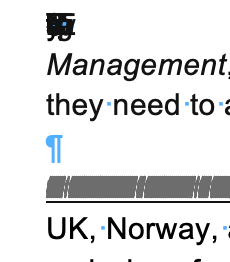
I am using Microsoft 365 on Mac running Tahoe 26.3.1. I downloaded a Google document from a client as a .docx Word document. This is something I do often. My client is also using a Mac. The Word document has corruptions in it, full lines of text are appearing as lines (like a barcode) and there seem to be letters and symbols stacked up on top of each other. Screenshots attached. I have tried saving as a .doc Word document but the corruptions are still there. If I select all of the text and change the font, the corruptions are still there. I copied the text into Text Edit and converted to plain text. The corruptions disappear in Text Edit but so does any text that was there, sentences are incomplete. If I copy and paste this plain text into a new Word document, the corruptions reappear. If I import the Plain Text into InDesign, the corruptions reappear. If I copy and paste the plain text into InDesign, the corruptions reappear. This strikes me as very odd because as far as I know Plain Text should remove any corruptions. My client says that they see no corruptions in the Word doc or in the Plain Text doc that they created. But when they send these docs in email, the corruptions are still there. I spent 4 hours with Microsoft Support yesterday trying to figure out the problem and when they couldn't figure it out, they just closed and left the chat.... I would love to let my client know what they can do to fix this on their end so that we can move forward with the project. Any suggestions are appreciated!124Views0likes4Comments
How do I get balloon commenting on the right side of the page?
I'm using Word 2024 because I don't want AI in my interface. Now commenting all appears in the tab side bar. I can click on the "Comment" pulldown in the ribbon to show comments properly, but I can't write in them. This is aggressively hostile to people with vision difficulties. Even with my glasses, that's much smaller than I'm comfortable with. How can I get the comments that were so good and useful back? If not, how can I change the type size in the sidebar so I can read and write comments? Microsoft, please, don't ruin your products because you want to make us use AI for things that it's not helpful for. I don't use Word for anything I want AI in and deal with documents I cannot legally allow to be exposed to unverified servers like AI chatbots.Solved191Views0likes1Comment
Word document is displayed different on different systems
Hi, I've a word document that, when I open it on my local Mac with Office365, has 17 pages. When I export it to a pdf (electronic version) it suddenly become 16 pages as the document is more compressed, which is a strange behaviour. So I tested it on two other platforms, one Windows PC and another Macbook Air, and there the document has also 16 pages and looks like the exported pdf. The same applies for a colleague who also has 16 pages when open it. So the problem seems to be related with my local configuration. In addition to this strange behaviour, my word version don't open the printing dialog and also exporting a pdf as printable version leads to an error. Excel, for example, opens the printer dialog. Anything I can do to fix this issue? It's really annoying and a NO GO that the same document looks different. I'm using a Macbook Pro M1 with Tahoe 26.2 and Word Version 16.105.3 (26020123)624Views0likes3Comments
Weird frame around paragraph in Word
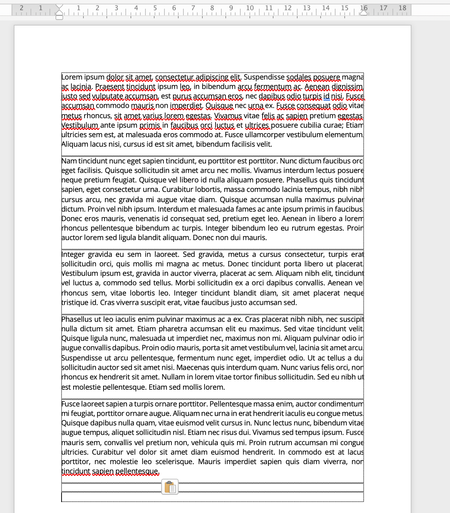
Hello ! About two months ago, frames appeared around every paragraph in all my Word documents. I have attempted to remove them using the following menus: margins, borders, grid and rulers, spacing between paragraphs, and other formatting elements, but they persist. They remain invisible when printing or exporting as a PDF, yet they appear in both the page view and online display modes. I work on Word mac 16.92 on a 2021 Macbook Pro. See the attached pictures for an example. the frame is already there before I start writing. Could you kindly help me figure out how to remove the frames around every paragraph?Solved417Views0likes2CommentsIssue with Background Color Not Exporting Correctly in Word Office 365 for Mac
Hello, I'm experiencing an issue with Microsoft Word on Office 365 for Mac. When I export a document that has a background color other than white, the exported document ends up with a white background instead of the color I set. I've tested this on different Mac models, but the issue persists across all of them. However, the same document can be exported correctly on a Windows PC, where the background color is retained. Has anyone else encountered this issue on a Mac? Any suggestions on how to resolve it would be greatly appreciated. Thank you!1.9KViews0likes1CommentOffice 365 navigation pane cannot move titles.【In the Mac version.】
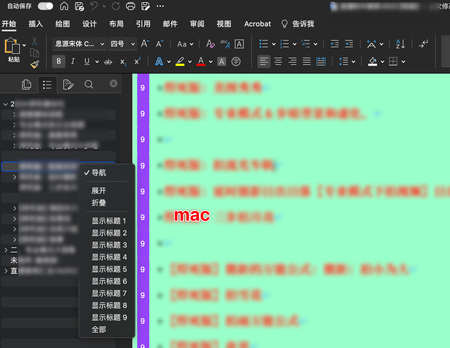
We can notice that in the Windows version, we can change the title levels in the navigation pane of Word, but in the Mac version of Word, there is no similar function. After selecting the title levels in the navigation pane, we cannot move them up or down to change their position. Please provide a method for this operation. ⬆️mac:When the navigation pane is collapsed, the main text area does not synchronize and collapse accordingly. ⬆️win:By selecting different levels, you can click and drag or delete all the text under that level with a long press, making it very convenient. ⬆️win(According to different levels, you can collapse the titles in the Mac version, making it more convenient to view the content at different levels.) —————————— The features we need for the navigation pane of Office 365 on the Mac version include the following operations: 1. Select the entire content under the title. 2. Delete the entire content under the title. 3. Drag the title to modify the order and position of the content within the same level of titles in the document. 4. Upgrade or downgrade the selected title (similar to 3). This feature is particularly important for users who are accustomed to using Mac to edit Word documents, especially long ones. We hope it will be given due attention.585Views0likes1Comment
wrong A4 Layout in word on mac
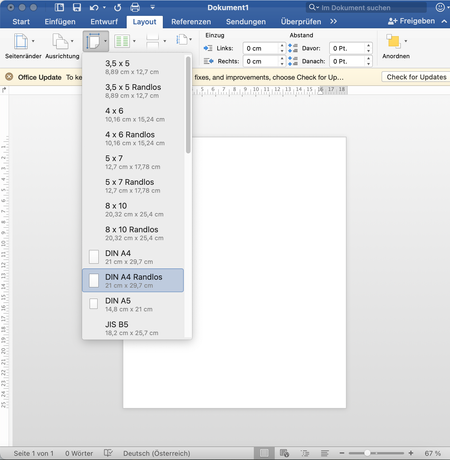
my word documents don't have the correct Layout and sizing. the height of my document is showing as the height for an A4 paper, but in reality it's not the correct height. Which means I can't use the header and the whole upper part of a document is cut off. everything should be calibrated to the correct extend but it's still not working. Feedback and Help preferably in German 🙂 ad picture: the Layout can't be changed and the right dimesions are chosen1.6KViews0likes2Comments
PDFs Saved in Word for Mac Can't be Printed from Windows Computers
Hi, I need help with issues I've been having when pdfs I create using Word for Mac (version 16.45) are printed by others. I sent some of the pdfs of certificates I created to Staples to be printed, but Staples couldn't even open them. Oddly, they could print out pdfs of letters that I created the same way that were in portrait, unlike the certificates which are in landscape. We also sent certificates to a client, and while he was able to print them, a lot of the text and graphics were missing. I sent a colleague with a Windows computer the certificates in docx format and he exported them as pdfs in Word without making any changes. There was no issue with printing the pdfs he created, either for our client or at Staples. I have attached generic copies of our certificates to OneDrive in case that is helpful in solving this problem. I've also attached a picture from our client of the certificate that they printed, with sensitive info blacked out. I urgently need to figure out how I can create pdfs in Word on my Mac that can be printed without issue by Staples or from a client's PC. If anybody could help me, that would be appreciated. Thanks!842Views0likes0CommentsWord issue on Mac: Arrial Narrow Italic - polish language letters
I am reporting a problem with Polish letters in Word on Mac for Arrial Narrow Italic font. The font does not support Polish letters (ex. ż, ą, ę, ł). Polish letters are replaced with Arrial Italic font instead of Arrial Narrow Italic font. It's different on a Windows computer - everything is fine there. I am asking for help and a solution to this problem. Technical Support was unable to resolve the issue - Case number 1012624486552Views0likes0Comments