mac
12 Topics
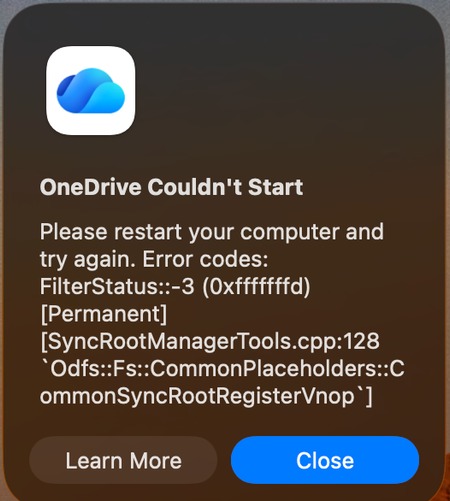
Mac: OneDrive Couldn't Start: Please restart your computer and try again
When OneDrive updated on 9/11, with build 26158.0816, I started to get this error: OneDrive Couldn't Start: Please restart your computer and try again. Error codes: FilterStatus::-3 (0xfffffffd) [Permanent] [SyncRootManagerTools.cpp:128 `Odfs::Fs::CommonPlaceholders::CommonSyncRootRegisterVnop`] I have powered off my Mac and rebooted. Restarting OneDrive does nothing. It keeps giving me this error and as a result, I also cannot live edit docs using the thick clients (Word, Excel, etc). Files I have modified with them are stuck on my Mac. I am looking for tips. Please do not ask me to unlink/de-register all of my Onedrive sync'd shares.6.5KViews13likes29Comments
For OneDrive, Save A Copy does not default to the folder/path of the original, with MS365 apps)
When I open a document in Word and Save A Copy, the save location is not the folder the document was opened from. Word is choosing a different folder that I have previously saved other documents in. Normal behavior: Open Acme_v1 from Acme folder > Save A Copy > save dialog opens to Acme folder What's happening: Open Acme_v1 from Acme folder. > Save A Copy > save dialog opens to a random folder that was saved to previously This behavior is unique to when accessing and saving files through Onedrive for Mac. It works fine if retrieving/saving files locally, or if doing the same operation on OneDrive for Windows. This behavior is a significant issue for us and causing people to avoid saving files to onedrive altogether and to save files locally or use alternative cloud services rather than put up with this nonsense. I am unable to find any configuration setting to change this behavior. Ideas?550Views1like0Comments
OneDrive for MacOS - can't search files in Spotlight
Hi When using OneDrive on MacOS I can't search my OneDrive files in Spotlight, making file access more cumbersome. I tried to edit the Spotlight search settings, but I don't see my OneDrive folder there. I checekd the SpotLight settings under preferences - and the "Folders" and "Documents" options are both set. Is this a OneDrive Limitation ? Environment: MacBook Pro (Intel), Ventura 13.6.61.1KViews1like2Comments