m365
4 Topics
Issue Sideloading Word Extension into Word Online via GoDaddy M365 Account
Hi everyone, We’re currently facing an issue while trying to sideload a Word extension into Word Online. From what we understand, the standard process is to upload the add-in through the Microsoft 365 Admin Center, after which users within the organisation can access it through the “Add-ins” section in Word Online. However, our organisation’s Microsoft 365 account was purchased through GoDaddy instead of directly from Microsoft. Because of this, attempts to access certain Microsoft 365 Admin Center features appear to get redirected to the GoDaddy Admin Center instead. We suspect this may be preventing us from accessing the required deployment/app management options needed for sideloading the extension. Has anyone faced a similar issue with GoDaddy-managed Microsoft 365 accounts? Any guidance or workaround suggestions would be greatly appreciated. Thanks in advance.158Views0likes1Comment
Teams Meeting Intelligent Recap/AI Notes feature license requirement
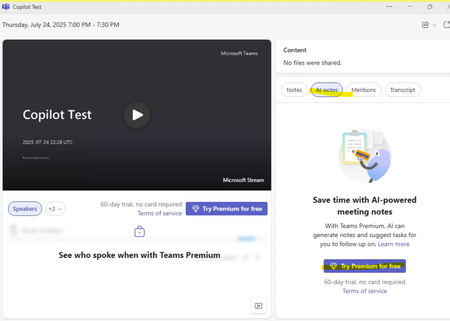
Hello Experts, We've read that from this article: https://learn.microsoft.com/en-us/microsoftteams/intelligent-recap-calls-meetings The intelligent recap/AI notes for meetings license requirement is Teams Premium "or" M365 Copilot license. However, when we test this for a couple of test users that only has Copilot license(paid) but without Teams Premium. The AI Notes in Teams Meetings Recap is locked. See sample screenshot. We confirmed that the AI Notes is unlocked once you have Teams Premium license but this seems like a bug or maybe an error from the official article. Can someone from the engineering team confirm this? Your help is highly appreciated.220Views0likes0CommentsTeams SMS Campaign Approval
Our use case is strictly for receiving inbound notifications. We do not send any outbound messages. As we won't be using the SMS feature to contact individuals directly. Is there any way to get approved without fulfilling requirements that don't apply to our specific use case like the Call-To-Action and SMS Terms and Condition?238Views0likes1Comment
Unable to call 200 help line using Microsoft Teams (US based)
Hello Team, We would like to confirm if others are experiencing or is aware of this behavior. We are using Teams as our telephony service and we are able to call emergency numbers like 911 using Teams but not 211 helpline nor 800. Is there any documentation regarding this? Thank you!1.1KViews0likes1Comment