lists
3218 Topics
Workflow for importing Excel to List
I'm a novice developing a workflow for importing an Excel spreadsheet to a SharePoint list. Have I missed anything? Workflow: Thoroughly clean up the data in Excel before importing to a list. Caution: Excel filters (and list filters) are case-insensitive and ignore superfluous spaces, etc. So we can't rely solely on filter functionality to find messy values. Instead, consider using the EXACT function in Excel like this: =OR(EXACT(A2,"PRIMARY"),EXACT(A2,"SECONDARY")). See this Stack Exchange post for more options: https://sharepoint.stackexchange.com/questions/317576/find-list-values-that-arent-in-the-picklist-choices Or, as a last resort, we could consider importing to an Oracle table and use a GROUP BY query (SQL) to find incorrect values, since that's dead easy in databases. I don't use Access for this because it has the same filtering limitations that Excel and lists have. Manually create an empty list. Or import a blank list from Excel and modify it. Caution: When importing from Excel to a list, the list won't honor the Excel column names for the internal list names, even if the Excel names are clean. The list will generate column names like "field_0" through to "field_30" (or whatever applies). Google suggests importing from Access is an alternative -- the column names should be honored. https://i.sstatic.net/3KoAsrMl.png Caution: The time zone for my SharePoint sites and personal MS list environment is wrong. It's set to Pacific Time, when it should be Eastern Time. Keep an eye on any list date values to ensure they are correct and haven't been automatically changed to a different day. Import the Excel rows/data using Power Automate. For what it's worth, any dates that get imported via PA will be correct, despite the time zone, unlike when importing data from Excel using the list UI. Inspect the imported data, correct the list columns/settings, correct the Excel data, and repeat #3. Do this multiple times -- as many times as it takes.141Views0likes1CommentNew in SharePoint Lists: Choose How Views Appear
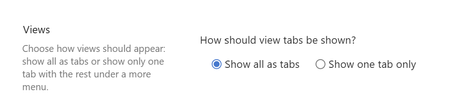
One of the newest SharePoint Lists features is also one of the simplest... and that's exactly why I like it. Microsoft has added a new setting that lets you choose how views are displayed in a SharePoint list. If you work with SharePoint Lists regularly, you've probably seen lists with a large number of views. Over time, the navigation bar can become crowded with tabs: 📋 All Items 📋 Active 📋 Completed 📋 My Items 📋 Archived 📋 Reports 📋 And many more... Now, SharePoint offers a new option in List Settings → Advanced Settings: ✅ Choose how views should appear You can either: ✅ Show all views as tabs or ✅ Show only one tab and place the remaining views under a More views menu This may sound like a small UI enhancement, but it can have a noticeable impact on usability. Benefits include: 🔹 Cleaner navigation 🔹 Less visual clutter 🔹 Better use of screen space 🔹 Easier experience for end users 🔹 A more modern and streamlined interface Interestingly, I don't see this setting available in Document Libraries yet, only in SharePoint Lists. It will be interesting to see whether Microsoft brings the same experience to Document Libraries in a future update. I often say that successful adoption is not only about new capabilities. It's also about reducing friction. When users can find what they need faster and the interface feels less overwhelming, the overall experience improves significantly. Not every Microsoft 365 update needs to be revolutionary. Sometimes the best improvements are the ones that quietly make everyday work easier. Have you already noticed this new SharePoint Lists setting, and which option would you choose for your users: All Views as Tabs or More Views? Check out the video i have recorded on the topic https://www.youtube.com/watch?v=y5jDYkkgL0E #SharePoint #SharePointLists #Microsoft365 #M365 #MicrosoftLists #SharePointOnline #Productivity #DigitalWorkplace #Collaboration #Microsoft365Tips263Views1like1Comment
SharePoint List Web Part - major caching issues
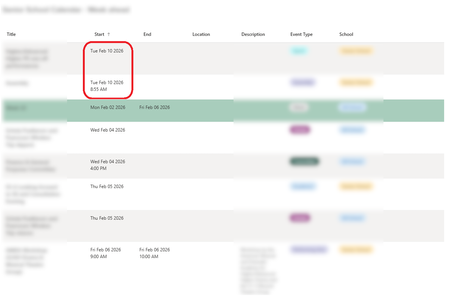
Hi All, I've spent a lot of time building a List based company calendar in our SharePoint Intranet Portal, and the calendar itself is working great, however I'm having no end of headaches with the List Web Part. (not just for this calendar, but all list web parts for that matter) The calendar has a Start and End field - both are Date and Time fields. A custom view is created for use with the List Web Part to embed an "upcoming week" view, this is based on a filter which checks both Start and End dates to see whether an event exists within or spans the date range from today to 7 days in the future, so it is a rolling 7 day window. This is based on a number of filter criteria which include [Today] and [Today]+6. The view also has a sort criteria to sort based on the Start (Date/Time) field. This all works fine when previewing the view within the list itself - at midnight the results update to include events from the day that is now 7 days in the future which were previously excluded. So the view itself is working fine. However the same view in a List Web part on another page suffers from a ridiculous amount of browser side (?) caching, to the point that it is basically broken and unusable. When I open the page the next day in a browser (even if the browser was closed) one of three things happens, somewhat at random: The events 7 days in the future (which just came into filter scope today) just don't appear until a forced page reload is done. The events 7 days in the future do appear but they are sorted incorrectly, appearing at the TOP when the date sort order should show them at the BOTTOM. Sometimes 2 happens but the event is shown with the Start and End Date/Time fields empty - so not only is it at the wrong end of the list it doesn't even show a date at all until the page is refreshed. Here is a picture showing the sort order being incorrect as in case 2: When these various problems happen a full CTRL-F5 browser refresh always updates the list to be complete, up to date and sorted correctly, however, if after that you click away from the page and follow a link to return to it OR press a regular F5 refresh it goes back to being incorrect! It takes many page reloads or a lot of time to pass (hours) before it finally settles down and gives the correct results every time. Then the next day the same caching problems happen again. If you go to a new browser or PC the same problems happen again, suggesting this is browser side caching not something at the servers. While the actual content of the list items update in real-time if you edit the list content in another page (which is pretty cool) the "result set" of list items (which items should or should not be seen) is heavily cached, and the sorting is unreliable. Has anyone else found a solution to this ? I have already done things like disabling offline mode for the list, (this only seems to affect caching of the actual data in the list items, not caching of filter results) etc and I cannot find a solution. The only thing I know which would probably work, as I have had to use this approach on another list is to extend the date range of the filter criteria for the view further into the future, then filter out the extra days using json code in "format view - however AFAIK you can only selectively hide rows like this if you use a custom rowFormatter, which means you have to fully re-implement the standard view including hard coding all the columns you want and it still won't look quite the same. This is a lot of work and maintenance overhead in the future to work around a caching problem that shouldn't exist in the first place. Any thoughts appreciated as a lot of time and effort has gone into building an entire calendar system around a SharePoint List, only to find that the list web part just doesn't work properly.851Views0likes2CommentsIf list multi-select choice column contains certain value, auto-populate flag column in related list
I have a SharePoint list called List1 with columns ID (single-line text) and Type (multi-select choice): ID Type ---- ------ ID1 Apple ID2 Apple, Pear ID3 Pear, Banana, Apple ID4 Pear ID5 And a second list called List2 with columns ID (a Lookup column) and Has_Pear (yes/no). I want to automatically populate Has_Pear with "Yes" if the related row in List1 has "Pear" in the Type column. Like this: ID Has_Pear ---- ------ ID1 No ID2 Yes ID3 Yes ID4 Yes ID5 No How can I automatically populate the Has_Pear column?462Views0likes3Comments
How to create a view to display the last 6 month items in SharePoint list
Hello All, I have a SharePoint list and there are many items. I can filter items for the last 6 months. However, I want to have a view when someone selects that view, the view always shows the last 6 months list items. Thanks for your answers/support in advanced.Solved627Views0likes4Comments
JSON formatting to change background color of ENTIRE column of list?
Hi, I'm trying to use JSON formatting to change the color of an entire column of a SharePoint list, and I can't figure it out. Setting the background-color style property appears to only affect the background color of the text. You can still see the default column color in between rows. I want the whole column to be one color. Is there a way to do that?Solved575Views0likes2CommentsRecycle Bin and Site Content Hidden for Site Members and Site Visitors
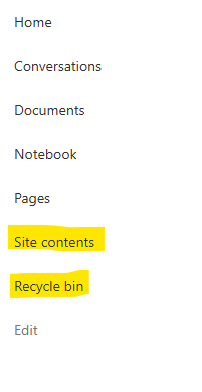
I posted this before but made a mistake with my write up, so I am reposting. I have a requirement that the Recycle bin and Site Contents should be be hidden from the Site Members and Site Visitors. Please how can I achieve this because the Server Infrastructure activation is not working for me. Any workarounds? Please help749Views0likes1CommentCustom Formatter for Read-Only Fields conditional based on other columns
Hello! Does anyone know if it's possible with the fieldsettings, readonly formatting, to make it conditional based on a Person field? It's a multi people field if that makes a difference? I ideally want to make certain fields read only based on who is viewing it (without having to use a Power App customised form!). This is what I want (but I know the syntax is likely all wrong!) but not sure if it's possible to use an IF statement with boolean statements? { "sections": [ {} ], "fieldsettings": [ { "name": "Comments", "readonly": "=if([$People.email] == me, false, true)" } ] }902Views0likes2Comments
MS List Column Width Forced
Hi, I've had a number of MS lists and been able to enter grid view and amend the width of columns and the text doesn't overflow which I want to keep the overall list width smaller; but as of yesterday all my columns are forced to be as wide as the text, meaning the that 1 column can be multiple screens wide for multi-line columns and they can't be resized smaller Is this a bug? Any help appreciated.825Views0likes2CommentsSharePoint list dynamic filtering on a multi-choice column
Hello, I was wondering if anyone has a solution/work around for a limitation I'm running into with using dynamic filtering on one of my SharePoint lists. The way I have it set up: there is a "Tags" column that has multi-selectible choices like "x", "y", "z", etc. The problem I'm running into is when you try doing dynamic filtering on the list webpart and want to view every item with tags "x AND y", it filters using the logic "x OR y". So, the output contains way too many unrelated items and the filtering is pretty much pointless. This is on top of the limitation that you can only dynamically filter by 1 column at a time, which is why I needed to add every tag to a multi-selectable choice column in the first place. Has anyone found a way around this? Or is there some solution I'm not seeing?Solved848Views0likes1Comment