laptop
5 Topics
Windows Defender Cannot Be Activated After Uninstalling Comodo Anti Virus– Help Needed (Windows 10)
Hello Community, I’m experiencing a problem with my Windows 10 laptop and hope to get some guidance. Official support is no longer available for my system, so I’m turning to the community for help. Problem Comodo Anti Virus /Internet Security / Internet Security Essentials had been installed on my laptop for a long time. While Comodo was active, I could not load certain websites properly, and games like League of Legends would not run. For this reason, I recently uninstalled Comodo. After the uninstallation, the previously blocked websites and games work again. Current issue: My Windows Defender Antivirus cannot be activated. In Windows Security, it shows: “Virus & threat protection: Action required” “The threat service has stopped. Start it now” Clicking “Start now” only shows a loading indicator and then an “An unexpected error has occurred” message. I have administrator rights, but Defender still cannot be activated. Steps I’ve Tried 1. Registry checks Path: HKEY_LOCAL_MACHINE\SOFTWARE\Policies\Microsoft\Windows Defender Checked entries like DisableAntiSpyware and DisableRealtimeMonitoring Modifications often failed → access denied 2. PowerShell commands Set-MpPreference -DisableRealtimeMonitoring $false → errors: “Parameter not found” or “Access denied” Other commands like Set-ItemProperty or Set-Content → errors: “UnauthorizedAccessException” or “InvalidArgument” 3. CMD / SC commands sc config WinDefend start=auto Error: “SC Open Service Error 5 – Access denied” 4. Service check Get-Service WinDefend | Select-Object Status, StartType → Status: Running, StartType: Automatic Despite the service running, Defender cannot be enabled in Windows Security 5. System restore point created (For Comodo Revomal Tool) Drive C: protection enabled Backup created as a precaution Insights / Analysis (Speculations) After uninstalling Comodo, websites and games work again → this suggests that Comodo previously installed network filters or drivers that blocked them. It is possible that remnants of Comodo (drivers, services, registry entries) are preventing Windows Defender from starting. Firewall, App & Browser protection, and Exploit protection are active → partial protection, but Defender is not functional. I am not certain if there are other causes, but based on my experience, it seems strongly related to leftover Comodo components. Has anyone experienced similar issues where Defender remains blocked after uninstalling Comodo? Are there safe methods to fully reactivate Defender without risking system stability? Should I use the official Comodo Removal Tool to remove all remnants? Are there alternative steps to try before using a removal tool? I would greatly appreciate any guidance, tips, or steps I can try to get Windows Defender working again. Thank you in advance!783Views0likes5CommentsPerformance Issues on Convertible Laptop — Need Suggestions
Hi everyone, I’ve recently started using a convertible laptop for work and creative tasks. It’s been fantastic for switching between productivity work, streaming, and sketching in tablet mode. However, I’m running into some performance challenges, especially when multitasking or working with heavy creative applications. Even though my device has an https://www.lenovo.com/in/en/d/i7-laptops/, I’ve noticed occasional slowdowns and faster-than-expected battery drain when switching between tasks. I’ve already tried tweaking the power settings and disabling unnecessary background apps, but the issue persists. I came across the Microsoft Tech Community while searching for solutions and thought I’d ask for help here. Are there any specific settings or optimizations to improve performance on a convertible laptop? I’m also curious if there are tools that can help manage resources better or boost system efficiency. Thanks in advance for your suggestions!124Views0likes0Comments
When is Microsoft going to bring Microsoft Authenticator windows aka desktop or within edge itself?
When is Microsoft going to bring Microsoft Authenticator windows aka desktop or within edge itself? (People like me lose mobiles) Isn't Windows device considered anything? Only mobiles and android and iOS devices matter? People like don't store important info on Windows devices? Edge has support for in-built password manager like chrome with chrome and google passwords then why is edge not having 2fa support on windows yet in 2024? Is windows still usable if my phones goes for service center, dies randomly, or is stolen? Can I consider windows devices to be of valuable in 2024 or should I shift 100 percent to android and MacOS and ios? Should I throw my windows devices out of window since it is not dependent device when any other fails? On a sidenote, I tried checking out but WinAuth Authenticator exists for Windows PC is open-source & offers 2-step verification (but unfortunately not updated since 2016) so why Microsoft which focuses so much of AI of everything has been able to bring desktop version for windows users? Or am I asking too much in the name of security and privacy that big tech promotes all the time? Can we trust microsoft and windows devices? Or is everything going to be done by google and chrome?2KViews0likes2Comments
Windows Desktop - New Folder Type Feature
I'd love to see a new desktop icon/folder feature. Adding a specific type of New Folder that will only be displayed on your main/primary display desktop. The folder would always be visible on the main display and contain the icons that show up on all external monitors that are not flagged as the main display. That way, when a laptop isn't connected to an external monitor, those sets of icons are quickly accessible via the special desktop folder on your main display. You would no longer have a flood of icons when using only the laptop and when docked you have them at their normal positions.358Views0likes0CommentsSurface Laptop 4 heats up with minimal use or idle, even more when charging
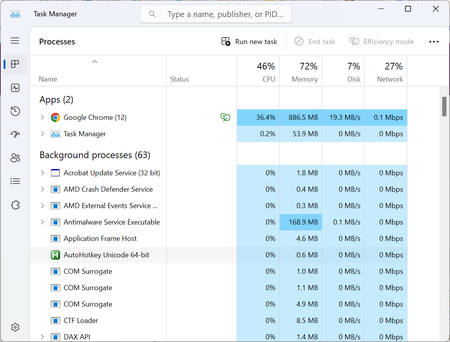
A couple of months ago, I started noticing the fans on my laptop spinning up during pretty light use. Normally they never turned on, except for during heavy use. Now the fans are on by default and the bottom of the chassis is constantly warm, and when charging it's almost too hot to touch. I don't recall having installed something around the same time this started happening. I've never opened the laptop or cleaned the fans. When I open the task manager it's nothing crazy (this is while the fans are very audibly on and the bottom of the laptop is very hot) Any suggestions are more than welcome, thanks! PS Device specifications Processor AMD Ryzen 5 Microsoft Surface (R) Edition 2.20 GHz Installed RAM 8.00 GB (7.45 GB usable) System type 64-bit operating system, x64-based processor Windows specifications Edition Windows 11 Home Version 22H2 Installed on 23/09/2022 OS build 22621.3007 Experience Windows Feature Experience Pack 1000.22681.1000.0880Views0likes0Comments