isv
41 Topics
Introducing Everpure Cloud Azure Native for Azure VMs
Overview We're excited to announce Everpure Cloud Azure Native for Azure Virtual Machines (VMs). With this release, Azure customers can provision enterprise-grade block storage volumes and attach it directly to their Azure VMs, all managed natively within the Azure portal. No appliances to manage, no complex storage stack to stitch together — just elastic, high-performance block storage that behaves like any other Azure disk. This release solves three persistent challenges Azure VM customers face with traditional Managed Disks: Pay for capacity what you actually use, not what you provision — Billing follows effective capacity after deduplication and compression, helping customers avoid overprovisioning and reduce storage costs (by up to 40%) Scale storage independently from compute — Grow capacity and tune performance without resizing your VM or touching the VM SKU, giving you finer control over both cost and performance. Enterprise data services built in — Thin provisioning, deduplication, and compression — all native to Everpure. What you can expect Familiar building blocks — storage pools, volume groups, and volumes that map cleanly to your applications and VMs. Independent scaling of capacity and IOPS — dial storage performance up or down without disturbing compute. Seamless guest-OS integration — mounted volumes appear as standard Windows disks; no special drivers or custom tooling required. Step-by-step: Setting up Everpure Cloud Azure Native storage for your Azure VM Step 1 — Deploy Everpure Cloud service Find Azure Native Everpure Cloud in the Azure Marketplace and deploy it into your subscription. The service is provisioned natively as an Azure resource and enables the service in selected region. Step 2 — Create a Storage Pool Create a storage pool — Choose an availability zone for resiliency and use the performance slider to set your desired IOPS independently of capacity Step 3 — Create a volume group Create a volume group — a logical container that groups related volumes together, for example all the disks belonging to a single application, database, or VM. Operating at the group level makes access control and day-2 management simpler at scale. Step 4 — Create volumes Within the volume group, create the volumes your VM will consume. Specify a name and size — this size is a logical limit, not pre-allocated capacity. Volumes can be resized live and shared across multiple VMs when needed. Step 5 — Mount to your Azure VM From the volume group, select Mount on VM. The Azure VM connection experience opens, letting you attach the volume to your chosen Azure Virtual Machine. Step 6 — Bring the disk online inside the guest OS Once mounted, the final step happens inside the VM. The Everpure volumes appear as standard, uninitialized Windows disks. Open Disk Management, initialize the disks with GPT, run the New Simple Volume Wizard, and format them as NTFS. Within seconds, the Everpure-backed volume becomes a regular drive letter (for example, F:) ready for any workload. Get Started Today Everpure Cloud Azure Native for Azure VMs is available now in the Azure Marketplace. Deploy it into your subscription to start bringing enterprise-grade Everpure to your Azure VMs Start Your Free Trial of Everpure Cloud Azure Native Check out the Everpure Cloud release notes for detailed guidance on supported configurations, capacity points, and operational considerations. Read the Everpure GA announcement blog to learn how Everpure Cloud Azure Native for Azure VMs helps reduce costs and simplify storage operations. Have feedback or questions? Drop a comment below — we'd love to hear how you plan to use Everpure Cloud for your Azure workloads.42Views0likes0Comments
From insight to action: how Adobe and Microsoft are helping marketers move faster with AI
Today’s marketing leaders are under pressure to do more than ever—deliver meaningful personalization, accelerate execution, and prove measurable business impact. At the same time, teams are navigating increasing complexity: fragmented data, disconnected tools, and insights that arrive too late to act on. AI can change this—but only when it’s embedded directly into how people already work. That’s why Microsoft and Adobe are deepening our partnership: bringing customer experience intelligence, AI-powered workflows, and enterprise-grade AI directly into Microsoft 365 Copilot—so teams can move from insight to alignment to execution in one continuous workflow. The result is faster decisions, more coordinated execution, and clearer business outcomes—without breaking flow or context. Bringing customer experience intelligence into the flow of work Marketing teams don’t struggle because they lack data. They struggle because insights live in one place, collaboration in another, and execution somewhere else entirely. That disconnect slows teams down and creates unnecessary friction between analysis and action. Together, Adobe and Microsoft are changing that dynamic by connecting Adobe’s customer experience capabilities with Microsoft 365 Copilot and Copilot Cowork—so insight, collaboration, and next-best action can happen where work already happens: in Copilot Chat and in everyday apps like Teams, Word, and PowerPoint. Marketers can ask questions, explore insights, align with teammates, and take action without jumping between tools—turning intelligence into impact at the moment it matters. Adobe Marketing Agent for Microsoft 365 Copilot: now generally available A major milestone in this journey is the general availability of the Adobe Marketing Agent for Microsoft 365 Copilot, now available via Microsoft Commercial Marketplace. The Adobe Marketing Agent brings Adobe customer experience intelligence directly into Copilot, enabling marketing teams to: Accelerate time from insight to decision Move seamlessly from analysis to execution Keep humans firmly in control, with AI supporting—not replacing—decision‑making Importantly, the agent is enterprise-ready by design. IT administrators can deploy and manage the experience through the Microsoft 365 admin center, ensuring security, governance, and compliance at scale. Expanding executive experiences with Copilot Cowork Looking ahead, Adobe skills designed for customer experience orchestration will be accessible in Copilot Cowork—in a future release. This upcoming experience will enable customer experience leaders to engage with customer experience insights in a more direct, conversational way, bringing strategic visibility into the same Copilot environments where decisions are made and actions are coordinated. Built on Azure to scale securely and responsibly The technology foundation of this innovation is Azure. Adobe Experience Platform, Adobe Experience Platform Agent Orchestrator, and Adobe AI Agents are built on Azure and leverage Azure AI models, providing the scalability, security, and reliability enterprises require. By running on Azure, these agentic experiences benefit from Microsoft’s global infrastructure, enterprise‑grade security, and responsible AI commitments—supporting customer trust as organizations scale AI across their business. Designed for interoperability across agent ecosystems Modern enterprises don’t operate in a single ecosystem—and their agents shouldn’t either. Adobe agents are built to interoperate with agents created using Microsoft Azure AI Foundry or Copilot Studio, enabling customers to orchestrate richer, cross‑functional workflows across marketing, sales, service, and operations. This architecture is designed to enable organizations to compose agentic solutions that reflect how work actually happens—across systems, teams, and business processes. Moving from experimentation to execution This partnership reflects a broader shift in how organizations adopt AI—moving from experimentation to embedded, enterprise‑ready execution. By bringing the full power of Adobe Experience Platform together with Microsoft’s AI platform, cloud infrastructure, and Copilot experiences, we’re helping teams move faster with clarity, confidence, and control. This is how AI becomes not just powerful—but practical. Learn more Adobe + Microsoft partnership page Adobe Marketing Agent for Microsoft Copilot page234Views1like0CommentsAzure Native Integrations: Public Preview of Napster Companion API on Azure
What is Napster Companion API? Napster Companion API is Napster's platform for building Omniagents: persistent, multi-channel AI agents with one identity, one memory, and one set of tools that show up across every channel an end user touches. The same Omniagent meets the customer on the website, in the mobile app, on video, and on the phone line with the same face, the same voice, and the same memory of the last conversation. The Omniagent as a digital worker The clearest way to think about an Omniagent is as a digital worker: It has a role (customer support specialist, sales advisor, internal IT assistant). It carries the memory of past shifts and prior conversations. It has the tools it needs to do the job which include APIs, knowledge bases, ticketing systems, CRMs. It shows up across every surface the end user touches, like a human worker who answers the door, the phone, and the inbox. When something is outside its scope, it hands off to a human colleague with the context already attached and picks the thread back up when the human is done. Use cases for the Companion API Teams are already exploring the Companion API across a wide range of scenarios: Agentic commerce. Agents that guide end users through discovery, recommendations, purchase, and post-sales support all in one continuous conversation across channels. Customer service. Agents that resolve issues end to end, escalate to humans with full context attached, and pick the thread back up across sessions. Internal operations and digital coworkers. Agents that orchestrate workflows, retrieve knowledge, and automate repetitive tasks for the workforce. Capabilities introduced by Napster Companion API The Companion API public preview brings the following capabilities to Azure customers: Persistent multi-channel agents that maintain identity, memory, and context across web, mobile, voice, video, and telephony. Real-time multimodal interactions across voice, video, and text for natural back-and-forth conversation. Tool and API orchestration that lets agents take real actions like opening tickets, updating records, retrieving documents, and triggering workflows. Persona-driven agents with configurable behavior, conversational style, and avatar-based interaction. Knowledge bases and deterministic question-and-answer pairs for grounded, accurate responses on topics where exactness matters. Developer SDKs and a no-code Dashboard for building, testing, deploying, and iterating on agents. Better together: Napster and Microsoft This integration is the result of a long-term Azure-native partnership between Napster and Microsoft. It is not an external service layered onto Azure infrastructure but it is a co-engineered offering designed to help enterprises operationalize persistent AI agents at scale. In practice, the Azure Native integration delivers: Benefit What it means for you Seamless development experience Provision and manage Companion API resources directly from the Azure portal, alongside your other Azure services. Build and operate Omniagents in the Napster Dashboard, reached through single sign-on. Bring your own model or use Napster Hosted Connect your Azure OpenAI realtime deployment on Microsoft Foundry so inference runs in your tenant. Or use the Napster Hosted tier where Napster manages the model for you. Simplified billing Manage Companion API spend through Azure Marketplace, on the same invoice as the rest of your Azure consumption which means no separate procurement, no separate billing relationship. Single sign-on with Microsoft Entra Switch between Azure resources and the Companion API Dashboard without re-entering credentials. Enterprise-ready foundation Built on Azure's compliance, security, and global infrastructure footprint. How it works?    If the player doesn’t load, open the video in a new window: Open video Get started in minutes Provisioning Napster Companion API on Azure takes just a few clicks: Open the Azure portal and search for *Napster Companion API*. Create a new resource and choose your subscription, resource group, region, and pricing tier. Link your Napster organization (or create one as part of resource provisioning). Launch the Companion API Dashboard from the resource overview page using single sign-on, and start building your first Omniagent in the Napster portal. Full step-by-step guidance is available in the Napster Companion API documentation on Microsoft Learn Resources Product documentation: Napster Companion API on Microsoft Learn Quickstart: Create a Napster Companion API resource Azure Marketplace listing: Napster Companion API Napster for partners: napster.com/partners Azure Native Integrations overview: Azure partner solutions What's next This public preview is the first milestone on a broader roadmap. We are eager to hear from early adopters. Try the public preview, build your first Omniagent, and let us know what you think as your feedback will shape what ships next. Get started today by searching for Napster Companion API in the Azure portal.1.4KViews1like1Comment
Foundry IQ and the partner opportunity: Turning domain knowledge into AI advantage
Turning domain knowledge into AI advantage with Foundry IQ The enterprise software landscape is undergoing a fundamental shift. AI agents are moving quickly from experimental pilots into production workloads. As organizations deploy agents at scale, a hard truth is emerging: an agent is only as valuable as the knowledge behind it. General-purpose models can reason, summarize, and generate. What they cannot replicate is the deep domain expertise software development companies have spent years building into products, data models, and best practices. That expertise is what turns an agent from “capable” into “useful” in real business workflows. This is the moment to ask a strategic question: where does your knowledge live in the AI agent economy, and how easily can customers find it when they are building agents? Microsoft Foundry IQ is designed to answer that question. What Foundry IQ means for the partner ecosystem Foundry IQ is a knowledge layer within Microsoft AI Foundry that connects curated, structured knowledge sources to the agents customers build and deploy. Organizations constructing agents in Foundry can browse, evaluate, and attach knowledge sources in the same place they select models and tools. Microsoft is leading with its own investment. Foundry IQ already surfaces product knowledge for first-party services, including: Microsoft Fabric (data pipelines, lakehouses, analytics) Azure Storage (blob, file, queue, and table architectures) SharePoint (collaboration, content management, and search) A growing set of additional Microsoft services For partners, this matters because it establishes a distribution surface inside the workflows where customers design and operationalize agents. Customers already use Microsoft knowledge sources when building. That same integration path is now open to partners, creating a clear opportunity to bring domain expertise into the agent-building experience. Microsoft knowledge covers Microsoft products. Customers also need industry and function-specific expertise that only partners provide. Foundry IQ enables you to meet that need by connecting your knowledge to the moment of highest intent, when customers are assembling the knowledge and tools their agents will rely on. In return, partners can gain: Increased visibility inside the platform where enterprise AI decisions are made A route to customer acquisition at the point of agent creation, not only through a separate sales cycle Stronger integration into the Microsoft ecosystem that can reinforce alignment with Microsoft sellers The ability to consume Microsoft first-party knowledge via the Model Context Protocol (MCP), making partner-built agents more capable without duplicating knowledge pipelines Three partner value paths The opportunity is not one-size-fits-all. Depending on your product architecture and go-to-market strategy, Foundry IQ opens three practical paths. Path 1: Integrate your knowledge where customers are already building Microsoft has populated Foundry IQ with knowledge for Fabric, SharePoint, Azure Storage, and other first-party services. Partners can integrate alongside these sources, becoming discoverable at the moment customers are assembling their agents. This is about showing up where design choices happen, not after the architecture is locked. A financial services organization builds a compliance agent and pulls in Microsoft platform knowledge alongside your regulatory expertise. A healthcare organization constructs a clinical workflow agent and discovers your domain knowledge at the point of need. In this model, your expertise becomes part of the agent’s foundation. Instead of being evaluated later through a separate procurement cycle, it becomes a selectable component in the agent-building workflow. That creates a new distribution channel at the point of highest customer intent. Path 2: Consume Foundry IQ to power your own agents The value flows both ways. Partners building agents, or agent-building platforms, can consume Foundry IQ as a knowledge source through MCP. Consider a partner offering a vertical supply chain platform. By connecting to Foundry IQ via MCP, that platform can: Ground its agents in Microsoft knowledge for Azure infrastructure, data services, and collaboration tools Layer the partner’s proprietary supply chain logic on top Deliver more capable agents without building and maintaining knowledge pipelines for every Microsoft service This is leverage. Partners benefit from Microsoft’s knowledge investment. Customers get agents that understand more of the full stack, from infrastructure through industry workflows. Path 3: Extend your existing knowledge platform with Foundry IQ Some partners already operate knowledge management or intelligence platforms. For these partners, Foundry IQ can expand relevance without forcing a platform rewrite. Foundry IQ and Microsoft Search capabilities can be integrated into your existing solution so you can: Combine your proprietary knowledge graph with Microsoft’s enterprise knowledge surface Deliver a more unified experience without requiring users to leave the platform they already use Evolve a standalone knowledge product into one that is connected to broader enterprise intelligence workflows This path strengthens your role as the knowledge hub while extending the reach of the content you surface. The business case for software development companies Across these paths, the business case tends to show up in three ways: Growth through integration When your knowledge becomes a selectable part of a customer’s agent architecture, each deployment becomes a durable touchpoint. Agents built with your integration can create ongoing product usage and expanded commercial opportunity. Differentiation through domain expertise Microsoft covers the platform layer. Partners cover the domain layer. As reasoning capabilities become more common, curated domain expertise becomes a key differentiator in agent outcomes. Ecosystem leverage through co-innovation Partners who integrate early can shape emerging patterns, build stronger visibility into customer demand, and become a natural choice when customers need domain-specific knowledge connected to their agents. Next steps Microsoft has already committed its product knowledge to Foundry IQ, and customers are using it to build agents. The domain layer is where partners complete the picture. Start with these actions: Identify your value path: Which of the three models aligns with your product and go-to-market strategy? Inventory your knowledge assets: What expertise, data sets, or frameworks would materially improve customer-built agents? Define an integration plan: Prioritize one scenario where your knowledge creates clear customer value and can be packaged repeatably. Engage your Microsoft partner development team: Align on scope and the right technical path to integrate or consume knowledge. The partners who move early can help set quality benchmarks and establish durable placement in the agent-building workflows customers adopt first. Additional resources Microsoft AI Foundry – Build, evaluate, and deploy AI agents Foundry IQ Overview – Learn how Foundry IQ connects knowledge to agents Model Context Protocol (MCP) – Open standard for connecting AI agents to knowledge and tools Azure AI Foundry Documentation – Technical documentation for the Foundry platform Microsoft Partner Network – Explore partnership opportunities and engagement path488Views0likes0Comments
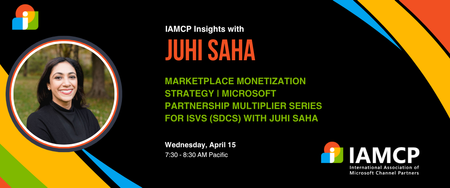
Microsoft Partnership Multiplier Series for ISVs (SDCs) with Juhi Saha
Eighty percent of Azure Marketplace listings never generate meaningful revenue - this session reveals why and shows you how to be in the winning twenty percent. We'll move beyond basic listings to explore the monetization hierarchy: when contact-me offers work versus when transactability becomes essential, how private offers unlock enterprise opportunities, and advanced strategies like MACC consumption programs. You'll learn the pricing models that convert versus those that create friction, discover what truly drives marketplace visibility and field seller recommendations, and understand the co-marketing tactics that actually work. Walk away with a clear offer design strategy and your path to first marketplace transaction. Register for the event here About Juhi She specializes in turning partnerships into a company’s fastest growth engine. A seasoned operator, over the past two decades, she's helped startups, scale-ups, services companies and global enterprises transform complex ecosystems into real revenue, driving billions in pipeline (and valuations), accelerating exits, and scaling globally while de-risking the investment into partner-led growth. At Microsoft, she launched and led Pegasus, the company’s flagship program for high-growth VC-backed startups, unlocking hundreds of millions in pipeline. She also built fintech and AI partnerships that shaped Microsoft’s GTM strategy with key industries. As VP of Partnerships at Clearbit, she designed and ran a new partner business that generated double-digit revenue growth and positioned the company for acquisition by HubSpot. Earlier leadership roles at Intel and Qualcomm gave her a foundation in product, operations, and ecosystem expansion. Today, as CEO of Partner1, she advises CEOs and CROs on how to: ✔ Grow profitably and globally through B2B partnerships while de-risking investment in partnerships ✔ Accelerate co-sell and marketplace revenue with Microsoft, AWS, GCP, AI and other key ecosystems ✔ Align GTM, sales, and partner strategies to unlock non-dilutive, scalable growth She also serves as a board director and strategic advisor to fintech, AI, and SaaS companies scaling through ecosystem-led growth. With a B.S. in Electrical Engineering & Computer Science from UC Berkeley, an M.S. in Electrical & Computer Engineering from UC San Diego, and three patents that run on every mobile device, she pairs deep technical expertise with real-world impact. Combined with go-to-market expertise, She brings the rare ability to bridge vision with execution, and partnerships with revenue.146Views1like0CommentsLearn to maximize your productivity at the proMX Project Operations + AI Summit 2026
As organizations accelerate AI adoption across business applications, mastering how Microsoft Dynamics 365 solutions, Copilot, and agents work together is becoming a strategic priority. Fortunately, businesses no longer need to rely on speculation — they can gain practical insights with fellow industry professionals during a unique two-day event: On April 21-22, 2026, Microsoft and proMX will jointly host the fourth edition of proMX Project Operations Summit at the Microsoft office in Munich, but this time with an AI edge. The summit brings together Dynamics 365 customers and Microsoft and proMX experts to explore how AI is reshaping project delivery, resource management, and operational decision‑making across industries. On day one, participants will discover how Dynamics 365 Project Operations, Copilot, Project Online, proMX 365 PPM, and Contact Center can strategically transform business processes and drive organizational growth. On day two, they can explore the technical side of these solutions. Secure your spot! What to expect from the summit Expert-led, actionable insights Join interactive sessions led by Microsoft and proMX experts to learn practical AI and Dynamics 365 skills you can use right away. Inspiring keynotes Gain future-focused perspectives on Dynamics 365, Copilot, and AI to prepare your organization for what’s next. In between our special guests we have Microsoft's Rupa Mantravadi, Chief Product Officer, Dynamics 365 Project Operations, Rob Nehrbas, Head of AI Business Solutions, Archana Prasad, Worldwide FastTrack Leader for Project Operations, and Mathias Klaas, Partner Development Manager. Hands-on AI workshops Take part in workshops where Sebastian Sieber, Global Technology Director (proMX) and Microsoft MVP will show the newest AI features in Dynamics 365, giving you real-world experience with innovative tools. Connect with industry leaders Engage with experts through Q&A sessions, round tables, and personalized Connect Meetings for tailored guidance on your business needs. Real customer success stories Hear case studies from proMX customers who are already using Dynamics 365 solutions and learn proven strategies for successful digital transformation. Who should attend? This summit is tailored for business and IT decision-makers that are using Dynamics 365 solutions and want to drive more business impact with AI, but also for those who might be planning to move away from other project management solutions such as Project Online and need practical guidance grounded in real-life implementations. Date: Apr 21 & 22, 2026 | 2 -Days event Location: Microsoft Munich, Walter-Gropius Straße 5, Munich, Bavaria, DE, 80807 Ready to maximize your productivity? Register here.190Views1like0Comments
Announcing seamless integration of Apache Kafka with Azure Cosmos DB in Azure Native Confluent
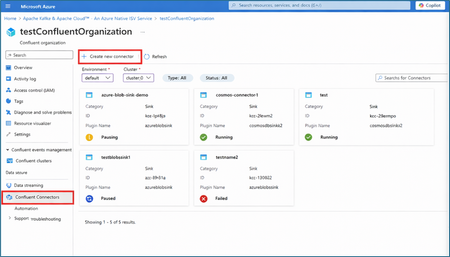
Integrate Azure Cosmos DB with Kafka applications Confluent announced general availability (GA) of the fully managed V2 Kafka connector for Azure Cosmos DB, enabling users to seamlessly integrate their Azure Cosmos DB containers with Kafka-powered event streaming applications. without worrying about provisioning, scaling, or managing the connector infrastructure. The Confluent Cosmos DB v2 connector offers significant advantages as compared to the v1 connector in terms of higher throughput, enhanced security and observability, and increased reliability. Seamless Integration with Azure Native Confluent We are excited to announce a new capability in Azure Native Confluent service that enables users to create and configure Confluent-managed Cosmos DB Kafka connectors (v2) for Azure Cosmos DB containers through a direct, seamless experience in the Azure portal. Users can also provision and manage environments, Kafka clusters and Kafka topics from within the Azure Native Confluent service, creating a holistic end-to-end experience to integrate with Azure Cosmos DB. This eliminates the need for users to switch between the Azure and Confluent Cloud portal. Key Highlights Bi-directional Support: Allows users to create source connectors to stream data from Cosmos DB to Kafka topics, or sink connectors to move data from Kafka into Cosmos DB. Secure Authentication: Users can authenticate to Kafka cluster using service accounts, enabling least-privilege access controls to provision the connectors - aligned with Confluent’s recommended security guidelines. Create a Confluent Cosmos DB (v2) Kafka Connector from Azure portal The following section summarizes the key steps required to provision the connector from the Azure Native Confluent service. Navigate to the native Confluent resource in Azure. Navigate to Connectors -> Create new connector You can also create an environment, cluster and topic from within the Azure Portal. Choose the desired connector type Source: to stream data from Azure Cosmos DB Sink to move data into Azure Cosmos DB Select ‘Azure Cosmos DB V2’ as the connector plugin Enter the connector name. Then, select the required Kafka topics, Azure Cosmos DB account and database. Select Service Account authentication and provide a name for the service account. When the connector is created, this will create a new service account on Confluent Cloud. Optionally, you can also select the user-account based authentication by provisioning an API key on Confluent Cloud. Do the required connector configurations. Enter the topic container mapping in the form of ‘topic1#container1,topic2#container2…’ Review the configuration summary and click Create. Your connector will appear in the list with real-time status indicators. Other Resources Try out the Azure Native Confluent Service right away! Every new sign-up gets a free $1000 credit! To learn more, check out the Microsoft Docs Follow the Azure Partner discussion board to keep up to date all on Azure announcements and join the conversation with subject matter experts! If you would like to give us feedback on this feature, the overall product or have any suggestions for us to work on, please drop in your suggestions in the comments.321Views0likes0CommentsNow Generally Available: Azure Native Pure Storage Cloud for Azure VMware Solution
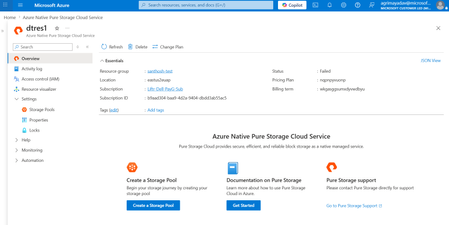
Co authored by: vjirovsky Azure Native Integrations enable you to easily provision, manage, and tightly integrate Independent Software Vendors (ISV) SaaS with a unified billing on Azure. By leveraging the power of Azure, Pure Storage Cloud Service offers you the same trusted Pure Storage capabilities in the cloud, without the complexity of refactoring or rearchitecting your VMware environments. You can easily discover and sign up for this via the Azure Marketplace. Azure Native Integrations enable you to easily provision, manage, and tightly integrate Independent Software Vendors (ISV) SaaS with a unified billing on Azure. By leveraging the power of Azure, Pure Storage Cloud Service offers you the same trusted Pure Storage capabilities in the cloud, without the complexity of refactoring or rearchitecting your VMware environments. You can easily discover and sign up for this via the Azure Marketplace. “We’re excited to announce Microsoft’s strengthened partnership with Pure Storage through the Azure Native Integrations program. With the service now generally available, customers can seamlessly deploy enterprise-grade block storage on Pure directly from the Azure portal. This seamless integration with Azure VMware Solution enables elastic capacity, flexible performance, and instant resizing – all while unlocking the full power of Azure’s cloud and AI capabilities.” - Scott Hunter, Vice President Product Management, Microsoft Developer Division Key Benefits of Azure Native Pure Storage Cloud on AVS Enterprise customers migrating VMware workloads to the cloud have long faced challenges with storage scalability, cost inefficiencies, and operational overhead. With this GA release, Pure Storage removes those barriers and delivers: Decoupled Scalability & Flexibility: across Compute and Storage solutions, so you pay only for what you need. Seamless Native Azure Experience: Provision Pure Storage Cloud resources via the client of your choice - Azure portal, CLI, PowerShell or SDK. Multi-Region support: Enjoy the support for your Pure Storage resource across East US, East US 2, West US 2, Central US and Australia East regions, with many more coming in shortly! Cost Efficiency: Achieve up to 40% Total Cost of Operations (TCO) savings through best-in-class data reduction and compression solutions. Streamlined VMware Migration: Simplify the transition of VMware workloads from on-premises or hybrid and multi-cloud environments onto Azure with consistent storage performance, nearly zero downtime, and minimal business disruption. Easy management: Perform all daily operations on AVS from a single VMware vSphere client directly via built-in plugin for Pure Storage Cloud Robust performance and reliability for mission-critical workloads with enterprise-grade Data protection and Data resilience support, with solutions such as Pure Snapshots and Hybrid Disaster Recovery in the pipeline. Fig 1: Pure Storage benefits of decoupled storage scalability. Why Pure Storage? Gartner report from Sept 2025 states that by 2029, consumption-based storage as a service (STaaS) will replace 50% of on-premises enterprise storage and data services infrastructure capital expenditure (capex), an increase from 15% in early 2025. Pure Storage® is a pivotal storage player among the Enterprise customers in revolutionizing the storage, management and resiliency while ensuring flexibility. From AI to archive, Pure Storage delivers a seamless cloud migration experience with one unified Storage as-a-Service (STaaS) platform across on-premises, private and public cloud, and hybrid environments. Pure has been named a Leader in the Gartner® Magic Quadrant™ for Enterprise Storage Platforms, with highest rating in Execution & Vision. An enterprise-favorite, some key customers for Pure Storage include ServiceNow, NASA, Comcast and many more! Fig 2: Magic Quadrant for Enterprise Storage Platforms, Sep 2025, Gartner Inc. Get Started with Azure Native Pure Storage Cloud Getting started is simple and fully integrated into the Azure experience. You can now start your journey quick and easy, and you pay only for the storage you use. For a detailed step-by-step visual guide, check out this YouTube playlist. Search and Provisioning the Pure Storage Cloud Resource Look for “Pure Storage Cloud” in the Azure portal or Azure Marketplace and sign up to subscribe. Select the service and create a new Pure Storage resource. Follow the instructions in the QuickStart to easily spin up your Pure Storage resource. Fig 3: Searching for Azure Native Pure Storage via Azure portal Create Storage Pools Using your Vnet and a delegated subnet to PureStorage.Block/storagePools, use the Overview blade navigation or the Action tile in the bottom to create and configure your storage pools. Fig 4: Newly created Pure Storage resource Overview in Azure portal Fig 5: Create Storage pool blade in Azure portal Connect to an Azure VMware Solution (AVS) resource Once created, you can use the Connect button up top to link your storage pool to AVS. In a few minutes, your storage pool is coupled with your VMware resource and ready to use! Fig 6: Connect AVS button establishes connection between storage pool and AVS resource Also, it automatically installs the Pure Storage Cloud plugin into your VMware resource, so you can manage everything, including the storage, from a single place, vSphere Client. Fig 7: Creation of a Datastore within the vSphere Client – this maps to a Storage container on your Pure Storage Cloud resource We’re excited for you to try out our solution! If you have suggestions or questions, contact us at azurenative@purestorage.com Resources Sign up for the service via Azure marketplace here. For a detailed visual guide on the step-by-step process to create a Pure Storage resource on Azure, check out this YouTube playlist. To learn more about the service, FAQ, and how to create your resource, check out the Microsoft docs as well as the Pure docs. Learn about how to create datastores and volumes and manage your Pure Storage here. Check out Azure Storage's blog and Pure’s press release for more excitement around the Pure-Microsoft partnership.468Views0likes0CommentsIntroducing Dell PowerScale for Azure: Now in Public Preview
We’re excited to announce the public preview of Dell PowerScale for Microsoft Azure – a fully managed, enterprise-grade file storage solution natively integrated into Azure. This offering brings Dell’s proven scale-out Network-attached storage (NAS) technology directly into Azure, delivering the performance and scalability enterprises expect with the simplicity of Azure-native management. Supporting up to 8.4PB in a single namespace, Dell PowerScale offers the scalability needed for demanding modern workloads. With multi-protocol support (NFS, SMB, S3), it ensures seamless access across diverse applications while maintaining the trusted Dell PowerScale user experience. This Dell-managed solution handles monitoring, maintenance, and updates, enabling organizations to streamline operations, optimize storage, and focus on business priorities with confidence in their data’s security and accessibility. This natively integrated solution uses purpose-built virtual machine infrastructure provisioned by Microsoft in the standard Azure hyper scaler environment. This special VM leverages cache to flash persistent memory technology using NVDIMM-N specifications suitable for the fast linked journaling transactions. These purpose-built VMs enable higher performance throughput and max capacity scale. Capabilities of Dell PowerScale for Azure Multi-protocol access – Global permission structure shared across users and protocols. Seamless scalability – Easily adjust to changing workloads with scale-out capacity. Operational consistency – Same experience as PowerScale on-premises. Smooth data mobility – Transfer data across environments without disruption. Advanced data protection – Safeguard critical information with comprehensive backup and recovery solutions. Snapshots – Fast data backup and recovery. Native replication – Asynchronous replication for data migration or disaster recovery. Why Dell PowerScale for Azure? Dell PowerScale is purpose-built for modern data-intensive workloads that require high performance and scalability — such as AI/ML pipelines, media & entertainment, EDA (electronic design automation), backup & recovery, and enterprise content management. Key Benefits of the Integration: Dell-Managed Service: Enjoy a streamlined storage experience, with Dell handling deployment, monitoring, maintenance, and upgrades — freeing your IT teams to focus on higher-value initiatives. Scalable & Elastic: As business requirements grow, PowerScale dynamically scales capacity and performance by adding nodes on demand, without any downtime. Enterprise-Grade Durability: Data is distributed across multiple nodes within the cluster, ensuring high durability and fault tolerance. Advanced Protection: Uses erasure coding for space-efficient protection and features like SyncIQ for asynchronous replication across sites — keeping your data available even during outages. Secure Private Access: PowerScale integrates into your Azure Virtual Network (VNet) through Vnet Injection, ensuring secure, high-performance data access. Azure-Native Experience: Provision, manage, and monitor PowerScale from within the Azure portal. It supports full integration with Azure Resource Manager (ARM), upcoming support for CLI/Powershell/Terraform, and supports native billing. How to Use the Integration: Mount shared volumes to Azure VMs or Kubernetes running in the same VNet. Run analytics or AI workloads that need parallel access to high-throughput file storage. Support backup, disaster recovery, and archival workflows across sites. Store and manage media assets or research data in regulated industries. Getting Started with Dell PowerScale for Azure Getting started with Dell PowerScale is simple: Navigate to Azure Portal Go to https://portal.azure.com and search for Dell PowerScale in the Marketplace. The offer is named Dell PowerScale for Azure - Dell managed (Public Preview). Contact Dell for a private offer and request a Dell Reference Number. Deploy the Storage Resource Follow guided steps here to configure your resource or cluster Connect Your Workloads Use standard NFS or SMB to mount volumes from Azure VMs or AKS. More Resources You can subscribe to the service through the Azure Marketplace online store or through the Azure portal. Search for it by name: Dell PowerScale for Azure - Dell managed (Public Preview) To learn more about the service, check out Microsoft docs as well as Dell docs419Views4likes0CommentsWhat’s New? Unveiling the Latest Features of the Azure Native Dynatrace Service
Introducing Multi-Subscription Monitoring for Dynatrace on Azure We’re excited to announce the general availability of Multi-Subscription Monitoring (MSM) for the Azure Native Dynatrace Service (ANDS). This powerful new capability allows customers to monitor multiple Azure subscriptions through a single Dynatrace resource—significantly simplifying the setup of observability for multiple Azure subscriptions at scale. Organizations often operate across dozens—or even hundreds—of Azure subscriptions. Until now, when setting up observability with the Azure Native Dynatrace Service, customers had to create one Dynatrace resource per Azure subscription, leading to higher operational overhead and some redundant configurations. With Multi-Subscription Monitoring, customers can now consolidate monitoring of up to 20 Azure subscriptions into a single Dynatrace resource, streamlining their operations and reducing complexity. 🧩 How It Works The feature is available directly in the Azure portal: Navigate to your Dynatrace resource. Go to Environment Configuration > Monitored Subscriptions. Click Add Subscriptions. Select the subscriptions you want to monitor—Dynatrace will automatically detect those where your managed identity has the required permissions. Click Add. Once added, the subscriptions will appear with an “Active” status, and diagnostic settings will be applied automatically based on your tag rules. ⚠️ Note: You can link up to 20 subscriptions per Dynatrace resource. If you reach the 20 subscriptions linked to one Dynatrace resource, you have to create a new Dynatrace resource in the next Azure subscription you want to link. To use MSM, the managed identity associated with your Dynatrace resource must have Owner permissions on the target subscriptions. 📘 Learn More Check out the article here for step-by-step guidance and stay tuned for updates on the Azure Tech Community blog. We look forward to your feedback! Announcing Enhanced Customization for Dynatrace OneAgent Installation on Azure VMs We’re excited to introduce a powerful new capability in the Azure Native Dynatrace Service: The installation of Dynatrace OneAgent on Virtual Machines (VMs) now supports additional parameters. This enhancement adds flexibility and control to your observability workflows—directly from the Azure portal. Previously, customers installing Dynatrace OneAgent via the Azure portal needed to manually configure important options. This included enabling system logs, choosing infrastructure-only monitoring, or setting proxy configurations. These settings were only available through CLI-based setups or post-installation. This manual configuration created friction for certain use cases, including the following: Security-conscious teams wanting to pre-configure log ingestion, proxy settings and custom installation paths. SREs managing multiple subscriptions desiring to predefine host groups and network zones for better organization and routing. With this update, we’re providing advanced configuration and automation. What’s New: Full Parameter Control at Install Time You can now configure the following parameters during agent installation via the Azure portal or CLI: Parameter Description Monitoring Mode Enable full-stack or infra-only monitoring Host Group Assign host to a logical group Network Zone Route traffic through a specific network zone Proxy Define address of proxy server Custom Host Name Custom host name for agent Enable Log Monitoring Enable/disable log monitoring Enable Auto Update Auto-update agent version Access to System Logs Enable/disable system log collection Enable Automatic Ingestion Enable/disable auto-ingestion Extensions ingest port Set custom ingest port StatsD Port Set custom StatsD port These parameters are optional, giving you the freedom to tailor the installation to your environment’s needs. 🔍 Learn More To explore the full list of parameters and their usage, check out the official Dynatrace documentation: Customize OneAgent installation on Linux — Dynatrace Docs We look forward to your feedback!236Views0likes0Comments