isv
8 TopicsUsing Azure AI Document Intelligence and Azure OpenAI to extract structured data from documents
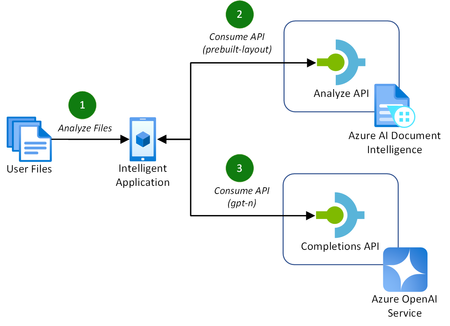
Addressing the challenges of efficient document processing, explore a novel solution to extract structured data from documents using Azure AI Document Intelligence and Azure OpenAI. Context In today’s data-driven landscape, efficient document processing is crucial for most organizations worldwide. Accurate document analysis is essential to provide much needed streamlining of business workflows to enhance productivity. In this article, we’ll explore the key challenges that solution providers face with extracting relevant, structured data from documents. We'll also showcase a novel solution to solve these challenges using Azure AI Document Intelligence and Azure OpenAI. Key challenges of effective document data extraction ISVs and Digital Natives building document data extraction solutions often grapple with the complexities of finding a reliable mechanism to parse their customer’s documents. The key challenges include: Variability in document layout. Documents, such as contracts or invoices, often contain similar data. However, they vary in both layout, structure, and language, including domain jargon. Content in unstructured formats. It is common for pieces of useful information to be stored in unstructured formats, such as handwritten letters or emails. Diversity in file formats. Solutions need to be able to handle a variety of formats that customers provide to them. This includes images, PDFs, Word documents, Excel spreadsheets, emails, and HTML pages. With many Azure AI services to build solutions with, it can be difficult for teams to identify the best approach to resolve these challenges. Benefits of using Azure AI Document Intelligence with Azure OpenAI As solution providers for document data extraction capabilities, the following approach enables these benefits over other approaches: No requirement to train a custom model. Combining these Azure AI services allows you to extract structured data without the need to train a custom model for the various document formats and layouts that your solution may receive. Instead, you tailor natural language prompts to your specific needs. Define your own schema. The capabilities of GPT models enables you to extract data that matches or closely matches a schema that you define. This is a major benefit over alternative approach, particularly when each document’s domain jargon differs. This makes it easier to extract structured data accurately for your downstream processes post-extraction. Out-of-the-box support for multiple file types. This approach supports a variety of document types, including PDFs, Office file types, HTML, and images. This flexibility allows you to extract structure data from a variety of sources without the need for custom logic in your application for each file type. Let’s explore how to extract structured data from documents with both Azure AI Document Intelligence and Azure OpenAI in more detail. Understanding layout analysis to Markdown with Azure AI Document Intelligence Updated in March 2024, the pre-built layout model in Azure AI Document Intelligence gained new capabilities to extract content and structure from Office file types (Word, PowerPoint, and Excel) and HTML, alongside the existing PDF and image capabilities. This introduced the capability for document processing solutions to take any document, such as a contract or invoice, with any layout or file format, and convert it into a structured Markdown output. This has the significant benefit of maintaining the content’s hierarchy when extracted. This is important when we consider the capabilities of the Azure OpenAI GPT models. GPT models are pre-trained on vast amounts of natural language data, which helps them to understand structures and semantic patterns. The simplicity of Markdown’s markup allows GPT models to interpret structures such as headings, lists, and tables, as well as formatting such as links, emphasis (italic/bold), and code blocks. When you combine these capabilities for data extraction with efficient prompting, you can easily and accurately extract relevant data as structured JSON. Combining Azure AI Document Intelligence layout analysis with GPT prompting for data extraction The following diagram illustrates this novel approach, introducing the new Markdown capabilities of Azure AI Document Intelligence’s pre-built layout model with completion requests to Azure OpenAI to extract the data. This approach is achieved in the following way: A customer uploads their files to analyze for data extraction. This could be of any supported file type, including PDF, image, or Word document. The application makes a request to the Azure AI Document Intelligence’s analyze API using the pre-built layout model with the output content format flag set to Markdown. The document data is provided in the request either as a base64 source or a URI. If you are processing many, large documents, it is recommended to use a URI to reduce the memory utilization which will prevent unexpected behavior in your application. You can achieve this approach by uploading your documents to an Azure Blob Storage container and providing a SAS URI to the document. With the Markdown result as context, prompt the Azure OpenAI completions API with specific instruction to extract the structured data you require in a JSON format. With a now structured data response, you can store this data however you require for the needs of your application. For a full code sample demonstrating this capability, check out the using Azure AI Document Intelligence and Azure OpenAI GPT-3.5 Turbo to extract structured data from documents sample on GitHub. Along with the code, this sample includes the necessary infrastructure-as-code Bicep templates to deploy the Azure resources for testing. Conclusion Adopting Azure AI Document Intelligence and Azure OpenAI to extract structured data from documents simplifies the challenges of document processing today. This well-rounded solution offers significant benefits over alternatives, removing the requirement to train custom models and improving overall accuracy of data extraction in most use cases. Consider the following recommendations to maximize the benefits of this approach: Experiment with prompting for data extraction. The provided code sample provides a well-rounded starting point for structure data extraction. Consider experimenting with the prompt and JSON schemas to incorporate domain specific language to capture the nuances in your documents to improve accuracy further. Optimize the document processing workflow. As you scale out this approach to production, consider the host resource requirements for your application to process a large quantity of documents. Optimize this approach by maximizing CPU and memory usage by offloading the loading of documents to Azure AI Document Intelligence using URIs. By adopting this approach, solution providers can streamline their document processing workflows, enhancing productivity for themselves and their customers. Read more on document processing with Azure AI Thank you for taking the time to read this article. We are sharing our insights for ISVs and Startups that enable document processing in their AI-powered solutions, based on real-world challenges we encounter. We invite you to continue your learning through our additional insights in this series. Optimizing Data Extraction Accuracy with Custom Models in Azure AI Document Intelligence Discover how to enhance data extraction accuracy with Azure AI Document Intelligence by tailoring models to your unique document structures. Using Structured Outputs in Azure OpenAI’s GPT-4o for consistent document data processing Discover how to leverage GPT-4o’s Structured Outputs to ensure reliable, schema-compliant document data processing. Evaluating the quality of AI document data extraction with small and large language models Discover our evaluation of the effectiveness of AI models in quality document data extraction using small and large language models (SLMs and LLMs). Further Reading Using Azure AI Document Intelligence and Azure OpenAI GPT-3.5 Turbo to extract structured data from documents | GitHub Explore the solution discussed in this article with this sample using .NET. Azure AI Document Intelligence add new preview features including US 1040 tax forms, 1003 URLA mortgage forms and updates to custom models | Tech Community Read more about the release of the new capabilities of Azure AI Document Intelligence discussed in this article. What's new in Document Intelligence (formerly Form Recognizer) | Microsoft Learn Keep up-to-date with the latest changes to the Azure AI Document Intelligence service. Prompt engineering techniques with Azure OpenAI | Microsoft Learn Discover how to improve your prompting techniques with Azure OpenAI to maximize the accuracy of your document data extraction. Using Azure OpenAI GPT-4 Vision to extract structured JSON data from PDF documents | GitHub Explore another novel approach to document data extraction utilizing only Azure OpenAI's GPT-4 Vision model.33KViews4likes5CommentsEvaluating the quality of AI document data extraction with small and large language models
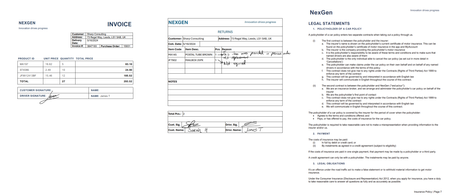
Evaluating the effectiveness of AI models in document data extraction. Comparing accuracy, speed, and cost-effectiveness between Small and Large Language Models (SLMs and LLMs). Context As the adoption of AI in solutions increases, technical decision-makers face challenges in selecting the most effective approach for document data extraction. Ensuring high quality is crucial, particularly when dealing with critical solutions where minor errors have substantial consequences. As the volume of documents increases, it becomes essential to choose solutions that can scale efficiently without compromising performance. This article evaluates AI document data extraction techniques using Small Language Models (SLMs) and Large Language Models (LLMs). Including a specific focus on structured and unstructured data scenarios. By evaluating models, the article provides insights into their accuracy, speed, and cost-efficiency for quality data extraction. It provides both guidance in evaluating models, as well as the quality of the outputs from models for specific scenarios. Key challenges of effective document data extraction With many AI models available to ISVs and Startups, challenges arise in which technique is the most effective for quality document data extraction. When evaluating the quality of AI models, key challenges include: Ensuring high accuracy and reliability. High accuracy and confidence are crucial, especially for critical applications such as legal or financial documents. Minor errors in data extraction could lead to significant issues. Additionally, robust data validation mechanisms verify the data and minimize false positives and negatives. Getting results in a timely manner. As the volume of documents increases, the selected approach must scale efficiently to handle large document quantities without significant impact. Balancing the need for fast processing speeds with maintaining high accuracy levels is challenging. Balancing cost with accuracy and efficiency. Ensuring high accuracy and efficiency often requires the most advanced AI models, which can be expensive. Evaluating AI models and techniques highlights the most cost-effective solution without compromising on the quality of the data extraction. When choosing an AI model for document data extraction on Azure, there is no one-size-fits-all solution. Depending on the scenario, one may outperform another for accuracy at the sacrifice of cost. While another model may provide sufficient accuracy at a much lower cost. Establishing evaluation techniques for AI models in document data extraction When evaluating AI models for document data extraction, it’s important to understand how they perform for specific use cases. This evaluation focused on structured and unstructured scenarios to provide insights into simple and complex document structures. Evaluation Scenarios Structured Data: Invoices A collection of assorted invoices with varying simple and complex layouts, handwritten signatures, obscured content, and handwritten notes across margins. Unstructured Data: Vehicle Insurance Policy A 10+ page vehicle insurance policy document containing both structured and unstructured data, including natural, domain-specific language with inferred data. This scenario focuses on extracting data by combining structured data with the natural language throughout the document. Models and Techniques This evaluation focused on multiple techniques for data extraction with the language models: Markdown Extraction with Azure AI Document Intelligence. This technique involves converting the document into Markdown using the pre-built layout model in Azure AI Document Intelligence. Read more about this technique in our detailed article. Vision Capabilities of Multi-Modal Language Models. This technique focuses on GPT-4o and GPT-4o Mini models by converting the document pages to images. This leverages the models’ capabilities to analyze both text and visual elements. Explore this technique in more detail in our sample project. Comprehensive Combination. This technique combines both Markdown extraction with vision capable models to enhance the extraction process. Additionally, the layout analysis of Azure AI Document Intelligence will ease the human review of a document if the confidence or accuracy is low. For each technique, the model is prompted using either Structured Outputs in GPT-4o or with inline JSON schemas for other models. This establishes the expected output, improving the overall accuracy of the generated response. The AI models evaluated in this analysis include: Phi-3.5 MoE, an SLM deployed as a serverless endpoint in Azure AI Studio GPT-4o (2024-08-06), an LLM deployed with 10K TPM in Azure OpenAI GPT-4o Mini (2024-07-18), an LLM deployed with 10K TPM in Azure OpenAI Evaluation Methodology To ensure a reliable and consistent evaluation, the following approach was established: Baseline Accuracy. A single source of truth for the data extraction results ensures each model’s output is compared against a standard. This approach, while manually intensive, provides a precise measure for accuracy. Confidence. To demonstrate when an extraction should be raised up to a human for review, each model provides an internal assessment on how certain it is about its predicted output. Azure OpenAI provides these confidence values as logprobs, while Azure AI Document Intelligence returns these confidence scores by default in the response. Execution Time. This is calculated based on the time between the initial request for data extraction to the response, without streaming. For scenarios utilizing the Markdown technique, the time is based on the end-to-end processing, including the request and response from Azure AI Document Intelligence. Cost Analysis. Using the average input and output tokens from each iteration, the estimated cost per 1,000 pages is calculated, providing a clearer picture of cost-effectiveness at scale. Consistent Prompting. Each model has the same system and extraction prompt. The system prompt is consistent across all scenarios as “You are an AI assistant that extracts data from documents”. Each scenario has its own extraction prompt, including the output schema. Multiple Iterations. 10 variants of the document are run per model technique. Every property in the result compares for an exact match against the standard response. This provides the results for accuracy, confidence, execution time, and cost. These metrics establish the baseline evaluation. By establishing the baseline, it is possible to experiment with the prompt, schema, and request configuration. This allows you to compare improvements in the overall quality by evaluating the accuracy, confidence, speed, and cost. For the evaluation outlined in this article, we created a Python test project with multiple test cases. Each test case is a combination of a specific use case and model. Additionally, each test case is run independently. This is to ensure that the speed is evaluated fairly for each request. The tests take advantage of the Python SDKs for both Azure AI Document Intelligence and Azure OpenAI. Evaluating AI Models for Structured Data Complex Invoice Document Model Technique Accuracy (95th) Confidence (95th) Speed (95th) Est. Cost (1,000 pages) GPT-4o Vision 98.99% 99.85% 22.80s $7.45 GPT-4o Vision + Markdown 96.60% 99.82% 22.25s $19.47 Phi-3.5 MoE Markdown 96.11% 99.49% 54.00s $10.35 GPT-4o Markdown 95.66% 99.44% 31.60s $16.11 GPT-4o Mini Vision + Markdown 91.84% 99.99% 56.69s $18.14 GPT-4o Mini Vision 79.31% 99.76% 56.71s $8.02 GPT-4o Mini Markdown 78.61% 99.76% 24.52s $10.41 When processing invoices in our analysis, GPT-4o with Vision capabilities stands out as the most ideal combination. This approach delivers the highest accuracy and confidence scores, effectively handling complex layouts and visual elements. Additionally, it handles this at reasonable speeds at significantly lower costs. Accuracy in our evaluation shows that overall, most models in the evaluation can be regarded as having high accuracy. GPT-4o with Vision processing achieves the highest scores for invoices. While our assumptions that providing the additional document text context would increase this, our analysis showed that it's possible to retain high accuracy without it. Confidence levels are high across models and techniques, demonstrating that combined with high accuracy, these approaches perform well for automated processing with minimal human intervention. Speed is a crucial factor for scalability of a document processing pipeline. For background processing per document, GPT-4o models can process all techniques in a quick timescale. In contrast, small language models like Phi-3.5 MoE are took longer which could impact throughput for large-scale applications. Cost-effectiveness is also essential when building a scalable pipeline to process thousands of document pages. GPT-4o with Vision stands out as the most cost-effective at $7.45 per 1,000 pages. However, all models in Vision or Markdown techniques offer high value when also considering their accuracy, confidence, and speed. One significant benefit of using GPT-4o with Vision processing is its ability to handle visual elements such as handwritten signatures, obscured content, and stamps. By processing the document as an image, the model minimizes false positives and negatives that can arise when relying solely on text-based Markdown processing. Phi-3.5 MoE is a notable highlight when it comes to the use of small language models. The analysis demonstrates these models are just as capable at processing documents into structured JSON outputs as the more advanced large language models. For this Invoice analysis, GPT-4o with Vision provides the best balance between accuracy, confidence, speed, and cost. It is particularly adept at handling documents with complex layouts and visual elements, making it a suitable choice for extracting structured data from a diverse range of invoices. Evaluating AI Models for Unstructured Data Complex Vehicle Insurance Document Model Technique Accuracy (95th) Confidence (95th) Speed (95th) Est. Cost (1,000 pages) GPT-4o Vision + Markdown 100% 99.35% 68.93s $13.96 GPT-4o Markdown 98.25% 89.03% 134.85s $12.24 GPT-4o Vision 97.04% 98.71% 66.24s $2.31 GPT-4o Mini Markdown 93.25% 89.04% 99.78s $10.12 GPT-4o Mini Vision + Markdown 82.99% 99.16% 101.89s $15.71 GPT-4o Mini Vision 67.25% 98.73% 83.01s $5.67 Phi-3.5 MoE Markdown 64.99% 88.28% 102.89s $10.16 When extracting structured data from large, unstructured documents, such as insurance policies, the combination of GPT-4o with both Vision and Markdown techniques proves to be the most ideal solution. This hybrid approach leverages the visual context of the document's layout alongside the structured textual representation, resulting in the highest degrees of accuracy and confidence. It effectively handles the complexity of domain-specific language and inferred fields, providing a comprehensive and precise extraction process. Accuracy is spread across all models when extracting data from larger quantities of unstructured text. GPT-4o utilizing both Vision and Markdown demonstrates the effectiveness of combining visual and textual context for documents containing natural language. Confidence varies also in comparison to the Invoice analysis, with less certainty from the models when extracting from large blocks of text. However, analyzing the confidence scores of GPT-4o for each technique shows that building on them towards a comprehensive approach yields higher confidence. Speed of execution will naturally increase as the number of pages, complexity of layout, and quantity of text increases. These techniques for large, unstructured documents are likely to be reserved for background, batch processing than real-time applications. Cost varies when utilizing multiple Azure services to perform document data extraction. However, the overall cost for GPT-4o with both Vision and Markdown demonstrates where utilizing multiple AI services to achieve a goal can yield exceptional accuracy and confidence. This leads to automated solutions that require minimal human intervention. The combination of Vision and Markdown techniques can offer a highly efficient approach to structured document data extraction. However, while highly accurate, models like GPT-4o and 4o Mini are bound by their maximum context window of 128K tokens. When processing text and images in a single request, you may need to consider chunking or classification techniques to break down large documents into smaller document boundaries. Highlighting the specific capabilities of Phi-3.5 MoE, it falls short in accuracy. This lower performance indicates limitations in handling large, complex natural language that requires understanding and inference to extract data accurately. While optimizations can be made in prompts to improve accuracy, this analysis highlights the importance of evaluating and selecting a model and technique that aligns with the specific demands of your document extraction scenarios. Key Evaluation Findings Accuracy: For most extraction scenarios, advanced large language models like GPT-4o consistently deliver high accuracy and confidence levels. They are particularly effective at managing complex layouts and accurately extracting data from both visual and text context. Cost-Effectiveness: Language models with vision capabilities are highly cost-effective for large-scale processing, with GPT-4o demonstrating costs below $10 per 1,000 pages in all scenarios where vision was used solely. However, the cost-benefit of using a hybrid Vision and Markdown approach can be justified in certain scenarios where high precision is required. Speed: The time of execution for document varies depending on the number of pages, layout complexity, and quantity of text. For most scenarios, using language models for document data extraction demonstrates the capabilities for large-scale background processing, rather than real-time applications. Limitations: Smaller models, like Phi-3.5 MoE, indicate limitations when handling complex documents with large unstructured text. However, they excel with minimal prompting for smaller, structured documents, such as invoices. Comprehensive Techniques: Combining both text and vision techniques provides an effective strategy for highly accurate, highly confident data extraction from documents. The approach enhances the extraction, particularly for documents that include complex layout, visual elements, and complex, domain-specific, natural language. Recommendations for Evaluating AI Models in Document Data Extraction High-Accuracy Solutions. For solutions where accuracy is critical or visual elements must be evaluated, such as medical records, legal cases, or financial reports, explore GPT-4o with both Vision and Markdown capabilities. Its high performance in accuracy and confidence justifies the investment. Text-Based or Self-Hosted Solutions. For text-based document extractions where self-hosting a model is necessary, small open language models, such as Phi-3.5 MoE, can provide high accuracy in data extraction comparable to OpenAI's GPT-4o. Adopt Evaluation Techniques. Implement a rigorous evaluation methodology like the one used in this analysis. Establishing a baseline for accuracy, speed, and cost through multiple iterations and consistent prompting ensures reliable and comparable results. Regularly conduct evaluations when considering new techniques, models, prompts, and configurations. This helps in making informed decisions when opting for an approach in your specific use cases. Read more on AI Document Intelligence Thank you for taking the time to read this article. We are sharing our insights for ISVs and Startups that enable document intelligence in their AI-powered solutions, based on real-world challenges we encounter. We invite you to continue your learning through our additional insights in this series. Optimizing Data Extraction Accuracy with Custom Models in Azure AI Document Intelligence Discover how to enhance data extraction accuracy with Azure AI Document Intelligence by tailoring models to your unique document structures. Using Azure AI Document Intelligence and Azure OpenAI to extract structured data from documents Discover how Azure AI Document Intelligence and Azure OpenAI efficiently extract structured data from documents, streamlining document processing workflows for AI-powered solutions. Using Structured Outputs in Azure OpenAI’s GPT-4o for consistent document data processing Discover how to leverage GPT-4o’s Structured Outputs to ensure reliable, schema-compliant document data processing. Further Reading Phi Open Models - Small Language Models | Microsoft Azure Learn more about the Phi-3 small language models and their potential, including running effectively in offline environments. Prompt engineering techniques with Azure OpenAI | Microsoft Learn Discover how to improve your prompting techniques with Azure OpenAI to maximize the accuracy of your document data extraction. Samples demonstrating techniques for processing documents with Azure AI | GitHub A collection of samples that demonstrate both the document data extraction techniques used in this analysis, as well as techniques for classification.20KViews2likes2CommentsUsing Structured Outputs in Azure OpenAI’s GPT-4o for consistent document data processing
When using language models for AI-driven document processing, ensuring reliability and consistency in data extraction is crucial for downstream processing. This article outlines how the Structured Outputs feature of GPT-4o offers the most reliable and cost-effective solution to this challenge. To jump into action and use Structured Outputs for document processing, get hands on with our Python samples on GitHub. Key challenges in consistency in generating structured outputs ISVs and Startups building document data extraction solutions grapple with the complexities of ensuring that language models generate a consistent output inline with their defined schemas. These key challenges include: Limitations in inline JSON output. While some models introduced the ability to produce JSON outputs, inconsistencies still arise from them. Language models can generate a response that doesn’t conform to the provided schema. This requires additional prompt engineering or post-processing to resolve. Complexity in prompts. Including detailed inline JSON schemas within prompts increases the overall number of input tokens consumed. This is particularly problematic if you have a large, complex output structure. Benefits of using the Structured Outputs features in Azure OpenAI’s GPT-4o To overcome the limitations and inconsistencies of inline JSON outputs, GPT-4o’s structured outputs enables the following capabilities: Strict schema adherence. Structured Outputs dynamically constrains the model’s outputs to adhere to JSON schemas provided in the response format of the request to GPT-4o. This ensures that the response is always well-formed for downstream processing. Reliability and consistency. Using additional libraries, such as Pydantic, combined with Structured Outputs, developers can define exactly how data should be constrained to a specific model. This minimizes any post-processing and improves data validation. Cost optimization. Unlike inline JSON schemas, Structured Outputs do not count towards the total number of input tokens consumed in a request to GPT-4o. This provides more overall input tokens for consuming document data. Let’s explore how to use Structured Outputs with document processing in more detail. Understanding Structured Outputs in document processing Introduced in September 2024, the Structured Outputs feature in Azure OpenAI’s GPT-4o model provided much needed flexibility in requests to generate a consistent output using class models and JSON schemas. For document processing, this enables a more streamlined approach to both structured data extraction as well as document classifications. This is particularly useful when building document processing pipelines. By utilizing a JSON schema format, GPT-4o constrains the generated output to a JSON structure that is consistent with every request. These JSON structures can then easily be deserialized into a model object that can be processed easily by other services or systems. This eliminates potential errors often caused by inline JSON structures being misinterpreted by language models. Implementing consistent outputs using GPT-4o in Python To take full advantage and simplify the schema generation with Python, Pydantic is the ideal supporting library to build out class models to define the desired structure for outputs. Pydantic offers built-in schema generation for producing the necessary JSON schema required for the request, as well as data validation. Below is an example for extracting data from an invoice demonstrating the capabilities of a complex class structure using Structured Outputs. from typing import Optional from pydantic import BaseModel class InvoiceSignature(BaseModel): type: Optional[str] name: Optional[str] is_signed: Optional[bool] class InvoiceProduct(BaseModel): id: Optional[str] description: Optional[str] unit_price: Optional[float] quantity: Optional[float] total: Optional[float] reason: Optional[str] class Invoice(BaseModel): invoice_number: Optional[str] purchase_order_number: Optional[str] customer_name: Optional[str] customer_address: Optional[str] delivery_date: Optional[str] payable_by: Optional[str] products: Optional[list[InvoiceProduct]] returns: Optional[list[InvoiceProduct]] total_product_quantity: Optional[float] total_product_price: Optional[float] product_signatures: Optional[list[InvoiceSignature]] returns_signatures: Optional[list[InvoiceSignature]] The JSON schema supported by the Structured Outputs feature requires that all properties be required. In this example, using the Optional shorthand notation will still ensure that the property adheres to the required nature of the JSON schema. However, it defines the type for the property as anyof for both the expected type and null. This ensures that the model can generate a null value if the data can't be found in the document. With a well-defined model in place, requests to the Azure OpenAI chat completions endpoint are as simple as providing the model as the request’s response format. This is demonstrated below in a request to extract data from an invoice. completion = openai_client.beta.chat.completions.parse( model="gpt-4o", messages=[ { "role": "system", "content": "You are an AI assistant that extracts data from documents.", }, { "role": "user", "content": f"""Extract the data from this invoice. - If a value is not present, provide null. - Dates should be in the format YYYY-MM-DD.""", }, { "role": "user", "content": document_markdown_content, } ], response_format=Invoice, max_tokens=4096, temperature=0.1, top_p=0.1 ) Best practices for utilizing Structured Outputs for document data processing Schema/model design. Use well defined names for nested objects and properties to make it easier for the GPT-4o model to interpret how to extract these key pieces of information from documents. Be specific in terminology to ensure the model determines the correct value for fields. Utilize prompt engineering. Continue to use your input prompts to provide direct instruction to the model on how to work with the document provided. For example, include the definitions for domain jargon, acronyms, and synonyms that may exist in a document type. Use libraries that generate JSON schemas. Libraries, such as Pydantic for Python, make it easier to focus on building out models and data validation without the complexities of understanding how to convert or build a JSON schema from scratch. Combine with GPT-4o vision capabilities. Processing document pages as images in a request to GPT-4o using Structured Outputs can yield higher accuracy and cost-effectiveness when compared to processing document text alone. Summary Leveraging Structured Outputs in Azure OpenAI’s GPT-4o provides a necessary solution to ensure consistent and reliable outputs when processing documents. By enforcing adherence to JSON schemas, this feature minimizes the chances of errors, reduces post-processing needs, and optimizes token usage. The one key recommendation to take away from this guidance is: Evaluate Structured Outputs for your use cases. We have provided a collection of samples on GitHub to guide you through potential scenarios, including extraction and classifications. Modify these samples to the needs of your specific document types to evaluate the effectiveness of the techniques. Get the samples on GitHub. By exploring this approach, you can further streamline your document processing workflows, enhancing developer productivity and satisfaction for end users. Read more on document processing with Azure AI Thank you for taking the time to read this article. We are sharing our insights for ISVs and Startups that enable document processing in their AI-powered solutions, based on real-world challenges we encounter. We invite you to continue your learning through our additional insights in this series. Optimizing Data Extraction Accuracy with Custom Models in Azure AI Document Intelligence Discover how to enhance data extraction accuracy with Azure AI Document Intelligence by tailoring models to your unique document structures. Using Azure AI Document Intelligence and Azure OpenAI to extract structured data from documents Discover how Azure AI Document Intelligence and Azure OpenAI efficiently extract structured data from documents, streamlining document processing workflows for AI-powered solutions. Evaluating the quality of AI document data extraction with small and large language models Discover our evaluation of the effectiveness of AI models in quality document data extraction using small and large language models (SLMs and LLMs). Further reading How to use structured outputs with Azure OpenAI Service | Microsoft Learn Discover how the structured outputs feature works, including limitations with schema size and field types. Prompt engineering techniques with Azure OpenAI | Microsoft Learn Discover how to improve your prompting techniques with Azure OpenAI to maximize the accuracy of your document data extraction. Why use Pydantic | Pydantic Docs Discover more about why you should adopt Pydantic for using the structured outputs feature in Python application, including details on how the JSON Schema output works.7.6KViews4likes0CommentsAzure Orphan Resources Grafana Dashboard
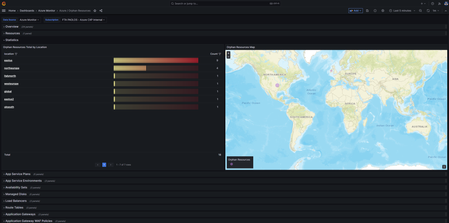
In cloud computing, it is crucial to follow best practices when building a reliable, high-performing, and secure environment. However, it is equally important to implement a strategy aimed at reducing the total cost of ownership. In this context, this Grafana dashboard offers a centralized view of Azure orphan resources that can be safely removed. By identifying and removing these unnecessary resources, you can effectively decrease the overall cost associated with maintaining their Azure subscriptions and increase the operational efficiency. You can find the Grafana dashboard under this GitHub repository. This dashboard is influenced by the Azure Orphaned Resources 2.0 project developed by my colleague Dolev Shor. It incorporates and integrates some of the queries he designed for his Azure workbook, which can be created and utilized within the Azure Portal. You can refer to the Azure workbook documentation to learn more about creating and utilizing workbooks in the Azure Portal. Prerequisites You can host the Grafana dashboard in Azure Managed Grafana, your own Grafana installation in an AKS cluster, or any Kubernetes cluster with access to the public internet. Implementation The dashboard performs a series of queries using the Kusto Query Language and Azure Resource Graph to individuate unused, orphan resources that can be safely removed from your Azure subscriptions without impacting the operability of your cloud hosted workloads. Azure Resource Graph is an Azure service designed to extend Azure Resource Management by providing efficient and performant resource exploration with the ability to query at scale across a given set of subscriptions so that you can effectively govern your environment. For more information Azure Resource Graph, you can refer to the following links: Azure Resource Graph Overview Query Resource Changes Here is the list of the resources currently supported by the dashboard: App Service Plans App Service Environments Availability Sets Managed Disks Load Balancers Route Tables Application Gateways Application Gateway WAF Policies Front Door WAF Policies Traffic Manager Profiles Virtual Networks Subnets Network Interfaces Virtual Network Gateways Network Security Groups NAT Gateways Public IP Addresses Public IP Prefixes IP Groups Private DNS Zones Private Endpoints Private Link Services SQL Elastic Pools Resource Groups Please note that all the resources mentioned above come with an associated cost. Some resources like Availability Sets, Route Tables, Subnets, IP Groups, and Resource Groups are available free of charge. Importing the dashboard into Azure Managed Grafana To import the dashboard into Azure Managed Grafana, follow these steps: Go to the Azure Portal and navigate to your Azure Managed Grafana resource. Click Identity under Settings . Ensure that the system-assigned managed identity is enabled. Click on the Azure role assignments button. Assign the Monitoring Reader role to the Grafana managed identity, scoped to your Azure subscription or Management Group. Click on the Endpoint URL on the Overview page of your Azure Managed Grafana resource. In the Grafana dashboard, go to Connections and ensure that you have an Azure Monitor datasource. If not, create one and select Managed Identity as the authentication mechanism. Click on the Load subscriptions button to test the data source. Go to Dashboards , click on New , and then select Import . Upload the dashboard JSON file or copy and paste the JSON code into the textbox, then click the Load button. Choose a category for the dashboard and click the Import button. Upload Dashboard to Azure Managed Grafana Importing the Dashboard into a Bring Your Own (BYO) Grafana Installation Before importing the dashboard into your own Grafana installation, you need to create a service principal under your Microsoft Azure AD account and assign the Monitoring Reader role to it. Once done, follow these steps: In the Grafana dashboard, go to Connections and ensure that you have an Azure Monitor datasource. If not, create one and specify the tenant id , client Id , and client secret of your service princiapl as shown in the following picture: Click on the Load subscriptions button to test the data source. Go to Dashboards , click on New , and then select Import . Upload the dashboard JSON file or copy and paste the JSON code into the textbox, then click the Load button. Choose a category for the dashboard and click the Import button.6.7KViews4likes0CommentsDeploy Kaito on AKS using Terraform
The Kubernetes AI toolchain operator (Kaito) is a Kubernetes operator that simplifies the experience of running OSS AI models like Falcon and Llama2 on your AKS cluster. You can deploy Kaito on your AKS cluster as a managed add-on for Azure Kubernetes Service (AKS). The Kubernetes AI toolchain operator (Kaito) uses Karpenter to automatically provision the necessary GPU nodes based on a specification provided in the Workspace custom resource definition (CRD) and sets up the inference server as an endpoint for your AI models. This add-on reduces onboarding time and allows you to focus on AI model usage and development rather than infrastructure setup. In this project, I will show you how to: Deploy the Kubernetes AI Toolchain Operator (Kaito) and a Workspace on Azure Kubernetes Service (AKS) using Terraform. Utilize Kaito to create an AKS-hosted inference environment for the Falcon 7B Instruct model. Develop a chat application using Python and Chainlit that interacts with the inference endpoint exposed by the AKS-hosted model. By following this guide, you will be able to easily set up and use the powerful capabilities of Kaito, Python, and Chainlit to enhance your AI model deployment and create dynamic chat applications. For more information on Kaito, see the following resources: Kubernetes AI Toolchain Operator (Kaito) Deploy an AI model on Azure Kubernetes Service (AKS) with the AI toolchain operator Intelligent Apps on AKS Ep02: Bring Your Own AI Models to Intelligent Apps on AKS with Kaito Open Source Models on AKS with Kaito The companion code for this article can be found in this GitHub repository. NOTE This article provides information on the Kubernetes AI Toolchain (Kaito) operator, which is currently in the early stages of development and undergoing frequent updates. Please note that the content of this article is applicable to Kaito version 0.2.0. It is advised to regularly check for the latest updates and changes in subsequent versions of Kaito. NOTE You can find the architecture.vsdx file used for the diagram under the visio folder. Prerequisites An active Azure subscription. If you don't have one, create a free Azure account before you begin. Visual Studio Code installed on one of the supported platforms along with the HashiCorp Terraform. Azure CLI version 2.59.0 or later installed. To install or upgrade, see Install Azure CLI. aks-preview Azure CLI extension of version 2.0.0b8 or later installed Terraform v1.7.5 or later. The deployment must be started by a user who has sufficient permissions to assign roles, such as a User Access Administrator or Owner . Your Azure account also needs Microsoft.Resources/deployments/write permissions at the subscription level. Architecture The following diagram shows the architecture and network topology deployed by the sample: This project provides a set of Terraform modules to deploy the following resources: Azure Kubernetes Service: A public or private Azure Kubernetes Service(AKS) cluster composed of a: A system node pool in a dedicated subnet. The default node pool hosts only critical system pods and services. The worker nodes have node taint which prevents application pods from beings scheduled on this node pool. A user node pool hosting user workloads and artifacts in a dedicated subnet. User-defined Managed Identity: a user-defined managed identity used by the AKS cluster to create additional resources like load balancers and managed disks in Azure. Azure Virtual Machine: Terraform modules can optionally create a jump-box virtual machine to manage the private AKS cluster. Azure Bastion Host: a separate Azure Bastion is deployed in the AKS cluster virtual network to provide SSH connectivity to both agent nodes and virtual machines. Azure NAT Gateway: a bring-your-own (BYO) Azure NAT Gateway to manage outbound connections initiated by AKS-hosted workloads. The NAT Gateway is associated to the SystemSubnet , UserSubnet , and PodSubnet subnets. The outboundType property of the cluster is set to userAssignedNatGateway to specify that a BYO NAT Gateway is used for outbound connections. NOTE: you can update the outboundType after cluster creation and this will deploy or remove resources as required to put the cluster into the new egress configuration. For more information, see Updating outboundType after cluster creation. Azure Storage Account: this storage account is used to store the boot diagnostics logs of both the service provider and service consumer virtual machines. Boot Diagnostics is a debugging feature that allows you to view console output and screenshots to diagnose virtual machine status. Azure Container Registry: an Azure Container Registry (ACR) to build, store, and manage container images and artifacts in a private registry for all container deployments. Azure Key Vault: an Azure Key Vault used to store secrets, certificates, and keys that can be mounted as files by pods using Azure Key Vault Provider for Secrets Store CSI Driver. For more information, see Use the Azure Key Vault Provider for Secrets Store CSI Driver in an AKS cluster and Provide an identity to access the Azure Key Vault Provider for Secrets Store CSI Driver. Azure Private Endpoints: an Azure Private Endpoint is created for each of the following resources: Azure Container Registry Azure Key Vault Azure Storage Account API Server when deploying a private AKS cluster. Azure Private DNDS Zones: an Azure Private DNS Zone is created for each of the following resources: Azure Container Registry Azure Key Vault Azure Storage Account API Server when deploying a private AKS cluster. Azure Network Security Group: subnets hosting virtual machines and Azure Bastion Hosts are protected by Azure Network Security Groups that are used to filter inbound and outbound traffic. Azure Log Analytics Workspace: a centralized Azure Log Analytics workspace is used to collect the diagnostics logs and metrics from all the Azure resources: Azure Kubernetes Service cluster Azure Key Vault Azure Network Security Group Azure Container Registry Azure Storage Account Azure jump-box virtual machine Azure Monitor workspace: An Azure Monitor workspace is a unique environment for data collected by Azure Monitor. Each workspace has its own data repository, configuration, and permissions. Log Analytics workspaces contain logs and metrics data from multiple Azure resources, whereas Azure Monitor workspaces currently contain only metrics related to Prometheus. Azure Monitor managed service for Prometheus allows you to collect and analyze metrics at scale using a Prometheus-compatible monitoring solution, based on the Prometheus. This fully managed service allows you to use the Prometheus query language (PromQL) to analyze and alert on the performance of monitored infrastructure and workloads without having to operate the underlying infrastructure. The primary method for visualizing Prometheus metrics is Azure Managed Grafana. You can connect your Azure Monitor workspace to an Azure Managed Grafana to visualize Prometheus metrics using a set of built-in and custom Grafana dashboards. Azure Managed Grafana: an Azure Managed Grafana instance used to visualize the Prometheus metrics generated by the Azure Kubernetes Service(AKS) cluster deployed by the Bicep modules. Azure Managed Grafana is a fully managed service for analytics and monitoring solutions. It's supported by Grafana Enterprise, which provides extensible data visualizations. This managed service allows to quickly and easily deploy Grafana dashboards with built-in high availability and control access with Azure security. NGINX Ingress Controller: this sample compares the managed and unmanaged NGINX Ingress Controller. While the managed version is installed using the Application routing add-on, the unmanaged version is deployed using the Helm Terraform Provider. You can use the Helm provider to deploy software packages in Kubernetes. The provider needs to be configured with the proper credentials before it can be used. Cert-Manager: the cert-manager package and Let's Encrypt certificate authority are used to issue a TLS/SSL certificate to the chat applications. Prometheus: the AKS cluster is configured to collect metrics to the Azure Monitor workspace and Azure Managed Grafana. Nonetheless, the kube-prometheus-stack Helm chart is used to install Prometheus and Grafana on the AKS cluster. Kaito Workspace: a Kaito workspace is used to create a GPU node and the Falcon 7B Instruct model. Workload namespace and service account: the Kubectl Terraform Provider and Kubernetes Terraform Provider are used to create the namespace and service account used by the chat applications. Azure Monitor ConfigMaps for Azure Monitor managed service for Prometheus and cert-manager Cluster Issuer are deployed using the Kubectl Terraform Provider and Kubernetes Terraform Provider.` The architecture of the kaito-chat application can be seen in the image below. The application calls the inference endpoint created by the Kaito workspace for the Falcon-7B-Instruct model. Kaito The Kubernetes AI toolchain operator (Kaito) is a managed add-on for AKS that simplifies the experience of running OSS AI models on your AKS clusters. The AI toolchain operator automatically provisions the necessary GPU nodes and sets up the associated inference server as an endpoint server to your AI models. Using this add-on reduces your onboarding time and enables you to focus on AI model usage and development rather than infrastructure setup. Key Features Container Image Management: Kaito allows you to manage large language models using container images. It provides an HTTP server to perform inference calls using the model library. GPU Hardware Configuration: Kaito eliminates the need for manual tuning of deployment parameters to fit GPU hardware. It provides preset configurations that are automatically applied based on the model requirements. Auto-provisioning of GPU Nodes: Kaito automatically provisions GPU nodes based on the requirements of your models. This ensures that your AI inference workloads have the necessary resources to run efficiently. Integration with Microsoft Container Registry: If the license allows, Kaito can host large language model images in the public Microsoft Container Registry (MCR). This simplifies the process of accessing and deploying the models. Architecture Overview Kaito follows the classic Kubernetes Custom Resource Definition (CRD)/controller design pattern. The user manages a workspace custom resource that describes the GPU requirements and the inference specification. Kaito controllers automate the deployment by reconciling the workspace custom resource. The major components of Kaito include: Workspace Controller: This controller reconciles the workspace custom resource, creates machine custom resources to trigger node auto-provisioning, and creates the inference workload (deployment or statefulset) based on the model preset configurations. Node Provisioner Controller: This controller, named gpu-provisioner in the Kaito Helm chart, interacts with the workspace controller using the machine CRD from Karpenter. It integrates with Azure Kubernetes Service (AKS) APIs to add new GPU nodes to the AKS cluster. Note that the gpu-provisioner is an open-source component maintained in the Kaito repository and can be replaced by other controllers supporting Karpenter-core APIs. Using Kaito greatly simplifies the workflow of onboarding large AI inference models into Kubernetes, allowing you to focus on AI model usage and development without the hassle of infrastructure setup. Benefits There are some significant benefits of running open source LLMs with Kaito. Some advantages include: Automated GPU node provisioning and configuration: Kaito will automatically provision and configure GPU nodes for you. This can help reduce the operational burden of managing GPU nodes, configuring them for Kubernetes, and tuning model deployment parameters to fit GPU profiles. Reduced cost: Kaito can help you save money by splitting inferencing across lower end GPU nodes which may also be more readily available and cost less than high-end GPU nodes. Support for popular open-source LLMs: Kaito offers preset configurations for popular open-source LLMs. This can help you deploy and manage open-source LLMs on AKS and integrate them with your intelligent applications. Fine-grained control: You can have full control over data security and privacy, model development and configuration transparency, and the ability to fine-tune the model to fit your specific use case. Network and data security: You can ensure these models are ring-fenced within your organization's network and/or ensure the data never leaves the Kubernetes cluster. Models At the time of this writing, Kaito supports the following models. Llama 2 Meta released Llama 2, a set of pretrained and refined LLMs, along with Llama 2-Chat, a version of Llama 2. These models are scalable up to 70 billion parameters. It was discovered after extensive testing on safety and helpfulness-focused benchmarks that Llama 2-Chat models perform better than current open-source models in most cases. Human evaluations have shown that they align well with several closed-source models. The researchers have even taken a few steps to guarantee the security of these models. This includes annotating data, especially for safety, conducting red-teaming exercises, fine-tuning models with an emphasis on safety issues, and iteratively and continuously reviewing the models. Variants of Llama 2 with 7 billion, 13 billion, and 70 billion parameters have also been released. Llama 2-Chat, optimized for dialogue scenarios, has also been released in variants with the same parameter scales. For more information, see the following resources: Llama 2: Open Foundation and Fine-Tuned Chat Models Llama 2 Project Falcon Researchers from Technology Innovation Institute, Abu Dhabi introduced the Falcon series, which includes models with 7 billion, 40 billion, and 180 billion parameters. These models, which are intended to be causal decoder-only models, were trained on a high-quality, varied corpus that was mostly obtained from online data. Falcon-180B, the largest model in the series, is the only publicly available pretraining run ever, having been trained on a dataset of more than 3.5 trillion text tokens. The researchers discovered that Falcon-180B shows great advancements over other models, including PaLM or Chinchilla. It outperforms models that are being developed concurrently, such as LLaMA 2 or Inflection-1. Falcon-180B achieves performance close to PaLM-2-Large, which is noteworthy given its lower pretraining and inference costs. With this ranking, Falcon-180B joins GPT-4 and PaLM-2-Large as the leading language models in the world. For more information, see the following resources: The Falcon Series of Open Language Models Falcon-40B-Instruct Falcon-180B Falcon-7B Falcon-7B-Instruct Mistral Mistral 7B v0.1 is a cutting-edge 7-billion-parameter language model that has been developed for remarkable effectiveness and performance. Mistral 7B breaks all previous records, outperforming Llama 2 13B in every benchmark and even Llama 1 34B in crucial domains like logic, math, and coding. State-of-the-art methods like grouped-query attention (GQA) have been used to accelerate inference and sliding window attention (SWA) to efficiently handle sequences with different lengths while reducing computing overhead. A customized version, Mistral 7B — Instruct, has also been provided and optimized to perform exceptionally well in activities requiring following instructions. For more information, see the following resources: Mistral-7B-Instruct Mistral-7B Phi-2 Microsoft introduced Phi-2, which is a Transformer model with 2.7 billion parameters. It was trained using a combination of data sources similar to Phi-1.5. It also integrates a new data source, which consists of NLP synthetic texts and filtered websites that are considered instructional and safe. Examining Phi-2 against benchmarks measuring logical thinking, language comprehension, and common sense showed that it performed almost at the state-of-the-art level among models with less than 13 billion parameters. For more information, see the following resources: Phi-2 Chainlit Chainlit is an open-source Python package that is specifically designed to create user interfaces (UIs) for AI applications. It simplifies the process of building interactive chats and interfaces, making developing AI-powered applications faster and more efficient. While Streamlit is a general-purpose UI library, Chainlit is purpose-built for AI applications and seamlessly integrates with other AI technologies such as LangChain, LlamaIndex, and LangFlow. With Chainlit, developers can easily create intuitive UIs for their AI models, including ChatGPT-like applications. It provides a user-friendly interface for users to interact with AI models, enabling conversational experiences and information retrieval. Chainlit also offers unique features, such as the ability to display the Chain of Thought, which allows users to explore the reasoning process directly within the UI. This feature enhances transparency and enables users to understand how the AI arrives at its responses or recommendations. For more information, see the following resources: Documentation Examples API Reference Cookbook Deploy Kaito using Azure CLI As stated in the documentation, enabling the Kubernetes AI toolchain operator add-on in AKS creates a managed identity named ai-toolchain-operator-<aks-cluster-name> . This managed identity is utilized by the GPU provisioner controller to provision GPU node pools within the managed AKS cluster via Karpenter. To ensure proper functionality, manual configuration of the necessary permissions is required. Follow the steps outlined in the following sections to successfully install Kaito through the AKS add-on. Register the AIToolchainOperatorPreview feature flag using the az feature register command. It takes a few minutes for the registration to complete. az feature register --namespace "Microsoft.ContainerService" --name "AIToolchainOperatorPreview" Verify the registration using the az feature show command. az feature show --namespace "Microsoft.ContainerService" --name "AIToolchainOperatorPreview" Create an Azure resource group using the az group create command. az group create --name ${AZURE_RESOURCE_GROUP} --location $AZURE_LOCATION Create an AKS cluster with the AI toolchain operator add-on enabled using the az aks create command with the --enable-ai-toolchain-operator and --enable-oidc-issuer flags. az aks create --location $AZURE_LOCATION \ --resource-group $AZURE_RESOURCE_GROUP \ --name ${CLUSTER_NAME} \ --enable-oidc-issuer \ --enable-ai-toolchain-operator AI toolchain operator enablement requires the enablement of OIDC issuer. On an existing AKS cluster, you can enable the AI toolchain operator add-on using the az aks update command as follows: az aks update --name ${CLUSTER_NAME} \ --resource-group ${AZURE_RESOURCE_GROUP} \ --enable-oidc-issuer \ --enable-ai-toolchain-operator Configure kubectl to connect to your cluster using the az aks get-credentials command. az aks get-credentials --resource-group $AZURE_RESOURCE_GROUP --name $CLUSTER_NAME Export environment variables for the MC resource group, principal ID identity, and Kaito identity using the following commands: export MC_RESOURCE_GROUP=$(az aks show --resource-group $AZURE_RESOURCE_GROUP \ --name $CLUSTER_NAME \ --query nodeResourceGroup \ -o tsv) export PRINCIPAL_ID=$(az identity show --name "ai-toolchain-operator-$CLUSTER_NAME" \ --resource-group $MC_RESOURCE_GROUP \ --query 'principalId' \ -o tsv) export KAITO_IDENTITY_NAME="ai-toolchain-operator-${CLUSTER_NAME,,}" Get the AKS OIDC Issuer URL and export it as an environment variable: export AKS_OIDC_ISSUER=$(az aks show --resource-group "${AZURE_RESOURCE_GROUP}" \ --name "${CLUSTER_NAME}" \ --query "oidcIssuerProfile.issuerUrl" \ -o tsv) Create a new role assignment for the service principal using the az role assignment create command. The Kaito user-assigned managed identity needs the Contributor role on the resource group containing the AKS cluster. az role assignment create --role "Contributor" \ --assignee $PRINCIPAL_ID \ --scope "/subscriptions/$AZURE_SUBSCRIPTION_ID/resourcegroups/$AZURE_RESOURCE_GROUP" Create a federated identity credential between the KAITO managed identity and the service account used by KAITO controllers using the az identity federated-credential create command. az identity federated-credential create --name "Kaito-federated-identity" \ --identity-name "${KAITO_IDENTITY_NAME}" \ -g "${MC_RESOURCE_GROUP}" \ --issuer "${AKS_OIDC_ISSUER}" \ --subject system:serviceaccount:"kube-system:Kaito-gpu-provisioner" \ --audience api://AzureADTokenExchange Verify that the deployment is running using the kubectl get command: kubectl get deployment -n kube-system | grep Kaito Deploy the Falcon 7B-instruct model from the Kaito model repository using the kubectl apply command. kubectl apply -f https://raw.githubusercontent.com/Azure/Kaito/main/examples/Kaito_workspace_falcon_7b-instruct.yaml Track the live resource changes in your workspace using the kubectl get command. kubectl get workspace workspace-falcon-7b-instruct -w Check your service and get the service IP address of the inference endpoint using the kubectl get svc command. export SERVICE_IP=$(kubectl get svc workspace-falcon-7b-instruct -o jsonpath='{.spec.clusterIP}') Run the Falcon 7B-instruct model with a sample input of your choice using the following curl command: kubectl run -it --rm -n $namespace --restart=Never curl --image=curlimages/curl -- curl -X POST http://$serviceIp/chat -H "accept: application/json" -H "Content-Type: application/json" -d "{\"prompt\":\"Tell me about Tuscany and its cities.\", \"return_full_text\": false, \"generate_kwargs\": {\"max_length\":4096}}" NOTE As you track the live resource changes in your workspace, the machine readiness can take up to 10 minutes, and workspace readiness up to 20 minutes. Deploy Kaito using Terraform At the time of this writing, the azurerm_kubernetes_cluster resource in the AzureRM Terraform provider for Azure does not have a property to enable the add-on and install the Kubernetes AI toolchain operator (Kaito) on your AKS cluster. However, you can use the AzAPI Provider to deploy Kaito on your AKS cluster. The AzAPI provider is a thin layer on top of the Azure ARM REST APIs. It complements the AzureRM provider by enabling the management of Azure resources that are not yet or may never be supported in the AzureRM provider, such as private/public preview services and features. The following resources replicate the actions performed by the Azure CLI commands mentioned in the previous section. data "azurerm_resource_group" "node_resource_group" { count = var.Kaito_enabled ? 1 : 0 name = module.aks_cluster.node_resource_group depends_on = [module.node_pool] } resource "azapi_update_resource" "enable_Kaito" { count = var.Kaito_enabled ? 1 : 0 type = "Microsoft.ContainerService/managedClusters@2024-02-02-preview" resource_id = module.aks_cluster.id body = jsonencode({ properties = { aiToolchainOperatorProfile = { enabled = var.Kaito_enabled } } }) depends_on = [module.node_pool] } data "azurerm_user_assigned_identity" "Kaito_identity" { count = var.Kaito_enabled ? 1 : 0 name = local.KAITO_IDENTITY_NAME resource_group_name = data.azurerm_resource_group.node_resource_group.0.name depends_on = [azapi_update_resource.enable_Kaito] } resource "azurerm_federated_identity_credential" "Kaito_federated_identity_credential" { count = var.Kaito_enabled ? 1 : 0 name = "Kaito-federated-identity" resource_group_name = data.azurerm_resource_group.node_resource_group.0.name audience = ["api://AzureADTokenExchange"] issuer = module.aks_cluster.oidc_issuer_url parent_id = data.azurerm_user_assigned_identity.Kaito_identity.0.id subject = "system:serviceaccount:kube-system:Kaito-gpu-provisioner" depends_on = [azapi_update_resource.enable_Kaito, module.aks_cluster, data.azurerm_user_assigned_identity.Kaito_identity] } resource "azurerm_role_assignment" "Kaito_identity_contributor_assignment" { count = var.Kaito_enabled ? 1 : 0 scope = azurerm_resource_group.rg.id role_definition_name = "Contributor" principal_id = data.azurerm_user_assigned_identity.Kaito_identity.0.principal_id skip_service_principal_aad_check = true depends_on = [azurerm_federated_identity_credential.Kaito_federated_identity_credential] } Here is a description of the code above: azurerm_resource_group.node_resource_group : Retrieves the properties of the node resource group in the current AKS cluster. azapi_update_resource.enable_Kaito : Enables the Kaito add-on. This operation installs the Kaito operator on the AKS cluster and creates the related user-assigned managed identity in the node resource group. azurerm_user_assigned_identity.Kaito_identity : Retrieves the properties of the Kaito user-assigned managed identity located in the node resource group. azurerm_federated_identity_credential.Kaito_federated_identity_credential : Creates the federated identity credential between the Kaito managed identity and the service account used by the Kaito controllers in the kube-system namespace, particularly the Kaito-gpu-provisioner controller. azurerm_role_assignment.Kaito_identity_contributor_assignment : Assigns the Contributor role to the Kaito managed identity with the AKS resource group as the scope. Create the Kaito Workspace using Terraform To create the Kaito workspace, you can utilize the kubectl_manifest resource from the Kubectl Provider in the following manner. resource "kubectl_manifest" "Kaito_workspace" { count = var.Kaito_enabled ? 1 : 0 yaml_body = <<-EOF apiVersion: Kaito.sh/v1alpha1 kind: Workspace metadata: name: workspace-falcon-7b-instruct namespace: ${var.namespace} annotations: Kaito.sh/enablelb: "False" resource: count: 1 instanceType: "${var.instance_type}" labelSelector: matchLabels: apps: falcon-7b-instruct inference: preset: name: "falcon-7b-instruct" EOF depends_on = [kubectl_manifest.service_account] } To access the OpenAPI schema of the Workspace custom resource definition, execute the following command: kubectl get crd workspaces.Kaito.sh -o jsonpath="{.spec.versions[0].schema}" | jq -r Kaito Workspace Inference Endpoint Kaito creates a Kubernetes service with the same name and inside the same namespace of the workspace. This service exposes an inference endpoint that AI applications can use to call the API exposed by the AKS-hosted model. Here is an example of an inference endpoint for a Falcon model from the Kaito documentation: curl -X POST \ -H "accept: application/json" \ -H "Content-Type: application/json" \ -d '{ "prompt":"YOUR_PROMPT_HERE", "return_full_text": false, "clean_up_tokenization_spaces": false, "prefix": null, "handle_long_generation": null, "generate_kwargs": { "max_length":200, "min_length":0, "do_sample":true, "early_stopping":false, "num_beams":1, "num_beam_groups":1, "diversity_penalty":0.0, "temperature":1.0, "top_k":10, "top_p":1, "typical_p":1, "repetition_penalty":1, "length_penalty":1, "no_repeat_ngram_size":0, "encoder_no_repeat_ngram_size":0, "bad_words_ids":null, "num_return_sequences":1, "output_scores":false, "return_dict_in_generate":false, "forced_bos_token_id":null, "forced_eos_token_id":null, "remove_invalid_values":null } }' \ "http://<SERVICE>:80/chat" Here are the parameters you can use in a call: prompt : The initial text provided by the user, from which the model will continue generating text. return_full_text : If False only generated text is returned, else full text is returned. clean_up_tokenization_spaces : True/False, determines whether to remove potential extra spaces in the text output. prefix : Prefix added to the prompt. handle_long_generation : Provides strategies to address generations beyond the model's maximum length capacity. max_length : The maximum total number of tokens in the generated text. min_length : The minimum total number of tokens that should be generated. do_sample : If True, sampling methods will be used for text generation, which can introduce randomness and variation. early_stopping : If True, the generation will stop early if certain conditions are met, for example, when a satisfactory number of candidates have been found in beam search. num_beams : The number of beams to be used in beam search. More beams can lead to better results but are more computationally expensive. num_beam_groups : Divides the number of beams into groups to promote diversity in the generated results. diversity_penalty : Penalizes the score of tokens that make the current generation too similar to other groups, encouraging diverse outputs. temperature : Controls the randomness of the output by scaling the logits before sampling. top_k : Restricts sampling to the k most likely next tokens. top_p : Uses nucleus sampling to restrict the sampling pool to tokens comprising the top p probability mass. typical_p : Adjusts the probability distribution to favor tokens that are "typically" likely, given the context. repetition_penalty : Penalizes tokens that have been generated previously, aiming to reduce repetition. length_penalty : Modifies scores based on sequence length to encourage shorter or longer outputs. no_repeat_ngram_size : Prevents the generation of any n-gram more than once. encoder_no_repeat_ngram_size : Similar to no_repeat_ngram_size but applies to the encoder part of encoder-decoder models. bad_words_ids : A list of token ids that should not be generated. num_return_sequences : The number of different sequences to generate. output_scores : Whether to output the prediction scores. return_dict_in_generate : If True, the method will return a dictionary containing additional information. pad_token_id : The token ID used for padding sequences to the same length. eos_token_id : The token ID that signifies the end of a sequence. forced_bos_token_id : The token ID that is forcibly used as the beginning of a sequence token. forced_eos_token_id : The token ID that is forcibly used as the end of a sequence when max_length is reached. remove_invalid_values : If True, filters out invalid values like NaNs or infs from model outputs to prevent crashes. Deploy the Terraform modules Before deploying the Terraform modules in the project, specify a value for the following variables in the terraform.tfvars variable definitions file. name_prefix = "Anubi" location = "westeurope" domain = "babosbird.com" kubernetes_version = "1.29.2" network_plugin = "azure" network_plugin_mode = "overlay" network_policy = "azure" system_node_pool_vm_size = "Standard_D4ads_v5" user_node_pool_vm_size = "Standard_D4ads_v5" ssh_public_key = "ssh-rsa XXXXXXXXXXXXXXXXXXXXXXXXXXXXX" vm_enabled = true admin_group_object_ids = ["XXXXXXXX-XXXX-XXXX-XXXX-XXXXXXXXXXXX"] web_app_routing_enabled = true dns_zone_name = "babosbird.com" dns_zone_resource_group_name = "DnsResourceGroup" namespace = "Kaito-demo" service_account_name = "Kaito-sa" grafana_admin_user_object_id = "XXXXXXXX-XXXX-XXXX-XXXX-XXXXXXXXXXXX" vnet_integration_enabled = true openai_enabled = false Kaito_enabled = true instance_type = "Standard_NC12s_v3" This is the description of the parameters: name_prefix : Specifies a prefix for all the Azure resources. location : Specifies the region (e.g., westeurope) where deploying the Azure resources. domain : Specifies the domain part (e.g., subdomain.domain) of the hostname of the ingress object used to expose the chatbot via the NGINX Ingress Controller. kubernetes_version : Specifies the Kubernetes version installed on the AKS cluster. network_plugin : Specifies the network plugin of the AKS cluster. network_plugin_mode : Specifies the network plugin mode used for building the Kubernetes network. Possible value is overlay. network_policy : Specifies the network policy of the AKS cluster. Currently supported values are calico, azure and cilium. system_node_pool_vm_size : Specifies the virtual machine size of the system-mode node pool. user_node_pool_vm_size : Specifies the virtual machine size of the user-mode node pool. ssh_public_key : Specifies the SSH public key used for the AKS nodes and jumpbox virtual machine. vm_enabled : a boleean value that specifies whether deploying or not a jumpbox virtual machine in the same virtual network of the AKS cluster. admin_group_object_ids : when deploying an AKS cluster with Microsoft Entra ID and Azure RBAC integration, this array parameter contains the list of Microsoft Entra ID group object IDs that will have the admin role of the cluster. web_app_routing_enabled : Specifies whether the application routing add-on is enabled. When enabled, this add-on installs a managed instance of the NGINX Ingress Controller on the AKS cluster. dns_zone_name : Specifies the name of the Azure Public DNS zone used by the application routing add-on. dns_zone_resource_group_name : Specifies the resource group name of the Azure Public DNS zone used by the application routing add-on. namespace : Specifies the namespace of the workload application. service_account_name : Specifies the name of the service account of the workload application. grafana_admin_user_object_id : Specifies the object id of the Azure Managed Grafana administrator user account. vnet_integration_enabled : Specifies whether API Server VNet Integration is enabled. openai_enabled : Specifies whether to deploy Azure OpenAI Service or not. This sample does not require the deployment of Azure OpenAI Service. Kaito_enabled : Specifies whether to deploy the Kubernetes AI Toolchain Operator (Kaito). instance_type : Specifies the GPU node SKU (e.g. Standard_NC12s_v3 ) to use in the Kaito workspace. NOTE We suggest reading sensitive configuration data such as passwords or SSH keys from a pre-existing Azure Key Vault resource. For more information, see Referencing Azure Key Vault secrets in Terraform. Before proceeding, also make sure to run the register-preview-features.sh Bash script in the terraform folder to register any preview feature used by the AKS cluster. GPU VM-family vCPU quotas Before installing the Terraform module, make sure to have enough vCPU quotas in the selected region for the GPU VM family specified in the instance_type parameter. In case you don't have enough quota, follow the instructions described in Increase VM-family vCPU quotas. The steps for requesting a quota increase vary based on whether the quota is adjustable or non-adjustable. Adjustable quotas: Quotas for which you can request a quota increase fall into this category. Each subscription has a default quota value for each VM family and region. You can request an increase for an adjustable quota from the Azure Portal My quotas page, providing an amount or usage percentage for a given VM family in a specified region and submitting it directly. This is the quickest way to increase quotas. Non-adjustable quotas: These are quotas which have a hard limit, usually determined by the scope of the subscription. To make changes, you must submit a support request, and the Azure support team will help provide solutions. If you don't have enough vCPU quota for the selected instance type, the Kaito workspace creation will fail. You can check the error description using the Azure Monitor Activity Log, as shown in the following figure: To read the logs of the Kaito GPU provisioner pod in the kube-system namespace, you can use the following command. kubectl logs -n kube-system $(kubectl get pods -n kube-system | grep Kaito-gpu-provisioner | awk '{print $1; exit}') In case you exceeded the quota for the selected instance type, you could see an error message as follows: {"level":"INFO","time":"2024-04-04T08:42:40.398Z","logger":"controller","message":"Create","machine":{"name":"ws560b34aa2"}} {"level":"INFO","time":"2024-04-04T08:42:40.398Z","logger":"controller","message":"Instance.Create","machine":{"name":"ws560b34aa2"}} {"level":"INFO","time":"2024-04-04T08:42:40.398Z","logger":"controller","message":"createAgentPool","agentpool":"ws560b34aa2"} {"level":"ERROR","time":"2024-04-04T08:42:48.010Z","logger":"controller","message":"Reconciler error","controller":"machine.lifecycle","controllerGroup":"karpenter.sh","controllerKind":"Machine","Machine":{"name":"ws560b34aa2"},"namespace":"","name":"ws560b34aa2","reconcileID":"b6f56170-ae31-4b05-80a6-019d3f716acc","error":"creating machine, creating instance, agentPool.BeginCreateOrUpdate for \"ws560b34aa2\" failed: PUT https://management.azure.com/subscriptions/1a45a694-af23-4650-9774-89a981c462f6/resourceGroups/AtumRG/providers/Microsoft.ContainerService/managedClusters/AtumAks/agentPools/ws560b34aa2\n--------------------------------------------------------------------------------\nRESPONSE 400: 400 Bad Request\nERROR CODE: PreconditionFailed\n--------------------------------------------------------------------------------\n{\n \"code\": \"PreconditionFailed\",\n \"details\": null,\n \"message\": \"Provisioning of resource(s) for Agent Pool ws560b34aa2 failed. Error: {\\n \\\"code\\\": \\\"InvalidTemplateDeployment\\\",\\n \\\"message\\\": \\\"The template deployment '490396b4-1191-4768-a421-3b6eda930287' is not valid according to the validation procedure. The tracking id is '1634a570-53d2-4a7f-af13-5ac157edbb9d'. See inner errors for details.\\\",\\n \\\"details\\\": [\\n {\\n \\\"code\\\": \\\"QuotaExceeded\\\",\\n \\\"message\\\": \\\"Operation could not be completed as it results in exceeding approved standardNVSv3Family Cores quota. Additional details - Deployment Model: Resource Manager, Location: eastus, Current Limit: 0, Current Usage: 0, Additional Required: 24, (Minimum) New Limit Required: 24. Submit a request for Quota increase at https://aka.ms/ProdportalCRP/#blade/Microsoft_Azure_Capacity/UsageAndQuota.ReactView/Parameters/%7B%22subscriptionId%22:%221a45a694-af23-4650-9774-89a981c462f6%22,%22command%22:%22openQuotaApprovalBlade%22,%22quotas%22:[%7B%22location%22:%22eastus%22,%22providerId%22:%22Microsoft.Compute%22,%22resourceName%22:%22standardNVSv3Family%22,%22quotaRequest%22:%7B%22properties%22:%7B%22limit%22:24,%22unit%22:%22Count%22,%22name%22:%7B%22value%22:%22standardNVSv3Family%22%7D%7D%7D%7D]%7D by specifying parameters listed in the ‘Details’ section for deployment to succeed. Please read more about quota limits at https://docs.microsoft.com/en-us/azure/azure-supportability/per-vm-quota-requests\\\"\\n }\\n ]\\n }\",\n \"subcode\": \"\"\n}\n--------------------------------------------------------------------------------\n"} Kaito Chat Application The project provides the code of a chat application using Python and Chainlit that interacts with the inference endpoint exposed by the AKS-hosted model. As an alternative, the chat application can be configured to call the REST API of an Azure OpenAI Service. For more information about how to configure the chat application with Azure OpenAI Service, see the following articles: Create an Azure OpenAI, LangChain, ChromaDB, and Chainlit chat app in AKS using Terraform (Azure Samples)(My GitHub)(Tech Community) Deploy an OpenAI, LangChain, ChromaDB, and Chainlit chat app in Azure Container Apps using Terraform (Azure Samples)(My GitHub)(Tech Community) This is the code of the sample application. # Import packages import os import sys import requests import json from openai import AsyncAzureOpenAI import logging import chainlit as cl from azure.identity import DefaultAzureCredential, get_bearer_token_provider from dotenv import load_dotenv from dotenv import dotenv_values # Load environment variables from .env file if os.path.exists(".env"): load_dotenv(override=True) config = dotenv_values(".env") # Read environment variables temperature = float(os.environ.get("TEMPERATURE", 0.9)) top_p = float(os.environ.get("TOP_P", 1)) top_k = float(os.environ.get("TOP_K", 10)) max_length = int(os.environ.get("MAX_LENGTH", 4096)) api_base = os.getenv("AZURE_OPENAI_BASE") api_key = os.getenv("AZURE_OPENAI_KEY") api_type = os.environ.get("AZURE_OPENAI_TYPE", "azure") api_version = os.environ.get("AZURE_OPENAI_VERSION", "2023-12-01-preview") engine = os.getenv("AZURE_OPENAI_DEPLOYMENT") model = os.getenv("AZURE_OPENAI_MODEL") system_content = os.getenv("AZURE_OPENAI_SYSTEM_MESSAGE", "You are a helpful assistant.") max_retries = int(os.getenv("MAX_RETRIES", 5)) timeout = int(os.getenv("TIMEOUT", 30)) debug = os.getenv("DEBUG", "False").lower() in ("true", "1", "t") useLocalLLM = os.getenv("USE_LOCAL_LLM", "False").lower() in ("true", "1", "t") aiEndpoint = os.getenv("AI_ENDPOINT", "") if not useLocalLLM: # Create Token Provider token_provider = get_bearer_token_provider( DefaultAzureCredential(), "https://cognitiveservices.azure.com/.default", ) # Configure OpenAI if api_type == "azure": openai = AsyncAzureOpenAI( api_version=api_version, api_key=api_key, azure_endpoint=api_base, max_retries=max_retries, timeout=timeout, ) else: openai = AsyncAzureOpenAI( api_version=api_version, azure_endpoint=api_base, azure_ad_token_provider=token_provider, max_retries=max_retries, timeout=timeout, ) # Configure a logger logging.basicConfig( stream=sys.stdout, format="[%(asctime)s] {%(filename)s:%(lineno)d} %(levelname)s - %(message)s", level=logging.INFO, ) logger = logging.getLogger(__name__) @cl.on_chat_start async def start_chat(): await cl.Avatar( name="Chatbot", url="https://cdn-icons-png.flaticon.com/512/8649/8649595.png", ).send() await cl.Avatar( name="Error", url="https://cdn-icons-png.flaticon.com/512/8649/8649595.png", ).send() await cl.Avatar( name="You", url="https://media.architecturaldigest.com/photos/5f241de2c850b2a36b415024/master/w_1600%2Cc_limit/Luke-logo.png", ).send() if not useLocalLLM: cl.user_session.set( "message_history", [{"role": "system", "content": system_content}], ) @cl.on_message async def on_message(message: cl.Message): # Create the Chainlit response message msg = cl.Message(content="") if useLocalLLM: payload = { "prompt": f"{message.content} answer:", "return_full_text": False, "clean_up_tokenization_spaces": False, "prefix": None, "handle_long_generation": None, "generate_kwargs": { "max_length": max_length, "min_length": 0, "do_sample": True, "early_stopping": False, "num_beams":1, "num_beam_groups":1, "diversity_penalty":0.0, "temperature": temperature, "top_k": top_k, "top_p": top_p, "typical_p": 1, "repetition_penalty": 1, "length_penalty": 1, "no_repeat_ngram_size":0, "encoder_no_repeat_ngram_size":0, "bad_words_ids": None, "num_return_sequences":1, "output_scores": False, "return_dict_in_generate": False, "forced_bos_token_id": None, "forced_eos_token_id": None, "remove_invalid_values": True } } headers = {"Content-Type": "application/json", "accept": "application/json"} response = requests.request( method="POST", url=aiEndpoint, headers=headers, json=payload ) # convert response.text to json result = json.loads(response.text) result = result["Result"] # remove all double quotes if '"' in result: result = result.replace('"', "") msg.content = result else: message_history = cl.user_session.get("message_history") message_history.append({"role": "user", "content": message.content}) logger.info("Question: [%s]", message.content) async for stream_resp in await openai.chat.completions.create( model=model, messages=message_history, temperature=temperature, stream=True, ): if stream_resp and len(stream_resp.choices) > 0: token = stream_resp.choices[0].delta.content or "" await msg.stream_token(token) if debug: logger.info("Answer: [%s]", msg.content) message_history.append({"role": "assistant", "content": msg.content}) await msg.send() Here's a brief explanation of each variable and related environment variable: temperature : A float value representing the temperature for Create chat completion method of the OpenAI API. It is fetched from the environment variables with a default value of 0.9. top_p : A float value representing the top_p parameter that uses nucleus sampling to restrict the sampling pool to tokens comprising the top p probability mass. top_k : A float value representing the top_k parameter that restricts sampling to the k most likely next tokens. api_base : The base URL for the OpenAI API. api_key : The API key for the OpenAI API. The value of this variable can be null when using a user-assigned managed identity to acquire a security token to access Azure OpenAI. api_type : A string representing the type of the OpenAI API. api_version : A string representing the version of the OpenAI API. engine : The engine used for OpenAI API calls. model : The model used for OpenAI API calls. system_content : The content of the system message used for OpenAI API calls. max_retries : The maximum number of retries for OpenAI API calls. timeout : The timeout in seconds. debug : When debug is equal to true , t , or 1 , the logger writes the chat completion answers. useLocalLLM : the chat application calls the inference endpoint of the local model when the parameter value is set to true. aiEndpoint : the URL of the inference endpoint. The application calls the inference endpoint using the requests.request method when the useLocalLLM environment variable is set to true . You can run the application locally using the following command. The -w flag` indicates auto-reload whenever we make changes live in our application code. chainlit run app.py -w NOTE To locally debug your application, you have two options to expose the AKS-hosted inference endpoint service. You can either use the kubectl port-forward command or utilize an ingress controller to expose the endpoint publicly. Deployment Scripts and YAML manifests You can locate the Dockerfile, Bash scripts, and YAML manifests for deploying the chat application to your AKS cluster in the companion sample under the scripts folder. Conclusions In conclusion, while it is possible to manually create a GPU-enabled agent nodes, deploy, and tune open-source large language models (LLMs) like Falcon, Mistral, or Llama 2 on Azure Kubernetes Service (AKS), using the Kubernetes AI toolchain operator (Kaito) automates these steps for you. Kaito simplifies the experience of running OSS AI models on your AKS clusters by automatically provisioning the necessary GPU nodes and setting up the inference server as an endpoint for your models. By utilizing Kaito, you can reduce the time spent on infrastructure setup and focus more on AI model usage and development. Additionally, Kaito has just been released, and new features are expected to follow, providing even more capabilities for managing and deploying AI models on AKS.5.1KViews4likes0CommentsDeploy Secure Azure AI Studio with a Managed Virtual Network
This article and the companion sample demonstrates how to set up an Azure AI Studio environment with managed identity and Azure RBAC to connected Azure AI Services and dependent resources and with the managed virtual network isolation mode set to Allow Internet Outbound. For more information, see How to configure a managed network for Azure AI Studio hubs. For more information, see: Azure AI Studio Documentation Azure Resources You can use the Bicep templates in this GitHub repository to deploy the following Azure resources: Resource Type Description Azure Application Insights Microsoft.Insights/components An Azure Application Insights instance associated with the Azure AI Studio workspace Azure Monitor Log Analytics Microsoft.OperationalInsights/workspaces An Azure Log Analytics workspace used to collect diagnostics logs and metrics from Azure resources Azure Key Vault Microsoft.KeyVault/vaults An Azure Key Vault instance associated with the Azure AI Studio workspace Azure Storage Account Microsoft.Storage/storageAccounts An Azure Storage instance associated with the Azure AI Studio workspace Azure Container Registry Microsoft.ContainerRegistry/registries An Azure Container Registry instance associated with the Azure AI Studio workspace Azure AI Hub / Project Microsoft.MachineLearningServices/workspaces An Azure AI Studio Hub and Project (Azure ML Workspace of kind 'hub' and 'project') Azure AI Services Microsoft.CognitiveServices/accounts An Azure AI Services as the model-as-a-service endpoint provider including GPT-4o and ADA Text Embeddings model deployments Azure Virtual Network Microsoft.Network/virtualNetworks A bring-your-own (BYO) virtual network hosting a jumpbox virtual machine to manage Azure AI Studio Azure Bastion Host Microsoft.Network/virtualNetworks A Bastion Host defined in the BYO virtual network that provides RDP connectivity to the jumpbox virtual machine Azure NAT Gateway Microsoft.Network/natGateways An Azure NAT Gateway that provides outbound connectivity to the jumpbox virtual machine Azure Private Endpoints Microsoft.Network/privateEndpoints Azure Private Endpoints defined in the BYO virtual network for Azure Container Registry, Azure Key Vault, Azure Storage Account, and Azure AI Hub Workspace Azure Private DNS Zones Microsoft.Network/privateDnsZones Azure Private DNS Zones are used for the DNS resolution of the Azure Private Endpoints You can select a different version of the GPT model by specifying the openAiDeployments parameter in the main.bicepparam parameters file. For details on the models available in various Azure regions, please refer to the Azure OpenAI Service models documentation. The default deployment includes an Azure Container Registry resource. However, if you wish not to deploy an Azure Container Registry, you can simply set the acrEnabled parameter to false . Network isolation architecture and isolation modes When you enable managed virtual network isolation, a managed virtual network is created for the hub workspace. Any managed compute resources you create for the hub, for example the virtual machines of online endpoint managed deployment, will automatically use this managed virtual network. The managed virtual network can also utilize Azure Private Endpoints for Azure resources that your hub depends on, such as Azure Storage, Azure Key Vault, and Azure Container Registry. There are three different configuration modes for outbound traffic from the managed virtual network: Outbound mode Description Scenarios Allow internet outbound Allow all internet outbound traffic from the managed virtual network. You want unrestricted access to machine learning resources on the internet, such as python packages or pretrained models. Allow only approved outbound Outbound traffic is allowed by specifying service tags. You want to minimize the risk of data exfiltration, but you need to prepare all required machine learning artifacts in your private environment. * You want to configure outbound access to an approved list of services, service tags, or FQDNs. Disabled Inbound and outbound traffic isn't restricted. You want public inbound and outbound from the hub. The Bicep templates in the companion sample demonstrate how to deploy an Azure AI Studio environment with the hub workspace's managed network isolation mode configured to Allow Internet Outbound . The Azure Private Endpoints and Private DNS Zones in the hub workspace managed virtual network are automatically created for you, while the Bicep templates create the Azure Private Endpoints and relative Private DNS Zones in the client virtual network. Managed Virtual Network When you provision the hub workspace of your Azure AI Studio with an isolation mode equal to the Allow Internet Outbound isolation mode, the managed virtual network and the Azure Private Endpoints to the dependent resources will not be created if public network access of Azure Key Vault, Azure Container Registry, and Azure Storage Account dependent resources is enabled. The creation of the managed virtual network is deferred until a compute resource is created or provisioning is manually started. When allowing automatic creation, it can take around 30 minutes to create the first compute resource as it is also provisioning the network. For more information, see Manually provision workspace managed VNet. If you initially create Azure Key Vault, Azure Container Registry, and Azure Storage Account dependent resources with public network enabled and then decide to disable it later, the managed virtual network will not be automatically provisioned if it is not already provisioned, and the private endpoints to the dependent resources will not be created. In this case, if you want o create the private endpoints to the dependent resources, you need to reprovision the hub manage virtual network in one of the following ways: Redeploy the hub workspace using Bicep or Terraform templates. If the isolation mode is set to Allow Internet Outbound and the dependent resources referenced by the hub workspace have public network access disabled, this operation will trigger the creation of the managed virtual network, if it does not already exist, and the private endpoints to the dependent resources. Execute the following Azure CLI command az ml workspace provision-network to reprovision the managed virtual network. The private endpoints will be created with the managed virtual network if the public network access of the dependent resources is disabled. az ml workspace provision-network --name my_hub_workspace_name --resource-group At this time, it's not possible to directly access the managed virtual network via the Azure CLI or the Azure Portal. You can see the managed virtual network indirectly by looking at the private endpoints, if any, under the hub workspace. You can proceed as follows: Go to the Azure Portal and select your Azure AI hub. Click on Settings and then Networking . Open the Workspace managed outbound access tab. Expand the section titled Required outbound rules . Here, you will find the private endpoints that are connected to the resources within the hub managed virtual network. Ensure that these private endpoints are active. You can also see the private endpoints hosted by the manage virtual network of your hub workspace inside the Networking settings of individual dependent resources, for example Key Vault: Go to the Azure Portal and select your Azure Key Vault. Click on Settings and then Networking . Open the Private endpoint connections tab. Here, you will find the private endpoint created by the Bicep templates in the client virtual network along with the private endpoint created in the hub managed virtual network of the hub. Also note that when you create a hub workspace with the Allow Internet Outbound isolation mode, the creation of the managed network is not immediate to save costs. The managed virtual network needs to be manually triggered via the az ml workspace provision-network command, or it will be triggered when you create a compute resource or private endpoints to dependent resources. At this time, the creation of an online endpoint does not automatically trigger the creation of a managed virtual network. An error occurs if you try to create an online deployment under the workspace which enabled workspace managed VNet but the managed VNet is not provisioned yet. Workspace managed VNet should be provisioned before you create an online deployment. Follow instructions to manually provision the workspace managed VNet. Once completed, you may start creating online deployments. For more information, see Network isolation with managed online endpoint and Secure your managed online endpoints with network isolation. Limitations The current limitations of managed virtual network are: Azure AI Studio currently doesn't support bringing your own virtual network, it only supports managed virtual network isolation. Once you enable managed virtual network isolation of your Azure AI, you can't disable it. Managed virtual network uses private endpoint connections to access your private resources. You can't have a private endpoint and a service endpoint at the same time for your Azure resources, such as a storage account. We recommend using private endpoints in all scenarios. The managed virtual network is deleted when the Azure AI is deleted. Data exfiltration protection is automatically enabled for the only approved outbound mode. If you add other outbound rules, such as to FQDNs, Microsoft can't guarantee that you're protected from data exfiltration to those outbound destinations. Using FQDN outbound rules increases the cost of the managed virtual network because FQDN rules use Azure Firewall. For more information, see Pricing. FQDN outbound rules only support ports 80 and 443. When using a compute instance with a managed network, use the az ml compute connect-ssh command to connect to the compute using SSH. Pricing According to the documentation, the hub managed virtual network feature is free. However, you will be charged for the following resources used by the managed virtual network: Azure Private Link - Private endpoints used to secure communications between the managed virtual network and Azure resources rely on Azure Private Link. For more information on pricing, see Azure Private Link pricing. FQDN outbound rules - FQDN outbound rules are implemented using Azure Firewall. If you use outbound FQDN rules, charges for Azure Firewall are included in your billing. Azure Firewall SKU is standard. Azure Firewall is provisioned per hub. NOTE The firewall isn't created until you add an outbound FQDN rule. If you don't use FQDN rules, you will not be charged for Azure Firewall. For more information on pricing, see Azure Firewall pricing. Secure Access to the Jumpbox Virtual Machine The jumpbox virtual machine is deployed with Windows 11 operating system and the Microsoft.Azure.ActiveDirectory VM extension, a specialized extension for integrating Azure virtual machines (VMs) with Microsoft Entra ID. This integration provides several key benefits, particularly in enhancing security and simplifying access management. Here's an overview of what the Microsoft.Azure.ActiveDirectory VM extension offers: Microsoft.Azure.ActiveDirectory VM extension is specialized for integrating Azure virtual machines (VMs) with Microsoft Entra ID. This integration provides several key benefits, particularly in enhancing security and simplifying access management. Here's an overview of the features and benefits of this VM extension: Enables users to sign in to a Windows or Linux virtual machine using their Microsoft Entra ID credentials. Facilitates single sign-on (SSO) experiences, reducing the need for managing separate local VM accounts. Supports multi-factor authentication, increasing security by requiring additional verification steps during login. Integrates with Azure RBAC, allowing administrators to assign specific roles to users, thereby controlling the level of access and permissions on the virtual machine. Allows administrators to apply conditional access policies to the VM, enhancing security by enforcing controls such as trusted device requirements, location-based access, and more. Eliminates the need to manage local administrator accounts, simplifying VM management and reducing overhead. For more information, see Sign in to a Windows virtual machine in Azure by using Microsoft Entra ID including passwordless. Make sure to enforce multi-factor authentication on your user account in your Microsoft Entra ID Tenant, as shown in the following screenshot: Then, specify at least an authentication method in addition to the password for the user account, for example the phone number, as shown in the following screenshot: To log in to the jumpbox virtual machine using a Microsoft Entra ID tenant user, you need to assign one of the following Azure roles to determine who can access the VM. To assign these roles, you must have the Virtual Machine Data Access Administrator role, or any role that includes the Microsoft.Authorization/roleAssignments/write action, such as the Role Based Access Control Administrator role. If you choose a role other than the Virtual Machine Data Access Administrator, it is recommended to add a condition to limit the permission to create role assignments. Virtual Machine Administrator Login: Users who have this role assigned can sign in to an Azure virtual machine with administrator privileges. Virtual Machine User Login: Users who have this role assigned can sign in to an Azure virtual machine with regular user privileges. To allow a user to sign in to the jumpbox virtual machine over RDP, you must assign the Virtual Machine Administrator Login or Virtual Machine User Login role to the user at the subscription, resource group, or virtual machine level. The virtualMachine.bicep module assigns the Virtual Machine Administrator Login to the user identified by the userObjectId parameter. To log in to the jumpbox virtual machine via Azure Bastion Host using a Microsoft Entra ID tenant user with multi-factor authentication, you can use the az network bastion rdp command as follows: az network bastion rdp \ --name <bastion-host-name> \ --resource-group <resource-group-name> \ --target-resource-id <virtual-machine-resource-id> \ --auth-type AAD After logging in to the virtual machine, if you open the Edge browser and navigate to the Azure Portal or Azure AI Studio, the browser profile will automatically be configured to the tenant user account used for the VM login. Bicep Parameters Specify a value for the required parameters in the main.bicepparam parameters file before deploying the Bicep modules. Here is the markdown table extrapolating the name, type, and description of the parameters from the provided Bicep code: Name Type Description prefix string Specifies the name prefix for all the Azure resources. suffix string Specifies the name suffix for all the Azure resources. location string Specifies the location for all the Azure resources. hubName string Specifies the name Azure AI Hub workspace. hubFriendlyName string Specifies the friendly name of the Azure AI Hub workspace. hubDescription string Specifies the description for the Azure AI Hub workspace displayed in Azure AI Studio. hubIsolationMode string Specifies the isolation mode for the managed network of the Azure AI Hub workspace. hubPublicNetworkAccess string Specifies the public network access for the Azure AI Hub workspace. connectionAuthType string Specifies the authentication method for the OpenAI Service connection. systemDatastoresAuthMode string Determines whether to use credentials for the system datastores of the workspace workspaceblobstore and workspacefilestore. projectName string Specifies the name for the Azure AI Studio Hub Project workspace. projectFriendlyName string Specifies the friendly name for the Azure AI Studio Hub Project workspace. projectPublicNetworkAccess string Specifies the public network access for the Azure AI Project workspace. logAnalyticsName string Specifies the name of the Azure Log Analytics resource. logAnalyticsSku string Specifies the service tier of the workspace: Free, Standalone, PerNode, Per-GB. logAnalyticsRetentionInDays int Specifies the workspace data retention in days. applicationInsightsName string Specifies the name of the Azure Application Insights resource. aiServicesName string Specifies the name of the Azure AI Services resource. aiServicesSku object Specifies the resource model definition representing SKU. aiServicesIdentity object Specifies the identity of the Azure AI Services resource. aiServicesCustomSubDomainName string Specifies an optional subdomain name used for token-based authentication. aiServicesDisableLocalAuth bool Specifies whether to disable the local authentication via API key. aiServicesPublicNetworkAccess string Specifies whether or not public endpoint access is allowed for this account. openAiDeployments array Specifies the OpenAI deployments to create. keyVaultName string Specifies the name of the Azure Key Vault resource. keyVaultNetworkAclsDefaultAction string Specifies the default action of allow or deny when no other rules match for the Azure Key Vault resource. keyVaultEnabledForDeployment bool Specifies whether the Azure Key Vault resource is enabled for deployments. keyVaultEnabledForDiskEncryption bool Specifies whether the Azure Key Vault resource is enabled for disk encryption. keyVaultEnabledForTemplateDeployment bool Specifies whether the Azure Key Vault resource is enabled for template deployment. keyVaultEnableSoftDelete bool Specifies whether soft delete is enabled for this Azure Key Vault resource. keyVaultEnablePurgeProtection bool Specifies whether purge protection is enabled for this Azure Key Vault resource. keyVaultEnableRbacAuthorization bool Specifies whether to enable the RBAC authorization for the Azure Key Vault resource. keyVaultSoftDeleteRetentionInDays int Specifies the soft delete retention in days. acrEnabled bool Specifies whether to create the Azure Container Registry. acrName string Specifies the name of the Azure Container Registry resource. acrAdminUserEnabled bool Enable admin user that have push/pull permission to the registry. acrPublicNetworkAccess string Specifies whether to allow public network access. Defaults to Enabled. acrSku string Specifies the tier of your Azure Container Registry. acrAnonymousPullEnabled bool Specifies whether or not registry-wide pull is enabled from unauthenticated clients. acrDataEndpointEnabled bool Specifies whether or not a single data endpoint is enabled per region for serving data. acrNetworkRuleSet object Specifies the network rule set for the container registry. acrNetworkRuleBypassOptions string Specifies whether to allow trusted Azure services to access a network-restricted registry. acrZoneRedundancy string Specifies whether or not zone redundancy is enabled for this container registry. storageAccountName string Specifies the name of the Azure Storage Account resource. storageAccountAccessTier string Specifies the access tier of the Azure Storage Account resource. The default value is Hot. storageAccountAllowBlobPublicAccess bool Specifies whether the Azure Storage Account resource allows public access to blobs. The default value is false. storageAccountAllowSharedKeyAccess bool Specifies whether the Azure Storage Account resource allows shared key access. The default value is true. storageAccountAllowCrossTenantReplication bool Specifies whether the Azure Storage Account resource allows cross-tenant replication. The default value is false. storageAccountMinimumTlsVersion string Specifies the minimum TLS version to be permitted on requests to the Azure Storage account. The default value is TLS1_2. storageAccountANetworkAclsDefaultAction string The default action of allow or deny when no other rules match. storageAccountSupportsHttpsTrafficOnly bool Specifies whether the Azure Storage Account resource should only support HTTPS traffic. virtualNetworkResourceGroupName string Specifies the name of the resource group hosting the virtual network and private endpoints. virtualNetworkName string Specifies the name of the virtual network. virtualNetworkAddressPrefixes string Specifies the address prefixes of the virtual network. vmSubnetName string Specifies the name of the subnet which contains the virtual machine. vmSubnetAddressPrefix string Specifies the address prefix of the subnet which contains the virtual machine. vmSubnetNsgName string Specifies the name of the network security group associated with the subnet hosting the virtual machine. bastionSubnetAddressPrefix string Specifies the Bastion subnet IP prefix. This prefix must be within the virtual network IP prefix address space. bastionSubnetNsgName string Specifies the name of the network security group associated with the subnet hosting Azure Bastion. bastionHostEnabled bool Specifies whether Azure Bastion should be created. bastionHostName string Specifies the name of the Azure Bastion resource. bastionHostDisableCopyPaste bool Enable/Disable Copy/Paste feature of the Bastion Host resource. bastionHostEnableFileCopy bool Enable/Disable File Copy feature of the Bastion Host resource. bastionHostEnableIpConnect bool Enable/Disable IP Connect feature of the Bastion Host resource. bastionHostEnableShareableLink bool Enable/Disable Shareable Link of the Bastion Host resource. bastionHostEnableTunneling bool Enable/Disable Tunneling feature of the Bastion Host resource. bastionPublicIpAddressName string Specifies the name of the Azure Public IP Address used by the Azure Bastion Host. bastionHostSkuName string Specifies the name of the Azure Bastion Host SKU. natGatewayName string Specifies the name of the Azure NAT Gateway. natGatewayZones array Specifies a list of availability zones denoting the zone in which the NAT Gateway should be deployed. natGatewayPublicIps int Specifies the number of Public IPs to create for the Azure NAT Gateway. natGatewayIdleTimeoutMins int Specifies the idle timeout in minutes for the Azure NAT Gateway. blobStorageAccountPrivateEndpointName string Specifies the name of the private link to the blob storage account. fileStorageAccountPrivateEndpointName string Specifies the name of the private link to the file storage account. keyVaultPrivateEndpointName string Specifies the name of the private link to the Key Vault. acrPrivateEndpointName string Specifies the name of the private link to the Azure Container Registry. hubWorkspacePrivateEndpointName string Specifies the name of the private link to the Azure Hub Workspace. vmName string Specifies the name of the virtual machine. vmSize string Specifies the size of the virtual machine. imagePublisher string Specifies the image publisher of the disk image used to create the virtual machine. imageOffer string Specifies the offer of the platform image or marketplace image used to create the virtual machine. imageSku string Specifies the image version for the virtual machine. authenticationType string Specifies the type of authentication when accessing the virtual machine. SSH key is recommended. vmAdminUsername string Specifies the name of the administrator account of the virtual machine. vmAdminPasswordOrKey string Specifies the SSH Key or password for the virtual machine. SSH key is recommended. diskStorageAccountType string Specifies the storage account type for OS and data disk. numDataDisks int Specifies the number of data disks of the virtual machine. osDiskSize int Specifies the size in GB of the OS disk of the VM. dataDiskSize int Specifies the size in GB of the data disk of the virtual machine. dataDiskCaching string Specifies the caching requirements for the data disks. enableMicrosoftEntraIdAuth bool Specifies whether to enable Microsoft Entra ID authentication on the virtual machine. enableAcceleratedNetworking bool Specifies whether to enable accelerated networking on the virtual machine. tags object Specifies the resource tags for all the resources. userObjectId string Specifies the object ID of a Microsoft Entra ID user. We suggest reading sensitive configuration data such as passwords or SSH keys from a pre-existing Azure Key Vault resource. For more information, see Create parameters files for Bicep deployment Getting Started To set up the infrastructure for the secure Azure AI Studio, you will need to install the necessary prerequisites and follow the steps below. Prerequisites Before you begin, ensure you have the following: An active Azure subscription Azure CLI installed on your local machine. Follow the installation guide if needed. Appropriate permissions to create resources in your Azure account Basic knowledge of using the command line interface Step 1: Clone the Repository Start by cloning the repository to your local machine: git clone <repository_url> cd bicep Step 2: Configure Parameters Edit the main.bicepparam parameters file to configure values for the parameters required by the Bicep templates. Make sure you set appropriate values for resource group name, location, and other necessary parameters in the deploy.sh Bash script. Step 3: Deploy Resources Use the deploy.sh Bash script to deploy the Azure resources via Bicep. This script will provision all the necessary resources as defined in the Bicep templates. Run the following command to deploy the resources: ./deploy.sh --resourceGroupName <resource-group-name> --location <location> --virtualNetworkResourceGroupName <client-virtual-network-resource-group-name> How to Test By following these steps, you will have Azure AI Studio set up and ready for your projects using Bicep. If you encounter any issues, refer to the additional resources or seek help from the Azure support team. After deploying the resources, you can verify the deployment by checking the Azure Portal or Azure AI Studio. Ensure all the resources are created and configured correctly. You can also follow these instructions to deploy, expose, and call the Basic Chat prompt flow using Bash scripts and Azure CLI.3.4KViews3likes2CommentsClient-Side Compute: A Greener Approach to Natural Language Data Queries
Introduction Using natural language to interact with data can significantly enhance our ability to work with and understand information, making data more accessible and useful for everyone. Considering the latest advances in large language models (LLMs), it seems like the obvious solution. However, while we've made strides in interacting with unstructured data using NLP and AI, structured data interaction still poses challenges. Using LLMs to convert natural language into domain-specific languages like SQL is a common and valid use case, showcasing a strong capability of these models. This blog identifies the limitations of current solutions and introduces novel, energy-efficient approaches to enhance efficiency and flexibility. My team focuses on ISVs and how each design decision impacts them. For example, if the ISV needs to allow "chat with data" as a solution, they must also address the challenges of hosting, monetizing, and securing these features. We present two key strategies: Leveraging deterministic tools to execute the domain-specific language on the appropriate systems and Offloading compute to client devices. These strategies not only improve performance and scalability but also reduce server load, making them ideal for ISVs looking to provide seamless and sustainable data access to their customers. The Challenge: Efficiently Interacting with Structured Data Structured data, typically stored in databases, structured files, and spreadsheets, is the backbone of business intelligence and analytics. However, querying and extracting insights from this data often requires knowledge of specific query languages like SQL, creating a barrier for many users. Additionally, ISVs face the challenge of anticipating the diverse ways their customers want to interact with their data. Due to increasing customer demand for natural language interfaces to simplify and intuitively access their data, ISVs are pressured to develop solutions that bridge the gap between users and the structured data they need to interact with. While using LLMs to convert natural language queries into domain-specific languages such as SQL is a powerful capability, it alone doesn't solve the problem. The next step is to execute these queries efficiently on the appropriate systems. Implementing such a solution must include several fundamental guardrails to ensure the generated SQL is safe to execute. Moreover, there is the additional challenge of managing the computational load. Hosting these capabilities on ISV servers can be resource-intensive and costly. Therefore, an effective solution must not only translate natural language into executable queries but also optimize how these queries are processed. This involves leveraging deterministic tools to execute domain-specific languages and offloading compute tasks to client devices. By doing so, ISVs can provide more efficient, scalable, and cost-effective data interaction solutions to their customers. A Common Use Case An ISV collects data from various sources, some public and most from its customers (or tenants). These tenants could come from various industries such as retail, healthcare, and finance, each requiring tailored data solutions. The ISV implements a medallion pattern for data ingestion, a design pattern that organizes data into layers (bronze, silver, and gold) to ensure data quality and accessibility. In this pattern, raw data is ingested into the bronze layer, cleaned and enriched into the silver layer, and then aggregated into the gold layer for analysis. The gold tables, containing the aggregated data, are generally smaller than 20MB per tenant. The data ingestion pipeline runs periodically, populating the gold tables hosted on Azure SQL Database. Data isolation is managed using row-level security or multiple schemas, tailored to the ISV's requirements. The next step for the ISV is to provide access for its tenants to the data through a web application, leveraging homegrown dashboards and reporting capabilities. Often, these ISVs are small companies that do not have the resources to implement a full Business Continuity and Disaster Recovery (BCDR) approach or afford paid tools like Power BI, and thus rely on homegrown or free packages. Despite having a robust infrastructure, the ISV faces several challenges: Complex Query Language: Users often struggle with the complexity of SQL or other query languages required to extract insights from the data. This creates a barrier to effective data utilization. Performance and Scalability: The server load increases significantly with complex queries, especially when multiple tenants access the data simultaneously. This can lead to performance bottlenecks and scalability issues. Cost and Resource Management: Hosting the necessary computational resources to handle data queries on the ISV’s servers is resource-intensive and costly. This includes maintaining high-performance databases and application servers. User Experience: Customers increasingly demand the ability to interact with their data using natural language, expecting a seamless and intuitive user experience. For more detailed information on the medallion pattern, you can refer to this link. The architecture diagram above illustrates the current setup: Data Sources: Public sources and tenant data are ingested into the system. Storage: The data lake (or lake house) process the data from multiple sources, perform cleansing, and store the data in the gold tables periodically. Orchestrator: Orchestrating ELT/ETL is done using Azure Fabric/Synapse or Azure Data Factory pipelines. Serving: The web application is hosted on Azure App Service, the data is queried using Azure SQL Database. Visualize: Data is reported using Power BI or other reporting tools, including home grown dashboards. Enhanced Approach: Energy-Efficient Data Interaction To address the challenges mentioned earlier, the ISV can adopt the following strategies: Leveraging Deterministic Tools for Query Execution: Translation: Utilize LLMs to convert natural language queries into SQL. Execution: Create a sandbox environment for each customer's data. This sandbox is hosted on lower-cost storage, such as a storage container per customer, which contains a snapshot of the data they can interact with. Data Management: The same data ingestion pipeline that updates the gold table in Azure SQL is adapted to update a customer-specific data set stored in their respective storage container. The idea is to use SQLite to store the customer-specific data, ensuring it is lightweight and portable. Benefits: Efficiency and Security: Ensures that queries are executed efficiently and securely, leveraging the robust capabilities of SQL databases while minimizing risks. By isolating each customer's data in a sandbox, the need for sophisticated guardrails against bad queries and overloading the reporting database is significantly reduced. Cost & Energy Savings: No need to manage or host a dedicated reporting database. Since the customer-specific data is hosted on Azure storage containers, the ISV avoids the costs and energy consumption associated with maintaining high-performance database infrastructure. Scalability and Reliability: The ISV does not need to plan for the worst-case scenario of all customers running queries simultaneously, which could impact the health of a centralized reporting database. Each customer's queries are isolated to their data, ensuring system stability and performance. Offloading Compute to Client Devices: Data Transmission: The client-side application ensures it has the current data snapshot available for the customer to work with. For example, it can check the data’s timestamp or use another method to verify if the local data is up-to-date and download the latest version if necessary. This snapshot is encapsulated in portable formats like JSON, SQLite, or Parquet. Local Processing: The client-side application processes the data locally using the translated SQL queries. Benefits: Performance: Reduces server load, enhances scalability, and provides faster query responses by utilizing the client’s computational resources. Cost & Energy Savings: Significant cost savings by reducing the need for high-performance server infrastructure. Hosting a static website and leveraging client devices' processing power also reduces overall energy consumption. Flexibility: Ensures that customers always work with the most current data without the need for constant server communication. Revised Architecture Data Sources: Public sources and tenant data are ingested into the system. Storage: The data lake (or lake house) process the data from multiple sources, perform cleansing, and store the data in customer specific containers. This enhances security and isolation. Orchestrator: Orchestrating ELT/ETL is done using Azure Fabric/Synapse or Azure Data Factory pipelines. The above components are hosted in the ISV's infrastructure. The client side web application will pull the data from the customer specific containers and process the data locally. Please visit our Azure OpenAI .NET Starter Kit for further reading and understanding - focus on the 07_ChatWithJson and 08_ChatWithData notebooks. Why This Approach? Efficiency: Data queries are executed locally, reducing the load on the server and improving performance. Security: Data is securely isolated within a client-side sandbox, ensuring customers can only query what is provided. Cost & Energy Saving: Hosting a static website is significantly cheaper and more energy-efficient than hosting a web application with a database. This approach leverages the processing power of client devices, further reducing infrastructure costs and energy consumption. Scalability: By isolating each customer's data in a sandbox, the ISV does not need to worry about the impact of simultaneous queries on a centralized database, ensuring system reliability and scalability. Flexibility: Ensures that customers always have access to the most current data without the need for constant server communication. Potential Downsides and Pitfalls Client-Side Performance Variability: The approach relies on the computational power of client devices. Data Synchronization: Ensuring that the local data snapshot on client devices is up-to-date can be challenging. Delays in synchronization could lead to users working with outdated data. Conclusion By adopting these strategies, ISVs can provide a more efficient, scalable, and cost-effective solution for natural language querying of structured data. Leveraging deterministic tools for executing domain-specific languages within isolated sandboxes ensures robust and secure query execution. Offloading compute to client devices not only reduces server load but also enhances performance and scalability, providing a seamless and intuitive user experience.1.3KViews7likes0CommentsAzure Virtual Machine: Centralized insights for smarter management
Introduction Managing Azure Virtual Machines (VMs) can be challenging without the right tools. There are several ways for monitoring, some of which extend beyond the platform's native capabilities. These may include options like installing an agent or utilizing third-party products, though they often require additional setup and may involve extra costs. This workbook is designed to use the native platform capabilities to give you a clear and detailed view of your VMs, helping you make informed decisions confidently without any additional cost. To get started, check out the GitHub repository. Why do you need this Workbook? When managing multiple VMs, understanding usage trends, comparing key metrics, and identifying areas for improvement can be time-consuming. The Azure Virtual Machine Insights Workbook simplifies this process by centralizing essential data into one place from multiple subscriptions and resource groups. It covers inventory to provide you with a clear overview of all your VM resources and platform metrics to help you monitor, analyze, compare, and optimize performance effectively. Scenarios to use this Workbook Here are a few examples of how this workbook can bring value: Management Centralized Inventory Management Easily view all your VMs in one place, ensuring a clear overview of your resources. Performance and Monitoring Performance monitoring Analyze metrics like CPU, memory, network, and disk usage to identify performance bottlenecks and maintain optimal application performance. Performance trends Examine long-term performance trends to understand how your VMs behave over time and identify areas for improvement. Comparing different VM types for the same workload Compare the performance of various VM types running the same workload to determine the best configuration for your needs. Virtual Machines behind a load balancer Monitor and compare the performance of VMs behind a load-balanced to ensure even distribution and optimal resource utilization. Virtual Machines farm Assess and compare the performance of VMs within a server farm to identify outliers and maintain operational efficiency. Cost Cost Optimization Detect and compare underutilized VMs or overprovisioned resources to reduce waste and save on costs. Analyse usage trends over time to determine if an hourly spend commitment through Azure savings plans is feasible. Understand the timeframes for automating the deallocation of non-production VMs, unless Azure Reservations cover them. Independent software vendors (ISVs) ISV managing VMs per customer Compare performance across all customer VMs to identify trends and ensure consistent service delivery for each customer. Trends and Planning Resource Planning Track usage trends over time to better predict future resource needs and ensure your VMs are prepared for business growth. Scalability Planning Utilize insights from trends and metrics to prepare for scaling your VMs during peak demand or business growth. Examples from the workbook Conclusion The Azure Virtual Machine Insights Workbook helps you manage your VMs by bringing key metrics and insights together in one place, using native Azure features at no extra cost. It lets you analyze performance, cut costs, and plan for future growth. Whether you are investigating performance issues, analyzing underused resources, or predicting future needs, this workbook helps you make smart decisions and manage your infrastructure more efficiently. For any queries or to contribute, feel free to connect via the GitHub repo or submit feedback!642Views0likes0Comments