ios
7 Topics
[iOS] Custom App Icon still renders as white square
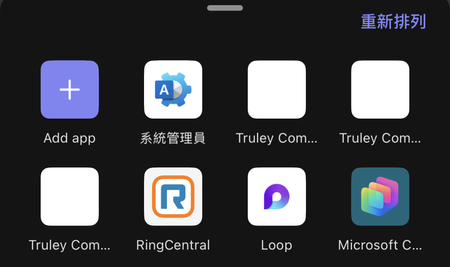
I am following up on a rendering issue where my custom app icon appears as a blank white square on the iOS client. Current Status: Despite following the standard guidelines, the icon fails to render on iOS (Works perfectly on Android/Desktop). What I have tried (and failed): Changed accentColor: Updated manifest from #FFFFFF to #4B6BF5 (Brand Blue) to avoid white-on-white issues. Version Bump: Increased manifest version from 1.0.17 to 1.0.18 to force cache invalidation. Re-installation: Completely uninstalled the app on iOS, cleared app data, and re-added it. Direct Upload via Teams Admin Center: I tried uploading the app package directly through the Admin Center, but the icon still fails to render on iOS. Commercial Marketplace: I have users who installed the app via the Commercial Marketplace, and they are also seeing a blank icon. "Publish to Org" via Developer Portal: I also tried the "Publish to Org" feature within the Developer Center, and the result is the same. Icon Validation: color.png: 192x192, PNG, Transparent background. outline.png: 32x32, PNG, Pure white pixels only with transparent background. Manifest Snippet: { "version": "1.0.18", "manifestVersion": "1.22", "id": "e4fae5da-30ea-4f90-9eae-807b2a13a127", "icons": { "outline": "outline.png", "color": "color.png" }, "accentColor": "#4B6BF5" } Questions & Request for Assistance: Has anyone faced a similar "blank white square" issue on iOS recently? Any suggestions would be greatly appreciated.463Views0likes2Comments
Message extension choiceset does not work on iOS App only
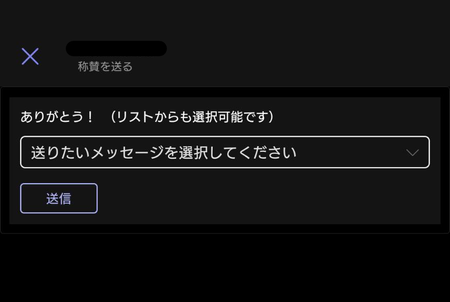
Hi, I'm an application developer for Teams Custom App. I have developed a Teams app with message extensions. Message extension "choiceset" does not work on iOS App. Please let me know how to resolve this. [Android App] drop-down list appears. [iOS App] drop-down list is gone...828Views0likes5CommentsError with message extension on iOS only.
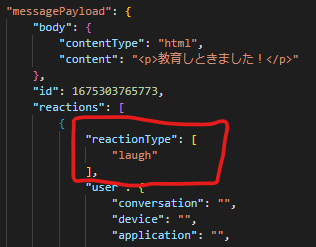
I used the message extension for Microsoft Teams to display a Hero Card in the input field. Only in the case of iOS, the error seems to be caused by a different definition of the JSON sent to the BOT. PC reaction Type = string Android reaction Type = string iOS reaction Type = array of string The following exception occurs. Newtonsoft.Json.JsonReaderException: 'Error reading string. Unexpected token: StartArray. Path 'messagePayload.reactions[0].reactionType'.' Is there any way to work around this bug?Solved1.9KViews0likes8Comments
iOS Teams app sends all choice data on Adaptivecard
When creating Adaptive card with check boxes with "choice", "submit action" behavior changes on platform where you execute. On Mac App, it sends only checked(selected) data, but on iOS app, it sends all data including non-checked checkbox (value of the non-checked checkbox is empty). [edit 3/28 16:16 JST since the issue was furthuer investigated.] Is this expected behavior? Is it a bug? Any workaround to use it on iOS Teams App??1.7KViews0likes5Comments
Urgent - yesterdays IOS app update broke messages sent via connectors
Hello, We have dozens of teams channel connectors for our organization to route critical messages to corresponding teams channels. Everything worked fine the past couple years, however yesterdays IOS app update is rendering all messages (new/old) as blank / empty messages. There are no errors with the posted connectors, the json snippets have very basic html formatting. Latest Android app works as expected. There are no issues on desktop either (mac/windows), as far as I can tell it works as expected. I've also tested on an iphone 7 with an older version of IOS with latest app and the messages do appear, however iphone 12's (for example) on latest ios / app versions are completely blank. This is beyond frustration, has this issue been identified yet / anyone else seeing similar issues? Thanks.1.6KViews0likes5CommentsMention + onBehalf is not working in IOS mobile client
I sent an adaptive card from a bot that has user mention entitites and also uses the onBehalfOf functionality which posts the name of the user on top of the message -> "User J via botname" That works fine in all cases on the desktop version. However on the ios client, the "User J via botname" is no longer rendered when there is a mention included in the card. If I remove the mention entities, the onbehalfof is properly rendered. As this is not consistent with the desktop I assume that it is a bug. Is this the proper forum to report it?1.3KViews0likes4Comments
Deep link to the scheduling dialog issue - Teams for iOS doesn't add participants to dialog.
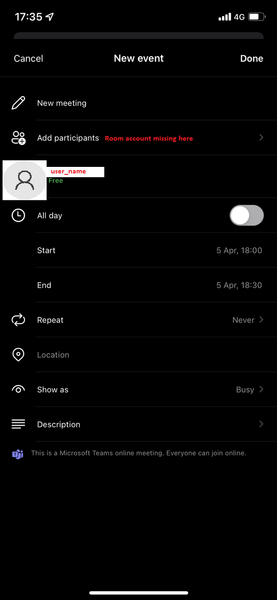
Greetings Tech Community ! Please help me to find a solution for the following issue : My organisation is using Teams Room Console systems and recently we have implemented QR codes with https://docs.microsoft.com/en-us/microsoftteams/platform/concepts/build-and-test/deep-links to the scheduling dialog with the Teams room account- for quick and easy on the go scheduling using mobile versions of MS Teams. At first everything was looking good, but soon we started getting negative feedback from users with iOS devices. When they access the deep link - they are redirected to the scheduling dialog, but the room account is missing from the participants list. Accessing the link from Android devices works just fine (sorry for cyrilic): I have tried both of the following format - with the same results : https://teams.microsoft.com/l/meeting/new?subject=New%20meeting&attendees=Email address removed msteams://https://teams.microsoft.com/l/meeting/new?subject=New%20meeting&attendees=Email address removed At this point I am not sure if it is something I am doing wrong, or it is some kind of Teams for iOS functionality bug. Thank you in advance.1.5KViews0likes2Comments