intune
4505 Topics
co-managed Working flow
Hi SCCM Expert, I would like to understand how co-management works in a multi-tenant scenario. Currently, my SCCM environment manages devices from two different domains: abc.com → Integrated with ABC Intune Tenant xyz.com → Integrated with XYZ Intune Tenant To enable co-management, we configured the Cloud Attach/Co-Management settings in SCCM using a Global Administrator account from the abc.com tenant. We then created a pilot collection and added devices from both abc.com and xyz.com domains. My questions are: Since co-management was configured using credentials from the abc.com tenant, how can devices belonging to the xyz.com tenant successfully become co-managed and receive Intune workloads from their respective tenant? During the co-management enrollment process, what determines which Intune tenant a device enrolls into? Is the SCCM co-management configuration tied to the tenant used during setup, or does the device use its own Azure AD/Entra ID registration information to identify the target tenant? What is the actual trigger point for the transition from SCCM management to co-management/Intune enrollment? If devices from multiple tenants exist in the same SCCM hierarchy, how does SCCM ensure that each device is enrolled into the correct Intune tenant? Could you please help clarify the architecture and enrollment flow in this scenario?17Views0likes1Comment
Configure only "trusted" usb flash drives to be allowed to the workstations through Itnune?
We would like to impose a policy that allows only vendor specific encrypted usb flash drives to be installed to the workstations without affecting other usb device classes. Is there a way to accomplish it through Intune configuration?Solved86Views0likes2CommentsCall for perspectives: Endpoint Management Experiences of IT Professionals Survey
Hi Endpoint management community, we’d love to hear from you! How do you manage employee devices today? Where do you turn for guidance and support? And how are you thinking about AI-enabled ways of working? 🔗 Share your perspective in our 15-minute survey: https://lnkd.in/gmjkFx8P We’re especially interested in hearing from people in their first five years in the field, but all experience levels are welcome. If someone in your network comes to mind who has relevant experience, feel free to pass the survey along!122Views0likes1Comment
WHFB - Intune - Only PIN works and it causes print issues
Hello, I have personally attempted to deploy this for my environment and so has a colleague. We deploy windows hello specifically to a single machine or user, the PIN ends up being the only option which can be used, the device will say every other option is not available. It will constantly pop up at the bottom right that the password needs to be put in again to authenticate the user and printing will not work at all. The devices are fully capable of using facial recognition. Has anyone encountered any of these issues in a similar fashion with an AD > Entra environment ? Thank you, Jamie.327Views0likes4Comments
Intune On-Demand Proactive Remediation API Reliability for Large-Scale Usage
Hi Team, We are testing the Intune On-Demand Proactive Remediation API: POST /deviceManagement/managedDevices/{managedDeviceId}/initiateOnDemandProactiveRemediation In our environment, the remediation package works correctly, and the API generally triggers the remediation as expected. However, during repeated testing, we noticed that a small percentage of requests do not seem to reach the endpoint. For example: 20 remediation requests sent 18-19 execute successfully 1-2 never trigger on the target device Devices are online and managed by Intune Added a 30-second delay between requests, but the behavior still occurs intermittently Before adopting this in production for a large client base, we'd like to understand: Has anyone observed similar behavior? Is this API reliable for triggering remediation across multiple devices in parallel? Are there any known limitations, queueing mechanisms, throttling considerations, or best practices? Is there a recommended way to verify that a remediation request was actually delivered to the device? Since this API is still in the beta/preview stage, is there any information on its roadmap or GA timeline? Note: For additional context, detailed test results, observations, and environment information, a PDF containing the complete analysis has been attached. Any guidance or real-world experience would be greatly appreciated. Thank you. https://learn-attachment.microsoft.com/api/attachments/1ad5bea4-9038-4b25-9a2a-a9e66a870f6a?platform=QnA https://learn.microsoft.com/en-us/graph/api/intune-devices-manageddevice-initiateondemandproactiveremediation?view=graph-rest-beta671Views0likes4CommentsEntra Shared Mode - Force App Stop
Hi All I hope you are well. Anyway, I was asked this yesterday and think I already might know the answer, but here goes. We had an instance of Microsoft Excel stuck in "getting things ready" on an Android Entra Shared Mode Device. Technical Support wondered if there was a way to Force Stop Excel or clear the app data. We had a look in Exit Kiosk Mode, Android Settings, and the Force Stop of Excel said "Action not allowed" and the clear the app data said "Unable to delete data for app" So, my question(s) would be, is going into Exit Kiosk Mode and even trying to force stop / clear data on apps even a valid option, or is this by design? Would adding Excel to this setting help? Any help or confirmation would be greatly appreciated. Stuart739Views0likes4CommentsWindows Autopilot ESP App Failures: My Troubleshooting Approach
Hi everyone, I’ve been working with Windows Autopilot and Microsoft Intune deployments and wanted to share a troubleshooting approach I use when a device fails during the Enrollment Status Page (ESP) Apps phase. When I see an Apps-stage failure, I normally start by checking: Which application failed in Intune. Whether the application is actually required during ESP. Win32 detection rules and installation commands. Application dependencies and assignment targeting. Autopilot/MDM diagnostic logs. Whether too many applications are being installed during ESP. One thing I’ve found particularly useful is separating applications that truly need to block provisioning from applications that can be installed after Autopilot has completed. I also try to avoid immediately resetting the device. Finding the failing application and understanding why it failed gives us a much better chance of preventing the same problem on future deployments. My basic workflow is: ESP failure → Identify failed app → Check assignment → Check install/detection → Review logs → Test with a controlled app set → Re-test Autopilot I'm interested in hearing how other Intune admins approach this. What logs or checks have helped you the most when troubleshooting ESP application failures? Thanks, Jayesh Kedar110Views0likes1Comment
enrolling in Intune MacBook Pro with an M5 Pro
Hi everyone We have tested the Wi-Fi and ethernet profile without success with Apple businesses manager. The Wi-Fi and the ethernet connection itself works, but the enrollment process into Intune does not complete successfully. At this stage, we cannot sign in, and neither the Wi-Fi nor the Ethernet connection appears to be working. The device is a 14-inch MacBook Pro with an M5 Pro chip, running macOS 26.5.1 the device connects to the server, the settings begin to apply, but the process suddenly stops, and we are then unable to log in. These are steps followed : Synchronize the device from Apple Business Manager to Intune. Assign the enrollment profile to the device. Perform a device wipe/reset. Start Automated Device Enrollment (ADE). Complete the device setup and user sign-in. The device successfully enrolls into Intune. Intune begins deploying configuration profiles, compliance policies, security policies, and applications. During the policy application process, Wi-Fi connectivity stops responding. The device loses network connectivity and cannot continue synchronizing policies. We are unable to sign in because the enrolment process has not been finalized. As a result, we have to wipe the Mac and start the process again each time. We have disabled some policies, but we are still experiencing the same issue. Have anyone experienced any issues like that ? Regards,533Views1like3CommentsNew MD-102 : Weird departure from course traditional design
The first slide deck is tremendously long. It takes me 5 hours of lecture to get students into the first lab. The slide decks are very repetitive and could often be replaced with Instructor Demonstration slides. The topics are far-ranging: it mixes identity administration, Intune RBAC, Android enrollment, LAPS, Windows enrollment, and Autopilot before students have a stable mental model of the fundamentals of: Device enrollment > Policy/app creation > Targeting assignment. The first lab is disjointed, with many configurations, such as Creating Administrative units, Assigning Scope tags, and Custom Intune Roles, not implemented until later in the week in Exercise 5. The delegation model, administrative-unit work, and Android restrictions obscure the basics students should understand first. The course design seems to be a big departure from most, if not all, Microsoft courses I have ever taught. No Entra Connect Lab and no real Autopilot lab are a disappointment to some students as well64Views0likes0CommentsAndroid Enterprise System update expected behavior
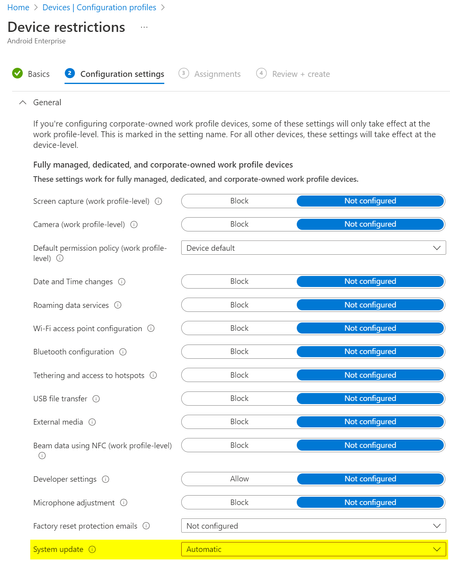
What would be the expected behaviour when we set the System update to Automatic in the Android Enterprise Device restriction profile? We have several devices rebooting "randomly" and without notification and when we check the dumpstate logs, these reboots were triggered by an update: Canonical boot reason: reboot,enterprise,mainline_updbug. According to the Android documentation this could be correct: https://source.android.com/devices/tech/admin/ota-updates Since we don't see the same behaviour on all devices, while they share the same Update policy, I'm not sure what to expect from this setting?4.5KViews0likes4Comments