identity
136 Topics
Minha conta Microsoft foi comprometida e o e-mail original deixou de ser reconhecido
Olá, preciso de ajuda para recuperar minha conta Microsoft. Minha conta originalmente usava o endereço email address removed for privacy reasons. Recentemente perdi o acesso e, quando tento entrar ou usar o formulário de recuperação com esse endereço, aparece a mensagem de que “a conta Microsoft inserida não existe”. Acredito que o endereço de e-mail e as informações de segurança da conta tenham sido alterados sem minha autorização. O endereço email address removed for privacy reasons ainda aparece no meu Microsoft Authenticator. Ainda tenho o Authenticator associado à conta antiga, mas o código de verificação não é aceito. Durante uma tentativa de recuperação apareceu o endereço email address removed for privacy reasons, que não reconheço. A conta também ainda aparece associada ao meu perfil de administrador do Windows e ainda consigo acessar minha conta do Minecraft pelo site. Já tentei o Assistente de Entrada e o formulário de recuperação, mas o endereço original não é mais reconhecido. Gostaria de saber qual é o procedimento correto para recuperar a conta ou entrar em contato com o suporte responsável por contas Microsoft comprometidas. Obrigado pela ajuda!16Views0likes0Comments
Microsoft Account connected apps management
Why is there no visible “Connected apps” management page in Microsoft Account? I noticed that third-party applications connected to a personal Microsoft account can be managed at: https://account.live.com/consent/Manage However, I cannot find any obvious navigation path to this page from the main Microsoft Account portal: https://account.microsoft.com/ The main account portal provides sections such as Security, Privacy, Devices, Subscriptions, and Your info, but there does not appear to be a visible “Connected apps”, “Apps and services”, or “App permissions” entry. I only discovered the consent management page after receiving a Microsoft security notification that a new application had been granted access to my Microsoft account. The “Manage your apps” button in that email links to the older account.live.com consent page. This creates two usability and security concerns: Users may not know where to review or revoke third-party OAuth permissions unless they still have the original security notification email. Microsoft Account management currently uses both microsoft.com and live.com domains, which can be confusing for users trying to verify whether an account-management page is an official Microsoft page. Would it be possible to add a visible “Connected apps”, “Apps and services”, or “App permissions” entry under Security or Privacy in account.microsoft.com? This would not require redesigning the existing consent system. Even a simple link from account.microsoft.com to the existing account.live.com/consent/Manage page would make third-party permission management much easier to discover. Is there currently an official navigation path to this page that I may have missed?77Views0likes2CommentsConditional Access enforces MFA but Service Account still ask to secure account
Hi, I've setup Conditional Access policies to enforce MFA. But it excludes a group for service accounts. Whenever we login to a Service Account, they all ask to secure your account. Hit next > It says no MFA options are available > Skip. Both our own MFA conditional access policy and MS per-user conditional access policy excludes this group. The Legacy per-user authentication policy has all accounts disabled there in favour of the conditional access policy. We must be missing something here. Some of these are shared inboxes, others regular user accounts. Many of these services requires login through the typical Microsoft sign in screen to authorize access. Some does not support OpenID. So how do I 100% exclude service accounts from MFA? And how do I get rid of this popup to secure these accounts when it says no MFA options are available? TIA985Views0likes2CommentsWho Can Access What? Designing RBAC and Identity in Azure
Who should be allowed to access an Azure resource? Azure makes it easy to create resources. The harder question comes afterwards: who should be allowed to access them? A Function App may need to read secrets from Key Vault. A Logic App may need to call APIs through API Management. A developer may need to deploy to Dev but have no access to Production. A CI/CD pipeline may need to deploy infrastructure without becoming an Owner of the entire subscription. This is where Azure Role-Based Access Control (RBAC) and Managed Identity become critical. In this article, I look at how to design access around people, applications and deployment pipelines, while keeping permissions as narrow as practical. The article covers: Azure RBAC and access scopes Least-privilege access Managed Identities Developer vs Production access boundaries Application identities CI/CD deployment permissions RBAC vs API authentication Privileged access and PIM Common RBAC design mistakes One of the key principles is simple: Give an identity only the permissions it actually needs. For example, if a Function App only needs to read secrets from Key Vault, giving it Contributor access to the entire Resource Group solves the problem with a much broader permission than necessary. Good RBAC design is not about assigning more permissions. It is about understanding: Who needs access? Why do they need it? What exactly do they need to do? At what scope should access be granted? How can that access be managed securely over time? I would be interested to hear how others approach RBAC and identity design in enterprise Azure environments. Full article: https://www.linkedin.com/pulse/who-can-access-what-designing-rbac-identity-azure-chethan-raj-ud6gc/120Views0likes0Comments
How much of your Microsoft 365 environment can you actually see at once?
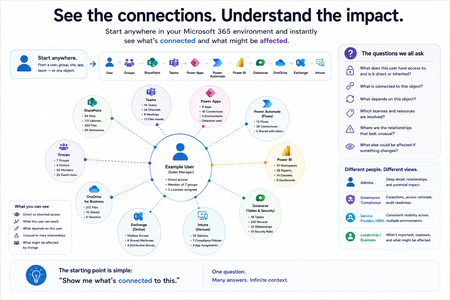
Not how many users you have. Not how many sites, teams, apps or flows you have. How much of it can you actually see connected together? I've been working across Microsoft 365 environments for a while, and I kept running into the same thing. There is no shortage of information. If anything, there is probably too much of it. Users, groups, permissions, SharePoint, Teams, Power Apps, Power Automate, Power BI, Dataverse, OneDrive, Exchange, Intune, licensing, configuration... It's all there. But when you're actually trying to understand how everything fits together, it can be a different story. You open one blade. Find something. Open another. Cross-check it. Go back. Open something else. Before long, you're jumping between different parts of the tenant trying to build the bigger picture in your head. And if you're working with larger environments, that gets difficult pretty quickly. The information isn't necessarily missing. The relationships between the information are what can be difficult to see. That got me thinking about a slightly different question: Instead of "where do I find this information?" "Show me what's connected to this." That's where VisibleState started. Start anywhere. Follow the connections. Imagine starting with a single user. Instead of seeing that user simply as a record with a list of properties, imagine being able to explore the relationships around them: User → Groups → SharePoint → Teams → Power Apps → Power Automate → Power BI → Dataverse → OneDrive → Exchange → Intune Then the questions become different: What does this user have access to? Is that access direct or coming through a group? What resources are connected to them? What depends on something they're associated with? Which licenses are involved? Are there relationships that look unusual? If something changes, what else might be affected? Those questions aren't necessarily about finding another piece of information. They're about putting information that already exists into context. A report can tell you that something exists. A connected view helps you understand what it is connected to. Illustrative example below — not a real customer environment. I'm not suggesting Microsoft 365 doesn't already give us this information Quite the opposite. Microsoft 365 already gives administrators an incredible amount of information and tooling. The thing I've been thinking about is what happens when you want to look across those boundaries. Sometimes I don't want another export. I don't want another list. I don't necessarily want another dashboard. I want to start with something I'm looking at and ask: "What's connected to this?" And then keep following the trail. That's the idea I'm exploring with VisibleState. The interesting part is what happens when you change the viewpoint The same relationships can be useful for completely different reasons. For example: Administrators may want to understand access, permissions and dependencies. Security and governance teams may want to find unusual relationships or exceptions. Compliance teams may need to understand who can access something and why. People managing multiple environments may want a consistent way to understand what's there without rebuilding the picture manually every time. Leadership may not need to see the graph at all. They may simply want to know what's important, what's exposed and what could be affected. It's still the same underlying environment. You're just looking at it from a different angle. And that's where I think things get interesting. Where I'm at with it VisibleState started as something I was building to make my own work easier. I was spending a lot of time investigating environments, tracing access and putting information together for reports. The individual tasks weren't necessarily difficult. It was the jumping between different places and reconstructing the bigger picture that took the time. So I started building something that would let me approach the environment through the relationships instead. It's grown quite a bit from where it started, and I'm continuing to build it. I'm not posting this as a product launch, and I'm not looking for people to sign up. I'm genuinely interested in whether the problem I'm seeing is familiar to other people working with Microsoft 365. So I'm curious... If you could start with any object in your Microsoft 365 environment and immediately see what it's connected to, where would you start? Would it be: Users and access Groups and permissions SharePoint and Teams Power Apps, Power Automate, Power BI and Dataverse Licensing and resources Governance and unusual relationships Something completely different Maybe you've already got a good way of doing this. Maybe you still find yourself jumping between different services and piecing things together manually. Or maybe I'm looking at the problem from the wrong direction. What's the one relationship in your Microsoft 365 environment that you wish you could see instantly?160Views0likes0Comments
**bleep**. Security Update (like KB5101650) breaking SmartCard Authentication for Office 2024 apps to O365
Looking for some support on this issue. I have Win11 clients that were upgraded from 24H2 to 25H2 last year. They were functioning well until earlier this year when the Cumulative Updates started breaking smartcard authentication on our clients (day after installing/rebooting/cache clearing). This seems to be a known issue but are there any real fixes? Symptom is that after the update is installed, next day (after a reboot or cache cleared) the user starts their Outlook or Teams application, when receiving the prompt that says "you will be prompted for your PIN" nothing follows, you will see the blue dots circling and after 5 or so minutes it times out. Clicking on the "..." shows an informational message error #50058, which says that not enough information was provided. The authentication process is failing... BTW - web authentication works just fine, it's just the local application (Teams, Outlook, etc.) that fail. I found that creating a new account on the system seems to work just fine, but for people that have established accounts and program environments that are setup for them to work, creating a new account is very unappealing to them. I'd like to be able to just get their current accounts working. Creating a new profile, wiping current profile info from registry doesn't seem to work thanks to automagic backups the OS is doing, but even that would still require setting up a new profile and copying over non AAPDAT file structure info... Does Microsoft not have a fix to this "known" issue? I spent a few weeks really digging into this and the best I can find as a work around is to disable the automatic backups of the NTUSER.DAT, blow away current profile info in registry, rename current profile structure, and then have the user login "anew". Again, this still requires a copy of the non-AAPDAT data back into the new structure (at least permissions won't be an issue) but that will not restore all application-based information for that user--that still will have to be re-created, which I think the users will not want to do because it means starting over from scratch.377Views0likes2Comments
Microsoft Authenticator & Microsoft Work Accounts
I am moving my data and apps from my previous Android phone to a new Android phone. I have run into a problem with the Microsoft Authenticator app. I have several Microsoft work accounts which Microsoft Authenticator on the new phone says I need a QR code to recover the account. However, when I go to the Security page for the Microsoft work accounts, click on "Add Sign-In Methods", there is no option for an authenticator app. I should point out that I do have Microsoft Authenticator for these accounts installed and working on some tablets and iPads. How do I fix this so I can use my new Android phone? Thank you.Solved437Views0likes5Comments
How to target Azure VPN (Microsoft-Registered) app with Conditional Access Policies?
I have an Azure Point-to-Site VPN Gateway configured using the Microsoft-registered Azure VPN Client App ID (Audience value: c632b3df-fb67-4d84-bdcf-b95ad541b5c8). Everything is working correctly for our users. The issue I am having is that anyone with an Entra account can connect to the VPN and I want to restrict this with a blocking Conditional access policy. I do not want to create a custom app registration, because then I will have to change the 'audience' value on the app gateway and all user's will need to modify their VPN clients. The problem is I need to target the Microsoft-registered Azure VPN app in a Conditional Access policy but it does not appear in my Enterprise Applications list or in the CA app picker when searching. My questions: Why does the Microsoft-registered app not automatically create a service principal in my tenant the way other Microsoft apps do? Is there a supported way to make it appear in the CA app picker without creating a custom app registration or changing the gateway Audience value? Has anyone successfully targeted c632b3df-fb67-4d84-bdcf-b95ad541b5c8 in a CA policy while keeping it as the gateway Audience value? Thanks for the assistance here250Views0likes2Comments
Add filters/ grouping to microsoft authenticator app accounts
Hello! Hope you are all well! I would like to see filters of personal/ Work and school accounts or by domain. Or even the ability to organise accounts manually into groups. Currently have a long list of personal accounts and work account.10KViews12likes11CommentsData and identity controls for the browser and network
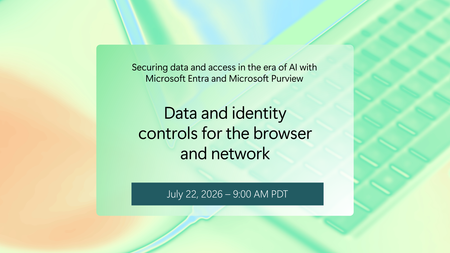
Sensitive data doesn't stay still. It moves through browsers, SaaS apps, generative AI tools, and prompts; often beyond the visibility of traditional controls. In this session, see how Microsoft Entra and Purview bring real-time visibility and control to sensitive data in motion across the network. You’ll learn how integrated data security and secure access controls can help reduce leakage risk, support responsible AI adoption, and enable modern work without slowing the business down. How do I participate? Select Add to Calendar to save the date, then click the Attend button to save your spot, receive event reminders, and participate in the Q&A. Not able to attend live? This session will be recorded and available on demand shortly after airing. Don't see Attend or Add to Calendar? Sign in to the Tech Community to join the conversation. If you can't view the session due to your organizational policies, you can also tune in on LinkedIn. This session is part of Securing data and access in the era of AI with Microsoft Entra and Microsoft Purview. View the full agenda for more insights to help you move from experimenting with AI to deploying it at scale, securing sensitive data, access, and AI usage.1.2KViews0likes3Comments