identity
143 Topics
How to disable option to stay signed in
The option for users to choose to stay signed in to Office 365 is a potential security problem. We have MFA turned on, but if users stay signed in another person may access the tenant if the computer is left unattended or is hacked. It was possible to turn this option off in Company Branding in AAD until the latest (preview) version of Company Branding was released. For some reason that feature is not available in the latest version. I assume I can revert to the previous version, and then turn it off, but when doing that, I receive a warning that it may have negative consequences for SharePoint Online, but it doesn't say what those consequences are. So, my questions are: 1. Can I turn it off by reverting to the previous version of Company Branding and what are the consequences? 2. Is it possible to achieve the same result in another way? PowerShell or Conditional Access maybe?43KViews1like4Comments
Windows AD account password expired but user can still send/receive email and use Teams
Hi. I recently discovered that some users with expired AD passwords are still working as if nothing has changed, which caught me by surprise. All the users affected do not use the VPN on a regular basis, or sign into Office 365. They all use desktop office for their email (Outlook) and chats (Teams). We are all still working from home. It appears as if a user is only challenged to update their expired password once they physically authenticate against the domain controller(s). But what if they never do? This means a user with an expired password will continue to send/receive emails and send chats in Teams regardless of when their password expired, unless they perform some form of "logon". I ran a PowerShell script to elucidate more and found that we have dozens of users in this boat. Some users have passwords that expired YEARS ago! Is this by design? In that the password expiration attribute is pointless until said account actively connects or authenticates to the domain? Why is the "expiration" attribute not part of the user SID? I'm baffled. We have on premise domain controllers which syncs out to Office 365 via ADSync and this is syncing fine with no errors, including password sync. Any help appreciated.Solved33KViews0likes2CommentsAzure AD SSPR Password write back issue
Hi all, A company I work for have issues with the reset password function with AD Connect. In the SSPR audit logs in Azure AD, we face on 'Reset password (self-service)' the status reason 'OnPremisesAdminActionRequired', with a follow up event log within the AD connect server: event ID: 33004 with error "hr=80230626, message=The password could not be updated because the management agent credentials were denied access" I face this issue before and this was causing because the AD DS connector account did not have the right permissions. In this case this is not. What I have done so far: - Updated AD Connect from 2.0.89.0 to 2.0.91.0 - enforced TLS 1.2: https://docs.microsoft.com/en-us/azure/active-directory/hybrid/reference-connect-tls-enforcement - Checked AD DS connecter account 'MSOL_xxxxxxxx' permissions: https://docs.microsoft.com/en-us/azure/active-directory/authentication/troubleshoot-sspr-writeback#verify-that-azure-ad-connect-has-the-required-permissions - the user do not have the options 'password never expires' or 'user cannot change password' configured - Let AD connect talk to another DC dc02 instead of dc01 - Checked connection to SSPR service from DC's : Test-NetConnection -ComputerName ssprdedicatedsbprodscu.servicebus.windows.net -Port 443 - The action 'Change password (self-service)' are successful (via my account portal) , only action 'Reset password (self-service)' face this issue (via passwordreset.microsoftonline.com) -- both use the same OnPremisesAgent ->> AADConnect Have anyone a idea what else I can try more? Regards, RicardoSolved27KViews0likes13CommentsAZ-500: Microsoft Azure Security Technologies Study Guide
The AZ-500 certification provides professionals with the skills and knowledge needed to secure Azure infrastructure, services, and data. The exam covers identity and access management, data protection, platform security, and governance in Azure. Learners can prepare for the exam with Microsoft's self-paced curriculum, instructor-led course, and documentation. The certification measures the learner’s knowledge of managing, monitoring, and implementing security for resources in Azure, multi-cloud, and hybrid environments. Azure Firewall, Key Vault, and Azure Active Directory are some of the topics covered in the exam.23KViews4likes3CommentsProtecting your user identities
Explore Microsoft identity security features. From password attacks to token replay, we will guide you through the technologies we have in place to help defenders like yourselves mitigate, investigate and use up to date best practice to protect your users and business. This session is part of the Microsoft Secure Tech Accelerator. RSVP for event reminders, add it to your calendar, and post your questions and comments below! This session will also be recorded and available on demand shortly after conclusion of the live event.18KViews8likes22Comments
Office 365 MFA using code sent to email, instead of getting request on Microsoft Authenticator
I am working on a tenant which have 400++ sites, and we need to force this permission settings for external user sharing:- Set the share permissions on all sites to allow for only external users if they are invited by email and requires MFA for a code sent to their email to authenticate So is this something we can achieve, to force the MFA code to be sent to email rather than mobile phone? Second question, If the answer to the above question is Yes, then will this need to be done on the site level or on the tenant level? If this need to be set on each site separately, then can we do this using Power shell, where we can loop through all the sites inside the Power-shell, but how we can set this setting using Power shell?Solved18KViews0likes1CommentWindows Hello for Business 0x80090010 NTE_PERM
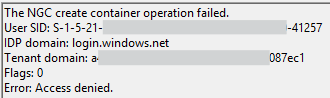
Hi all, I'm encountering an issue with Windows Hello for Business on the latest version of Windows (July 2025 update). The setup process fails during initialisation, and no biometric or PIN options are being provisioned for the user. Environment: Windows version: 11 24H2 Enterprise (latest update) Deployment mode: Hybrid Cloud Trust Hybrid joined devices Symptoms: Users are prompted to set up WHfB but the process fails at the last step with error 0x80090010 Users who already have WHfB authentication methods created can successfully login Event ID 311 & 303 in the User Device Registration logs Screenshots: Troubleshooting so far: Unjoined and rejoined to Entra ID Granted modify permissions on folder in which NGC container would be created Rolled back to June 2025 update (this worked) So it seems like this is caused or related to the latest Windows Update, which is rather unfortunate for us as we are just beginning to rollout WHfB for our organisation. I'm posting here to raise awareness of the issue, if there is a more appropriate place to post then please suggest.17KViews6likes18Comments