identity and access management
269 Topics
Why “Data in Switzerland” Is Not Enough
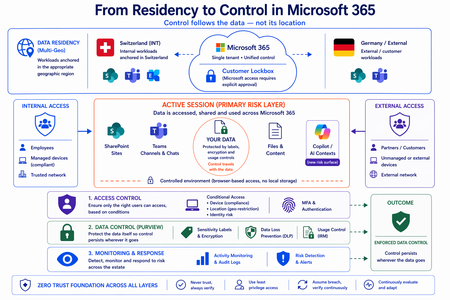
Moving from Residency to Control in Microsoft 365 Every conversation about data sovereignty in regulated industries tends to start the same way: “We use Multi-Geo. The data stays in Switzerland.” It’s the right starting point. Microsoft 365 Multi-Geo allows organizations to place selected workloads - SharePoint sites, OneDrive accounts, Teams data, or Exchange mailboxes - into specific regions, including Switzerland, while maintaining a single global tenant. This makes it possible to align sensitive data with regulatory or customer requirements without fragmenting the overall environment. But it only answers one question: Where is the data stored? It does not answer who accessed the data, from where, under which conditions, or what happened after access. That is where the real problem begins. A scenario that happens every day A Swiss engineering firm stores sensitive project documentation in Switzerland using Multi-Geo. An external contractor - working from an unmanaged device outside Switzerland - is granted access to review a file. The document opens. The data is now on a screen in an unknown location, on a device with no compliance posture, in a session with no restrictions. From the platform’s perspective, residency was enforced. From a sovereignty perspective, control was lost the moment access was granted without conditions. The file never left Switzerland. But sovereignty did. Residency is static. Control is not. The moment a document is opened, storage location stops being the relevant boundary. The file is no longer just “in Switzerland.” It moves instantly across endpoints and browsers, collaboration tools like Teams, external users and partners, and increasingly AI-driven contexts. The infrastructure remains unchanged. The data does not. From the platform’s perspective, everything is working as designed - access was granted, residency was enforced - and control was lost. Most “data in Switzerland” strategies fail at exactly this moment: when the data is used. The shift: from location to conditions If data sovereignty is the goal, the question must change. Not “Where is the data stored?” but: Under which conditions can data be accessed and used? This shift fundamentally changes the architecture. Control must be applied across three distinct layers - and all three must be connected. Layer 1: Access is conditional, not static Conditional Access extends control beyond authentication and turns it into continuous evaluation. Access decisions can depend on: Device compliance Location (geo-restriction) Identity and risk signals Multi-Geo ensures data is placed correctly. Conditional Access ensures it is reachable only under defined conditions. The two must work together - residency without access governance is an incomplete control. Layer 2: The session is the real risk surface Even with strict access controls, risk remains. A session is an exposure surface by design. During an active session, data is viewed, copied, shared, processed by applications, and connected to AI prompts. The gap does not appear at storage or authentication. It appears during active usage - inside the session. This is the layer most architectures do not explicitly address. Controls must extend into the session itself: limiting data transfer and replication, restricting interaction patterns, and enforcing policies in real time. Access is no longer a one-time event. It becomes continuously governed. This becomes even more critical as AI assistants consume content across SharePoint, Teams, Exchange, and other Microsoft 365 services. The question is no longer only where the source document resides - but whether the AI interaction itself is governed by the same access and protection controls as direct access. Layer 3: The document becomes the control point The most durable control does not sit in the network or in the session. It sits in the data itself. In regulated industries, organizations often arrive at this architecture having first evaluated sovereign or national encryption solutions. The decision to rely on native Microsoft 365 Purview encryption rather than a separate layer comes down to integration: AES-256 protection operating natively at file, user, and SharePoint level - including geo-based access restrictions - without an additional system to maintain. When protection is applied directly to the document through Microsoft Purview: Sensitivity labels define classification - automatically assigned based on content Encryption enforces access - AES-256, bound to the file itself IRM controls usage - view, copy, print, share, and presentation rights DLP governs movement across services - preventing data from leaving defined boundaries Dynamic watermarking tracks exposure - applied on open, view, or print At that point, access is enforced by the file, usage restrictions travel with it, and control persists regardless of location. The document becomes the perimeter. Platform control: limiting provider access One dimension often overlooked in sovereignty discussions is platform access itself. Even a perfectly configured tenant is only as sovereign as the controls placed on the operator. Customer Lockbox ensures that even Microsoft support cannot access customer data without explicit, logged, time-bound approval. Every access request is visible, auditable, and subject to customer veto. Data control applies not only to users - but also to the platform operating the service. Enforcement requires an integrated architecture Most organizations already have the required capabilities: Multi-Geo, Conditional Access, session control, Purview (labels, encryption, DLP, IRM), and monitoring. The issue is not capability. It is fragmentation. In practice, fragmentation looks like this: residency is configured in one project, Conditional Access policies are managed by a different team, and Purview labels were applied during a compliance initiative that never connected to the access layer. The tools exist. The signals do not flow between them. When designed as a single architecture: Data is placed intentionally - residency aligned to regulatory requirements Access is governed by context - device, location, and identity evaluated continuously Usage is controlled dynamically - session-level restrictions enforced in real time Protection is embedded in the document - encryption and IRM travel with the file Signals are connected across the platform - monitoring feeds access policy, not just audit logs “Data in Switzerland” becomes not just a statement - but an enforceable system property. Closing thought Placing data in Switzerland is the right first step. Multi-Geo makes it possible, even in global environments. But residency alone is not control. Data residency answers where information is stored. Data sovereignty requires proving who can access it, under which conditions, and what controls remain in place after access is granted. In Microsoft 365, sovereignty is no longer defined by geography alone. It is defined by the ability to enforce control wherever the data travels.Passkey Sign in Method (Entra Account) missing in Security
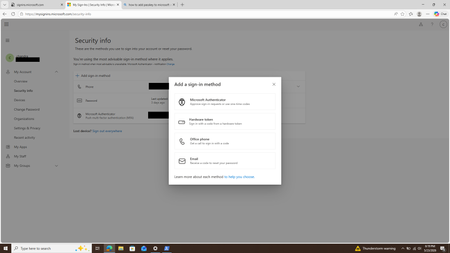
Hi BANNEDUSERNAMESupport we enable FIDO2 passkey in entraId. However, when we try to register the FIDO2 passkey on myaccount.microsoft.com -> Security -> Add a Sign-in Method -> Passkey is missing. Attached screenshot. For a personal account, the Passkey method is available at the same location, even though interface is slightly different than an Entra Id account. Attached screenshot for the personal account as well. Kindly guide us on where to register the passkey or if we need to enable certain settings in EntraId for the passkey to show up in sign-in methods. We have Auth Strengths enabled in EntraId for the particular user in question and this reflects in the Device Lockscreen during login on Entra Registred Device. Thanks ChandraSolvedSecurity Dashboard for AI: 3 Ways CISOs Drive Impact Today
AI is reshaping the enterprise and, with it, the threat landscape. Today's organizations face new threats with AI agents that modify configurations, execute workflows, and access data without direct human oversight. As a result, the gap between AI adoption and AI governance is widening, and CISOs face growing challenges to maintain visibility, control, and compliance across an increasingly complex ecosystem. As AI becomes embedded across the enterprise, CISOs face four key challenges: Scale without visibility: Over 75% of enterprises surveyed by PWC report they are already adopting AI agents. ¹ At the same time, over 80% of security teams surveyed by Nokod report visibility gaps into the applications and AI agents created within their organization. ² Rapid AI proliferation and evolving regulations make unified visibility across AI platforms, apps, and agents critical for CISOs. Fragmentation: Organizations rely on multiple siloed tools for AI asset visibility, making oversight fragmented and inefficient. According to Gartner’s 2024 survey of 162 enterprises, organizations use 45 cybersecurity tools on average. Expanding AI risk: AI proliferation is rapidly increasing the attack and risk surface, with the surge of AI-generated identities. By 2027, 4 out of 5 organizations will face phishing attacks powered by AI-generated synthetic identities, according to IDC. ³ This makes it harder for CISOs to track emerging threats, unmanaged assets, and shifting risk patterns. Overload: Alert fatigue is now a top challenge, with organizations now receiving an average of 2,992 security alerts daily, yet 63% go unaddressed. ⁴ Increasing AI risk without a way to prioritize what matters most compounds pressure on CISOs. In conversations between Microsoft and CISOs, one common need emerged: a single place to view integrated AI risk across the enterprise. To address these growing challenges, we are excited to provide CISOs with the Security Dashboard for AI, which recently became generally available. This unified dashboard aggregates posture and real-time risk signals from Microsoft Defender, Entra, and Purview into one unified, executive-level view of AI posture, risk, and inventory across agents, apps, and platforms. The Security Dashboard for AI helps CISOs: Gain unified AI risk visibility: Discover AI agents and applications and continuously monitor posture across the environment Prioritize critical risks: Correlate signals across identity, data, and threat protection to surface the most urgent issues Drive risk mitigations: Investigate activity and take action to help reduce exposure across the AI ecosystem The dashboard is capable of aggregating and surfacing AI risks from across Microsoft Defender, Entra, Purview - including Microsoft 365 Copilot, Microsoft Copilot Studio agents, and Microsoft Foundry applications and agents as well as cross-platform AI risks with Microsoft network-based or SDK-enabled integrations, and MCP servers. This supports comprehensive visibility and control, regardless of where applications and agents are built. As you activate Microsoft Security for AI capabilities, you can gain richer visibility into different aspects of your AI risk posture. Figure 1: Security Dashboard for AI in browser Getting Started with the Security Dashboard for AI The Security Dashboard for AI is provided at no additional cost to customers already using Defender, Entra, and/or Purview to protect their AI innovation. Based on how early adopter CISOs are using the dashboard, here are three ways you can start leveraging the dashboard today. 1. Manage Daily AI Risk Beyond reporting, you must stay hands-on with AI risks, scanning for emerging issues, verifying asset governance, and delegating remediations. The Security Dashboard for AI consolidates daily operations into a single pane of glass, surfacing critical alerts, unmanaged assets, and emerging risks. Use the dashboard as a daily AI risk radar, enabling rapid triage and ensuring you focus on the most urgent threats. Scan and triage daily AI risk: Start each day by identifying and prioritizing the highest-risk AI exposures. Risks are prioritized on severity reported by underlying security tools, helping you focus on the most critical exposures. Track AI asset inventory and monitor agent sprawl: Use the Inventory page to gain comprehensive visibility into all AI assets. Identify newly registered assets to mitigate the risk of shadow or unmanaged IT and surface inactive agents to proactively monitor and control agent sprawl. Delegate tasks for remediation: Move from insight to action by delegating tasks to your security team with easy click delegation. Delegation routes ownership via email or Microsoft Teams with notifications, due date, and ownership tracking. Delegate actions to specific roles such as global admin and AI administrator, without granting full access to underlying tools. Figure 2: Security Dashboard for AI risk page 2. Guide Briefings with Security Teams You require up-to-date intelligence to guide conversations with Security Teams about what is happening across the AI estate. The Security Dashboard for AI helps you anchor discussions in specific risks, trends, and ownership gaps surfaced in the data. The dashboard becomes a conversation driver, helping you ask the right questions about risk and security posture, to help ensure you and your team are triaging the right priorities. Because the dashboard consolidates signals from Defender, Entra, and Purview, both CISO and security teams operate from the same facts, enabling more outcome-driven discussions and faster prioritization, so you can shift the conversations from status updates to targeted action planning. Prioritize top AI Risk: Use the dashboard to help you prioritize the AI risk that matters the most. In preparation for team meetings, use Microsoft Security Copilot to explore AI risks, agent activity, and security recommendations via prompts to strengthen your AI security posture. With your team, take a closer look at risk vectors like data leakage, oversharing and unethical behavior, and discuss what actions need to be taken. Review Security Recommendations: Create a routine with your security team to review the recommended Microsoft security actions and track your progress over time. Across regular team check‑ins, review what has been addressed, what remains open, and which actions require follow‑up so you are prepared to respond to regulatory, audit, or executive questions with up‑to‑date metrics. Figure 3: Security Dashboard for AI inventory page Figure 4: Security Dashboard for AI delegation 3. Executive Reporting Reporting to the board on AI security posture has historically meant weeks of manual data gathering across multiple tools. The Security Dashboard for AI streamlines the data collection process with a single source of truth for AI risk, enabling confident, data-backed insights for your board presentations and conversations. Early adopters confirm the value and are using it for quarterly executive briefings. Prepare for Board Discussions: Use the dashboard to help get the right insights at the right altitude to help you prepare for discussions with your board. The Overview page aggregates identity, data security, and threat protection signals from Defender, Entra, and Purview into an AI risk scorecard with risk factors. The embedded Security Copilot AI-powered insights provide suggested prompts with risk assessments, summaries, and recommendations to help you prioritize what matters most. Extend Observability to Executive Stakeholders: Authorize AI risk follow‑ups to the appropriate security, identity, or governance owners using Microsoft Teams or email. Distribute visibility across GRC lead, AI governance, and IT leaders, while maintaining executive‑level oversight. Figure 5: Security Dashboard for AI Copilot prompt gallery Next Steps The Security Dashboard for AI helps CISOs manage AI risk faster, more confidently and more collaboratively with their team. Defender, Entra, and Purview signals are surfaced in a single pane of glass, providing observability across your AI estate. Drive faster triage, use data to support board-level discussions about AI risk, and enable coordinated action with integrated insights, recommendations, and delegation to help accelerate remediation across existing security workflows. The Security Dashboard for AI is generally available now. If your organization uses Microsoft Defender, Entra, and/or Purview, you already have access, no additional licensing is required. Visit ai.security.microsoft.com to access the dashboard directly, or navigate to it from the Defender, Entra, or Purview portals. Learn more about the Security Dashboard for AI on the MS Learn page and the Security Dashboard for AI Security Blog. Discover new features in the Security Dashboard for AI such as the Security Reader role, new delegation flow, and new identity risk section here. ¹AI agent survey. PwC, May 2025 ²Security Teams Taking on Expanded AI Data Responsibilities. Bedrock Data, March 2025 ³IDC FutureScape: Worldwide Security and Trust 2026 Predictions, November 2025 ⁴2026 State of Threat Detection and Response Report. Vectra AI, February 2026Why UK Enterprise Cybersecurity Is Failing in 2026 (And What Leaders Must Change)
Enterprise cybersecurity in large organisations has always been an asymmetric game. But with the rise of AI‑enabled cyber attacks, that imbalance has widened dramatically - particularly for UK and EMEA enterprises operating complex cloud, SaaS, and identity‑driven environments. Microsoft Threat Intelligence and Microsoft Defender Security Research have publicly reported a clear shift in how attackers operate: AI is now embedded across the entire attack lifecycle. Threat actors use AI to accelerate reconnaissance, generate highly targeted phishing at scale, automate infrastructure, and adapt tactics in real time - dramatically reducing the time required to move from initial access to business impact. In recent months, Microsoft has documented AI‑enabled phishing campaigns abusing legitimate authentication mechanisms, including OAuth and device‑code flows, to compromise enterprise accounts at scale. These attacks rely on automation, dynamic code generation, and highly personalised lures - not on exploiting traditional vulnerabilities or stealing passwords. The Reality Gap: Adaptive Attackers vs. Static Enterprise Defences Meanwhile, many UK enterprises still rely on legacy cybersecurity controls designed for a very different threat model - one rooted in a far more predictable world. This creates a dangerous "Resilience Gap." Here is why your current stack is failing- and the C-Suite strategy required to fix it. 1. The Failure of Traditional Antivirus in the AI Era Traditional antivirus (AV) relies on static signatures and hashes. It assumes malicious code remains identical across different targets. AI has rendered this assumption obsolete. Modern malware now uses automated mutation to generate unique code variants at execution time, and adapts behaviour based on its environment. Microsoft Threat Intelligence has observed threat actors using AI‑assisted tooling to rapidly rewrite payload components, ensuring that every deployment looks subtly different. In this model, there is no reliable signature to detect. By the time a pattern exists, the attacker has already moved on. Signature‑based detection is not just slow - it is structurally misaligned with AI‑driven attacks. The Risk: If your security relies on "recognising" a threat, you are already breached. By the time a signature exists, the attacker has evolved. The C-Suite Pivot: Shift investment from artifact detection to EDR/XDR (Extended Detection and Response). We must prioritise behavioural analytics and machine learning models that identify intent rather than file names. 2. Why Perimeter Firewalls Fail in a Cloud-First World Many UK enterprise still rely on firewalls enforcing static allow/deny rules based on IP addresses and ports. This model worked when applications were predictable and networks clearly segmented. Today, enterprise traffic is encrypted, cloud‑hosted, API‑driven, and deeply integrated with SaaS and identity services. AI‑assisted phishing campaigns abusing OAuth and device‑code flows demonstrate this clearly. From a network perspective, everything looks legitimate: HTTPS traffic to trusted identity providers. No suspicious port. No malicious domain. Yet the attacker successfully compromises identity. The Risk: Traditional firewalls are "blind" to identity-based breaches in cloud environments. The C-Suite Pivot: Move to Identity-First Security. Treat Identity as the new Control Plane, integrating signals like user risk, device health, and geolocation into every access decision. 3. The Critical Weakness of Single-Factor Authentication Despite clear NCSC guidance, single-factor passwords remain a common vulnerability in legacy applications and VPNs. AI-driven credential abuse has changed the economics of these attacks. Threat actors now deploy adaptive phishing campaigns that evolve in real-time. Microsoft has observed attackers using AI to hyper-target high-value UK identities- specifically CEOs, Finance Directors, and Procurement leads. The Risk: Static passwords are now the primary weak link in UK supply chain security. The C-Suite Pivot: Mandate Phishing‑resistant MFA (Passkeys or hardware security keys). Implement Conditional Access policies that evaluate risk dynamically at the moment of access, not just at login. Legacy Security vs. AI‑Era Reality 4. The Inherent Risk of VPN-Centric Security VPNs were built on a flawed assumption: that anyone "inside" the network is trustworthy. In 2026, this logic is a liability. AI-assisted attackers now use automation to map internal networks and identify escalation paths the moment they gain VPN access. Furthermore, Microsoft has tracked nation-state actors using AI to create synthetic employee identities- complete with fake resumes and deepfake communication. In these scenarios, VPN access isn't "hacked"; it is legally granted to a fraudster. The Risk: A compromised VPN gives an attacker the "keys to the kingdom." The C-Suite Pivot: Transition to Zero Trust Architecture (ZTA). Access must be explicit, scoped to the specific application, and continuously re‑evaluated using behavioural signals. 5. Data: The High-Velocity Target Sensitive data sitting unencrypted in legacy databases or backups is a ticking time bomb. In the AI era, data discovery is no longer a slow, manual process for a hacker. Attackers now use AI to instantly analyse your directory structures, classify your files, and prioritise high-value data for theft. Unencrypted data significantly increases your "blast radius," turning a containable incident into a catastrophic board-level crisis. The Risk: Beyond the technical breach, unencrypted data leads to massive UK GDPR fines and irreparable brand damage. The C-Suite Pivot: Adopt Data-Centric Security. Implement encryption by default, classify data while adding sensitivity labels and start board-level discussions regarding post‑quantum cryptography (PQC) to future-proof your most sensitive assets. 6. The Failure of Static IDS Traditional Intrusion Detection Systems (IDS) rely on known indicators of compromise - assuming attackers reuse the same tools and techniques. AI‑driven attacks deliberately avoid that assumption. Threat actors are now using Large Language Models (LLMs) to weaponize newly disclosed vulnerabilities within hours. While your team waits for a "known pattern" to be updated in your system, the attacker is already using a custom, AI-generated exploit. The Risk: Your team is defending against yesterday's news while the attacker is moving at machine speed. The C-Suite Pivot: Invest in Adaptive Threat Detection. Move toward Graph‑based XDR platforms that correlate signals across email, endpoint, and cloud to automate investigation and response before the damage spreads. From Static Security to Continuous Security Closing Thought: Security Is a Journey, Not a Destination For UK enterprises, the shift toward adaptive cybersecurity is no longer optional - it is increasingly driven by regulatory expectation, board oversight, and accountability for operational resilience. Recent UK cyber resilience reforms and evolving regulatory frameworks signal a clear direction of travel: cybersecurity is now a board‑level responsibility, not a back‑office technical concern. Directors and executive leaders are expected to demonstrate effective governance, risk ownership, and preparedness for cyber disruption - particularly as AI reshapes the threat landscape. AI is not a future cybersecurity problem. It is a current force multiplier for attackers, exposing the limits of legacy enterprise security architectures faster than many organisations are willing to admit. The uncomfortable truth for boards in 2026 is that no enterprise is 100% secure. Intrusions are inevitable. Credentials will be compromised. Controls will be tested. The difference between a resilient enterprise and a vulnerable one is not the absence of incidents, but how risk is managed when they occur. In mature organisations, this means assuming breach and designing for containment: Access controls that limit blast radius Least privilege and conditional access restricting attackers to the smallest possible scope if an identity is compromised Data‑centric security using automated classification and encryption, ensuring that even when access is misused, sensitive data cannot be freely exfiltrated As a Senior Enterprise Cybersecurity Architect, I see this moment as a unique opportunity. AI adoption does not have to repeat the mistakes of earlier technology waves, where innovation moved fast and security followed years later. We now have a rare chance to embed security from day one - designing identity controls, data boundaries, automated monitoring, and governance before AI systems become business‑critical. When security is built in upfront, enterprises don’t just reduce risk - they gain the confidence to move faster and unlock AI’s value safely. Security is no longer a “department”. In the age of AI, it is a continuous business function - essential to preserving trust and maintaining operational continuity as attackers move at machine speed. References: Inside an AI‑enabled device code phishing campaign | Microsoft Security Blog AI as tradecraft: How threat actors operationalize AI | Microsoft Security Blog Detecting and analyzing prompt abuse in AI tools | Microsoft Security Blog Post-Quantum Cryptography | CSRC Microsoft Digital Defense Report 2025 | Microsoft https://www.ncsc.gov.uk/news/government-adopt-passkey-technology-digital-servicesAuthorization and Governance for AI Agents: Runtime Authorization Beyond Identity at Scale
Designing Authorization‑Aware AI Agents at Scale Enforcing Runtime RBAC + ABAC with Approval Injection (JIT) Microsoft Entra Agent Identity enables organizations to govern and manage AI agent identities in Copilot Studio, improving visibility and identity-level control. However, as enterprises deploy multiple autonomous AI agents, identity and OAuth permissions alone cannot answer a more critical question: “Should this action be executed now, by this agent, for this user, under the current business and regulatory context?” This post introduces a reusable Authorization Fabric—combining a Policy Enforcement Point (PEP) and Policy Decision Point (PDP)—implemented as a Microsoft Entra‑protected endpoint using Azure Functions/App Service authentication. Every AI agent (Copilot Studio or AI Foundry/Semantic Kernel) calls this fabric before tool execution, receiving a deterministic runtime decision: ALLOW / DENY / REQUIRE_APPROVAL / MASK Who this is for Anyone building AI agents (Copilot Studio, AI Foundry/Semantic Kernel) that call tools, workflows, or APIs Organizations scaling to multiple agents and needing consistent runtime controls Teams operating in regulated or security‑sensitive environments, where decisions must be deterministic and auditable Why a V2? Identity is necessary—runtime authorization is missing Entra Agent Identity (preview) integrates Copilot Studio agents with Microsoft Entra so that newly created agents automatically get an Entra agent identity, manageable in the Entra admin center, and identity activity is logged in Entra. That solves who the agent is and improves identity governance visibility. But multi-agent deployments introduce a new risk class: Autonomous execution sprawl — many agents, operating with delegated privileges, invoking the same backends independently. OAuth and API permissions answer “can the agent call this API?” They do not answer “should the agent execute this action under business policy, compliance constraints, data boundaries, and approval thresholds?” This is where a runtime authorization decision plane becomes essential. The pattern: Microsoft Entra‑Protected Authorization Fabric (PEP + PDP) Instead of embedding RBAC logic independently inside every agent, use a shared fabric: PEP (Policy Enforcement Point): Gatekeeper invoked before any tool/action PDP (Policy Decision Point): Evaluates RBAC + ABAC + approval policies Decision output: ALLOW / DENY / REQUIRE_APPROVAL / MASK This Authorization Fabric functions as a shared enterprise control plane, decoupling authorization logic from individual agents and enforcing policies consistently across all autonomous execution paths. Architecture (POC reference architecture) Use a single runtime decision plane that sits between agents and tools. What’s important here Every agent (Copilot Studio or AI Foundry/SK) calls the Authorization Fabric API first The fabric is a protected endpoint (Microsoft Entra‑protected endpoint required) Tools (Graph/ERP/CRM/custom APIs) are invoked only after an ALLOW decision (or approval) Trust boundaries enforced by this architecture Agents never call business tools directly without a prior authorization decision The Authorization Fabric validates caller identity via Microsoft Entra Authorization decisions are centralized, consistent, and auditable Approval workflows act as a runtime “break-glass” control for high-impact actions This ensures identity, intent, and execution are independently enforced, rather than implicitly trusted. Runtime flow (Decision → Approval → Execution) Here is the runtime sequence as a simple flow (you can keep your Mermaid diagram too). ```mermaid flowchart TD START(["START"]) --> S1["[1] User Request"] S1 --> S2["[2] Agent Extracts Intent\n(action, resource, attributes)"] S2 --> S3["[3] Call /authorize\n(Entra protected)"] S3 --> S4 subgraph S4["[4] PDP Evaluation"] ABAC["ABAC: Tenant · Region · Data Sensitivity"] RBAC["RBAC: Entitlement Check"] Threshold["Approval Threshold"] ABAC --> RBAC --> Threshold end S4 --> Decision{"[5] Decision?"} Decision -->|"ALLOW"| Exec["Execute Tool / API"] Decision -->|"MASK"| Masked["Execute with Masked Data"] Decision -->|"DENY"| Block["Block Request"] Decision -->|"REQUIRE_APPROVAL"| Approve{"[6] Approval Flow"} Approve -->|"Approved"| Exec Approve -->|"Rejected"| Block Exec --> Audit["[7] Audit & Telemetry"] Masked --> Audit Block --> Audit Audit --> ENDNODE(["END"]) style START fill:#4A90D9,stroke:#333,color:#fff style ENDNODE fill:#4A90D9,stroke:#333,color:#fff style S1 fill:#5B5FC7,stroke:#333,color:#fff style S2 fill:#5B5FC7,stroke:#333,color:#fff style S3 fill:#E8A838,stroke:#333,color:#fff style S4 fill:#FFF3E0,stroke:#E8A838,stroke-width:2px style ABAC fill:#FCE4B2,stroke:#999 style RBAC fill:#FCE4B2,stroke:#999 style Threshold fill:#FCE4B2,stroke:#999 style Decision fill:#fff,stroke:#333 style Exec fill:#2ECC71,stroke:#333,color:#fff style Masked fill:#27AE60,stroke:#333,color:#fff style Block fill:#C0392B,stroke:#333,color:#fff style Approve fill:#F39C12,stroke:#333,color:#fff style Audit fill:#3498DB,stroke:#333,color:#fff ``` Design principle: No tool execution occurs until the Authorization Fabric returns ALLOW or REQUIRE_APPROVAL is satisfied via an approval workflow. Where Power Automate fits (important for readers) In most Copilot Studio implementations, Agents calls Power Automate (agent flows), is the practical integration layer that calls enterprise services and APIs. Copilot Studio supports “agent flows” as a way to extend agent capabilities with low-code workflows. For this pattern, Power Automate typically: acquires/uses the right identity context for the call (depending on your tenant setup), and calls the /authorize endpoint of the Authorization Fabric, returns the decision payload to the agent for branching. Copilot Studio also supports calling REST endpoints directly using the HTTP Request node, including passing headers such as Authorization: Bearer <token>. Protected endpoint only: Securing the Authorization Fabric with Microsoft Entra For this V2 pattern, the Authorization Fabric must be protected using Microsoft Entra‑protected endpoint on Azure Functions/App Service (built‑in auth). Microsoft Learn provides the configuration guidance for enabling Microsoft Entra as the authentication provider for Azure App Service / Azure Functions. Step 1 — Create the Authorization Fabric API (Azure Function) Expose an authorization endpoint: HTTP Step 2 — Enable Microsoft Entra‑protected endpoint on the Function App In Azure Portal: Function App → Authentication Add identity provider → Microsoft Choose Workforce configuration (enterprise tenant) Set Require authentication for all requests This ensures the Authorization Fabric is not callable without a valid Entra token. Step 3 — Optional hardening (recommended) Depending on enterprise posture, layer: IP restrictions / Private endpoints APIM in front of the Function for rate limiting, request normalization, centralized logging (For a POC, keep it minimal—add hardening incrementally.) Externalizing policy (so governance scales) To make this pattern reusable across multiple agents, policies should not be hardcoded inside each agent. Instead, store policy definitions in a central policy store such as Cosmos DB (or equivalent configuration store), and have the PDP load/evaluate policies at runtime. Why this matters: Policy changes apply across all agents instantly (no agent republish) Central governance + versioning + rollback becomes possible Audit and reporting become consistent across environments (For the POC, a single JSON document per policy pack in Cosmos DB is sufficient. For production, add versioning and staged rollout.) Store one PolicyPack JSON document per environment (dev/test/prod). Include version, effectiveFrom, priority for safe rollout/rollback. Minimal decision contract (standard request / response) To keep the fabric reusable across agents, standardize the request payload. Request payload (example) Decision response (deterministic) Example scenario (1 minute to understand) Scenario: A user asks a Finance agent to create a Purchase Order for 70,000. Even if the user has API permission and the agent can technically call the ERP API, runtime policy should return: REQUIRE_APPROVAL (threshold exceeded) trigger an approval workflow execute only after approval is granted This is the difference between API access and authorized business execution. Sample Policy Model (RBAC + ABAC + Approval) This POC policy model intentionally stays simple while demonstrating both coarse and fine-grained governance. 1) Coarse‑grained RBAC (roles → actions) FinanceAnalyst CreatePO up to 50,000 ViewVendor FinanceManager CreatePO up to 100,000 and/or approve higher spend 2) Fine‑grained ABAC (conditions at runtime) ABAC evaluates context such as region, classification, tenant boundary, and risk: 3) Approval injection (Agent‑level JIT execution) For higher-risk/high-impact actions, the fabric returns REQUIRE_APPROVAL rather than hard deny (when appropriate): How policies should be evaluated (deterministic order) To ensure predictable and auditable behavior, evaluate in a deterministic order: Tenant isolation & residency (ABAC hard deny first) Classification rules (deny or mask) RBAC entitlement validation Threshold/risk evaluation Approval injection (JIT step-up) This prevents approval workflows from bypassing foundational security boundaries such as tenant isolation or data sovereignty. Copilot Studio integration (enforcing runtime authorization) Copilot Studio can call external REST APIs using the HTTP Request node, including passing headers such as Authorization: Bearer <token> and binding response schema for branching logic. Copilot Studio also supports using flows with agents (“agent flows”) to extend capabilities and orchestrate actions. Option A (Recommended): Copilot Studio → Agent Flow (Power Automate) → Authorization Fabric Why: Flows are a practical place to handle token acquisition patterns, approval orchestration, and standardized logging. Topic flow: Extract user intent + parameters Call an agent flow that: calls /authorize returns decision payload Branch in the topic: If ALLOW → proceed to tool call If REQUIRE_APPROVAL → trigger approval flow; proceed only if approved If DENY → stop and explain policy reason Important: Tool execution must never be reachable through an alternate topic path that bypasses the authorization check. Option B: Direct HTTP Request node to Authorization Fabric Use the Send HTTP request node to call the authorization endpoint and branch using the response schema. This approach is clean, but token acquisition and secure secretless authentication are often simpler when handled via a managed integration layer (flow + connector). AI Foundry / Semantic Kernel integration (tool invocation gate) For Foundry/SK agents, the integration point is before tool execution. Semantic Kernel supports Azure AI agent patterns and tool integration, making it a natural place to enforce a pre-tool authorization check. Pseudo-pattern: Agent extracts intent + context Calls Authorization Fabric Enforces decision Executes tool only when allowed (or after approval) Telemetry & audit (what Security Architects will ask for) Even the best policy engine is incomplete without audit trails. At minimum, log: agentId, userUPN, action, resource decision + reason + policyIds approval outcome (if any) correlationId for downstream tool execution Why it matters: you now have a defensible answer to: “Why did an autonomous agent execute this action?” Security signal bonus: Denials, unusual approval rates, and repeated policy mismatches can also indicate prompt injection attempts, mis-scoped agents, or governance drift. What this enables (and why it scales) With a shared Authorization Fabric: Avoid duplicating authorization logic across agents Standardize decisions across Copilot Studio + Foundry agents Update governance once (policy change) and apply everywhere Make autonomy safer without blocking productivity Closing: Identity gets you who. Runtime authorization gets you whether/when/how. Copilot Studio can automatically create Entra agent identities (preview), improving identity governance and visibility for agents. But safe autonomy requires a runtime decision plane. Securing that plane as an Entra-protected endpoint is foundational for enterprise deployments. In enterprise environments, autonomous execution without runtime authorization is equivalent to privileged access without PIM—powerful, fast, and operationally risky.Microsoft Entra Conditional Access Optimization Agent - Move from Static to Continuous Protection
Conditional Access has long been Microsoft Entra’s Zero Trust policy engine—powerful, flexible, and can easily go wrong with misconfiguration over time due to large volume of policies. As the no of tenants increase the no of new users and applications the new modern authentication methods are introduced continuously, and Conditional Access policies that once provided full coverage often drift into partial or inconsistent protection. This is an operational gap which introduces complexity and manageability challenges. The solution to this is utilizing Conditional Access Optimization Agent, an AI‑powered agent integrated with Microsoft Security Copilot that continuously evaluates Conditional Access coverage and recommends targeted improvements aligned to Microsoft Zero Trust best practices. In this article, Let us understand what problem the agent can solve, how it works, how it can be best utilized with the real‑world Entra Conditional Access strategy. The Problem is Conditional Access does not break loudly Most Conditional Access issues are not caused by incorrect syntax or outright failure. Instead, they emerge gradually due to the continuous changes into the enviornment. New users are created but not included in existing policies New SaaS or enterprise apps bypass baseline controls MFA policies exist, but exclusions expand silently Legacy authentication or device code flow remains enabled for edge cases Multiple overlapping policies grow difficult to reason about Although there are tools like What‑If, Insights & Reporting, and Gap Analyzer workbooks help, they all require manual review and interpretation. At enterprise scale with large no of users and applications, this becomes increasingly reactive rather than preventative. What is the Conditional Access Optimization Agent? The Conditional Access Optimization Agent is one of the Microsoft Entra agents built to operate autonomously using Security Copilot. Its purpose is to continuously answer a critical question. Are all users, applications, and agent identities protected by the right Conditional Access policies - right now? The agent analyzes your tenant and recommends the following. Creating new policies Updating existing policies Consolidating similar policies Reviewing unexpected policy behavior patterns All recommendations are reviewable and optional, with actions typically staged in Report‑Only mode before enforcement. How the agents actually works ? The agent operates in two distinct phases - First the Analysis and then Recommendation & remediation During the analysis phase it evaluates the following. Enabled Conditional Access policies User, application, and agent identity coverage Authentication methods and device‑based controls Recent sign‑in activity (24‑hour evaluation window) Redundant or near‑duplicate policies This phase identifies gaps, overlaps, and deviations from Microsoft’s learned best practices. The next and final phase of recommendation and remediation depends on the results from the finding. Based on this the agent can suggest the following. Enforcing MFA where coverage is missing Adding device compliance or app protection requirements Blocking legacy authentication and device code flow Consolidating policies that differ only by minor conditions Creating new policies in report‑only mode Some of offer one click remediation making it easy for the administrators to control and enforce the decisions more appropriately. What are its key capabilities ? Continuous coverage validation The agent continuously checks for new users and applications that fall outside existing Conditional Access policy scope - one of the most common real‑world gaps in Zero Trust deployments. Policy consolidation support Large environments often accumulate near‑duplicate policies over time. The agent analyzes similar policy pairs and proposes consolidation, reducing policy sprawl while preserving intent. Plain‑language explanations Each recommendation includes a clear rationale explaining why the suggestion exists and what risk it addresses, helping administrators validate changes rather than blindly accepting automation. Policy review reports (This feature is still in preview) The agent can generate policy review reports that highlight spikes or dips in enforcement behavior—often early indicators of misconfiguration or unintended impact Beyond classic MFA and device controls, One of the most important use case is the agent also supports passkey adoption campaigns (This feature is still in preview) . It can include the following. Assess user readiness Generate phased deployment plans Guide enforcement once prerequisites are met This makes the agent not only a corrective tool, but it is helpful as a migration and modernization assistant for building phishing‑resistant authentication strategies. Zero Trust strategies utilizing agents For a mature Zero Trust strategies, the agent provides continuous assurance that Conditional Access intent does not drift as identities and applications evolve. The use of Conditional Access Optimization Agent does not replace the architectural design or automatic policy enforcement instead it can be utilized to ensure continuous evaluation, early‑alarm system for any policy drift and can act as a force‑multiplier for identity teams managing change at scale. The object of agent usage is to help close the gap upfront between policy intent depending on the actual use, instead of waiting for the analysis to complete upon resolving incidents and post auditing. In this modernized era, the identity environments are dynamic by default. The Microsoft Entra Conditional Access Optimization Agent reflects a shift toward continuous validation and assisted governance, where policies are no longer assumed to be correct simply because they exist. For organizations already mature in Conditional Access, the agent offers operational resilience. For those still building, it provides guardrails that scale with complexity but without removing human accountability.Announcing public preview of custom graphs in Microsoft Sentinel
Security attacks span identities, devices, resources, and activity, making it critical to understand how these elements connect to expose real risk. In November, we shared how Sentinel graph brings these signals together into a relationship-aware view to help uncover hidden security risks. We’re excited to announce the public preview of custom graphs in Sentinel, available starting April 1 st . Custom graphs let defenders model relationships that are unique to their organization, then run graph analytics to surface blast radius, attack paths, privilege chains, chokepoints, and anomalies that are difficult to spot in tables alone. In this post, we’ll cover what custom graphs are, how they work, and how to get started so the entire team can use them. Custom graphs Security data is inherently connected: a sign-in leads to a token, a token touches a workload, a workload accesses data, and data movement triggers new activity. Graphs represent these relationships as nodes (entities) and edges (relationships), helping you answer questions like: “Who received the phishing email, who clicked, and which clicks were allowed by the proxy?” or “Show me users who exported notebooks, staged files in storage, then uploaded data to personal cloud storage- the full, three‑phase exfiltration chain through one identity.” With custom graphs, security teams can build, query, and visualize tailored security graphs using data from the Sentinel data lake and non-Microsoft sources, powered by Fabric. By uncovering hidden patterns and attack paths, graphs provide the relationship context needed to surface real risk. This context strengthens AI‑powered agent experiences, speeds investigations, clarifies blast radius, and helps teams move from noisy, disconnected alerts to confident decisions. In the words of our preview customers: “We ingested our Databricks management-plane telemetry into the Sentinel data lake and built a custom security graph. Without writing a single detection rule, the graph surfaced unusual patterns of activity and overprivileged access that we escalated for investigation. We didn't know what we were looking for, the graph surfaced the risk for us by revealing anomalous activity patterns and unusual access combinations driven by relationships, not alerts.” – SVP, Security Solutions | Financial Services organization Use cases Sentinel graph offers embedded, Microsoft managed, security graphs in Defender and Microsoft Purview experiences to help you at every stage of defense, from pre-breach to post-breach and across assets, activities, and threat intelligence. See here for more details. The new custom graph capability gives you full control to create your own graphs combining data from Microsoft sources, non-Microsoft sources, and federated sources in the Sentinel data lake. With custom graphs you can: Understand blast radius – Trace phishing campaigns, malware spread, OAuth abuse, or privilege escalation paths across identities, devices, apps, and data, without stitching together dozens of tables. Reconstruct real attack chains – Model multi-step attacker behavior (MITRE techniques, lateral movement, before/after malware) as connected sequences so investigations are complete and explainable, not a set of partial pivots. Reconstruct these chains from historical data in the Sentinel data lake. Figure 2: Drill into which specific MITRE techniques each IP is executing and in which tactic category Spot hidden risks and anomalies – Detect structural outliers like users with unusually broad access, anomalous email exfiltration, or dangerous permission combinations that are invisible in flat logs. Figure 3: OAuth consent chain – a single compromised user consented four dangerous permissions Creating custom graph Using the Sentinel VS Code extension, you can generate graphs to validate hunting hypotheses, such as understanding attack paths and blast radius of a phishing campaign, reconstructing multi‑step attack chains, and identifying structurally unusual or high‑risk behavior, making it accessible to your team and AI agents. Once persisted via a schedule job, you can access these custom graphs from the ready-to-use section in the graphs section in the Defender portal. Figure 4: Use AI-assisted vibe coding in Visual Studio Code to create tailored security graphs powered by Sentinel data lake and Fabric Graphs experience in the Microsoft Defender portal After creating your custom graphs, you can access them in the Graphs section of the Microsoft Defender portal under Sentinel. From there, you can perform interactive, graph-based investigations, for example, using a graph built for phishing analysis to quickly evaluate the impact of a recent incident, profile the attacker, and trace paths across Microsoft telemetry and third-party data. The graph experience lets you run Graph Query Language (GQL) queries, view the graph schema, visualize results, see results in a table, and interactively traverse to the next hop with a single click. Figure 5: Query, visualize, and traverse custom graphs with the new graph experience in Sentinel Billing Custom graph API usage for creating graph and querying graph is billed according to the Sentinel graph meter. Get started To use custom graphs, you’ll need Microsoft Sentinel data lake enabled in your tenant, since the lake provides the scalable, open-format foundation that custom graphs build on. Use the Sentinel data lake onboarding flow to provision the data lake if it isn’t already enabled. Ensure the required connectors are configured to populate your data lake. See Manage data tiers and retention in Microsoft Sentinel | Microsoft Learn. Create and persist a custom graph. See Get started with custom graphs in Microsoft Sentinel (preview) | Microsoft Learn. Run adhoc graph queries and visualize graph results. See Visualize custom graphs in Microsoft Sentinel graph (preview) | Microsoft Learn. [Optional] Schedule jobs to write graph query results to the lake tier and analytics tier using notebooks. See Exploring and interacting with lake data using Jupyter Notebooks - Microsoft Security | Microsoft Learn. Learn more Earlier posts (Sentinel graph general availability) RSAC 2026 announcement roundup Custom graphs documentation Custom graph billingAuthentication Context (Entra ID) Use case
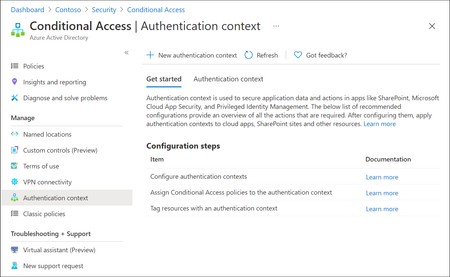
Microsoft Entra ID has evolved rapidly over the last few years, with Microsoft continuously introducing new identity, access, and security capabilities as part of the broader Zero Trust strategy. While many organizations hold the necessary Entra ID and Microsoft 365 licenses (often through E3 or E5 bundles), a number of these advanced features remain under‑utilised or entirely unused. This is frequently due to limited awareness, overlapping capabilities or uncertainty about where and how these features provide real architectural value. One such capability which is not frequently used is Authentication Context. Although this feature is available for quite some time, it is often misunderstood or overlooked because it does not behave like traditional Conditional Access controls. Consider Authentication Context as a mobile “assurance tag” that connects a resource (or a particular access route to that resource) to one or several Conditional Access (CA) policies, allowing security measures to be enforced with resource-specific accuracy instead of broad, application-wide controls. Put simply, it permits step-up authentication only when users access sensitive information or perform critical actions, while maintaining a smooth experience for the “regular path.” When used intentionally, it enables resource‑level and scenario‑driven access control, allowing organizations to apply stronger authentication only where it is actually needed without increasing friction across the entire user experience. Not expensive Most importantly to use Authentication Context the minimum licensing requirement is Microsoft Entra ID Premium P1 which most customers already have this license. so you not need to convenience for higher license to utilize this feature. But do note Entra Premium 2 is needed if your Conditional Access policy uses advanced signals, such as: User or sign‑in risk (Identity Protection) Privileged Identity Management (PIM) protected roles Risk‑based Conditional Access policies The Workflow Architecturally, Authentication Context works when a claims request is made as part of token issuance commonly expressed via the acrs claim. When the request includes a specific context (for example c1), Entra evaluates CA policies that target that context and forces the required controls (MFA, device compliance, trusted location, etc.). The important constraint: the context must be requested/triggered by a supported workload (e.g., SharePoint) or by an application designed to request the claim; it is not an automatic “detect any action inside any app” feature. Lets look at few high level architecture reference 1. Define “assurance tiers” as contexts Create a small set of contexts (e.g., c1: Confidential Access, c2: Privileged Operations) and publish them for use by supported apps/services. 2. Bind contexts to resources Assign the context to the resource boundary you want to protect—most commonly SharePoint sites (directly or via sensitivity labels), so only those sites trigger the context. (e.g - Specific SharePoint sites like financials, agreements etc ) 3. Attach Conditional Access policies to the context Create CA policies that target the context and define enforcement requirements (Additional MFA strength, mandating device compliance, or location constraint through named locations etc.). The context is the “switch” that activates those policies at the right moment. 4. Validate runtime behavior and app compatibility Because authentication context can impact some client apps and flows, validate supported clients and known limitations (especially for SharePoint/OneDrive/Teams integrations). Some Practical Business Scenarios Scenario A — Confidential SharePoint Sites (M&A / Legal / HR) Problem: You want stronger controls for a subset of SharePoint sites without forcing those controls for all SharePoint access. Architect pattern: Tag the confidential site(s) with Authentication Context and apply a CA policy requiring stronger auth (e.g., compliant device + MFA) for that context. Pre-reqs: SharePoint Online support for authentication context; appropriate licensing and admin permissions; CA policies targeted to the context Scenario B — “Step-up” Inside a Custom Line-of-Business App Problem: Users can access the app normally, but certain operations (approval, export, privileged view) need elevated assurance. Architect pattern: Build the app on OpenID Connect/OAuth2 and explicitly request the authentication context (via acrs) when the user reaches the sensitive path; CA then enforces step-up. Pre-reqs: App integrated with Microsoft identity platform using OIDC/OAuth2; the app can trigger claims requests/handle claim challenges where applicable; CA policies defined for the context Scenario C — Granular “Resource-based” Zero Trust Without Blanket MFA Problem: Security wants strong controls on crown jewels, but business wants minimal prompts for routine work. Architect pattern: Use authentication context to enforce higher assurance only for protected resources (e.g., sensitive SharePoint sites). This provides least privilege at the resource boundary while reducing global friction. Pre-reqs: Clearly defined resource classification; authentication context configured and published; CA policies and monitoring. In a nutshell, Authentication Context allows organizations to move beyond broad, one‑size‑fits‑all Conditional Access policies and adopt a more precise, resource‑driven security model. By using it to link sensitive resources or protected access paths to stronger authentication requirements, organizations can improve security outcomes while minimizing unnecessary user friction. When applied deliberately and aligned to business‑critical assets, Authentication Context helps close the gap between licensing capability and real‑world value—turning underused Entra ID features into practical, scalable Zero Trust controls. If you find this useful, please do not forget to like and add your thoughts 🙂Kerberos and the End of RC4: Protocol Hardening and Preparing for CVE‑2026‑20833
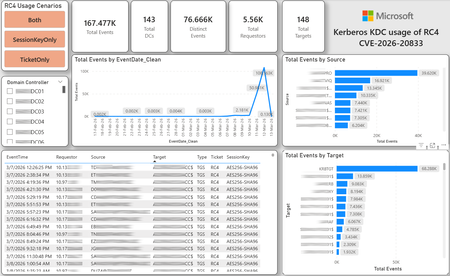
CVE-2026-20833 addresses the continued use of the RC4‑HMAC algorithm within the Kerberos protocol in Active Directory environments. Although RC4 has been retained for many years for compatibility with legacy systems, it is now considered cryptographically weak and unsuitable for modern authentication scenarios. As part of the security evolution of Kerberos, Microsoft has initiated a process of progressive protocol hardening, whose objective is to eliminate RC4 as an implicit fallback, establishing AES128 and AES256 as the default and recommended algorithms. This change should not be treated as optional or merely preventive. It represents a structural change in Kerberos behavior that will be progressively enforced through Windows security updates, culminating in a model where RC4 will no longer be implicitly accepted by the KDC. If Active Directory environments maintain service accounts, applications, or systems dependent on RC4, authentication failures may occur after the application of the updates planned for 2026, especially during the enforcement phases introduced starting in April and finalized in July 2026. For this reason, it is essential that organizations proactively identify and eliminate RC4 dependencies, ensuring that accounts, services, and applications are properly configured to use AES128 or AES256 before the definitive changes to Kerberos protocol behavior take effect. Official Microsoft References CVE-2026-25177 - Security Update Guide - Microsoft - Active Directory Domain Services Elevation of Privilege Vulnerability Microsoft Support – How to manage Kerberos KDC usage of RC4 for service account ticket issuance changes related to CVE-2026-20833 (KB 5073381) Microsoft Learn – Detect and Remediate RC4 Usage in Kerberos AskDS – What is going on with RC4 in Kerberos? Beyond RC4 for Windows authentication | Microsoft Windows Server Blog So, you think you’re ready for enforcing AES for Kerberos? | Microsoft Community Hub Risk Associated with the Vulnerability When RC4 is used in Kerberos tickets, an authenticated attacker can request Service Tickets (TGS) for valid SPNs, capture these tickets, and perform offline brute-force attacks, particularly Kerberoasting scenarios, with the goal of recovering service account passwords. Compared to AES, RC4 allows significantly faster cracking, especially for older accounts or accounts with weak passwords. Technical Overview of the Exploitation In simplified terms, the exploitation flow occurs as follows: The attacker requests a TGS for a valid SPN. The KDC issues the ticket using RC4, when that algorithm is still accepted. The ticket is captured and analyzed offline. The service account password is recovered. The compromised account is used for lateral movement or privilege escalation. Official Timeline Defined by Microsoft Important clarification on enforcement behavior Explicit account encryption type configurations continue to be honored even during enforcement mode. The Kerberos hardening associated with CVE‑2026‑20833 focuses on changing the default behavior of the KDC, enforcing AES-only encryption for TGS ticket issuance when no explicit configuration exists. This approach follows the same enforcement model previously applied to Kerberos session keys in earlier security updates (for example, KB5021131 related to CVE‑2022‑37966), representing another step in the progressive removal of RC4 as an implicit fallback. January 2026 – Audit Phase Starting in January 2026, Microsoft initiated the Audit Phase related to changes in RC4 usage within Kerberos, as described in the official guidance associated with CVE-2026-20833. The primary objective of this phase is to allow organizations to identify existing RC4 dependencies before enforcement changes are applied in later phases. During this phase, no functional breakage is expected, as RC4 is still permitted by the KDC. However, additional auditing mechanisms were introduced, providing greater visibility into how Kerberos tickets are issued in the environment. Analysis is primarily based on the following events recorded in the Security Log of Domain Controllers: Event ID 4768 – Kerberos Authentication Service (AS request / Ticket Granting Ticket) Event ID 4769 – Kerberos Service Ticket Operations (Ticket Granting Service – TGS) Additional events related to the KDCSVC service These events allow identification of: the account that requested authentication the requested service or SPN the source host of the request the encryption algorithm used for the ticket and session key This information is critical for detecting scenarios where RC4 is still being implicitly used, enabling operations teams to plan remediation ahead of the enforcement phase. If these events are not being logged on Domain Controllers, it is necessary to verify whether Kerberos auditing is properly enabled. For Kerberos authentication events to be recorded in the Security Log, the corresponding audit policies must be configured. The minimum recommended configuration is to enable Success auditing for the following subcategories: Kerberos Authentication Service Kerberos Service Ticket Operations Verification can be performed directly on a Domain Controller using the following commands: auditpol /get /subcategory:"Kerberos Service Ticket Operations" auditpol /get /subcategory:"Kerberos Authentication Service" In enterprise environments, the recommended approach is to apply this configuration via Group Policy, ensuring consistency across all Domain Controllers. The corresponding policy can be found at: Computer Configuration - Policies - Windows Settings - Security Settings - Advanced Audit Policy Configuration - Audit Policies - Account Logon Once enabled, these audits record events 4768 and 4769 in the Domain Controllers’ Security Log, allowing analysis tools—such as inventory scripts or SIEM/Log Analytics queries—to accurately identify where RC4 is still present in the Kerberos authentication flow. April 2026 – Enforcement with Manual Rollback With the April 2026 update, the KDC begins operating in AES-only mode (0x18) when the msDS-SupportedEncryptionTypes attribute is not defined. This means RC4 is no longer accepted as an implicit fallback. During this phase, applications, accounts, or computers that still implicitly depend on RC4 may start failing. Manual rollback remains possible via explicit configuration of the attribute in Active Directory. July 2026 – Final Enforcement Starting in July 2026, audit mode and rollback options are removed. RC4 will only function if explicitly configured—a practice that is strongly discouraged. This represents the point of no return in the hardening process. Official Monitoring Approach Microsoft provides official scripts in the repository: https://github.com/microsoft/Kerberos-Crypto/tree/main/scripts The two primary scripts used in this analysis are: Get-KerbEncryptionUsage.ps1 The Get-KerbEncryptionUsage.ps1 script, provided by Microsoft in the Kerberos‑Crypto repository, is designed to identify how Kerberos tickets are issued in the environment by analyzing authentication events recorded on Domain Controllers. Data collection is primarily based on: Event ID 4768 – Kerberos Authentication Service (AS‑REQ / TGT issuance) Event ID 4769 – Kerberos Service Ticket Operations (TGS issuance) From these events, the script extracts and consolidates several relevant fields for authentication flow analysis: Time – when the authentication occurred Requestor – IP address or host that initiated the request Source – account that requested the ticket Target – requested service or SPN Type – operation type (AS or TGS) Ticket – algorithm used to encrypt the ticket SessionKey – algorithm used to protect the session key Based on these fields, it becomes possible to objectively identify which algorithms are being used in the environment, both for ticket issuance and session establishment. This visibility is essential for detecting RC4 dependencies in the Kerberos authentication flow, enabling precise identification of which clients, services, or accounts still rely on this legacy algorithm. Example usage: .\Get-KerbEncryptionUsage.ps1 -Encryption RC4 -Searchscope AllKdcs | Export-Csv -Path .\KerbUsage_RC4_All_ThisDC.csv -NoTypeInformation -Encoding UTF8 Data Consolidation and Analysis In enterprise environments, where event volumes may be high, it is recommended to consolidate script results into analytical tools such as Power BI to facilitate visualization and investigation. The presented image illustrates an example dashboard built from collected results, enabling visibility into: Total events analyzed Number of Domain Controllers involved Number of requesting clients (Requestors) Most frequently involved services or SPNs (Targets) Temporal distribution of events RC4 usage scenarios (Ticket, SessionKey, or both) This type of visualization enables rapid identification of RC4 usage patterns, remediation prioritization, and progress tracking as dependencies are eliminated. Additionally, dashboards help answer key operational questions, such as: Which services still depend on RC4 Which clients are negotiating RC4 for sessions Which Domain Controllers are issuing these tickets Whether RC4 usage is decreasing over time This combined automated collection + analytical visualization approach is the recommended strategy to prepare environments for the Microsoft changes related to CVE‑2026‑20833 and the progressive removal of RC4 in Kerberos. Visualizing Results with Power BI To facilitate analysis and monitoring of RC4 usage in Kerberos, it is recommended to consolidate script results into a Power BI analytical dashboard. 1. Install Power BI Desktop Download and install Power BI Desktop from the official Microsoft website 2. Execute data collection After running the Get-KerbEncryptionUsage.ps1 script, save the generated CSV file to the following directory: C:\Temp\Kerberos_KDC_usage_of_RC4_Logs\KerbEncryptionUsage_RC4.csv 3. Open the dashboard in Power BI Open the file RC4-KerbEncryptionUsage-Dashboards.pbix using Power BI Desktop. If you are interested, please leave a comment on this post with your email address, and I will be happy to share with you. 4. Update the data source If the CSV file is located in a different directory, it will be necessary to adjust the data source path in Power BI. As illustrated, the dashboard uses a parameter named CsvFilePath, which defines the path to the collected CSV file. To adjust it: Open Transform Data in Power BI. Locate the CsvFilePath parameter in the list of Queries. Update the value to the directory where the CSV file was saved. Click Refresh Preview or Refresh to update the data. Click Home → Close & Apply. This approach allows rapid identification of RC4 dependencies, prioritization of remediation actions, and tracking of progress throughout the elimination process. List-AccountKeys.ps1 This script is used to identify which long-term keys are present on user, computer, and service accounts, enabling verification of whether RC4 is still required or whether AES128/AES256 keys are already available. Interpreting Observed Scenarios Microsoft recommends analyzing RC4 usage by jointly considering two key fields present in Kerberos events: Ticket Encryption Type Session Encryption Type Each combination represents a distinct Kerberos behavior, indicating the source of the issue, risk level, and remediation point in the environment. In addition to events 4768 and 4769, updates released starting January 13, 2026, introduce new Kdcsvc events in the System Event Log that assist in identifying RC4 dependencies ahead of enforcement. These events include: Event ID 201 – RC4 usage detected because the client advertises only RC4 and the service does not have msDS-SupportedEncryptionTypes defined. Event ID 202 – RC4 usage detected because the service account does not have AES keys and the msDS-SupportedEncryptionTypes attribute is not defined. Event ID 203 – RC4 usage blocked (enforcement phase) because the client advertises only RC4 and the service does not have msDS-SupportedEncryptionTypes defined. Event ID 204 – RC4 usage blocked (enforcement phase) because the service account does not have AES keys and msDS-SupportedEncryptionTypes is not defined. Event ID 205 – Detection of explicit enablement of insecure algorithms (such as RC4) in the domain policy DefaultDomainSupportedEncTypes. Event ID 206 – RC4 usage detected because the service accepts only AES, but the client does not advertise AES support. Event ID 207 – RC4 usage detected because the service is configured for AES, but the service account does not have AES keys. Event ID 208 – RC4 usage blocked (enforcement phase) because the service accepts only AES and the client does not advertise AES support. Event ID 209 – RC4 usage blocked (enforcement phase) because the service accepts only AES, but the service account does not have AES keys. https://support.microsoft.com/en-gb/topic/how-to-manage-kerberos-kdc-usage-of-rc4-for-service-account-ticket-issuance-changes-related-to-cve-2026-20833-1ebcda33-720a-4da8-93c1-b0496e1910dc They indicate situations where RC4 usage will be blocked in future phases, allowing early detection of configuration issues in clients, services, or accounts. These events are logged under: Log: System Source: Kdcsvc Below are the primary scenarios observed during the analysis of Kerberos authentication behavior, highlighting how RC4 usage manifests across different ticket and session encryption combinations. Each scenario represents a distinct risk profile and indicates specific remediation actions required to ensure compliance with the upcoming enforcement phases. Scenario A – RC4 / RC4 In this scenario, both the Kerberos ticket and the session key are issued using RC4. This is the worst possible scenario from a security and compatibility perspective, as it indicates full and explicit dependence on RC4 in the authentication flow. This condition significantly increases exposure to Kerberoasting attacks, since RC4‑encrypted tickets can be subjected to offline brute-force attacks to recover service account passwords. In addition, environments remaining in this state have a high probability of authentication failure after the April 2026 updates, when RC4 will no longer be accepted as an implicit fallback by the KDC. Events Associated with This Scenario During the Audit Phase, this scenario is typically associated with: Event ID 201 – Kdcsvc Indicates that: the client advertises only RC4 the service does not have msDS-SupportedEncryptionTypes defined the Domain Controller does not have DefaultDomainSupportedEncTypes defined This means RC4 is being used implicitly. This event indicates that the authentication will fail during the enforcement phase. Event ID 202 – Kdcsvc Indicates that: the service account does not have AES keys the service does not have msDS-SupportedEncryptionTypes defined This typically occurs when: legacy accounts have never had their passwords reset only RC4 keys exist in Active Directory Possible Causes Common causes include: the originating client (Requestor) advertises only RC4 the target service (Target) is not explicitly configured to support AES the account has only legacy RC4 keys the msDS-SupportedEncryptionTypes attribute is not defined Recommended Actions To remediate this scenario: Correctly identify the object involved in the authentication flow, typically: a service account (SPN) a computer account or a Domain Controller computer object Verify whether the object has AES keys available using analysis tools or scripts such as List-AccountKeys.ps1. If AES keys are not present, reset the account password, forcing generation of modern cryptographic keys (AES128 and AES256). Explicitly define the msDS-SupportedEncryptionTypes attribute to enable AES support. Recommended value for modern environments: 0x18 (AES128 + AES256) = 24 As illustrated below, this configuration can be applied directly to the msDS-SupportedEncryptionTypes attribute in Active Directory. AES can also be enabled via Active Directory Users and Computers by explicitly selecting: This account supports Kerberos AES 128 bit encryption This account supports Kerberos AES 256 bit encryption These options ensure that new Kerberos tickets are issued using AES algorithms instead of RC4. Temporary RC4 Usage (Controlled Rollback) In transitional scenarios—during migration or troubleshooting—it may be acceptable to temporarily use: 0x1C (RC4 + AES) = 28 This configuration allows the object to accept both RC4 and AES simultaneously, functioning as a controlled rollback while legacy dependencies are identified and corrected. However, the final objective must be to fully eliminate RC4 before the final enforcement phase in July 2026, ensuring the environment operates exclusively with AES128 and AES256. Scenario B – AES / RC4 In this case, the ticket is protected with AES, but the session is still negotiated using RC4. This typically indicates a client limitation, legacy configuration, or restricted advertisement of supported algorithms. Events Associated with This Scenario During the Audit Phase, this scenario may generate: Event ID 206 Indicates that: the service accepts only AES the client does not advertise AES in the Advertised Etypes In this case, the client is the issue. Recommended Action Investigate the Requestor Validate operating system, client type, and advertised algorithms Review legacy GPOs, hardening configurations, or settings that still force RC4 For Linux clients or third‑party applications, review krb5.conf, keytabs, and Kerberos libraries Scenario C – RC4 / AES Here, the session already uses AES, but the ticket is still issued using RC4. This indicates an implicit RC4 dependency on the Target or KDC side, and the environment may fail once enforcement begins. Events Associated with This Scenario This scenario may generate: Event ID 205 Indicates that the domain has explicit insecure algorithm configuration in: DefaultDomainSupportedEncTypes This means RC4 is explicitly allowed at the domain level. Recommended Action Correct the Target object Explicitly define msDS-SupportedEncryptionTypes with 0x18 = 24 Revalidate new ticket issuance to confirm full migration to AES / AES Conclusion CVE‑2026‑20833 represents a structural change in Kerberos behavior within Active Directory environments. Proper monitoring is essential before April 2026, and the msDS-SupportedEncryptionTypes attribute becomes the primary control point for service accounts, computer accounts, and Domain Controllers. July 2026 represents the final enforcement point, after which there will be no implicit rollback to RC4.33KViews4likes16Comments