history
64 TopicsIncrease history retention
Edge's History has the memory of a goldfish. It has a very limited memory - I keep having to manually find pages using my search engine Edge seems to forget them. The address bar often doesn't suggest pages that I've visited many times before. Perhaps this is to force us to use Bing? I think I read somewhere that it only remembers the past 90 days. Compare this with Firefox which remembers basically ALL history, and the address bar always suggests previously visited pages accurately, even from a year ago, making it quicker and easier to visit pages you use regularly.602Views0likes0Comments
Teams meeting history question
Hello, I have the following scenario here- There are three email addresses, for simplicity sake I will name them as EmailA, EmailB and EmailC. My phone has Teams setup and is logged in as EmailA. EmailB sent a Teams meeting invite to EmailC. I used my phone to open the invite email sent to EmailC, I then joined the Teams meeting as EmailA because I was already logged in as EmailA on Teams. Is it possible to still view the meeting history in this case? I couldn't find any sort of chat or meeting history under EmailA account. The meeting invite was listed under the calendar for EmailC.Solved1.8KViews0likes2Comments
PLEASE, PLEASE, PLEASE highlight the last visited (viewed) list item on the HISTORY Sidebar
Please people, back me up on this. I've asked for this for 6 months now. The History sidebar (not the full page history list). SIDEBAR !! 1. Click on a history list item on the history side bar 2. View the page, now go to the very next page in the list. 3. Repeat 1 and 2 this under your say 'Where I'm I, what was the last item I clicked, I quit'. The last list item you clicked and viewed SHOULD BE HIGHLIGHTED SOMEHOW. I'm yelling now because no one seems to be listening546Views0likes0Comments
What is the purpose of the Activity screen?
I do not understand the purpose of Activity screen. The only thing I see there is a few missed calls and expired invitations to a meeting. I would expect to see things such as meetings that have taken place or chats that occurred. But nothing like that is there. At the moment there seems to be no way to view what happened within my Teams yesterday (or any other day). Am I missing something?1.9KViews0likes2Comments
History wishes:➀Site-Partitioning➁Filtering➂FolderPath View➃exportable
When above yet available, softcopy of Windows 10 Edge is what I need to: select certain sites such as http://xyz.global.abc.com/Shared) extract folder path when History View shows only url; I am extracting it from address bar filter out items incurred by multi-tasking to open un-related Webpages (Viewer not yet capable of filtering) keep record longer than 90 days (current max capacity of Edge) accidental clearing of history Reason for above is to print, then assemble huge process tree of Sharepoint documents (Flowcharts) with external links. I need to trace where I clicked on for each webpage. Otherwise, for each webpage, other than tagging, I have to copy link from address bar extract folder path from link append into a Log file every day.799Views0likes0Comments
edge policies to control the appearance settings of history and downloads
Are there plans to create edge policies for controlling the appearance of history and downloads on the menu of edge like show cast / home button etc? are there any other way to control its appearance not though admx in endpoint manager for now?2.3KViews0likes7CommentsYou can now open History page faster
Microsoft Edge Version 91.0.837.0 (Official build) canary (64-bit) newly added flag: edge://flags/#edge-history-accelerator-override Enable history accelerator to open the full page Enables the History keyboard shortcut to open the full page instead of the hub. – Mac, Windows, Linux #edge-history-accelerator-override with this flag enabled, pressing Ctrl + H no longer opens the history flyout, instead it will open edge://history/all4KViews5likes5CommentsEdge Windows Search Integration - possible Windows 10 Timeline integration?
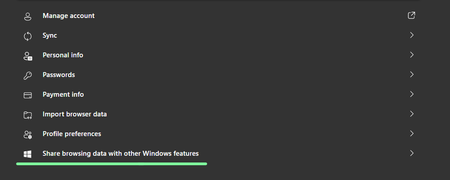
Microsoft Edge Version 91.0.831.0 (Official build) canary (64-bit) it's a Controlled Feature Rollout Share browsing data with other Windows features When turned on, Microsoft Edge will connect local browsing data from this profile with the rest of Windows. Turning this feature on will help you find information from your history, favorites, top sites and recent tabs more easily using features such as Windows search box. If you turn off this feature Microsoft Edge will remove the data shared with Windows on the device and stop sharing any new browsing data from this profile. Learn more I'm on the latest Windows 10 insider Dev build and latest Edge insider canary, so far I couldn't see any sign of this feature working, it's very new, just added to Edge canary. so eager to find out more about this. I personally would love to see Edge history appear in Windows 10 timeline, just like Edge legacy's did. It's very interesting, I submitted a feedback for the exact same thing 2 months ago.2.2KViews2likes2CommentsAdd the ability to search for a word in Clipboard of Windows 10
I often find myself in a situation where I have lots of Clipboard entries with texts and pictures, and I know what I'm looking for, but there is no easy way to search for it in the Clipboard other than going through each of them one by one and checking them manually. it won't even work for long clipboard entries as the Windows Clipboard only previews the first couple of lines of the item and not the entire thing, so I have to paste my entries in notepad one by one just to find what I'm looking for. if there was a mini search bar on Windows 10 Clipboard, I could type the word I'm looking for and find the correct entry fast. the search bar doesn't have to be visible at all times, it can be a responsive search bar, where we click on an icon and then the search bar appears. Please upvote this feedback in feedback hub: https://aka.ms/AAbj6m4770Views0likes0Comments