help
18 Topics
New to Access
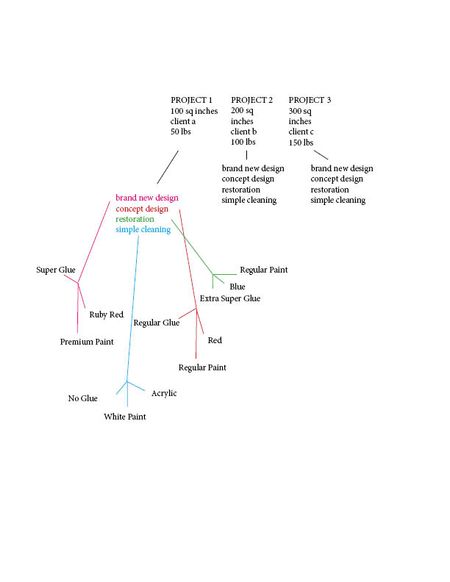
Hello! I am new to MS Access, and currently looking for some advice in working the program. In using Access, I am working with a team that has data in arts and crafts projects that fall under many different categories, which are being exported from Excel. I’ve attached an image of what this data looks like, but I’ve also explained it below. For instance, the data might be sorted into something like 5 fields, those being: project name, square inches, client name, and weight. An example would be: Project 1, 100 sq inches, Client A, 50 lbs Project 2, 200 sq inches, Client B, 100 lbs Project 3, 300 sq inches, Client C, 150 lbs Etc. Then, we’d have a second collection of data that would branch off of the first set. For instance, the data might be sorted into something like 4 fields, being: brand new design, concept design, restoration, or simple cleaning. Finally, a third set of data would branch off of this information, detailing that each of the aforementioned categories have their own data. Such as, brand new design projects use X brand of glue, Y brand of paint, and are always Z color. Whereas, simple cleaning projects might use a totally different brand of glue, paint, and color. Now, my question is, is it possible in MS Access to be presented with all of the data based on what I ask for? Such as, say, I want to view all projects that have used X brand of glue. Am I able to create a database that will pull that up? Or if I wanted to view all brands of paint used ONLY in cleaning projects? Essentially, is it possible to create a database that can show me any combination of information based on what I ask for, creating relationships with one another to search both forwards and backwards with simplicity? If so, what research should I do to approach this, or what other direction do you suggest that I go in if it is not possible? I appreciate the help :)Solved269Views0likes3Comments
How can I remove the shortcuts with AltGr?
Guys, I have to use a new keyboard (Greek one) for some academic research and some accents conflicts with the AltGr + shortcuts. There's a way that I can just remove them all? I've tried to find and remove the shortcuts for Add a New Commentary (AltGr + A) and the topic structure (AltGr + o) but I can't find them in the list of shortcuts (Options > keyboard shortcuts > Personalize) I really need that ;(154Views0likes1Comment
Help with creating Word macros for footnotes
Hi everyone, I'm new here and a non-techie so please excuse any mistakes. I was directed here by the Microsoft support chat team. I write a lot of long essays in Word, and I use footnotes. When using footnotes, Word puts the footnote's text into a separate section at the bottom and leaves only the superscript number for the footnote in the main text body. Long story short, I've written my essays using this footnotes function, but I cannot have this format. I need the footnote in the main text body and not separated into a bottom footnote section. What I've been doing is going back one-by-one and copying the footnote's text from the separate bottom section and pasting it into the main text body and then putting it into brackets, for example: [Footnote 25, Office.com] I know with macros we're able to automate certain repetitive functions, is there a way to do this using Macros? So that each footnote within the Word document is moved from the bottom section and pasted into the main text body (instead of the superscript number only) and put into brackets like how I've been doing? Thank you for any and all help, ideas, solutions/alternative solutions!Solved2.3KViews0likes1CommentCannot Export App Package Save As for SharePint
Hi All, very weird problem: in my office I have 2 Win10 boxes, with Access 16 and 19 respectively, both 64bit. Neither of them has the possibility of Saving the Database as "App Package" under the "save as" menu. https://support.office.com/en-ie/article/create-an-access-app-package-5c409c03-ded9-4a41-82c3-fdd490a91b42 Am I missing something here? My database is extremely simple and small, see attached, I just need it on a SharePoint page. Using instead a SP list is not an option since it does not do what it should, neither it is exporting the DB table to a SP list because the ID generation does not work the same as Access. I just need the very same DB in Share Point ( we use Share Point 2016)803Views0likes0CommentsComputing the sum of a range based on a separate column with variable input values.
I am trying to solve for a range of numbers based on a value I choose. For example in Column A: I have a depth values in 0.05 m increments. I want to take a depth range from Column A (d-8b to d+4b, where d is depth and b is length value) then sum the cells in Column F that correspond to this range. d and b are in cells above the data so I can adjust them to suit my specific needs. I would like a cell that has a formula that gives me the sum of the values in column F that correspond to the depth range of d-8b to d+4b (from Column A). Please, if you have experience doing something like this, provide me with some insight. Please request clarification if my question is unclear. Thanks!Solved2.2KViews0likes5Comments
all Excel file freezes when I try to save
I'm on a mac and all my issues with excel first started when I tried saving a sheet from a file that had special read/write permissions on (my document). After I copied over this sheet to a separate excel document/ blank sheet, I tried to save the new file as a new excel document. When I pressed "save as" and then "save" the entire save box turned grey and froze. It froze for an infinity amount of time and now whenever I try to save the document it freezes every time (also, it automatically does "save as" function regardless if you press command + s). I now have to force quit the document every time in order to get the frozen sheet to go away. THEN I tried opening a totally separate file (new blank docs, other spreadsheets, etc.) on excel and now NOTHING--ZERO EXCE FILES- save properly. EVERYTHING freezes when I try to save it. I went and checked for microsoft updates (because I have it set to manual check) and updated the latest versions/updates available. STILL NOTHING SAVES. What else can I do? Any help would be super appreciated.1.7KViews0likes0CommentsTransfer date to a table
So at work we keep a long spreadsheet of all the enquiries we get, when we get them, if we win them so on and so forth. At the minute it’s just one long spreadsheet with one enquiry after the next. What I need to do is transfer it to a spreadsheet, but I need to link it so we see how many enquiries we get each month, how many we win and how much they’re for. How do I do that?1.7KViews0likes3Comments
Merge Cells with Different Data Types
I have two columns with many rows. In the left column, load ratings for tires. In the right column, the speed ratings for those tires. I need to copy this info into another spreadsheet, but for the client's convenience it needs to be one column. Since I have well over four-hundred entries, I was hoping there was an easier way to merge these cells so I can just copy/paste into the new spreadsheet instead of typing it out manually. To clarify, the left column contains integers and the right column contains letters, can I consolidate the data into one column? (Example: 113 and S --> 113S)Solved3.4KViews0likes2Comments
Need Help with Sorting (Macro)
Hi All, I'm trying to run the Macro below but it crashes every time it get to the highlighted .Apply line. I have no idea why since it did not crash on the first .Apply line. Can someone please point me to the right direction? Thanks Dim arng As Range Dim brng As Range Dim crng As Range Set arng = wsSAdj.Range("A:A") Set brng = wsSAdj.Range("J:J") Set crng = wsSAdj.Range("S:S") For Each icell In brng.Cells If Right(icell.Value, 5) = "Total" Then Worksheets("Slides - ADJ").Sort.SortFields.Add Key:=Range( _ icell.Offset(-1, 3), icell.Offset(-1, 3).End(xlUp)), SortOn:=xlSortOnValues, Order:=xlDescending, DataOption:= _ xlSortNormal With ActiveWorkbook.Worksheets("Slides - ADJ").Sort .SetRange Range(icell.Offset(-1, 1), icell.Offset(-1, 1).End(xlToRight).End(xlUp)) .Header = xlYes .MatchCase = False .Orientation = xlTopToBottom .SortMethod = xlPinYin .Apply End With End If Next For Each icell In crng.Cells If Right(icell.Value, 5) = "Total" Then Worksheets("Slides - ADJ").Sort.SortFields.Add Key:=Range( _ icell.Offset(-1, 3), icell.Offset(-1, 3).End(xlUp)), SortOn:=xlSortOnValues, Order:=xlDescending, DataOption:= _ xlSortNormal With ActiveWorkbook.Worksheets("Slides - ADJ").Sort .SetRange Range(icell.Offset(-1, 1), icell.Offset(-1, 1).End(xlToRight).End(xlUp)) .Header = xlYes .MatchCase = False .Orientation = xlTopToBottom .SortMethod = xlPinYin .Apply End With End If Next855Views0likes0Comments