groups
18 Topics
Teams Restore
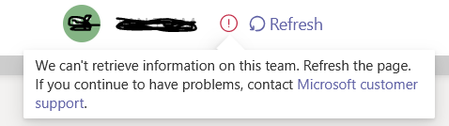
Team in MS Teams has been deleted accidentally. In the process to restore, I went to Azure AD groups and restored the group associated with this Team. Group has been restored and now Team is also listing/showing under Manage Teams section (admin center). However, it's not completely restored. It greyed out and message says 'We can't retrieve information on this team. Refresh the page. If you continue to have problems, contact Microsoft customer support.' It's been 3 hours since the restore, still it says the same. Attaching the screenshot of the error (FYI). Any help is greatly appreciated!Solved3.8KViews0likes3Comments
Duplicating groups created for school classes / subjects in schools
Hi....when a new academic school year starts, school groups that were created for the previous year usually get archived. I want to duplicate the groups before archiving them....so that I can update the copies and keep the originals as they are. How can I do that? Thank u891Views0likes1CommentTeams policy to limit user meeting access to certain number of members from specific group
I have a scenario that I need some assistance figuring out. We have a group of 7 individuals within our organization. These individuals are not allowed to have more than 50% of them in any one given place without previously scheduled meetings and agendas, physically or digitally. I need to configure a way that will not allow more than 3 of those individuals to be in the same Teams meeting together. Is it possible to create a policy to do this?1.2KViews0likes1Comment
disable teams notification when a user is added
Hello world, Whenever i add somebody as member to a team(Using Graph APIs). A notification is displayed on the screen of the newly added member. The business requirement states that this member is to be added and removed multiple times in a day and I don't want the user to get frustrated by all the notifications he will get. Is there a way i can add a user without him getting a notification on teams? This teams group is security enabled and we are trying to control the access that a user has by adding and removing him from this teams group. Thanks in advance, Anubhav7.4KViews1like3Comments
Pinning banner images to top of channels - full screen
I'm just developing a Team for our group of 400 people, and am having some trouble with images. For each of my channels, I wanted to pin a banner (which i've been able to do by adding it through a new conversation) to the top of each of my channels. The banners are nice and visual images, with some text over the top. The text is the name of the channel. I.e. Questions and Answers, and with some supporting text about what the purpose of that channel is. The issue i'm having, is that when adding an image to a conversation, it leaves space for text whether you add text to it or not, and means that the banner isn't really showing as visually as i'd like. I wanted it to just sit at the very top above all the conversations so that every time you came to that channel, you'd know what it was for... Any thoughts or workarounds? Even the fullest dimensions of the image would be great to know too. Thank you 🙂 Jodie9.8KViews0likes1CommentBest practices in document storage when using Teams
Hey all, I apologize if this is a little long, but I would like to find out what other people are doing about this. So, when users add files to channels in Teams, they are dumped into folders with no metadata, not exactly a KM/RM best practice. It really is for collaboration in the moment rather than storage. What do people do with these documents once they are done? We need them for records. Do you ask users to move them to libraries in the group created add metadata, including labels, and archive the Team so they are still accessible? If so, do you have clean up days or something? Do you just leave them in that Documents folder and just let them pile up with no metadata? Do you ask users to put metadata on them, including labels? Or do you have people store documents in places other than Teams in the first place and link to them? Follow-up work seems almost more onerous than just using Teams for only basic communication and pointing to the group for storage. I'd love to hear your experiences with this and how successful you have found it.Solved12KViews2likes4Comments