graph api
41 Topics
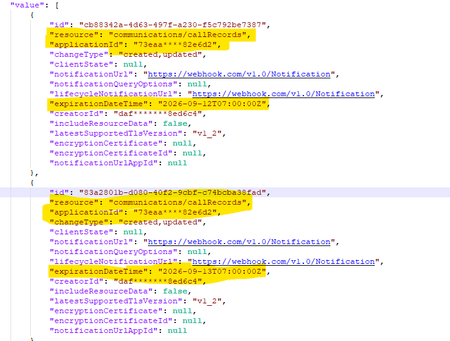
Duplicate subscriptions for a specific resource
Hello, Previously, we were not allowed to create duplicate subscriptions for the same resource. But now we can create duplicate subscriptions for a specific resource. Could you please confirm whether this functionality has been newly enabled or supported? Why duplicate subscriptions are now allowed for the same resource like (/users, /groups & communications/callRecords). Whether this is a change or a bug. We would appreciate clarification on the expected behavior and the supported use cases.417Views0likes2Comments
Graph /users query with mailboxSettings filters/expands excludes unlicensed users
Hello Microsoft Graph team, I would like to report what appears to be a bug in Microsoft Graph user queries involving mailboxSettings. Issue summary: When mailboxSettings is used in a filter or expand clause on /users, unlicensed users are not returned, even when they should match the filter. Example scenario: Filter used: mailboxSettings/userPurpose ne 'room' Observed behavior: Users without Exchange license/mailbox are excluded from results (or result set appears truncated to mailbox-enabled users). Expected behavior: All users should be considered in /users query evaluation. If a user has no mailbox settings, behavior should be consistent and documented (for example null handling), but those users should not be silently dropped from /users results unless explicitly filtered out by query semantics. Reproduction steps: In a tenant with mixed users: Licensed mailbox users Unlicensed users without mailbox Run a /users query that includes mailboxSettings in filter and/or expand. Compare returned users with a baseline /users query without mailboxSettings conditions. Notice unlicensed users disappear when mailboxSettings is involved. Sample request patterns: GET https://graph.microsoft.com/v1.0/users?$filter=mailboxSettings/userPurpose ne 'room' GET https://graph.microsoft.com/v1.0/users?$expand=mailboxSettings&$filter=mailboxSettings/userPurpose ne 'room'427Views0likes1Comment
Virtual Event Legal Terms
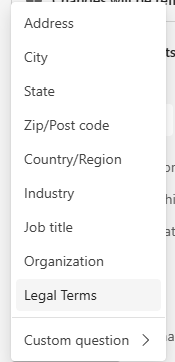
Hello all - I'm currently in the process of attempting to integrate Team webinar registration into my Drupal site, but we discovered an issue where if this Legal Terms field is added to the Event > Registration > Configuration: It doesn't show up when we GET predefined questions, but we can't create a registration without somehow returning a response for this field. We get this error: But we can't find anything in the graph API documentation about how to structure a POST to include an agreement to the terms of use. In the graph api metadata I do see an unknownFutureValue enum which is in the same place in the list as where Legal Terms is in the Teams UI. Is there any current way around this, or is this just a feature that will be added to the API eventually? We'd have no problem just never selecting Legal Terms and including our own checkbox that would have to be checked to submit the registration, but then users who register for the event outside of our Drupal site would not have to agree to our terms to register because the only way to see it here is to add the Legal Terms field to the configuration.215Views1like0Comments
Retrieve all Teams transcripts a bot has attended to using Graph API
Hi there, I've been struggling for a lot of time trying to get this done. Has anyone been able to achieve something like this ? I wanted to : 1- Get all the meetings and transcripts of the tenant 2- Filter on those where the bot was attending 3- Get the transcripts when available. 4- Add rules to restrict the bot's access Right now I am stuck with the OAuth : The application 'bot-transcript' asked for scope 'OnlineMeetings.Read.All' that doesn't exist on the resource '00000003-0000-0000-c000-000000000000'. But this permission was added, and really seems to exist. Right ? Thanks in advance for any kind of help you could give me.463Views0likes1CommentMicrosoft Graph: Private channel SharePoint site URL naming appears to have changed
📄 Question We are creating private channels using the Microsoft Graph API: POST https://graph.microsoft.com/v1.0/teams/{team-id}/channels With the following payload: { "@odata.type": "#microsoft.graph.channel", "displayName": "Project-Channel-001", "description": "Sample private channel for testing", "membershipType": "private", "members": [ { "@odata.type": "#microsoft.graph.aadUserConversationMember", "******@odata.bind": "https://graph.microsoft.com/v1.0/users/{user-id}", "roles": ["owner"] } ] } 🔍 Observed Behavior When the private channel is created, the associated SharePoint site is provisioned automatically (as expected). However, the URL format appears to have changed. Previously observed behavior: https://{tenant}.sharepoint.com/sites/ProjectTeamURL-Project-Channel-001 Current behavior: https://{tenant}.sharepoint.com/sites/ProjectTeamName-Project-Channel-001 ❗ Impact This change introduces several issues: Breaks deterministic URL generation logic Produces longer and less predictable URLs Introduces dependency on display name, which is mutable and may contain unexpected characters Impacts existing automation and integrations relying on the previous pattern ❓ Questions Has there been a recent change in how SharePoint site URLs are generated for private channels? Is this behavior intentional and documented, or a regression? Is there any way (via Graph or otherwise) to: Control the generated SharePoint site URL, or Retrieve the final site URL deterministically without relying on pattern assumptions? Is the previous {ParentTeamUrl}-{ChannelName} format still expected in some scenarios, or has it been deprecated? 🧪 Additional Notes This behavior is observed when creating channels via Microsoft Graph (v1.0) The issue is reproducible across multiple test scenarios 🙏 Any clarification from Microsoft or others encountering this would be appreciated.258Views0likes0Comments
Unable to retrieve all attachments from forwarded Outlook emails using Graph API
We have integrated Outlook with our system using Microsoft Graph API and subscribed to message events. Whenever we receive an event, we process the email message at our end. Currently, we are facing an issue related to attachments in forwarded email conversations. Scenario An email conversation contains multiple replies. Some of these replies contain attachments. When a user forwards the entire email thread, Outlook generates a forwarded email that includes the conversation history in the email body. Problem When we receive the forwarded email event and fetch the message details using the Microsoft Graph API, we observe the following: The forwarded email only contains the latest reply's attachment. Attachments from earlier replies in the thread are not included in the forwarded message attachments. In some cases: The first reply contains an attachment. Subsequent replies do not contain attachments. When the user forwards the email, the forwarded message JSON shows: hasAttachments: false But, the forwarded email body still contains the previous conversation that had attachments. Our Questions Is there a way to retrieve all attachments from the entire email thread when a conversation is forwarded? Can we retrieve these attachments using the current user's access token via Microsoft Graph API? If there is a way, please also let us know how we can identify forwarded emails using the Microsoft Graph API, so that we can apply this solution only for forwarded emails. Our Requirement We need a reliable solution that works in production to ensure that all attachments from the email conversation are retrieved, even when the email thread is forwarded. This issue is currently impacting our production system, so we would greatly appreciate any guidance on the correct approach. Thank you in advance for your support.288Views0likes0CommentsIs principalId Always a GUID in Microsoft Graph ??
{ "error": { "code": "Request_BadRequest", "message": "Invalid GUID:HR", "innerError": { "date": "2026-02-13T06:44:24", "request-id": "87678d90-1d94-4131-a705-4356ad3568a4", "client-request-id": "63569c7b-1dea-42d4-8d72-aa3668c78418" } } } We’re encountering an issue with the Microsoft Graph API response for directoryRole Recently, one of our Graph API calls started returning a response where the principalId value appears to be a custom string instead of the expected GUID. In our code, we loop through each id from the delta response, assuming it will always be a valid GUID. However, we are now getting errors because one of the returned principalId values does not match the expected format. Our questions: Is it possible for Microsoft Graph API to return a custom string instead of a GUID for principalId? Has anyone experienced similar behavior with delta queries for directoryRole or any other object? Are there any known scenarios where the principalId format differs from the standard GUID? Any insights would be appreciated.247Views0likes0Comments
How to Retrieve Windows Edition (SKU) from managedDevices API
Hi everyone, I am working with the Microsoft Graph API endpoint /v1.0/deviceManagement/managedDevices to iterate through all devices in a tenant and collect operating system related information. For Windows devices, the operatingSystem field only returns "Windows". However, Windows has multiple editions such as Enterprise, Education, and Pro. For my use case, I need the specific Windows edition. Is it possible to retrieve this information using only the v1.0 endpoint, or is the beta endpoint /beta/deviceManagement/managedDevices/{managedDeviceId} required to get the SKU family? Thanks in advance for your help.231Views0likes0CommentsResource not found while trying to access the available resource
I am attempting to automate CRUD operations on Microsoft Entra objects using the Microsoft Graph API. However, I am encountering a Resource not found error when accessing a resource programmatically, even though the same resource is accessible without issue when invoking the API endpoint via Postman.473Views0likes2Comments