glitch
10 Topics
Formatting wont transfer from Excel to Outlook
The last 2 or 3 days every time I copy and paste from Excel into Outlook it drops all of the formatting. I've adjusted my settings to keep formatting, tried manually telling it to keep the formatting. It simply wont. I've googled and searched the Microsoft website to no avail.282Views0likes2Comments
Outlook Meeting Invitation Glitch
We’ve been experiencing an ongoing Outlook glitch where meeting invitations are being resent from our shared inbox without anyone triggering them. Some of these invites relate to meetings that have already taken place, and in a few cases the system has even removed some attendees unexpectedly. We’ve gone through all the details and can’t find any pattern in terms of attendees, dates, times, descriptions, or actions taken. It also doesn't seem linked to any one persons account in the shared inbox. It happens on both Classic Outlook and New Outlook, on both Teams meetings and F2F meetings. The resends happen at completely random times of day or night, including times when no one is online. This has happened repeatedly, and in total more than 300 unwanted emails have been sent over the course of a year. We’d really appreciate any guidance on why this might be happening, whether anyone else has experienced something similar, or how we can stop these automatic resends from occurring.1.5KViews0likes2Comments
Teams duplicates contacts until it maxed out at 15000
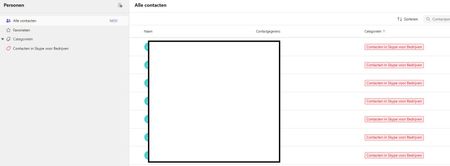
Hi, I have a weird issue with some users, Teams seems to be duplicating old Skype for Business contacts until it maxes out at 15000 contacts. I have been digging into it a bit and found out the location of the folder through Exchange powershell but I can't clear or delete it. Skype for Business is phased out and disabled in my tenant for a long time now so I couldn't do much there, I can't login to it through powershell. We've had Teams since like 2017 so I suspect this is a niche legacy issue popping up recently somehow. Manual deleting is possible through the browser environment but that is such a hassle because it keeps glitching if you delete per 100 and skipping pages and stuff, need to refresh constantly. Just a pain, it would take days. And no guarentee its not coming back either. See screenshots. Does anyone know why this is happening and how to fix this? Thanks for reading, cheers!324Views0likes3CommentsHelp- When I go onto the chat on a teams call, everything zoom/glitches
Recently, when I've been on a teams video call (on my computer teams app) and I go onto the chat, the whole screen view has changed. It becomes sort of zoomed in and very difficult to navigate. I can only go up and down by trying to click up through the chat messages or by trying to zoom out a lot so that I'm able to see the chat exit sign and I am not able to see any of the people in the call or any of the functions like leave/mute.... If I'm able to reach the exit button, once the chat is left the screen view goes back to normal. It's really annoying, please let me know how to fix this. Thanks27KViews4likes30Comments
--js-flags=--noexpose_wasm launch flag causes STATUS_BREAKPOINT
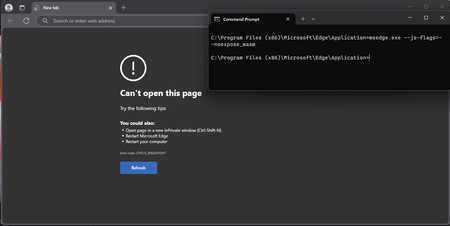
Version 135.0.3179.73 (Official build) (64-bit), Windows 11 Education, also occurs on Windows 10 Education and Windows 10 Pro, been testing this since probably version 129 of Edge. --js-flags=--noexpose_wasm as a launch flag causes STATUS_BREAKPOINT, this is regardless of default configuration and with or without extensions. WASM can be used to discover privileged information about a machine, and this seems to be working in the past according to some users online, but no longer does now. Please can someone advise?423Views0likes1Comment
Full Screen not working correctly with Power BI app
I have attempted a few times recently to use full screen to display dashboards created in the Power BI app on the Teams desktop client. Entering full screen mode works perfectly, but once in full screen, there is no option available to leave this mode. Hitting the Esc key will shrink the window to show the Taskbar, but the window will remain borderless and it will be entirely filled by the dashboard. This leaves me unable to leave the Power BI dashboard and go back to view chats, teams, my calendar, etc. The only way I've found to get back to view other areas is to right-click on the teams tab in my Taskbar and click "New Chat," which will take me back to view all of my chats as normal. Other people at my company trying to view the same dashboards are having the same issue. This doesn't feel like something that was intended, but I can't find any information on this issue or how to resolve it anywhere. Am I just missing the button to leave full screen somewhere? If anyone knows of an intended way to change the view back to windowed correctly, it would be greatly appreciated.5.9KViews3likes5CommentsCan't change Microsoft Teams Profile Picture (Receiving Error)
Hello! I'm having a bug with Profile Pictures. I've tried changing it many times, but I receive an error every time. What makes this stranger is I have never set a profile picture in Teams but somehow Teams imported an old profile Picture from my Xbox Account - And won't let me change it. I've tried to change my profile picture in Teams on Windows and Android. Windows gives this error: "There was a problem saving the photo. Please try again" Android gives this error: "Failed to update profile picture. Please try again" So, what in want to know is: 1. Why Teams is not using my Microsoft Account profile picture. 2. Why Teams is using my Xbox 360 Profile Picture. 3. How do I fix this so Teams can use the profile picture I want it to. Please find screenshots of errors & of my MS and Xbox accounts attached. Additional: My wife is also having the exact same problem on her account.Solved135KViews3likes20Comments