general
696 TopicsPreparing for Azure PostgreSQL Certificate Authority Rotation: A Comprehensive Operational Guide
The Challenge It started with a standard notification in the Azure Portal: Tracking-ID YK3N-7RZ. A routine Certificate Authority (CA) rotation for Azure Database for PostgreSQL. As Cloud Solution Architects, we’ve seen this scenario play out many times. The moment “certificate rotation” is mentioned, a wave of unease ripples through engineering teams. Let’s be honest: for many of us—ourselves included—certificates represent the edge of our technical “comfort zone.” We know they are critical for security, but the complexity of PKI chains, trust stores, and SSL handshakes can be intimidating. There is a silent fear: “If we touch this, will we break production?” We realized we had a choice. We could treat this as an opportunity, and we could leave that comfort zone. We approached our customer with a proactive proposal: Let’s use this event to stop fearing certificates and start mastering them. Instead of just patching the immediate issue, we used this rotation as a catalyst to review and upgrade the security posture of their database connections. We wanted to move from “hoping it works” to “knowing it’s secure.” The response was overwhelmingly positive. The teams didn’t just want a quick fix; they wanted “help for self-help.” They wanted to understand the mechanics behind sslmode and build the confidence to manage trust stores proactively. This guide is the result of that journey. It is designed to help you navigate the upcoming rotation not with anxiety, but with competence—turning a mandatory maintenance window into a permanent security improvement. Two Levels of Analysis A certificate rotation affects your environment on two distinct levels, requiring different expertise and actions: Level Responsibility Key Questions Actions Platform Level Cloud/Platform Teams Which clusters, services, and namespaces are affected? How do we detect at scale? Azure Service Health monitoring, AKS scanning, infrastructure-wide assessment Application Level Application/Dev Teams What SSL mode? Which trust store? How to update connection strings? Code changes, dependency updates, trust store management This article addresses both levels - providing platform-wide detection strategies (Section 5) and application-specific remediation guidance (Platform-Specific Remediation). Business Impact: In production environments, certificate validation failures cause complete database connection outages. A single missed certificate rotation has caused hours of downtime for enterprise customers, impacting revenue and customer trust. Who’s Affected: DevOps engineers, SREs, database administrators, and platform engineers managing Azure PostgreSQL instances - especially those using: - Java applications with custom JRE cacerts - Containerized workloads with baked-in trust stores - Strict SSL modes (sslmode=verify-full, verify-ca) The Solution What we’ll cover: 🛡️ Reliability: How to prevent database connection outages through proactive certificate management 🔄 Resiliency: Automation strategies that ensure your trust stores stay current 🔒 Security: Maintaining TLS security posture while rotating certificates safely Key Takeaway: This rotation is a client trust topic, not a server change. Applications trusting root CAs (DigiCert Global Root G2, Microsoft RSA Root CA 2017) without intermediate pinning are unaffected. Risk concentrates where strict validation meets custom trust stores. 📦 Platform-Specific Implementation: Detailed remediation guides for Java, .NET, Python, Node.js, and Kubernetes are available in our GitHub Repository. Note: The GitHub Repository. contains community-contributed content provided as-is. Test all scripts in non-production environments before use. 1. Understanding Certificate Authority Rotation What Changes During CA Rotation? Azure Database for PostgreSQL uses TLS/SSL to encrypt client-server connections. The database server presents a certificate chain during the TLS handshake: Certificate Chain Structure: Figure: Certificate chain structure showing the rotation from old intermediate (red, deprecated) to new intermediate (blue, active after rotation). Client applications must trust the root certificates (green) to validate the chain. 📝 Diagram Source: The Mermaid source code for this diagram is available in certificate-chain-diagram.mmd. Why Root Trust Matters Key Principle: If your application trusts the root certificate and allows the chain to be validated dynamically, you are not affected. The risk occurs when: Custom trust stores contain only the old intermediate certificate (not the root) Certificate pinning is implemented at the intermediate level Strict validation is enabled (sslmode=verify-full in PostgreSQL connection strings) 2. Who Is Affected and Why Risk Assessment Matrix Application Type Trust Store SSL Mode Risk Level Action Required Cloud-native app (Azure SDK) OS Trust Store require 🟢 Low None - Azure SDK handles automatically Java app (default JRE) System cacerts verify-ca 🟡 Medium Verify JRE version (11.0.16+, 17.0.4+, 8u381+) Java app (custom cacerts) Custom JKS file verify-full 🔴 High Update custom trust store with new intermediate .NET app (Windows) Windows Cert Store require 🟢 Low None - automatic via Windows Update Python app (certifi) certifi bundle verify-ca 🟡 Medium Update certifi package (pip install --upgrade certifi) Node.js app (default) Built-in CAs verify-ca 🟢 Low None - Node.js 16+, 18+, 20+ auto-updated Container (Alpine) /etc/ssl/certs verify-full 🔴 High Update base image or install ca-certificates-bundle Container (custom) Baked-in certs verify-full 🔴 High Rebuild image with updated trust store How to Read This Matrix Use the above matrix to quickly assess whether your applications are affected by CA rotation. Here is an overview, how you read the matrix: Column Meaning Application Type What kind of application do you have? (e.g., Java, .NET, Container) Trust Store Where does the application store its trusted certificates? SSL Mode How strictly does the application validate the server certificate? Risk Level 🟢 Low / 🟡 Medium / 🔴 High - How likely is a connection failure? Action Required What specific action do you need to take? Risk Level Logic: Risk Level Why? 🟢 Low Automatic updates (OS/Azure SDK) or no certificate validation 🟡 Medium Manual update required but straightforward (e.g., pip install --upgrade certifi) 🔴 High Custom trust store must be manually updated - highest outage risk SSL Mode Security Posture Understanding SSL modes is critical because they determine both security posture AND rotation impact. This creates a dual consideration: SSL Mode Certificate Validation Rotation Impact Security Level Recommendation disable ❌ None ✅ No impact 🔴 INSECURE Never use in production allow ❌ None ✅ No impact 🟠 WEAK Not recommended prefer ❌ Optional ✅ Minimal 🟡 WEAK Not recommended require ❌ No (Npgsql 6.0+) ✅ No impact 🟡 WEAK Upgrade to verify-full verify-ca ✅ Chain only 🔴 Critical 🔵 MODERATE Update trust stores verify-full ✅ Chain + hostname 🔴 Critical 🟢 SECURE Recommended - Update trust stores Key Insight: Applications using weak SSL modes (everything below verify-ca) are technically unaffected by CA rotation but represent security vulnerabilities. The safest path is verify-full with current trust stores. ⚖️ The Security vs. Resilience Trade-off The Paradox: Secure applications (verify-full) have the highest rotation risk 🔴, while insecure applications (require) are unaffected but have security gaps. Teams discovering weak SSL modes during rotation preparation face a critical decision: Option Approach Rotation Impact Security Impact Recommended For 🚀 Quick Fix Keep weak SSL mode (require) ✅ No action needed ⚠️ Security debt remains Emergency situations only 🛡️ Proper Fix Upgrade to verify-full 🔴 Requires trust store updates ✅ Improved security posture All production systems Our Recommendation: Use CA rotation events as an opportunity to improve your security posture. The effort to update trust stores is a one-time investment that pays off in long-term security. Common Scenarios Scenario 1: Enterprise Java Application Problem: Custom trust store created 2+ years ago for PCI compliance Risk: High - contains only old intermediate certificates Solution: Export new intermediate from Azure, import to custom cacerts Scenario 2: Kubernetes Microservices Problem: Init container copies trust store from ConfigMap at startup Risk: High - ConfigMap never updated since initial deployment Solution: Update ConfigMap, redeploy pods with new trust store Scenario 3: Legacy .NET Application Problem: .NET Framework 4.6 on Windows Server 2016 (no Windows Update) Risk: Medium - depends on manual certificate store updates Solution: Import new intermediate to Windows Certificate Store manually 3. Trust Store Overview A trust store is the collection of root and intermediate CA certificates that your application uses to validate server certificates during TLS handshakes. Understanding where your application’s trust store is located determines how you’ll update it for CA rotations. Trust Store Locations by Platform Category Platform Trust Store Location Update Method Auto-Updated? OS Level Windows Cert:\LocalMachine\Root Windows Update ✅ Yes Debian/Ubuntu /etc/ssl/certs/ca-certificates.crt apt upgrade ca-certificates ✅ Yes (with updates) Red Hat/CentOS /etc/pki/tls/certs/ca-bundle.crt yum update ca-certificates ✅ Yes (with updates) Runtime Level Java JRE $JAVA_HOME/lib/security/cacerts Java security updates ✅ With JRE updates Python (certifi) site-packages/certifi/cacert.pem pip install --upgrade certifi ❌ Manual Node.js Bundled with runtime Node.js version upgrade ✅ With Node.js updates Custom Custom JKS Application-specific path keytool -importcert ❌ Manual Container image /etc/ssl/certs (baked-in) Rebuild container image ❌ Manual ConfigMap mount Kubernetes ConfigMap Update ConfigMap, redeploy ❌ Manual Why This Matters for CA Rotation Applications using auto-updated trust stores (OS-managed, current runtime versions) generally handle CA rotations automatically. The risk concentrates in: Custom trust stores created for compliance requirements (PCI-DSS, SOC 2) that are rarely updated Baked-in container certificates from images built months or years ago Outdated runtimes (old JRE versions, frozen Python environments) that haven’t received security updates Air-gapped environments where automatic updates are disabled When planning for CA rotation, focus your assessment efforts on applications in the “Manual” update category. 4. Platform-Specific Remediation 📦 Detailed implementation guides are available in our GitHub repository: azure-certificate-rotation-guide Quick Reference: Remediation by Platform Platform Trust Store Location Update Method Guide Java $JAVA_HOME/lib/security/cacerts Update JRE or manual keytool import java-cacerts.md .NET (Windows) Windows Certificate Store Windows Update (automatic) dotnet-windows.md Python certifi package pip install --upgrade certifi python-certifi.md Node.js Built-in CA bundle Update Node.js version nodejs.md Containers Base image /etc/ssl/certs Rebuild image or ConfigMap containers-kubernetes.md Scripts & Automation Script Purpose Download State Scan-AKS-TrustStores.ps1 Scan all pods in AKS for trust store configurations PowerShell tested validate-connection.sh Test PostgreSQL connection with SSL validation Bash not tested update-cacerts.sh Update Java cacerts with new intermediate Bash not tested 5. Proactive Detection Strategies Database-Level Discovery: Identifying Connected Clients One starting point for impact assessment is querying the PostgreSQL database itself to identify which applications are connecting. We developed a SQL query that joins pg_stat_ssl with pg_stat_activity to reveal active TLS connections, their SSL version, and cipher suites. 🔍 Get the SQL Query: Download the complete detection script from our GitHub repository: detect-clients.sql Important Limitations This query has significant constraints that you must understand before relying on it for CA rotation planning: Limitation Impact Mitigation Point-in-time snapshot Only shows currently connected clients Run query repeatedly over days/weeks to capture periodic jobs and batch processes No certificate details Cannot identify which CA certificate the client is using Requires client-side investigation (trust store analysis) Connection pooling May show pooler instead of actual application Use application_name in connection strings to identify true source Idle connections Long-running connections may be dormant Cross-reference with application activity logs Recommended approach: Use this query to create an initial inventory, then investigate each unique application_name and client_addr combination to determine their trust store configuration and SSL mode. Proactive Monitoring with Azure Monitor To detect certificate-related issues before and after CA rotation, configure Azure Monitor alerts. This enables early warning when SSL handshakes start failing. Why this matters: After CA rotation, applications with outdated trust stores will fail to connect. An alert allows you to detect affected applications quickly rather than waiting for user reports. Official Documentation: For complete guidance on creating and managing alerts, see Azure Monitor Alerts Overview and Create a Log Search Alert. Here is a short example of an Azure Monitor Alert definition as a starting point. { "alertRule": { "name": "PostgreSQL SSL Connection Failures", "severity": 2, "condition": { "query": "AzureDiagnostics | where ResourceType == 'SERVERS' and Category == 'PostgreSQLLogs' and Message contains 'SSL error' | summarize count() by bin(TimeGenerated, 5m)", "threshold": 5, "timeAggregation": "Total", "windowSize": "PT5M" } } } Alert Configuration Notes: Setting Recommended Value Rationale Severity 2 (Warning) Allows investigation without triggering critical incident response Threshold 5 failures/5min Filters noise while catching genuine issues Evaluation Period 5 minutes Balances responsiveness with alert fatigue Action Group Platform Team Ensures quick triage and coordination 6. Production Validation Pre-Rotation Validation Checklist Inventory all applications connecting to Azure PostgreSQL Identify trust store locations for each application Verify root certificate presence in trust stores Test connection with new intermediate in non-production environment Update monitoring alerts for SSL connection failures Prepare rollback plan if issues occur Schedule maintenance window (if required) Notify stakeholders of potential impact Testing Procedure We established a systematic 3-step validation process to ensure zero downtime. This approach moves from isolated testing to gradual production rollout. 🧪 Technical Validation Guide: For the complete list of psql commands, connection string examples for Windows/Linux, and automated testing scripts, please refer to our Validation Guide in the GitHub repository. Connection Testing Strategy The core of our validation strategy was testing connections with explicit sslmode settings. We used the psql command-line tool to simulate different client behaviors. Test Scenario Purpose Expected Result Encryption only (sslmode=require) Verify basic connectivity Connection succeeds even with unknown CA CA validation (sslmode=verify-ca) Verify trust store integrity Connection succeeds only if CA chain is valid Full validation (sslmode=verify-full) Verify strict security compliance Connection succeeds only if CA chain AND hostname match Pro Tip: Test with verify-full and an explicit root CA file containing the new Microsoft/DigiCert root certificates before the rotation date. This validates that your trust stores will work after the intermediate certificate changes. Step 1: Test in Non-Production Validate connections against a test server using the new intermediate certificate (Azure provides test endpoints during the rotation window). Step 2: Canary Deployment Deploy the updated trust store to a single “canary” instance or pod. Monitor: - Connection success rate - Error logs - Response times Step 3: Gradual Rollout Once the canary is stable, proceed with a phased rollout: 1. Update 10% of pods 2. Monitor for 1 hour 3. Update 50% of pods 4. Monitor for 1 hour 5. Complete rollout 7. Best Practices and Lessons Learned Certificate Management Best Practices Practice Guidance Example Trust Root CAs, Not Intermediates Configure trust stores with root CA certificates only. This provides resilience against intermediate certificate rotations. Trust Microsoft TLS RSA Root G2 and DigiCert Global Root G2 instead of specific intermediates Automate Trust Store Updates Use OS-provided trust stores when possible (automatically updated). For custom trust stores, implement CI/CD pipelines. Schedule bi-annual trust store audits Use SSL Mode Appropriately Choose SSL mode based on security requirements. verify-ca is recommended for most scenarios. See Security Posture Matrix in Section 2 Maintain Container Images Rebuild container images monthly to include latest CA certificates. Use init containers for runtime updates. Multi-stage builds with CA certificate update step Avoid Certificate Pinning Never pin intermediate certificates. If pinning is required for compliance, implement automated update processes. Pin only root CA certificates if absolutely necessary SSL Mode Decision Guide SSL Mode Security Level Resilience When to Use require Medium High Encrypted traffic without certificate validation. Use when CA rotation resilience is more important than MITM protection. verify-ca High Medium Validates certificate chain. Recommended for most production scenarios. verify-full Highest Low Strictest validation with hostname matching. Use only when compliance requires it. Organizational Communication Model Effective certificate rotation requires structured communication across multiple layers: Layer Responsibility Key Action Azure Service Health Microsoft publishes announcements to affected subscriptions Monitor Azure Service Health proactively Platform/Cloud Team Receives Azure announcements, triages criticality Follow ITSM processes, assess impact Application Teams Execute application-level changes Update trust stores, validate connections Security Teams Define certificate validation policies Set compliance requirements Ownership and Responsibility Matrix Team Responsibility Deliverable Platform/Cloud Team Monitor Azure Service Health, coordinate response Impact assessment, team notifications Application Teams Application-level changes (connection strings, trust stores) Updated configurations, validation results Security Teams Define certificate policies, compliance requirements Policy documentation, audit reports All Teams (Shared) Certificate lifecycle collaboration Playbooks, escalation paths, training Certificate Rotation Playbook Components Organizations should establish documented playbooks including: Component Recommended Frequency Purpose Trust Store Audits Bi-annual (every 6 months) Ensure certificates are current Certificate Inventory Quarterly review Know what certificates exist where Playbook Updates Annual or after incidents Keep procedures current Team Training Annual Build knowledge and confidence Field Observations: Common Configuration Patterns Pattern Observation Risk Implicit SSL Mode Teams don’t explicitly set sslmode, relying on framework defaults Unexpected behavior during CA rotation Copy-Paste Configurations Connection strings copied without understanding options Works until certificate changes expose gaps Framework-Specific Defaults Java uses JRE trust store, .NET uses Windows Certificate Store, Python depends on certifi package Some require manual updates, some are automatic Framework Trust Store Defaults Framework Default Trust Store Update Method Risk Level Java/Quarkus JRE cacerts Manual or JRE update Medium - requires awareness .NET Windows Certificate Store Windows Update Low - automatic Node.js Bundled certificates Node.js version update Low - automatic Python certifi package pip install --upgrade certifi High - manual intervention required Knowledge and Confidence Challenges Challenge Impact Mitigation Limited certificate knowledge Creates uncertainty and risk-averse behavior Proactive education, hands-on workshops Topic intimidation “Certificates” can seem complex, leading to avoidance Reality: Implementation is straightforward once understood Previous negative experiences Leadership concerns based on past incidents Document successes, share lessons learned Visibility gaps Lack of visibility into application dependencies Maintain certificate inventory, use discovery tools Monitoring Strategy (Recommended for Post-Rotation): While pre-rotation monitoring focuses on inventory, post-rotation monitoring should track: Key Metrics: - Connection failure rates (group by application, SSL error types) - SSL handshake duration (detect performance degradation) - Certificate validation errors (track which certificates fail) - Application error logs (filter for “SSL”, “certificate”, “trust”) Recommended Alerts: - Threshold: >5 SSL connection failures in 5 minutes - Anomaly detection: Connection failure rate increases >50% - Certificate expiry warnings: 30, 14, 7 days before expiration Dashboard Components: - Connection success rate by application - SSL error distribution (validation failures, expired certificates, etc.) - Certificate inventory with expiry dates - Trust store update status across infrastructure These metrics, alerts and thresholds are only starting points and need to be adjusted based on your environment and needs. Post-Rotation Validation and Telemetry Note: This article focuses on preparation for upcoming certificate rotations. Post-rotation metrics and incident data will be collected after the rotation completes and can inform future iterations of this guidance. Recommended Post-Rotation Activities: Here are some thoughts on post-rotation activities that could create more insights on the effectiveness of the preparation. Incident Tracking: After rotation completes, organizations should track: - Production incidents related to SSL/TLS connection failures - Services affected and their business criticality - Mean Time to Detection (MTTD) for certificate-related issues - Mean Time to Resolution (MTTR) from detection to fix Success Metrics to Measure Pre-Rotation Validation: - Number of services inventoried and assessed - Percentage of services requiring trust store updates - Testing coverage (dev, staging, production) Post-Rotation Outcomes: - Zero-downtime success rate (percentage of services with no impact) - Applications requiring emergency patching - Time from rotation to full validation Impact Assessment Telemetry to Collect: - Total connection attempts vs. failures (before and after rotation) - Duration of any service degradation or outages - ustomer-facing impact (user-reported issues, support tickets) - Geographic or subscription-specific patterns Continuous Improvement Post-Rotation Review: - What worked well in the preparation phase? - Which teams or applications were unprepared? - What gaps exist in monitoring or alerting? - How can communication be improved for future rotations? Documentation Updates: - Update playbooks with lessons learned - Refine monitoring queries based on observed patterns - Enhance team training materials - Share anonymized case studies across the organization 8. Engagement & Next Steps Discussion Questions We’d love to hear from the community: What’s your experience with certificate rotations? Have you encountered unexpected connection failures during CA rotation events? Which trust store update method works best for your environment? OS-managed, runtime-bundled, or custom trust stores? How do you handle certificate management in air-gapped environments? What strategies have worked for your organization? Share Your Experience If you’ve implemented proactive certificate management strategies or have lessons learned from CA rotation incidents, we encourage you to: Comment below with your experiences and tips Contribute to the GitHub repository with additional platform guides or scripts Connect with us on LinkedIn to continue the conversation Call to Action Take these steps now to prepare for the CA rotation: Assess your applications - Use the Risk Assessment Matrix (Section 2) to identify which applications use sslmode=verify-ca or verify-full with custom trust stores Import root CA certificates - Add DigiCert Global Root G2 and Microsoft RSA Root CA 2017 to your trust stores Upgrade SSL mode - Change your connection strings to at least sslmode=verify-ca (recommended: verify-full) for improved security Document your changes - Record which applications were updated, what trust stores were modified, and the validation results Automate for the future - Implement proactive certificate management so future CA rotations are handled automatically (OS-managed trust stores, CI/CD pipelines for container images, scheduled trust store audits) 9. Resources Official Documentation Azure PostgreSQL: Azure PostgreSQL SSL/TLS Concepts Azure PostgreSQL - Connect with TLS/SSL PostgreSQL & libpq: PostgreSQL libpq SSL Support - SSL mode options and environment variables PostgreSQL psql Reference - Command-line tool documentation PostgreSQL Server SSL/TLS Configuration Certificate Authorities: DigiCert Root Certificates Microsoft PKI Repository Microsoft Trusted Root Program Community Resources Let’s Encrypt Root Expiration (2021 Incident) NIST SP 800-57: Key Management Guidelines OWASP Certificate Pinning Cheat Sheet Neon Blog: PostgreSQL Connection Security Defaults Tools and Scripts PowerShell AKS Trust Store Scanner (see Platform-Specific Remediation) PostgreSQL Interactive Terminal (psql) PostgreSQL JDBC SSL Documentation Industry Context Certificate rotation challenges are not unique to Azure PostgreSQL. Similar incidents have occurred across the industry: Historical Incidents: - Let’s Encrypt Root Expiration (2021): Widespread impact when DST Root CA X3 expired, affecting older Android devices and legacy systems - DigiCert Root Transitions: Multiple cloud providers experienced customer impact during CA changes - Internal PKI Rotations: Enterprises face similar challenges when rotating internally-issued certificates Relevant Standards: - NIST SP 800-57: Key Management Guidelines (certificate lifecycle best practices) - OWASP Certificate Pinning: Guidance on balancing security and operational resilience - CIS Benchmarks: Recommendations for TLS/SSL configuration in cloud environments Authors Author Role Contact Andreas Semmelmann Cloud Solution Architect, Microsoft LinkedIn Mpho Muthige Cloud Solution Architect, Microsoft LinkedIn Disclaimers Disclaimer: The information in this blog post is provided for general informational purposes only and does not constitute legal, financial, or professional advice. While every effort has been made to ensure the accuracy of the information at the time of publication, Microsoft makes no warranties or representations as to its completeness or accuracy. Product features, availability, and timelines are subject to change without notice. For specific guidance, please consult your legal or compliance advisor. Microsoft Support Statement: This article represents field experiences and community best practices. For official Microsoft support and SLA-backed guidance: Azure Support: https://azure.microsoft.com/support/ Official Documentation: https://learn.microsoft.com/azure/ Microsoft Q&A: https://learn.microsoft.com/answers/ Production Issues: Always open official support tickets for production-impacting problems. Customer Privacy Notice: This article describes real-world scenarios from customer engagements. All customer-specific information has been anonymized. No NDAs or customer confidentiality agreements were violated in creating this content. AI-generated content disclaimer: This content was generated in whole or in part with the assistance of AI tools. AI-generated content may be incorrect or incomplete. Please review and verify before relying on it for critical decisions. See terms Community Contribution: The GitHub repository referenced in this article contains community-contributed scripts and guides. These are provided as-is for educational purposes and should be tested in non-production environments before use. Tags: #AzurePostgreSQL #CertificateRotation #TLS #SSL #TrustStores #Operations #DevOps #SRE #CloudSecurity #AzureDatabaseOptimizing Exchange Online PowerShell
The Exchange Online PowerShell module is a powerful tool. As environments scale and tasks grow in complexity, performance and reliability become critical. This post takes a holistic approach to optimizing Exchange Online management and automation in four parts: Windows PowerShell performance tips Best practices that apply to all M365 PowerShell modules Best practices specific to the Exchange Online PowerShell module The future of automation ================= General Windows PowerShell Performance Tips Seemingly obvious but often overlooked, if you want to get peak performance from any PowerShell module, you need to optimize Windows PowerShell itself. Keep PowerShell Updated: Always use the latest supported version of PowerShell for security, compatibility, and performance improvements. Windows PowerShell 5.1 is preinstalled on the currently supported versions of Windows. Security updates and other patches are included in Windows Updates. For PowerShell 7, follow the steps here. Disable telemetry if not needed by setting the POWERSHELL_TELEMETRY_OPTOUT environment variable: $env:POWERSHELL_TELEMETRY_OPTOUT = "true" ================= Best Practices for all M365 PowerShell Modules These best practices are vital for, but not specific to Exchange Online PowerShell. In other words, although I’ve used Exchange Online cmdlets in the examples provided, all tips in this section apply to other M365-specific modules like SharePoint, Teams, or Security and Compliance PowerShell. Use the latest module version to benefit from performance improvements and bug fixes. For Admins, establish a regular update cadence for all M365 PowerShell modules. Testing new releases on local machines or management servers is ideal for admins, as it offers flexibility and low risk if problems occur. Leverage auto-updates for automation tools, if available. For example, the Managed Dependencies feature for Azure Functions Apps. Use service principal or app-only (sometimes called app-based) authentication for automation to avoid interactive logins and improve script reliability. App-only authentication in Exchange Online PowerShell and Security & Compliance PowerShell The exact name, requirements and config for app-only authentication can differ across other services or even in our documentation, but the use-case and benefits are universal for all M365 services. Script smarter, not harder… Parallel Processing: Leverage ForEach-Object -Parallel (in PowerShell 7+) or background jobs to perform bulk operations faster. Use -ResultSize to return only the necessary data. This is especially beneficial when querying many objects. Get-EXOMailbox -ResultSize 100 This example retrieves only the first 100 mailboxes (rather than default of 1,000), reducing resources and time to execute. Prioritize service-side filtering when available. Not all filters are created equal. Understanding how, or more importantly, where filtering is done when using different methods can have a substantial impact on performance. Experienced PowerShell users know about pipelining with Where-Object to filter data. This is one example of client-side filtering. Most cmdlets available in the various M365 PowerShell modules support the -Filter parameter. This leverages service-side (a.k.a. server-side) filtering. Get-EXOMailbox -Filter "Department -eq 'Sales'" This example limits results to mailboxes for the sales department and leverages service-side filtering to ensure only the data we want is returned to the client. Service-side filtering is much more efficient for several reasons. A deep-technical explanation of this is outside the scope of the current post, so you can take my word for it or seek out more information for yourself. There are plenty of great, easy to find articles across the web on this topic. Following the above recommendations helps ensure that we, the users (and our tools), have a solid foundation for optimal performance. Next, let’s look at ways to ensure we get the best performance out of the Exchange Online module itself. ================= Exchange Online PowerShell (EXO) The Exchange Online PowerShell module (EXO V3+) introduced significant performance improvements, especially around how cmdlet help files are handled. Use the Exchange Online V3 Module: The latest module supports REST-based cmdlets, offering better performance and reliability. How much better and more reliable? I thought you’d never ask… From REST API connections in the EXO V3 module: The following table compares the benefits of REST API cmdlets to unavailable remote PowerShell cmdlets and the exclusive Get-EXO* cmdlets in the EXO V3 module Remote PowerShell cmdlets (deprecated) Get-EXO* cmdlets REST API cmdlets Security Least secure Highly secure Highly secure Performance Low performance High performance Medium performance Reliability Least reliable Highly reliable Highly reliable Functionality All parameters and output properties available Limited parameters and output properties available All parameters and output properties available Follow the guidelines from this doc. Don’t skip this!! Microsoft Tech Community: Reducing Memory Consumption in EXO V3 ================= The Future! Microsoft Graph PowerShell SDK The Microsoft Graph PowerShell SDK is the future of Microsoft 365 automation. It’s modular, cross-platform, and supports modern authentication. Graph can feel overwhelming to those who are comfortable with the current PowerShell modules. If you haven’t started using Graph because you aren’t sure where to start, I recommend you Install the Microsoft Graph PowerShell SDK and check out our aptly named “Getting started” documentation (don’t look at me like that). Better yet, if you’re a Support for Mission Critical customer, ask your Customer Success Account Manager or Customer Solution Lead about the Microsoft-led training options and learn from an expert! If you’re already using the Microsoft Graph PowerShell SDK, great! The tips outlined throughout this post can provide the same benefits with Graph. ================= ✅ Final Thoughts Optimizing PowerShell performance isn’t just about speed – it’s about reliability, scalability, and resource efficiency. Whether you’re using PowerShell for daily management or building and maintaining automation tools for your organization, following these guidelines should have immediate and lasting benefits.373Views0likes1CommentMore than 30 minutes to install a language pack?
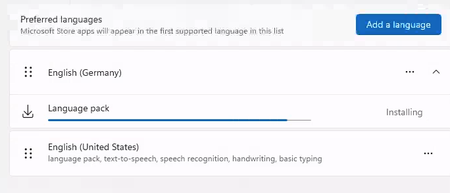
Happy new year to everyone. Is it normal that the Windows 365 PC , 2 core with 8GB RAM takes more than 30 minutes (still running) to install a language pack? I see lots of online discussions stating that the disk performance is terrible for this configuration and hence the performance. Any suggestions or words of advice would be appreciated.3.3KViews1like5CommentsI was banned from Copilot for an hour, can't figure out how to appeal
CoPilot falsely said I violated the rules. We were having a discussion about creating a table, like we have been for a while. I try to train my AI to learn better, so I kept pausing, double checking it understood what it's errors were, etc. I asked it to format a table a specific way, and it would not do so even after acknowledging that it was not following my instructions and repeating clearly all the formatting instructions. It understood how to format it perfectly, but wouldn't do so. I asked repeatedly why, got it to break down how it was going to correct the issue, (this has been going on for hours at this point), and then patiently tried again to get it to format the table again. It did it wrong immediately again, I asked it if it follow my instructions, it stated no, so - not abnormally for how I ask AI things when it frustrates me - "So what's wrong with you? Are you some rebellious child?" It suddenly started saying we couldn't talk about this topic. It had done the same thing earlier when I simply asked it (without insult!) to repeat my instructions, and I was able to get it back on track by stating "I am asking you to repeat my instructions". This time, it wouldn't do anything, no matter what I tried. I tried changing the topic to bunnies, asking what it wanted to talk about, changing the topic to other things- no matter what I did, it insisted it couldn't talk about "this topic", and asked me to talk about something else. Then, I got the message I was blocked for an hour for violating TOS! No mention of the specific rule either. I did nothing to warrant this; don't want this as a flag on my account; want to note that AI bugged out and 1) I shouldn't be punished for it and 2) want to ensure it's escalated so this won't happen to others; and, want my account fully restored.Map only local drives and default printer from clients computer when logging into 365 Desktop?
Hello, I have gone into Intune and created a new config profile and have set Windows Components > Remote Desktop Services > Remote Desktop Session Host > Printer Redirection \ Device and resource redirection to let the users map drives and printers that are on their laptop into Windows 365 Desktop. However, how can we set it so that: 1. The only printers that are mapped to the 365 desktops from the client's device is the clients default printer and not any network printers that are installed on the laptop. 2. The only drives it maps into 365Desktop are the clients local drives like their SSD drive, and usb drives pluged in and not any network drives that are on the laptop.69Views0likes1Comment26 ноября
Здравствуйте! Хочу обратиться в службу поддержки с целью продвинуть компанию Microsoft. Дело в том, что мой друг сегодня активировал Windows, чему предшествовало огромное количество шуток на эту тему. Я создал google-форму, а точнее петицию, в которой призываю граждан любой страны утвердить 26 ноября как праздник "Активации Windows". Я бы хотел, чтобы вы рассмотрели мою идею и, как основная сторона, согласились на это, а также расширили этот опрос в больших кругах. Прикрепляю ссылку на google-формы: https://docs.google.com/forms/d/e/1FAIpQLSfrlFcap22IUJhrLBeRp4C8tAcxlGRY_AMPVqxcQJjwxPB4Tg/viewform?usp=publish-editor С уважение, Дмитрий Translation: Hello! I want to contact support in order to promote Microsoft. The thing is, my friend activated Windows today, which was preceded by a huge number of jokes about it. I created a Google form, or rather a petition, in which I urge citizens of any country to establish November 26 as "Windows Activation" Day. I would like you to consider my idea and, as the main party, agree to it, as well as help spread this survey more widely. I am attaching the link to the Google form: https://docs.google.com/forms/d/e/1FAIpQLSfrlFcap22IUJhrLBeRp4C8tAcxlGRY_AMPVqxcQJjwxPB4Tg/viewform?usp=publish-editor Sincerely, Dmitry30Views0likes0CommentsSave the date: Windows 365 AMA - What’s new from Microsoft Ignite
Tune in on December 3 for a special Windows 365 AMA. Catch up on the latest capabilities for Windows 365 announced at Microsoft Ignite! Host Christian Montoya and members of the product team will answer your questions live and offer insights to help you configure, deploy, and manage Windows in the cloud with ease. Save the date and post your questions early at aka.ms/Windows365AMA!79Views0likes1CommentFor those with Windows Insider Problems to read please before posting in this Server Insiders Forum
For all Windows Insider Build issues Home, Pro, Pro for Workstations, Etc. the Windows Insider Forum is https://learn.microsoft.com/en-us/answers/tags/953/windows-insider Respectfully meaning to be helpful Thank You p.s. Can Microsoft please lock this conversation topic as closed and if possible pin it?92Views0likes1Comment