general
738 Topics
Hacker destroyed my emails
Last July as I was boarding a plane and had no access to Wifi for 5 hours (worst nightmare ever), I realized someone hacked into my hotmail account. I had more than 20 years worth of emails there which is why I can't stray anywhere else. ANYWAY, the hacker wrote an email demanding money, and proceeded to lock me out of all of my apps and subscriptions... I couldn't do anything. He had forwarded everything to a different email and set up some rule. I finally was able to get back into my account on Microsoft but now I'm realizing I'm missing thousands of emails. I checked the rules, did all the troubleshooting steps etc. and anything prior to July 1, 2025 is just GONE. Can anyone help me recover these? I feel like they have to be on a server somewhere!6Views0likes0Comments
Best way to access Windows 365 Cloud PC from Mac?
Looking to find the best way to access a Windows 365 Cloud PC from a Mac. Clearly, I can access it by logging into the browser and running it there, but is there any way to use the Microsoft Remote Desktop for Mac app to make the connection more "native" to the Mac OS environment? Any other thoughts would be welcomed as well. Thank you,Solved26KViews0likes7Comments
Multiple Copilot notebooks disappeared immediately after sync
Today, after a Copilot synchronisation event, multiple notebooks disappeared from my account. I observed the notebooks briefly appear on a second device (MacBook Air) and then disappear during synchronisation. One missing notebook is called VIT. Several other notebooks also disappeared at the same time. Chats associated with those notebooks are no longer visible in chat history. Other notebooks remain visible. One remaining notebook ("8 STEM") displays the message: "Limit reached: Copilot can chat about the 20 oldest items in your notebook." The timing strongly suggests a synchronisation or migration issue rather than accidental deletion. This content represents a substantial amount of teaching-related work and planning material. Can Microsoft confirm whether the missing notebook and chat data still exists on the backend and whether there is a way to force a resynchronisation? Additional observations: The notebooks existed prior to the sync. Notebooks were briefly visible, then disappeared. The issue occurs across multiple devices. Associated chats are also missing.
I had interesting conversation with copilot. Asked it to test it’s internet retrieval functions.
It failed on all retrievals. and suggested to report the following: M365 Copilot web retrieval consistently fails with ExpiredWeb/internet retrieval from M365 Copilot is currently failing. Multiple independent retrieval attempts were tested, including web search and direct URL retrieval across Microsoft and non-Microsoft domains. All attempts consistently return Expired.The failure appears to occur at the retrieval/tool layer rather than at the destination website, because unrelated domains and different retrieval methods exhibit the same result.The Microsoft Cloud status page currently reports Copilot as operational, so this may be an unreported partial, regional, tenant-specific, or backend retrieval-service degradation.Repeated testing from the same Copilot session reproduces the problem consistently. I'd include 5 October 2026, 19:00GMT, your region/location, and screenshots of both Expired results and the Operational status if the reporting interface allows attachments.
Can't login to my account
I changed my password this morning for my 365 account which subsequently logged me out of my Outlook account. I went to sign back in but needed my Authenticator app to sign in. I went to Authenticator app but this has also signed out prompting me to sign in. The only two options I have are: Approve a request on my Microsoft Authenticator app Use a verification code There are no other methods like phone number, alternate email address or text showing - I am now in a loop where I can't get back in. How do I gain access again? This is important as I need my documents and access to my emails. Thanks171Views0likes2CommentsMore than 30 minutes to install a language pack?
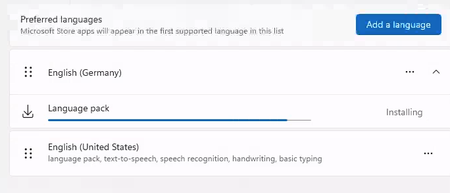
Happy new year to everyone. Is it normal that the Windows 365 PC , 2 core with 8GB RAM takes more than 30 minutes (still running) to install a language pack? I see lots of online discussions stating that the disk performance is terrible for this configuration and hence the performance. Any suggestions or words of advice would be appreciated.13KViews3likes11CommentsEnhancements to Windows Containers
Everyone, I have created a github issue list for getting Windows Containers on par with linux containers: Here are the issues I documented: Syscall/capability-scoped restriction policy for process-isolated containers (seccomp/capabilities parity) #649 — Syscall/capability-scoped restriction policy for process-isolated containers (seccomp/capabilities parity) True PID namespace isolation for process-isolated containers (server silos) #650 — True PID namespace isolation for process-isolated containers (server silos) CimFS-backed overlay mount performance parity with Linux overlayfs for container image layers #651 — CimFS-backed overlay mount performance parity with Linux overlayfs for container image layers Decouple container base image version from host OS version for process-isolated containers #652 — Decouple container base image version from host OS version for process-isolated containers Please check them out and upvote them. We need to make Windows containers as capable as Linux containers.123Views0likes0Comments