fslogix
20 Topics
CfExecute(TRANSFER_PLACEHOLDERS) returns E_INVALIDARG inside an FSLogix profile container
We develop a Cloud Files sync provider. When the sync root lives in a user profile that FSLogix redirects to a per-user VHDX container, some FETCH_PLACEHOLDERS callbacks cannot be answered: every CfExecute(CF_OPERATION_TYPE_TRANSFER_PLACEHOLDERS) for them fails with E_INVALIDARG (0x80070057), including the error completion. The request stays pending until the platform cancels it after about 60 s, and the application that triggered it (File Explorer, Office and Edge background processes, line-of-business apps) hangs for that time. The callback is raised by a name lookup of a non-existent child (`CreateFileW` / `GetFileAttributesExW` on `<dir>\missing.txt`) inside a placeholder directory with on-demand population enabled, and nobody has had that directory open for about one to two minutes. The same callback raised by a directory enumeration is answered fine every time. A lookup on a directory opened a few seconds earlier is fine too. A standalone PowerShell script (own throwaway sync root, no third-party software) reproduces it on a clean Windows Server 2022 (20348.5761, October 2026 CU) with FSLogix 26.08 (3.26.826.17182) for a user with a profile container. The same script on the same server, ten minutes later, as a local user in the "FSLogix Profile Exclude List": all answers accepted. Also reproduced on Windows Server 2022 20348.3328 and 20348.5622 and on Windows Server 2025 26100.1742 with profile containers; not reproducible on the same builds without FSLogix, with a sync root on a plain VHDX volume or a mount point, or on Windows 11. The OS patch level and the FSLogix release did not make a difference in our tests. Waiting, an attributes-only open of the directory, or omitting the correlation vector, request key and sync status from CF_OPERATION_INFO do not help. If the provider opens the directory with FILE_LIST_DIRECTORY (and may close it again) before answering, or after the rejection and then resends the byte-identical answer, CfExecute returns S_OK. CfUpdatePlaceholder(DISABLE_ON_DEMAND_POPULATION) on the directory has the same effect. We ship the directory open as a workaround. Is this a known issue for a Cloud Files sync root inside an FSLogix-redirected profile? Script and both logs (reproduced / not reproduced, same server): https://gist.github.com/pdupont1/85cc0b4a708a784db03087bdcdbe74c8 Full write-up with the environment matrix and all tested variants on https://learn.microsoft.com/en-us/answers/questions/6039901/cfexecute-transfer-placeholders-returns-e-invalida7Views0likes1Comment
FSLogix Version Compatibility
Hi, We are using FSLogix on a Windows Server 2025 RDS farm and are looking to update FSLogix version from 2.9.8884.27471 to the latest version. Is to ok to update one or two of the RDS hosts at a time to make sure there are no issues, or is it required to update all RDS hosts at the same time for profile compatibility. Thanks!121Views0likes0Comments
FSlogix Profile Disconnects
Hi, Just wondering has seen this issue with their AVD instances and FSlogix in regards to profile container disconnects. We have version 3.25.822.19044 and my theory is that computers that go into sleep mode (due to power timeouts) are not cleanly triggering the disconnect procedure for the container to be cleanly disconnected. We have noticed this by the users .VHDX.metadata file not deleting on their log off. It's also not releasing the Handles and Leases for their containers, making them sign in with a temp profile if they try again. We are just running a standard regedit profile setup based on this page, https://learn.microsoft.com/en-us/fslogix/concepts-configuration-examples Just seeing if anyone else has any fixes in place? Or is this a known issue. Thanks Josh.337Views1like0Comments
Error removing Rule at logoff
Hello folks. during user logoff Fslogix is trying to remove some rules but get an exception [ERROR:80070490] Error removing Rule: C:\Users\username\AppData\Local\CrashDumps (Element not found.) As a result it removes "users profile" and "local_username" folder correctly with no issues, but sends Error to the logs. It's spamming the logs because it will put error one every excluded folder from redirection. We don't use any FSLogixAppsRuleEditor or something else, checked by ."\frx.exe list-rules -verbose" it returns - "No rules" The redections.xml looks like [...] <Exclude Copy="0">AppData\Local\CrashDumps</Exclude> [...] Is this an known issue ? Thinking it came around with 3.25.202.4223. Thx JensSolved740Views2likes3Comments
Old file server still present in registry on user profiles
We are running FSLogix 2.9.8884.27471 on Server 2022. Our domain controllers are all Server 2022. We just migrated to a new file server. The Citrix profiles are stored on a completely different server; we have not changed the Citrix profile file server. We only changed/migrated the general file server used for general file storage. After we powered off the old file server, Citrix users complained of "slowness" when using File Explorer. We discovered that there are a bunch of references to the old file server in each user's FSLogix profile registry. If we mount the FSLogix profile, when a user is logged out, and delete the references from a user's profile registry, the "slowness" issues with File Explorer, are resolved. The registry entries that seem to be present in each user's profile are located in the following: HKU\FSL.VHD.****\Software\Microsoft\Windows\CurrentVersion\Explorer\MountPoints 2 (there are a couple mount points still present for the old file server) HKU\FSL.VHD.****\Software\Microsoft\Windows\CurrentVersion\Explorer\Shell Folders (we use GPO to redirect a users "Favorites" folder - the old file server is still listed in the "Favorites" registry entry, even though the GPO is setup to point to the new file server) HKU\FSL.VHD.****\Software\Microsoft\Windows\CurrentVersion\Explorer\User Shell Folders (we use GPO to redirect a users "Favorites" folder - the old file server is still listed in the "Favorites" registry entry, even though the GPO is setup to point to the new file server) When we delete the "Favorites" entries, we find that after a user logs in/out, the "Favorites" entry updates properly to the new file server path. We can also remedy the File Explorer "slowness" by simply powering on the old file server. Again, all of the sharing on the old file server has been disabled. So it seems like as long as a user can "ping" the old file server, then that's all FSLogix needs to ensure that File Explorer works. This issue does not occur on physical Windows computers/servers- only with with FSLogix profiles. Instead of either leaving on the old file server powered on, or manually editing the registry in each user's profile, is there a way to remove (or update) these registry entries that point to the old file server?372Views1like1CommentNew Teams not loading with FSLogix 2210 HF4, Horizon non-persistent VDI
Hi all, We've been testing the latest Teams 2.1 Bootstrapper on our non-persistent Horizon VDI machines but having issues once we bring FSLogix into the mix. We are able to deploy new Teams onto our base image and when using a local profile it launches and runs as expected from the shortcut in the Start Menu. Similarly on our physical PCs Classic Teams > New Teams upgrades without issue (we're not running FSLogix on physical machines... yet) When logging in with FSLogix enabled (frxtray shows version 2.9.8228.50276) the Teams shortcut is present, however clicking it produces a white progress bar and no further action. We have updated our Redirections.xml to one we found here https://www.jeffriechers.com/wiki/teams-2-1-with-fslogix-setup-guide/comment-page-1/ If we look at the properties of the Windows Store App for Teams it returns 16KB, which seems wrong? Looking in Event Viewer AppxPackaging log we see this error, can't find much online relating to it. App manifest validation warning: Declared namespace http://schemas.microsoft.com/appx/manifest/uap/windows10/7 is inapplicable, it will be ignored during manifest processing. I note from another thread that there's a GPO for ODFC called IncludeTeams that needs to be turned on to roam the new Teams cache etc. https://learn.microsoft.com/en-us/microsoftteams/new-teams-vdi-requirements-deploy HKEY_LOCAL_MACHINE\SOFTWARE\Policies\FSLogix\ODFC\IncludeTeams However we don't use ODFC as FSLogix is in single-profile mode as recommended here... https://learn.microsoft.com/en-us/fslogix/tutorial-configure-odfc-containers Using the ODFC container in a dual container configuration isn't necessary or recommended. So my question is: does anyone have new Teams 2.1 working with FSLogix HF4 and single container profile? is ODFC required for Teams 2.1 to operate? If so is there any definitive MS documentation to say this as it seems rather vague and support are not giving us any further information has anyone got a stable non-persistent VDI desktop working with Teams 2.1 and FSLogix in general? Any input much appreciated as it feels like we've hit a wall here at present. The MS documentation suggests Hotfix 4 is meant to be the supported configuration for Teams 2.x but struggling to find evidence of a working setup. As an aside the reason we're running FSLogix in the first place is in order for OneDrive client to be deployed onto our non-persistent VDI machines as Microsoft don't support Roaming Profiles for this (which is what we used for roaming user data previously)2.4KViews0likes3CommentsFSLogix FontSmoothing Issue
I'm running into an issue where I can't get the fontsmoothing option to stay on when running FSLogix. If I stop both FSLogix services on the golden image of the VM then it stays but once I turn the FSLogix services back on that setting is reverted back. Anyone else run into this issue or have a solution?138Views0likes1Comment
[FSLogix & Citrix] How to save the profile data of account2 that was startet within my account1?
Hello, i am starting Citrix Workspaceapp with account1 which uses FSLogix. Within the Citrix workspace app i start a Citrix app with account2 in another user context. If possible, how can i configure FSLogix which is aware of account1 to save account2 as a FSLogix profile, too? Thanks in advance and kind regards BerndSolved669Views0likes4CommentsNew Microsoft Teams on Citrix VDI (w/ FSLogix profiles)
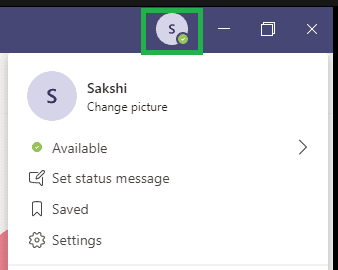
Hello, we're trying to deploy the New Microsoft Teams in our infrastructure. Technical details: - Citrix CVAD 1912LTSR CU8 (VDAs are running 2311.0.0.247) - Windows 10 22H2 19045.4291 - Teams 24074.2321.2810.3500 - Citrix HDX Optimized - FSLogix 2210 hotfix 3 (2.9.8784.63912) - Machines are deployes using both PVS and MCS New Teams opens up, but the "Account/Status management" drop-down menu at the top-right of the MS Teams window disappears immediately. As a result, users can't manage their status and change their profile settings. Screenshot of what's missing: What MS Teams looks like in our Citrix VDI environment: Troubleshooting done so far: - New Teams re-deployment (completely uninstalled and installed) - Cache cleared - User profile (FSLogix) reset and re-created from scratch Any idea on what could be the cause of the issue? Thank you Zeno897Views0likes1Comment