features
39 Topics
Multiple Copilot notebooks disappeared immediately after sync
Today, after a Copilot synchronisation event, multiple notebooks disappeared from my account. I observed the notebooks briefly appear on a second device (MacBook Air) and then disappear during synchronisation. One missing notebook is called VIT. Several other notebooks also disappeared at the same time. Chats associated with those notebooks are no longer visible in chat history. Other notebooks remain visible. One remaining notebook ("8 STEM") displays the message: "Limit reached: Copilot can chat about the 20 oldest items in your notebook." The timing strongly suggests a synchronisation or migration issue rather than accidental deletion. This content represents a substantial amount of teaching-related work and planning material. Can Microsoft confirm whether the missing notebook and chat data still exists on the backend and whether there is a way to force a resynchronisation? Additional observations: The notebooks existed prior to the sync. Notebooks were briefly visible, then disappeared. The issue occurs across multiple devices. Associated chats are also missing.
Copilot Chat on Windows repeatedly triggers a file‑access permission prompt; Copilot Health does not
Subject: Copilot Chat on Windows repeatedly triggers a file‑access permission prompt; Copilot Health does not Summary of Behavior: Copilot Chat on Windows displays a Windows dialog asking whether to allow access to local files every time a new chat is started. This happens consistently and repeatedly. Copilot Health does not display this dialog. If Copilot is closed, reopened, and the user goes directly into Copilot Health, the permission prompt does not appear — even when asking questions that require analysis or reasoning. Copilot on iPhone also does not display any permission prompt. Repro Steps: Open Copilot Chat on Windows. Start a new chat. Windows shows a dialog asking whether to allow access to local files. Close Copilot completely. Reopen Copilot. Navigate directly to Copilot Health. Ask a question. No permission dialog appears. Use Copilot on iPhone. No permission dialog appears. Troubleshooting Attempts (All Unsuccessful): Toggled Windows “File system access” privacy settings (global and per‑app). Verified Edge permissions. Closed and reopened Copilot. Tested Copilot Health (no prompt). Tested Copilot on iPhone (no prompt). Tested multiple chat sessions (prompt appears every time). Reboot not yet tested, but all other attempts show the behavior is isolated to Copilot Chat. None of these actions changed the behavior. The permission prompt appears only in Copilot Chat on Windows. Impact: This behavior is highly disruptive and makes Copilot appear unsafe or intrusive. It undermines user trust, especially for users who rely on Copilot Health. It creates confusion, breaks workflow, and makes Copilot feel unusable. This is likely to push users toward competing AI products that do not exhibit this behavior.
Copilot Nonperformance and AI Credit deduction
A simple prompt for fixing spelling, punctuation, repetitions, capitalization in a dictation text across 20 pages is not being done, and one is told it has been done. And then the AI credit is deducted every time you ask it to redo it. Any ideas what is going on, and shouldn't there be a way to ensure that the wrong debited credits are re-credited to the account.
Issues while trying to build a graph connector to Azure SQL in M365 copilot
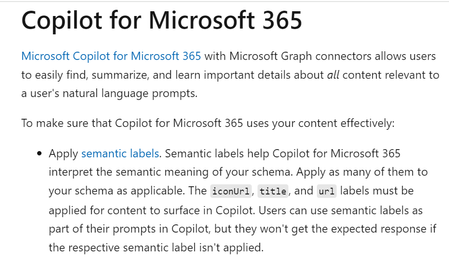
Dear All, I tried to create a Graph Connector to Azure SQL. I wanted to ingest data from Azure SQL and ask questions about it within Copilot for Microsoft 365. The graph connector was created in this Microsoft 365 Admin Centre within the 'Data sources' section in 'Search and Intelligence' menu: https://admin.microsoft.com/#/homepage The Microsoft documentation (https://learn.microsoft.com/en-us/graph/connecting-external-content-experiences#copilot-for-microsoft-365) screenshot below states that in order for the information to surface in Copilot for Microsoft 365, the fields "title," "url," and "iconUrl" need to be filled out during the configuration process. However, during the configuration process, I noticed that the 'iconUrl' field is greyed out. Hence, I am not able surface data from Azure SQL in Copilot for Microsoft 365. On the other hand, Microsoft Search and Sharepoint both displayed the Azure SQL data as I proceeded to configure the connector anyway. Is there any workaround for this? Are there any alternative approaches that I can take to surface the data in Copilot chat? Would appreciate any help regarding the same.Automate Copilot in Excel
Hi, Is it possible to automate opening Copilot in Excel and send a prompt using VBA? Currently, Copilot in excel seems to work only through the UI, where we have to manually click the Copilot button in the ribbon section and paste the prompt. I want to automate this process so that, with a single click, Excel opens Copilot and enters the prompt automatically. If this is not possible, are there any alternative approaches to achieve similar automation?Using Copilot and other Addins in "Edge Apps"
Hi everyone, i want to use Copilot in my PWA - this is not possible? Why is there such a restriction? It makes no sense? I created a feedback - please vote Allow Copilot and other addins in PWA · Community You’re running into a known limitation of Microsoft Edge “Apps” (site-as-app / PWA mode): 👉 Copilot Chat, M365 add-ins, extensions, and the sidebar are not available inside Edge apps. Here’s what’s going on — and what you can do. ✅ Why Copilot & Add-ins don’t show in Edge App mode When you install a website as an app in Edge (PWA mode), the resulting window runs in a minimal UI container. This mode intentionally removes browser features — including: Edge sidebar (where Copilot lives) Browser extensions Add-ins Many productivity/AI integrations This is confirmed by Microsoft’s PWA documentation: PWAs run like standalone apps and don’t expose the full browser interface or settings. [learn.microsoft.com] So your ITSM tool as an Edge App simply cannot load Copilot or add-ins – by design. ✅ How to enable Copilot & Add-ins when using your ITSM tool Option 1 — Open the ITSM tool in a normal Edge tab This is the easiest fix: Open Microsoft Edge normally (not the app window). Navigate to your ITSM tool’s URL. Use Copilot Chat (sidebar) and any extensions/add-ins normally. This gives you full Copilot capabilities, including Copilot Mode options from Edge settings. [pureinfotech.com] Option 2 — Pin the site instead of installing it as an app If you still want fast access: Right‑click the tab → Pin tab, or Add it to Favorites, or Add it to the Edge sidebar This preserves full browser functionality including Copilot. Option 3 — If you must use app mode There’s unfortunately no supported way today to enable: Copilot sidebar M365 add-ins Extensions …in a PWA window. Edge currently isolates PWAs from browser-level AI features (no Microsoft documentation or Edge settings allow re-enabling them). 🧩 Optional: Enable Copilot Mode in full Edge (not PWA) If you want the richer Copilot experience in normal Edge, ensure Copilot Mode is enabled: Go to: edge://settings/ai Turn on Copilot Mode. (Available on Edge v141+.) [pureinfotech.com] This gives you: Copilot button in the toolbar AI-powered new tab experience Better in‑context Copilot support But again: This does not apply to PWAs. 🎯 Summary Environment Copilot Sidebar Extensions/Add-ins Recommended? Edge normal window ✅ Yes ✅ Yes ✔️ Best choice Edge App (PWA) ❌ No ❌ No ❌ Not for Copilot BR StephanCopilot Agent in Sharepoint - customisation options
Hi there, I've been asked by a client to design and deploy a Copilot Agent as part of a Sharepoint intranet build. The client would like the Sharepoint pane to be persistently open when their users are visiting Sharepoint pages - even better if it can start a conversation like a customer service chatbot. Could someone let me know if this is possible? Using iFrames looks really clunky, and we're not convinced users will know to click the Copilot icon that's currently in the top right. Copilot itself thinks it's possible but the Javascript it gives me doesn't seem to work! Thanks
Copilot is slow compared to free GenAI chat tools
We are rolling out Copilot with Commercial Data Protection to staff and working on adoption and trying to get people to use it instead of ChatGPT. One piece of feedback that has come back from several staff members is speed. ChatGPT, a free tool, is very fast - you get answers almost instantly. Whereas Copilot, a product we are paying for, is slow. You wait and watch it type sentence after sentence. Although we are selling the security and power of Copilot the speed makes initial impressions very dissapointing to staff familiar with other services. Overall comments are negative instead of seeing the potential. Are there plans to speed it up as I can see staff looking for alternatives?Copilot in Edge - Text Prompt Focus on Open (Suggestion)
Hello, I have been a Copilot user in Edge for a long time and I have encountered the same issue repeatedly. I decided to share it here in case there is a solution for it. Whenever I click on the Copilot icon in the upper right corner of Edge, I often start typing my query without noticing that the cursor is not active in the text box. Then I have to type everything again. Would it be possible to make the text box of the Copilot in Edge automatically focused after the panel opens? I think that would be a reasonable expectation for someone who opens the panel, as they probably want to type something.Solved