fabric
197 TopicsJoin the Fabric Partner Community for the next AMA with Fabric LT
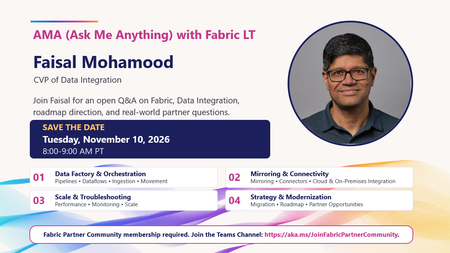
📣 Microsoft Fabric partners, save the date! Have questions about Fabric, Data Integration, roadmap direction, or real-world customer and partner scenarios? This is your chance to ask them directly. Join our AMA (Ask Me Anything) with Fabric LT Faisal Mohamood, CVP of Data Integration, for an open Q&A covering: 🔹 Data Factory & Orchestration: Pipelines, Dataflows, ingestion, and movement 🔹 Mirroring & Connectivity: Connectors, cloud, and on-premises integration 🔹 Scale & Troubleshooting: Performance, monitoring, and scaling 🔹 Strategy & Modernization: Migration, roadmap, and partner opportunities 📅 Tuesday, November 10, 2026 ⏰ 8:00–9:00 AM PT Bring your questions, challenges, feedback, and scenarios. This session is designed to give our Fabric Partner Community direct access to the conversation. 👉 Fabric Partner Community membership is required. https://aka.ms/JoinFabricPartnerCommunity What would you ask at the AMA? Drop your question in the comments. 👇39Views1like0Comments🔐 On the Next Fabric Engineering Connection: Securing Fabric
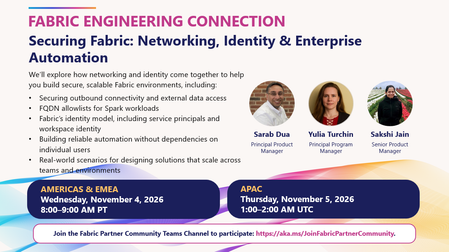
How do you design Microsoft Fabric environments that are secure, scalable, and ready for enterprise automation? That’s exactly what we’re digging into on the next Fabric Engineering Connection: 🛡️ Securing Fabric: Networking, Identity & Enterprise Automation 🎤 Sarabjit Dua, Principal Product Manager 🎤 Yulia Turchin, Principal Program Manager 🎤 Sakshi Jain, Senior Product Manager The team will explore how networking and identity come together in Fabric, with practical guidance on: 🔒 Securing outbound connectivity and external data access 🌐 FQDN allowlists for Spark workloads 🪪 Fabric’s identity model, including service principals and workspace identity ⚙️ Building reliable automation without dependencies on individual users 🏢 Real-world patterns for solutions that need to scale across teams and environments If you’re helping customers navigate enterprise security, networking, identity, or automation in Fabric, bring your questions. This is a great opportunity to hear directly from the product team and dig into the scenarios you’re seeing in the field. 📅 Americas & EMEA: Wednesday, November 4 | 8:00–9:00 AM PT 📅 APAC: Thursday, November 5 | 1:00–2:00 AM UTC 🔒 Fabric Engineering Connection is exclusively for members of the Fabric Partner Community. Microsoft partners can join here: 👉 https://aka.ms/JoinFabricPartnerCommunity Looking forward to another high-signal conversation with our partners! 🚀40Views1like0Comments🏨👻 There’s something strange happening at the Fabric Haunted Hotel
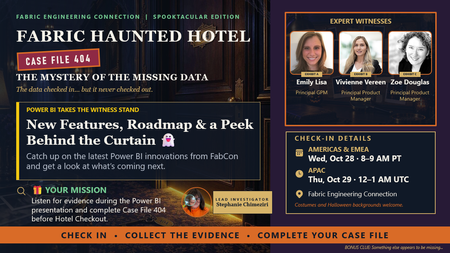
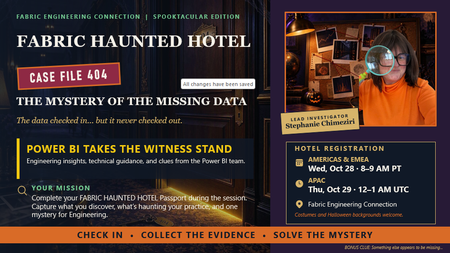
The data checked in. But it never checked out. 👀 So, for our Spooktacular edition of Fabric Engineering Connection, we’re opening: 🔎 CASE FILE 404: The Mystery of the Missing Data And we’ve called in three Power BI Expert Witnesses: 🔍 Emily Lisa, Principal GPM 🔍 Vivienne Vereen, Principal Product Manager 🔍 Zoe Douglas, Principal Product Manager They’ll take the witness stand for: New Features, Roadmap & a Peek Behind the Curtain 👻 Partners will hear about the latest Power BI innovations from FabCon and get a peek at what’s coming next. But this won’t be a sit-back-and-watch investigation. Every Fabric Detective will receive digital Case File 404 and collect evidence while listening to the Power BI team. 🔍 And yes...🎁 There will be prizes. 📅 Americas & EMEA: Oct. 28 | 8–9 AM PT 📅 APAC: Oct. 29 | 12–1 AM UTC 🔑 Want a key to the hotel? This experience is for members of the Fabric Partner Community. If your organization is a Microsoft partner and you’re not already part of the community, join us before check-in: 👉 https://aka.ms/JoinFabricPartnerCommunity Already a member? Tag another Microsoft partner who should join the investigation. 👇 🎃 Costumes encouraged. 🏨 Haunted Hotel backgrounds ready. 🔎 Curiosity required. CHECK IN • COLLECT THE EVIDENCE • COMPLETE YOUR CASE FILE113Views1like0CommentsOn the Next Fabric Engineering Connection
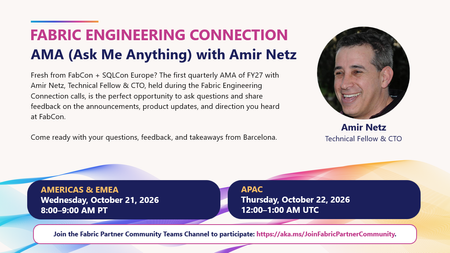
🚀 On the Next Fabric Engineering Connection: AMA with Amir Netz! Fresh from European Microsoft Fabric + SQL Community Conference with questions, feedback, or a few “wait, tell me more about that…” moments? 👀 The next Fabric Engineering Connection is the perfect place to bring them. 🎤 AMA (Ask Me Anything) with Amir Netz, Technical Fellow & CTO This is our first Quarterly AMA of FY27, and partners will have the opportunity to ask questions directly about: ✨ The announcements and product updates coming out of FabCon Europe 💡 What those updates mean for customers and partner practices 🧭 Fabric’s direction and where partners should be focusing 💬 Your own technical questions, feedback, and real-world customer scenarios One of the best parts of the Fabric Partner Community is getting this kind of direct access to the people shaping the product, so come ready with your questions! 📅 Americas & EMEA: Wednesday, October 21 | 8:00–9:00 AM PT 📅 APAC: Thursday, October 22 | 12:00–1:00 AM UTC 🔒 Fabric Engineering Connection is exclusively for members of the Fabric Partner Community. If you’re a Microsoft partner and haven't joined yet, this is a great reason to jump in. 👉 https://aka.ms/JoinFabricPartnerCommunity See you there. I have a feeling this is going to be a good one! 🔥106Views1like0CommentsThis week on Fabric Engineering Connection
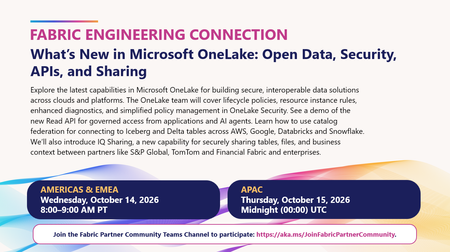
🚀 On the Next Fabric Engineering Connection: What’s New in OneLake There’s a lot happening in Microsoft OneLake, and this week we’re bringing the OneLake team directly to partners to unpack some of the latest capabilities across open data, security, APIs, and sharing. We’ll dig into: 🔐 OneLake Security updates, including lifecycle policies, resource instance rules, enhanced diagnostics, and simplified policy management 🤖 The new Read API, enabling governed access to OneLake data from applications and AI agents 🌐 Catalog federation, connecting Iceberg and Delta tables across AWS, Google, Databricks, and Snowflake 🤝 IQ Sharing, designed to securely share tables, files, and business context between enterprises and partners If you’re helping customers build secure, AI-ready, multi-cloud data architectures, this is one you’ll want on your calendar. 📅 Americas & EMEA: Wednesday, October 14 | 8:00–9:00 AM PT 📅 APAC: Thursday, October 15 | 12:00–1:00 AM UTC 🔒 Fabric Engineering Connection is exclusively for members of the Fabric Partner Community. If you’re a Microsoft partner and haven’t joined us yet, now’s a great time! 👉 https://aka.ms/JoinFabricPartnerCommunity Come ready with questions and hear directly from the team building what’s next for OneLake. 🚀122Views1like0Comments🏨👻 Partners, save the date. Your reservation at the FABRIC HAUNTED HOTEL is waiting...
This Halloween, Fabric Engineering Connection is getting a spooky makeover. 🔎 CASE FILE 404: The Mystery of the Missing Data The data checked in... but it never checked out. 👀 And we’re calling in some expert witnesses: the Power BI team will take the witness stand with engineering insights, technical guidance, and answers to your Power BI mysteries. But you won't just be watching: 🔎 Check into the FABRIC HAUNTED HOTEL 🕵️ Collect evidence during the session 🏨 Complete your Haunted Hotel Passport 🎁 And yes... there will be prizes 📅 Americas & EMEA: Oct. 28 | 8–9 AM PT 📅 APAC: Oct. 29 | 12–1 AM UTC 🔑 YOUR KEY TO THE HOTEL This experience is for members of the Fabric Partner Community. Not a member yet? Join the community before the call to participate: https://aka.ms/JoinFabricPartnerCommunity Already a member? Save the date and help us spread the word. Tag a Microsoft partner who should check into the hotel with you. 👇 🎃 Costumes and Halloween backgrounds encouraged. 👓 Curiosity required. 🎁 A little friendly competition may be rewarded. CHECK IN • COLLECT THE EVIDENCE • SOLVE THE MYSTERY127Views1like0CommentsThe Context Advantage
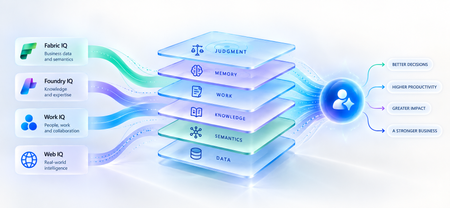
A strange thing happens when enterprises upgrade their AI models. The model gets smarter. The benchmarks improve. The demos become more impressive. And sometimes, the business outcome barely moves. The agent still asks questions the organization answered months ago. It recommends something policy doesn't allow. It treats a strategic customer like any other customer. It proposes an architecture your engineering team rejected six months ago. The problem isn't necessarily intelligence. It is ignorance of the business. That distinction matters because the world's most capable models are becoming available to almost everyone. Your competitors can increasingly access the same frontier intelligence you can. What they cannot access is your customer history, operating knowledge, organizational memory or understanding of how decisions actually get made. Models are becoming shared. Context remains proprietary. And that may be where the next enterprise AI advantage is built. Intelligence Without Context is Surprisingly Ordinary Consider a simple enterprise question: Can we offer this customer a larger discount? A powerful model can reason about discounts. But answering that question properly may require the customer's lifetime value, current contract, payment history, margins and approval thresholds and perhaps a conversation yesterday in which the account executive learned that a competitor had entered the deal. The model isn't missing intelligence. It is missing context. Humans rarely make important decisions from one piece of information. We combine data, experience, relationships, history and situational awareness almost unconsciously. Agents need a version of the same capability. That is why enterprise AI is moving from an era dominated by prompt engineering toward one increasingly shaped by context engineering. Satya Nadella recently described the emerging market simply as “a world of context engineering.” Prompt engineering asks: What should I tell the model? Context engineering asks the larger question: What does the model need to understand before it can act well? That difference becomes critical as AI moves from answering questions to performing work. The Enterprise Context Stack In discussions about enterprise agents, “context” can easily become shorthand for giving a model access to more data. That definition is too narrow. I think about enterprise context as a stack: DATA → SEMANTICS → KNOWLEDGE → WORK → MEMORY → JUDGMENT Data tells the agent what happened: orders, transactions, inventory, claims and customer records. Semantics tells it what that data means to the business: what constitutes a strategic customer, how margin is calculated, which assets belong to which production line. Knowledge tells it what the organization knows: policies, contracts, procedures, research and accumulated expertise. Work tells it what is happening now: who is involved, what has been discussed and which commitments already exist. Memory tells it what happened before: previous interactions, decisions, exceptions and outcomes. And judgment helps determine what should happen next. Memory deserves particular attention because it is context agents can accumulate through experience. Microsoft Foundry now distinguishes between session, user and procedural memory - moving agents beyond remembering a conversation toward remembering preferences and learning how work gets done across repeated interactions. Sometimes the cheapest way to make an agent meaningfully better may not be a bigger model. It may be a better memory. Not every agent needs every layer. But the more consequential its responsibility, the richer, and more carefully governed, its context usually needs to become. This is where context stops being a retrieval problem and starts becoming an enterprise architecture problem. Context Is Becoming Infrastructure This shift is now visible well beyond any one technology platform. Gartner increasingly describes a context layer as an architectural foundation for agentic AI - bringing together semantics, operational state, provenance and other enterprise signals so agents can act reliably. Anthropic, approaching the problem from AI engineering, argues that context should be treated as a finite resource that must be carefully curated rather than simply expanded. Microsoft's recent direction is particularly interesting through this lens. Work IQ, Fabric IQ, Foundry IQ and Web IQ increasingly form a shared intelligence layer across Microsoft's stack. Work IQ provides context about how work happens. Fabric IQ brings business semantics and relationships. Foundry IQ provides reusable enterprise knowledge and agentic retrieval. Web IQ extends that understanding with fresh external intelligence. The architectural implication matters more than the product names. Instead of every new agent rebuilding connectors, retrieval logic, semantic definitions and permissions, context becomes reusable infrastructure from which many agents can reason. Microsoft captured the shift particularly well: As agents become the new application model, context becomes critical infrastructure. Your Data Estate Is Not Automatically Your AI Moat For years, organizations have been told their data is a competitive advantage. Sometimes it is. But possessing data and making that data useful to an agent are very different things. Most enterprises don't suffer from a shortage of information. They suffer from an abundance of it -scattered across databases, documents, emails, meetings, applications and people's heads. The advantage doesn't come from connecting an agent to all of it. It comes from turning information into usable context: preserving business meaning, understanding relationships, distinguishing authoritative knowledge from convenient information, respecting permissions and retrieving what matters when a decision is being made. The enterprise with the most data may not build the best AI. The enterprise that makes its context most usable might. The Context Budget There is a trap on the other side too. If context improves AI, the natural instinct is to give the agent as much as possible. That is the wrong objective. Context consumes attention and compute. Irrelevant information creates noise. Stale information can mislead. Conflicting context can degrade reasoning rather than improve it. The objective should therefore not be maximum context. It should be minimum sufficient context the smallest trusted, relevant and permission-aware set of information required to produce the right outcome. In Beyond Tokens, I introduced the idea of an Intelligence Budget: How much intelligence does this outcome deserve? Enterprise agents increasingly need a companion concept. The Context Budget. How much context does this decision deserve? A scheduling agent may need calendars and preferences. A pricing agent may need customer economics, margins, commitments and approval policies. A clinical agent requires an entirely different level of completeness, provenance and governance. Every unnecessary token of context is cost. Every missing piece of necessary context is risk. Which gives us a useful way to think about enterprise agents: Right Intelligence × Right Context → Right Outcome Spend more intelligence where the outcome warrants it. Provide more context where the decision requires it. Do neither indiscriminately. What An Agent May Know Matters Too! There is another dimension to the Context Budget: permissions. Enterprise context belongs to someone. A system that retrieves the right answer but ignores whether the agent is entitled to see it isn't intelligent. It is a security problem. Enterprise context must therefore remain identity-aware and permission-aware as it moves from source systems into agent reasoning. This becomes especially important as agents gain persistent identities and greater autonomy. What an agent may know is as much a part of its job description as what it may do. Autonomy defines the boundary of action. Context defines the boundary of understanding. From RAG Projects To Context Architecture The first generation of enterprise GenAI often started with RAG: connect documents to a model and retrieve relevant passages. That was an important step. But an agentic enterprise cannot become a collection of hundreds of independent RAG pipelines, each separately rediscovering the organization's customers, products, policies, terminology and permissions. That risks creating another generation of technology fragmentation. The opportunity is to move from agent-specific retrieval toward reusable enterprise context. What knowledge should agents inherit? Which business entities should have common definitions? Which sources are authoritative? Which memories should persist—and which should be forgotten? And perhaps the hardest question: Who owns enterprise context? Today, responsibility is scattered across data teams, application teams, knowledge management, security, business functions and increasingly AI teams. In an agentic enterprise, context may need to be managed as a product, not everyone's side project. The Moat Is Not The Model Imagine two competing organizations using exactly the same frontier model. One connects it to fragmented documents and a handful of applications. The other has strong data foundations, shared business semantics, governed knowledge, connected workflows and organizational memory. They have access to the same AI. They do not have the same intelligence system. The second organization's agents understand customers more deeply, interpret signals more accurately and act with greater awareness of how the organization actually works. And that advantage compounds. Every workflow creates more context. Every interaction adds organizational memory. Every decision creates another signal from which future agents can reason. Models depreciate the moment a better one ships. Context appreciates every day you operate. That may be the most important strategic shift of all. Anyone can rent intelligence. No one can rent your context. Intelligence Is Becoming Abundant. Understanding Isn't. The first wave of enterprise AI taught us how powerful models could be. The next may teach us that models were only one part of the equation. An agent needs intelligence to reason. But it needs context to understand your business. As frontier intelligence becomes more accessible, enterprises may discover that their most defensible AI asset was never the model. It was everything the organization had learned before the model arrived: its data, semantics, knowledge, relationships, history, workflows and judgment. The organizations that turn those assets into trusted, reusable context will give every agent they build an advantage from day one. So perhaps the strategic question is no longer simply: Which model should we use? It is: What does our organization know that our competitors don't and can our AI actually use it? Because in a world where everyone can access intelligence, context may be what makes that intelligence uniquely yours. References Microsoft — FY2026 Q2 Earnings Conference Call Microsoft — FY2026 Q4 Earnings Conference Call Microsoft Learn — What is Foundry IQ? Microsoft Foundry — Foundry IQ: Build Smarter Agents Faster with Unified Knowledge and Serverless Retrieval Microsoft Foundry — What's New in Microsoft Foundry | Build 2026 Gartner — Context Engineering Is the New Prompt Engineering Gartner — Market Overview for AI Context Platforms Gartner — The 3 Core Components of the Context Layer for AI Agents383Views0likes2Comments
The hardest part of modernizing enterprise BI is NOT the dashboard
For my team, a whole lotta enterprise BI modernization discussions start with the visualization layer, mostly around: Which dashboard should be rebuilt? Should the reports use Direct Lake? Should the organization move to a Lakehouse? How should Power BI capacity be configured? Those are important questions, but there is another one that tends to surface later: Where should the business logic live? In a multi-source environment, the same KPI can be derived from SAP, operational systems, spreadsheets, or application databases. If each report implements the calculation independently, moving the data into a modern platform doesn't automatically create consistent reporting. A more maintainable pattern is to separate the responsibilities: Ingestion: bring source data into the platform with appropriate batch or event-based patterns. Transformation: clean, conform, and standardize data before it reaches reporting. Business layer: define reusable measures and business rules in the semantic model. Security: apply access rules at the appropriate data or semantic layer rather than duplicating them across individual reports. Visualization: keep reports focused on analysis and user experience rather than embedding large amounts of transformation logic. Microsoft Fabric, in that same environment, makes it feasible to bring several of these capabilities into one unified platform, but the architecture still needs clear boundaries between them. I have found this distinction especially important when upgrading reporting environments that have accumulated years of spreadsheet logic and report-specific calculations. For those working on enterprise BI modernization, where do you draw the line between data transformation logic and semantic-model/business logic? And what has worked best for keeping KPI definitions consistent across multiple Power BI reports?93Views1like0Comments
Adding Multiple ontologies to a Data Agent??
I was able to add multiple ontologies to a data agent , but now I could add only one ontology to the data agent and multiple agents. Do we have any documentation supporting this? is the feature of adding multiple ontologies stopped if yes why ..do we have any documentation for that ?142Views1like1CommentOn the Next Fabric Engineering Connection
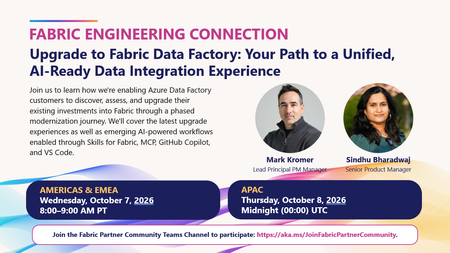
Fresh off European Microsoft Fabric + SQL Community Conference, we're kicking off the next chapter of Fabric Engineering Connection with a session focused on one of the biggest opportunities for partners helping customers modernize their data estates and embrace AI-powered development. 🎤 Upgrade to Fabric Data Factory: Your Path to a Unified, AI-Ready Data Integration Experience Presented by: Mark Kromer — Lead Principal PM Manager Sindhu Bharadwaj — Senior Product Manager Join us to learn how Microsoft is helping Azure Data Factory customers discover, assess, and upgrade their existing investments into Fabric through a phased modernization journey. You'll also get a look at emerging AI-powered experiences that are transforming how developers build and manage data integration solutions, including: ✅ Skills for Fabric ✅ Model Context Protocol (MCP) ✅ GitHub Copilot ✅ VS Code integration Whether you're guiding customers through migration decisions, modernizing integration workloads, or exploring how AI can accelerate developer productivity, this is a session you won't want to miss. 🗓️ Live call times Americas & EMEA: Wednesday, October 7 | 8:00–9:00 AM PT APAC: Thursday, October 8 | 12:00–1:00 AM UTC 🔒 Fabric Engineering Connection is hosted exclusively in the Fabric Partner Community. Microsoft partners can join at https://aka.ms/JoinFabricPartnerCommunity Looking forward to another great discussion and keeping the post‑FabCon momentum going! 🚀🔥112Views1like0Comments