exchange server
2640 Topics
Migration from Exchange on prem to Exchange online
Will migration from on-premise Exchange to Exchange Online stop working as of October 2026? You can see this error in the logs:"Error: The job encountered too many transient failures (61) and is quitting. The most common failure is CommunicationErrorTransientException with the hit count 60." And in IIS you see error 401 The solution is to recreate the migration endpoint using the UPN (email address removed for privacy reasons) instead of "Domain\user". Simply modifying the existing endpoint will not work.18Views0likes0CommentsMicrosoft Defender for Office 365: New “Move to Quarantine” Feature Coming Soon
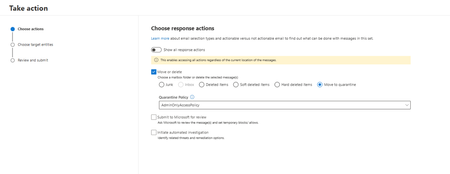
Microsoft introducing Move to Quarantine, a new remediation action in Microsoft Defender for Office 365. It enables security teams to move potentially malicious email messages from users' mailboxes directly to Microsoft Defender quarantine. This provides a safer and more flexible way to contain suspicious messages that bypassed initial detection while preserving the ability to investigate, release, or permanently delete them later. This capability is available with Microsoft Defender for Office 365 Plan 2, including eligible Microsoft 365 subscriptions that include Plan 2. Rollout schedule General Availability (Worldwide): Beginning in early November 2026 and expected to complete by mid-December 2026 Remediate malicious email that was delivered in Office 365 - Microsoft Defender for Office 365 | Microsoft Learn119Views0likes0CommentsWhy do Apple macOS and Ubuntu clients display Exchange meeting times one hour earlier than scheduled
If a meeting is generated from Apple macOS and Ubuntu clients showing the meeting time as one hour earlier than the actual scheduled time email solution is exchange server 2019, what will be the issue.217Views0likes1Comment
Cross-Tenant Mailbox Migration - HTTP 401 Unauthenticated during Test-MigrationServerAvailability
We are performing a Cross-Tenant Exchange Online mailbox migration between two Microsoft 365 tenants. The migration endpoint is configured with ApplicationId authentication and validates successfully. When running: Test-MigrationServerAvailability -Endpoint "MexicoToPortugal" -TestMailbox "<user>" the test consistently fails with: StatusCode="Unauthenticated" HTTP Status Code: 401 We reproduced the issue with two different users. We have already validated: - MailUser configuration - ExchangeGuid - LegacyExchangeDN (X500) - ExternalEmailAddress - Accepted Domains - Organization Relationships - Migration Endpoint - Enterprise Application - Mailbox.Migration permission - Admin Consent - Cross-Tenant Migration licensing The same HTTP 401 error occurs for multiple mailboxes after all configuration issues are corrected. Has anyone experienced a similar Cross-Tenant Mailbox Migration scenario where Test-MigrationServerAvailability returns HTTP 401 Unauthenticated even though the Enterprise Application, Mailbox.Migration permission and Admin Consent are correctly configured?150Views0likes0CommentsRetirement of Azure Communication Services
Microsoft has announced several retirement and breaking changes in September 2026. One notable change is the retirement of Azure Communication Services as a standalone offering, scheduled to take effect on September 30, 2028. Organizations currently using Azure Communication Services should review the announcement, assess the potential impact on their environments, and begin planning accordingly. https://learn.microsoft.com/en-us/azure/communication-services/acs-retirement-and-breaking-changes-guide Which Microsoft service would be the best option for sending approximately 10,000 bulk emails per day?384Views0likes2CommentsRetirement of Azure Communication Services
Microsoft has announced several retirement and breaking changes in September 2026. One notable change is the retirement of Azure Communication Services as a standalone offering, scheduled to take effect on September 30, 2028. Organizations currently using Azure Communication Services should review the announcement, assess the potential impact on their environments, and begin planning accordingly. https://learn.microsoft.com/en-us/azure/communication-services/acs-retirement-and-breaking-changes-guide790Views0likes1Comment
Sincronizzare scheda contatti dell'account di posta elettronica con active directory
Good morning, I need to update the mobile and office phone numbers for users in Active Directory and then synchronize them with the contact information in their email accounts. The goal is to ensure that when a user types an email address in Outlook and hovers their mouse over it, the phone and mobile numbers are visible in the contact card.331Views0likes2Comments
Exchange SE Published Calendar URLs giving HTTP 500 error (both html and ics)
I'm getting an http 500 error when trying to browse any published calendar url. I already recreated the owa virtual directories and just updated to the latest patch level of Exchange Server SE. I did a failed request tracing for error 500 and I see the following info: When I got to that section of the web.config I see the following under rewrite: I tried using AI to "fix" this but it didn't fix anything. Can anyone offer any insite as to what's wrong here? Thanks! p.s. this was getting listed as spam so I will paste the text from the pictures in a reply below437Views0likes1CommentExchange Server OWA does not display lnline Images after EEMS M2.1.0 mitigation.
Exchange Server can automatically apply applicable mitigations by using the Exchange Emergency Mitigation Service (EEMS) to retrieve mitigation information from Microsoft's Office Config Service (OCS). EEMS can apply several types of mitigations: 1. IIS URL Rewrite Rule Mitigation: Blocks specific malicious HTTP request patterns that could put an Exchange Server at risk. 2. Exchange Service Mitigation: Disables a vulnerable Exchange service. 3. Application Pool Mitigation: Disables a vulnerable application pool on the Exchange Server. In this case, inline images were displayed correctly in Outlook, but the same images were not displayed in OWA. The issue was identified as being related to the IIS URL Rewrite rule deployed by the M2.1.0 mitigation for CVE-2026-42897. Verification Run the following commands in the Exchange Management Shell. 1. Check the installed Exchange Security Update version (Get-Command ExSetup.exe).FileVersionInfo.ProductVersion 2. Check whether the Emergency Mitigation Service is enabled Get-OrganizationConfig | fl MitigationsEnabled 3. Check applied and blocked mitigations Get-ExchangeServer | fl Name,MitigationsApplied,MitigationsBlocked For example, a server affected by this issue may show: MitigationsApplied : {PING1, M2.1.0} MitigationsBlocked : {M2.1.0} 4. Check the IIS URL Rewrite rule Import-Module WebAdministration Get-WebConfigurationProperty -PSPath "IIS:\Sites\Default Web Site\owa" -Filter "system.webServer/rewrite/outboundRules/rule" -Name "." | Select-Object name The following rule may be present: EEMS M2.1 OWA CSP - outbound Microsoft provides Security Updates (SUs) to address security vulnerabilities in Exchange Server. Exchange Server SE is currently supported, while Exchange Server 2016 and Exchange Server 2019 can continue to receive applicable security updates through the Extended Security Updates (ESU) program. Note: Exchange Server 2016 and Exchange Server 2019 reached end of support in October 2025. ESU must be purchased separately to continue receiving applicable security updates. Resolution 1. Install the July 2026 SU or later Install the July 2026 SU or a later Security Update (preferably the latest available SU), and then restart the server. Installing the update does not automatically remove the previously applied CVE-2026-42897 mitigation. 2. Block M2.1.0 from being reapplied If M2.1.0 is not already listed under MitigationsBlocked, add it: Set-ExchangeServer -Identity EXSE-01 -MitigationsBlocked @{Add="M2.1.0"} Note: Adding M2.1.0 to MitigationsBlocked does not remove the IIS rules that have already been applied. It prevents EEMS from reapplying the M2.1.0 mitigation. 3. Back up the OWA web.config file Copy-Item ` -Path "$env:ExchangeInstallPath\FrontEnd\HttpProxy\owa\web.config" ` -Destination "$env:ExchangeInstallPath\FrontEnd\HttpProxy\owa\web.config.$((Get-Date).ToString('yyyyMMdd-HHmmss')).bak" 4. Remove the M2.1.0 IIS URL Rewrite rule and precondition Remove-WebConfigurationProperty ` -PSPath "IIS:\Sites\Default Web Site\owa" ` -Filter "system.webServer/rewrite/outboundRules" ` -Name "." ` -AtElement @{name="EEMS M2.1 OWA CSP - outbound"} Then remove the associated precondition: Remove-WebConfigurationProperty ` -PSPath "IIS:\Sites\Default Web Site\owa" ` -Filter "system.webServer/rewrite/outboundRules/preConditions" ` -Name "." ` -AtElement @{name="EEMS M2.1 OWA SPA HTML shell - precondition"} Verification After Rollback Without restarting the Exchange Server or running IISReset, reopen the same OWA message that previously failed to display the inline image and verify that the image is now displayed correctly. Test Results I reproduced the issue in an Exchange Server SE June 2026 SU test environment. After EEMS automatically applied the M2.1.0 mitigation, an inline PNG image that was displayed correctly in Outlook was no longer displayed in OWA. After blocking M2.1.0 and removing the M2.1.0 IIS rules according to Microsoft's rollback guidance, the inline image in the same message was displayed correctly again in OWA. No Exchange Server restart or IISReset was required after removing the IIS rules.514Views0likes0CommentsMicrosoft Entra Connect 2.x Version Retirement Reminder
Microsoft is retiring older versions of Microsoft Entra Connect Sync 2.x as part of its version lifecycle policy. Version 2.5.79.0 Retirement date: 23 October 2026 This version will retire 12 months after the release of version 2.5.190.0. Important to know Microsoft Entra Connect Sync 2.x versions retire 12 months after a newer version is released. This retirement policy has been in effect since 15 March 2023. For new installations: Always install the latest available version. For existing environments: Plan your upgrade to the latest version before your currently installed version reaches its retirement date.588Views0likes1Comment