exchange online
3104 TopicsMicrosoft Defender for Office 365: New “Move to Quarantine” Feature Coming Soon
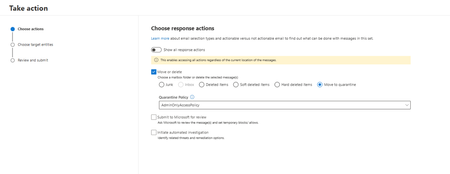
Microsoft introducing Move to Quarantine, a new remediation action in Microsoft Defender for Office 365. It enables security teams to move potentially malicious email messages from users' mailboxes directly to Microsoft Defender quarantine. This provides a safer and more flexible way to contain suspicious messages that bypassed initial detection while preserving the ability to investigate, release, or permanently delete them later. This capability is available with Microsoft Defender for Office 365 Plan 2, including eligible Microsoft 365 subscriptions that include Plan 2. Rollout schedule General Availability (Worldwide): Beginning in early November 2026 and expected to complete by mid-December 2026 Remediate malicious email that was delivered in Office 365 - Microsoft Defender for Office 365 | Microsoft Learn145Views0likes0CommentsExchange Web Services Enters the Final Mile
Exchange Web Services has entered its final mile, and Microsoft is now prompting Microsoft 365 tenants about the need to find and update EWS applications. All is well if the EWS usage report in the Microsoft 365 admin center lists nothing or a set of known applications, but only six months or so is available if some unidentified or unknown apps are listed. Time is running out and April 1, 2027 will come very quickly. What’s your tenant’s status? https://office365itpros.com/2026/10/23/exchange-web-services-final/52Views0likes0CommentsHow to Record Long Term Statistics About Mail Flow Rule Reports
A question about an article describing how to use a mail flow rule to suppress inbound email from spammer domains led to a discussion about gathering statistics over a longer period than the ten days allowed by the Get-MailDetailTransportRuleReport cmdlet. The solution is a scheduled Azure Automation runbook to update a CSV file stored in SharePoint with weekly statistics. Over time, data accrues to support statistical analysis. The solution works, with some care taken with Graph SDK Files cmdlets. https://office365itpros.com/2026/10/22/mail-flow-rule-long-term/41Views0likes0Comments
Exchange RFC 6710, RFC 6758 and RFC 4021 compliance
I need to verify whether Exchange Online supports the following SMTP extension RFCs: RFC 6710 - Simple Mail Transfer Protocol Extension for Message Transfer Priorities (MT-PRIORITY) RFC 6758 - Tunneling Plaintext Authentication Credentials Using TLS (CRAM) RFC 4021 - Registration of Mail and MIME Header Field Names Specifically, I need to know: Are these RFCs implemented and advertised in the Exchange Online SMTP EHLO response? Is there official Microsoft documentation that lists the complete set of supported SMTP extensions for Exchange Online? If these RFCs are not supported, is there a published list of unsupported RFCs or a roadmap for future implementation? Context: I'm integrating third-party mail systems that require RFC 6710 (MT-PRIORITY) support for priority message handling. Currently, Microsoft documentation only references RFCs 3030, 2920, 6698, and 8461 as supported extensions, but there is no comprehensive list of unsupported RFCs. Any clarification or documentation would be greatly appreciated.46Views0likes0Comments
Accepted Domain Verification Causes Mail Flow Failure to Google Workspace Recipients (No MX Changes)
Scenario Source: - Google Workspace (production) - All users actively using Gmail Target: - Microsoft 365 tenant - Existing Exchange Online users Actions Performed 1. Added the production domain to Microsoft 365. 2. Added only the TXT record required for domain verification. 3. No MX, SPF, or other mail-routing records were changed. 4. Domain verification completed successfully. Observed Behavior - Users in the Microsoft 365 tenant could no longer send email to recipients hosted in Google Workspace using the same domain. - Google Workspace users continued to receive email from external senders. - MX records remained pointing to Google Workspace. Testing Performed 1. Removed the domain from Microsoft 365. Result: Mail flow to Google Workspace users worked normally. 2. Added the domain and TXT verification again. Result: Mail flow failure immediately reoccurred. 3. Repeated the test multiple times with consistent results. Question Is this expected behavior when a domain becomes an accepted domain in Exchange Online, even if MX records remain pointed to Google Workspace? Has anyone experienced similar recipient-resolution or routing behavior during Google Workspace to Microsoft 365 migration preparation?88Views0likes0CommentsMicrosoft Finally Makes Send Mail from Alias Generally Available
Nearly five years after going into preview, Microsoft has made the send from alias feature for Exchange Online generally available. It’s a very useful feature that eliminates the need to use a shared mailbox to be able to send messages with different email addresses. Microsoft has closed some functionality gaps since the preview started, but sending from an alias is not the same as sending from a mailbox’s primary SMTP address. Some user training might be necessary! https://office365itpros.com/2026/10/09/send-from-alias-finally-ga/193Views0likes0CommentsWhy do Apple macOS and Ubuntu clients display Exchange meeting times one hour earlier than scheduled
If a meeting is generated from Apple macOS and Ubuntu clients showing the meeting time as one hour earlier than the actual scheduled time email solution is exchange server 2019, what will be the issue.225Views0likes1Comment