exchange online
3086 Topics
550 5.7.705 Tenant Email Block 55+ Hours - Support Unresolved
Our M365 tenant (labaradorpake.onmicrosoft.com) has been blocked from sending outbound email for over 55 hours with error 550 5.7.705 Access denied, tenant has exceeded threshold. Despite multiple support tickets and promises of 24-hour resolution, the block remains active. **Error Details:** - NDR: 550 5.7.705 Access denied, tenant has exceeded threshold - Scope: External outbound email only is blocked; internal tenant-to-tenant email works fine - Microsoft Defender Restricted Entities page shows 0 restricted users — the block is at tenant level, NOT user level - No transport rules exist that could be blocking outbound - No alerts in Exchange Admin Center **Timeline:** - June 19: Support ticket #2606190040005588 created, agent Manisha confirmed remediation complete and promised block would be lifted within 24 hours - June 21 (55+ hours later): Block STILL ACTIVE. Manisha has not responded to follow-ups. - June 21: Created 2nd ticket #2606210040000778, assigned to agent Odunayo — no action taken - June 21: Created 3rd ticket #2606210040000844 with phone callback request — no callback received yet **What we have tried:** 1. Three Microsoft support tickets (all Sev C) 2. Escalation emails to agent, tech lead, team manager (all bounce due to tenant block preventing outbound email) 3. Support Assistant chat bot — cannot escalate to human agents 4. Azure Portal support — No Access for this tenant tier 5. getsupport.microsoft.com — No Access 6. Microsoft Learn Q&A post: https://learn.microsoft.com/en-us/answers/questions/5926147 7. Phone callback requested on 3rd ticket — still waiting **Critical Impact:** The tenant cannot send ANY external email. All outbound messages to external recipients bounce with 550 5.7.705. This is a complete business email outage that has persisted for over 55 hours despite Microsoft support confirming remediation was complete. Has anyone experienced a similar tenant-level block (550 5.7.705) that took this long to resolve? What escalation paths actually work when support agents are unresponsive? Any advice on getting this block lifted urgently would be greatly appreciated. Cross-posted from Microsoft Learn Q&A: https://learn.microsoft.com/en-us/answers/questions/5926147256Views0likes3Comments
Exchange 2010 to Microsoft 365 Migration – Recommended Approach and Tools
I’m looking for guidance on migrating Exchange 2010 (on-premises) to Microsoft 365 / Office 365. Is a direct migration from Exchange 2010 supported, or is an intermediate hop (such as upgrading Exchange or setting up a hybrid configuration) required? Additionally, could you please recommend any reliable tools that can help with this migration? I also have a few PST files that need to be migrated as part of the process. I’d appreciate insights on best practices, common challenges, and lessons learned from real-world migrations. Thanks in advance for your help.854Views0likes5Comments
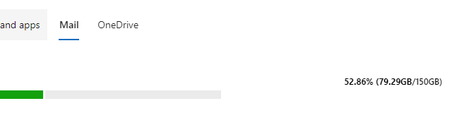
Anyone else seeing mailboxes with Exchange Online 2 showing they now have 150gb?
Noticed this this morning. I understand that Basic was going to go to 100gb as they roll that out, but did they also increase Exchange 2 to 150gb to make it still worth paying for it vs an archive license? Or is this a glitch that is going to give us a problem later when people blow through the limit and MS corrects it? This example mailbox is licensed with Business Basic, then Exchange Online added on. It now shows 150gb. I'm seeing this for every user in every tenant I have looked at so far.912Views1like5Comments