excel
103 Topics
The Copilot Agent Mode icon in Excel, which I was using until a few days ago, is no longer visible.
I am a user of Microsoft 365 Premium on the Beta Channel. I was able to use it until a few days ago, but the Agent Mode that was visible until recently (as shown in the snapshot) is no longer visible. Why is this happening?182Views1like2Comments
Insider status / membership / icon disappear
After installin Visio 2024 I lost my Insider status I have Microsoft 365 Subscription (consumer) (actually I have more subscriptions but active is consumer) Formarly I had joined Insider but now there is missing any connection to insider HOw to get back Insider Henn (very long time insider and MCT since 1996)207Views0likes2Comments
(Beta) Color issues with Dark Mode in Excel
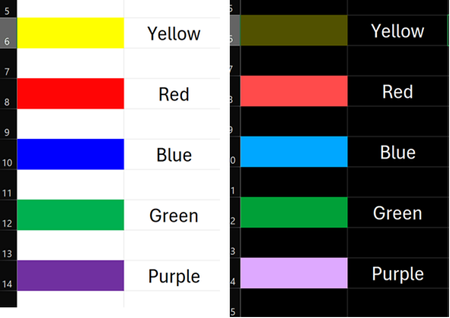
I just downloaded the insider update that allows for a full dark mode in excel. A couple of things I've noticed: Black and white are inverted. If you select black for a font color, cell fill, or border color, you'll end up with white, and vice versa. If someone is in dark mode, they're going to get awfully confused when they try to change various colors of the cells they're working in and aren't getting the color they want to pick, especially for those who need to use specific colors in their spreadsheets for whatever reason. This isn't so bad with black and white; annoying as it is, you can still at least remember to choose black when you need white or white when you need black. But when you choose other colors, you often end up with a color that is vaguely in the family of the color you selected, but not really. Trying to select the standard yellow used for highlighting, and you end up with an almost pale gold-like color. An example of what happens with a few colors is shown in the picture, but every color is affected to some degree. This makes the dark mode feature almost entirely useless for those who rely on colored conditional formatting in some or all of their spreadsheets, as the colors selected in dark mode end up being completely different from the color you actually wanted to select, and it's nearly impossible to try to figure out which color you have to select to get something that even resembles the color you actually want. The colors of individual elements of a spreadsheet (Font color, highlighting, borders, etc.) should not be altered this severely based on whether or not dark mode is turned on.610Views0likes1CommentData Types and StockHistory Missing in Beta
I recently upgraded to latest beta release update (Version 2502 - Build 18502.20000) and noticed that Data Types have now disappeared from the Data Ribbon in Excel. STOCKHISTORY formula still shows up as a usable formula, but when I enter the fields, I now get a #CONNECTION error. Has Stocks as a data type now been removed from the newest versions of Beta or is this a bug? Anyone else experience the problem?152Views0likes0Commentshow to know if I should have a function / feature in Excel beta?
Hello, I am new to insider program. I have just set up a beta channel in my excel on a computer and I can happily try out some functions which are only available in beta channel. Now my questions are: - where can I have infos which functions are currently available in beta only? - how come there are functions I've seen from youtubers I can now also try, but others are unavailable. Like I see the REGEX functions, but not the TRANSLATE. Some other features, like the very newly published :. annotation is also missing for me. Thanks, SzilviaSolved500Views0likes2CommentsNew regex modes for XLOOKUP and XMATCH
Microsoft 365 Insiders, Great news for Excel enthusiasts! Get ready to enhance your Excel game with regex modes for XLOOKUP and XMATCH. Whether you’re pulling specific data or locating exact matches, these updates help parse text more easily. Jake Armstrong, Product Manager on the Excel team, breaks it all down for you in our latest blog: New regex modes for XLOOKUP and XMATCH Thanks! Perry Sjogren Microsoft 365 Insider Community Manager Become a Microsoft 365 Insider and gain exclusive access to new features and help shape the future of Microsoft 365. Join Now: Windows | Mac | iOS | Android484Views1like1Comment