excel online
634 Topics
Unable to add data to SharePoint
Hello, I am fairly new to SharePoint. I want to export my data from an Excel workbook onto a SharePoint list, the data has around 50k rows and about 100 columns. SharePoint is not permitting me to upload such a big file. How do I work around this?615Views0likes0Comments
Sharing data between excel tables in SharePoint
Hi All, This might have been answered somewhere else but can't find the answer. I am trying to link data between Excel tables in SharePoint. Basically, I have multiple workbooks where I use a VLOOKUP formula to pull data from the other workbook. Problem is it only works when all workbooks are open (e.g. the workbook that has the information in originally). I thought with it being on SharePoint it would pull the information automatically without the need to keep the workbooks open. I even thought it would work on Excel online, but no luck. Can anyone help?810Views0likes0CommentsPost a Teams message, when Excel online criteria is met.
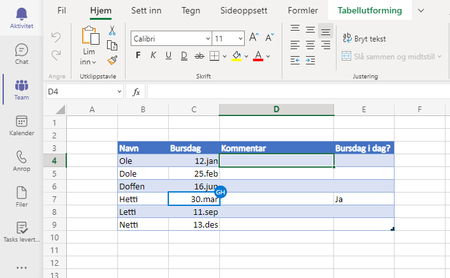
Hi, The idea/problem I would like to solve is to post a message everyday if a criteria is met. Th Excel online Sheet Column "Bursdag i dag" (Birthday today) is set to yes ithe person have birthday. The flow: Scheduled to run everyday Check if the column is "ja" Post a message at Teams: I Guess the way I check column value in Excel is wrong here. Is this scenario possible? If yes, how do I configure it? Best Regards - GeirUsers seeing different document version
Hi, I have two users who regularly access an excel spreadsheet in the browser, usually at the same time. They have noticed that they often see different versions of the spreadsheet, for example user1 sees the version that he edited the previous day and user2 sees a version where those edits are not showing. We have a workaround in place where they can check through the version history and restore the version that needs to be in place. Also, the correct version apppeared for both users after about 24 hours without any action being taken. Has anyone experienced the same issues?4.8KViews0likes4Comments
All cells with Formulas showing up blank in read-only view
I have a workbook that I share with several other people in read-only mode in Excel Online. When they open the page, any cell with a formula just shows blank. Even simple ones like =Now(). If I open the book myself it updates and then shows up proper in read-only view, but after awhile they show up blank again. The workbook is being written to by an external script but everything showed up fine for months, this problem only showed up in the last week or so.5.3KViews0likes5Comments
How do I create a dropdown selection with that selection determining other cells?
Hi, I'm creating a document, see attached, where i want to have a selection of clients via a drop down and whatever client i choose (maybe out of a list of 6) this in turn will automatically fill out the contact name, mobile, telephone based on who the client is. (i.e if i pick harrys as a client Ann would appear next to contact, 123 next to mobile... etc) How would I do this? Thanks, Bailey100Solved6.5KViews0likes6Comments
Formula IF not taking another formaula result as a value
Hi everyone, I would like to use the following formula (1): =IF([@[Unit Sold]]>[@Ecom];[@Ecom];[@[Unit Sold]]) knowing that [@[Unit Sold]] has the following formula (2): =IFERROR(VLOOKUP($B10;'Unit Sold W1-W25'!$A$1:$M$4932;3;FALSE);"0") Ideally I wanted the formula 1 to understand the value 0 of the formula 2 when it is, but it doesn't So I have my high value showing instead of the 0. I could copy past [Unit Sold]] as value, but Im trying to build an automated file so I would like to find another solution and keep the formula 2 in my cells Thanks in advance !897Views0likes2CommentsResult of a formula not considered as a value
Hi everyone, I would like to use the following formula (1): =SI([@[Unit Sold]]>[@Ecom];[@Ecom];[@[Unit Sold]]) knowing that [@[Unit Sold]] has the following formula (2): =SIERREUR(RECHERCHEV($B10;'Unit Sold W1-W25'!$A$1:$M$4932;3;FAUX);"0") Ideally I wanted the formula 1 to understand the value 0 of the formula 2 when it is, but it doesn't So I have my high value showing instead of the 0. I could copy past [Unit Sold]] as value, but Im trying to build an automated file so I would like to find another solution and keep the formula 2 in my cells Thanks in advance !898Views0likes1Comment
Helping find the Beta (Variance and Covariance) between sets of data based on date and category
Hi Everyone, I have a large data set which involves the return for a category as well as its benchmark. I wish to find the correlation or beta between the two. The given formula is COVARIANCE.P(stock return, index return)/VAR.P (Index Return), however as i have large number of stocks (categories), i also have mutiple benchmark returns, which apply to different stocks. Is there a formula which will select the data for this formula by matching the two categories. Eg a domestic share to the domestic share index. I have attached an example and looking for any suggestions. Thank you kindly.859Views0likes0CommentsSort data by categories between certain dates.
Hi, I have a large amount of data which involves categories and transaction. I would like to find a formula which will automatically find the relevant information between certain date periods. I would then like it to be sorted by each category. I have attached an example. Can someone please assist. Kind regards,Solved3KViews0likes13Comments