excel on mac
2749 TopicsExcel Community: Simplifying Spaces and Labels
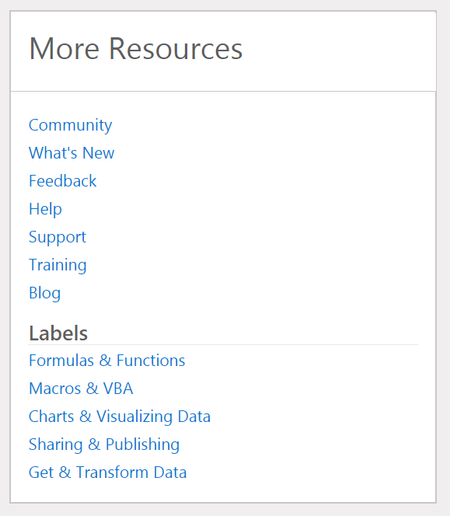
Hi all, As you may have noticed already, we as the Excel Team have done a bit of "spring/summer cleaning" for the community. We have received feedback that the number of "spaces" was simply too many at nine, so we have pared things down. Now, there are three community spaces: Excel: this will be the primary place for posting content, as many of the old spaces have been migrated as labels will find a good home here BI and Data Analysis: this will be a good place for posting about tasks and questions that cut across Excel, Power BI, and other topics in this realm Resources and Community: this will increasingly become a place for folks to share sample files and templates with each other Q: What happened to the other spaces that used to exist? A: They have since been rolled up as "Labels", which you can find in the "More Resources" sidebar under "Labels" of any of the three spaces mentioned above. Look for these on the right side: Please let us know if you have any other questions. Thanks for reading!4.7KViews5likes25Comments
Stock prices not getting updated
Hello, my stock prices are not getting updated on excel. The error message shows: "COULDN'T REFRESH DATA TYPES. Sorry, our server is teporarily having problems. We're working to fix it" Can you please let me know if this will really be fixed? thanks618Views4likes4Comments
Get external data from web not showing
Hello, I am trying to link external information from a url to my Excel spreadsheet, but for whatever reason the "Get data from Web" option is not showing up on my menu. Does anyone have any idea why this might be happening? See attached a screenshot of what I'm getting. Shouldn't that option be appearing between the "From HTML" and "From Text" options? I'm on Microsoft Excel for Mac, version 16.23 (19.03.09) Thanks in advance, Pedro143KViews4likes35Comments
Excel 365 on Mac - Issue with refreshing data types
I am getting error message "couldn't refresh data types, we need to fix your account, sign out and sign in again. I am getting this message after upgrading to MacOS Ventura 13. signing out and signing in again didn't resolve, anyone facing similar issues. Do we have a resolution to this Regards Ramesh5.3KViews4likes20CommentsHave an Excel question?
Ask the Excel team anything. Get your questions ready for the Excel team! Join our Reddit AMA this Thurs. November 17th at 12pm EST. https://www.reddit.com/r/excel/comments/5aonww/microsoft_excel_product_team_ama_november_17th/ Related Excel Resources: Besides this community we also have a large set of related resources for Excel. From training videos to Hands on labs, from support to feature request. Here are the top links for Excel: Excel Basics Guided Learning: Excel LinkedIn Learning Videos Excel Documentation More Excel Learning YouTube Videos Excel Intermediate-Advanced Guided Learning: Data Analysis using Excel at edx.org Analyzing and Visualizing Data with Excel at edx.org Excel Hands On Labs Analyzing Data in Excel Hands On Labs Get and Transform Data Hands On Labs Excel Data Model Hands On Labs Support Documentation: Excel Documentation What is new in Excel Product and bug support: Excel Support Community: Excel Community Request a Feature: Excel Feature Requests Blog: Excel Blogs Demo Files: Excel Demos Download trial version of Excel Try Power BI for pre-built dashboards On Demand Excel session from Microsoft Ignite: Excel sessions at Microsoft Ignite 20161.4KViews4likes0CommentsFill BLANKs down, up or both in column(s) - similar to Power Query
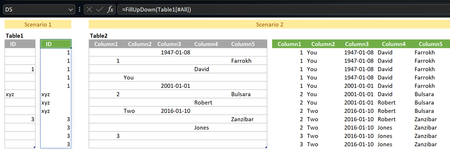
Hi Looked at +/- replicating Fill Down and Fill Up functionnalities in Power Query with a LAMBDA. My attempt below: // FillDownUp: =LAMBDA(array, LET( Data, DROP(array, 1), DataCols, COLUMNS(Data), FillCol, LAMBDA(array, SCAN( IF( ISBLANK( TAKE(array, 1) ), XLOOKUP(FALSE, ISBLANK(array), array, ""), "" ), array, LAMBDA(seed,x, IF( ISBLANK(x), seed, x)) ) ), FillStack, LAMBDA(seed,col, HSTACK( seed, FillCol( CHOOSECOLS(Data, col) ) )), DataFilled, IF(DataCols = 1, FillCol(Data), DROP( REDUCE(0, SEQUENCE(DataCols), FillStack),, 1) ), VSTACK(CHOOSEROWS(array, 1), DataFilled) ) ) Open to alternatives...Solved4.7KViews3likes15Comments
WHERE IS THE "Check for Issues" button on the INFO TAB?????
Is Microsoft kidding me??? I spent the last HOUR troubleshooting with THREE different technicians where this option is and NONE of them knew how to troubleshoot! I am using EXCEL on a MACBOOK PRO. When you navigate to FILE > INFO, a panel shows up that includes a "Check for Issues" button, but NOWHERE is it shown. To make things EASIER for you, go to this link: https://www.exceldemy.com/excel-hidden-rows/ Hit the CMD + F (if you're using a MAC), On the Search Bar type in: Delete Excel Hidden Rows It will navigate you to the TITLE SECTION with that exact text. Read the section within that titled: 2.1 Use ‘Inspect Document’ Option to Delete Hidden Rows in Excel You will see exactly what I'm talking about. My issue: THERE IS NO "CHECK FOR ISSUES" OPTION VISIBLE. WHERE IN THE F-CK IS THAT OPTION? I AM PAYING EXCEL A $100 YEARLY SUBSCRIPTION JUST TO HAVE THEM MAKE ME DO THEIR JOB FOR THEM. THIS DOESN'T MAKE ANY SENSE! IF THIS ISN'T IMPLEMENTED, THEN IMPLEMENT IT! HOW CAN MICROSOFT MAKE MAC USERS PAY FOR A PROGRAM WHERE THEY DON'T EVEN ADD THE FULL FUNCTIONALITIES FOR A WINDOWS COMPUTER? WHAT THE HECK?????8.3KViews3likes3CommentsCan Excel raise a warning when I am saving a csv file with multiple sheets?
Excel doesn't raise any exception while storing a csv file with multiple sheets, but once the file is saved with multiple sheets, closed and opened again, only the last active sheet is saved and others are discarded. If other sheets are discarded anyway, then when even let create additional sheets? There is a warning that says "possible data loss" but it would be nice to have a warning that says other sheets would be discarded.6.8KViews3likes6Comments