error
27 Topics
Booking Error Message
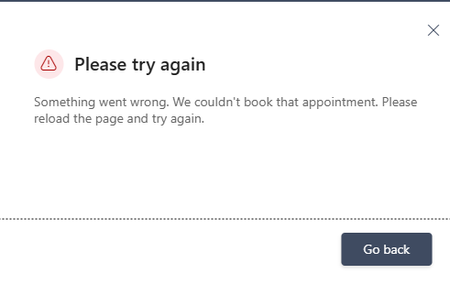
Microsoft Bookings public booking page displays “Something went wrong. We couldn't book that appointment,” but the appointment is actually created in the Bookings/Outlook calendar. The issue occurs even when using different browsers and Incognito mode. I checked availability and other things, everything looks fine. How to fix this?307Views0likes3Comments
What's wrong with my XLOOKUP formula?
I'm trying for the first time to define cells in an Excel worksheet with values selected from list, which is defined by a table. The table is in the same worksheet, to the right of my data columns. I was OK until I tried to make the cell look up the value in one table column (an ID) and display the corresponding value from another column. I'm defining the cell with data validation, type list, using this expression for source: =XLOOKUP(D2,CatTable[ID],CatTable[Categories]) Where D2 is a data cell, CatTable is the table's name, and ID and Categories are respectively the names of the ID and display columns. When I click OK, Excel says "There's a problem with this formula" (followed by some useless stuff that assumes I don't know what a formula is and entered one by mistake). What is wrong?85Views0likes3Comments
My printers don't work after I reinstalled Microsoft 365
I recently had to reinstall Microsoft 365. The software now works quite well, but I can't print a document in Microsoft Word or from anywhere in Windows 11. I have two printers: an HP Envy Inspire 7900e AIO and a Brother HL-L2420DW. Both printers worked before the reinstall, and both printers work without any problems on the Mac side of my laptop. (I use a Mac with Parallels to run Windows 11.) When I try to print from MS-Word in Windows 11, I select a printer from the list in the Print dialog. Then I have to wait for a printer connection. A few seconds later, I get a notice that the printer is "in an error state." My first thought was that I'll have to reinstall my printers in Windows 11, but I went looking for help. An AI helper I've consulted a few times walked me through a labyrinth of steps to fix the problem. The steps involved using the Command prompt or PowerShell (Administrator), but so far I've not had any luck. Seems to me I'll do as well by simply removing and reinstalling the printers. But that thought brings up more questions. I installed both printers using the manufacturer's instructions. For example, the HP AIO I installed with the full-feature software. My question: Do I need to do anything special before I reinstall the printers? Do I simply go to Printers & Scanners and delete my printers and then reinstall them? Also, will any of this affect these same printers on the Mac side?241Views0likes2Comments
Extreamly frustrated that I cannot get help for a serious problem
What the devil do I have to do to get help with a serious problem with the cloud for our non-profit business account for our small charity. I have 'lost' sight of a large number of documents from the cloud since we had to start paying for our subscription. After many chats with ai and emails and the problem being escalated I have now been told to go back to where I started at Non-profit support and put a support ticket in. Doesnt matter what machine I use, what browser I use, what network I use, I cannot get past the submit form page and keep getting an error message - this has been going on for weeks now. Ive tried ringing and the call keeps dropping while on hold - no one, no-one will call me about the problem and no one seems interested in dealing with the problem and its not just affecting me on our system either. Please will someone tell me how to get to a human for support without using an AI help system,222Views0likes1CommentMicrosoft Word - Footnote remains on the original page after moving the original reference up
Issue I encountered an issue in Microsoft Word where moving the original footnote reference to an earlier location in the document did not move the footnote itself. The footnote remained on its original page even though the reference had been moved. This was particularly problematic because the same footnote was referenced multiple times throughout the document using cross-references. Cause The footnote is anchored to the original footnote reference in the main text. In my case, Word had somehow lost track of that original anchor, so the footnote stayed on its original page while all cross-references continued to point to it. Solution Hold Ctrl and click the misplaced footnote reference. Word jumps to the original footnote reference in the main text. Cut the original footnote reference (Ctrl+X). Paste it in the correct location using Keep Source Formatting. Press Ctrl+A, then F9 to update all fields. Verify that: the footnote has moved to the correct page, the numbering has updated correctly, all cross-references still work. In my document, one footnote had previously lost its connection to the original reference, so its numbering did not update automatically. That one had to be repaired manually. Important Do not create a new footnote or copy the footnote text itself. Move the original footnote reference in the main text. This preserves the existing footnote, its numbering, and every cross-reference that points to it. I hope this helps someone else. It took me quite a while to figure out what was happening.231Views0likes1Comment
Outlook "Classic" issues
Without any changes being made to my system, I am suddenly getting the following error message when trying to send/receive mail. Task 'email address removed for privacy reasons: Folder:Inbox Check for new mail.' reported error (0x800CCC0E) : 'Outlook cannot download folder Inbox from the IMAP email server for account email address removed for privacy reasons. Error: Cannot connect to the server. If you continue to receive this message, contact your server administrator or Internet service provider (ISP).' I have followed all of the suggested solutions that I could find including editing the registry but nothing is working. Hope someone can help as thjis is a big problem for me.Solved230Views0likes2CommentsWhy is Excel macros sometimes missing ?
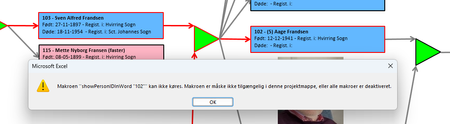
I have an excel file with a lot of rectangular shapes showing a tree structure for a family. When the user clicks on one of the rectangulat shapes the 'story' of that person opens up in a Word dokument. BUT ... Most often the macro 'assigned' to the OnAction WONT run - instead this message comes up: The macros is NOT shown when I "show macros" but it IS present in the VBA section when I press alt+F11 ! When it's working it's most often reight after a reboot og the machine - then it maybe works in 10-30 minuts and then the problem is back again ! I HAVE chesked the security setting allowing macros to be activated ! I have tha SAME file running under Window 10 for years WITHOUT any problems !!!! I can see out there that people FOR YEARS have had similar problems with missing macros - but unfortunately I found no solution ! What the _BEEP_ is wrong here ?582Views0likes9Comments
OneDrive, SharePoint Offline access through File explorer
The connection through a short cut to file explorer is bugged and MS does no seem any keen to resolve this. I took a business support ticket only to be told that the issue is with development and they do not have any indication that it will be addressed any time soon. Any associated applcation with Office 365, seems will not be attempted to be bug fixed. This is very unfortunate for those who took for granted that MS will support.53Views0likes0Comments
Error installing Apps 365, command not supported.
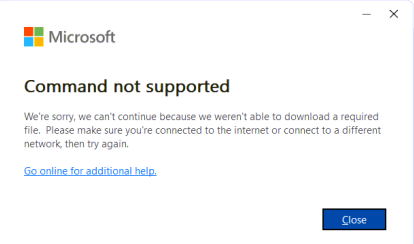
I was performing an Online Repair for a user. It did the uninstall fine, but then threw this error. I tried to reinstall, same error. Used the MS Cleanup tool, ran SFC, cleared temp files, cache... Internet connection is stable. Disabled security software (Zscaler). I'm out of ideas. I'm hoping someone has seen this before. Thanks for any help!Solved419Views0likes2CommentsBioEnrollmentHost.exe failes setting up Windows Hello (August 2025)
Hello, when trying to add another fingerprint, there is a failure. The editing interface does not open - it disappears without displaying an error message. The eventlog shows the error: Log Name: Application Source: Application Error Date: 25.08.2025 9:09:22 Event ID: 1000 Task Category: Application Crashing Events Level: Error Description: Faulting application name: BioEnrollmentHost.exe, version: 10.0.26100.4484, time stamp: 0x3a2c5e36 Faulting module name: Windows.UI.Xaml.dll, version: 10.0.26100.4946, time stamp: 0x4374ba0f Exception code: 0xc000027b Fault offset: 0x0000000000903d13 Faulting process id: 0x3B10 Faulting application start time: 0x1DC158F2982572A Faulting application path: C:\Windows\SystemApps\Microsoft.BioEnrollment_cw5n1h2txyewy\BioEnrollmentHost.exe Faulting module path: C:\Windows\System32\Windows.UI.Xaml.dll Report Id: da35663e-a5e8-4638-b202-5afed9fd901c Faulting package full name: Microsoft.BioEnrollment_10.0.19587.1000_neutral__cw5n1h2txyewy Faulting package-relative application ID: App There is no problem with OS integrity > PS C:\WINDOWS\system32> DISM.exe /Online /Cleanup-image /Scanhealth Deployment Image Servicing and Management tool Version: 10.0.26100.1150 Image Version: 10.0.26100.4946 [==========================100.0%==========================] No component store corruption detected. The operation completed successfully. PS C:\WINDOWS\system32> PS C:\WINDOWS\system32> DISM.exe /Online /Cleanup-image /Restorehealth Deployment Image Servicing and Management tool Version: 10.0.26100.1150 Image Version: 10.0.26100.4946 [==========================100.0%==========================] The restore operation completed successfully. The operation completed successfully. PS C:\WINDOWS\system32> PS C:\WINDOWS\system32> sfc /scannow Beginning system scan. This process will take some time. Beginning verification phase of system scan. Verification 100% complete. Windows Resource Protection did not find any integrity violations. PS C:\WINDOWS\system32> chkdsk c: /scan /perf The type of the file system is NTFS. ... Windows has scanned the file system and found no problems. No further action is required. ... PS C:\WINDOWS\system32> PS C:\WINDOWS\system32> systeminfo | findstr /B /C:"OS Name" /B /C:"OS Version" OS Name: Microsoft Windows 11 Enterprise LTSC OS Version: 10.0.26100 N/A Build 26100 PS C:\WINDOWS\system32> Any ideas?916Views0likes4Comments