entra admin center
30 Topics
M365 Admin Center Global Administrator Lockout
Hello Microsoft Community, I am seeking urgent assistance and guidance regarding a critical Microsoft 365 tenant lockout that has been ongoing for several days without a resolution or proper communication from the support team. Our organization manages Microsoft 365 services for a business with more than 200 active users who depend on Microsoft 365 for their daily operations. Issue Description We have been locked out of our Microsoft 365 tenant's administrator account. This prevents us from properly managing our Microsoft 365 environment and restoring normal access to essential business services. Our business-critical data, including important documents and operational information, is stored in SharePoint. The inability to access and manage these services has significantly disrupted our business operations. Microsoft Support Ticket References We have raised multiple support tickets and followed up repeatedly, but the issue remains unresolved. Tracking ID: 2610050040001149 Tracking ID: 2610090010001066 Tracking ID: 2610050040001222 Despite these support cases and repeated follow-ups, we have not received a satisfactory resolution or a clear recovery timeline. Support Experience So Far Following a discussion with the support team, we were expecting a call to assist with unlocking the administrator account and providing a temporary password through the appropriate recovery process. However, we have not received the expected call or a meaningful update. Our main concerns are: Complete loss of access to the Microsoft 365 tenant administrator account. More than 200 users affected by the ongoing incident. Critical business data and documents stored in SharePoint. Multiple support tickets without a concrete resolution. Lack of clear communication regarding the root cause and recovery timeline. No clear escalation path or confirmation of the next recovery steps. Our Concerns We understand that technical issues can occur, but leaving a business-critical environment inaccessible for an extended period without meaningful updates is extremely concerning. We purchase Microsoft 365 licenses through a partner and expect appropriate technical support and escalation assistance when critical incidents occur. Our organization previously used Google Workspace and recommended migrating to Microsoft 365 because of its enterprise capabilities. This incident has seriously affected user confidence and business continuity. If access cannot be restored promptly, we may have to consider alternative email hosting arrangements to minimize further disruption. Request for Assistance I would appreciate guidance from Microsoft engineers, Microsoft 365 administrators, and community members who have experienced similar situations. What is the appropriate escalation process when all available tenant administrator accounts are inaccessible? How can we expedite tenant ownership verification and administrator account recovery? Is there a dedicated Microsoft team that handles critical tenant lockout incidents affecting business operations? What is the recommended recovery process when the administrator cannot access the Microsoft 365 Admin Center? How can we obtain urgent assistance when multiple support tickets and repeated follow-ups have not resulted in a clear resolution? Can the three referenced support tickets be escalated for urgent review by the appropriate Microsoft support team? We are not looking for workarounds that compromise tenant security. We need Microsoft's official recovery process to restore authorized administrative access safely. Microsoft Support Team: If any Microsoft support representatives are monitoring this community, we would appreciate your guidance on the appropriate escalation channel for this incident. We can provide additional information privately through the appropriate official channels. Thank you for your time and assistance. Any guidance that helps us restore our services and protect business continuity would be greatly appreciated. Best regards, Microsoft 365 Tenant Administrator201Views0likes1Comment
Microsoft Entra and logging in
Hi there, I signed up for a free trial of M365 with my iCloud email. It showed me what my login would be, i.e. John@<companyname>.onmicrosoft.com I never received an email to my iCloud account with any type of confirmation that the trial was active or my login info. I did not screenshot the login as I thought I would get an email with it. How can I retrieve that information as I obviously cannot login with my iCloud account. Recently I have been getting emails like these to my iCloud. You have a new recommendation for Arlo inc Do not allow users to grant consent to unreliable applications See why this recommendation was generated for your tenant and how to remediate it in the https://entra.microsoft.com/#view/Microsoft_AAD_IAM/RecommendationDetails.ReactView/recommendationId/2bc392f3-b17c-44ce-bb25-b52a2b095d0b_integratedApps/source/email. https://go.microsoft.com/fwlink/?linkid=2260505. But again, I have no idea what my login is. Any help would be greatly appreciated. My trial has been active for a few days now and I am running out of tie with it. Sincerely, John924Views0likes2Comments
Microsoft SSO SAML Assertion Claims
While getting the assertions back from SAML Assertion Claims, I have configured the user.country & assigned some value in the field. But while getting the claim we are reading the some different value like "IN" ? can I know does the user.country claim supports or not during the claim?503Views0likes4Comments
MS support "unable to reach you loop" for locating only GA account.
For 5 day in a row I've received this response to my support case "I am writing this email in reference to case ID 2609070010000261. I was unable to reach you at your contact phone number provided. Please let me know the best time frame and phone number to call you back by replying to this email. " I do not have any missed calls on my phone, I have provided an alternative number, I have stated what I'm looking for in the email response, I have tried calling the number in the email but get to a " provide an update online " and hung up prompt. I have a tenant Ive paid for. I'm trying to attach a domain that is my mostly unique last name to it that I forgot I had on another tenant ( that wasn't paid for yet and has my first name last name) and I dont know the GA username on the tenant, I've tried every iteration I can think of for a username. I'd just love for a password reset email be sent from that tenant and I think I would get the email, reset it, release the domain, and move on. however I dont see that tenant's onmicrosoft url in any of my emails either if that's a possible secondary issue. If anyone has suggestions for getting into the tenant or getting something more than " unable to reach you" I'd greatly appreciate it!284Views0likes1Comment
M365 only admin locked out MFA error 53003
I am learning this the hard way....so here it goes. Currently I am locked out of as the only admin on the tenant with error 53003. I was updating some Microsoft MFA default policy settings in Entra and mistakenly deleted the admin user from the exclusions list, and got locked out. Thankfully I have another tenant, not as big the one locked out. Initiated several support tickets for which everyone calls, and despite of subline mentioning the issue says that they have to assign this ticket to Entra. Then the ticket gets updated and noone has been assigned every since. I have initiated severity A support tickets from Azure portal but no one has called in last 24 hours to help. We area business with Business Premium licenses with over 20 users, and now completely locked out. I have looked almost everywhere online. There is no phone number that takes you to a support agent - PLEASE HELP........814Views0likes3Comments
Looking for Microsoft 365 best practices for a large dynamic company group
Looking for Microsoft 365 best practices for a large dynamic company group I'm a Microsoft 365 admin trying to figure out the best architecture for a company-wide group (100+ users) and I'm wondering if there's a better approach than what I'm currently doing. What I need I want a single company group that can: Automatically include users through dynamic membership Share SharePoint sites, files, OneDrive content, Teams resources, etc. Allow sending company-wide emails Allow sending required Outlook meeting invitations (not optional) Have moderation/approval for announcements, meeting invites, or posts Allow certain trusted users to bypass approval while everyone else requires approval Scale as employees are hired/terminated automatically Current setup Dynamic Distribution List Used for company-wide emails and Outlook meeting invites. Membership is dynamic using an Exchange recipient filter based on US users. Private Microsoft 365 Group Used for SharePoint, file sharing, and collaboration. Membership is dynamic through an Entra ID Dynamic Membership Rule. I had to use PowerShell to configure some permissions because the portal didn't support everything I needed. Problems I'm running into I now have two separate groups that should always contain the same people. The Dynamic Distribution List works well for email/meetings but doesn't provide SharePoint, Teams, or file collaboration. The Microsoft 365 Group provides collaboration but doesn't seem to support everything I need for company-wide communication. I haven't found a clean way to have approvers/moderators, while allowing a few designated people to post or send meeting invites without requiring approval. I also haven't found a good way to make Outlook meeting requests "required" from the sender side other than relying on attendees not changing their RSVP. My questions Is there a better Microsoft 365 architecture for this? Should I be using a Dynamic Distribution List, a Microsoft 365 Group, a Mail-enabled Security Group, Teams, Viva Engage, or something else? Is there a supported way to have dynamic membership + SharePoint + company email + moderated announcements/meeting invites all in one solution? How do large organizations typically handle company-wide communications while keeping membership automatic? Is maintaining two dynamic groups (one for collaboration and one for email) simply the recommended approach? I'd love to hear how other Microsoft 365 admins have solved this in production. Thanks!561Views0likes3Comments
Unable to access our Microsoft Entra admin center
We cannot create a support request from the admin center because we cannot sign in Dear Microsoft Support Team, We are unable to access our Microsoft Entra admin center because even our administrator account, email address removed for privacy reasons, is being prompted for MFA, and we do not currently have access to the Microsoft Authenticator method required to complete the sign-in. As a result, we cannot access Entra ID / Microsoft 365 admin settings to reset MFA methods, issue a Temporary Access Pass, or re-register authentication methods for the affected users. Tenant/domain: itieurope.com Affected admin account: email address removed for privacy reasons Issue: MFA is required to sign in, but the Authenticator method is unavailable Impact: We are locked out of the tenant administration portal and cannot manage users or authentication methods We request assistance with one of the following recovery actions: Reset MFA methods for the administrator account email address removed for privacy reasons; or Enable re-registration of MFA for this account; or Provide a Temporary Access Pass or another Microsoft-approved recovery method so that we can regain administrative access to the tenant. We had force majeure, the only authenticator was on the phone, which was destroyed due to an unforeseen situation. (crashed) We are ready to verify domain ownership, provide billing information, tenant details, proof of identity, or any other information required to confirm that we are the legitimate owners/administrators of this Microsoft 365 tenant. Please escalate this as an urgent tenant lockout / admin access recovery issue. Kind regards, itieurope.com email address removed for privacy reasons426Views0likes1CommentMFA alerts for when a alternative phone number is added
Hi, i need to be able to find a way when someones adds a alternative phone number to MFA it sends an alert via email that would go into a shared mailbox but haven't been able to find a way to get the MFA alerts for alternative phone numbers. can someone help please?767Views2likes1Comment
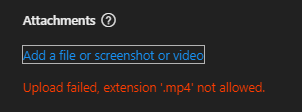
Usable Video Format for Microsoft Support?
I swear the ineptitude of Microsoft support knows no bounds. You give us the option to upload a video, but the format for which the WINDOWS OS's SNIPPET TOOL USES AS WELL AS CIipChamp that is referenced as a program to edit with FROM THE SNIPPING TOOL (which this forum WOULDN'T even allow me to have as a word here...) uses MP4 BUT MP4 IS NOT ALLOWED... I mean seriously who is in charge of this madness!? They should be ejected into the sun for this sort of stupidity, and then the tool tip gives you 0 information as well as the error. So freaking annoying and stupid.565Views1like1Comment