entra admin center
27 Topics
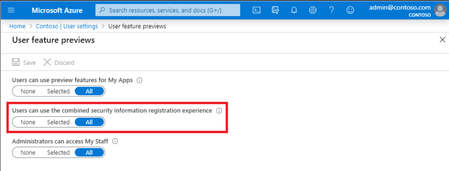
Moved Users can use the combined security information registration experience?
Hello, I am trying set up conditional access at Entra and i have to enable this settings but i cannot find it. By documentation it shout be here but it is not. Azure Active Directory > User settings > Manage user feature settings2.2KViews0likes5Comments
OneDrive for Business contents will be preserved for 300 days
Dear Team, how do I access this below user one drive. USER account has been deleted from the Active Directory. Their OneDrive for Business will be preserved for 300 days. You're the temporary owner of all documents saved to their OneDrive for Business. If you would like to save content beyond the 300 day retention period, you can copy important documents to another location. You can also contact your administrator to reassign ownership to another OneDrive for Business owner. After 300 days, OneDrive for Business will be permanently deleted. Go to USER OneDrive for Business at Regards Niket R2KViews0likes4Comments
O365 SSPR require users to register when signing in
Hi Everyone Can someone please shed some light on this. In Azure SSPR under password reset>registration> require users to register when signing in Yes or No. Below is MS website explanation. Does that mean if I set it to Yes, if users go to office.com they are prompted to register in SSPR? What are the down side of choosing no, https://learn.microsoft.com/en-us/entra/identity/authentication/concept-sspr-howitworks#require-users-to-register-when-they-sign-in if they use modern authentication or web browser to sign in to any applications using Microsoft Entra ID. This workflow includes the following applications: Microsoft 365 Microsoft Entra admin center Access Panel Federated applications Custom applications using Microsoft Entra ID When you don't require registration, users aren't prompted during sign-in, but they can manually register999Views0likes4Comments
Company Rebrand - looking for advise on what needs to change in M365/Azure
Hi experts, our company will change the name soon and I'm trying to find out what all needs to be changed and where 🙂 .... We use M365 / Exchange Online / Sharepoint & One Drive / Azure (have VMs and storage accounts there etc..) and we are hybrid scenario with DC running in Azure changing primary email address - this should not be an issue - I will just register/activate new domain in M365; update proxyAddress in AD to have them synced as "alias" - once prepared, I will just make them a primary when needed for "primary" user name - again... I will just change it to the new one when ready Or - when I change the "default domain" to the new one, will primary username and primary email update automatically for users? What else needs to be modified so that we have sharepoint links, etc showing the new company name? I've will change "Name" in "Org Settings -> Organization Information" in M365 Admin portal I will change "Name" in "Microsoft Entra ID -> Overview -> Properties" (if the change in M365 admin above will not change it automatically) Is there anything else that needs to be changed? Will EXISTING SharePoint links that are shared with partners, for example, be unusable after company name changes and new folders needs to be re-shared? Appreciate your advise on this... Have still few weeks for this to happen so want to be prepared as best as I can 😉999Views0likes2Comments
Phishing and Email Security
A user in our org was phished. We are making changes on swapping to phishing resistant MFA but what I am more concerned about is how Microsoft didn't catch the email with the malicious attachment. I reported it to Microsoft and after investigation, the dashboard shows "Reclassified as Bulk". While the incident took place, I scanned with Virus Total and numerous scanners already had the file labeled malicious and labeled phishing. The Microsoft scanner showed undetected. 2 weeks later and more scanners show phishing with Microsoft STILL showing undetected. 1. Google and other prominent scanners show phishing, but Microsoft does not. How can that be? 2. How do I add more reliable scanners into our Microsoft environment to check? 3. Any other suggestions? Please see the screenshot for the detections.967Views0likes2CommentsPartner Center MPN ID
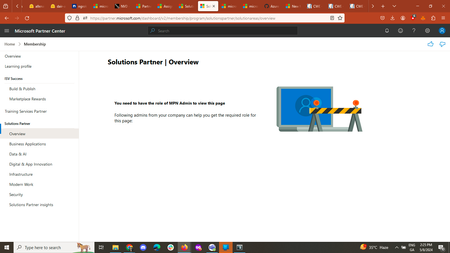
I was trying to access the solutions designation center on the partner center dashboard but got the following error: I have read the how to guides to gain the Microsoft Partner Network ID but could not find that in the partner center dashboard. Thanks & Regards Siddhartha Sharma918Views0likes4CommentsForce change password at next login on-premise and MS online
Hi Currently, I have a hybrid environment with AD on-premise, Azure AD sync (with password hash & SSPR), and Exchange Online. My goal is to force change the password at the next login from on-premise AD to MS online and vice versa. It's working. When I change the password on-premise AD, MS Online prompts me to change the password. It is not working when I set the account from the Admin center to force the password change at the next login; it does not sync to on-premise AD. The domain computer will not prompt to change password. Thanks in advance MS recommend to try this Install-Module -Name Microsoft.Graph Connect-MgGraph -Scopes "OnPremDirectorySynchronization.ReadWrite.All" Then run this command. $OnPremSync = Get-MgDirectoryOnPremiseSynchronization $OnPremSync.Features.UserForcePasswordChangeOnLogonEnabled = $true Update-MgDirectoryOnPremiseSynchronization -OnPremisesDirectorySynchronizationId $OnPremSync.Id -Features $OnPremSync.Features899Views0likes1CommentConditional Access Help
Hi - Thought this would be easy but it's not. We have a group of 5 temporary employees that need to access one custom built app in our environment. That app utilizes M365 authentication. I setup these users in a security group and want to block all access with the exclusion to this one app. The problem is, if I block Office 365, it does not allow them to login to the custom app. They get an error that blocks them, even though the app itself is excluded. I then exclude the app and Office 365 and it allows the login. This is frustrating because we cannot allow any access to Outlook, Sharepoint, OneDrive, etc. Any advice? When I try to search for just Exchange or Sharepoint by itself, there are no options to select under Cloud Apps.815Views0likes4Comments
No M365 support | My Templates help (Outlook OWA only)
Hello, please would like part of this to be responded by Microsoft directly. 1. Our reseller cannot help with Outlook OWA issues that have frequently been bugs. I was previously able to raise help ticket with Microsoft directly. Please bring this back - they cant help me. How do I get Microsoft support? 2. Outlook OWA is not saving changes to templates. (It's not the size of them or total memory constraint, as attempting to make them smaller, not larger). Ideas? No changes are accepted - on browser refresh they're lost. 3. Anyone have any advice to implementing 3rd party OWA Mail templates on A SHARED MAILBOX? Can I do this? How? (As a team we need templates on our shared mailbox).748Views2likes2Comments