enterprise integration
127 TopicsIntroducing GenAI Gateway Capabilities in Azure API Management
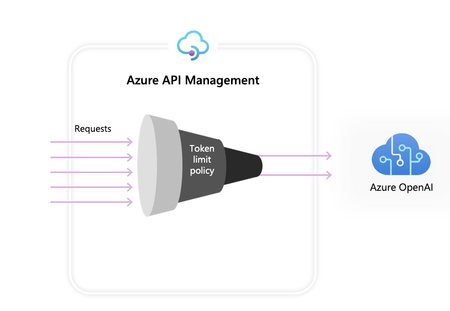
We are thrilled to announce GenAI Gateway capabilities in Azure API Management – a set of features designed specifically for GenAI use cases. Azure OpenAI service offers a diverse set of tools, providing access to advanced models like GPT3.5-Turbo to GPT-4 and GPT-4 Vision, enabling developers to build intelligent applications that can understand, interpret, and generate human-like text and images. One of the main resources you have in Azure OpenAI is tokens. Azure OpenAI assigns quota for your model deployments expressed in tokens-per-minute (TPMs) which is then distributed across your model consumers that can be represented by different applications, developer teams, departments within the company, etc. Starting with a single application integration, Azure makes it easy to connect your app to Azure OpenAI. Your intelligent application connects to Azure OpenAI directly using API Key with a TPM limit configured directly on the model deployment level. However, when you start growing your application portfolio, you are presented with multiple apps calling single or even multiple Azure OpenAI endpoints deployed as Pay-as-you-go or Provisioned Throughput Units (PTUs) instances. That comes with certain challenges: How can we track token usage across multiple applications? How can we do cross charges for multiple applications/teams that use Azure OpenAI models? How can we make sure that a single app does not consume the whole TPM quota, leaving other apps with no option to use Azure OpenAI models? How can we make sure that the API key is securely distributed across multiple applications? How can we distribute load across multiple Azure OpenAI endpoints? How can we make sure that PTUs are used first before falling back to Pay-as-you-go instances? To tackle these operational and scalability challenges, Azure API Management has built a set of GenAI Gateway capabilities: Azure OpenAI Token Limit Policy Azure OpenAI Emit Token Metric Policy Load Balancer and Circuit Breaker Import Azure OpenAI as an API Azure OpenAI Semantic Caching Policy (in public preview) Azure OpenAI Token Limit Policy Azure OpenAI Token Limit policy allows you to manage and enforce limits per API consumer based on the usage of Azure OpenAI tokens. With this policy you can set limits, expressed in tokens-per-minute (TPM). This policy provides flexibility to assign token-based limits on any counter key, such as Subscription Key, IP Address or any other arbitrary key defined through policy expression. Azure OpenAI Token Limit policy also enables pre-calculation of prompt tokens on the Azure API Management side, minimizing unnecessary request to the Azure OpenAI backend if the prompt already exceeds the limit. Learn more about this policy here. Azure OpenAI Emit Token Metric Policy Azure OpenAI enables you to configure token usage metrics to be sent to Azure Applications Insights, providing overview of the utilization of Azure OpenAI models across multiple applications or API consumers. This policy captures prompt, completions, and total token usage metrics and sends them to Application Insights namespace of your choice. Moreover, you can configure or select from pre-defined dimensions to split token usage metrics, enabling granular analysis by Subscription ID, IP Address, or any custom dimension of your choice. Learn more about this policy here. Load Balancer and Circuit Breaker Load Balancer and Circuit Breaker features allow you to spread the load across multiple Azure OpenAI endpoints. With support for round-robin, weighted (new), and priority-based (new) load balancing, you can now define your own load distribution strategy according to your specific requirements. Define priorities within the load balancer configuration to ensure optimal utilization of specific Azure OpenAI endpoints, particularly those purchased as PTUs. In the event of any disruption, a circuit breaker mechanism kicks in, seamlessly transitioning to lower-priority instances based on predefined rules. Our updated circuit breaker now features dynamic trip duration, leveraging values from the retry-after header provided by the backend. This ensures precise and timely recovery of the backends, maximizing the utilization of your priority backends to their fullest. Learn more about load balancer and circuit breaker here. Import Azure OpenAI as an API New Import Azure OpenAI as an API in Azure API management provides an easy single click experience to import your existing Azure OpenAI endpoints as APIs. We streamline the onboarding process by automatically importing the OpenAPI schema for Azure OpenAI and setting up authentication to the Azure OpenAI endpoint using managed identity, removing the need for manual configuration. Additionally, within the same user-friendly experience, you can pre-configure Azure OpenAI policies, such as token limit and emit token metric, enabling swift and convenient setup. Learn more about Import Azure OpenAI as an API here. Azure OpenAI Semantic Caching policy Azure OpenAI Semantic Caching policy empowers you to optimize token usage by leveraging semantic caching, which stores completions for prompts with similar meaning. Our semantic caching mechanism leverages Azure Redis Enterprise or any other external cache compatible with RediSearch and onboarded to Azure API Management. By leveraging the Azure OpenAI Embeddings model, this policy identifies semantically similar prompts and stores their respective completions in the cache. This approach ensures completions reuse, resulting in reduced token consumption and improved response performance. Learn more about semantic caching policy here. Get Started with GenAI Gateway Capabilities in Azure API Management We’re excited to introduce these GenAI Gateway capabilities in Azure API Management, designed to empower developers to efficiently manage and scale their applications leveraging Azure OpenAI services. Get started today and bring your intelligent application development to the next level with Azure API Management.37KViews10likes14CommentsMicrosoft named a Leader in 2023 Gartner® Magic Quadrant™ for API Management
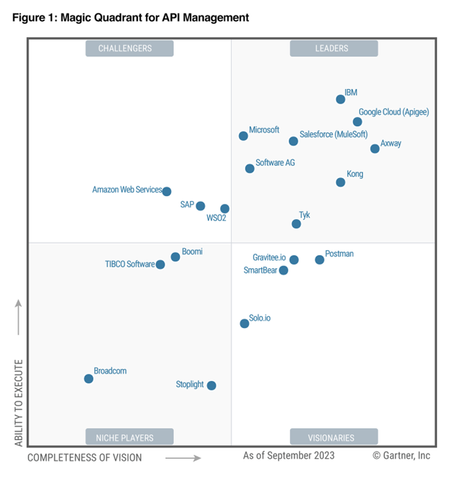
We're thrilled to announce that Gartner has once again recognized Microsoft as a Leader in the 2023 Magic Quadrant for API Management, marking the fourth consecutive year of this recognition. We believe our continued recognition as a Leader is a testament to our deep customer engagements.Azure API Management Your Auth Gateway For MCP Servers
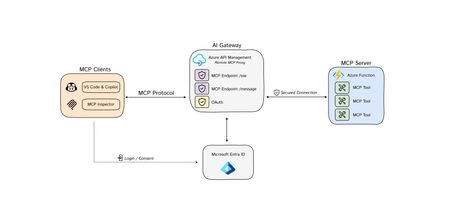
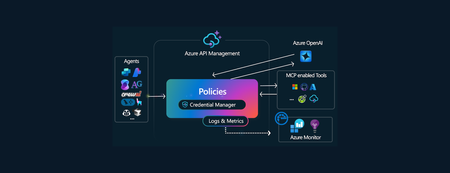
The Model Context Protocol (MCP) is quickly becoming the standard for integrating Tools 🛠️ with Agents 🤖 and Azure API Management is at the fore-front, ready to support this open-source protocol 🚀. You may have already encountered discussions about MCP, so let's clarify some key concepts: Model Context Protocol (MCP) is a standardized way, (a protocol), for AI models to interact with external tools, (and either read data or perform actions) and to enrich context for ANY language models. AI Agents/Assistants are autonomous LLM-powered applications with the ability to use tools to connect to external services required to accomplish tasks on behalf of users. Tools are components made available to Agents allowing them to interact with external systems, perform computation, and take actions to achieve specific goals. Azure API Management: As a platform-as-a-service, API Management supports the complete API lifecycle, enabling organizations to create, publish, secure, and analyze APIs with built-in governance, security, analytics, and scalability. New Cool Kid in Town - MCP AI Agents are becoming widely adopted due to enhanced Large Language Model (LLM) capabilities. However, even the most advanced models face limitations due to their isolation from external data. Each new data source requires custom implementations to extract, prepare, and make data accessible for any model(s). - A lot of heavy lifting. Anthropic developed an open-source standard - the Model Context Protocol (MCP), to connect your agents to external data sources such as local data sources (databases or computer files) or remote services (systems available over the internet through e.g. APIs). MCP Hosts: LLM applications such as chat apps or AI assistant in your IDEs (like GitHub Copilot in VS Code) that need to access external capabilities MCP Clients: Protocol clients that maintain 1:1 connections with servers, inside the host application MCP Servers: Lightweight programs that each expose specific capabilities and provide context, tools, and prompts to clients MCP Protocol: Transport layer in the middle At its core, MCP follows a client-server architecture where a host application can connect to multiple servers. Whenever your MCP host or client needs a tool, it is going to connect to the MCP server. The MCP server will then connect to for example a database or an API. MCP hosts and servers will connect with each other through the MCP protocol. You can create your own custom MCP Servers that connect to your or organizational data sources. For a quick start, please visit our GitHub repository to learn how to build a remote MCP server using Azure Functions without authentication: https://aka.ms/mcp-remote Remote vs. Local MCP Servers The MCP standard supports two modes of operation: Remote MCP servers: MCP clients connect to MCP servers over the Internet, establishing a connection using HTTP and Server-Sent Events (SSE), and authorizing the MCP client access to resources on the user's account using OAuth. Local MCP servers: MCP clients connect to MCP servers on the same machine, using stdio as a local transport method. Azure API Management as the AI Auth Gateway Now that we have learned that MCP servers can connect to remote services through an API. The question now rises, how can we expose our remote MCP servers in a secure and scalable way? This is where Azure API Management comes in. A way that we can securely and safely expose tools as MCP servers. Azure API Management provides: Security: AI agents often need to access sensitive data. API Management as a remote MCP proxy safeguards organizational data through authentication and authorization. Scalability: As the number of LLM interactions and external tool integrations grows, API Management ensures the system can handle the load. Security remains to be a critical piece of building MCP servers, as agents will need to securely connect to protected endpoints (tools) to perform certain actions or read protected data. When building remote MCP servers, you need a way to allow users to login (Authenticate) and allow them to grant the MCP client access to resources on their account (Authorization). MCP - Current Authorization Challenges State: 4/10/2025 Recent changes in MCP authorization have sparked significant debate within the community. 🔍 𝗞𝗲𝘆 𝗖𝗵𝗮𝗹𝗹𝗲𝗻𝗴𝗲𝘀 with the Authorization Changes: The MCP server is now treated as both a resource server AND an authorization server. This dual role has fundamental implications for MCP server developers and runtime operations. 💡 𝗢𝘂𝗿 𝗦𝗼𝗹𝘂𝘁𝗶𝗼𝗻: To address these challenges, we recommend using 𝗔𝘇𝘂𝗿𝗲 𝗔𝗣𝗜 𝗠𝗮𝗻𝗮𝗴𝗲𝗺𝗲𝗻𝘁 as your authorization gateway for remote MCP servers. 🔗For an enterprise-ready solution, please check out our azd up sample repo to learn how to build a remote MCP server using Azure API Management as your authentication gateway: https://aka.ms/mcp-remote-apim-auth The Authorization Flow The workflow involves three core components: the MCP client, the APIM Gateway, and the MCP server, with Microsoft Entra managing authentication (AuthN) and authorization (AuthZ). Using the OAuth protocol, the client starts by calling the APIM Gateway, which redirects the user to Entra for login and consent. Once authenticated, Entra provides an access token to the Gateway, which then exchanges a code with the client to generate an MCP server token. This token allows the client to communicate securely with the server via the Gateway, ensuring user validation and scope verification. Finally, the MCP server establishes a session key for ongoing communication through a dedicated message endpoint. Diagram source: https://aka.ms/mcp-remote-apim-auth-diagram Conclusion Azure API Management (APIM) is an essential tool for enterprise customers looking to integrate AI models with external tools using the Model Context Protocol (MCP). In this blog, we've emphasized the simplicity of connecting AI agents to various data sources through MCP, streamlining previously complex implementations. Given the critical role of secure access to platforms and services for AI agents, APIM offers robust solutions for managing OAuth tokens and ensuring secure access to protected endpoints, making it an invaluable asset for enterprises, despite the challenges of authentication. API Management: An Enterprise Solution for Securing MCP Servers Azure API Management is an essential tool for enterprise customers looking to integrate AI models with external tools using the Model Context Protocol (MCP). It is designed to help you to securely expose your remote MCP servers. MCP servers are still very new, and as the technology evolves, API Management provides an enterprise-ready solution that will evolve with the latest technology. Stay tuned for further feature announcements soon! Acknowledgments This post and work was made possible thanks to the hard work and dedication of our incredible team. Special thanks to Pranami Jhawar, Julia Kasper, Julia Muiruri, Annaji Sharma Ganti Jack Pa, Chaoyi Yuan and Alex Vieira for their invaluable contributions. Additional Resources MCP Client Server integration with APIM as AI gateway Blog Post: https://aka.ms/remote-mcp-apim-auth-blog Sequence Diagram: https://aka.ms/mcp-remote-apim-auth-diagram APIM lab: https://aka.ms/ai-gateway-lab-mcp-client-auth Python: https://aka.ms/mcp-remote-apim-auth .NET: https://aka.ms/mcp-remote-apim-auth-dotnet On-Behalf-Of Authorization: https://aka.ms/mcp-obo-sample 3rd Party APIs – Backend Auth via Credential Manager: Blog Post: https://aka.ms/remote-mcp-apim-lab-blog APIM lab: https://aka.ms/ai-gateway-lab-mcp YouTube Video: https://aka.ms/ai-gateway-lab-demo25KViews12likes4Comments
Scaling Logic Apps Standard – Sustained Event Processing System
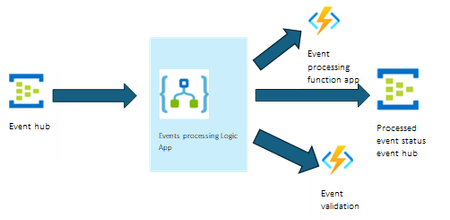
In the previous blog of this blog post series, we discussed how Logic App standard can be used to process high throughput batched data. In this blog, we showcase an application crafted with Azure integration services components, aiming to streamline the event processing. The events are sent to an event hub at a sustained rate, the logic app workflow processes each event by initiating a series of actions. These actions encompass the processing of the relevant event information using variables, conditions, scopes, and Azure functions for processing them, followed by sending the status of the processed event to another event hub. We will discuss two scenarios, one for the high throughput and the other one to handle throttling limitations, to protect the downstream services. High throughput event processing Logic App An influx of 4 million events is ingested through this process in a span of 8 hours. The workflow uses the event hubs built-in trigger, so the events are promptly picked up and are processed in the run at par with ingress rate. Each workflow run orchestrates several data transformation steps and collaborates with other services to enrich each event payload with additional data and then finally sends it to another event hub. Event processing Logic App with throttling limits on downstream services Now let’s handle the scenario where downstream services have throttling limits. We will use a parent workflow which reads events from the event hub and randomly sends the events to a child workflow which has 100 concurrency set on it for processing. During this test 10K events per minute were pushed to the event hub for 3-4 hours and it took close to 5 hours to complete processing cause of the slowdown from concurrency. Tests setup High throughput event processing Logic App Event processing Logic App with throttling on downstream services Number of workflows 1 11 (1 parent, 10 child workflows) Triggers Event hub Event hub Actions Event hub, variables(3), Functions (3), compose(2), conditions(6), scopes(8) Event hub, variables(3), Functions (3), compose(2), conditions(6), scopes(8) Number of storage accounts 4 4 Prewarmed instances 20 20 WS Plan WS3 WS3 Max Scale settings 100 100 Host settings used: Event hubs extension event batch size = 100 "eventHubs": { "maxEventBatchSize": 100 } "eventHubs": { "maxEventBatchSize": 100 } Exponential retry on nested workflow call N/A "retryPolicy": { "count": 4, "interval": "PT20S", "maximumInterval": "PT1H", "minimumInterval": "PT10S", "type": "exponential" } Concurrency N/A 100(on HTTP trigger in child workflow) Performance characteristics High throughput event processing Logic App Events processing trigger Rate Receiving over 10K/min events at a sustained rate for 8 hours. Action Execution Rate Consistent action execution rate of 250K actions/min for the 8 hours load run. Job Execution Rate Execution rate at the sustained average rate of 400k/min for whole of the run and maximum going to 600K/min. Execution delay and instance scaling The app had a prewarmed instance count of 20 and took about 40mins to scale out to 40 instances and during the whole run it used an average of 45 instances after the ramp-up. The 95th percentile execution delay stayed below 170ms for the most part but increased to maximum 4s during the compute ramp-up. This is expected since more jobs got queued up during the ramp-up period than were dequeued for processing. Execution Delay Instance count Event processing Logic App with throttling limits on downstream services Action Execution Rate The action execution rate of 200-250K actions/min for the 4 hours load run and then draining the queue runs for close to an hour after the test was stopped. The action execution rate per workflow is 15K-20K actions/min. Runs Execution Rate The run execution rate of 12K-15K actions/min for the 4 hours load run and then draining the queue runs for close to an hour after the test was stopped. The runs execution per workflow is 700-800 runs per minute. Job Execution Rate Execution rate of close 400k/min for whole of the run. Execution delay and instance scaling The app had a prewarmed instance count of 20 and took a maximum of 32 instances after the ramp-up. The 95th percentile execution delay stayed below 300ms for the most part but increased to a maximum 600ms during the compute ramp-up. This is expected since more jobs got queued up during the ramp-up period than were dequeued for processing. Execution Delay Instance count Results Summary This case study shows patterns for processing sustained high throughput load and controlling the throttling limits for the downstream services. 10K events per minute are processed by a single workflow and the processing is at par with the ingress rate. When concurrency knobs are used to slow down to protect the downstream services, there is a delay in processing of events. 4 hours run takes close to 5 hours to complete. High throughput events processing Logic App Logic App with throttling limits on the downstream services Total number of events processed 4,800,000 1,538,200 Total processing time 8 hours 4 hours Triggers 10k/min sustained events read 10k/min sustained events read Actions 250K actions/min sustained rate. Total actions executed: 115.2M 150K actions/minute sustained rate Total actions executed: 57M Jobs 600K/min job rate at peak 400K/min job rate sustain 490K/min job rate at peak 400K/min job rate sustain Execution delay 95th percentile increased up to 4s during scale-out and came back below 170ms at sustained load 95th percentile increased up to 600ms during scale-out and came back below 300ms for most part of the run Scale out Scaling instance count from 20 to 40 took about 40mins with maximum 52 instances. 32 maximum instances used over the course of the run References: Refer blog for using multiple storage accounts in the app.9.7KViews2likes0Comments
Expose REST APIs as MCP servers with Azure API Management and API Center (now in preview)
As AI-powered agents and large language models (LLMs) become central to modern application experiences, developers and enterprises need seamless, secure ways to connect these models to real-world data and capabilities. Today, we’re excited to introduce two powerful preview capabilities in the Azure API Management Platform: Expose REST APIs in Azure API Management as remote Model Context Protocol (MCP) servers Discover and manage MCP servers using API Center as a centralized enterprise registry Together, these updates help customers securely operationalize APIs for AI workloads and improve how APIs are managed and shared across organizations. Unlocking the value of AI through secure API integration While LLMs are incredibly capable, they are stateless and isolated unless connected to external tools and systems. Model Context Protocol (MCP) is an open standard designed to bridge this gap by allowing agents to invoke tools—such as APIs—via a standardized, JSON-RPC-based interface. With this release, Azure empowers you to operationalize your APIs for AI integration—securely, observably, and at scale. 1. Expose REST APIs as MCP servers with Azure API Management An MCP server exposes selected API operations to AI clients over JSON-RPC via HTTP or Server-Sent Events (SSE). These operations, referred to as “tools,” can be invoked by AI agents through natural language prompts. With this new capability, you can expose your existing REST APIs in Azure API Management as MCP servers—without rebuilding or rehosting them. Addressing common challenges Before this capability, customers faced several challenges when implementing MCP support: Duplicating development efforts: Building MCP servers from scratch often led to unnecessary work when existing REST APIs already provided much of the needed functionality. Security concerns: Server trust: Malicious servers could impersonate trusted ones. Credential management: Self-hosted MCP implementations often had to manage sensitive credentials like OAuth tokens. Registry and discovery: Without a centralized registry, discovering and managing MCP tools was manual and fragmented, making it hard to scale securely across teams. API Management now addresses these concerns by serving as a managed, policy-enforced hosting surface for MCP tools—offering centralized control, observability, and security. Benefits of using Azure API Management with MCP By exposing MCP servers through Azure API Management, customers gain: Centralized governance for API access, authentication, and usage policies Secure connectivity using OAuth 2.0 and subscription keys Granular control over which API operations are exposed to AI agents as tools Built-in observability through APIM’s monitoring and diagnostics features How it works MCP servers: In your API Management instance navigate to MCP servers Choose an API: + Create a new MCP Server and select the REST API you wish to expose. Configure the MCP Server: Select the API operations you want to expose as tools. These can be all or a subset of your API’s methods. Test and Integrate: Use tools like MCP Inspector or Visual Studio Code (in agent mode) to connect, test, and invoke the tools from your AI host. Getting started and availability This feature is now in public preview and being gradually rolled out to early access customers. To use the MCP server capability in Azure API Management: Prerequisites Your APIM instance must be on a SKUv1 tier: Premium, Standard, or Basic Your service must be enrolled in the AI Gateway early update group (activation may take up to 2 hours) Use the Azure Portal with feature flag: ➤ Append ?Microsoft_Azure_ApiManagement=mcp to your portal URL to access the MCP server configuration experience Note: Support for SKUv2 and broader availability will follow in upcoming updates. Full setup instructions and test guidance can be found via aka.ms/apimdocs/exportmcp. 2. Centralized MCP registry and discovery with Azure API Center As enterprises adopt MCP servers at scale, the need for a centralized, governed registry becomes critical. Azure API Center now provides this capability—serving as a single, enterprise-grade system of record for managing MCP endpoints. With API Center, teams can: Maintain a comprehensive inventory of MCP servers. Track version history, ownership, and metadata. Enforce governance policies across environments. Simplify compliance and reduce operational overhead. API Center also addresses enterprise-grade security by allowing administrators to define who can discover, access, and consume specific MCP servers—ensuring only authorized users can interact with sensitive tools. To support developer adoption, API Center includes: Semantic search and a modern discovery UI. Easy filtering based on capabilities, metadata, and usage context. Tight integration with Copilot Studio and GitHub Copilot, enabling developers to use MCP tools directly within their coding workflows. These capabilities reduce duplication, streamline workflows, and help teams securely scale MCP usage across the organization. Getting started This feature is now in preview and accessible to customers: https://aka.ms/apicenter/docs/mcp AI Gateway Lab | MCP Registry 3. What’s next These new previews are just the beginning. We're already working on: Azure API Management (APIM) Passthrough MCP server support We’re enabling APIM to act as a transparent proxy between your APIs and AI agents—no custom server logic needed. This will simplify onboarding and reduce operational overhead. Azure API Center (APIC) Deeper integration with Copilot Studio and VS Code Today, developers must perform manual steps to surface API Center data in Copilot workflows. We’re working to make this experience more visual and seamless, allowing developers to discover and consume MCP servers directly from familiar tools like VS Code and Copilot Studio. For questions or feedback, reach out to your Microsoft account team or visit: Azure API Management documentation Azure API Center documentation — The Azure API Management & API Center Teams9.3KViews5likes7CommentsAI Gateway tier of API Management now in public preview
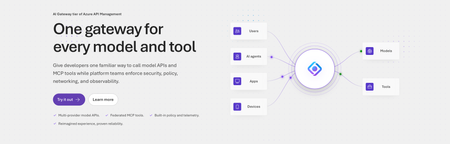
Today, we are introducing the AI Gateway tier of Azure API Management, now in public preview. It gives platform teams a purpose-built experience built specifically for AI workloads - publishing and governing models and MCP servers. Controls are configured through policy cards rather than XML and expressions, and the portal experience and control plane are structured around models, MCP servers, and tools rather than APIs. (For brevity, we refer to the AI Gateway tier as AI Gateway throughout the rest of this article.) AI Gateway is built on Azure API Management, bringing proven operational capabilities to AI workloads. The resource runs in your subscription, uses your Entra tenant, and sends telemetry to destinations you control. The operating model will be familiar to existing API Management customers, but the interface is built around AI workloads. The AI Gateway tier is intended for teams that want this focused experience; other API Management tiers remain the right choice when organizations also need general-purpose API management or capabilities not included in the AI Gateway experience. A practical model for platform teams The AI Gateway gives platform teams a shared place to manage models, MCP servers, policies, and observability destinations, with access controlled through Azure RBAC. For example, a central platform group can connect a set of approved models and tools and publish them for application teams. The application teams can test those assets in the test console and build against them without routing every change through the central group. The platform group still owns the shared guardrails and can see how the assets are being used. After an asset is published, developers can create a named runtime key and begin calling the gateway immediately. Bring the models and tools you already use Most organizations don't standardize on a single model provider. Different models are selected based on quality, latency, cost, geography, or specialized capabilities. The preview supports models from Microsoft Foundry including OpenAI, Anthropic, Mistral, and other Foundry hosted models, as well as models hosted in AWS Bedrock, Google Vertex AI, OpenAI, and Anthropic. A guided wizard simplifies importing models from Microsoft Foundry. Other providers can be added by configuring a connection, with backend authentication configured as part of that connection. All published models are available under the same stable endpoint. Applications continue to use supported API formats such as OpenAI Chat Completions and Responses or Anthropic Messages directly or via SDKs. The AI Gateway extends governance beyond models to the MCP servers and tools agents use to interact with enterprise systems. You can expose an existing MCP server over SSE or Streamable HTTP, turn all or selected operations from a REST API into an MCP server by uploading its OpenAPI specification, or use more than 1,400 connector-backed tools from the Power Platform and Logic Apps library. You can also federate multiple MCP servers behind a single server, so an agent connects once and sees the tools across those servers. Backend authentication supports an API key, OAuth client credentials, managed identity, or mTLS. Governance that's built in Organizations need consistent governance across models and MCP servers without requiring every application team to implement those capabilities independently. The AI Gateway portal presents governance policies through an intuitive card-based experience rather than requiring policy XML. The same policies are expressed as JSON properties, making them easy to manage as infrastructure as code and to audit and enforce across a fleet with Azure Policy. In the public preview, those cards cover request and token rate limits, token quotas, Azure AI Content Safety, and fallback to a secondary model. Policies are applied per asset, making it clear which controls protect each model or MCP server. OpenTelemetry-based token metrics The AI Gateway emits token-usage metrics through OpenTelemetry, with attributes following GenAI and cloud semantic conventions. Metrics can be sent to Application Insights, Datadog, Splunk, Grafana Cloud, or another OTLP endpoint. The portal provides a monitoring view over Application Insights data. Better together: Microsoft Foundry and AI Gateway With AI Gateway, teams can extend the same governance controls, for example token rate limits and quotas, across models hosted in Microsoft Foundry and models hosted elsewhere. Foundry and non-Foundry models are published through gateway-managed endpoints, giving applications and agents a consistent way to access governed models regardless of where they are hosted. Foundry-hosted agents can consume curated sets of tools from Foundry toolboxes, with access to the underlying MCP servers and APIs governed through AI Gateway. Together, Microsoft Foundry and AI Gateway cover the enterprise application lifecycle: Foundry for building and running AI applications, and AI Gateway for publishing, governing, and observing models, tools, and MCP servers across your AI estate. The new AI Gateway tier will soon be available through the gateway experience in Microsoft Foundry portal. We are working toward a seamless, integrated AI Gateway experience within Foundry portal and will share more about that work separately. Available today in public preview The AI Gateway tier is available today at no cost in public preview in East US 2 and Sweden Central. Pricing will be shared separately. To provision a resource, add a model or MCP server, and make a first call click this to go to the AI Gateway tier portal and try it. If you prefer to start from code, use a sample to deploy all the required resources for a Foundry-hosted agent configured to access its model and tools through AI Gateway. We look forward to your feedback as we continue to rapidly evolve AI Gateway.7.9KViews5likes10CommentsMicrosoft BizTalk Server Product Lifecycle Update
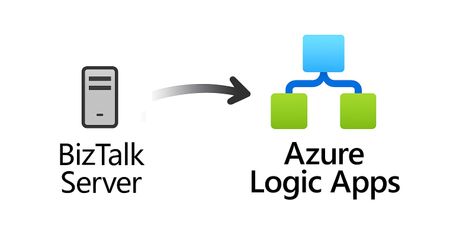
For more than 25 years, Microsoft BizTalk Server has supported mission-critical integration workloads for organizations around the world. From business process automation and B2B messaging to connectivity across industries such as financial services, healthcare, manufacturing, and government, BizTalk Server has played a foundational role in enterprise integration strategies. To help customers plan confidently for the future, Microsoft is sharing an update to the BizTalk Server product lifecycle and long-term support timelines. BizTalk Server 2020 will be the final version of BizTalk Server. Guidance to support long-term planning for mission-critical workloads This announcement does not change existing support commitments. Customers can continue to rely on BizTalk Server for many years ahead, with a clear and predictable runway to plan modernization at a pace that aligns with their business and regulatory needs. Lifecycle Phase End Date What’s Included Mainstream Support April 11, 2028 Security + non-security updates and Customer Service & Support (CSS) support Extended Support April 9, 2030 CSS support, Security updates, and paid support for fixes (*) End of Support April 10, 2030 No further updates or support (*) Paid Extended Support will be available for BizTalk Server 2020 between April 2028 and April 2030 for customers requiring hotfixes for non-security updates. CSS will continue providing their typical support. BizTalk Server 2016 is already out of mainstream support, and we recommend those customers evaluate a direct modernization path to Azure Logic Apps. Continued Commitment to Enterprise Integration Microsoft remains fully committed to supporting mission-critical integration, including hybrid connectivity, future-ready orchestration, and B2B/EDI modernization. Azure Logic Apps, part of Azure Integration Services — which includes API Management, Service Bus, and Event Grid — delivers the comprehensive integration platform for the next decade of enterprise connectivity. Host Integration Server: Continued Support for Mainframe Workloads Host Integration Server (HIS) has long provided essential connectivity for organizations with mainframe and midrange systems. To ensure continued support for those workloads, Host Integration Server 2028 will ship as a standalone product with its own lifecycle, decoupled from BizTalk Server. This provides customers with more flexibility and a longer planning horizon. Recognizing Mainframe modernization customers might be looking to integrate with their mainframes from Azure, Microsoft provides Logic Apps connectors for mainframe and midrange systems, and we are keen on adding more connectors in this space. Let us know about your HIS plans, and if you require specific features for Mainframe and midranges integration from Logic Apps at: https://aka.ms/lamainframe Azure Logic Apps: The Successor to BizTalk Server Azure Logic Apps, part of Azure Integration Services, is the modern integration platform that carries forward what customers value in BizTalk while unlocking new innovation, scale, and intelligence. With 1,400+ out-of-box connectors supporting enterprise, SaaS, legacy, and mainframe systems, organizations can reuse existing BizTalk maps, schemas, rules, and custom code to accelerate modernization while preserving prior investments including B2B/EDI and healthcare transactions. Logic Apps delivers elastic scalability, enterprise-grade security and compliance, and built-in cost efficiency without the overhead of managing infrastructure. Modern DevOps tooling, Visual Studio Code support, and infrastructure-as-code (ARM/Bicep) ensure consistent, governed deployments with end-to-end observability using Azure Monitor and OpenTelemetry. Modernizing Logic Apps also unlocks agentic business processes, enabling AI-driven routing, predictive insights, and context-aware automation without redesigning existing integrations. Logic Apps adapts to business and regulatory needs, running fully managed in Azure, hybrid via Arc-enabled Kubernetes, or evaluated for air-gapped environments. Throughout this lifecycle transition, customers can continue to rely on the BizTalk investments they have made while moving toward a platform ready for the next decade of integration and AI-driven business. Charting Your Modernization Path Microsoft remains fully committed to supporting customers through this transition. We recognize that BizTalk systems support highly customized and mission-critical business operations. Modernization requires time, planning, and precision. We hope to provide: Proven guidance and recommended design patterns A growing ecosystem of tooling supporting artifact reuse Unified Support engagements for deep migration assistance A strong partner ecosystem specializing in BizTalk modernization Potential incentive programs to help facilitate migration for eligible customers (details forthcoming) Customers can take a phased approach — starting with new workloads while incrementally modernizing existing BizTalk deployments. We’re Here to Help Migration resources are available today: Overview: https://aka.ms/btmig Best practices: https://aka.ms/BizTalkServerMigrationResources Video series: https://aka.ms/btmigvideo Feature request survey: https://aka.ms/logicappsneeds Reactor session: Modernizing BizTalk: Accelerate Migration with Logic Apps - YouTube Migration Agent (Complete refactoring from BizTalk to Logic Apps): Bringing all your Integration workloads to Logic Apps Standard | Microsoft Community Hub We encourage customers to engage their Microsoft accounts team early to assess readiness, identify modernization opportunities, and explore assistance programs. Your Modernization Journey Starts Now BizTalk Server has played a foundational role in enterprise integration success for more than two decades. As you plan ahead, Microsoft is here to partner with you every step of the way, ensuring operational continuity today while unlocking innovation tomorrow. To begin your transition, please contact your Microsoft account team or visit our migration hub. Thank you for your continued trust in Microsoft and BizTalk Server. We look forward to partnering closely with you as you plan the future of your integration platforms. Frequently Asked Questions Do I need to migrate now? No. BizTalk Server 2020 is fully supported through April 11, 2028, with paid Extended Support available through April 9, 2030, for non-security hotfixes. CSS will continue providing their typical support. You have a long and predictable runway to plan your transition. Will there be a new BizTalk Server version? No. BizTalk Server 2020 is the final version of the product. What happens after April 9, 2030? BizTalk Server will reach End of Support, and security updates or technical assistance will no longer be provided. Workloads will continue running but without Microsoft servicing. Is paid support available past 2028? Yes. Paid extended support will be available through April 2030 for BizTalk Server 2020 customers looking for non-security hotfixes. CSS will continue to provide the typical support. What is the end of sale date for BizTalk Server? We will announce an end of sale date for BizTalk Server on July 2026. What about BizTalk Server 2016 or earlier versions? Those versions are already out of mainstream support. We strongly encourage moving directly to Logic Apps rather than upgrading to BizTalk Server 2020. Will Host Integration Server continue? Yes. Host Integration Server (HIS) 2028 will be released as a standalone product with its own lifecycle and support commitments. Can I reuse BizTalk Server artifacts in Logic Apps? Yes. Most of BizTalk maps, schemas, rules, assemblies, and custom code can be reused with minimal effort using Microsoft and partner migration tooling. We welcome feature requests here: https://aka.ms/logicappsneeds Does modernization require moving fully to the cloud? No. Logic Apps supports hybrid deployments for scenarios requiring local processing or regulatory compliance, and fully disconnected environments are under evaluation. More information of the Hybrid deployment model here: https://aka.ms/lahybrid. Does modernization unlock AI capabilities? Yes. Logic Apps enables AI-driven automations through Agent Loop, improving routing, decisioning, and operational intelligence. Where do I get planning support? Your Microsoft account team can assist with assessment and planning. Migration resources are also linked in this announcement to help you get started. Microsoft Corporation7.6KViews3likes1CommentScaling Logic App Standard – High Throughput Batched Data Processing System
In the previous instance of this blog post series, we discussed how Logic App standard can be configured to scale to run high throughput workloads. In this blog, we showcase an application developed with Azure integration services components, aiming to streamline the processing of large number of orders received as a batch that needs to be processed within certain predetermined amount of time.7.6KViews0likes0Comments