edu
12 Topics
Introduction to the Data Science Process
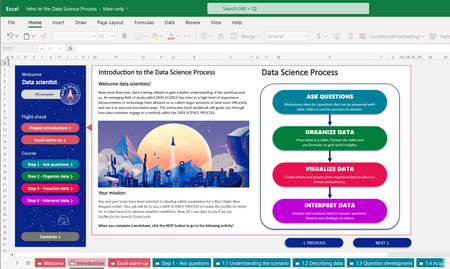
We are excited to collaborate with Club for the Future and introduce your students to the data science process. In this free and interactive Excel based curriculum, students use data and a step-by-step data science process to simulate the decision-making process that data scientists in a command center use to give a Go/No-Go signal for a rocket launch.41KViews3likes4CommentsA new chapter for the Microsoft Student Ambassadors program, built for you
Join the reimagined Student Ambassadors program to learn and lead. Experiment with AI, drive projects that solve real problems, and earn recognition for the impact you make. For more than two decades, the Microsoft Student Ambassadors program has helped student-developers from around the world build practical technical and leadership skills—skills that have helped open doors for hundreds of thousands of students, sparked their confidence, and turned curiosity into careers. Today, we’re announcing an exciting new chapter for the program, shaped by the evolving needs of students everywhere who are preparing for careers that demand not only technical fluency but also adaptable, broad-based skills. We’re reimagining Microsoft Student Ambassadors to welcome students from all disciplines, across higher-education campuses worldwide (restrictions apply). The future of work—and the future of AI—won’t be shaped by one type of learner, one major, or one path. It will be shaped by people who are curious about AI, motivated to learn by doing, and ready to help others with their learning. That’s why we’re expanding the program beyond its developer roots, making it a place and opportunity for all students. By joining the Student Ambassadors program, you can learn to lead with AI in creative and responsible ways, so you can think bigger, build faster, and bring bold ideas to life. You will have the opportunity to grow your skills faster by learning alongside a community that challenges and supports you at every step, where friendships spark creativity and mentorship builds confidence. Along the way, you can turn potential into proof, building a résumé that reflects your strengths and contributions and shows that you’re not just ready for what’s next—you’re already doing it. There’s no application required to join. No gatekeeping. Just a shared commitment to building your skills and helping others to build theirs. How to join the Student Ambassadors program Go to Student Ambassadors, and select Get Started. Take a few minutes to complete the sign-up steps (no application or interview.) Participate in activities aligned to your interests and skills—from creating and sharing social content that helps to upskill others, to hosting events and contributing to the community. Hit milestones to unlock benefits and build experience, whether you’re focused on your career path or a startup idea. What it means to be a Student Ambassador As a Student Ambassador, you have an array of benefits to support your development while you upskill and support others across your campus and online community. After your onboarding to the program, you gain access to cutting-edge Microsoft technologies, including Microsoft 365 Copilot, Visual Studio Enterprise, and $150 in monthly Azure credits. As you progress through the program and unlock milestones, you earn opportunities for leadership positions and deeper engagement with Microsoft. Through our new immersive, rotational work with Microsoft teams, you can contribute to real initiatives while gaining experience that builds practical skills, industry awareness, and results to showcase on your résumé and LinkedIn profile. These short, focused engagements give Student Ambassadors direct exposure to the teams shaping Microsoft technologies. Through product updates, open discussions, and feedback opportunities, you can learn how we build, prioritize, and evolve products, and you can develop the professional skills required in today’s workplace. As a result, Student Ambassadors learn to navigate professional environments, engage in meaningful conversations, and develop a clear point of view on emerging technologies and industry trends. With this foundation, you can be prepared to show up as a credible voice in both technical and nontechnical communities, while building confidence for future career opportunities. What’s next In the coming months, we’ll continue to write new chapters for the program, including the launch of Microsoft Campus Clubs and the Microsoft Student Ambassadors Alumni Network. These initiatives will open doors for even more people to participate in the Microsoft Student Ambassadors program and to connect with Microsoft communities. The future needs people who are ready to get involved. Get started with Microsoft Student Ambassadors.27KViews7likes13Comments
Join Microsoft Stream at BETT 2020!
BETT 2020 is kicking off this week and we look forward to seeing you there! The Stream team will join educators, students, partners and others on January 22 -25 in London. We hope you visit us in the Microsoft Hub and in sessions to learn more about inclusive and collaborative digital experiences that are fueling learning and growth for students and teachers from K-12 to higher education and beyond. SESSIONS Join Stream in the Learn Live Theater where we will share new innovations and best practices for using video in classrooms and with your fellow educators. Wednesday - Friday @ 14:00-14:30 Learn Live Theater: Develop a Teaching and Learning Video Culture with Teams and Stream - Connect with meetings and live events, teach with web-based screen recordings and create on mobile using the Flipgrid Camera. MICROSOFT TRAINING ACADEMY Attend these sessions to learn how to enrich your classrooms with Teams, Stream and other collaboration applications in Office 365. Wednesday- Saturday @ 10:30-11:00 Getting teachers to learn and students to teach This session will inspire teachers to leverage Class Notebook, Teams, SharePoint and Stream to experiment with new student tasks and innovative practice for their own context and set up opportunities for O365 staff training to improve learning outcomes in the long run. Wednesday - Saturday @ 15:30- 16:00 Teams University - Maximizing Teams at your higher education institution This session will cover the basics of Teams for a newcomer in Higher Education that don't have much experience with the tool. Faculty will benefit from getting hands on training and immersing themselves in the tool. MICROSOFT HUB Come by the Microsoft Hub to connect with Stream experts throughout the conference. The Hub is located in booth Booth #NF40 . We look forward to seeing you at BETT 2020!9.1KViews1like0CommentsFrom campus to career: 3 practical steps for students
This graduation season, build the skills employers are looking for, create proof-of-work to get you noticed, grow as a global student community leader. And explore free tools & offers to help you build what's next! For many students around the world, graduation season is here – bringing both excitement and uncertainty about what’s next. According to LinkedIn’s 2026 Grad’s guide, students are entering one of the toughest job markets in years and many are reconsidering traditional career paths. Yet alongside these challenges comes real opportunity to create and shape the future with access to powerful new tools in ways earlier generations never could. This is a moment of real uncertainty, but it is also one of unprecedented opportunities. Whether you're graduating, beginning an internship, starting a first job, exploring entrepreneurship, or returning to campus, here are three practical steps and free tools to help you move forward. 1. Develop the skills employers are increasingly looking for According to the 2026 Work Trend Index Annual Report employers are increasingly interested in AI‑related skills, particularly for early-career roles. Students who start building skills early may be better prepared to seize their next opportunity. Microsoft AI Skills Fest (June 8–12, 2026) is a large, no-cost online AI skilling event (registration required). This year features two playlists for students entering the workforce: Get the Job (resume to job offer) and Succeed at the Job (your first 90 days). Two LinkedIn Live sessions anchor the week: Ask a Recruiter, an open Q&A with Microsoft early-career recruiters on interviews and resumes, and Build your Brand: From Zero to Resume, a session on using Microsoft Copilot to build a "walking deck" that articulates your experience before your first professional role. In addition, AI Skills Navigator gives you a personalized starting point with a newly launched student path filled with learning options. Pair it with LinkedIn's 2026 Grad Guide for a better understanding about which roles are growing and how to stand out. 2. Build proof-of-work that can get you noticed Hiring managers aren't just scanning resumes. They're looking for evidence. The candidates who stand out arrive with something to show: a project, a prototype, a piece of published work that shows what they can do. Building an app, a website, or an AI tool that brings your ideas to life is easier than ever. To start, join GitHub Education and get access to free and discounted products and tutorials including GitHub Copilot, Codespaces, and other tools that are part of the Student Developer Pack. Find inspiration for your entrepreneurial dreams by exploring student stories from programs like Imagine Cup and Red Bull Basement that show how Microsoft can help bring your ideas to life. 3. Grow into a global student community leader Heading back to campus in a few months? The Microsoft Student Ambassadors program is now open to all higher education students, not just developers. Fill in a simple form and complete a few activities and you’re in! As an ambassador, you connect with peers, mentors, and Microsoft employees, build verifiable credentials, and develop leadership experience that shows up on a resume. The program is for currently enrolled college students. Learn more and register today. Tools and offers to help you learn and build what's next Between classes, finals, internships, and figuring out what’s next, student life can feel like a lot! Many colleges provide students with access to AI tools like Microsoft Copilot. Learning-science-based tools like the Study and Learn Agent found in Copilot can help you break down complex materials across a range of subjects, turn notes into flashcards and quizzes, and help build your confidence for interviews or exams. Copilot in Word can help you refine your resume to present your experiences more clearly. The Microsoft student page lists our best offers and deals for college students right now. If you’re graduating, the Microsoft 365 Premium graduation offer gives you 12 months of access, at no cost to eligible students and recent graduates, to some of the most powerful AI tools Microsoft offers. Microsoft 365 Premium unlocks Copilot in familiar apps like Word, Excel, and PowerPoint, along with extensive AI usage tokens, exclusive Copilot features and agents, and up to 6 TB of secure cloud storage that you can share with five others (1 TB per person). 1 Start building apps, explore AI, and build your developer skills with free access to professional tools with a $100 Azure credit or access to the GitHub student developer pack. With the Ultimate college bundle, eligible U.S. students who buy a select Windows 11 PC can get 1 year of Microsoft 365 Premium, Xbox Game Pass Ultimate, and a design-your-own Xbox Wireless Controller—over $500 in estimated value based on included products. 2 step coaching with images Your next steps Students like you are already shaping the future with Microsoft tools and skilling programs available today. Register for Microsoft AI Skills Fest (June 8–12, 2026) and explore the content curated for students, including featured playlists and live sessions. Claim the Windows 11 College Student Bundle (US only), Microsoft 365 Premium student offer or GitHub student developer pack. Explore other free tools and offers for students at the Microsoft Education student page. If you’re headed back to campus, register for Microsoft Student Ambassadors and follow @MicrosoftStudentSkills on Instagram where we share real-world skills for college and beyond. Wherever you are right now, explore these ideas, and take a step forward today towards your future. ______________________________________________________________________________________________________________________ 1. Offers vary by market and end June 30, 2026. Eligibility requirements apply. Students will need to verify their academic status using their college email address. See details here. 2. Offer is valid only for verified college students physically located in the United States at time of qualifying PC purchase, while supplies last. Redemption requires a Microsoft account and following the provided steps after purchase of a qualifying PC. Eligibility and terms apply. Offers vary by market. See details here.6.2KViews6likes0CommentsGetting started with low code software development whilst still in education
Are you still a student, perhaps at college or high school, maybe studying a degree at University? Are you considering a tech career, or even just a side hustle? I'm going to let you in on a bit of knowledge... in this post you'll find out how you can get started with low code software development whilst still being a student... and should you want it to, even let it lead into a career in Business Applications.5.2KViews1like0Comments
التعليم عن بعد في عصر التقنية
ساهمت التقنية في منحنا تقدم كبير في حياتنا واصبحت ضمن اساسيات الحياة فلم نعد نستغني عنها وكذلك التعليم اصبح في ضل التقنية اكثر تطورا ونهضة خصوصا في ضل ازمة كورونا الذي انقذت التقنية التعليم في دول العالم فضهرت تقنيات https://down-plus.com/category/%d8%a8%d8%b1%d8%a7%d9%85%d8%ac-%d8%a7%d9%84%d8%aa%d8%b9%d9%84%d9%8a%d9%85-%d8%b9%d9%86-%d8%a8%d8%b9%d8%af/ لتكون سبب استمرار التعليم باساليب عصرية تقنية وتربط الطلبة مع اساتذتهم900Views0likes0Comments
Create Education Assignment returns “20132” error using microsoft graph api at c#
I want to create a specific class of assignments. At Graph Explorer, https://graph.microsoft.com/beta/education/classes/{classId}/assignments This request works well. But in my C# code, var assignInfo = new EducationAssignment { DisplayName = "test", DueDateTime = DateTimeOffset.Parse("2020-09-20T18:00:00Z"), Instructions = new EducationItemBody { ContentType = BodyType.Html, Content = "hi" }, Status = EducationAssignmentStatus.Draft, AllowStudentsToAddResourcesToSubmission = true, AssignTo = new EducationAssignmentClassRecipient { }, Grading = new EducationAssignmentPointsGradeType() { MaxPoints = 100 }, CreatedDateTime = DateTimeOffset.Parse("2020-09-20T12:00:00Z"), AssignDateTime = DateTimeOffset.Parse("2020-09-20T13:00:00Z"), AssignedDateTime = DateTimeOffset.Parse("2020-09-20T13:00:00Z"), CloseDateTime = null, AllowLateSubmissions = true }; await graphClient.Education.Classes[pClassId].Assignments .Request() .AddAsync(assignInfo); It occured error: {"Code: 20132\r\nMessage: The content of the request is invalid. Common causes are an invalid Content-Type header or no content in the body.\r\nInner error:\r\n\tAdditionalData:\r\n\tdate: 2020-09-20T07:25:14\r\n\trequest-id: d2181119-9116-4f1d-9ed4-d007e2e406d0\r\n\tclient-request-id: d2181119-9116-4f1d-9ed4-d007e2e406d0\r\nClientRequestId: d2181119-9116-4f1d-9ed4-d007e2e406d0\r\n"} Why is this happening? I've been thinking and trying all day. I tried await graphClient.Education.Classes[pClassId].Assignments .Request() .Header("Content-Type", "application/json") .AddAsync(assignInfo); But there was the same error. If only the displayname element was requested, the results were the same. The Permissions has been dealt with. EduAssignments.ReadWriteBasic, EduAssignments.ReadWrite.. etc And the dll(NuGet pakage) is also prepared in beta version. I referred to https://docs.microsoft.com/en-us/graph/api/educationclass-post-assignments?view=graph-rest-beta I'm desperate for help.. Thanks.800Views0likes0Comments