edit
6 Topics
I no longer have an edit button for assignments on one EndpointSec>DiskEncrypt>Bitlocker profiles
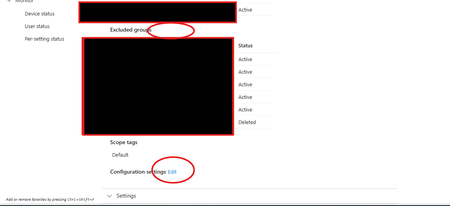
I have two Intune>Endpoint Security>Disk Encryption>Bitlocker policies. One is the 2+ year old deprecated policy everyone is currently on, and the other is a new policy I made two months ago. I am in the process of testing to move the company from old to new. Old policy no longer has an "Edit" button for group assignments and exclusions, much like when you don't have permissions. However, I am still able to edit the actual policy. Has anyone seen this or can help with this? Attached picture. I am using Intune Administrator permissions, and again, it's not a permissions issue as I can edit the actual policy. I have tried different browsers. I have tried another computer. The policy is scoped to default. I was last able to edit group assignments 10/25/25 Solution right now will just be to delete the old profile and move to new with no more testing. Thank you in advance, -ZP227Views1like2Comments
Error - To update this folder, go to the channel in Microsoft Teams
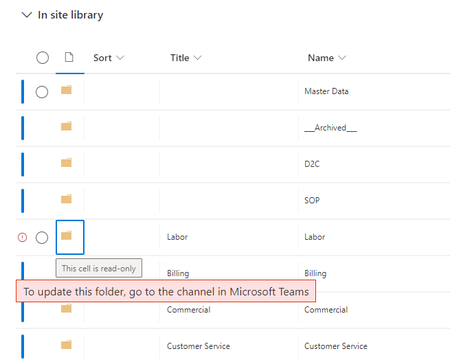
I have a MS Team where I manage (1) Permissions and (2) the primary Folder structure of my SharePoint site. Example MS Team Channels: Labor Billing Commercial Customer Service Etc. These Channels obviously create the root Folders in the main Document Library on the SharePoint site. Within the SharePoint Document Library, I had added a new Folder and File "attribute" which I include in the Default View for users when viewing this Document Library... The custom "attribute" is "Title". I did this because often times a file's name may be long and not fully reflective of content, and by customizing my "Title", I can make it more clear to the users. This "Title" attribute also applies to Folders. And to cleanly navigate the Document Library, I also need to edit the "Title" for my Folders. Something has recently changed, and when I try to edit the "Title" attribute of a main Folder (one created by adding a Channel to the Team) I get an error - "To update this folder, go to the channel in Microsoft Teams". (see screenshot below) The problem is that I am not able to edit the "Title" attribute anywhere in Teams either. Any clue how to get around this new limitation? In the screenshot above, I am not trying to change the "Name" field at all, only the "Title" field, so I really believe this error is a bug at the end of the day. Truly appreciate any help and guidance! Brian13KViews1like6Comments